How to rowwise sum the variables that contain the same variable string pattern in R

This is another blog post so that I can keep a snippet of code for myself! And if you find it helpful too, all the better.

Archie Madekwe Wow GIF by Saltburn - Find & Share on GIPHY

We will be completing rowwise computations, which is not the default in R. Therefore, we need to explicitly state that is what we are hoping to do

Source: https://cmdlinetips.com/2021/06/row-wise-operations-in-r/

In this instance, we will be using c_across() to specify we want to sum across particular columns.

Specifically… all columns that contain a string pattern of “totals_”

df <- df %>% 
  rowwise() %>%
  mutate(totals_sum = sum(c_across(contains("totals_")), na.rm = TRUE)) %>%
  ungroup()  

rowwise(): This function is used to indicate that operations following it should be applied row by row instead of column by column (which is the default behavior in dplyr).

mutate(totals_sum = sum(c_across(contains("totals_")), na.rm = TRUE)):

Within the mutate() function, sum(c_across(contains("totals_"))) computes the sum of all columns for each row that contain the pattern “totals_”.

The na.rm = TRUE argument is used to ignore NA values in the sum. c_across() is used to select columns within rowwise() context.

ungroup(): This function is used to remove the rowwise grouping imposed by rowwise(), returning the dataframe to a standard tbl_df.

Usually I forget to ungroup. Oops. But this is important for performance reasons and because most dplyr functions expect data not to be in a rowwise format.

Oh Yeah Hot Ones GIF by First We Feast - Find & Share on GIPHY

Create a rowwise binary variable

data <- data %>%
  rowwise() %>%
  mutate(has_ruler = as.integer(any(c_across(starts_with("broad_cat_")) == "ruler"))) %>%
  ungroup()

How to create a Regional Economic Communities dataset. PART TWO: consolidating string variables to dummy variables

Click here to read PART ONE of the blog series on creating the Regional Economic Communities dataset

Packages we will need:

library(tidyverse)
library(countrycode)
library(WDI)

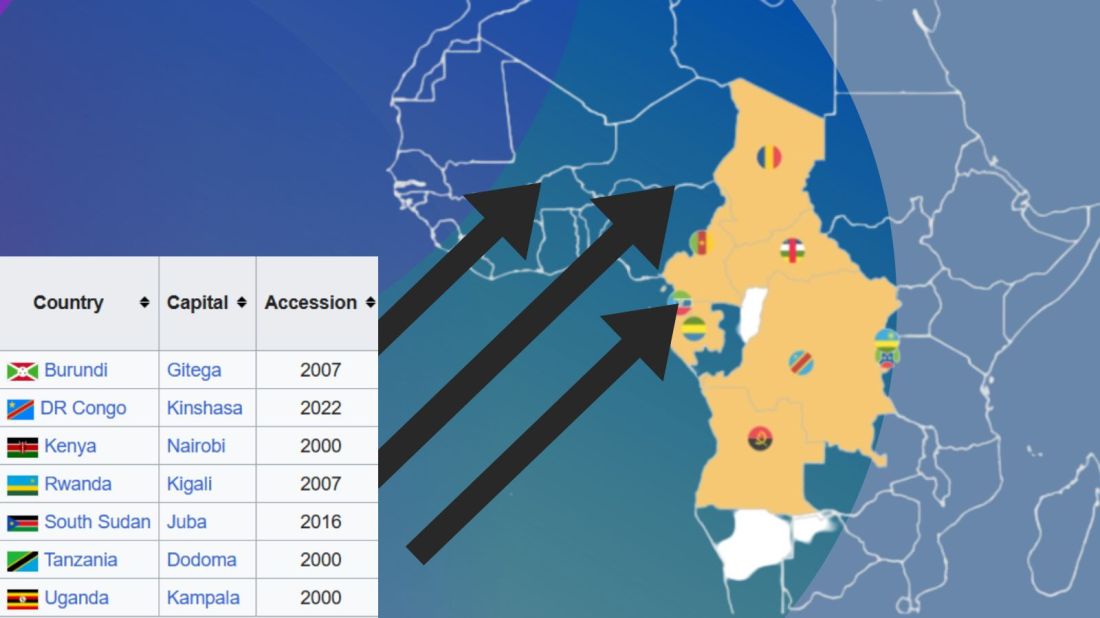
There are eight RECs in Africa. Some countries are only in one of the RECs, some are in many. Kenya is the winner with membership in four RECs: CEN-SAD, COMESA, EAC and IGAD.

In this blog, we will create a consolidated dataset for all 54 countries in Africa that are in a REC (or TWO or THREE or FOUR groups). Instead of a string variable for each group, we will create eight dummy group variables for each country.

To do this, we first make a vector of all the eight RECs.

patterns <- c("amu", "cen-sad", "comesa", "eac", "eccas", "ecowas", "igad", "sadc")

We put the vector of patterns in a for-loop to create a new binary variable column for each REC group.

We use the str_detect(rec_abbrev, pattern)) to see if the rec_abbrev column MATCHES the one of the above strings in the patterns vector.

The new variable will equal 1 if the variable string matches the pattern in the vector. Otherwise it will be equal to 0.

The double exclamation marks (!!) are used for unquoting, allowing the value of var_name to be treated as a variable name rather than a character string.

Then, we are able to create a variable name that were fed in from the vector dynamically into the for-loop. We can automatically do this for each REC group.

In this case, the iterated !!var_name will be replaced with the value stored in the var_name (AMU, CEN-SAD etc).

We can use the := to assign a new variable to the data frame.

The symbol := is called the “walrus operator” and we use it make or change variables without using quotation marks.

for (pattern in patterns) {
  var_name <- paste0(pattern, "_binary")
  rec <- rec %>%
    mutate(!!var_name := as.integer(str_detect(rec_abbrev, pattern)))
}

This is the dataset now with a binary variables indicating whether or not a country is in any one of the REC groups.

However, we quickly see the headache.

We do not want four rows for Kenya in the dataset. Rather, we only want one entry for each country and a 1 or a 0 for each REC.

We use the following summarise() function to consolidate one row per country.

rec %>%
group_by(country) %>%
  summarise(
    geo = first(geo),
    rec_abbrev = paste(rec_abbrev, collapse = ", "),
    across(ends_with("_binary"), ~ as.integer(any(. == 1)))) ->  rec_consolidated

The first() function extracts the first value in the geo variable for each country. This first() function is typically used with group_by() and summarise() to get the value from the first row of each group.

We use the the across() function to select all columns in the dataset that end with "_binary".

The ~ as.integer(any(. == 1)) checks if there’s any value equal to 1 within the binary variables. If they have a value of 1, the summarised data for each country will be 1; otherwise, it will be 0.

The following code can summarise each filtered group and add them to a new dataset that we can graph:

summ_group_pop <- function(my_df, filter_var, rec_name) {
  my_df %>%
    filter({{ filter_var }} == 1) %>% 
    summarize(total_population = sum(pop, na.rm = TRUE)) %>% 
    mutate(group = rec_name)
}

filter_vars <- c("amu_binary", "cen.sad_binary", "comesa_binary", 
                 "eac_binary", "eccas_binary", "ecowas_binary",
                 "igad_binary", "sadc_binary")
group_names <- c("AMU", "CEN-SAD", "COMESA", "EAC", "ECCAS", "ECOWAS",
                 "IGAD", "SADC")

rec_pop_summary <- data.frame()

for (i in seq_along(filter_vars)) {
  summary_df <- summ_group_pop(rec_wdi, !!as.name(filter_vars[i]), group_names[i])
  rec_pop_summary <- bind_rows(rec_pop_summary, summary_df)
}

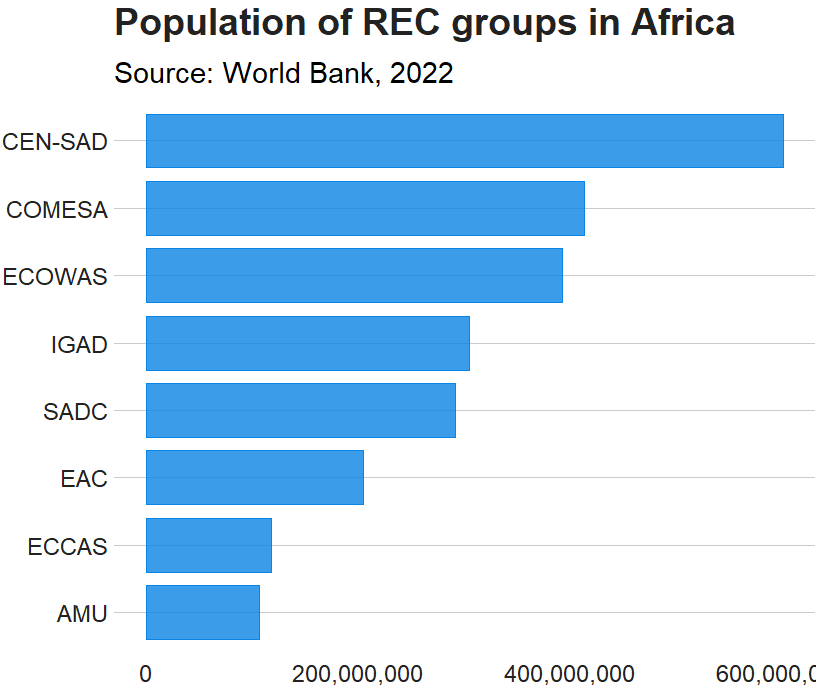
And we graph it with geom_bar()

rec_pop_summary %>% 
  ggplot(aes(x = reorder(group, total_population),
             y = total_population)) + 
  geom_bar(stat = "identity", 
           width = 0.7, 
           color = "#0a85e5", 
           fill = "#0a85e5") +
  bbplot::bbc_style() + 
  scale_y_continuous(labels = scales::comma_format()) +
  coord_flip() + 
  labs(x = "RECs", 
       y = "Population", 
       title = "Population of REC groups in Africa", 
       subtitle = "Source: World Bank, 2022")

Cline Center Coup d’État Project Dataset

tailwind_palette <- c("001219","005f73","0a9396","94d2bd","e9d8a6","ee9b00","ca6702","bb3e03","ae2012","9b2226")

add_hashtag <- function(my_vec){
    hash_vec <-  paste0('#', my_vec)
    return(hash_vec)
  
  tailwind_hash <- add_hashtag(tailwind_palette)

Coups per million people in each REC

create_stateyears(system = "cow") %>% 
    add_democracy() -> demo

rec_wdi %>% 
  select(!c(year, country)) %>% 
  left_join(demo, by = c("cown" = "ccode")) %>% 
  filter(year > 1989) %>% 
  filter(amu_binary == 1) %>% 
  group_by(year) %>% 
  summarize(mean_demo = mean(v2x_polyarchy, na.rm = TRUE)) %>% 
  mutate(rec = "AMU") -> demo_amu

We can use a function to repeat the above code with all eight REC groups:

 create_demo_summary <- function(my_df, filter_var, group_name) {
  my_df %>%
    select(!c(year, country)) %>% 
    left_join(demo, by = c("cown" = "ccode")) %>% 
    filter(year > 1989) %>% 
    filter({{ filter_var }} == 1) %>% 
    group_by(year) %>% 
    summarize(mean_demo = mean(v2x_polyarchy, na.rm = TRUE)) %>% 
    mutate(rec = group_name)
}

rec_democracy_df <- data.frame()

for (i in seq_along(filter_vars)) {
  summary_df <- create_demo_summary(rec_wdi, !!as.name(filter_vars[i]), group_names[i])
  rec_democracy_df <- bind_rows(rec_democracy_df, summary_df)
}

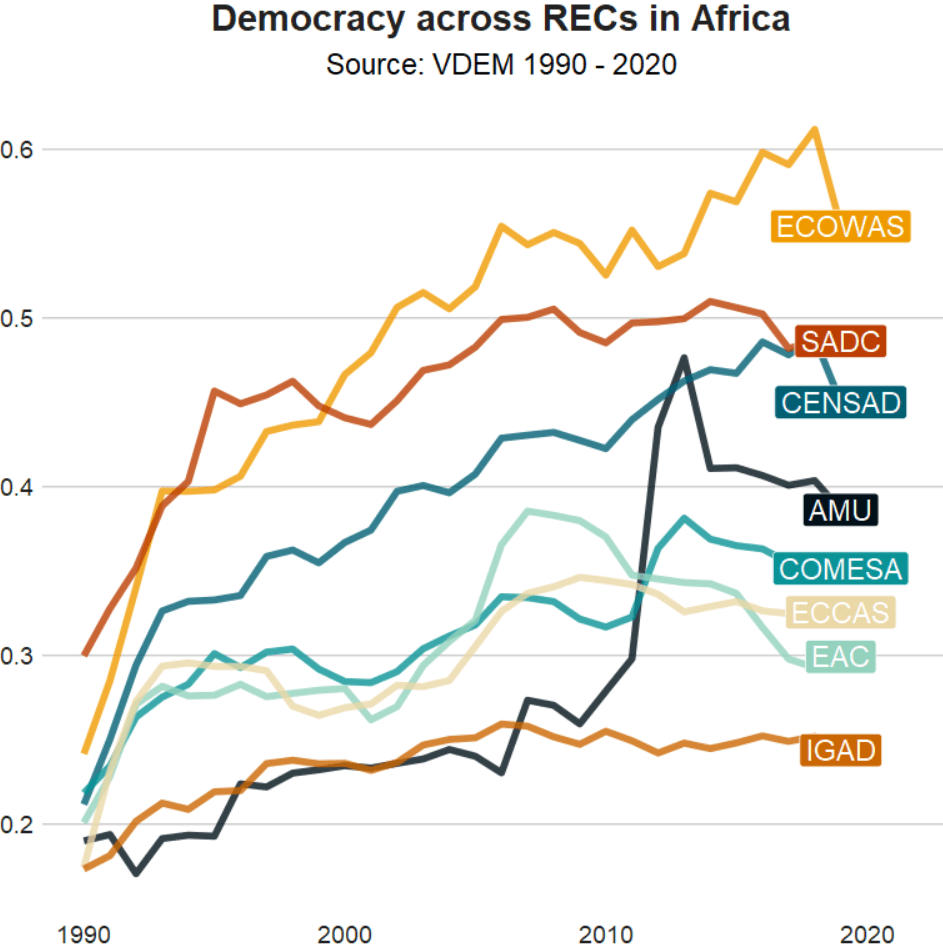
And we graph out the average democracy scores cross the years

rec_democracy_df %>% 
  ggplot(aes(x = year, y = mean_demo, group = rec)) + 
  geom_line(aes(fill = rec, color = rec), size = 2, alpha = 0.8) + 
  # geom_point(aes(fill = rec, color = rec), size = 4) + 
  geom_label(data = . %>% group_by(rec) %>% filter(year == 2019), 
             aes(label = rec, 
                 fill = rec, 
                 x = 2019), color = "white",
             legend = FALSE, size = 3) +  
  scale_color_manual(values = tailwind_hash) + 
  scale_fill_manual(values = tailwind_hash) + 
  theme(legend.position = "none")