Graphing female politicians in Irish parliament with R PART 2: Trends and Maps

Packages we will need

library(tidyverse)
library(magrittr)
library(waffle)
library(geojsonio)
library(sf)

In PART 1, we looked at the gender package to help count the number of women in the 33rd Irish Parliament.

I repeated that for every session since 1921. The first and second Dail are special in Ireland as they are technically pre-partition.

Cleaned up the data aaaand now we have a full dataset with constituencies data.

If anyone wants a copy of the dataset, I can upload it here for those who are curious ~

So first… a simple pie chart!

First we calculate proportion of seats held by women

dail %>% 
  mutate(decade = substr(year, 1, 3)) %>% 
  mutate(decade = paste0(decade, "0s")) %>%
  group_by(decade) %>% 
  ungroup() %>% 
  group_by(decade, gender) %>% 
  count() %>% 
  group_by(decade) %>% 
  mutate(proportion = n / sum(n)) -> dail_pie
# A tibble: 22 × 4
# Groups:   decade [11]
   decade gender     n proportion
   <chr>  <chr>  <int>      <dbl>
 1 1920s  female    20     0.0261
 2 1920s  male     747     0.974 
 3 1930s  female    10     0.0172
 4 1930s  male     572     0.983 
 5 1940s  female    12     0.0284
 6 1940s  male     411     0.972 
 7 1950s  female    16     0.0363
 8 1950s  male     425     0.964 
 9 1960s  female    11     0.0255
10 1960s  male     421     0.975 
# 12 more rows

We will be looking at how proportions changed over the decades.

When using facet_wrap() with coord_polar(), it’s a pain in the arse.

This is because coord_polar() does not automatically allow each facet to have a different scale. Instead, coord_polar() treats all facets as having the same axis limits.

This will mess everything up.

If we don’t change the coord_polar(), we will just distort pie charts when the facet groups have different total values. There will be weird gaps and make some phantom pacman non-charts.

function() TRUE is an anonymous function that always returns TRUE.

my_coord_polar$is_free <- function() TRUE forces coord_polar() to allow different scales for each facet.

In our case, we call my_coord_polar$is_free, which means that whenever ggplot2 checks whether the coordinate system allows free scales across facets, it will now always return TRUE!!!

Overriding is_free() to always return TRUE signals to ggplot2 that coord_polar() means that our pie charts NOOWW will respect the "free" scaling specified in facet_wrap(scales = "free").

my_coord_polar <- coord_polar(theta = "y")
my_coord_polar$is_free <- function() TRUE

If you want to look more at this, check out this blog:

And we can go and create the ggplot:

dail_pie %>%
  ggplot(aes(x = "", 
         y = proportion, 
         fill = as.factor(gender))) +

  geom_bar(stat="identity", width = 1) +
  
  geom_text(
    data = . %>% filter(gender == "female"), aes(label = scales::percent(proportion, 
    accuracy = 0.1)), 
    color = "white",
    size = 8) +
  
  my_coord_polar +

  facet_wrap(~decade, scales = "free") + 
  scale_fill_manual(values =c("#bc4749", "#003049")) +
  # my_style() +
  theme(axis.text.x = element_blank(),
        panel.grid.major = element_blank(),
        panel.grid.minor = element_blank(),
        panel.grid = element_blank(), 
        panel.background = element_blank(), 
        axis.text = element_blank(), 
        axis.ticks = element_blank()) 
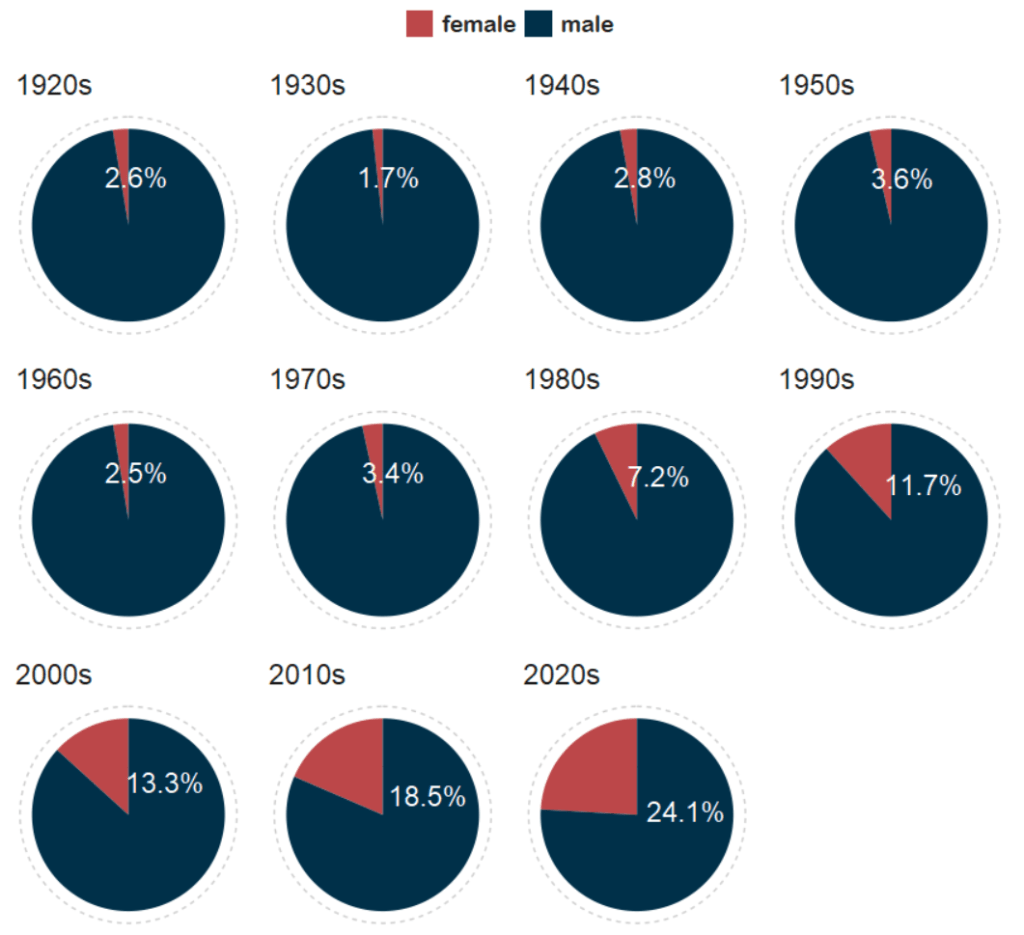
And with Canva, I add the arrows and titles~

Sorry I couldn’t figure it out in R. I just hate all the times I need to re-run graphics to move a text or number by a nano-centimeter. Websites like Canva are just far better for my sanity and short attention span.
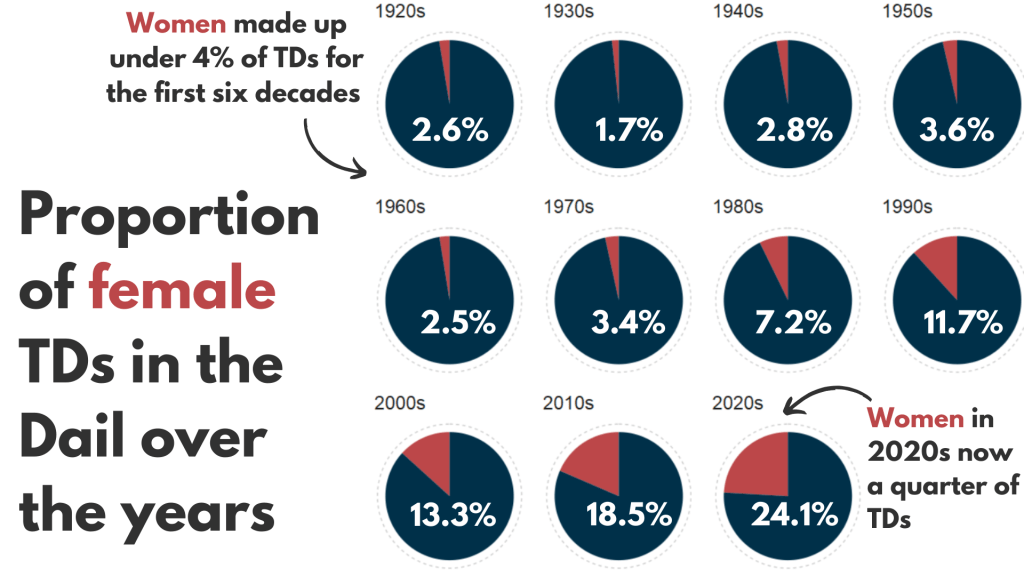
Next, we can make a facetted waffle plot!

dail %>% 
  group_by(decade) %>% 
  ungroup() %>% 
  group_by(decade, gender) %>% 
  count() %>% 
  ggplot(aes(fill = as.factor(gender), values = n)) +
  waffle::geom_waffle(color = "white", 
                      size = 0.5, 
                      n_rows = 10, 
                      flip = TRUE) +
  facet_wrap(~decade, nrow = 1, strip.position = "bottom") +
# my_style  +
  scale_fill_manual(values =c("#003049", "#bc4749")) +
  theme(axis.text.x.bottom = element_blank(),
        text = element_text(size = 40))

And mea culpa, I finished the annotation and titles are with Canva.

Once again, life is too short to be messing with annotation in ggplot.

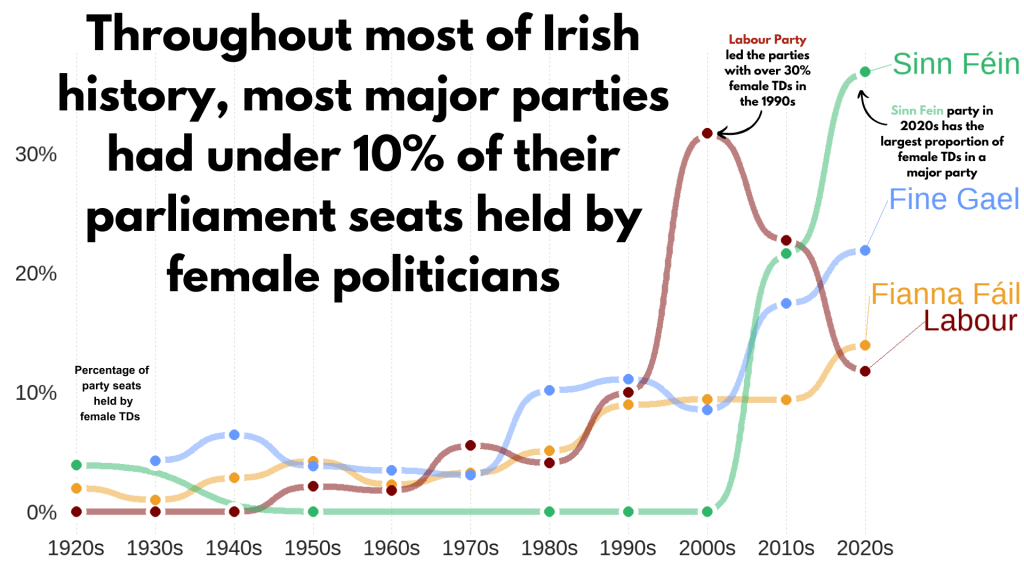
Next, we can make a simple trend line of the top Irish parties and see how they have fared with women TDs.

Let’s get a dataframe with average number of TDs elected to each party over the decades

dail %>% 
  filter(constituency != "National University") %>% 
  filter(party %in% c("Fianna Fáil", "Fine Gael", "Labour", "Sinn Féin")) %>% 
  group_by(party, decade) %>% 
  summarise(avg_female = mean(gender == "female")) -> dail_avg
# A tibble: 39 × 3
# Groups:   party [4]
   party       decade avg_female
   <chr>       <chr>       <dbl>
 1 Fianna Fáil 1920s     0.0198 
 2 Fianna Fáil 1930s     0.00685
 3 Fianna Fáil 1940s     0.0284 
 4 Fianna Fáil 1950s     0.0425 
 5 Fianna Fáil 1960s     0.0230 
 6 Fianna Fáil 1970s     0.0327 
 7 Fianna Fáil 1980s     0.0510 
 8 Fianna Fáil 1990s     0.0897 
 9 Fianna Fáil 2000s     0.0943 
10 Fianna Fáil 2010s     0.0938 
# 29 more rows

We create a new mini data.frame of four values so that we can have the geom_text() only at the end of the year (so similar to the final position of the graph).

final_positions <- dail_avg %>%
  group_by(party) %>%
  filter(decade == "2020s")  %>% 
  mutate(color = ifelse(party == "Sinn Féin", "#2fb66a",
         ifelse(party == "Fine Gael","#6699ff",
         ifelse(party == "Fianna Fáil","#ee9f27", 
         ifelse(party == "Labour", "#780000", "#495051")))))
# A tibble: 4 × 4
# Groups:   party [4]
  party       decade avg_female color  
  <chr>       <chr>       <dbl> <chr>  
1 Fianna Fáil 2020s       0.140 #ee9f27
2 Fine Gael   2020s       0.219 #6699ff
3 Labour      2020s       0.118 #780000
4 Sinn Féin   2020s       0.368 #2fb66a

A hex colour for each major party

party_pal <- c("Sinn Féin" = "#2fb66a",
                "Fine Gael" = "#6699ff",
                "Fianna Fáil" = "#ee9f27", 
                "Labour" = "#780000")

And a geom_bump() layer in the plot using the ggbump() package for more wavy lines.

dail_avg %>% 
  ggplot(aes(x = decade,
             y = avg_female, 
             group = party, 
             color = party)) + 

  ggbump::geom_bump(aes(color = party),
            smooth = 5,
            alpha = 0.5,
            size = 4)  +

  geom_point(color = "white", 
             size = 7, 
             stroke = 4) + 

  geom_point(size = 6) +

  ggrepel::geom_text_repel(data = final_positions,
            aes(color = party,
                y = avg_female,
                x = decade,
            label = party),
            family = "Arial Rounded MT Bold",
            vjust = -2,
            hjust = -1,
            size = 15) +
# my_style() 
  scale_color_manual(values = party_pal) +
  scale_y_continuous(labels = scales::label_percent()) +
  scale_x_discrete(expand = expansion(add = c(0.2, 2))) +
  theme(legend.position = "none") 

This graph looks at major Irish political parties from the 1920s to the 2020s.

For most of Irish history, female representation remained under 10%.

The Labour Party surged ahead like crazy in the 1990s; it got over 30% female TDs!

Now in the 2020s, Sinn Féin has the largest proportion of female TDs and goes way above and beyond the other major parties.

Now, onto constituency maps.

We can go to the Irish government’s website with heaps of data! Yay free data.

This page brings us to the election constituencies GeoJSON map data.

For more information about making GeoJSON and SF maps click here to read about how to create maps in R ~

So we read in the data and convert to SF dataframe.

constituency_map <- geojson_read(file.choose(), what = "sp")

constituency_sf <- st_as_sf(constituency_map)

This constituency_sf has 64 variables but most of them are meta-data info like the dates that each variable was updated. The vaaast majority, we don’t need so we can just pull out the consituency var for our use:

constituency_sf %>% 
  select(constituency = ENG_NAME_VALUE, 
         geometry) -> mini_constituency_sf
Simple feature collection with 1072 features and 1 field
Geometry type: POLYGON
Dimension:     XY
Bounding box:  xmin: 417437.9 ymin: 516356.4 xmax: 734489.6 ymax: 966899.7
Projected CRS: IRENET95 / Irish Transverse Mercator
First 10 features:
          constituency                       geometry
1  Cork South-West (3) POLYGON ((501759.8 527442.6...
2            Kerry (5) POLYGON ((451686.2 558529.2...
3            Kerry (5) POLYGON ((426695 561869.8, ...
4            Kerry (5) POLYGON ((451103.9 555882.8...
5            Kerry (5) POLYGON ((434925.3 572926.2...
6          Donegal (5) POLYGON ((564480.8 917991.7...
7          Donegal (5) POLYGON ((571201.9 892870.7...
8          Donegal (5) POLYGON ((615249.9 944590.2...
9          Donegal (5) POLYGON ((563593.8 897601, ...
10         Donegal (5) POLYGON ((647306 966899.4, ...

As we see, the number of seats in each constituency is in brackets behind the name of the county. So we can separate them and create a seat variable:

  mini_constituency_sf %<>% 
   separate(constituency, 
            into = c("constituency", "seats"), 
            sep = " \\(", fill = "right") %>%
   mutate(seats = as.numeric(gsub("\\)", "", seats))) 

One problem I realised along the way when I was trying to merge the constituency map with the TD politicians data is that one data.frame uses a hyphen and one uses a dash in the constituency variable.

So we can make a quick function to replace en dash (–) with hyphen (-).

 replace_dash <- function(x) {
   if (is.character(x)) {
     gsub("–", "-", x)  
   } else {x}
}

 mini_constituency_sf %<>%
   mutate(across(where(is.character), replace_dash))

And now we can merge!

 dail %<>%
   right_join(mini_constituency_sf, by = "constituency") 

Now a quick map ~

 dail %<>%
  mutate(n = ifelse(is.na(percentage_women), 0, percentage_women)) %>%
   ggplot(aes(geometry = geometry)) +
   geom_sf(aes(fill = percentage_women),
           color = "black") +  s
   labs(title = "Map of Irish Constituencies") +
   # my_style() +
   scale_fill_viridis_c(option = "plasma")  +

    scale_fill_gradient2(low = "#57cc99",
                         mid = "#38a3a5",
                         high = "#22577a") +

   theme(axis.text = element_blank(),
     axis.text.x.bottom = element_blank(),
     legend.key.width = unit(1.5, "cm"), 
     legend.key.height = unit(0.4, "cm"), 
     legend.position = "bottom")
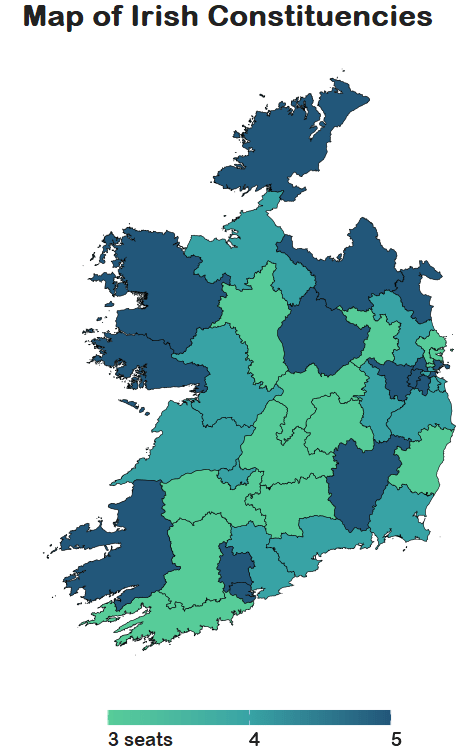
We can see that some constituencies have 3 seats, some 5~

So we cannot directly compare who has more female TDs.

A way to deal with this is scaling the data.

In PART 3, we will look at scaling data and analysing trends across the years!

Yay!
Graphing female politicians in Irish parliament R PART 1: Predicting names

Packages we will be using:

library(gender)
library(tidyverse)
library(stringi)
library(toOrdinal)
library(rvest)
library(janitor)
library(magrittr)

I heard a statistic a while ago that there are more men named Mike than total women in charge of committees in the US Senate.

In this blog, we can whether the number of women in the Irish parliament outnumber any common male name.

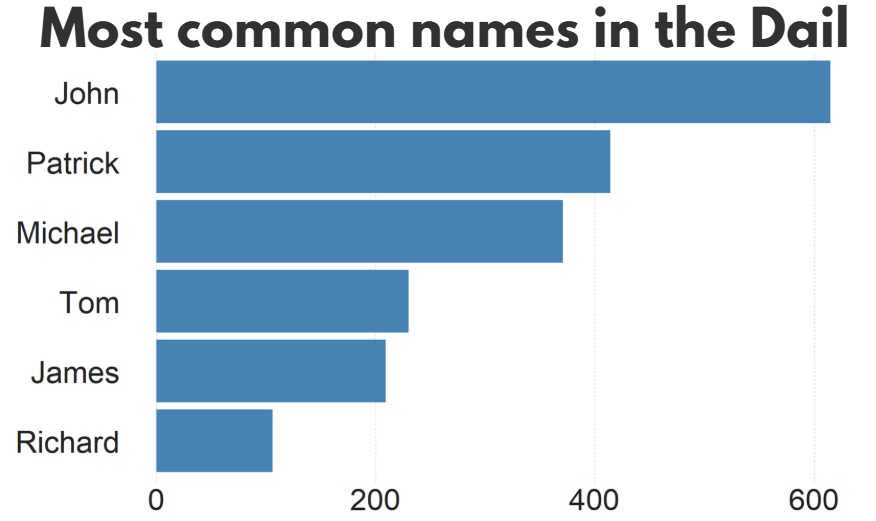
A quick glance on the most common names in the Irish parliament, we can see that from 1921 to 2024, there have been over 600 seats won by someone named John.

There are a LOT of men in Irish politics with the name Patrick (and variants thereof).

Worldcloud made with wordcloud2() package!

So, in this blog, we will:

  1. scrape data on Irish TDs,
  2. predict the gender of each politician and
  3. graph trends on female TDs in the parliament across the years.

The gender package attempts to infer gender (or more precisely, sex assigned at birth) based on first names using historical data.

Of course, gender is a spectrum. It is not binary.

As of 2025, there are no non-binary or transgender politicians in Irish parliament.

In this package, we can use the following method options to predict gender based on the first name:

1. “ssa” method uses U.S. Social Security Administration (SSA) baby name data from 1880 onwards (based on an implementation by Cameron Blevins)

2. “ipums” (Integrated Public Use Microdata Series) method uses U.S. Census data in the Integrated Public Use Microdata Series (contributed by Ben Schmidt)

3. “napp” uses census microdata from Canada, UK, Denmark, Iceland, Norway, and Sweden from 1801 to 1910 created by the North Atlantic Population Project

4. “kantrowitz” method uses the Kantrowitz corpus of male and female names, based on the SSA data.

5. The “genderize” method uses the Genderize.io API based on user profiles from social networks.

We can also add in a “countries” variable for just the NAPP method

For the “ssa” and “ipums” methods, the only valid option is “United States” which will be assumed if no argument is specified. For the “kantrowitz” and “genderize” methods, no country should be specified.

For the “napp” method, you may specify a character vector with any of the following countries: “Canada”, “United Kingdom”, “Denmark”, “Iceland”, “Norway”, “Sweden”.

We can compare these different method with the true list of the genders that I manually checked.

So let’s look at the 33rd Dail from Wikipedia.

https://en.wikipedia.org/wiki/33rd_D%C3%A1il

We can create a new variable with separate() so that it only holds the first name of each politician. We will predict the gender based on this.

dail_33 %<>% 
  separate(
    col = "name",
    into = c("first_name", "rest_name"),
    sep = " ",
    remove = FALSE,
    extra = "merge",
    fill = "warn") 

Irish names often have fadas so we can remove them from the name and make it easier for the prediction function.

remove_fada <- function(x) {
  stri_trans_general(x, id = "Latin-ASCII")
}

dail_33 %<>% 
  mutate(first_name = remove_fada(first_name)) 

Now we’re ready.

We can extract two variables of interest with the gender() function:

  1. gender variable (prediction of male or female name) and
  2. proportion_male (level of certainty about that prediction from 0 to 1).

If the method is confident about predicting male, it will give a higher score.

dail_33 %<>% 
  rowwise() %>%
  mutate(
    gender_ssa = gender(first_name, method = "ssa")$gender[1],  
    prop_male_ssa = gender(first_name, method ="ssa")$proportion_male[1])  

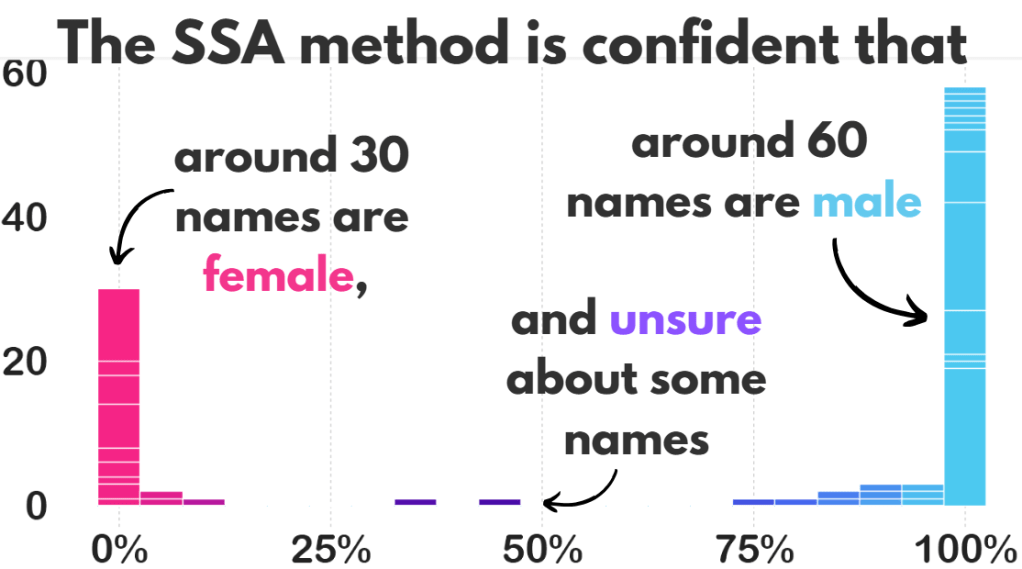
We can add both these to the dail_33 data.frame and check how confident the SSA method is about predicting the gender of all the names.

We can now create a histogram of this level of certainty about the prediction.

Before we graph it out, we

  • filter out the NA values,
  • remove duplicate first names,
  • round up the certainty to three decimal points and
  • choose the bin size for the histogram
  • find some nice hex colours for the graphs
dail_33 %<>% 
  filter(is.finite(prop_male_ssa)) %>% 
  distinct(first_name, .keep_all = TRUE) %>% 
  mutate(
    prop_male_ssa = round(prop_male_ssa, 3),
    bin_category = cut(prop_male_ssa, breaks = 10, labels = FALSE))

 gender_palette <- c("#f72585","#b5179e","#7209b7","#560bad","#480ca8","#3a0ca3","#3f37c9","#4361ee","#4895ef","#4cc9f0")

We can graph it out with the above palette of hex colours.

We can add label_percent() from the scales package for adding percentage signs on the x axis.

dail_33 %>%
  ggplot(aes(x = prop_male_ssa, fill = prop_male_ssa, 
group = prop_male_ssa)) +
  geom_histogram(binwidth = 0.05, color = "white") +  
  scale_fill_gradientn(colors = gender_palette) +  
 # my_style() +
  scale_x_continuous(labels = scales::label_percent()) +
  theme(legend.position = "none")

I added the arrows and texts on Canva.

Don’t judge. I just hate the annotate() part of ggplotting.

Two names that the prediction function was unsure about:

  full_name     prop_male_ssa  gender_ssa
    
Pat Buckley      0.359         female    
Jackie Cahill    0.446         female  

In these two instances, the politicians are both male, so it was good that the method flagged how unsure it was about labeling them as “female”.

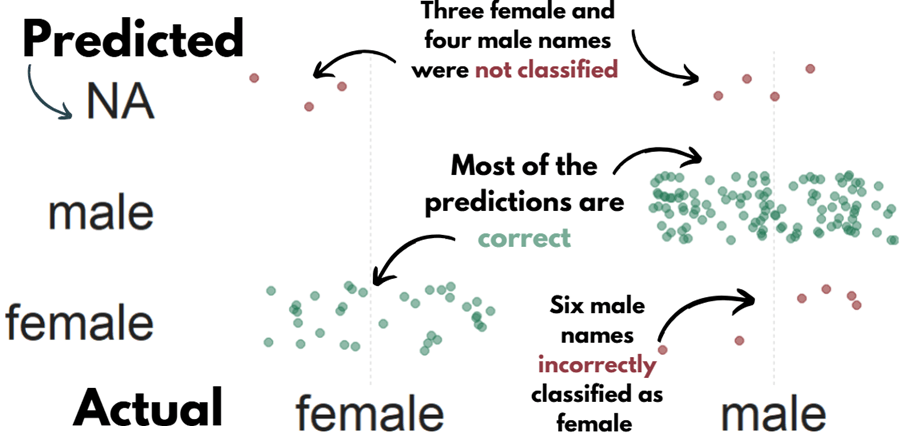
And the names that the function had no idea about so assigned them as NA:

Violet-Anne Wynne    
Aindrias Moynihan    
Donnchadh Ó Laoghaire
Bríd Smith           
Sorca Clarke         
Ged Nash             
Peadar Tóibín 

Which is fair.

We can graph out whether the SSA predicted gender are the same as the actual genders of the TDs.

So first, we create a new variable that classifies whether the predictions were correct or not. We can also call NA results as incorrect. Although god bless any function attempting to guess what Donnchadh is.

dail_33 %>%
    mutate(correct = ifelse(gender == gender_ssa, "Correct", "Incorrect"), correct = ifelse(is.na(gender_ssa), "Incorrect", correct)) -> dail_correct

And graph it out:

dail_correct %>%
  ggplot(aes(x = gender, y = gender_ssa, color = correct )) +
  geom_jitter(width = 0.3, height = 0.3, alpha = 0.5, size = 4) +
  labs(
    x = "Actual Gender",
    y = "Predicted Gender",
    color = "Prediction") +
  scale_color_manual(values = c("Correct" = "#217653", "Incorrect" = "#780000")) +
  # my_style()

 dail %<>% 
   select(first_name, contains("gender")) %>% 
   distinct(first_name, .keep_all = TRUE) %>%  
   mutate(across(everything(), ~ ifelse(. == "either", NA, .))) 

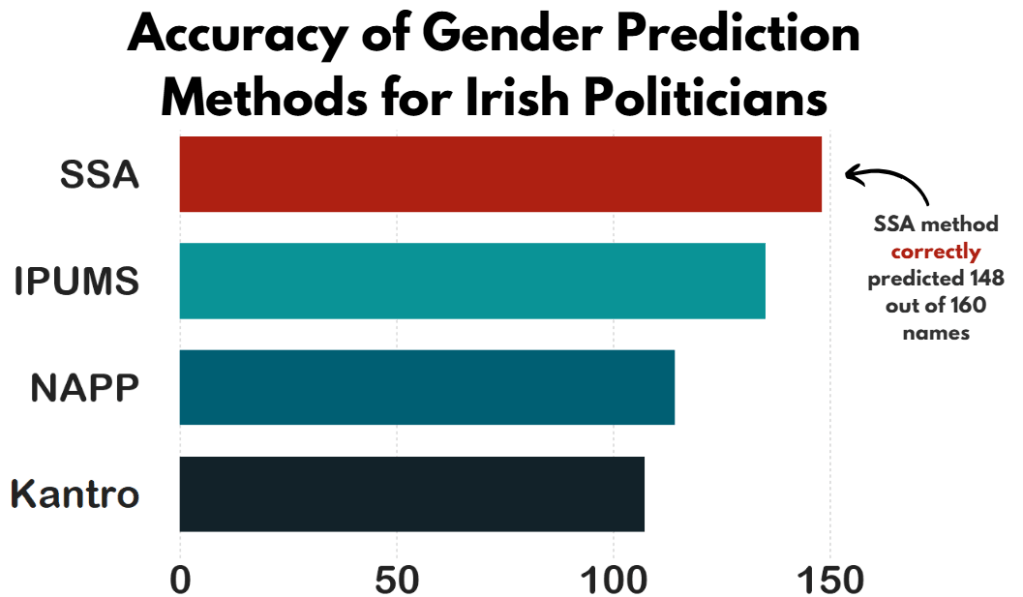
Now, we can compare the SSA method with the other methods in the gender package and see which one is most accurate.

First, we repeat the same steps with the gender() function like above, and change the method arguments.

dail_33 %<>% 
  rowwise() %>%
  mutate(
    gender_ipums = gender(first_name, method = "ipums")$gender[1])

dail_33 %<>% 
  rowwise() %>%
  mutate(gender_napp = gender(first_name, method = "napp")$gender[1])

dail_33 %<>% 
  rowwise() %>%
  mutate(gender_kantro = gender(first_name, method = "kantrowitz" )$gender[1])

dail_33 %<>% 
  rowwise() %>%
  mutate(gender_ize = gender(first_name, method = "genderize" )$gender[1])

Or we can remove duplicates with purrr package

dail_33 %<>% 
  rowwise() %>%
  mutate(across(
    c("ipums", "napp", "kantrowitz", "genderize"), 
    ~ gender(first_name, method = .x)$gender[1], 
    .names = "gender_{.col}"
  ))

Then we calculate which one is closest to the actual measures.

dail_33 %>% 
summarise(accuracy_ssa = mean(ifelse(is.na(gender == gender_ssa), FALSE, gender == gender_ssa)),

     accuracy_ipums = mean(ifelse(is.na(gender == gender_ipums), FALSE, gender == gender_ipums)),

     accuracy_napp = mean(ifelse(is.na(gender == gender_napp), FALSE, gender == gender_napp)),

     accuracy_kantro = mean(ifelse(is.na(gender == gender_kantro), FALSE, gender == gender_kantro))) -> acc

Or to make it cleaner with across()

acc <- dail_33 %>%
  summarise(across(
    c(gender_ssa, gender_ipums, gender_napp, gender_kantro),
    ~ mean(ifelse(is.na(gender == .x), FALSE, gender == .x)),
    .names = "accuracy_{.col}"
  ))

Pivot the data.frame longer so that each method is in a single variable and each value is in an accuracy method.

acc %<>%
  pivot_longer(cols = everything(), names_to = "method", values_to = "accuracy") %>% 
  mutate(method = fct_reorder(method, accuracy, .desc = TRUE)) %>% 
  mutate(method = factor(method, levels = c("accuracy_kantro", "accuracy_napp", "accuracy_ipums", "accuracy_ssa"))) 

my_pal <- c(
  "accuracy_kantro" = "#122229",
  "accuracy_napp" = "#005f73",
  "accuracy_ipums" = "#0a9396",
  "accuracy_ssa" = "#ae2012")

And then graph it all out!

We can use scale_x_discrete() to change the labels of each different method

# Cairo::CairoWin()

acc %>% 
  ggplot(aes(x = method, y = accuracy, fill = method)) +  
  geom_bar(stat = "identity", width = 0.7) +
  coord_flip() + 
  ylim(c(0,160)) +
  theme(legend.position = "none",
        text = element_text(family = "Arial Rounded MT Bold")) +
  scale_fill_manual(values = sample(my_pal)) +
  scale_x_discrete(labels = c("accuracy_ssa" = "SSA",
                              "accuracy_napp" = "NAPP",
                              "accuracy_ipums" = "IPUMS", 
                              "accuracy_kantro" = "Kantro")) +
# my_style() 

Once again, I added the title and the annotations in Canva. I will never add arrow annotations in R if I have other options.

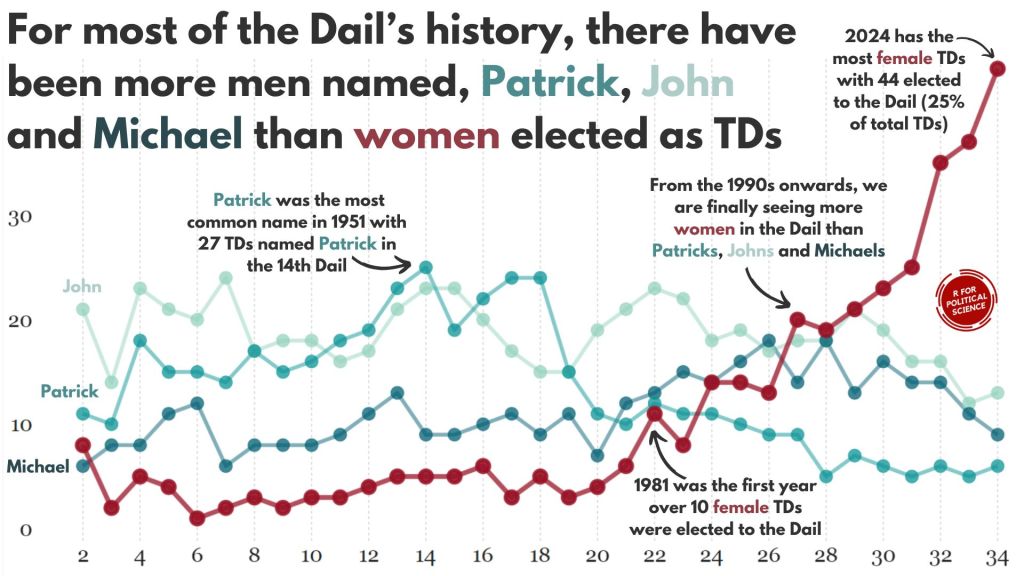
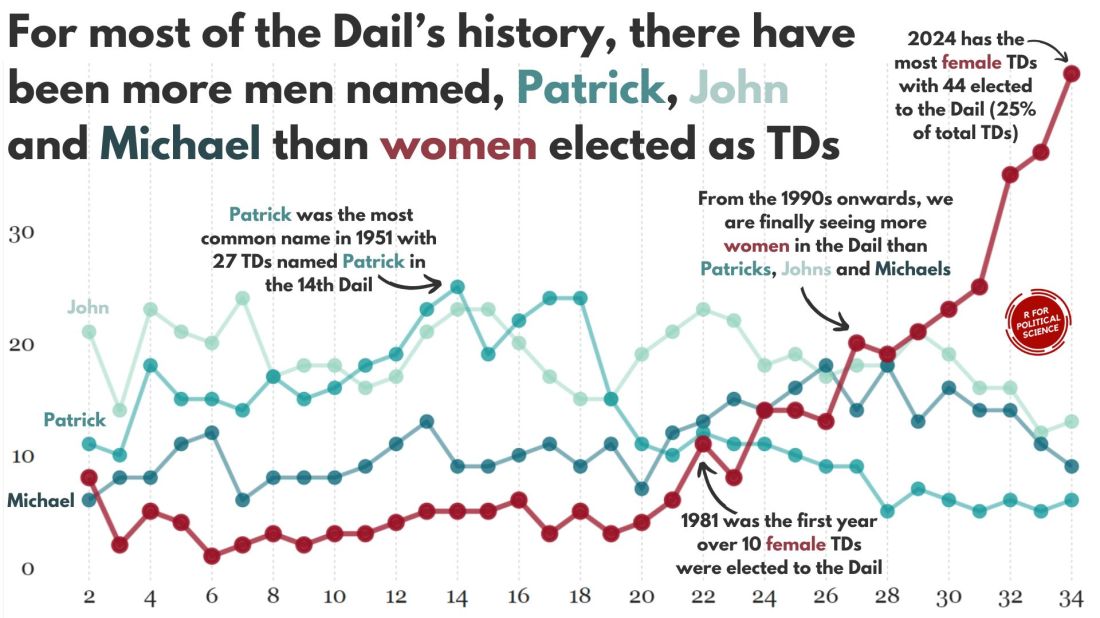
Coming up next, PART 2 on how we can analyse variations on women in the Irish parliament, such as the following graph:

How to download and animate the Varieties of Democracy (V-DEM) dataset in R

In this blog post, we will download the V-DEM datasets with their vdemdata package. It is still in development, so we will use the install_github() function from the devtools package

devtools::install_github("vdeminstitute/vdemdata")

library(vdemdata)

And really quickly we can download the dataset with one line of code

vdemdata::vdem -> vdem

We can use the find_var function to get information on variables based on keywords.

For example, we can look up variables that are concerned with protest mobilization.

vdemdata::find_var("mobilization") -> mob
 mob %>% names
 [1] "question_id"              "question_number"          "metasection"             
 [4] "name"                     "vartype"                  "cb_section"              
 [7] "tag"                      "projectmanager"           "question"                
[10] "clarification"            "responses"                "ordering"                
[13] "scale"                    "answertype"               "sources"                 
[16] "notes"                    "datarelease"              "citation"                
[19] "coverage"                 "subsetof"                 "crosscoder_aggregation"  
[22] "aggregation"              "ccp_tag"                  "clean_tag"               
[25] "survey_id"                "vignettes_used"           "old_tag"                 
[28] "compiler"                 "clarification_historical" "codebook_id"             
[31] "conthistmerge"            "histmerged"               "years"                   
[34] "hist_outside_coding"      "additional_versions"      "cleaning"                
[37] "date_specific"            "available_versions"       "cont_outside_coding"     
[40] "overlap_use_hist"         "is_party"                 "cb_section_type"         
[43] "defaultdate"              "convergence"              "cy_aggregation"          
[46] "no_update" 

Or download the entire codebook:

vdemdata::codebook -> vdem_codebook

And we can look at information for a specific variable

vdemdata::var_info("e_regionpol_6C") -> region_info 
region_info$responses
1: Eastern Europe and Central Asia (including Mongolia and German Democratic Republic)
2: Latin America and the Caribbean
3: The Middle East and North Africa (including Israel and Türkiye, excluding Cyprus)
4: Sub-Saharan Africa
5: Western Europe and North America (including Cyprus, Australia and New Zealand, but excluding German Democratic Republic)
6: Asia and Pacific (excluding Australia and New Zealand; see 5)"

For our analysis, we can focus on the years 1900 to 2022.

vdem %<>% 
  filter(year %in% c(1900:2022))

And we will create a ggplot() object that also uses the Five Thirty Eight theme from the ggthemes package.

Click here to read more about the ggthemes options.

Source: https://yutannihilation.github.io/allYourFigureAreBelongToUs/ggthemes/

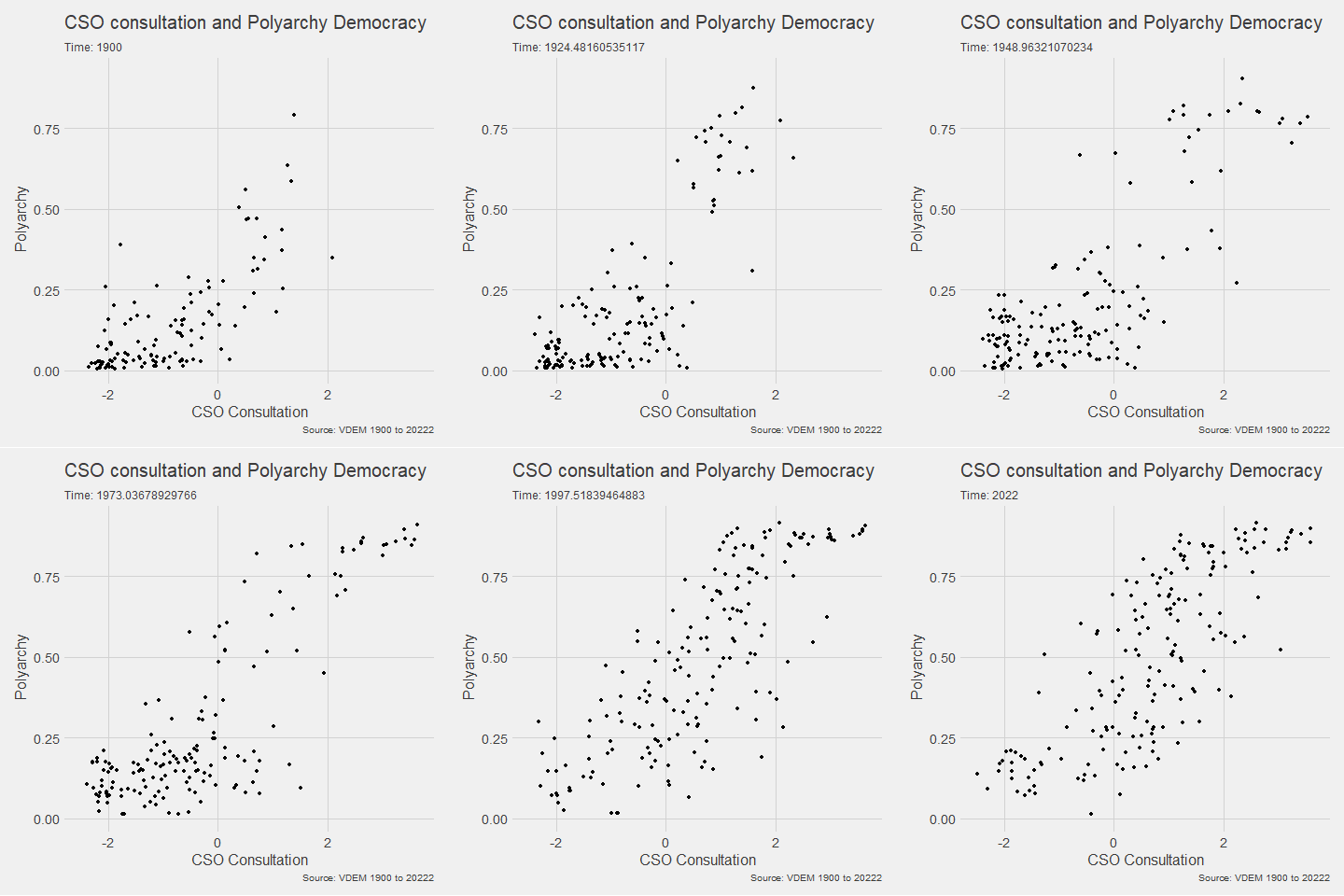
In the V-DEM package, we will look at a scatterplot of CSO consultation (v2cscnsult) and democracy score (v2x_polyarchy).

  • v2cscnsult asks are major civil society organizations (CSOs) routinely consulted by policymakers on policies relevant to their members?
  • v2x_polyarchy examines to what extent is the ideal of electoral democracy in its fullest sense achieved?

First, find below the packages we will need to install and load

install.packages("gganimate")
install.packages("transformr")  # sometimes needed as a dependency

library(gganimate)

And we plot our graph:

my_graph <- ggplot(vdem, aes(x = v2cscnsult, 
                      y = v2x_polyarchy, 
                      group = year)) +
  geom_point()  +
  ggthemes::theme_fivethirtyeight() +
  theme(text = element_text(size = 12),  # Default text size for all text elements
        plot.title = element_text(size = 20, face="bold"),  
        axis.title = element_text(size = 16), 
        axis.text = element_text(size = 14), 
        legend.title = element_text(size = 14),  
        legend.text = element_text(size = 12))  

In the themes argument, we can change the size of the text for the various parts of the ggplot (legends, axes etc.)

To make the ggplot object animated, we use the transition_time(year) function from the gganimate package.

Also we can add a subtitle the displays the year and time frame in the graph.

animated_graph <- my_graph +
  transition_time(year) +
  labs(title = "CSO consultation and Polyarchy Democracy",
       subtitle = "Time: {frame_time}",
       caption = "Source: VDEM 1900 to 2022",
       x = "CSO Consultation",
       y = "Polyarchy")

And we can change how we render the graph with the animate() function.

We choose duration = 15 so that the gif lasts 15 seconds

We set frames per second to 20 fps (the higher the number, the smoother the gif changes, but the longer it takes to load)

And finally we can choose a special renderer that makes the gif more smooth too.

Finally we can save the gif to our computer (so I can upload it here on this blog)

animate(animated_plot, duration = 15, fps = 20, renderer = gifski_renderer()) -> CSO_poly_gif

anim_save("animated_plot.gif", animation = CSO_poly_gif)

We can make a few changes so that it is divided by region and adds colors:

Notice the change to subtitle = "Year: {as.integer(frame_time)}" so it only uses the year, not the year and frame rate.

ggplot(vdem, aes(x = v2cscnsult, 
                      y = v2x_polyarchy, 
                      group = year,
                 size = e_pop, 
                 colour = as.factor(e_regionpol_6C))) +
  geom_point(alpha = 0.7, show.legend = FALSE) +
  ggthemes::theme_fivethirtyeight() +
  theme(text = element_text(size = 12),  
        plot.title = element_text(size = 20, face="bold"), 
        axis.title = element_text(size = 16),  
        axis.text = element_text(size = 14),  
        legend.title = element_text(size = 14),  
        legend.text = element_text(size = 12)) +
  facet_wrap(~e_regionpol_6C) +
  transition_time(year) +
  labs(title = "CSO consultation and Polyarchy Democracy",
       subtitle = "Year: {as.integer(frame_time)}",
       caption = "Source: VDEM 1900 to 2022",
       x = "CSO Consultation",
       y = "Polyarchy")  

Next, we can animate a map

library(sf)
library(rnaturalearth)

First we download a world object with the longitude and latitude data we need.

Click here to read more about the rnaturalearth package

my_map <- ne_countries(scale = "medium", returnclass = "sf")

And we merge the two data.frames together

my_map %<>% 
  mutate(COWcode = countrycode::countrycode(sovereignt, "country.name", "cown"))

vdem_map <- left_join(vdem, my_map, by = c("COWcode"))

Set up some colors for the map

colors <- c("#001427", "#708d81", "#f4d58d", "#bf0603", "#8d0801")

Next we draw the map:

vdem_map %>% 
  filter(year %in% c(1945:2023)) %>% 
  filter(sovereignt != "Antarctica") %>% 
  group_by(country_name, geometry) %>% 
  summarise(avg_polyarchy = mean(v2x_polyarchy, na.rm = TRUE)) %>% 
  ungroup() %>% 
  ggplot() +
  geom_sf(aes(geometry = geometry, fill = avg_polyarchy),  
          position = "identity", color = "#212529", linewidth = 0.2, alpha = 0.85) +
  geom_tile(data = data.frame(value = seq(0, 1, length.out = length(colors))), 
            aes(x = 1, y = value, fill = value), 
            show.legend = FALSE) +
  scale_fill_gradientn(colors = colors, 
                       breaks = scales::pretty_breaks(n = length(colors)),
                       labels = scales::number_format(accuracy = 1)) +
  theme_minimal()

When I made the first attempt to animate the polyarchy democracy data on the map, it was a bit of an affront to the senses:

So attempt number two involved a bit more wrangling!

vdem_map %>% 
  filter(year %in% c(1945:2023)) %>% 
  filter(sovereignt != "Antarctica") %>% 
  ggplot() +
  geom_sf(aes(geometry = geometry, fill = v2x_polyarchy, group = year),  
          position = "identity", color = "#212529", linewidth = 0.2, alpha = 0.85) +
  theme_minimal() +
  scale_fill_gradientn(colors = colors,
                       breaks = scales::pretty_breaks(n = length(colors)),
                       labels = scales::number_format(accuracy = 3)) +
  transition_time(year) + 
  labs(title = "Polyarchy Democracy annual global changes",
       subtitle = "Year: {as.integer(frame_time)}",
       caption = "Source: VDEM 1900 to 2023",
       x = " ",
       y = " ",
       fill = "Democracy Score")  -> my_plot

animate(my_plot, duration = 40, fps = 40,
        renderer = gifski_renderer()) -> map_gif

anim_save("animated_plot_3.gif", animation = map_gif)

How to run multiple t-tests in a function with the broom package in R

Packages we will need:

library(tidyverse)
library(broom)

We will use the Varieties of Democracy dataset again.

Excited Will Ferrell GIF - Find & Share on GIPHY

We will use a t-test comparing democracies (boix == 1) and non-democracies (boix == 0) in the years 2000 to 2020.

We need to remove the instances where boix is NA.

I choose three t-tests to run simultaneously. Comparing democracies and non-democracies on:

  1. the extent to which the country consults religious groups (relig_consult)
  2. the extent to which the country consults Civil Society Organization (CSO) groups (cso_consult)
  3. level of freedom from judicial corruption (judic_corruption) – higher scores mean that there are FEWER instances of judicial corruption
vdem %>% 
filter(year %in% c(2000:2020)) %>%
filter(!is.na(e_boix_regime)) %>%
group_by(e_boix_regime) %>%
select(relig_consult = v2csrlgcon,
cso_consult = v2cscnsult,
judic_corruption = v2jucorrdc) -> vdem

Next we need to pivot the data from wide to long

  vdem %<>% pivot_longer(!e_boix_regime, 
names_to = "variable",
values_to = "value")

Now we get to iterating over the three variables and conducting a t-test on each variable across democracies versus non-democracies

Excited Elf GIF - Find & Share on GIPHY
vdem %>%
group_by(variable) %>%
nest() %>%
mutate(t_test = map(data, ~t.test(value ~ e_boix_regime, data = .x)),
tidy = map(t_test, broom::tidy)) %>%
select(variable, tidy) %>%
unnest(tidy) -> ttest_results

If we look closely at the line

mutate(t_test = map(data, ~t.test(value ~ e_boix_regime, data = .x))):

Here, mutate() adds a new column named t_test to the grouped and nested data.

map() is used to apply a function to each element of the list-column (here, each nested data frame).

The function applied is t.test(value ~ e_boix_regime, data = .x).

This function performs a t-test comparing the means of value across two groups defined by e_boix_regime within each nested data frame.

.x represents each nested data frame in turn.

And here are the tidy results:

If we save the above results in a data.frame, we can graph the following:

ttest_results %>%
ggplot(aes(x = variable, y = estimate, ymin = conf.low, ymax = conf.high)) +
geom_point() +
geom_errorbar(width = 0.2) +
coord_flip() +
labs(title = "T-Test Estimates with Confidence Intervals",
x = "Variable",
y = "Estimate Difference") +
theme_minimal()

Add some colors to highlight magnitude of difference

  ggplot(aes(x = variable, y = estimate, ymin = conf.low, ymax = conf.high, color = color_value)) +
geom_point() +
geom_errorbar(width = 0.7, size = 3) +
scale_color_gradientn(colors = c("#0571b0", "#92c5de", "#f7f7f7", "#f4a582", "#ca0020")) +
coord_flip() +
labs(title = "T-Test Estimates with Confidence Intervals",
x = "Variable",
y = "Estimate Difference") +
theme_minimal() +
guides(color = guide_colorbar(title = ""))

Sometimes vdem variables are reverse scored or on different scales

  # mutate(across(judic_corruption, ~ 1- .x)) %>% 
# mutate(across(everything(), ~(.x - mean(.x, na.rm = TRUE)) / sd(.x, na.rm = TRUE), .names = "z_{.col}")) %>%
# select(contains("z_"))

How to run cross-validation of decision-tree models with xgboost in R (PART 4 Tidymodels series)

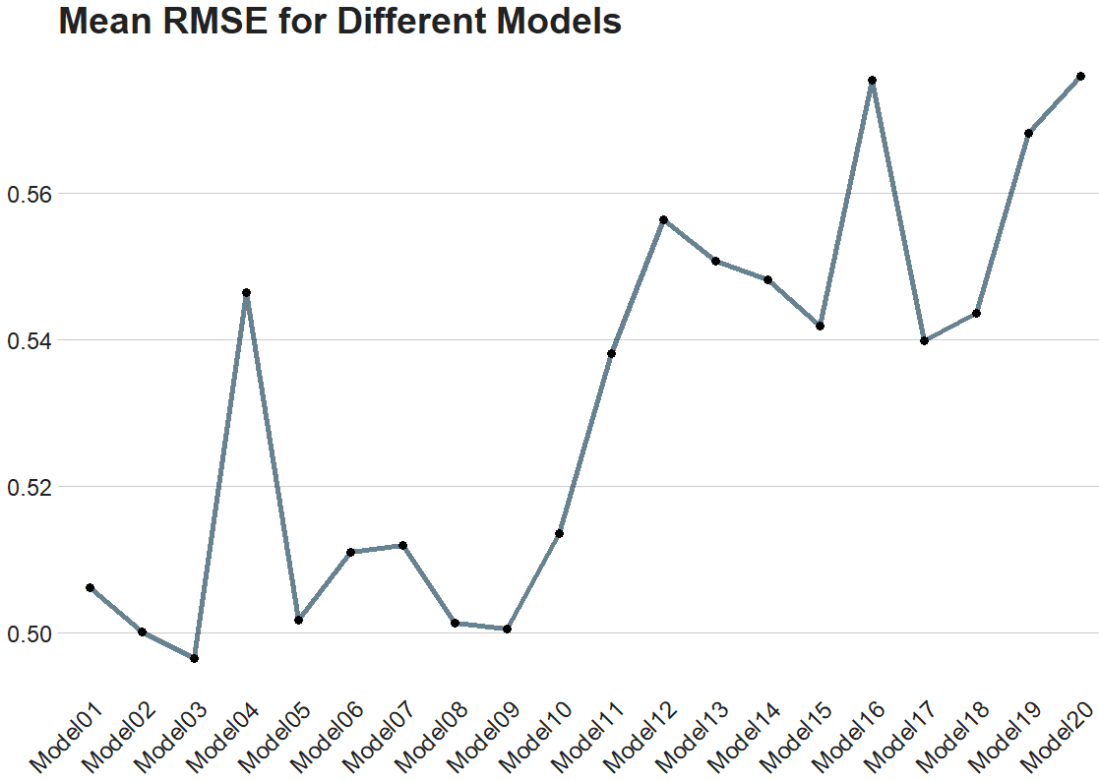
In this blog post, we will cross-validate different boosted tree models and find the one with best root mean square error (RMSE).

Specifically, part 2 goes into more detail about RMSE as a way to choose the best model

Click here to read part 1, part 2 or part 3 of this series on tidymodel package stuff.

Packages we will need:

library(tidymodels)
library(tidyverse)

Our resampling method will be 10-fold cross-validation.

Click here to watch a Youtube explainer by StatQuest on the fundamentals of cross validation. StatQuest is the cat’s pyjamas.

We can use the vfold_cv() function to create a set of “V-fold” cross-validation with 11 splits.

My favorite number is 11 so I’ll set that as the seed too.

set.seed(11) 
cross_folds <- vfold_cv(vdem_1990_2019, v = 11)

We put our formula into the recipe function and run the pre-processing steps: in this instance, we are just normalizing the variables.

my_recipe <- recipe(judic_corruption ~ freedom_religion + polarization, 
data = vdem_1990_2019) %>%
step_normalize(all_predictors(), -all_outcomes())

Here, we will initially define a boost_tree() model without setting any hyperparameters.

This is our baseline model with defaults.

With the vfolds, we be tuning them and choosing the best parameters.

For us, our mode is “regression” (not categorical “classification”)

my_tree <- boost_tree(
mode = "regression",
engine = "xgboost") %>%
set_engine("xgboost") %>%
set_mode("regression")

Next we will set up a grid to explore a range of hyperparameters.

my_grid <- grid_latin_hypercube(
trees(range = c(500, 1500)),
tree_depth(range = c(3, 10)),
learn_rate(range = c(0.01, 0.1)),
size = 20)

We use the grid_latin_hypercube() function from the dials package in R is used to generate a sampling grid for tuning hyperparameters using a Latin hypercube sampling method.

Latin hypercube sampling (LHS) is a way to generate a sample of plausible, semi-random collections of parameter values from a distribution.

This method is used to ensure that each parameter is uniformly sampled across its range of values. LHS is systematic and stratified, but within each stratum, it employs randomness.

Source: https://www.youtube.com/watch?app=desktop&v=Evua529dAgc

Inside the grid_latin_hypercube() function,we can set the ranges for the model parameters,

trees(range = c(500, 1500))

This parameter specifies the number of trees in the model

We can set a sampling range from 500 to 1500 trees.

tree_depth(range = c(3, 10))

This defines the maximum depth of each tree

We set values ranging from 3 to 10.

learn_rate(range = c(0.01, 0.1))

This parameter controls the learning rate, or the step size at each iteration while moving toward a minimum of a loss function.

It’s specified to vary between 0.01 and 0.1.

size = 20

We want the Latin Hypercube Sampling to generate 20 unique combinations of the specified parameters. Each of these combinations will be used to train a model, allowing for a systematic exploration of how different parameter settings impact model performance.

> my_grid

# A tibble: 20 × 3
   trees tree_depth learn_rate
   <int>      <int>      <dbl>
 1   803          7       1.03
 2   981          7       1.18
 3   862          6       1.09
 4  1185          9       1.06
 5   763          8       1.13
 6   593          4       1.11
 7   524          7       1.22
 8   743          3       1.17
 9  1347          5       1.07
10  1010          5       1.15
11   677          3       1.25
12  1482          5       1.05
13  1446          8       1.12
14   917          4       1.23
15  1296          6       1.04
16  1391          8       1.23
17  1106          9       1.18
18  1203          5       1.14
19   606         10       1.20
20  1088          9       1.10

So next, we will combine our recipe, model specification, and resampling method in a workflow, and use tune_grid() to find the best hyperparameters based on RMSE.

my_workflow <- workflow() %>%
add_recipe(my_recipe) %>%
add_model(my_tree)

The tune_grid() function does the hyperparameter tuning. We will make different combinations of hyperparameters specified in grid using cross-validation.

tuning_results <- my_workflow %>%
tune_grid(
resamples = cv_folds,
grid = my_grid,
metrics = metric_set(rmse))
# Tuning results
# 10-fold cross-validation 
# A tibble: 10 × 4
   splits             id     .metrics         .notes          
   <list>             <chr>  <list>           <list>          
 1 <split [3200/356]> Fold01 <tibble [1 × 4]> <tibble [0 × 3]>
 2 <split [3200/356]> Fold02 <tibble [1 × 4]> <tibble [0 × 3]>
 3 <split [3200/356]> Fold03 <tibble [1 × 4]> <tibble [0 × 3]>
 4 <split [3200/356]> Fold04 <tibble [1 × 4]> <tibble [0 × 3]>
 5 <split [3200/356]> Fold05 <tibble [1 × 4]> <tibble [0 × 3]>
 6 <split [3200/356]> Fold06 <tibble [1 × 4]> <tibble [0 × 3]>
 7 <split [3201/355]> Fold07 <tibble [1 × 4]> <tibble [0 × 3]>
 8 <split [3201/355]> Fold08 <tibble [1 × 4]> <tibble [0 × 3]>
 9 <split [3201/355]> Fold09 <tibble [1 × 4]> <tibble [0 × 3]>
10 <split [3201/355]> Fold10 <tibble [1 × 4]> <tibble [0 × 3]>

After tuning, we can extract and examine the best models.

show_best(tuning_results, metric = "rmse")
  trees tree_depth learn_rate .metric .estimator  mean     n std_err .config              
  <int>      <int>      <dbl> <chr>   <chr>      <dbl> <int>   <dbl> <chr>                
1   593          4       1.11 rmse    standard   0.496    10  0.0189 Preprocessor1_Model03
2   677          3       1.25 rmse    standard   0.500    10  0.0216 Preprocessor1_Model02
3  1296          6       1.04 rmse    standard   0.501    10  0.0238 Preprocessor1_Model09
4  1010          5       1.15 rmse    standard   0.501    10  0.0282 Preprocessor1_Model08
5  1482          5       1.05 rmse    standard   0.502    10  0.0210 Preprocessor1_Model05

The best model is model number 3!

The Fresh Prince Of Bel Air Reaction GIF - Find & Share on GIPHY

Finally, we can plot it out.

We use collect_metrics() to pull out the RMSE and other metrics from our samples.

It automatically aggregates the results across all resampling iterations for each unique combination of model hyperparameters, providing mean performance metrics (e.g., mean accuracy, mean RMSE) and their standard errors.

rmse_results <- tuning_results %>%
collect_metrics() %>%
filter(.metric == "rmse")
rmse_results %>%
mutate(.config = str_replace(.config, "^Preprocessor1_", "")) %>%
ggplot(aes(x = .config, y = mean)) +
geom_line(aes(group = 1), color = "#023047", size = 2, alpha = 0.6) +
geom_point(size = 3) +
bbplot::bbc_style() +
labs(title = "Mean RMSE for Different Models") +
theme(axis.text.x = element_text(angle = 45, hjust = 1))

How to run decision tree analysis with xgboost in R (Tidymodels Series PART 3)

Packages we will need:

library(tidymodels)
library(tidyverse)

In this blog post, we are going to run boosted decision trees with xgboost in tidymodels.

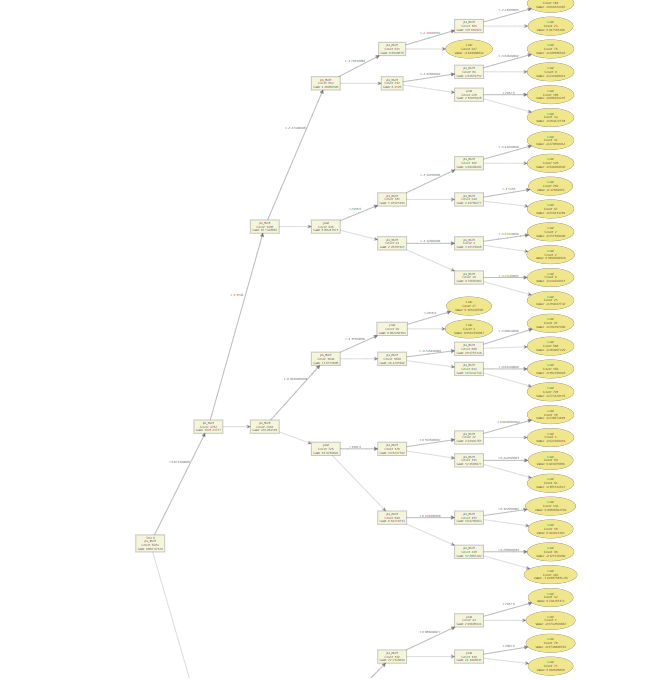
Boosted decision trees are a type of ensemble learning technique.

Ensemble learning methods combine the predictions from multiple models to create a final prediction that is often more accurate than any single model’s prediction.

The ensemble consists of a series of decision trees added sequentially, where each tree attempts to correct the errors of the preceding ones.

Source: https://towardsdatascience.com/10-decision-trees-are-better-than-1-719406680564

Similar to the previous blog, we will use Varieties of Democracy data and we will examine the relationship between judicial corruption and public sector theft.

Click here to read Part 1 of the tidymodels series

vdem <- read.csv(file.choose))

vdem %>%
select(judic_corruption = v2jucorrdc,
ps_theft = v2exthftps,
country_name,
year) -> vdem_vars

vdem_vars <- na.omit(vdem_vars)

We will divide the dataset into one from years 1990 to 2019 and a separate 2020 dataset.

vdem_vars %>% 
filter(year > 1989 & year < 2020) -> vdem_1990_2019

vdem_vars %>%
filter(year == 2020) -> vdem_2020

Now we will create our recipe with the model formula and any steps to mutate the variables

recipe_spec <- recipe(judic_corruption ~ ps_theft, 
data = vdem_1990_2019) %>%
step_normalize(all_predictors(), -all_outcomes())

Next we will set our decision tree.

boost_tree_spec <- boost_tree(
mode = "regression",
trees = 1000,
tree_depth = 3,
min_n = 10,
loss_reduction = 0.01,
sample_size = 0.5,
mtry = 2,
learn_rate = 0.01,
engine = "xgboost"
)

Let’s take a look at each part of this big step.

mode specifies the type of predictive modeling that we are running.

Common modes are:

  • "regression" for predicting numeric outcomes,
  • "classification" for predicting categorical outcomes,
  • "censored" for time-to-event (survival) models.

The mode we choose is regression.

Next we add the number of trees to include in the ensemble.

More trees can improve model accuracy but also increase computational cost and risk of overfitting. The choice of how many trees to use depends on the complexity of the dataset and the diminishing returns of adding more trees.

We will choose 1000 trees.

tree_depth indicates the maximum depth of each tree. The depth of a tree is the length of the longest path from a root to a leaf, and it controls the complexity of the model.

Deeper trees can model more complex relationships but also increase the risk of overfitting. A smaller tree depth helps keep the model simpler and more generalizable.

Our model is quite simple, so we can choose 3.

When your model is very simple, for instance, having only one independent variable, the need for deep trees diminishes. This is because there are fewer interactions between variables to consider (in fact, no interactions in the case of a single variable), and the complexity that a model can or should capture is naturally limited.

For a model with a single predictor, starting with a lower max_depth value (e.g., 3 to 5) is sensible. This setting can provide a balance between model simplicity and the ability to capture non-linear relationships in the data.

The best way to determine the optimal max_depth is with cross-validation. This involves training models with different values of max_depth and evaluating their performance on a validation set. The value that results in the best cross-validated metric (e.g., RMSE for regression, accuracy for classification) is the best choice.

We will look at RMSE at the end of the blog.

Next we look at the min_n, which is the minimum number of data points allowed in a node to attempt a new split. This parameter controls overfitting by preventing the model from learning too much from the noise in the training data. Higher values result in simpler models.

We choose min_n of 10.

loss_reduction is the minimum loss reduction required to make a further partition on a leaf node of the tree. It’s a way to control the complexity of the model; larger values result in simpler models by making the algorithm more conservative about making additional splits.

We input a loss_reduction of 0.01.

A low value (like 0.01) means that the model will be more inclined to make splits as long as they provide even a slight improvement in loss reduction.

This can be advantageous in capturing subtle nuances in the data but might not be as critical in a simple model where the potential for overfitting is already lower due to the limited number of predictors.

sample_size determines the fraction of data to sample for each tree. This parameter is used for stochastic boosting, where each tree is trained on a random subset of the full dataset. It introduces more variation among the trees, can reduce overfitting, and can improve model robustness.

Our sample_size is 0.5.

While setting sample_size to 0.5 is a common practice in boosting to help with overfitting and improve model generalization, its optimality for a model with a single independent variable may not be suitable.

We can test different values through cross-validation and monitoring the impact on both training and validation metrics

mtry indicates the number of variables randomly sampled as candidates at each split. For regression problems, the default is to use all variables, while for classification, a commonly used default is the square root of the number of variables. Adjusting this parameter can help in controlling model complexity and overfitting.

For this regression, our mtry will equal 2 variables at each split

learn_rate is also known as the learning rate or shrinkage. This parameter scales the contribution of each tree.

We will use a learn_rate = 0.01.

A smaller learning rate requires more trees to model all the relationships but can lead to a more robust model by reducing overfitting.

Finally, engine specifies the computational engine to use for training the model. In this case, "xgboost" package is used, which stands for eXtreme Gradient Boosting.

Season 6 Nbc GIF - Find & Share on GIPHY

When to use each argument:

Mode: Always specify this based on the type of prediction task at hand (e.g., regression, classification).

Trees, tree_depth, min_n, and loss_reduction: Adjust these to manage model complexity and prevent overfitting. Start with default or moderate values and use cross-validation to find the best settings.

Sample_size and mtry: Use these to introduce randomness into the model training process, which can help improve model robustness and prevent overfitting. They are especially useful in datasets with a large number of observations or features.

Learn_rate: Start with a low to moderate value (e.g., 0.01 to 0.1) and adjust based on model performance. Smaller values generally require more trees but can lead to more accurate models if tuned properly.

Engine: Choose based on the specific requirements of the dataset, computational efficiency, and available features of the engine.

NOW, we add the two steps together in the oven.

Season 5 Cooking GIF by Living Single - Find & Share on GIPHY
workflow_spec <- workflow() %>%
add_recipe(recipe_spec) %>%
add_model(boost_tree_spec)

And we fit the model with the data

fit <- workflow_spec %>%
fit(data = vdem_1990_2019)
══ Workflow [trained] 
Preprocessor: Recipe
Model: boost_tree()

── Preprocessor 
1 Recipe Step

• step_normalize()

── Model 
##### xgb.Booster
raw: 2.2 Mb 
call:
  xgboost::xgb.train(params = list(eta = 0.01, 
                                                             max_depth = 6, 
                                                             gamma = 0.01, 
colsample_bytree = 1, 
colsample_bynode = 1, 
min_child_weight = 10, 
subsample = 0.5), 
data = x$data, 
nrounds = 1000,
watchlist = x$watchlist, 
verbose = 0, 
nthread = 1, 
objective = "reg:squarederror")

params (as set within xgb.train):
eta = "0.01", 
max_depth = "6", 
gamma = "0.01", 
colsample_bytree = "1", 
colsample_bynode = "1", 
min_child_weight = "10", 
subsample = "0.5", 
nthread = "1", 
objective = "reg:squarederror", 
validate_parameters = "TRUE"
xgb.attributes: niter
callbacks: cb.evaluation.log()
# of features: 1 
niter: 1000
nfeatures : 1 
evaluation_log:
     iter training_rmse
    <num>         <num>
        1     1.5329271
        2     1.5206092
---                    
      999     0.4724800
     1000     0.4724075

We can now see how well our model can predict year 2020 data.

predictions <- predict(fit, new_data = vdem_2020)
predicted_values <- predictions$.pred

predicted_probabilities <- predict(fit, new_data = new_data, type = "prob") 
# For probabilities

Evaluating regression model performance using true values of judicial corruption

  actual_vs_predicted <- vdem_2020 %>%
select(judic_corruption) %>%
bind_cols(predictions)

Finally, we calculate metrics like RMSE, MAE, etc., using `yardstick`

  metrics <- actual_vs_predicted %>%
metrics(truth = judic_corruption, estimate = .pred)

rmse_val <- actual_vs_predicted %>%
rmse(truth = judic_corruption, estimate = .pred)

mae_val <- actual_vs_predicted %>%
mae(truth = judic_corruption, estimate = .pred)

print(metrics)
print(rmse_val)
print(mae_val)
.metric .estimator .estimate
  <chr>   <chr>          <dbl>
1 rmse    standard       0.661
2 rsq     standard       0.796
3 mae     standard       0.525

How to run linear regression analysis with tidymodels in R for temporal prediction (Tidymodels Series PART 2)

Packages we will need:

library(tidyverse)
library(tidymodels)
library(magrittr)

We will look at Varieties of Democracy dataset

vdem %>% 
select(judic_corruption = v2jucorrdc,
corruption = v2xnp_regcorr,
freedom_kill= v2clkill,
freedom_torture = v2cltort,
freedom_religion = v2clrelig,
ps_theft = v2exthftps,
country_name,
year) -> vdem

We will create two datasets: one for all years EXCEPT 2020 and one for only 2020

vdem %>% 
filter(year > 1989 & year < 2020) -> vdem_1990_2019

vdem %>%
filter(year == 2020) -> vdem_2020

First we build the model. We will look at whether level of public sector theft can predict the judicial corruption levels.

The model will have three parts

linear_reg() : This is the foundational step indicating the type of regression we want to run

set_engine() : This is used to specify which package or system will be used to fit the model, along with any arguments specific to that software. With a linear regression, we don’t really need any special package.

set_mode("regression") : In our regression model, the model predicts continuous outcomes. If we wanted to use a categorical variable, we would choose “classification

linear_spec <- linear_reg() %>%
set_engine("lm") %>%
set_mode("regression")

If we print out the linear_spec object, it gives us information about the model specifications we had just fed in!

> linear_spec
Linear Regression Model Specification (regression)

Computational engine: lm 

class(linear_spec)
[1] "linear_reg" "model_spec"

Now we create a “recipe” with our model formula and any steps we take to change the variables.

recipe_spec <- recipe(judic_corruption ~ ps_theft, data = vdem_1990_2019) %>%
step_normalize(all_predictors(), -all_outcomes())

Click here to look at all the possible steps we can add to the regression recipe

https://recipes.tidymodels.org/reference

When we print this out, it shows us the stages in our lm “recipe”

── Recipe 

── Inputs 
Number of variables by role
outcome:   1
predictor: 2

── Operations 
• Centering and scaling for: all_predictors(), 

Finally, we are going to feed the recipe and the model specification into the workflow “oven”, if we want to keep the cooking metaphor going.

linear_workflow <- workflow() %>%
add_recipe(recipe_spec) %>%
add_model(linear_spec) %>%
fit(data = vdem_1990_2019)

We can tidy up the results of the linear regression with the tidy() function

linear_workflow %>% tidy()

Printing out a tidy version of the data

linear_workflow %>% tidy()
# A tibble: 31 × 5
   term                   estimate std.error statistic p.value
   <chr>                     <dbl>     <dbl>     <dbl>   <dbl>
 1 (Intercept)            0.0822      0.0584   1.41      0.160
 2 ps_theft                    1.29        0.0105 123.        0    
 3 year-1.57179471038752 -0.0175      0.0825  -0.212     0.832
 4 year-1.45612480773099 -0.0119      0.0824  -0.144     0.885
 5 year-1.34045490507446 -0.0321      0.0823  -0.390     0.697
 6 year-1.22478500241793  0.00679     0.0823   0.0825    0.934
 7 year-1.1091150997614   0.000206    0.0823   0.00250   0.998
 8 year-0.99344519710487 -0.00175     0.0823  -0.0213    0.983
 9 year-0.87777529444834  0.00339     0.0823   0.0412    0.967
10 year-0.76210539179181 -0.00774     0.0822  -0.0942    0.925
# ℹ 21 more rows
# ℹ Use `print(n = ...)` to see more rows

Now we can see does the model from 1990 to 2019 predict the values in 2020?

Natasha Lyonne GIF by Golden Globes - Find & Share on GIPHY
predictions <- predict(linear_workflow, new_data = vdem_2020) %>%
bind_cols(vdem_2020)
> predictions
# A tibble: 179 × 6
    .pred judic_corruption ps_theft country_name   year  diff
    <dbl>            <dbl>    <dbl> <chr>         <int> <dbl>
 1 -0.447           -2.21    -0.693 Pakistan       2020  1.77
 2  1.03            -0.722    1.04  Tunisia        2020  1.76
 3  0.319           -1.38     0.205 Burkina Faso   2020  1.70
 4  0.228           -1.33     0.098 Bolivia        2020  1.56
 5 -0.569           -2.05    -0.837 Comoros        2020  1.48
 6 -1.73            -3.01    -2.19  Azerbaijan     2020  1.28
 7  0.469           -0.781    0.381 Peru           2020  1.25
 8  0.623           -0.578    0.562 Burma/Myanmar  2020  1.20
 9  1.64             0.478    1.76  Benin          2020  1.16
10  2.65             1.52     2.94  Luxembourg     2020  1.13
# ℹ 169 more rows
# ℹ Use `print(n = ...)` to see more rows

We can look at the RMSE, R square and MAE scores

In regression analysis, Root Mean Square Error (RMSE), R-squared (R²), and Mean Absolute Error (MAE) are metrics used to evaluate the performance and accuracy of regression models.

We use the metrics function from the yardstick package.

predictions represents the predicted values generated by your model. These are typically the values your model predicts for the outcome variable based on the input data.

truth is the actual or true values of the outcome variable. It is what you are trying to predict with your model. In the context of your code, judic_corruption is likely the true values of judicial corruption, against which the predictions are being compared.

The estimate argument is optional. It is used when the predictions are stored under a different name or within a different object.

metrics <- yardstick::metrics(predictions, truth = judic_corruption, estimate = .pred)

And here are the three metrics to judge how “good” our predictions are~

> metrics
# A tibble: 3 × 3
  .metric .estimator .estimate
  <chr>   <chr>          <dbl>
1 rmse    standard       0.774
2 rsq     standard       0.718
3 mae     standard       0.622

Determining whether RMSE, R-squared (R2), and MAE values are “good” depends on several factors, including the context of your specific problem, the scale of the outcome variable, and the performance of other models in the same domain.

RMSE (Root mean square deviation)

rmse <- sqrt(mean(predictions$diff^2))
  • RMSE measures the average magnitude of the errors between predicted and actual values.
  • Lower RMSE values indicate better model performance, with 0 representing a perfect fit.
  • Lower RMSE values indicate better model performance.
  • It’s common to compare the RMSE of your model to the RMSE of a baseline model or other competing models in the same domain.
  • The interpretation of “good” RMSE depends on the scale of your outcome variable. A small RMSE relative to the range of the outcome variable suggests better predictive accuracy.

R-squared

  • Higher R-squared values indicate a better fit of the model to the data.
  • However, R-squared alone does not indicate whether the model is “good” or “bad” – it should be interpreted in conjunction with other factors.
  • A high R-squared does not necessarily mean that the model makes accurate predictions.
  • This is especially if it is overfitting the data.
  • R-squared represents the proportion of the variance in the dependent variable that is predictable from the independent variables.
  • Values closer to 1 indicate a better fit, with 1 representing a perfect fit.

MAE (Mean Absolute Error):

  • Similar to RMSE, lower MAE values indicate better model performance.
  • MAE is less sensitive to outliers compared to RMSE, which may be advantageous depending on the characteristics of your data.
  • MAE measures the average absolute difference between predicted and actual values.
  • Like RMSE, lower MAE values indicate better model performance, with 0 representing a perfect fit.

And now we can plot out the differences between predicted values and actual values for judicial corruption scores

We can add labels for the countries that have the biggest difference between the predicted values and the actual values – i.e. the countries that our model does not predict well. These countries can be examined in more detail.

First we add a variable that calculates the absolute difference between the actual judicial corruption variable and the value that our model predicted.

Then we use filter to choose the top ten countries

And finally in the geom_repel() layer, we use this data to add the labels to the plot

predictions <- predictions %>%
mutate(difference = abs(judic_corruption - .pred),
rank = rank(-difference))

top_countries <- predictions %>%
filter(rank <= 10)

predictions %>%
ggplot(aes(x = judic_corruption, y = .pred)) +
geom_point(color = "#1d3557", alpha = 0.6, size = 4) +
ggrepel::geom_label_repel(data = top_countries, aes(label = country_name),
nudge_y = 0.15, color = "#14213d", size = 3.5, alpha = 0.7) +
geom_abline(intercept = 0, slope = 1, linetype = "dashed",
color = "#6a040f", size = 3, alpha = 0.75) +
ggtitle("Actual vs. Predicted Judicial Corruption Scores") +
xlab("Actual Scores") +
ylab("Predicted Scores") +
xlim(c(-3, 3)) +
ylim(c(-3, 3)) +
bbplot::bbc_style() +
theme(plot.title = element_text(hjust = 0.5))

How to run regressions with the tidymodels package in R: PART 1


The tidymodels framework in R is a collection of packages for modeling.

Within tidymodels, the parsnip package is primarily responsible for specifying models in a way that is independent of the underlying modeling engines. The set_engine() function in parsnip allows users to specify which computational engine to use for modeling, enabling the same model specification to be used across different packages and implementations.

 - Find & Share on GIPHY

In this blog series, we will look at some commonly used models and engines within the tidymodels package

  1. Linear Regression (lm): The classic linear regression model, with the default engine being stats, referring to the base R stats package.
  2. Logistic Regression (logistic_reg): Used for binary classification problems, with engines like stats for the base R implementation and glmnet for regularized regression.
  3. Random Forest (rand_forest): A popular ensemble method for classification and regression tasks, with engines like ranger and randomForest.
  4. Boosted Trees (boost_tree): Used for boosting tasks, with engines such as xgboost, lightgbm, and catboost.
  5. Decision Trees (decision_tree): A base model for classification and regression, with engines like rpart and C5.0.
  6. K-Nearest Neighbors (nearest_neighbor): A simple yet effective non-parametric method, with engines like kknn and caret.
  7. Principal Component Analysis (pca): For dimensionality reduction, with the stats engine.
  8. Lasso and Ridge Regression (linear_reg): For regression with regularization, specifying the penalty parameter and using engines like glmnet.

Click here for some resources I found:

  1. https://rviews.rstudio.com/2019/06/19/a-gentle-intro-to-tidymodels
  2. https://rpubs.com/chenx/tidymodels_tutorial
  3. https://bookdown.org/paul/ai_ml_for_social_scientists/06_01_ml_with_tidymodels.html