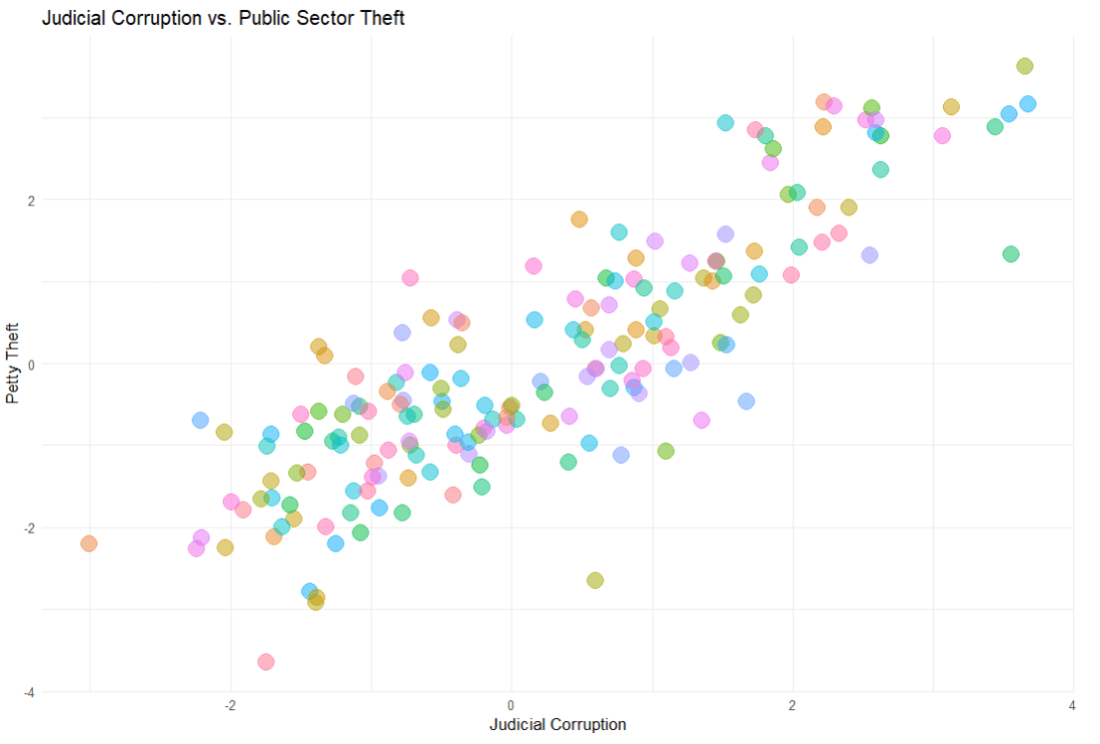
First we build the model. We will look at whether level of public sector theft can predict the judicial corruption levels.
The model will have three parts
linear_reg() : This is the foundational step indicating the type of regression we want to run
set_engine() : This is used to specify which package or system will be used to fit the model, along with any arguments specific to that software. With a linear regression, we don’t really need any special package.
set_mode("regression") : In our regression model, the model predicts continuous outcomes. If we wanted to use a categorical variable, we would choose “classification“
In regression analysis, Root Mean Square Error (RMSE), R-squared (R²), and Mean Absolute Error (MAE) are metrics used to evaluate the performance and accuracy of regression models.
We use the metrics function from the yardstick package.
predictions represents the predicted values generated by your model. These are typically the values your model predicts for the outcome variable based on the input data.
truth is the actual or true values of the outcome variable. It is what you are trying to predict with your model. In the context of your code, judic_corruption is likely the true values of judicial corruption, against which the predictions are being compared.
The estimate argument is optional. It is used when the predictions are stored under a different name or within a different object.
metrics <- yardstick::metrics(predictions, truth = judic_corruption, estimate = .pred)
And here are the three metrics to judge how “good” our predictions are~
> metrics
# A tibble: 3 × 3
  .metric .estimator .estimate
  <chr>   <chr>          <dbl>
1 rmse    standard       0.774
2 rsq     standard       0.718
3 mae     standard       0.622
Determining whether RMSE, R-squared (R2), and MAE values are “good” depends on several factors, including the context of your specific problem, the scale of the outcome variable, and the performance of other models in the same domain.
RMSE (Root mean square deviation)
rmse <- sqrt(mean(predictions$diff^2))
RMSE measures the average magnitude of the errors between predicted and actual values.
Lower RMSE values indicate better model performance, with 0 representing a perfect fit.
Lower RMSE values indicate better model performance.
It’s common to compare the RMSE of your model to the RMSE of a baseline model or other competing models in the same domain.
The interpretation of “good” RMSE depends on the scale of your outcome variable. A small RMSE relative to the range of the outcome variable suggests better predictive accuracy.
R-squared
Higher R-squared values indicate a better fit of the model to the data.
However, R-squared alone does not indicate whether the model is “good” or “bad” – it should be interpreted in conjunction with other factors.
A high R-squared does not necessarily mean that the model makes accurate predictions.
This is especially if it is overfitting the data.
R-squared represents the proportion of the variance in the dependent variable that is predictable from the independent variables.
Values closer to 1 indicate a better fit, with 1 representing a perfect fit.
MAE (Mean Absolute Error):
Similar to RMSE, lower MAE values indicate better model performance.
MAE is less sensitive to outliers compared to RMSE, which may be advantageous depending on the characteristics of your data.
MAE measures the average absolute difference between predicted and actual values.
Like RMSE, lower MAE values indicate better model performance, with 0 representing a perfect fit.
And now we can plot out the differences between predicted values and actual values for judicial corruption scores
We can add labels for the countries that have the biggest difference between the predicted values and the actual values – i.e. the countries that our model does not predict well. These countries can be examined in more detail.
First we add a variable that calculates the absolute difference between the actual judicial corruption variable and the value that our model predicted.
Then we use filter to choose the top ten countries
And finally in the geom_repel() layer, we use this data to add the labels to the plot
A simple feature to turn wide format into long format in R.
I have a dataset with the annual per capita military budget for 171 countries.
The problem is that it is in completely wrong format to use for panel data (i.e. cross-sectional time-series analysis).
So here is simple way I found to fix this problem and turn this:
WIDE FORMAT : a separate column for each year
into this:
LONG FORMAT : one single “year” column and one single “value” column
It’s like magic.
First install and load the reshape2 package
install.packages("reshape2")
library(reshape2)
I name my new long form dataframe; in this case, the imaginatively named mil_long.
I use the melt() function and first type in the name of the original I want to change; in this case it is mil_wide
id.vars tells R the unique ID for each new variable. Since I am looking at military budgets for each country, I’ll use Country variable as my ID.
variable.name for me is the year variable which, in wide format, is the name of every column. For me, I want to compress all the year columns into this new variable.
value.name is the new variable I make to hold the value that in my dataset is the per capita military budget amount per country per year. I name this new variable … you guessed it, value.
Looking at my new mil_long dataset, my new long format dataframe has only three columns = “Country”, “year” and “value” and 5,504 rows for each country-year observation across the 32 years.













 R Functions and Packages for Political Science Analysis