Graphing female politicians in Irish parliament with R PART 2: Trends and Maps

Packages we will need

library(tidyverse)
library(magrittr)
library(waffle)
library(geojsonio)
library(sf)

In PART 1, we looked at the gender package to help count the number of women in the 33rd Irish Parliament.

I repeated that for every session since 1921. The first and second Dail are special in Ireland as they are technically pre-partition.

Cleaned up the data aaaand now we have a full dataset with constituencies data.

If anyone wants a copy of the dataset, I can upload it here for those who are curious ~

So first… a simple pie chart!

First we calculate proportion of seats held by women

dail %>% 
  mutate(decade = substr(year, 1, 3)) %>% 
  mutate(decade = paste0(decade, "0s")) %>%
  group_by(decade) %>% 
  ungroup() %>% 
  group_by(decade, gender) %>% 
  count() %>% 
  group_by(decade) %>% 
  mutate(proportion = n / sum(n)) -> dail_pie
# A tibble: 22 × 4
# Groups:   decade [11]
   decade gender     n proportion
   <chr>  <chr>  <int>      <dbl>
 1 1920s  female    20     0.0261
 2 1920s  male     747     0.974 
 3 1930s  female    10     0.0172
 4 1930s  male     572     0.983 
 5 1940s  female    12     0.0284
 6 1940s  male     411     0.972 
 7 1950s  female    16     0.0363
 8 1950s  male     425     0.964 
 9 1960s  female    11     0.0255
10 1960s  male     421     0.975 
# 12 more rows

We will be looking at how proportions changed over the decades.

When using facet_wrap() with coord_polar(), it’s a pain in the arse.

This is because coord_polar() does not automatically allow each facet to have a different scale. Instead, coord_polar() treats all facets as having the same axis limits.

This will mess everything up.

If we don’t change the coord_polar(), we will just distort pie charts when the facet groups have different total values. There will be weird gaps and make some phantom pacman non-charts.

function() TRUE is an anonymous function that always returns TRUE.

my_coord_polar$is_free <- function() TRUE forces coord_polar() to allow different scales for each facet.

In our case, we call my_coord_polar$is_free, which means that whenever ggplot2 checks whether the coordinate system allows free scales across facets, it will now always return TRUE!!!

Overriding is_free() to always return TRUE signals to ggplot2 that coord_polar() means that our pie charts NOOWW will respect the "free" scaling specified in facet_wrap(scales = "free").

my_coord_polar <- coord_polar(theta = "y")
my_coord_polar$is_free <- function() TRUE

If you want to look more at this, check out this blog:

And we can go and create the ggplot:

dail_pie %>%
  ggplot(aes(x = "", 
         y = proportion, 
         fill = as.factor(gender))) +

  geom_bar(stat="identity", width = 1) +
  
  geom_text(
    data = . %>% filter(gender == "female"), aes(label = scales::percent(proportion, 
    accuracy = 0.1)), 
    color = "white",
    size = 8) +
  
  my_coord_polar +

  facet_wrap(~decade, scales = "free") + 
  scale_fill_manual(values =c("#bc4749", "#003049")) +
  # my_style() +
  theme(axis.text.x = element_blank(),
        panel.grid.major = element_blank(),
        panel.grid.minor = element_blank(),
        panel.grid = element_blank(), 
        panel.background = element_blank(), 
        axis.text = element_blank(), 
        axis.ticks = element_blank()) 
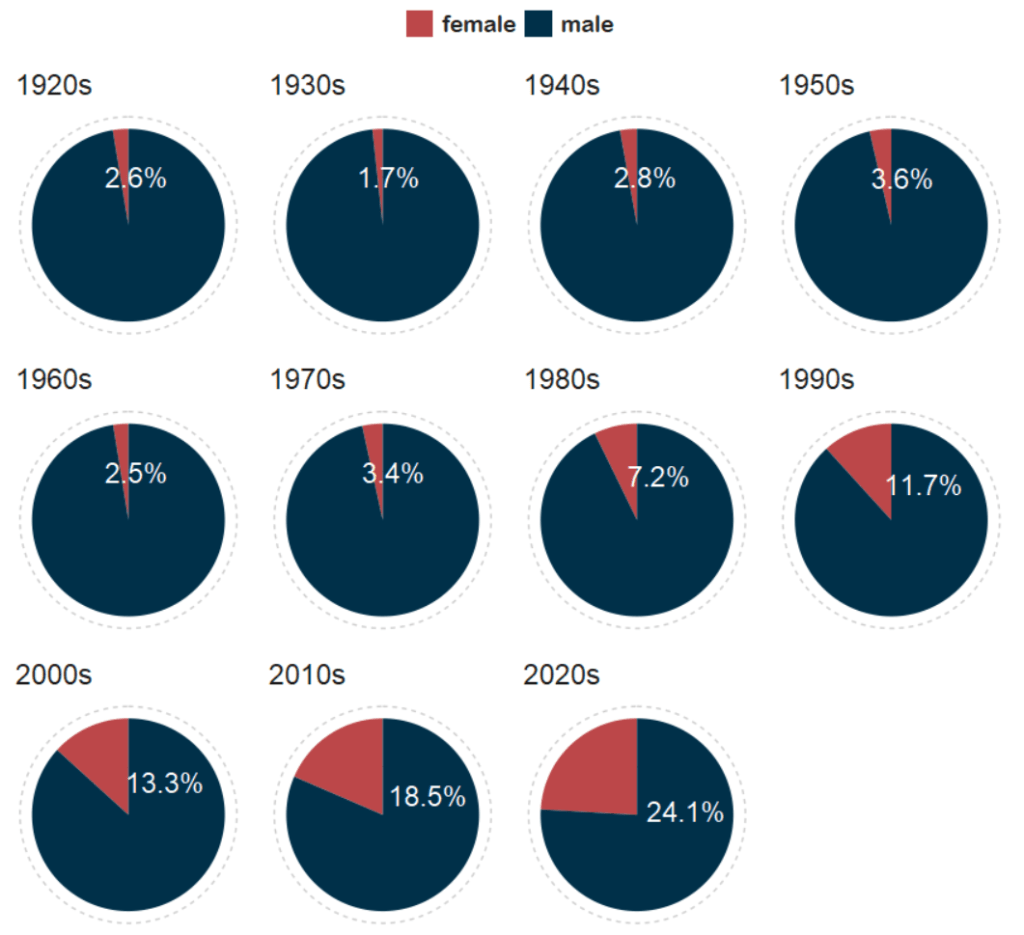
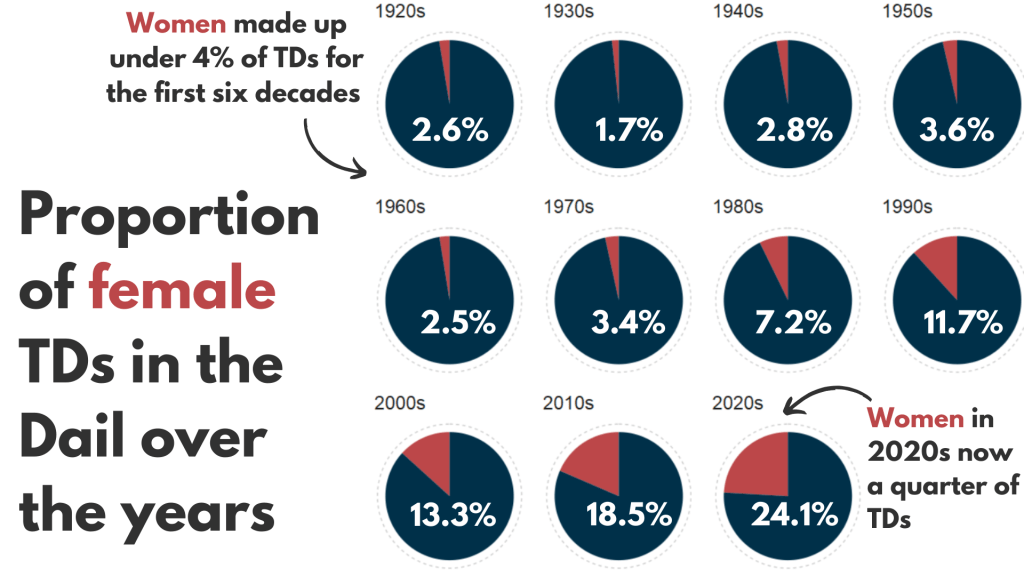
And with Canva, I add the arrows and titles~

Sorry I couldn’t figure it out in R. I just hate all the times I need to re-run graphics to move a text or number by a nano-centimeter. Websites like Canva are just far better for my sanity and short attention span.
Next, we can make a facetted waffle plot!

dail %>% 
  group_by(decade) %>% 
  ungroup() %>% 
  group_by(decade, gender) %>% 
  count() %>% 
  ggplot(aes(fill = as.factor(gender), values = n)) +
  waffle::geom_waffle(color = "white", 
                      size = 0.5, 
                      n_rows = 10, 
                      flip = TRUE) +
  facet_wrap(~decade, nrow = 1, strip.position = "bottom") +
# my_style  +
  scale_fill_manual(values =c("#003049", "#bc4749")) +
  theme(axis.text.x.bottom = element_blank(),
        text = element_text(size = 40))

And mea culpa, I finished the annotation and titles are with Canva.

Once again, life is too short to be messing with annotation in ggplot.

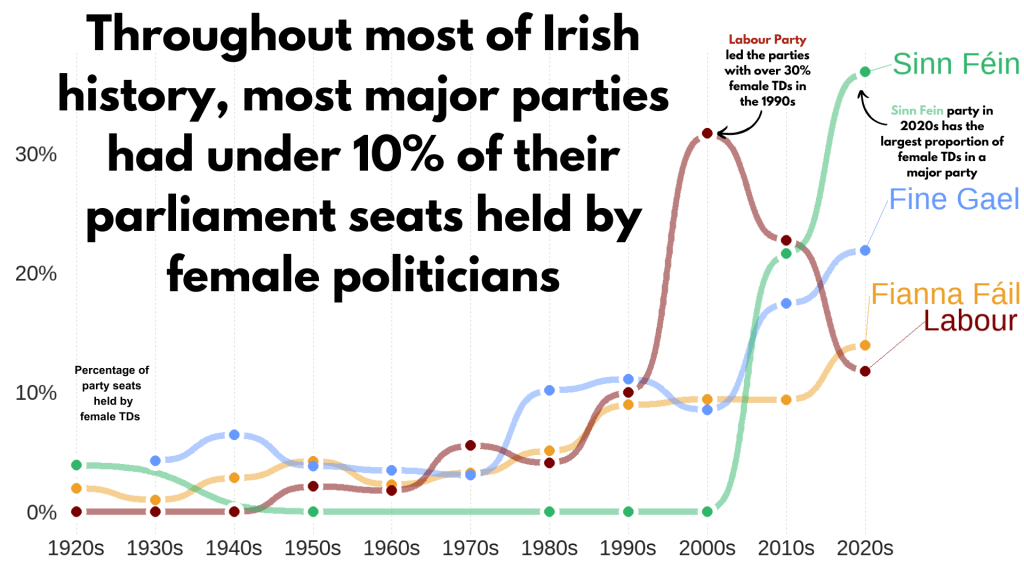
Next, we can make a simple trend line of the top Irish parties and see how they have fared with women TDs.

Let’s get a dataframe with average number of TDs elected to each party over the decades

dail %>% 
  filter(constituency != "National University") %>% 
  filter(party %in% c("Fianna Fáil", "Fine Gael", "Labour", "Sinn Féin")) %>% 
  group_by(party, decade) %>% 
  summarise(avg_female = mean(gender == "female")) -> dail_avg
# A tibble: 39 × 3
# Groups:   party [4]
   party       decade avg_female
   <chr>       <chr>       <dbl>
 1 Fianna Fáil 1920s     0.0198 
 2 Fianna Fáil 1930s     0.00685
 3 Fianna Fáil 1940s     0.0284 
 4 Fianna Fáil 1950s     0.0425 
 5 Fianna Fáil 1960s     0.0230 
 6 Fianna Fáil 1970s     0.0327 
 7 Fianna Fáil 1980s     0.0510 
 8 Fianna Fáil 1990s     0.0897 
 9 Fianna Fáil 2000s     0.0943 
10 Fianna Fáil 2010s     0.0938 
# 29 more rows

We create a new mini data.frame of four values so that we can have the geom_text() only at the end of the year (so similar to the final position of the graph).

final_positions <- dail_avg %>%
  group_by(party) %>%
  filter(decade == "2020s")  %>% 
  mutate(color = ifelse(party == "Sinn Féin", "#2fb66a",
         ifelse(party == "Fine Gael","#6699ff",
         ifelse(party == "Fianna Fáil","#ee9f27", 
         ifelse(party == "Labour", "#780000", "#495051")))))
# A tibble: 4 × 4
# Groups:   party [4]
  party       decade avg_female color  
  <chr>       <chr>       <dbl> <chr>  
1 Fianna Fáil 2020s       0.140 #ee9f27
2 Fine Gael   2020s       0.219 #6699ff
3 Labour      2020s       0.118 #780000
4 Sinn Féin   2020s       0.368 #2fb66a

A hex colour for each major party

party_pal <- c("Sinn Féin" = "#2fb66a",
                "Fine Gael" = "#6699ff",
                "Fianna Fáil" = "#ee9f27", 
                "Labour" = "#780000")

And a geom_bump() layer in the plot using the ggbump() package for more wavy lines.

dail_avg %>% 
  ggplot(aes(x = decade,
             y = avg_female, 
             group = party, 
             color = party)) + 

  ggbump::geom_bump(aes(color = party),
            smooth = 5,
            alpha = 0.5,
            size = 4)  +

  geom_point(color = "white", 
             size = 7, 
             stroke = 4) + 

  geom_point(size = 6) +

  ggrepel::geom_text_repel(data = final_positions,
            aes(color = party,
                y = avg_female,
                x = decade,
            label = party),
            family = "Arial Rounded MT Bold",
            vjust = -2,
            hjust = -1,
            size = 15) +
# my_style() 
  scale_color_manual(values = party_pal) +
  scale_y_continuous(labels = scales::label_percent()) +
  scale_x_discrete(expand = expansion(add = c(0.2, 2))) +
  theme(legend.position = "none") 

This graph looks at major Irish political parties from the 1920s to the 2020s.

For most of Irish history, female representation remained under 10%.

The Labour Party surged ahead like crazy in the 1990s; it got over 30% female TDs!

Now in the 2020s, Sinn Féin has the largest proportion of female TDs and goes way above and beyond the other major parties.

Now, onto constituency maps.

We can go to the Irish government’s website with heaps of data! Yay free data.

This page brings us to the election constituencies GeoJSON map data.
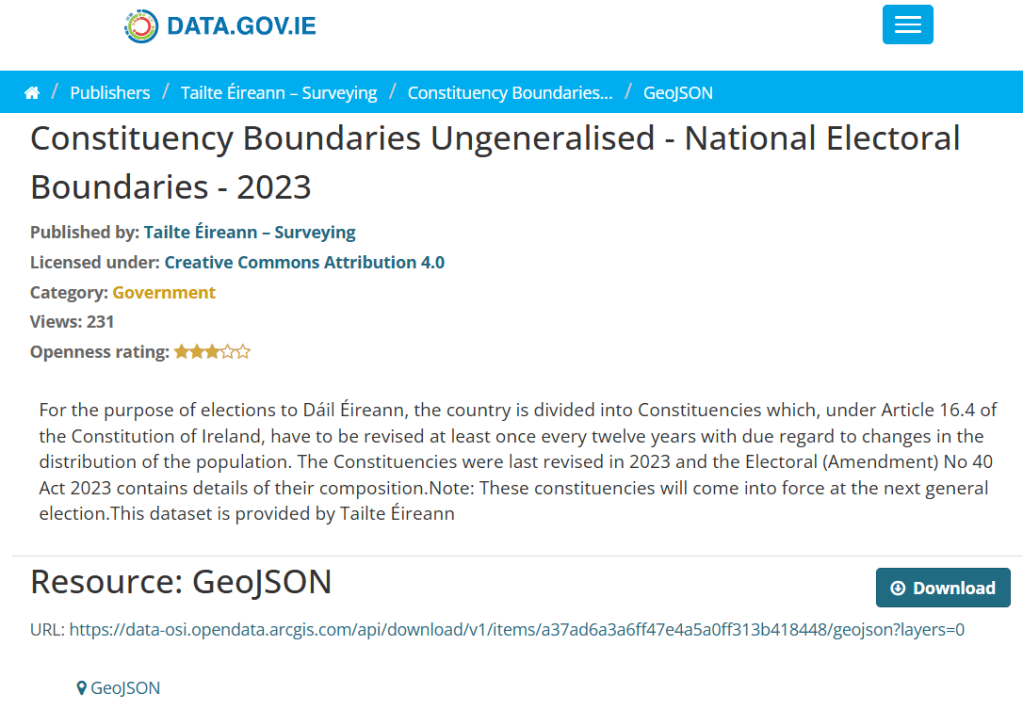
For more information about making GeoJSON and SF maps click here to read about how to create maps in R ~

So we read in the data and convert to SF dataframe.

constituency_map <- geojson_read(file.choose(), what = "sp")

constituency_sf <- st_as_sf(constituency_map)

This constituency_sf has 64 variables but most of them are meta-data info like the dates that each variable was updated. The vaaast majority, we don’t need so we can just pull out the consituency var for our use:

constituency_sf %>% 
  select(constituency = ENG_NAME_VALUE, 
         geometry) -> mini_constituency_sf
Simple feature collection with 1072 features and 1 field
Geometry type: POLYGON
Dimension:     XY
Bounding box:  xmin: 417437.9 ymin: 516356.4 xmax: 734489.6 ymax: 966899.7
Projected CRS: IRENET95 / Irish Transverse Mercator
First 10 features:
          constituency                       geometry
1  Cork South-West (3) POLYGON ((501759.8 527442.6...
2            Kerry (5) POLYGON ((451686.2 558529.2...
3            Kerry (5) POLYGON ((426695 561869.8, ...
4            Kerry (5) POLYGON ((451103.9 555882.8...
5            Kerry (5) POLYGON ((434925.3 572926.2...
6          Donegal (5) POLYGON ((564480.8 917991.7...
7          Donegal (5) POLYGON ((571201.9 892870.7...
8          Donegal (5) POLYGON ((615249.9 944590.2...
9          Donegal (5) POLYGON ((563593.8 897601, ...
10         Donegal (5) POLYGON ((647306 966899.4, ...

As we see, the number of seats in each constituency is in brackets behind the name of the county. So we can separate them and create a seat variable:

  mini_constituency_sf %<>% 
   separate(constituency, 
            into = c("constituency", "seats"), 
            sep = " \\(", fill = "right") %>%
   mutate(seats = as.numeric(gsub("\\)", "", seats))) 

One problem I realised along the way when I was trying to merge the constituency map with the TD politicians data is that one data.frame uses a hyphen and one uses a dash in the constituency variable.

So we can make a quick function to replace en dash (–) with hyphen (-).

 replace_dash <- function(x) {
   if (is.character(x)) {
     gsub("–", "-", x)  
   } else {x}
}

 mini_constituency_sf %<>%
   mutate(across(where(is.character), replace_dash))

And now we can merge!

 dail %<>%
   right_join(mini_constituency_sf, by = "constituency") 

Now a quick map ~

 dail %<>%
  mutate(n = ifelse(is.na(percentage_women), 0, percentage_women)) %>%
   ggplot(aes(geometry = geometry)) +
   geom_sf(aes(fill = percentage_women),
           color = "black") +  s
   labs(title = "Map of Irish Constituencies") +
   # my_style() +
   scale_fill_viridis_c(option = "plasma")  +

    scale_fill_gradient2(low = "#57cc99",
                         mid = "#38a3a5",
                         high = "#22577a") +

   theme(axis.text = element_blank(),
     axis.text.x.bottom = element_blank(),
     legend.key.width = unit(1.5, "cm"), 
     legend.key.height = unit(0.4, "cm"), 
     legend.position = "bottom")
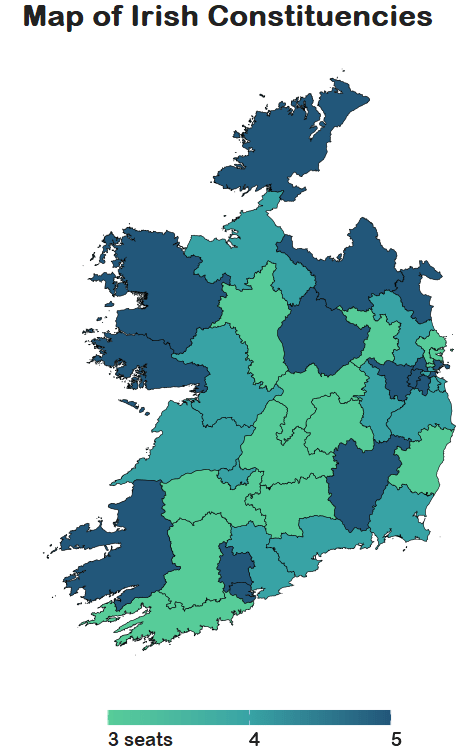
We can see that some constituencies have 3 seats, some 5~

So we cannot directly compare who has more female TDs.

A way to deal with this is scaling the data.

In PART 3, we will look at scaling data and analysing trends across the years!

Yay!
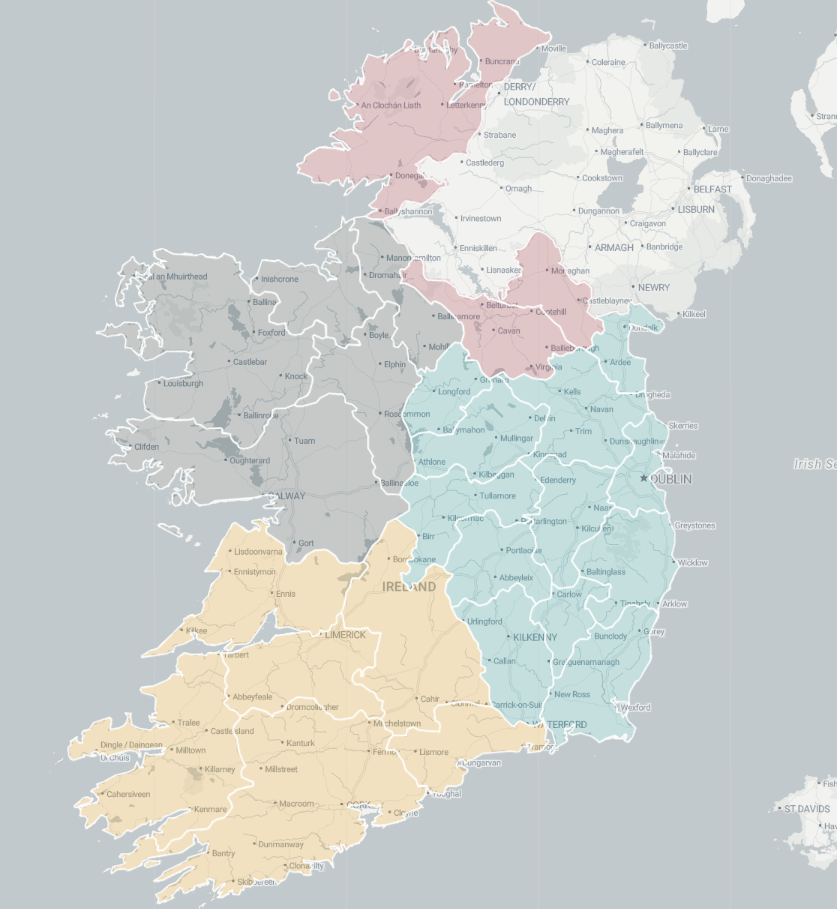
How to download and graph interactive country maps in R

Packages we will be using:

library(tidyverse)
library(geojsonio)
library(sf)

In this blog, we will make maps! Mapppsss!!!

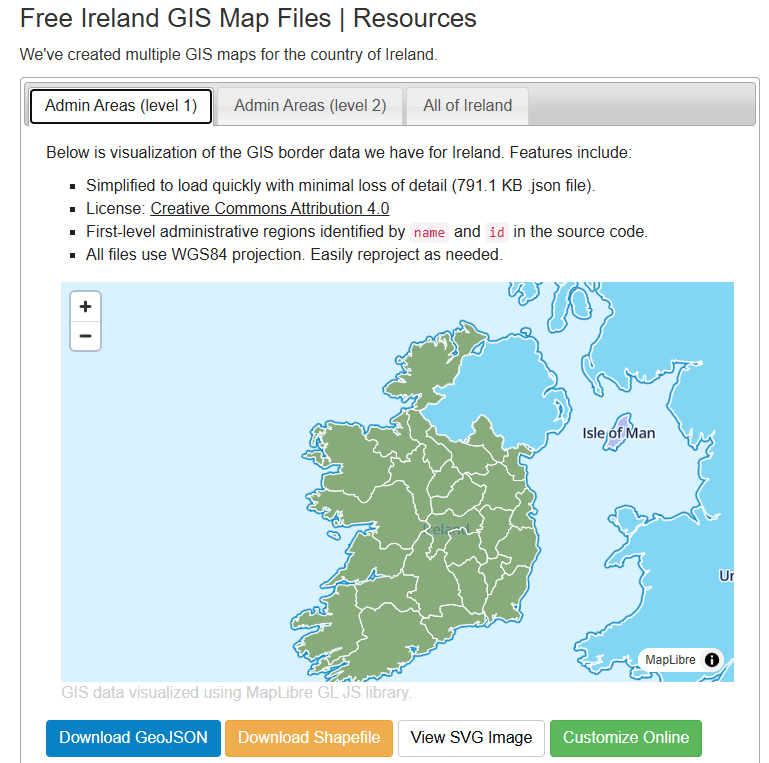
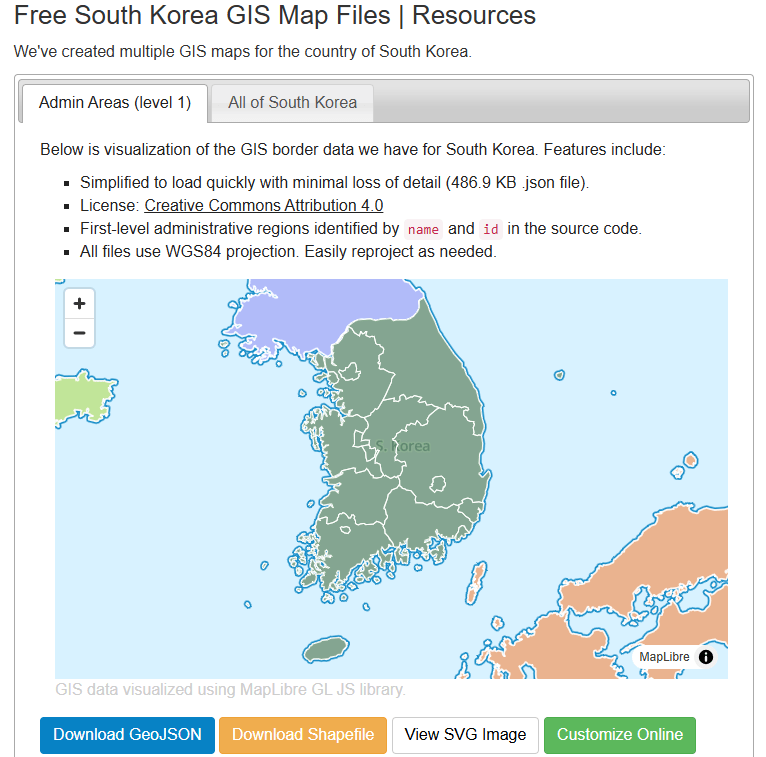
Go to this website and find the country GeoJSON you want to download:

We can choose the country we want.

For example, Ireland

https://simplemaps.com/gis/country/ie#admin1

Or South Korea, maybe~

https://simplemaps.com/gis/country/kr#admin1

Click the blue button to download the file.

I saved it on my desktop so it’s easy to read in~

ireland_map <- geojson_read("ie.json", what = "sp")

Next we need to convert a spatial object into an sf (Simple Features) object

ireland_sf <- st_as_sf(ireland_map)

I will be working on the Irish dataset and make a simple map

geojson_read() reads a GeoJSON file (from the geojsonio package).

A GeoJSON file is a file format for map data using JavaScript Object Notation (JSON). 

It’s an open standard used a lot to represent points, lines, and polygonzzz.

"ie.json" will be our GeoJSON file containing Ireland’s geographic data. That will be the 26 counties.

The argument what = "sp" makes it so that the output should be a spatial object (from the sp package).

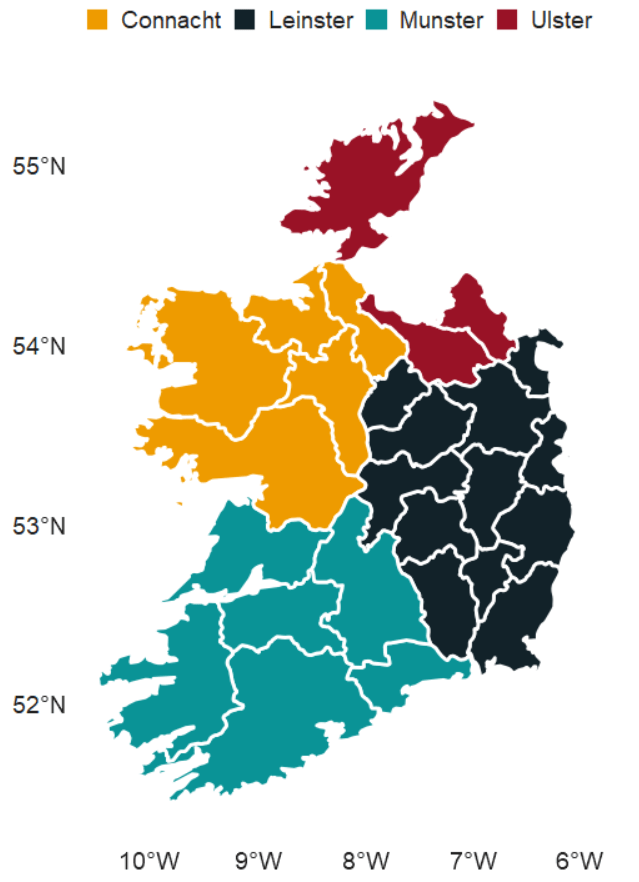
We can add data for the four provinces of Ireland

leinster <- c("Carlow", "Dublin", "Kildare", "Kilkenny", "Laois", "Longford", "Louth", "Meath", "Offaly", "Westmeath", "Wexford", "Wicklow")

munster <- c("Clare", "Cork", "Kerry", "Limerick", "Tipperary", "Waterford")

connacht <- c("Galway", "Leitrim", "Mayo", "Roscommon", "Sligo")

ulster <- c("Cavan", "Donegal", "Monaghan", "Antrim", "Armagh", "Derry", "Down", "Fermanagh", "Tyrone")

And some hex colours for the palette

province_pal <- c(
  "Leinster" = "#122229",
  "Munster" = "#0a9396",
  "Connacht" = "#ee9b00",
  "Ulster" = "#991226") 

And we can add all this data with the geom_sf() to the graph:

ireland_sf %>%
  mutate(county = name) %>% 
  mutate(county = ifelse(county == "Laoighis", "Laois", county)) %>% 
  mutate(province = ifelse(county %in% leinster, "Leinster",
                    ifelse(county %in% munster, "Munster",
                    ifelse(county %in% connacht, "Connacht",
                    ifelse(county %in% ulster, "Ulster", NA))))) %>% 
  ggplot() +
  geom_sf(aes(fill = province),
          linewidth = 1, color = "white") +
  bbplot::bbc_style() +
  scale_fill_manual(values = province_pal)

We can also make interactive maps that look like Google maps with the leaflet package!

Click here to read the cran PDF on the leaflet package.

It’s super easy but different from ggplot in many ways.

Instead of all the ifelse() statements and mutate(), we can alternatively use a case_when() function!

ireland_sf %<>% 
  mutate(county = name, 
         county = recode(county, "Laoighis" = "Laois"),
         province = case_when(
           county %in% leinster ~ "Leinster",
           county %in% munster  ~ "Munster",
           county %in% connacht ~ "Connacht",
           county %in% ulster   ~ "Ulster",
           TRUE ~ NA_character_))

We can add colours using the colorFactor() function from the leaflet package.
In colorFactor() specifies the set of possible input values that will be mapped to colours.

province_colorFactor <- colorFactor(
  palette = c("Leinster" = "#122229",
              "Munster"  = "#0a9396",
              "Connacht" = "#ee9b00",
              "Ulster"   = "#991226"), 
  domain = ireland_sf$province)

We can now use the leaflet() function with the input of our SF data.frame.

With the addProviderTiles(), we can choose a map style.

providers$CartoDB.Positron refers to the “Positron” tile set from CartoDB.

When we use the leaflet.extra package, the CartoDB means we can use a clean map style

Next, we add the addPolygons() function adds polygon shapes to the map. For us. these polygons are for each Irish county.

fillColor = ~province_colorFactor(province) sets the fill color of each of the fours province polygon!

Finally, we can add the thickness of the map border lines, color and opacity to make it all pretty!

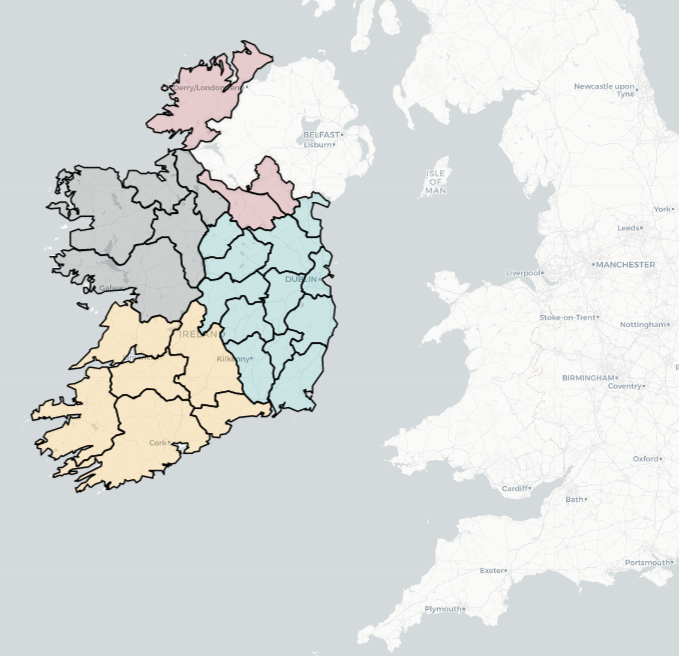
leaflet(ireland_sf) %>% 
  addProviderTiles(providers$CartoDB.Positron) %>%  
  addPolygons(fillColor = ~province_colorFactor(province),
              weight = 2, 
              color = "black", 
              opacity = 1)

Here are some commonly used provider tiles that we can feed into the addProviderTiles()

  • OpenStreetMap
    • providers$OpenStreetMap.Mapnik
    • providers$OpenStreetMap.DE
    • providers$OpenStreetMap.France
  • Stamen
    • providers$Stamen.Toner
    • providers$Stamen.Watercolor
    • providers$Stamen.Terrain
  • CartoDB
    • providers$CartoDB.Positron
    • providers$CartoDB.DarkMatter
  • Esri
    • providers$Esri.WorldStreetMap
    • providers$Esri.WorldImagery
    • providers$Esri.NatGeoWorldMap
  • Hike & Bike
    • providers$HikeBike.HikeBike
  • Thunderforest
    • providers$Thunderforest.Landscape
    • providers$Thunderforest.Outdoors
  • NASAGIBS
    • providers$NASAGIBS.ModisTerraTrueColorCR
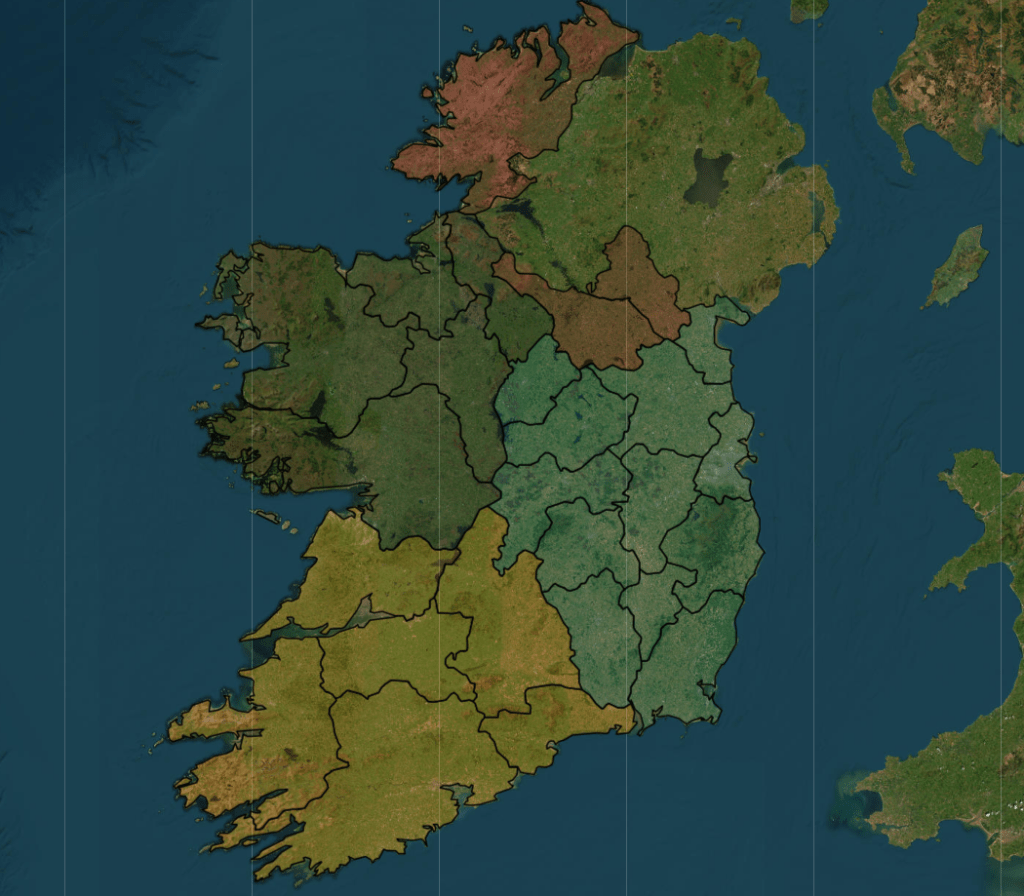
ireland_leaflet %>% 
  addProviderTiles(providers$Esri.WorldImagery)

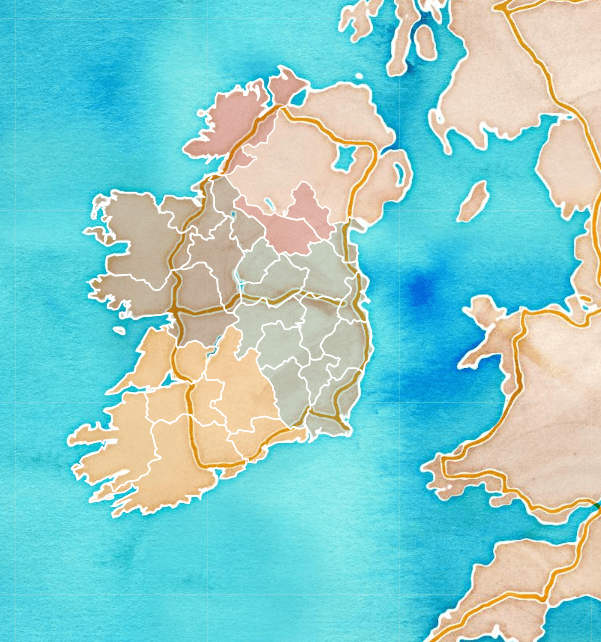
The watercolour style is pretty!

leaflet(ireland_pop_sf) %>%
  addProviderTiles(providers$Stadia.StamenWatercolor) %>%  
  addPolygons(fillColor = ~province_colorFactor(province),
              weight = 2, 
              color = "white", 
              opacity = 1) 

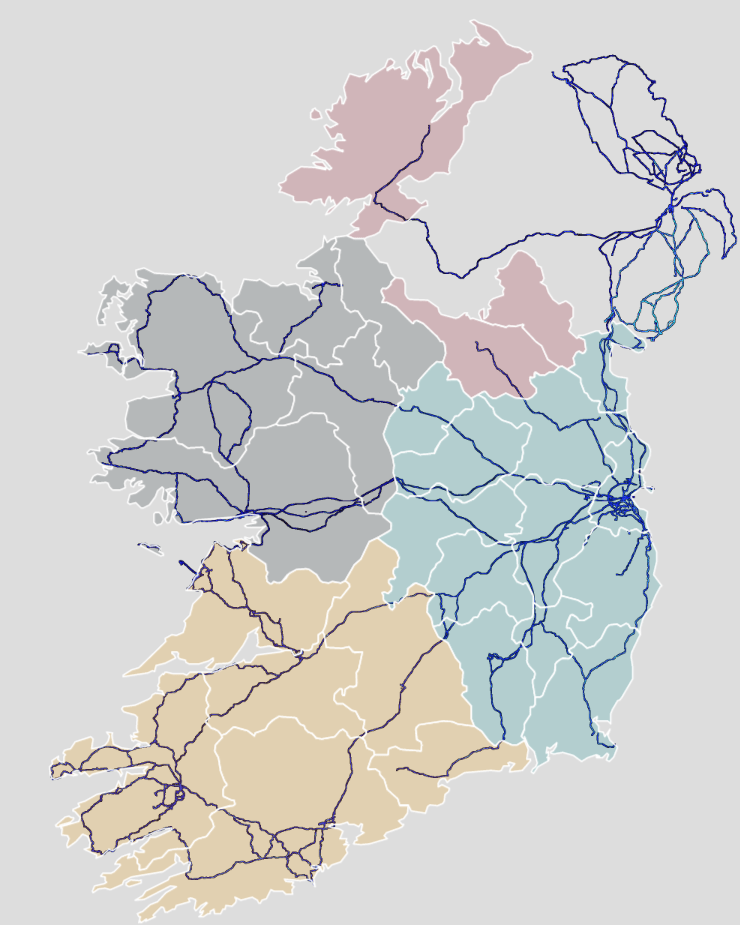
leaflet(ireland_pop_sf) %>%
  addPolygons(fillColor = ~province_colorFactor(province),
              weight = 2, 
              color = "white", 
              opacity = 1) %>% 
  addProviderTiles(providers$SafeCast) 

And we can add the towns and cities with the Stadia as the map provider.


leaflet(ireland_pop_sf) %>%
  addPolygons(fillColor = ~province_colorFactor(province),
              weight = 2, 
              color = "white", 
              opacity = 1) %>% 
  addProviderTiles(providers$Stadia) 

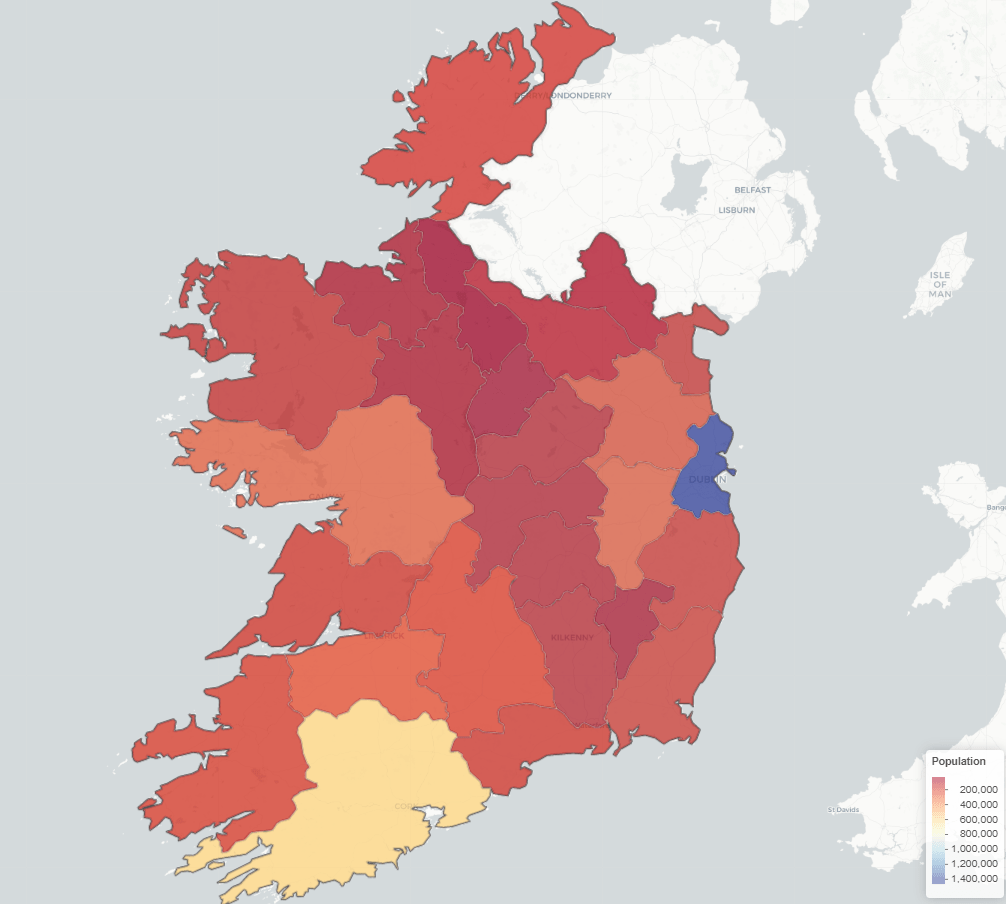
Next we can take 2023 population data for each county from Wikipedia (using rvest's read_html()

read_html("https://en.wikipedia.org/wiki/List_of_Irish_counties_by_population") %>% 
  html_table(header = TRUE, fill = TRUE) %>% 
  `[[`(1) %>% 
  janitor::row_to_names(row_number = 1) %>% 
  janitor::clean_names() %>% 
  mutate(population = as.numeric(gsub(",", "", population)) %>% 
  select(county, population) -> ireland_pop

Add join the population data to the SF map data with the county variable.

ireland_sf %>% 
  inner_join(ireland_pop, by = "county") -> ireland_pop_sf

First, we can prepare a colour palette

pop_pal <- colorNumeric(
  palette = "RdYlBu",
  domain = ireland_pop_sf$population)

We can create a leaflet map object …

leaflet(ireland_pop_sf) %>% 
  addProviderTiles(providers$CartoDB.Positron) -> ireland_leaflet

… and use this to add population data with a legend in the corner

ireland_leaflet %>%
  addPolygons(fillColor = ~pop_pal(population),  # Color by population
              weight = 1, 
              color = "white",
              fillOpacity = 0.7,
              popup = ~paste0("<b>", county, "</b><br>Population: ", population)) %>%
  addLegend(pal = pop_pal, 
            values = ireland_pop_sf$population, 
            title = legend_title, 
            position = "bottomright")

How to web scrape and graph 2024 Irish election data with R

Packages we will use:

library(tidyverse)
library(rvest)
library(janitor)
library(magrittr)
library(ggparliament)
library(ggbump)
library(bbplot)

I am an Irish person living abroad. I did NOT follow the elections last year. So, as penance (as I just mentioned, I am Irish and therefore full of phantom Catholic guilt for neglecting political news back home), we will be graphing some of the election data and familiarise ourselves with the new contours of Irish politics in this blog.

Click here to visit the wikipedia page we will be scraping with the rvest package.

Click here to read more about the rvest package for webscraping.

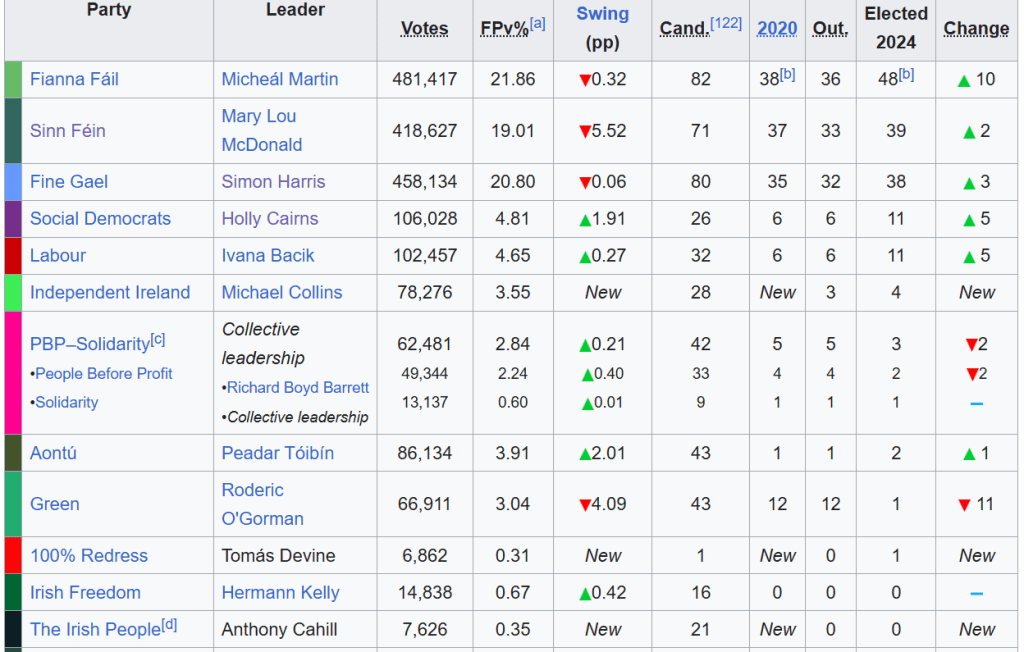
The data we want is in the 11th table on the page:

The columns that we will want are the Party and the Elected 2024 columns.

So using the read_html() function, we can feed in the URL, save all the tables with html_table() and then only keep the eleventh table with `[[`(11)

read_html("https://en.wikipedia.org/wiki/2024_Irish_general_election") %>% 
  html_table(header = TRUE, fill = TRUE) %>% 
  `[[`(11) -> dail_2024

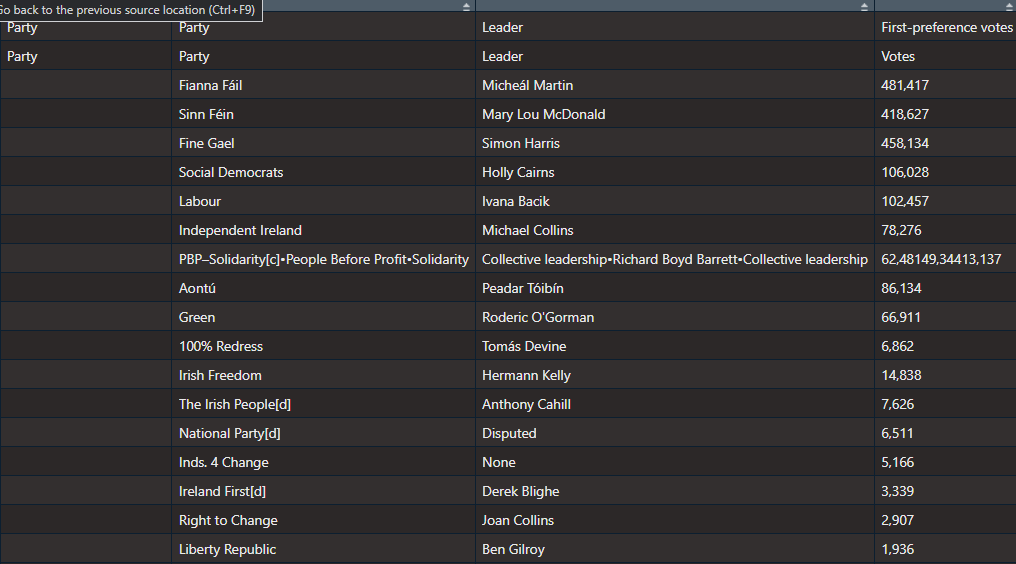
It’s a bit of a hot mess at this stage.

Right now, all the variable names are empty.

We can use the row_to_names() function from the janitor package. This moves a row up to became the variable names. Also we can use clean_names() (also a janitor package staple) to make every variable lowercase snake_case with underscores.

dail_2024 %<>% 
  row_to_names(row_number = 2) %>% 
  clean_names() %>% 

As you can see in the table above, the PBP cell is very crowded. This is due to the fact that many similar left-wing parties formed a loose coaltion when campaigning.

Because they are all in one cell, every number was shoved together without spaces. So instead of each party in the loose grouping, it was all added together. It makes the table wholly incorrect; the PBP coalition did not win trillions of votes.

Things like this highlights the importance of always checking the raw data after web scraping.

So I just brute recode the value according to what is actually on the Wiki page.

dail_2024 %<>% 
  mutate(elected2024 = if_else(party_2 == "PBP–Solidarity[c]•People Before Profit•Solidarity", "3", elected2024))

Next we need to remove the annoying [footnotes in square brackets] on the page with some regex nonsense.

dail_2024 %<>% 
  mutate(across(everything(), ~ str_replace(., "\\[.*$", ""))) 

And finally, we just need to select, rename and change the seat numbers from character to numeric

dail_2024 %<>%  
  select(party = party_2, seats = elected2024)  %>% 
  mutate(seats= parse_number(seats))

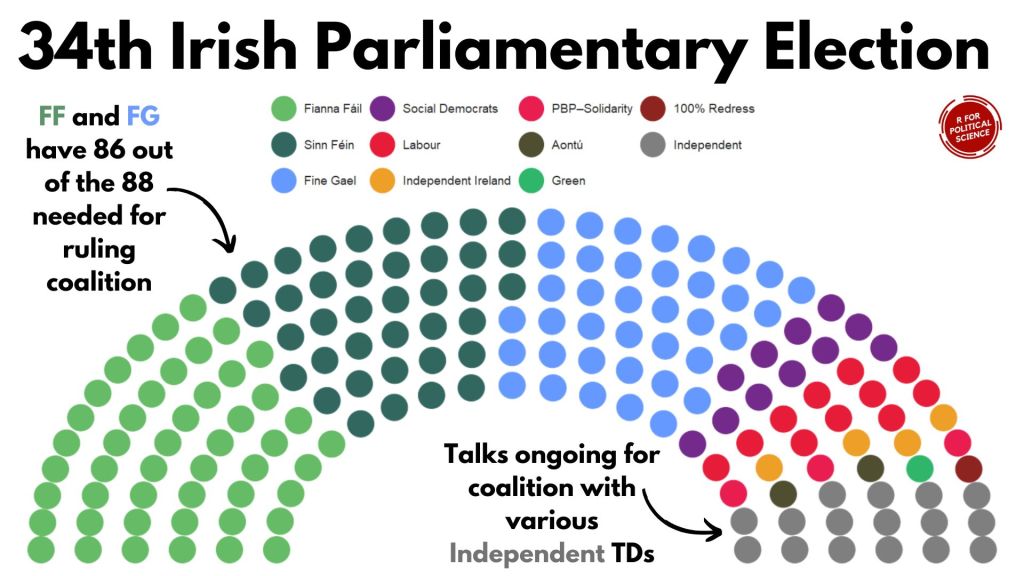
Next, we just need to graph it out with the geom_parliament_seats() layer of the ggplot graph with ggparliament package.

Click here to read more about the ggparliament package:

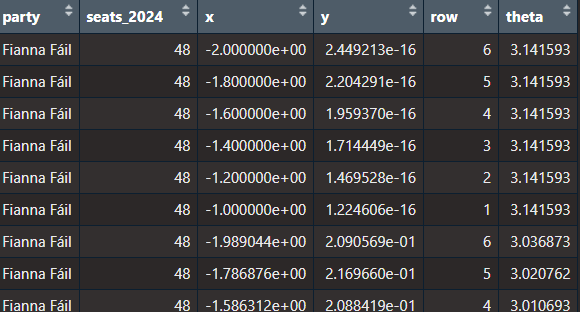
First, we generate the circle coordinates

dail_2024_coord <- parliament_data(election_data = dail_2024,
                   type = "semicircle", 
                   parl_rows = 6,  
                   party_seats = dail_2024$seats_2024)

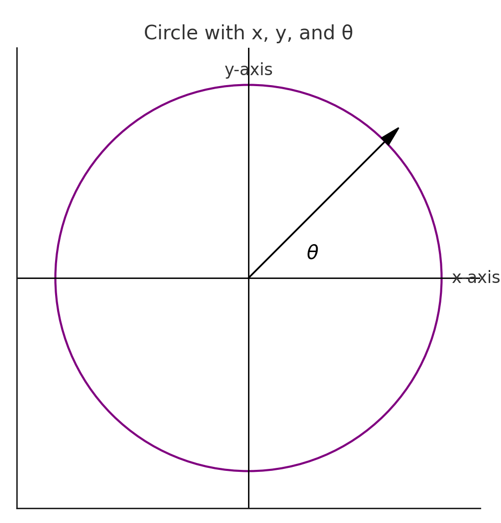
x: the horizontal position of a point in the semi-circle graph.

y: the vertical position of a point in the semi-circle graph.

row: The row or layer of the semi-circle in which the point (seat) is positioned. Rows are arranged from the base (row 1) to the top of the semi-circle.

theta: The angle (in radians) used to calculate the position of each seat in the semi-circle. It determines the angular placement of each point, starting at 0 radians (rightmost point of the semi-circle) and increasing counterclockwise to π\piπ radians (leftmost point of the semi-circle).

We want to have the biggest parties first and the smallest parties at the right of the graph

dail_elected %<>% 
  mutate(party = fct_reorder(party, table(party)[party], .desc = TRUE))

and we can add some hex colors that represent the parties’ representative colours.

dail_elected_coord %<>% 
  mutate(party_colour = case_when(party == "Fianna Fáil" ~ "#66bb66",
                       party == "Fine Gael" ~ "#6699ff",
                       party == "Green" ~ "#2fb66a",
                       party == "Labour" ~ "#e71c38",
                       party == "Sinn Féin" ~ "#326760",
                       party == "PBP–Solidarity" ~ "#e91d50",
                       party ==  "Social Democrats" ~ "#742a8b",
                       party == "Independent Ireland" ~ "#ee9f27",
                       party == "Aontú" ~ "#4f4e31",
                       party == "100% Redress" ~ "#8e2420"))

And we graph out the ggplot with the simple bbc_style() from the bbplot package

dail_elected_coord %>% 
  ggplot(aes(x = x, y = y,
             colour = party)) +
  geom_parliament_seats(size = 13) +
  bbplot::bbc_style()  +
  ggtitle("34th Irish Parliament") +
  theme(text = element_text(size = 50),
        legend.title = element_blank(),
        axis.text.x = element_blank(),
        axis.text.y = element_blank())  +
  scale_colour_manual(values = dail_elected_coord$party_colour,
                      limits = dail_elected_coord$party)

HONESTY TIME… I will admit, I replaced the title as well as the annotated text and arrows with Canva dot comm

Hell is … trying to incrementally make annotations to go to place we want via code. Why would I torment myself when drag-and-drop options are available for free.

Next, let’s compare this year with previous years

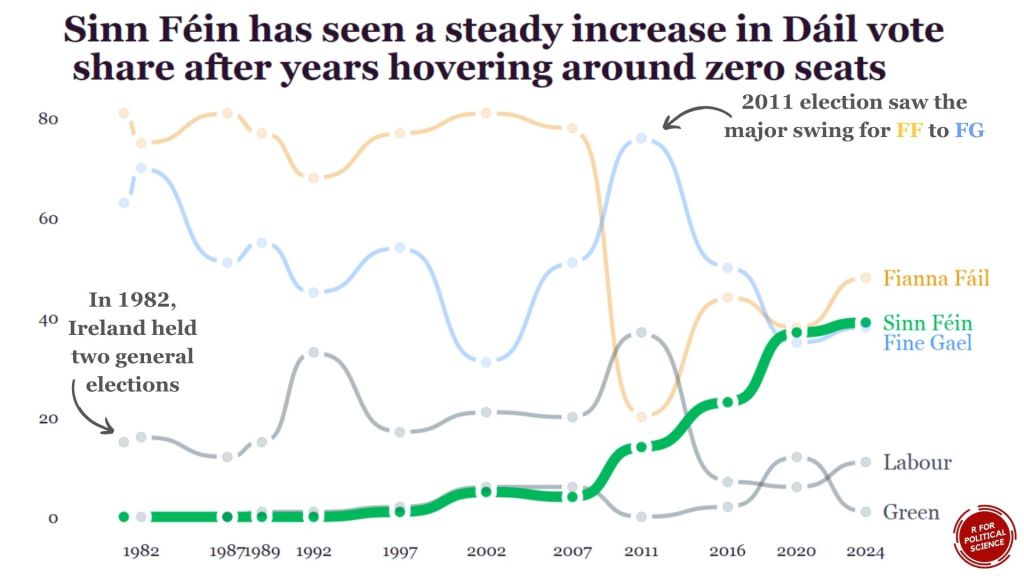
I was also hoping to try replicate this blog post about bump plots with highlighted labels from the r-graph-gallery website.

We can use this kind of graph to highlight a particular trend.

For example, the rise of Sinn Fein as a heavy-hitter in Irish politics.

We will need to go to many of the Wikipedia pages on the elections and scrape seat data for the top parties for each year.

Annoyingly, across the different election pages, the format is different so we have to just go by trial-and-error to find the right table for each election year and to find out what the table labels are for each given year.

Since going to many different pages ends up with repeating lots of code snippets, we can write a process_election_data() function to try cut down on replication.

process_election_data <- function(url, table_index, header_row, party_col, seats_col, top_parties, extra_mutate = NULL) {
  read_html(url) %>%
    html_table(header = TRUE, fill = TRUE) %>%
    `[[`(table_index) %>%
    row_to_names(row_number = header_row) %>%
    clean_names() %>%
    mutate(across(everything(), ~ str_replace(., "\\[.*$", ""))) %>%
    select(party = !!sym(party_col), seats = !!sym(seats_col)) %>%
    mutate(seats = parse_number(seats)) %>%
    filter(party %in% top_parties)
}

In this function, mutate(across(everything(), ~ str_replace(., "\\[.*$", ""))) removes all those annoying footnotes in square brackets from the Wiki table with regex code.

Annoyingly, the table for the 2024 election is labelled differently to the table with the 2016 results on le Wikipedia. So when we are scraping from each webpage, we will need to pop in a sliiiightly different string.

We can use the sym() and the !! to accomodate that.

When we type on !! (which the coder folks call bang-bang), this unquotes the string we feed in. We don’t want the function to treat our string as a string.

After this !! step, we can now add them as variables within the select() function.

We will only look at the biggest parties that have been on the scene since 1980s

top_parties <- c("Fianna Fáil", "Fine Gael", "Sinn Féin", "Labour Party", "Green Party")

Now, we feed in the unique features that are unique for scraping each web page:

dail_2024 <- process_election_data(
  url = "https://en.wikipedia.org/wiki/2024_Irish_general_election
  table_index = 11,
  header_row = 2,
  party_col = "party_2",
  seats_col = "elected2024",
  top_parties = top_parties)

dail_2020 <- process_election_data(
  url = "https://en.wikipedia.org/wiki/2020_Irish_general_election",
  table_index = 10,
  header_row = 2,
  party_col = "party_2",
  seats_col = "elected2020",
  top_parties = top_parties)

dail_2016 <- process_election_data(
  url = "https://en.wikipedia.org/wiki/2016_Irish_general_election",
  table_index = 10,
  header_row = 3,
  party_col = "party_2",
  seats_col = "elected2016_90",
  top_parties = top_parties)

dail_2011 <- process_election_data(
  url = "https://en.wikipedia.org/wiki/2011_Irish_general_election",
  table_index = 14,
  header_row = 2,
  party_col = "party_2",
  seats_col = "t_ds",
  top_parties = top_parties)

dail_2007 <- process_election_data(
  url = "https://en.wikipedia.org/wiki/2007_Irish_general_election",
  table_index = 8,
  header_row = 2,
  party_col = "party_2",
  seats_col = "seats",
  top_parties = top_parties)

dail_2002 <- process_election_data(
  url = "https://en.wikipedia.org/wiki/2002_Irish_general_election",
  table_index = 8,
  header_row = 2,
  party_col = "party_2",
  seats_col = "seats",
  top_parties = top_parties)

dail_1997 <- process_election_data(
  url = "https://en.wikipedia.org/wiki/1997_Irish_general_election",
  table_index = 9,
  header_row = 2,
  party_col = "party_2",
  seats_col = "seats",
  top_parties = top_parties)

dail_1992 <- process_election_data(
  url = "https://en.wikipedia.org/wiki/1992_Irish_general_election",
  table_index = 6,
  header_row = 2,
  party_col = "party_2",
  seats_col = "seats",
  top_parties = top_parties)

dail_1989 <- process_election_data(
  url = "https://en.wikipedia.org/wiki/1989_Irish_general_election",
  table_index = 5,
  header_row = 2,
  party_col = "party_2",
  seats_col = "seats",
  top_parties = top_parties)

dail_1987 <- process_election_data(
  url = "https://en.wikipedia.org/wiki/1987_Irish_general_election",
  table_index = 5,
  header_row = 2,
  party_col = "party_2",
  seats_col = "seats",
  top_parties = top_parties)

dail_1982_11 <- process_election_data(
  url = "https://en.wikipedia.org/wiki/November_1982_Irish_general_election",
  table_index = 5,
  header_row = 2,
  party_col = "party_2",
  seats_col = "seats",
  top_parties = top_parties)

dail_1982_2 <- process_election_data(
  url = "https://en.wikipedia.org/wiki/February_1982_Irish_general_election",
  table_index = 5,
  header_row = 2,
  party_col = "party_2",
  seats_col = "seats",
  top_parties = top_parties)

After we scraped every election, we can join them together

dail_years <- dail_2024 %>% 
  left_join(dail_2020, by = c("party")) %>% 
  left_join(dail_2016, by = c("party")) %>% 
  left_join(dail_2011, by = c("party")) %>% 
  left_join(dail_2007, by = c("party")) %>% 
  left_join(dail_2002, by = c("party")) %>%   
  left_join(dail_1997, by = c("party")) %>% 
  left_join(dail_1992, by = c("party")) %>% 
  left_join(dail_1989, by = c("party")) %>% 
  left_join(dail_1987, by = c("party")) %>% 
  left_join(dail_1982_11, by = c("party")) %>% 
  left_join(dail_1982_2, by = c("party"))

Or I can use a list and iterative left joins.

dail_list <- list(
  dail_2024,
  dail_2020,
  dail_2016,
  dail_2011,
  dail_2007,
  dail_2002,
  dail_1997,
  dail_1992,
  dail_1989,
  dail_1987,
  dail_1982_11,
  dail_1982_2)

dail_years <- reduce(dail_list, left_join, by = "party")

For the x axis ticks, we can quickly make a vector of all the election years we want to highlight on the graph.

election_years <- c(2024, 2020, 2016, 2011, 2007, 2002, 1997, 1992, 1989, 1987, 1982)

Next we pivot the data to long format:

dail_years %>% pivot_longer(
  cols = starts_with("seats_"),
  names_to = "year",
  names_prefix = "seats_",
  values_to = "seats") -> dail_longer

Then we can add specific hex colours for the main parties.

dail_longer %<>%
  mutate(color = ifelse(party == "Sinn Féin", "#2fb66a",
         ifelse(party == "Fine Gael","#6699ff",
         ifelse(party == "Fianna Fáil","#ee9f27","#495051"))))

Next, we can create a final_positions data.frame so that can put the names of the political parties at the end of the trend line instead of having a legend floating at top of the graph.

final_positions <_ dail_longer %>%
  group_by(party) %>%
  filter(year == max(year))  %>% 
  mutate(color = ifelse(party == "Sinn Féin", "#2fb66a",
         ifelse(party == "Fine Gael","#6699ff",
         ifelse(party == "Fianna Fáil","#ee9f27", "#495051")))

Click here to read more about the ggbump package

dail_longer %>% 
  ggplot(aes(x = year, y = seats, group = party)) +

  geom_bump(aes(color = color,
           alpha = ifelse(party == "Sinn Féin", 0.5, 0.2),
           linewidth = ifelse(party == "Sinn Féin", 0.8, 0.7)),
            smooth = 5) +

  geom_text(data = final_positions,
            aes(color = color,
            y = ifelse(party == "Fine Gael", seats - 3, seats),
            label = party,
            family = "Georgia"),
            x = x_position + 1.5,  
            hjust = 0, 
            size = 10) +

  geom_point(color = "white", 
             size = 6, 
             stroke = 3) +
  
  geom_point(aes(color = color,
             alpha = ifelse(party == "Sinn Féin", 0.5, 0.1)),
             size = 4) +

  scale_linewidth_continuous(range = c(2, 5)) +

  scale_alpha_continuous(range = c(0.2, 1)) +

  bbplot::bbc_style()  +

  theme(legend.position = "none",
        plot.title = element_text(size = 48)) +

  scale_color_identity() + 

  scale_x_continuous(limits = c(1980, 2030), breaks = election_years) +

  labs(title = "Sinn Féin has seen a steady increase in Dáil vote\n share after years hovering around zero seats")

Examining Ireland’s foreign policy in pictures with R

Packages we will need:

library(peacesciencer)  
library(forcats)
library(ggflags)
library(tidyverse)
library(magrittr)
library(waffle)
library(bbplot)
library(rvest)

In January 2015, the Irish government published a review of Ireland’s foreign policy. The document, The Global Island: Ireland’s Foreign Policy for a Changing World offers a perspective on Ireland’s place in the world.

In this blog, we will graph out some of the key features of Ireland’ foreign policy and so we can have a quick overview of the key relationships and trends.

Excited Season 4 GIF by The Office - Find & Share on GIPHY

First, we will look at the aid that Ireland gives to foreign countries. This read.csv(file.choose()) will open up the file window and you can navigate to the file and data that you can download from DAC OECD website: https://data.oecd.org/oda/net-oda.htm

dac <- read.csv(file.choose())

We will filter only Ireland and clean the names with the clean_names() function from the janitor package:

dac %<>% 
  filter(Donor == "Ireland") %>% 
  clean_names()

And change the variables, adding the Correlates of War codes and cleaning up some of the countries’ names.

dac %<>% 
  mutate(cown = countrycode(recipient_2, "country.name", "cown"),
         aid_amount = value*1000000) %>%  
  select(country = recipient_2, cown,
         year, time, aid_type, value, aid_amount) %>%
  mutate(cown = ifelse(country == "West Bank and Gaza Strip", 6666,
         ifelse(country == "Serbia", 345, 
         ifelse(country == "Micronesia", 987,cown))))%>%
  filter(!is.na(cown)) 

Next we can convert dataframe to wider format so we have a value column for each aid type

dac %>% 
  distinct(country, cown, year, time, aid_type, value, .keep_all = TRUE)  %>%  
  pivot_wider(names_from = "aid_type", values_from = "aid_amount") %>% 
  mutate(across(where(is.numeric), ~ replace_na(., 0))) %>% 
  clean_names() -> dac_wider

And we graph out the three main types of aid:

dac_wider %>%
  group_by(year) %>% 
  summarise(total_humanitarian = sum(humanitarian_aid, na.rm = TRUE),
  total_technical = sum(technical_cooperation, na.rm = TRUE),
  total_development_food_aid = sum(development_food_aid)) %>% 
  ungroup() %>% 
  pivot_longer(!year, names_to = "aid_type", values_to = "aid_value") %>% 
  ggplot(aes(x = year, y = aid_value, groups = aid_type)) + 
  geom_line(aes(color = aid_type), size = 2, show_guide  = FALSE) +
  geom_point(aes(color = aid_type), fill = "white", shape = 21, size = 3, stroke = 2) +
  bbplot::bbc_style()  +
  scale_y_continuous(labels = scales::comma) + 
  scale_x_discrete(limits = c(2010:2018)) +
  labs(title = "Irish foreign aid by aid type (2010 - 2018)",
       subtitle = ("Source: OECD DAC")) +
  scale_color_discrete(name = "Aid type", 
        labels = c("Development and Food", "Humanitarian", "Technical"))

We will look at total ODA aid:

dac %>% 
  count(aid_type) %>% 
  arrange(desc(n)) %>% 
  knitr::kable(format = "html")
aid_type n
Imputed Multilateral ODA 2298
Memo: ODA Total, excl. Debt 1292
Memo: ODA Total, Gross disbursements 1254
ODA: Total Net 1249
Grants, Total 1203
Technical Cooperation 541
ODA per Capita 532
Humanitarian Aid 518
ODA as % GNI (Recipient) 504
Development Food Aid 9

And get some pretty hex colours:

pal_10 <- c("#001219","#005f73","#0a9396","#94d2bd","#e9d8a6","#ee9b00","#ca6702","#bb3e03","#ae2012","#9b2226")

And download some regime, democracy, region and continent data from the PACL datase with the democracyData() package

pacl <- redownload_pacl() 

pacl %<>% 
  mutate(regime_name = ifelse(regime == 0, "Parliamentary democracies",
         ifelse(regime == 1, "Mixed democracies",
         ifelse(regime == 2, "Presidential democracies",
         ifelse(regime == 3, "Civilian autocracies",
         ifelse(regime == 4, "Military dictatorships",
         ifelse(regime ==  5,"Royal dictatorships", regime))))))) %>%
  mutate(regime = as.factor(regime)) 

pacl %<>% 
  select(year, country = pacl_country, 
         democracy, regime_name,
         region_name = un_region_name, 
         continent_name = un_continent_name)

pacl %<>% 
  mutate(cown = countrycode(country, "country.name", "cown")) %>% 
  select(!country)

Summarise the total aid for each country across the years and choose the top 20 countries

dac %>% 
  filter(aid_type == "Memo: ODA Total, Gross disbursements") %>% 
  group_by(country) %>% 
  summarise(total_country_aid = sum(aid_amount, na.rm = TRUE)) %>% 
  ungroup() %>% 
  top_n(n = 20) %>% 
  mutate(cown = countrycode::countrycode(country, "country.name", "cown")) %>% 
  inner_join(pacl, by = "cown") %>%  
  mutate(region_name = ifelse(country == "West Bank and Gaza Strip", "Western Asia", region_name)) %>% 
  mutate(region_name = ifelse(region_name == "Western Asia", "Middle East", region_name)) %>% 
  mutate(country = ifelse(country == "West Bank and Gaza Strip", "Palestine",
  ifelse(country == "Democratic Republic of the Congo", "DR Congo",
  ifelse(country == "Syrian Arab Republic", "Syria", country)))) %>% 
  mutate(iso2 = tolower(countrycode::countrycode(country, "country.name", "iso2c"))) %>% 
  ggplot(aes(x = forcats::fct_reorder(country, total_country_aid), y = total_country_aid)) + 
  geom_bar(aes(fill = region_name), stat = "identity", width = 0.7) + 
  coord_flip() + bbplot::bbc_style() + 
  geom_flag(aes(x = country, y = -100, country = iso2), size = 12) +
  scale_fill_manual(values = pal_10) +
  labs(title = "Ireland's largest ODA foreign aid recipients, 2010 - 2018",
       subtitle = ("Source: OECD DAC")) + 
  xlab("") + ylab("") + 
  scale_x_continuous(labels = scales::comma)

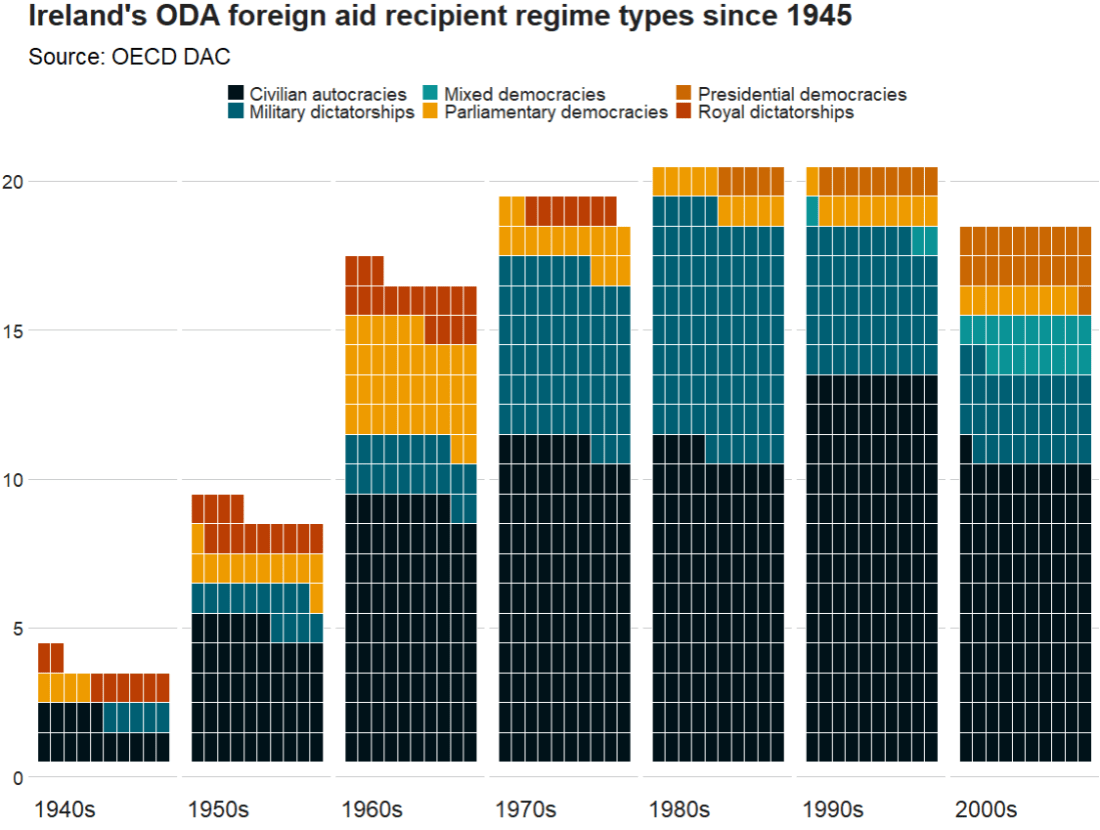
We can make a waffle plot to look at the different types of regimes to which the Irish government gave aid over the decades

 dac %>% 
  mutate(decade = substr(year, 1, 3)) %>% 
  mutate(decade = paste0(decade, "0s")) %>% 
  group_by(decade) %>% 
  count(regime_name) %>% 
  ggplot(aes(fill = regime_name, values = n)) +
  geom_waffle(color = "white", size = 0.3, n_rows = 10, flip = TRUE) +
  facet_wrap(~decade, nrow = 1, strip.position = "bottom") + 
  bbplot::bbc_style()  +
  scale_fill_manual(values = pal_10) +
   scale_x_discrete(breaks = round(seq(0, 1, by = 0.2),3)) +
  labs(title = "Ireland's ODA foreign aid recipient regime types since 1945",
       subtitle = ("Source: OECD DAC"))  

Next, we will download dyadic foreign policy similarity measures from peacesciencer.

Peacesciencer package has tools and data sets for the study of quantitative peace science. 

Click here to read more about the peacesciencer package by Steven Miller

fp_similar_df <- peacesciencer::create_dyadyears() %>% 
  add_gwcode_to_cow() %>% 
  add_fpsim()	

I am only looking at dyadic foreign policy similarity with Ireland, so filter by Ireland’s Correlates of War code, 205.

Click here to find out all countries’ COW code

fp_similar_df %<>% 
  filter(ccode1 == 205)

Data on alliance portfolios comes from the Correlates of War and is used to calculate similarity of foreign policy positions (see Altfeld & Mesquita, 1979).

The assumption is that similar alliance portfolios are the result of similar foreign policy positions.

With increasing in level of commitment, the strength of alliance commitments can be:

  1. no commitment
  2. entente
  3. neutrality or nonaggression pact
  4. defense pact

We will map out alliance similarity. This will use the measurement calculated with Cohen’s Kappa. Check out Hage’s (2011) article to read more about the different ways to measure alliance similarity.

Next we can look at UN similarity.

The UN voting variable calculates three values:

1 = Yes

2 = Abstain

3 = No

Based on these data, if two countries in a similar way on the same UN resolutions, this is a measure of the degree to which dyad members’ foreign policy positions are similar.

fp_similarity_df %>% 
  mutate(country = countrycode::countrycode(ccode2, "cown", "country.name")) %>% 
  select(country, ccode2, year,
         un_similar = kappavv) %>% 
  filter(year > 1989) %>% 
  filter(!is.na(country)) %>%
  mutate(iso2 = tolower(countrycode::countrycode(country, "country.name", "iso2c"))) %>% 
  group_by(country) %>% 
  mutate(avg_un = mean(un_similar, na.rm = TRUE)) %>%
  distinct(country, avg_un, iso2, .keep_all = FALSE) %>% 
  ungroup() %>% 
  top_n(n = 10)  -> top_un_similar

And graph out the top ten

  top_un_similar %>%
  ggplot(aes(x = forcats::fct_reorder(country, avg_un), 
             y = avg_un)) + 
  geom_bar(stat = "identity",
           width = 0.7, 
           color = "#0a85e5", 
           fill = "#0a85e5") +
  ggflags::geom_flag(aes(x = country, y = 0, country = iso2), size = 15) +
  coord_flip() + bbplot::bbc_style()  +
  ggtitle("UN voting similarity with Ireland since 1990")

If we change the top_n() to negative, we can get the bottom 10

top_n(n = -10)

We can quickly scrape data about the EU countries with the rvest package


eu_members_html <- read_html("https://en.wikipedia.org/wiki/European_Union")
eu_members_tables <- eu_members_html %>% html_table(header = TRUE, fill = TRUE)

eu_member <- eu_members_tables[[6]]

eu_member %<>% 
  janitor::clean_names()

eu_member %>% distinct(state) %>%  pull(state) -> eu_state

Last we are going to look at globalization scores. The data comes from the the KOF Globalisation Index. This measures the economic, social and political dimensions of globalisation. Globalisation in the economic, social and political fields has been on the rise since the 1970s, receiving a particular boost after the end of the Cold War.

Click here for data that you can download comes from the KOF website

kof %>%
  filter(country %in% eu_state) -> kof_eu

And compare Ireland to other EU countries on financial KOF index scores. We will put Ireland in green and the rest of the countries as grey to make it pop.

Ireland appears to follow the general EU trends and is not an outlier for financial globalisation scores.

kof_eu %>% 
  ggplot(aes(x = year,  y = finance, groups = country)) + 
  geom_line(color = ifelse(kof_eu$country == "Ireland",     "#2a9d8f", "#8d99ae"),
  size = ifelse(kof_eu$country == "Ireland", 3, 2), 
  alpha = ifelse(kof_eu$country == "Ireland", 0.9, 0.3)) +
  bbplot::bbc_style() + 
  ggtitle("Financial Globalization in Ireland, 1970 to 2020", 
          subtitle = "Source: KOF")

References

Häge, F. M. (2011). Choice or circumstance? Adjusting measures of foreign policy similarity for chance agreement. Political Analysis19(3), 287-305.

Dreher, Axel (2006): Does Globalization Affect Growth? Evidence from a new Index of Globalizationcall_made, Applied Economics 38, 10: 1091-​1110.