How to calculate a linguistic Herfindahl-Hirschman Index (HHI) with Afrobarometer survey data in R PART 2

Packages we will need:

library(tidyverse)
library(haven) # import SPSS data
library(rnaturalearth) # download map data
library(countrycode) # add country codes for merging
library(gt) # create HTML tables
library(gtExtras) # customise HTML tables

In this blog, we will look at calculating a variation of the Herfindahl-Hirschman Index (HHI) for languages. This will give us a figure that tells us how diverse / how concentrated the languages are in a given country.

We will continue using the Afrobarometer survey in the post!

Click here to read more about downloading the Afrobarometer survey data in part one of the series.

You can use the file.choose() to import the Afrobarometer survey round you downloaded. It is an SPSS file, so we need to use the read_sav() function from have package

ab <- read_sav(file.choose())

First, we can quickly add the country names to the data.frame with the case_when() function

ab %>% 
  mutate(country_name = case_when(
    COUNTRY == 2 ~ "Angola",
    COUNTRY == 3 ~ "Benin",
    COUNTRY == 4 ~ "Botswana",
    COUNTRY == 5 ~ "Burkina Faso",
    COUNTRY == 6 ~ "Cabo Verde",
    COUNTRY == 7 ~ "Cameroon",
    COUNTRY == 8 ~ "Côte d'Ivoire",
    COUNTRY == 9 ~ "Eswatini",
    COUNTRY == 10 ~ "Ethiopia",
    COUNTRY == 11 ~ "Gabon",
    COUNTRY == 12 ~ "Gambia",
    COUNTRY == 13 ~ "Ghana",
    COUNTRY == 14 ~ "Guinea",
    COUNTRY == 15 ~ "Kenya",
    COUNTRY == 16 ~ "Lesotho",
    COUNTRY == 17 ~ "Liberia",
    COUNTRY == 19 ~ "Malawi",
    COUNTRY == 20 ~ "Mali",
    COUNTRY == 21 ~ "Mauritius",
    COUNTRY == 22 ~ "Morocco",
    COUNTRY == 23 ~ "Mozambique",
    COUNTRY == 24 ~ "Namibia",
    COUNTRY == 25 ~ "Niger",
    COUNTRY == 26 ~ "Nigeria",
    COUNTRY == 28 ~ "Senegal",
    COUNTRY == 29 ~ "Sierra Leone",
    COUNTRY == 30 ~ "South Africa",
    COUNTRY == 31 ~ "Sudan",
    COUNTRY == 32 ~ "Tanzania",
    COUNTRY == 33 ~ "Togo",
    COUNTRY == 34 ~ "Tunisia",
    COUNTRY == 35 ~ "Uganda",
    COUNTRY == 36 ~ "Zambia",
    COUNTRY == 37 ~ "Zimbabwe")) -> ab 

If we consult the Afrobarometer codebook (check out the previous blog post to access), Q2 asks the survey respondents what is their primary langugage. We will count the responses to see a preview of the languages we will be working with

ab %>% 
   count(Q2) %>% 
   arrange(desc(n))
# A tibble: 445 x 2
       Q2              n
   <dbl+lbl>      <int>
 1      3 [Portuguese]   2508
 2      2 [French]       2238
 3      4 [Swahili]      2223
 4   1540 [Sudanese Arabic]  1779
 5      1 [English]      1549
 6    260 [Akan]          1368
 7    220 [Crioulo]      1197
 8    340 [Sesotho]     1160
 9   1620 [siSwati]     1156
10    900 [Créole]      1143
# ... with 435 more rows

Most people use Portuguese. This is because Portugese-speaking Angola had twice the number of surveys administered than most other countries. We will try remedy this oversampling later on.

We can start off my mapping the languages of the survey respondents.

We download a map dataset with the geometry data we will need to print out a map

ne_countries(scale = "medium", returnclass = "sf") %>% 
  filter(region_un == "Africa") %>% 
  select(geometry, name_long) %>% 
  mutate(cown = countrycode(name_long, "country.name", "cown")) -> map

map
Simple feature collection with 57 features and 2 fields
Geometry type: MULTIPOLYGON
Dimension:     XY
Bounding box:  xmin: -25.34155 ymin: -46.96289 xmax: 57.79199 ymax: 37.34038
Geodetic CRS:  +proj=longlat +datum=WGS84 +no_defs +ellps=WGS84 +towgs84=0,0,0
First 10 features:
                          name_long                       geometry cown
1                            Angola MULTIPOLYGON (((14.19082 -5...  540
2                           Burundi MULTIPOLYGON (((30.55361 -2...  516
3                             Benin MULTIPOLYGON (((3.59541 11....  434
4                      Burkina Faso MULTIPOLYGON (((0.2174805 1...  439
5                          Botswana MULTIPOLYGON (((25.25879 -1...  571
6          Central African Republic MULTIPOLYGON (((22.86006 10...  482
7                     Côte d'Ivoire MULTIPOLYGON (((-3.086719 5...  437
8                          Cameroon MULTIPOLYGON (((15.48008 7....  471
9  Democratic Republic of the Congo MULTIPOLYGON (((27.40332 5....  490
10                Republic of Congo MULTIPOLYGON (((18.61035 3....  484

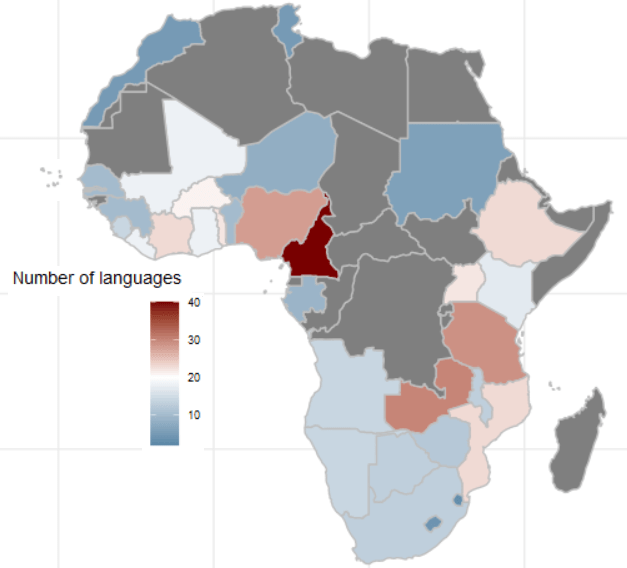
We then calculate the number of languages that respondents used in each country

ab %>% 
  dplyr::select(country_name, lang = Q2) %>% 
  mutate(lang = labelled::to_factor(lang)) %>% 
  group_by(country_name) %>% 
  distinct(lang) %>% 
  count() %>% 
  ungroup() %>%  
  arrange(desc(n)) -> ab_number_languages

We use right_join() to merge the map to the ab_number_languages dataset

ab_number_languages %>% 
  mutate(cown = countrycode::countrycode(country_name, "country.name", "cown")) %>% 
  right_join(map , by = "cown") %>% 
  ggplot() +
  geom_sf(aes(geometry = geometry, fill = n),
          position = "identity", color = "grey", linewidth = 0.5) +
  scale_fill_gradient2(midpoint = 20, low = "#457b9d", mid = "white",
                       high = "#780000", space = "Lab") +
  theme_minimal() + labs(title = "Total number of languages of respondents")
ab %>% group_by(country_name) %>% count() %>% 
  arrange(n)

There is an uneven number of respondents across the 34 countries. Angola has the most with 2400 and Mozambique has the fewest with 1110.

One way we can deal with that is to sample the data and run the analyse multiple times. We can the graph out the distribution of Herfindahl Index results.

set.seed(111)
sample_ab <- ab %>%
group_by(country_name) %>%
sample_n(500, replace = TRUE)

First we will look at just one country, Nigeria.

The Herfindahl-Hirschman Index (HHI) is a measure of market concentration often used in economics and competition analysis. The formula for the HHI is as follows:

HHI = (s1^2 + s2^2 + s3^2 + … + sn^2)

Where:

  • “s1,” “s2,” “s3,” and so on represent the market shares (expressed as percentages) of individual firms or entities within a given market.
  • “n” represents the total number of firms or entities in that market.

Each firm’s market share is squared and then summed to calculate the Herfindahl-Hirschman Index. The result is a number that quantifies the concentration of market share within a specific industry or market. A higher HHI indicates greater market concentration, while a lower HHI suggests more competition.

sample_ab %>%
filter(country_name == "Nigeria") %>%
dplyr::select(country_name, lang = Q2) %>%
group_by(lang) %>%
summarise(percentage_lang = n() / nrow(.) * 100,
number_speakers = n()) %>%
ungroup() %>%
mutate(square_per_lang = (percentage_lang / 100) ^ 2) %>%
summarise(lang_hhi = sum(square_per_lang))

And we see that the linguistic Herfindahl index is 16.4%

lang_hhi
     <dbl>
1    0.164

The Herfindahl Index ranges from 0% (perfect diversity) to 100% (perfect concentration).

16% indicates a moderate level of diversity or variation within the sample of 500 survey respondents. It’s not extremely concentrated (e.g., one dominant category) and highlight tht even in a small sample of 500 people, there are many languages spoken in Nigeria.

We can repeat this sampling a number of times and see a distribution of sample index scores.

We can also compare the Herfindahl score between all countries in the survey.

First step, we will create a function to calculate lang_hhi for a single sample, according to the HHI above.

calculate_lang_hhi <- function(sample_data) { 
sample_data %>%
dplyr::select(country_name, lang = Q2) %>%
group_by(country_name, lang) %>%
summarise(count = n()) %>%
mutate(percent_lang = count / sum(count) * 100) %>%
ungroup() %>%
group_by(country_name) %>%
mutate(square_per_lang = (percent_lang / 100) ^ 2) %>%
summarise(lang_hhi = sum(square_per_lang))
}

The next step, we run the code 100 times and calculate a lang_hhi index for each country_name

results <- replicate(100, { ab %>%
group_by(country_name) %>%
sample_n(100, replace = TRUE) %>%
calculate_lang_hhi()
}, simplify = FALSE)

simplify = FALSE is used in the replicate() function.

This guarantees that output will not be simplified into a more convenient format. Instead, the results will be returned in a list.

If we want to extract the 11th iteration of the HHI scores from the list of 100:

results[11] %>% as.data.frame() %>%
   mutate(lang_hhi = round(lang_hhi *100, 2)) %>%  
   arrange(desc(lang_hhi)) %>%
   gt() %>%
  gt_theme_guardian() %>% 
  gt_color_rows(lang_hhi) %>% as_raw_html()

We can see the most concentrated to least concentrated in this sample (Cabo Verde, Sudan) to the most liguistically diverse (Uganda)

country_name lang_hhi
Cabo Verde 100.00
Sudan 100.00
Lesotho 96.08
Mauritius 92.32
Eswatini 88.72
Morocco 76.94
Gabon 66.24
Botswana 65.18
Angola 63.72
Zimbabwe 54.40
Malawi 54.16
Tunisia 52.00
Tanzania 48.58
Niger 41.84
Senegal 41.72
Ghana 35.10
Burkina Faso 30.80
Mali 28.48
Namibia 28.12
Guinea 28.08
Benin 26.70
Ethiopia 26.60
Gambia 26.40
Sierra Leone 25.52
Mozambique 24.66
Togo 20.52
Cameroon 19.84
Zambia 17.56
Liberia 17.02
South Africa 16.92
Nigeria 16.52
Kenya 15.22
Côte d’Ivoire 15.06
Uganda 10.58

This gives us the average across all the 100 samples

average_lang_hhi <- results %>%
bind_rows(.id = "sample_iteration") %>%
group_by(country_name) %>%
summarise(avg_lang_hhi = mean(lang_hhi))

After that, we just need to combine all 100 results lists into a single tibble. We add an ID for each sample from 1 to 100 with .id = "sample"

combined_results <- bind_rows(results, .id = "sample")

And finally, we graph:

combined_results %>%
  ggplot(aes(x = lang_hhi)) +
  geom_histogram(binwidth = 0.01, 
                 fill = "#3498db", 
                 alpha = 0.6, color = "#708090") +
  facet_wrap(~factor(country_name), scales = "free_y") +
  labs(title = "Distribution of Linguistic HHI", x = "HHI") +
  theme_minimal()

From the graphs, we can see that the average HHI score in the samples is pretty narrow in countries such as Sudan, Tunisia (we often see that most respondents speak the same language so there is more linguistic concentration) and in countries such as Liberia and Uganda (we often see that the diversity in languages is high and it is rare that we have a sample of 500 survey respondents that speak the same language). Countries such as Zimbabwe and Gabon are in the middle in terms of linguistic diversity and there is relatively more variation (sometimes more of the random survey respondents speak the same langage, sometimes fewer!)
How to recreate Pew opinion graphs with ggplot2 in R

Packages we will need

library(HH)
library(tidyverse)
library(bbplot)
library(haven)

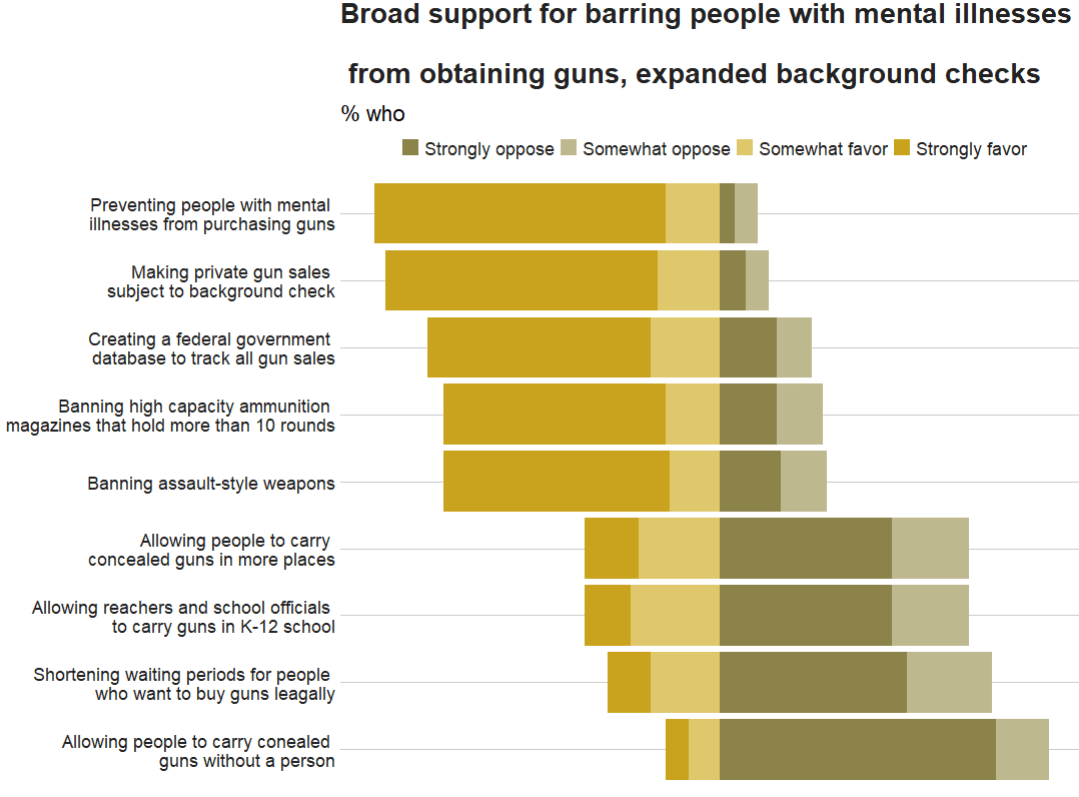
In this blog post, we are going to recreate Pew Opinion poll graphs.

This is the plot we will try to recreate on gun control opinions of Americans:

To do this, we will download the data from the Pew website by following the link below:

atp <- read.csv(file.choose())

We then select the variables related to gun control opinions

atp %>% 
  select(GUNPRIORITY1_b_W87:GUNPRIORITY2_j_W87) -> gun_df

I want to rename the variables so I don’t forget what they are.

Then, we convert them all to factor variables because haven labelled class variables are sometimes difficult to wrangle…

gun_df %<>%
  select(mental_ill = GUNPRIORITY1_b_W87,
         assault_rifle = GUNPRIORITY1_c_W87, 
         gun_database = GUNPRIORITY1_d_W87,
         high_cap_mag = GUNPRIORITY1_e_W87,
         gunshow_bkgd_check = GUNPRIORITY1_f_W87,
         conceal_gun =GUNPRIORITY2_g_W87,
         conceal_gun_no_permit = GUNPRIORITY2_h_W87,
         teacher_gun = GUNPRIORITY2_i_W87,
         shorter_waiting = GUNPRIORITY2_j_W87) %>% 
  mutate(across(everything()), haven::as_factor(.))

Also we can convert the “Refused” to answer variables to NA if we want, so it’s easier to filter out.

gun_df %<>% 
  mutate(across(where(is.factor), ~na_if(., "Refused")))

Next we will pivot the variables to long format. The new names variable will be survey_question and the responses (Strongly agree, Somewhat agree etc) will go to the new response variable!

gun_df %>% 
  pivot_longer(everything(), names_to = "survey_question", values_to = "response") -> gun_long

And next we calculate counts and frequencies for each variable

gun_long %<>% 
  group_by(survey_question, response) %>% 
  summarise(n = n()) %>%
  mutate(freq = n / sum(n)) %>% 
  ungroup() 

Then we want to reorder the levels of the factors so that they are in the same order as the original Pew graph.

gun_long %>% 
  mutate(survey_question = as.factor(survey_question))   %>% 
   mutate(survey_question_reorder = factor(survey_question, 
          levels =  c( 
           "conceal_gun_no_permit",
           "shorter_waiting",
           "teacher_gun",
           "conceal_gun",
           "assault_rifle",
           "high_cap_mag",
           "gun_database",
           "gunshow_bkgd_check",
           "mental_ill"
           ))) -> gun_reordered

And we use the hex colours from the original graph … very brown… I used this hex color picker website to find the right hex numbers: https://imagecolorpicker.com/en

brown_palette <- c("Strongly oppose" = "#8c834b",
                   "Somewhat oppose" = "#beb88f",
                   "Somewhat favor" = "#dfc86c",
                   "Strongly favor" = "#caa31e")

And last, we use the geom_bar() – with position = "stack" and stat = "identity" arguments – to create the bar chart.

To add the numbers, write geom_text() function with label = frequency within aes() and then position = position_stack() with hjust and vjust to make sure you’re happy with where the numbers are

gun_reordered %>% 
  filter(!is.na(response)) %>% 
  mutate(frequency = round(freq * 100), 0) %>% 
  ggplot(aes(x = survey_question_reorder, 
             y = frequency, fill = response)) +
  geom_bar(position = "stack",
           stat = "identity") + 
  coord_flip() + 
  scale_fill_manual(values = brown_palette) +
  geom_text(aes(label = frequency), size = 10, 
            color = "black", 
            position = position_stack(vjust = 0.5)) +
  bbplot::bbc_style() + 
  labs(title = "Broad support for barring people with mental illnesses 
       \n from obtaining guns, expanded background checks",
       subtitle = "% who", 
       caption = "Note: No answer resposes not shown.\n Source: Survey of U.S. adults conducted April 5-11 2021.") + 
  scale_x_discrete(labels = c(
    "Allowing people to carry conealed \n guns without a person",
    "Shortening waiting periods for people \n who want to buy guns leagally",
    "Allowing reachers and school officials \n to carry guns in K-12 school",
    "Allowing people to carry \n concealed guns in more places",
    "Banning assault-style weapons",
    "Banning high capacity ammunition \n magazines that hold more than 10 rounds",
    "Creating a federal government \n database to track all gun sales",
    "Making private gun sales \n subject to background check",
    "Preventing people with mental \n illnesses from purchasing guns"
    ))
Stephen Colbert Waiting GIF - Find & Share on GIPHY

Unfortunately this does not have diverving stacks from the middle of the graph

We can make a diverging stacked bar chart using function likert() from the HH package.

For this we want to turn the dataset back to wider with a column for each of the responses (strongly agree, somewhat agree etc) and find the frequency of each response for each of the questions on different gun control measures.

Then with the likert() function, we take the survey question variable and with the ~tilda~ make it the product of each response. Because they are the every other variable in the dataset we can use the shorthand of the period / fullstop.

We use positive.order = TRUE because we want them in a nice descending order to response, not in alphabetical order or something like that

gun_reordered %<>%
    filter(!is.na(response)) %>%  
  select(survey_question, response, freq) %>%  
  pivot_wider(names_from = response, values_from = freq ) %>%
  ungroup() %>% 
  HH::likert(survey_question ~., positive.order = TRUE,
            main =  "Broad support for barring people with mental illnesses
            \n from obtaining guns, expanded background checks")

With this function, it is difficult to customise … but it is very quick to make a diverging stacked bar chart.

Angry Stephen Colbert GIF by The Late Show With Stephen Colbert - Find & Share on GIPHY

If we return to ggplot2, which is more easy to customise … I found a solution on Stack Overflow! Thanks to this answer! The solution is to put two categories on one side of the centre point and two categories on the other!

gun_reordered %>% 
filter(!is.na(response)) %>% 
  mutate(frequency = round(freq * 100), 0) -> gun_final

And graph out

ggplot(data = gun_final, aes(x = survey_question_reorder, 
            fill = response)) +
  geom_bar(data = subset(gun_final, response %in% c("Strongly favor",
           "Somewhat favor")),
           aes(y = -frequency), position="stack", stat="identity") +
  geom_bar(data = subset(gun_final, !response %in% c("Strongly favor",
            "Somewhat favor")), 
           aes(y = frequency), position="stack", stat="identity") +
  coord_flip() + 
  scale_fill_manual(values = brown_palette) +
  geom_text(data = gun_final, aes(y = frequency, label = frequency), size = 10, color = "black", position = position_stack(vjust = 0.5)) +
  bbplot::bbc_style() + 
  labs(title = "Broad support for barring people with mental illnesses 
       \n from obtaining guns, expanded background checks",
       subtitle = "% who", 
       caption = "Note: No answer resposes not shown.\n Source: Survey of U.S. adults conducted April 5-11 2021.") + 
  scale_x_discrete(labels = c(
    "Allowing people to carry conealed \n guns without a person",
    "Shortening waiting periods for people \n who want to buy guns leagally",
    "Allowing reachers and school officials \n to carry guns in K-12 school",
    "Allowing people to carry \n concealed guns in more places",
    "Banning assault-style weapons",
    "Banning high capacity ammunition \n magazines that hold more than 10 rounds",
    "Creating a federal government \n database to track all gun sales",
    "Making private gun sales \n subject to background check",
    "Preventing people with mental \n illnesses from purchasing guns"
  ))
High Five Stephen Colbert GIF - Find & Share on GIPHY

Next to complete in PART 2 of this graph, I need to figure out how to add lines to graphs and add the frequency in the correct place

Scrape and graph election polling data from Wikipedia

Packages we will need:

library(rvest)
library(tidyverse)
library(magrittr)
library(forcats)
library(janitor)

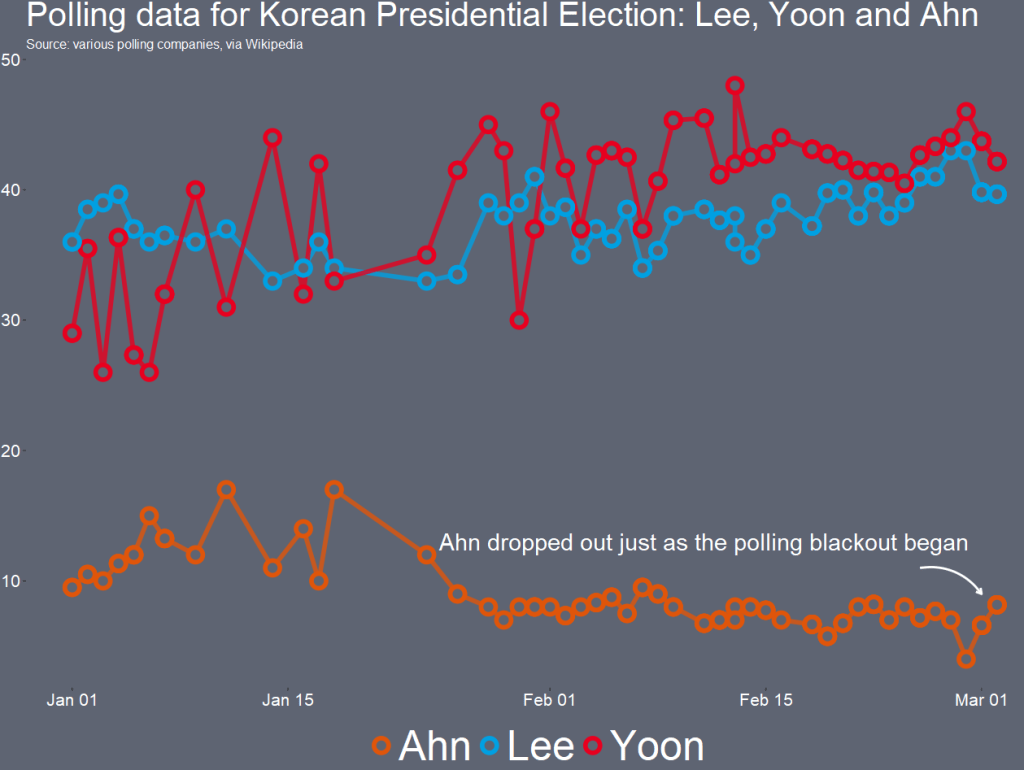
With the Korean Presidential elections coming up, I wanted to graph the polling data since the beginning of this year.

Happy Paul Rudd GIF by Saturday Night Live - Find & Share on GIPHY

The data we can use is all collated together on Wikipedia.

Click here to read more about using the rvest package for scraping data from websites and click here to read the CRAN PDF for the package.

poll_html <- read_html("https://en.wikipedia.org/wiki/2022_South_Korean_presidential_election")

poll_tables <- poll_html %>% html_table(header = TRUE, fill = TRUE)

There are 22 tables on the page in total.

I count on the page that the polling data is the 16th table on the page, so extract index [[16]] from the list

feb_poll <- poll_tables[[16]]
View(feb_poll)

It is a bit messy, so we will need to do a bit of data cleaning before we can graph.

John Mulaney Snl GIF by Saturday Night Live - Find & Share on GIPHY

First the names of many variables are missing or on row 2 / 3 of the table, due to pictures and split cells in Wikipedia.

 [1] "Polling firm / Client" "Polling firm / Client" "Fieldwork  date"       "Sample  size" "Margin of  error"     
 [6] ""       ""      ""     ""      ""                     
[11] ""  "Others/Undecided"   "Lead"   

The clean_names() function from the janitor package does a lot of the brute force variable name cleaning!

feb_poll %<>% clean_names()

We now have variable names rather than empty column names, at least.

 [1] "polling_firm_client" "polling_firm_client_2" "fieldwork_date"        "sample_size"  "margin_of_error"      
 [6] "x"  "x_2"  "x_3"  "x_4"  "x_5"                  
[11] "x_6"  "others_undecided"   "lead"

We can choose the variables we want and rename the x variables with the names of each candidate, according to Wikipedia.

feb_poll %<>% 
  select(fieldwork_date, 
         Lee = x, 
         Yoon = x_2,
         Shim = x_3,
         Ahn = x_4, 
         Kim = x_5, 
         Heo = x_6,
         others_undecided)

We then delete the rows that contain text not related to the poll number values.

feb_poll = feb_poll[-25,]
feb_poll = feb_poll[-81,]
feb_poll = feb_poll[-1,]

I want to clean up the fieldwork_date variable and convert it from character to Date class.

First I found that very handy function on Stack Overflow that extracts the last n characters from a string variable.

substrRight <- function(x, n){
  substr(x, nchar(x)-n+1, nchar(x))
}

If we look at the table, some of the surveys started in Feb but ended in March. We want to extract the final section (i.e. the March section) and use that.

So we use grepl() to find rows that have both Feb AND March, and just extract the March section. If it only has one of those months, we leave it as it is.

feb_poll %<>% 
  mutate(clean_date = ifelse(grepl("Feb", fieldwork_date) & grepl("Mar", fieldwork_date), substrRight(fieldwork_date, 5), fieldwork_date))

Next want to extract the three letter date from this variables and create a new month variable

feb_poll %<>%
  mutate(month = substrRight(clean_date, 3)) 

Following that, we use the parse_number() function from tidyr package to extract the first number found in the string and create a day_number varible (with integer class now)

 feb_poll %<>%
   mutate(day_number = parse_number(clean_date))   

We want to take these two variables we created and combine them together with the unite() function from tidyr again! We want to delete the variables after we unite them. But often I want to keep the original variables, so usually I change the argument remove to FALSE.

We indicate we want to have nothing separating the vales with the sep = "" argument

 feb_poll %<>%
     unite("date", day_number:month, sep = "", remove = TRUE)

And we convert this new date into Date class with as.Date() function.

Here is a handy cheat sheet to help choose the appropriate % key so the format recognises the dates. I will never memorise these values, so I always need to refer to this site.

We have days as numbers (1, 2, 3) and abbreviated 3 character month (Jan, Feb, Mar), so we choose %d and %b

feb_poll %<>%
  mutate(dates_format = as.Date(date, "%d%b")) %>% 
  select(dates_format, Lee:others_undecided) 

Next, we will use the pivot_longer() function to combine all the poll number values into one column. This will make it far easier to plot later.

feb_poll %<>%
  pivot_longer(!dates_format, names_to = "candidate", values_to = "favour") 

After than, we need to clean the actual numbers, remove the percentage signs and convert from character to number class. We use the str_extract() and the regex code to extract the number and not keep the percentage sign.

feb_poll %<>%
    mutate(candidate = as.factor(candidate),
 favour_percent = str_extract(favour, "\\d+\\.*\\d*")) %>% 
   mutate(favour_percent = as.integer(favour_percent)) 

Some of the different polls took place on the same day. So we will take the average poll favourability value for each candidate on each day with the group_by() function

feb_poll %<>%
  group_by(dates_format, candidate) %>% 
  mutate(favour_percent_mean = mean(favour_percent, na.rm = TRUE)) %>% 
  ungroup() %>% 
  select(candidate, dates_format, favour_percent_mean) 

And this is how the cleaned up data should look!

We repeat for the 17th and 16th tables, which contain data going back to the beginning of January 2022

early_feb_poll <- poll_tables[[17]]
early_feb_poll = early_feb_poll[-37,]
early_feb_poll = early_feb_poll[-1,]

We repeat the steps from above with early Feb in one chunk

early_feb_poll %<>%
  clean_names() %>% 
  mutate(month = substrRight(fieldwork_date, 3))  %>% 
  mutate(day_number = parse_number(fieldwork_date)) %>%
  unite("date", day_number:month, sep = "", remove = FALSE) %>% 
  mutate(dates_format = as.Date(date, "%d%b")) %>% 
  select(dates_format, 
         Lee = lee_jae_myung, 
         Yoon = yoon_seok_youl,
         Shim = sim_sang_jung,
         Ahn = ahn_cheol_soo, 
         Kim = kim_dong_yeon, 
         Heo = huh_kyung_young,
         others_undecided) %>% 
  pivot_longer(!dates_format, names_to = "candidate", values_to = "favour") %>% 
  mutate(candidate = as.factor(candidate),
         favour_percent = str_extract(favour, "\\d+\\.*\\d*")) %>% 
  mutate(favour_percent = as.integer(favour_percent)) %>% 
  group_by(dates_format, candidate) %>% 
  mutate(favour_percent_mean = mean(favour_percent, na.rm = TRUE)) %>% 
  ungroup() %>% 
  select(candidate, dates_format, favour_percent_mean)

And we use rbind() to combine the two data.frames

polls <- rbind(feb_poll, early_feb_poll)

Next we repeat with January data:

jan_poll <- poll_tables[[18]]

jan_poll = jan_poll[-34,]
jan_poll = jan_poll[-1,]

jan_poll %<>% 
  clean_names() %>% 
  mutate(month = substrRight(fieldwork_date, 3))  %>% 
  mutate(day_number = parse_number(fieldwork_date)) %>%   # drops any non-numeric characters before or after the first number. 
  unite("date", day_number:month, sep = "", remove = FALSE) %>% 
  mutate(dates_format = as.Date(date, "%d%b")) %>% 
  select(dates_format, 
         Lee = lee_jae_myung, 
         Yoon = yoon_seok_youl,
         Shim = sim_sang_jung,
         Ahn = ahn_cheol_soo, 
         Kim = kim_dong_yeon, 
         Heo = huh_kyung_young,
         others_undecided) %>% 
  pivot_longer(!dates_format, names_to = "candidate", values_to = "favour") %>% 
  mutate(candidate = as.factor(candidate),
         favour_percent = str_extract(favour, "\\d+\\.*\\d*")) %>% 
  mutate(favour_percent = as.integer(favour_percent)) %>% 
  group_by(dates_format, candidate) %>% 
  mutate(favour_percent_mean = mean(favour_percent, na.rm = TRUE)) %>% 
  ungroup() %>% 
  select(candidate, dates_format, favour_percent_mean)

And bind to our combined data.frame:

polls <- rbind(polls, jan_poll)

We can create variables to help us filter different groups of candidates. If we want to only look at the largest candidates, we can makes an important variable and then filter

We can lump the candidates that do not have data from every poll (i.e. the smaller candidate) and add them into the “other_undecided” category with the fct_lump_min() function from the forcats package

polls %>% 
  mutate(important = ifelse(candidate %in% c("Ahn", "Yoon", "Lee", "Shim"), 1, 0)) %>% 
  mutate(few_candidate = fct_lump_min(candidate, min = 110, other_level = "others_undecided")) %>% 
  group_by(few_candidate, dates_format) %>% 
  filter(important == 1) -> poll_data

I want to only look at the main two candidates from the main parties that have been polling in the 40% range – Lee and Yoon – as well as the data for Ahn (who recently dropped out and endorsed Yoon).

poll_data %>% 
  filter(candidate %in% c("Lee", "Yoon", "Ahn")) -> lee_yoon_data

We take the official party hex colors for the graph and create a vector to use later with the scale_color_manual() function below:

party_palette <- c(
  "Ahn" = "#df550a",
  "Lee" = "#00a0e2",
  "Yoon" = "#e7001f")

And we plot the variables.

lee_yoon_data %>% 
  ggplot(aes(x = dates_format, y = favour_percent_mean,
             groups = candidate, color = candidate)) + 
  geom_line( size = 2, alpha = 0.8) +
  geom_point(fill = "#5e6472", shape = 21, size = 4, stroke = 3) + 
  labs(title = "Polling data for Korean Presidential Election", subtitle = "Source: various polling companies, via Wikipedia") -> poll_graph

The bulk of aesthetics for changing the graph appearance in the theme()

poll_graph + theme(panel.border = element_blank(),
        legend.position = "bottom",        
        text = element_text(size = 15, color = "white"),
        plot.title = element_text(size = 40),
        legend.title = element_blank(),
        legend.text = element_text(size = 50, color = "white"),
        axis.text.y = element_text(size = 20), 
        axis.text.x = element_text(size = 20),
        legend.background = element_rect(fill = "#5e6472"),
        axis.title = element_blank(),
        axis.text = element_text(color = "white", size = 20),
        panel.grid.major.y = element_blank(),
        panel.grid.minor.y = element_blank(),
        panel.grid.major.x = element_blank(),
        panel.grid.minor.x = element_blank(),
        legend.key = element_rect(fill = "#5e6472"),
        plot.background = element_rect(fill = "#5e6472"),
        panel.background = element_rect(fill = "#5e6472")) +
  scale_color_manual(values = party_palette) 

Last, with the annotate() functions, we can also add an annotation arrow and text to add some more information about Ahn Cheol-su the candidate dropping out.

  annotate("text", x = as.Date("2022-02-11"), y = 13, label = "Ahn dropped out just as the polling blackout began", size = 10, color = "white") +
  annotate(geom = "curve", x = as.Date("2022-02-25"), y = 13, xend = as.Date("2022-03-01"), yend = 10, 
    curvature = -.3, arrow = arrow(length = unit(2, "mm")), size = 1, color = "white")

We will just have to wait until next Wednesday / Thursday to see who is the winner ~

Over It Reaction GIF by Saturday Night Live - Find & Share on GIPHY

Create density plots with ggridges package in R

Packages we will need:

library(tidyverse)
library(ggridges)
library(ggimage)  # to add png images
library(bbplot)   # for pretty graph themes

We will plot out the favourability opinion polls for the three main political parties in Ireland from 2016 to 2020. Data comes from Louwerse and Müller (2020)

Happy Danny Devito GIF by It's Always Sunny in Philadelphia - Find & Share on GIPHY

Before we dive into the ggridges plotting, we have a little data cleaning to do. First, we extract the last four “characters” from the date string to create a year variable.

I took this quick function from a StackOverflow response:

substrRight <- function(x, n){
  substr(x, nchar(x)-n+1, nchar(x))}

polls_csv$year <- substrRight(polls_csv$Date, 4)

Next, pivot the data from wide to long format.

More information of pivoting data with dplyr can be found here. I tend to check it at least once a month as the arguments refuse to stay in my head.

I only want to take the main parties in Ireland to compare in the plot.

polls <- polls_csv %>%
  select(year, FG:SF) %>% 
  pivot_longer(!year, names_to = "party", values_to = "opinion_poll")

I went online and found the logos for the three main parties (sorry, Labour) and saved them in the working directory I have for my RStudio. That way I can call the file with the prefix “~/**.png” rather than find the exact location they are saved on the computer.

polls %>% 
  filter(party == "FF" | party == "FG" | party == "SF" ) %>% 
  mutate(image = ifelse(party=="FF","~/ff.png",
 ifelse(party=="FG","~/fg.png", "~/sf.png"))) -> polls_three

Now we are ready to plot out the density plots for each party with the geom_density_ridges() function from the ggridges package.

We will add a few arguments into this function.

We add an alpha = 0.8 to make each density plot a little transparent and we can see the plots behind.

The scale = 2 argument pushes all three plots togheter so they are slightly overlapping. If scale =1, they would be totally separate and 3 would have them overlapping far more.

The rel_min_height = 0.01 argument removes the trailing tails from the plots that are under 0.01 density. This is again for aesthetics and just makes the plot look slightly less busy for relatively normally distributed densities

The geom_image takes the images and we place them at the beginning of the x axis beside the labels for each party.

Last, we use the bbplot package BBC style ggplot theme, which I really like as it makes the overall graph look streamlined with large font defaults.

polls_three %>% 
  ggplot(aes(x = opinion_poll, y = as.factor(party))) +  
  geom_density_ridges(aes(fill = party), 
                      alpha = 0.8, 
                      scale = 2,
                      rel_min_height = 0.01) + 
  ggimage::geom_image(aes(y = party, x= 1, image = image), asp = 0.9, size = 0.12) + 
  facet_wrap(~year) + 
  bbplot::bbc_style() +
  scale_fill_manual(values = c("#f2542d", "#edf6f9", "#0e9594")) +
  theme(legend.position = "none") + 
  labs(title = "Favourability Polls for the Three Main Parties in Ireland", subtitle = "Data from Irish Polling Indicator (Louwerse & Müller, 2020)")
Its Always Sunny In Philadelphia Thumbs Up GIF by HULU - Find & Share on GIPHY

Graphing Pew survey responses with ggplot in R

Packages we will need:

library(tidyverse)
library(forcats)
library(ggthemes)

We are going to look at a few questions from the 2019 US Pew survey on relations with foreign countries.

Data can be found by following this link:

We are going to make bar charts to plot out responses to the question asked to American participaints: Should the US cooperate more or less with some key countries? The countries asked were China, Russia, Germany, France, Japan and the UK.

Before we dive in, we can find some nice hex colors for the bar chart. There are four possible responses that the participants could give: cooperate more, cooperate less, cooperate the same as before and refuse to answer / don’t know.

pal <- c("Cooperate more" = "#0a9396",
         "Same as before" = "#ee9b00",
         "Don't know" = "#005f73",
         "Cooperate less" ="#ae2012")

We first select the questions we want from the full survey and pivot the dataframe to long form with pivot_longer(). This way we have a single column with all the different survey responses. that we can manipulate more easily with dplyr functions.

Then we summarise the data to count all the survey reponses for each of the four countries and then calculate the frequency of each response as a percentage of all answers.

Then we mutate the variables so that we can add flags. The geom_flag() function from the ggflags packages only recognises ISO2 country codes in lower cases.

After that we change the factors level for the four responses so they from positive to negative views of cooperation

pew %>% 
  select(id = case_id, Q2a:Q2f) %>% 
  pivot_longer(!id, names_to = "survey_question", values_to = "response")  %>% 
  group_by(survey_question, response) %>% 
  summarise(n = n()) %>%
  mutate(freq = n / sum(n)) %>% 
  ungroup() %>% 
  mutate(response_factor = as.factor(response)) %>% 
  mutate(country_question = ifelse(survey_question == "Q2a", "fr",
ifelse(survey_question == "Q2b", "gb",
ifelse(survey_question == "Q2c", "ru",
ifelse(survey_question == "Q2d", "cn",
ifelse(survey_question == "Q2e", "de",
ifelse(survey_question == "Q2f", "jp", survey_question))))))) %>% 
  mutate(response_string = ifelse(response_factor == 1, "Cooperate more",
ifelse(response_factor == 2, "Cooperate less",
ifelse(response_factor == 3, "Same as before",
ifelse(response_factor == 9, "Don't know", response_factor))))) %>% 
  mutate(response_string = fct_relevel(response_string, c("Cooperate less","Same as before","Cooperate more", "Don't know"))) -> pew_clean

We next use ggplot to plot out the responses.

We use the position = "stack" to make all the responses “stack” onto each other for each country. We use stat = "identity" because we are not counting each reponses. Rather we are using the freq variable we calculated above.

pew_clean %>%
  ggplot() +
  geom_bar(aes(x = forcats::fct_reorder(country_question, freq), y = freq, fill = response_string), color = "#e5e5e5", size = 3, position = "stack", stat = "identity") +
  geom_flag(aes(x = country_question, y = -0.05 , country = country_question), color = "black", size = 20) -> pew_graph

And last we change the appearance of the plot with the theme function

pew_graph + 
coord_flip() + 
  scale_fill_manual(values = pal) +
  ggthemes::theme_fivethirtyeight() + 
  ggtitle("Should the US cooperate more or less with the following country?") +
  theme(legend.title = element_blank(),
        legend.position = "top",
        legend.key.size = unit(2, "cm"),
        text = element_text(size = 25),
        legend.text = element_text(size = 20),
        axis.text = element_blank())