How to download and graph interactive country maps in R

Packages we will be using:

library(tidyverse)
library(geojsonio)
library(sf)

In this blog, we will make maps! Mapppsss!!!

Go to this website and find the country GeoJSON you want to download:
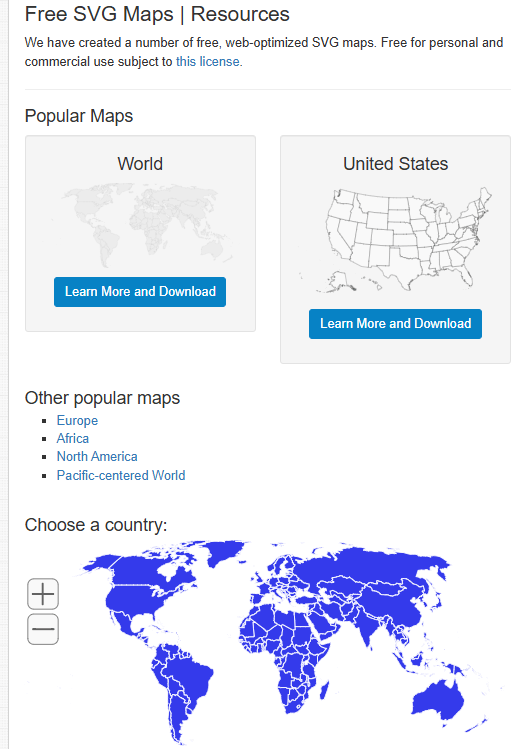
We can choose the country we want.

For example, Ireland
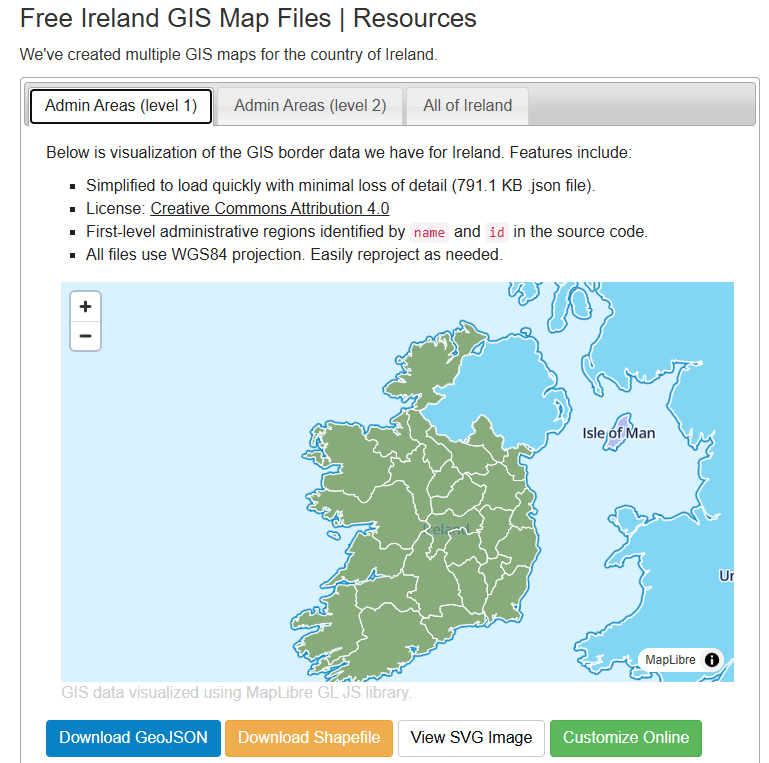
https://simplemaps.com/gis/country/ie#admin1

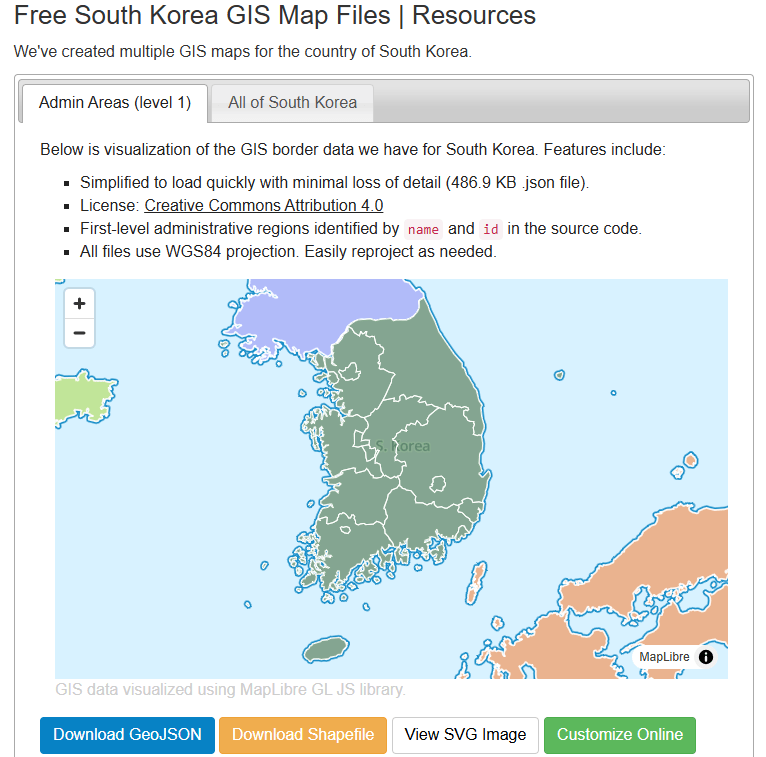
Or South Korea, maybe~

https://simplemaps.com/gis/country/kr#admin1

Click the blue button to download the file.

I saved it on my desktop so it’s easy to read in~

ireland_map <- geojson_read("ie.json", what = "sp")

Next we need to convert a spatial object into an sf (Simple Features) object

ireland_sf <- st_as_sf(ireland_map)

I will be working on the Irish dataset and make a simple map

geojson_read() reads a GeoJSON file (from the geojsonio package).

A GeoJSON file is a file format for map data using JavaScript Object Notation (JSON). 

It’s an open standard used a lot to represent points, lines, and polygonzzz.

"ie.json" will be our GeoJSON file containing Ireland’s geographic data. That will be the 26 counties.

The argument what = "sp" makes it so that the output should be a spatial object (from the sp package).

We can add data for the four provinces of Ireland

leinster <- c("Carlow", "Dublin", "Kildare", "Kilkenny", "Laois", "Longford", "Louth", "Meath", "Offaly", "Westmeath", "Wexford", "Wicklow")

munster <- c("Clare", "Cork", "Kerry", "Limerick", "Tipperary", "Waterford")

connacht <- c("Galway", "Leitrim", "Mayo", "Roscommon", "Sligo")

ulster <- c("Cavan", "Donegal", "Monaghan", "Antrim", "Armagh", "Derry", "Down", "Fermanagh", "Tyrone")

And some hex colours for the palette

province_pal <- c(
  "Leinster" = "#122229",
  "Munster" = "#0a9396",
  "Connacht" = "#ee9b00",
  "Ulster" = "#991226") 

And we can add all this data with the geom_sf() to the graph:

ireland_sf %>%
  mutate(county = name) %>% 
  mutate(county = ifelse(county == "Laoighis", "Laois", county)) %>% 
  mutate(province = ifelse(county %in% leinster, "Leinster",
                    ifelse(county %in% munster, "Munster",
                    ifelse(county %in% connacht, "Connacht",
                    ifelse(county %in% ulster, "Ulster", NA))))) %>% 
  ggplot() +
  geom_sf(aes(fill = province),
          linewidth = 1, color = "white") +
  bbplot::bbc_style() +
  scale_fill_manual(values = province_pal)
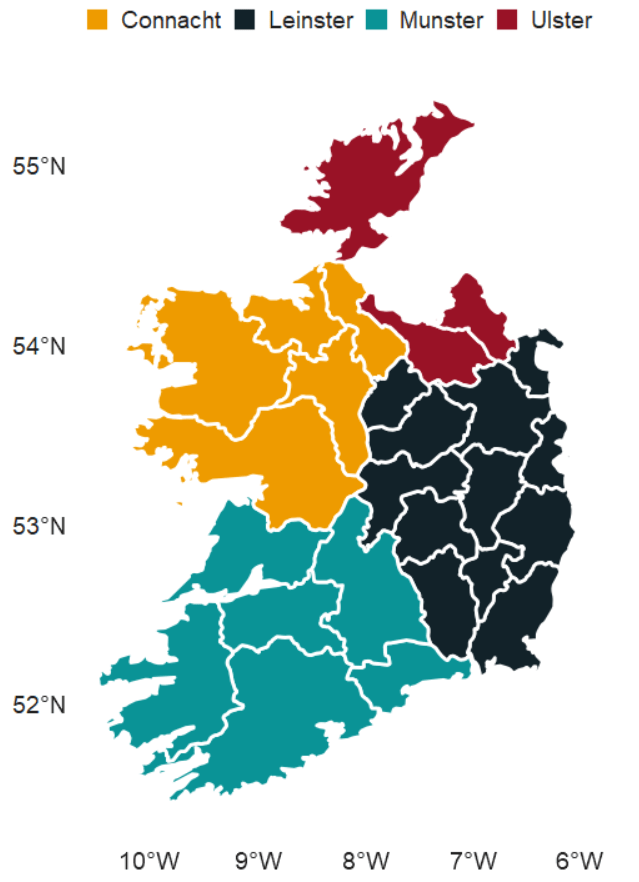
We can also make interactive maps that look like Google maps with the leaflet package!

Click here to read the cran PDF on the leaflet package.

It’s super easy but different from ggplot in many ways.

Instead of all the ifelse() statements and mutate(), we can alternatively use a case_when() function!

ireland_sf %<>% 
  mutate(county = name, 
         county = recode(county, "Laoighis" = "Laois"),
         province = case_when(
           county %in% leinster ~ "Leinster",
           county %in% munster  ~ "Munster",
           county %in% connacht ~ "Connacht",
           county %in% ulster   ~ "Ulster",
           TRUE ~ NA_character_))

We can add colours using the colorFactor() function from the leaflet package.
In colorFactor() specifies the set of possible input values that will be mapped to colours.

province_colorFactor <- colorFactor(
  palette = c("Leinster" = "#122229",
              "Munster"  = "#0a9396",
              "Connacht" = "#ee9b00",
              "Ulster"   = "#991226"), 
  domain = ireland_sf$province)

We can now use the leaflet() function with the input of our SF data.frame.

With the addProviderTiles(), we can choose a map style.

providers$CartoDB.Positron refers to the “Positron” tile set from CartoDB.

When we use the leaflet.extra package, the CartoDB means we can use a clean map style

Next, we add the addPolygons() function adds polygon shapes to the map. For us. these polygons are for each Irish county.

fillColor = ~province_colorFactor(province) sets the fill color of each of the fours province polygon!

Finally, we can add the thickness of the map border lines, color and opacity to make it all pretty!

leaflet(ireland_sf) %>% 
  addProviderTiles(providers$CartoDB.Positron) %>%  
  addPolygons(fillColor = ~province_colorFactor(province),
              weight = 2, 
              color = "black", 
              opacity = 1)
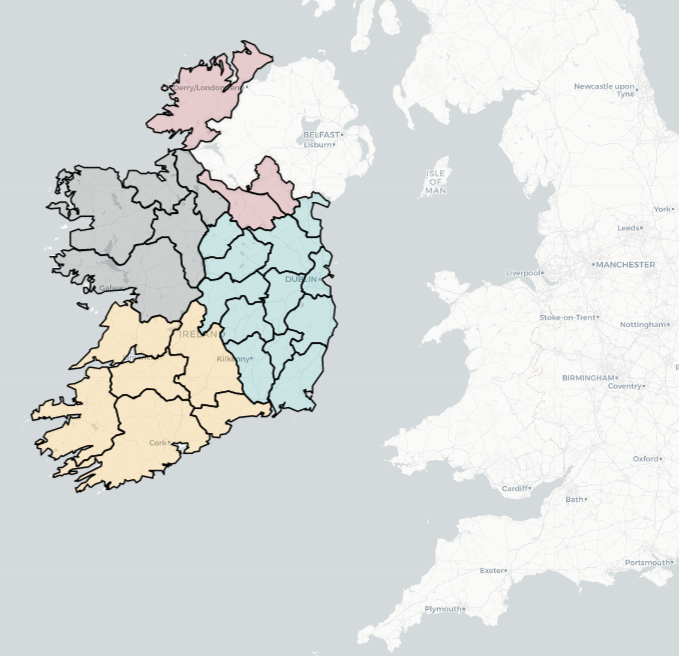
Here are some commonly used provider tiles that we can feed into the addProviderTiles()

  • OpenStreetMap
    • providers$OpenStreetMap.Mapnik
    • providers$OpenStreetMap.DE
    • providers$OpenStreetMap.France
  • Stamen
    • providers$Stamen.Toner
    • providers$Stamen.Watercolor
    • providers$Stamen.Terrain
  • CartoDB
    • providers$CartoDB.Positron
    • providers$CartoDB.DarkMatter
  • Esri
    • providers$Esri.WorldStreetMap
    • providers$Esri.WorldImagery
    • providers$Esri.NatGeoWorldMap
  • Hike & Bike
    • providers$HikeBike.HikeBike
  • Thunderforest
    • providers$Thunderforest.Landscape
    • providers$Thunderforest.Outdoors
  • NASAGIBS
    • providers$NASAGIBS.ModisTerraTrueColorCR
ireland_leaflet %>% 
  addProviderTiles(providers$Esri.WorldImagery)
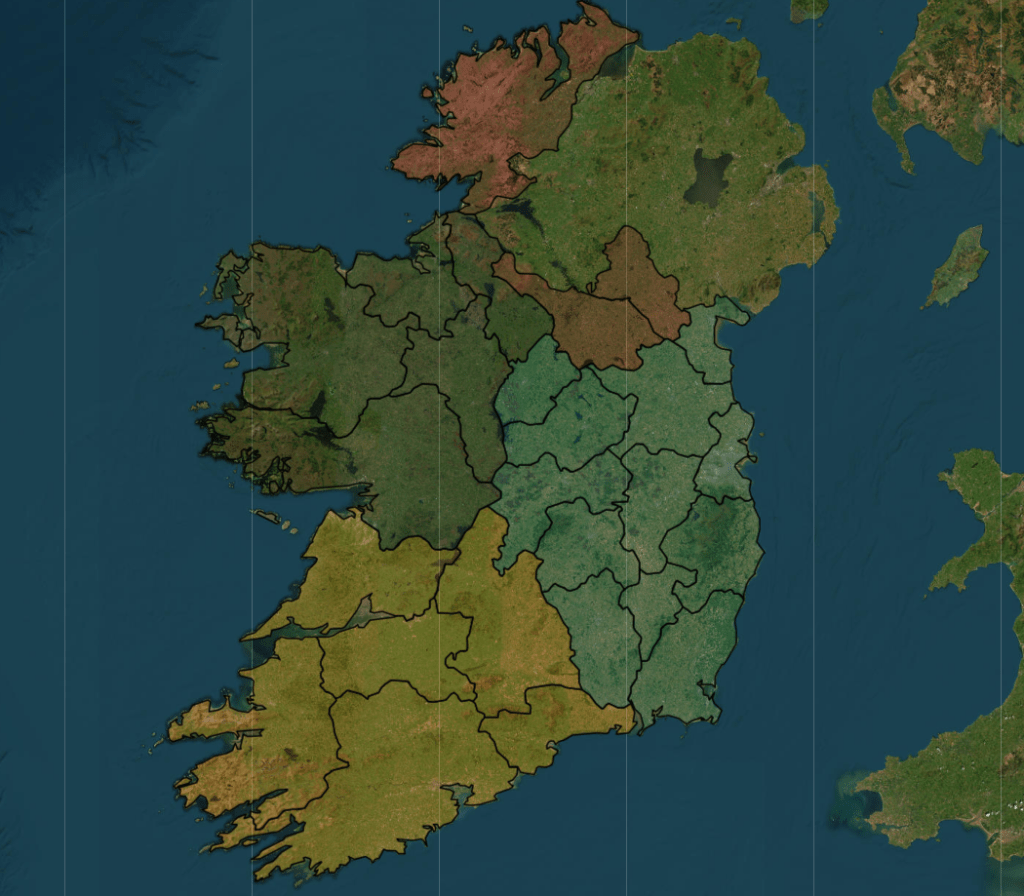
The watercolour style is pretty!

leaflet(ireland_pop_sf) %>%
  addProviderTiles(providers$Stadia.StamenWatercolor) %>%  
  addPolygons(fillColor = ~province_colorFactor(province),
              weight = 2, 
              color = "white", 
              opacity = 1) 
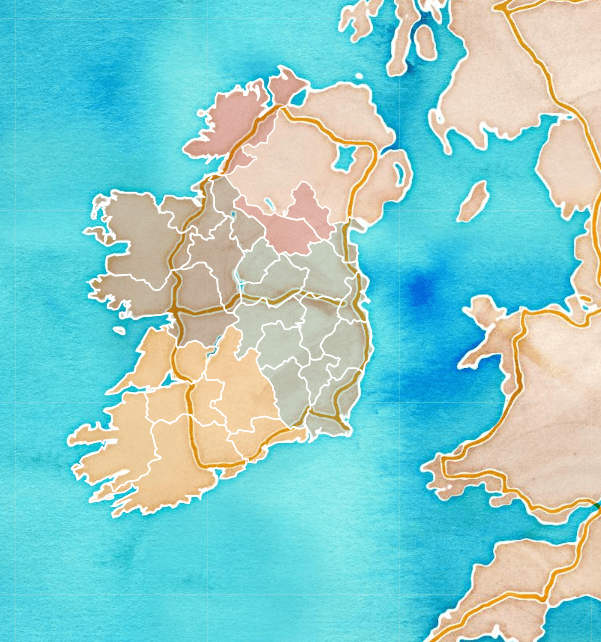
leaflet(ireland_pop_sf) %>%
  addPolygons(fillColor = ~province_colorFactor(province),
              weight = 2, 
              color = "white", 
              opacity = 1) %>% 
  addProviderTiles(providers$SafeCast) 
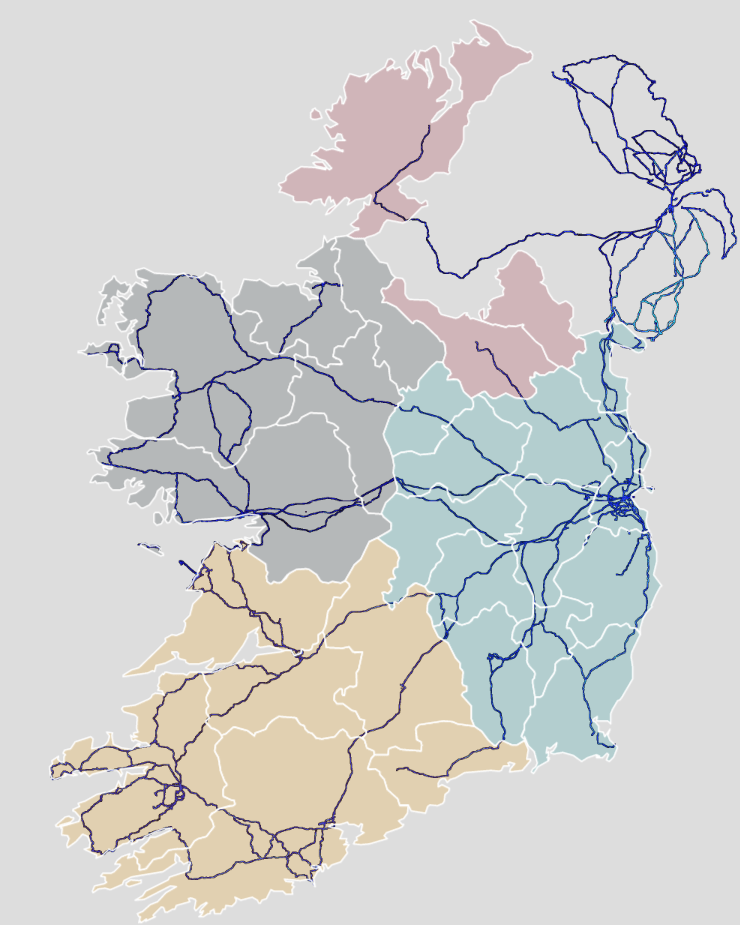
And we can add the towns and cities with the Stadia as the map provider.


leaflet(ireland_pop_sf) %>%
  addPolygons(fillColor = ~province_colorFactor(province),
              weight = 2, 
              color = "white", 
              opacity = 1) %>% 
  addProviderTiles(providers$Stadia) 
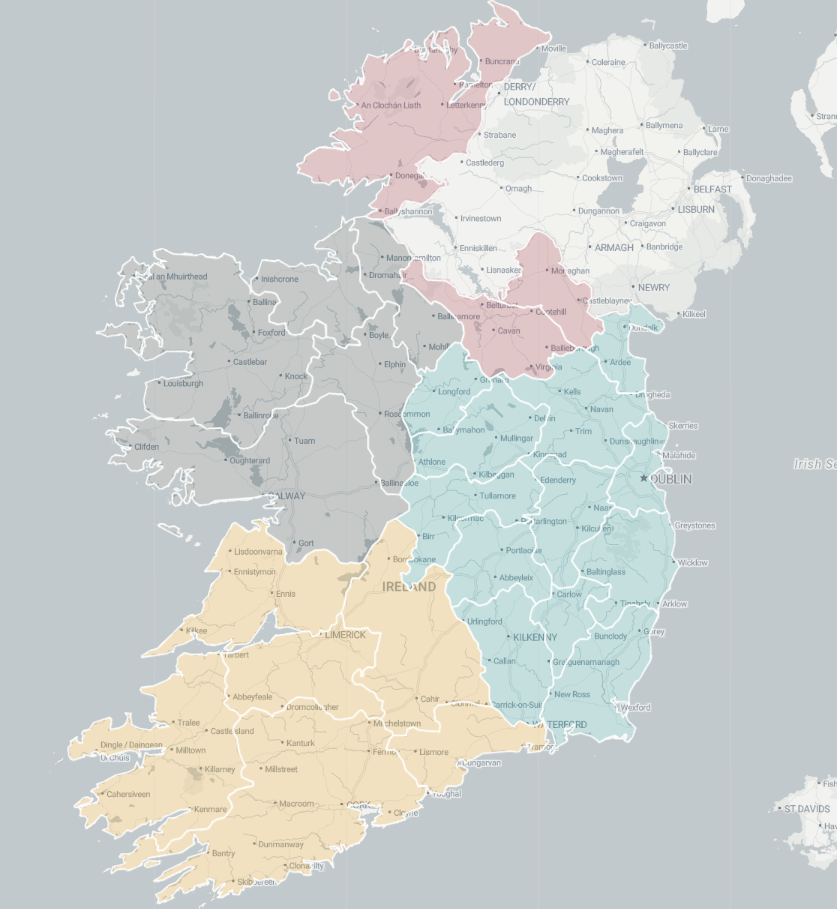
Next we can take 2023 population data for each county from Wikipedia (using rvest's read_html()

read_html("https://en.wikipedia.org/wiki/List_of_Irish_counties_by_population") %>% 
  html_table(header = TRUE, fill = TRUE) %>% 
  `[[`(1) %>% 
  janitor::row_to_names(row_number = 1) %>% 
  janitor::clean_names() %>% 
  mutate(population = as.numeric(gsub(",", "", population)) %>% 
  select(county, population) -> ireland_pop

Add join the population data to the SF map data with the county variable.

ireland_sf %>% 
  inner_join(ireland_pop, by = "county") -> ireland_pop_sf

First, we can prepare a colour palette

pop_pal <- colorNumeric(
  palette = "RdYlBu",
  domain = ireland_pop_sf$population)

We can create a leaflet map object …

leaflet(ireland_pop_sf) %>% 
  addProviderTiles(providers$CartoDB.Positron) -> ireland_leaflet

… and use this to add population data with a legend in the corner

ireland_leaflet %>%
  addPolygons(fillColor = ~pop_pal(population),  # Color by population
              weight = 1, 
              color = "white",
              fillOpacity = 0.7,
              popup = ~paste0("<b>", county, "</b><br>Population: ", population)) %>%
  addLegend(pal = pop_pal, 
            values = ireland_pop_sf$population, 
            title = legend_title, 
            position = "bottomright")
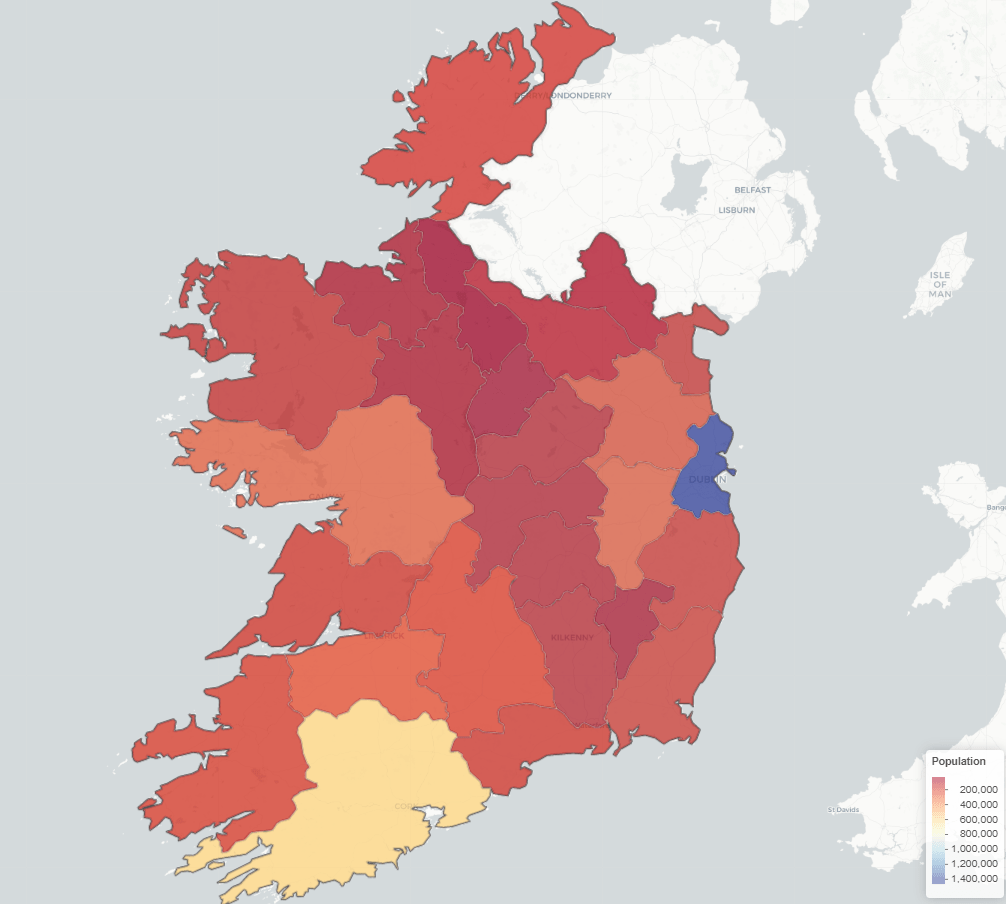
How to calculate a linguistic Herfindahl-Hirschman Index (HHI) with Afrobarometer survey data in R PART 2

Packages we will need:

library(tidyverse)
library(haven) # import SPSS data
library(rnaturalearth) # download map data
library(countrycode) # add country codes for merging
library(gt) # create HTML tables
library(gtExtras) # customise HTML tables

In this blog, we will look at calculating a variation of the Herfindahl-Hirschman Index (HHI) for languages. This will give us a figure that tells us how diverse / how concentrated the languages are in a given country.

We will continue using the Afrobarometer survey in the post!

Click here to read more about downloading the Afrobarometer survey data in part one of the series.

You can use the file.choose() to import the Afrobarometer survey round you downloaded. It is an SPSS file, so we need to use the read_sav() function from have package

ab <- read_sav(file.choose())

First, we can quickly add the country names to the data.frame with the case_when() function

ab %>% 
  mutate(country_name = case_when(
    COUNTRY == 2 ~ "Angola",
    COUNTRY == 3 ~ "Benin",
    COUNTRY == 4 ~ "Botswana",
    COUNTRY == 5 ~ "Burkina Faso",
    COUNTRY == 6 ~ "Cabo Verde",
    COUNTRY == 7 ~ "Cameroon",
    COUNTRY == 8 ~ "Côte d'Ivoire",
    COUNTRY == 9 ~ "Eswatini",
    COUNTRY == 10 ~ "Ethiopia",
    COUNTRY == 11 ~ "Gabon",
    COUNTRY == 12 ~ "Gambia",
    COUNTRY == 13 ~ "Ghana",
    COUNTRY == 14 ~ "Guinea",
    COUNTRY == 15 ~ "Kenya",
    COUNTRY == 16 ~ "Lesotho",
    COUNTRY == 17 ~ "Liberia",
    COUNTRY == 19 ~ "Malawi",
    COUNTRY == 20 ~ "Mali",
    COUNTRY == 21 ~ "Mauritius",
    COUNTRY == 22 ~ "Morocco",
    COUNTRY == 23 ~ "Mozambique",
    COUNTRY == 24 ~ "Namibia",
    COUNTRY == 25 ~ "Niger",
    COUNTRY == 26 ~ "Nigeria",
    COUNTRY == 28 ~ "Senegal",
    COUNTRY == 29 ~ "Sierra Leone",
    COUNTRY == 30 ~ "South Africa",
    COUNTRY == 31 ~ "Sudan",
    COUNTRY == 32 ~ "Tanzania",
    COUNTRY == 33 ~ "Togo",
    COUNTRY == 34 ~ "Tunisia",
    COUNTRY == 35 ~ "Uganda",
    COUNTRY == 36 ~ "Zambia",
    COUNTRY == 37 ~ "Zimbabwe")) -> ab 

If we consult the Afrobarometer codebook (check out the previous blog post to access), Q2 asks the survey respondents what is their primary langugage. We will count the responses to see a preview of the languages we will be working with

ab %>% 
   count(Q2) %>% 
   arrange(desc(n))
# A tibble: 445 x 2
       Q2              n
   <dbl+lbl>      <int>
 1      3 [Portuguese]   2508
 2      2 [French]       2238
 3      4 [Swahili]      2223
 4   1540 [Sudanese Arabic]  1779
 5      1 [English]      1549
 6    260 [Akan]          1368
 7    220 [Crioulo]      1197
 8    340 [Sesotho]     1160
 9   1620 [siSwati]     1156
10    900 [Créole]      1143
# ... with 435 more rows

Most people use Portuguese. This is because Portugese-speaking Angola had twice the number of surveys administered than most other countries. We will try remedy this oversampling later on.

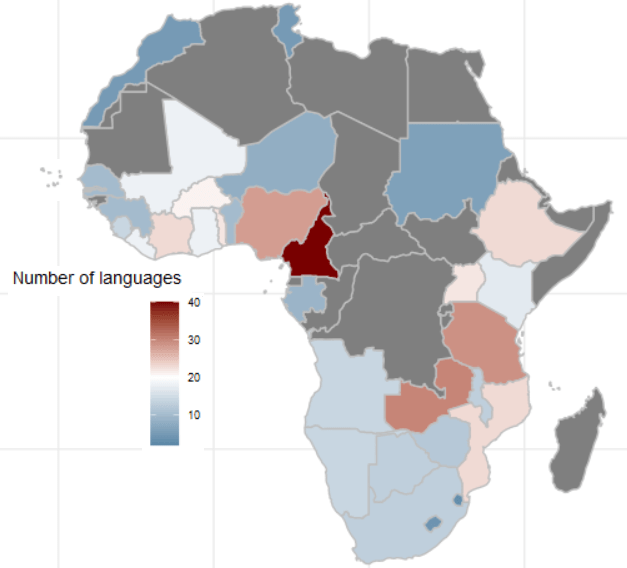
We can start off my mapping the languages of the survey respondents.

We download a map dataset with the geometry data we will need to print out a map

ne_countries(scale = "medium", returnclass = "sf") %>% 
  filter(region_un == "Africa") %>% 
  select(geometry, name_long) %>% 
  mutate(cown = countrycode(name_long, "country.name", "cown")) -> map

map
Simple feature collection with 57 features and 2 fields
Geometry type: MULTIPOLYGON
Dimension:     XY
Bounding box:  xmin: -25.34155 ymin: -46.96289 xmax: 57.79199 ymax: 37.34038
Geodetic CRS:  +proj=longlat +datum=WGS84 +no_defs +ellps=WGS84 +towgs84=0,0,0
First 10 features:
                          name_long                       geometry cown
1                            Angola MULTIPOLYGON (((14.19082 -5...  540
2                           Burundi MULTIPOLYGON (((30.55361 -2...  516
3                             Benin MULTIPOLYGON (((3.59541 11....  434
4                      Burkina Faso MULTIPOLYGON (((0.2174805 1...  439
5                          Botswana MULTIPOLYGON (((25.25879 -1...  571
6          Central African Republic MULTIPOLYGON (((22.86006 10...  482
7                     Côte d'Ivoire MULTIPOLYGON (((-3.086719 5...  437
8                          Cameroon MULTIPOLYGON (((15.48008 7....  471
9  Democratic Republic of the Congo MULTIPOLYGON (((27.40332 5....  490
10                Republic of Congo MULTIPOLYGON (((18.61035 3....  484

We then calculate the number of languages that respondents used in each country

ab %>% 
  dplyr::select(country_name, lang = Q2) %>% 
  mutate(lang = labelled::to_factor(lang)) %>% 
  group_by(country_name) %>% 
  distinct(lang) %>% 
  count() %>% 
  ungroup() %>%  
  arrange(desc(n)) -> ab_number_languages

We use right_join() to merge the map to the ab_number_languages dataset

ab_number_languages %>% 
  mutate(cown = countrycode::countrycode(country_name, "country.name", "cown")) %>% 
  right_join(map , by = "cown") %>% 
  ggplot() +
  geom_sf(aes(geometry = geometry, fill = n),
          position = "identity", color = "grey", linewidth = 0.5) +
  scale_fill_gradient2(midpoint = 20, low = "#457b9d", mid = "white",
                       high = "#780000", space = "Lab") +
  theme_minimal() + labs(title = "Total number of languages of respondents")
ab %>% group_by(country_name) %>% count() %>% 
  arrange(n)

There is an uneven number of respondents across the 34 countries. Angola has the most with 2400 and Mozambique has the fewest with 1110.

One way we can deal with that is to sample the data and run the analyse multiple times. We can the graph out the distribution of Herfindahl Index results.

set.seed(111)
sample_ab <- ab %>%
group_by(country_name) %>%
sample_n(500, replace = TRUE)

First we will look at just one country, Nigeria.

The Herfindahl-Hirschman Index (HHI) is a measure of market concentration often used in economics and competition analysis. The formula for the HHI is as follows:

HHI = (s1^2 + s2^2 + s3^2 + … + sn^2)

Where:

  • “s1,” “s2,” “s3,” and so on represent the market shares (expressed as percentages) of individual firms or entities within a given market.
  • “n” represents the total number of firms or entities in that market.

Each firm’s market share is squared and then summed to calculate the Herfindahl-Hirschman Index. The result is a number that quantifies the concentration of market share within a specific industry or market. A higher HHI indicates greater market concentration, while a lower HHI suggests more competition.

sample_ab %>%
filter(country_name == "Nigeria") %>%
dplyr::select(country_name, lang = Q2) %>%
group_by(lang) %>%
summarise(percentage_lang = n() / nrow(.) * 100,
number_speakers = n()) %>%
ungroup() %>%
mutate(square_per_lang = (percentage_lang / 100) ^ 2) %>%
summarise(lang_hhi = sum(square_per_lang))

And we see that the linguistic Herfindahl index is 16.4%

lang_hhi
     <dbl>
1    0.164

The Herfindahl Index ranges from 0% (perfect diversity) to 100% (perfect concentration).

16% indicates a moderate level of diversity or variation within the sample of 500 survey respondents. It’s not extremely concentrated (e.g., one dominant category) and highlight tht even in a small sample of 500 people, there are many languages spoken in Nigeria.

We can repeat this sampling a number of times and see a distribution of sample index scores.

We can also compare the Herfindahl score between all countries in the survey.

First step, we will create a function to calculate lang_hhi for a single sample, according to the HHI above.

calculate_lang_hhi <- function(sample_data) { 
sample_data %>%
dplyr::select(country_name, lang = Q2) %>%
group_by(country_name, lang) %>%
summarise(count = n()) %>%
mutate(percent_lang = count / sum(count) * 100) %>%
ungroup() %>%
group_by(country_name) %>%
mutate(square_per_lang = (percent_lang / 100) ^ 2) %>%
summarise(lang_hhi = sum(square_per_lang))
}

The next step, we run the code 100 times and calculate a lang_hhi index for each country_name

results <- replicate(100, { ab %>%
group_by(country_name) %>%
sample_n(100, replace = TRUE) %>%
calculate_lang_hhi()
}, simplify = FALSE)

simplify = FALSE is used in the replicate() function.

This guarantees that output will not be simplified into a more convenient format. Instead, the results will be returned in a list.

If we want to extract the 11th iteration of the HHI scores from the list of 100:

results[11] %>% as.data.frame() %>%
   mutate(lang_hhi = round(lang_hhi *100, 2)) %>%  
   arrange(desc(lang_hhi)) %>%
   gt() %>%
  gt_theme_guardian() %>% 
  gt_color_rows(lang_hhi) %>% as_raw_html()

We can see the most concentrated to least concentrated in this sample (Cabo Verde, Sudan) to the most liguistically diverse (Uganda)

country_name lang_hhi
Cabo Verde 100.00
Sudan 100.00
Lesotho 96.08
Mauritius 92.32
Eswatini 88.72
Morocco 76.94
Gabon 66.24
Botswana 65.18
Angola 63.72
Zimbabwe 54.40
Malawi 54.16
Tunisia 52.00
Tanzania 48.58
Niger 41.84
Senegal 41.72
Ghana 35.10
Burkina Faso 30.80
Mali 28.48
Namibia 28.12
Guinea 28.08
Benin 26.70
Ethiopia 26.60
Gambia 26.40
Sierra Leone 25.52
Mozambique 24.66
Togo 20.52
Cameroon 19.84
Zambia 17.56
Liberia 17.02
South Africa 16.92
Nigeria 16.52
Kenya 15.22
Côte d’Ivoire 15.06
Uganda 10.58

This gives us the average across all the 100 samples

average_lang_hhi <- results %>%
bind_rows(.id = "sample_iteration") %>%
group_by(country_name) %>%
summarise(avg_lang_hhi = mean(lang_hhi))

After that, we just need to combine all 100 results lists into a single tibble. We add an ID for each sample from 1 to 100 with .id = "sample"

combined_results <- bind_rows(results, .id = "sample")

And finally, we graph:

combined_results %>%
  ggplot(aes(x = lang_hhi)) +
  geom_histogram(binwidth = 0.01, 
                 fill = "#3498db", 
                 alpha = 0.6, color = "#708090") +
  facet_wrap(~factor(country_name), scales = "free_y") +
  labs(title = "Distribution of Linguistic HHI", x = "HHI") +
  theme_minimal()

From the graphs, we can see that the average HHI score in the samples is pretty narrow in countries such as Sudan, Tunisia (we often see that most respondents speak the same language so there is more linguistic concentration) and in countries such as Liberia and Uganda (we often see that the diversity in languages is high and it is rare that we have a sample of 500 survey respondents that speak the same language). Countries such as Zimbabwe and Gabon are in the middle in terms of linguistic diversity and there is relatively more variation (sometimes more of the random survey respondents speak the same langage, sometimes fewer!)

How to create a Regional Economic Communities dataset. PART TWO: consolidating string variables to dummy variables

Click here to read PART ONE of the blog series on creating the Regional Economic Communities dataset

Packages we will need:

library(tidyverse)
library(countrycode)
library(WDI)

There are eight RECs in Africa. Some countries are only in one of the RECs, some are in many. Kenya is the winner with membership in four RECs: CEN-SAD, COMESA, EAC and IGAD.

In this blog, we will create a consolidated dataset for all 54 countries in Africa that are in a REC (or TWO or THREE or FOUR groups). Instead of a string variable for each group, we will create eight dummy group variables for each country.

To do this, we first make a vector of all the eight RECs.

patterns <- c("amu", "cen-sad", "comesa", "eac", "eccas", "ecowas", "igad", "sadc")

We put the vector of patterns in a for-loop to create a new binary variable column for each REC group.

We use the str_detect(rec_abbrev, pattern)) to see if the rec_abbrev column MATCHES the one of the above strings in the patterns vector.

The new variable will equal 1 if the variable string matches the pattern in the vector. Otherwise it will be equal to 0.

The double exclamation marks (!!) are used for unquoting, allowing the value of var_name to be treated as a variable name rather than a character string.

Then, we are able to create a variable name that were fed in from the vector dynamically into the for-loop. We can automatically do this for each REC group.

In this case, the iterated !!var_name will be replaced with the value stored in the var_name (AMU, CEN-SAD etc).

We can use the := to assign a new variable to the data frame.

The symbol := is called the “walrus operator” and we use it make or change variables without using quotation marks.

for (pattern in patterns) {
  var_name <- paste0(pattern, "_binary")
  rec <- rec %>%
    mutate(!!var_name := as.integer(str_detect(rec_abbrev, pattern)))
}

This is the dataset now with a binary variables indicating whether or not a country is in any one of the REC groups.

However, we quickly see the headache.

We do not want four rows for Kenya in the dataset. Rather, we only want one entry for each country and a 1 or a 0 for each REC.

We use the following summarise() function to consolidate one row per country.

rec %>%
group_by(country) %>%
  summarise(
    geo = first(geo),
    rec_abbrev = paste(rec_abbrev, collapse = ", "),
    across(ends_with("_binary"), ~ as.integer(any(. == 1)))) ->  rec_consolidated

The first() function extracts the first value in the geo variable for each country. This first() function is typically used with group_by() and summarise() to get the value from the first row of each group.

We use the the across() function to select all columns in the dataset that end with "_binary".

The ~ as.integer(any(. == 1)) checks if there’s any value equal to 1 within the binary variables. If they have a value of 1, the summarised data for each country will be 1; otherwise, it will be 0.

The following code can summarise each filtered group and add them to a new dataset that we can graph:

summ_group_pop <- function(my_df, filter_var, rec_name) {
  my_df %>%
    filter({{ filter_var }} == 1) %>% 
    summarize(total_population = sum(pop, na.rm = TRUE)) %>% 
    mutate(group = rec_name)
}

filter_vars <- c("amu_binary", "cen.sad_binary", "comesa_binary", 
                 "eac_binary", "eccas_binary", "ecowas_binary",
                 "igad_binary", "sadc_binary")
group_names <- c("AMU", "CEN-SAD", "COMESA", "EAC", "ECCAS", "ECOWAS",
                 "IGAD", "SADC")

rec_pop_summary <- data.frame()

for (i in seq_along(filter_vars)) {
  summary_df <- summ_group_pop(rec_wdi, !!as.name(filter_vars[i]), group_names[i])
  rec_pop_summary <- bind_rows(rec_pop_summary, summary_df)
}

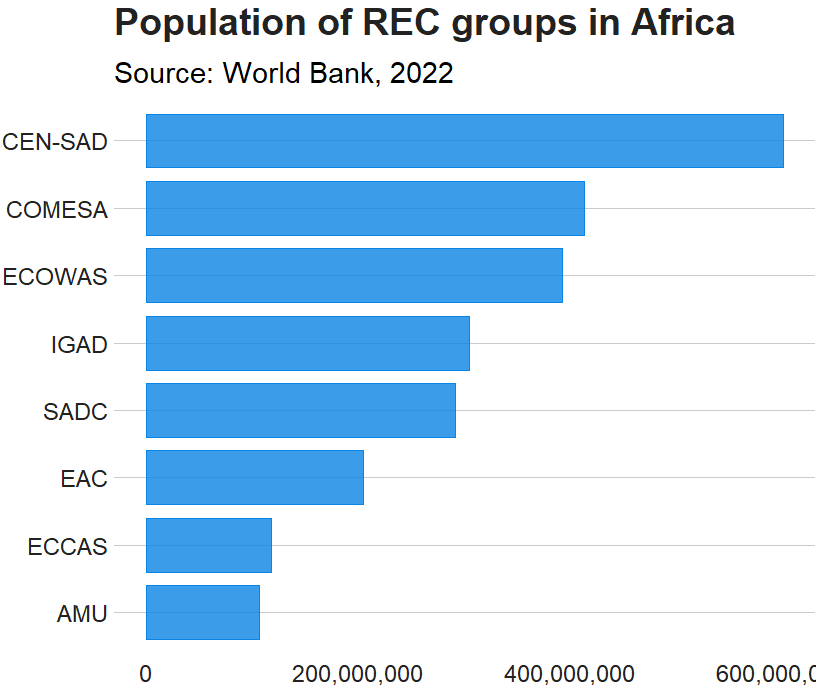
And we graph it with geom_bar()

rec_pop_summary %>% 
  ggplot(aes(x = reorder(group, total_population),
             y = total_population)) + 
  geom_bar(stat = "identity", 
           width = 0.7, 
           color = "#0a85e5", 
           fill = "#0a85e5") +
  bbplot::bbc_style() + 
  scale_y_continuous(labels = scales::comma_format()) +
  coord_flip() + 
  labs(x = "RECs", 
       y = "Population", 
       title = "Population of REC groups in Africa", 
       subtitle = "Source: World Bank, 2022")

Cline Center Coup d’État Project Dataset

tailwind_palette <- c("001219","005f73","0a9396","94d2bd","e9d8a6","ee9b00","ca6702","bb3e03","ae2012","9b2226")

add_hashtag <- function(my_vec){
    hash_vec <-  paste0('#', my_vec)
    return(hash_vec)
  
  tailwind_hash <- add_hashtag(tailwind_palette)

Coups per million people in each REC

create_stateyears(system = "cow") %>% 
    add_democracy() -> demo

rec_wdi %>% 
  select(!c(year, country)) %>% 
  left_join(demo, by = c("cown" = "ccode")) %>% 
  filter(year > 1989) %>% 
  filter(amu_binary == 1) %>% 
  group_by(year) %>% 
  summarize(mean_demo = mean(v2x_polyarchy, na.rm = TRUE)) %>% 
  mutate(rec = "AMU") -> demo_amu

We can use a function to repeat the above code with all eight REC groups:

 create_demo_summary <- function(my_df, filter_var, group_name) {
  my_df %>%
    select(!c(year, country)) %>% 
    left_join(demo, by = c("cown" = "ccode")) %>% 
    filter(year > 1989) %>% 
    filter({{ filter_var }} == 1) %>% 
    group_by(year) %>% 
    summarize(mean_demo = mean(v2x_polyarchy, na.rm = TRUE)) %>% 
    mutate(rec = group_name)
}

rec_democracy_df <- data.frame()

for (i in seq_along(filter_vars)) {
  summary_df <- create_demo_summary(rec_wdi, !!as.name(filter_vars[i]), group_names[i])
  rec_democracy_df <- bind_rows(rec_democracy_df, summary_df)
}

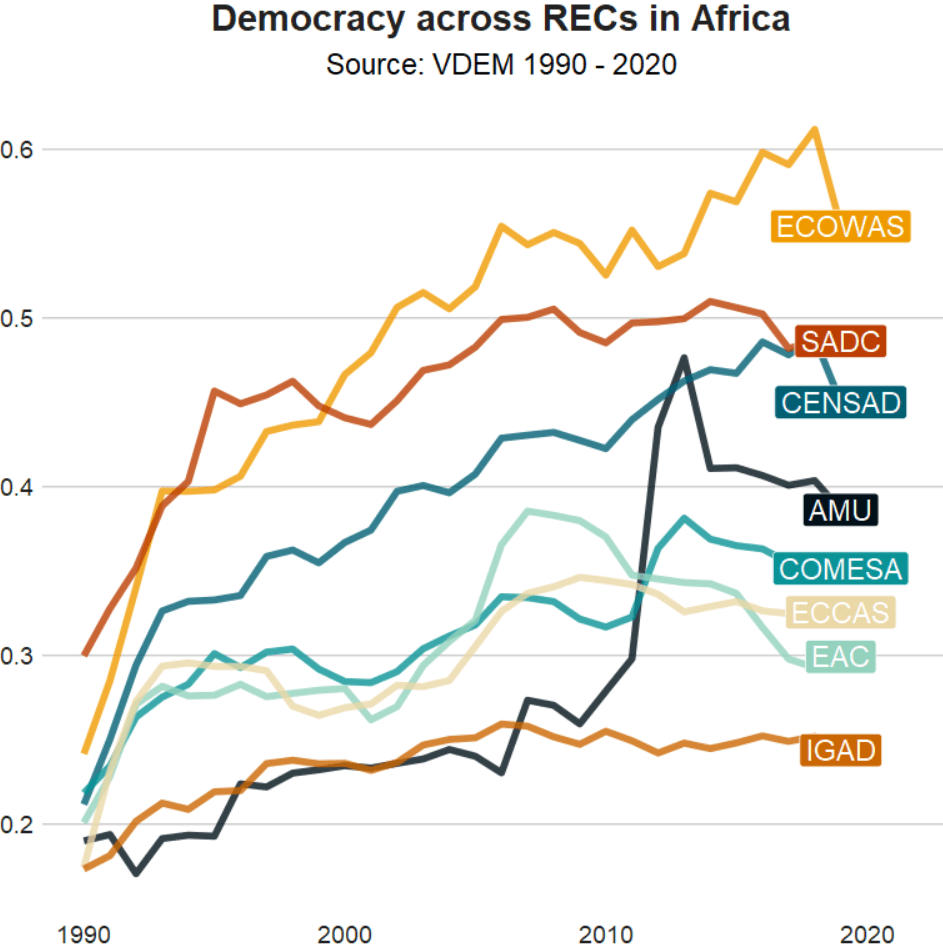
And we graph out the average democracy scores cross the years

rec_democracy_df %>% 
  ggplot(aes(x = year, y = mean_demo, group = rec)) + 
  geom_line(aes(fill = rec, color = rec), size = 2, alpha = 0.8) + 
  # geom_point(aes(fill = rec, color = rec), size = 4) + 
  geom_label(data = . %>% group_by(rec) %>% filter(year == 2019), 
             aes(label = rec, 
                 fill = rec, 
                 x = 2019), color = "white",
             legend = FALSE, size = 3) +  
  scale_color_manual(values = tailwind_hash) + 
  scale_fill_manual(values = tailwind_hash) + 
  theme(legend.position = "none")

How to create a Regional Economic Communities dataset. PART ONE: Scraping data with rvest in R

Click here for part two on the REC dataset.

Packages we will need:

library(tidyverse)
library(rvest)
library(janitor)
library(ggflags)
library(countrycode)

The Economic Community of West African States (ECOWAS) has been in the news recently. The regional bloc is openly discussing military options in response to the coup unfolding in the capital of Niger.

This made me realise that I know VERY VERY LITTLE about the regional economic communities (REC) in Africa.

Ernest Aniche (2015: 41) argues, “the ghost of [the 1884] Berlin Conference” led to a quasi-balkanisation of African economies into spheres of colonial influence. He argues that this ghost “continues to haunt Africa […] via “neo-colonial ties” today.

To combat this balkanisation and forge a new pan-Africanist approach to the continent’s development, the African Union (AU) has focused on regional integration.

This integration was more concretely codified with 1991’s Abuja Treaty.

One core pillar on this agreement highlights a need for increasing flows of intra-African trade and decreasing the reliance on commodity exports to foreign markets (Songwe, 2019: 97)

Broadly they aim mirror the integration steps of the EU. That translates into a roadmap towards the development of:

Free Trade Areas:

  • AU : The African Continental Free Trade Area (AfCFTA) aims to create a single market for goods and services across the African continent, with the goal of boosting intra-African trade.
  • EU : The European Free Trade Association (EFTA) is a free trade area consisting of four European countries (Iceland, Liechtenstein, Norway, and Switzerland) that have agreed to remove barriers to trade among themselves.

Customs Union:

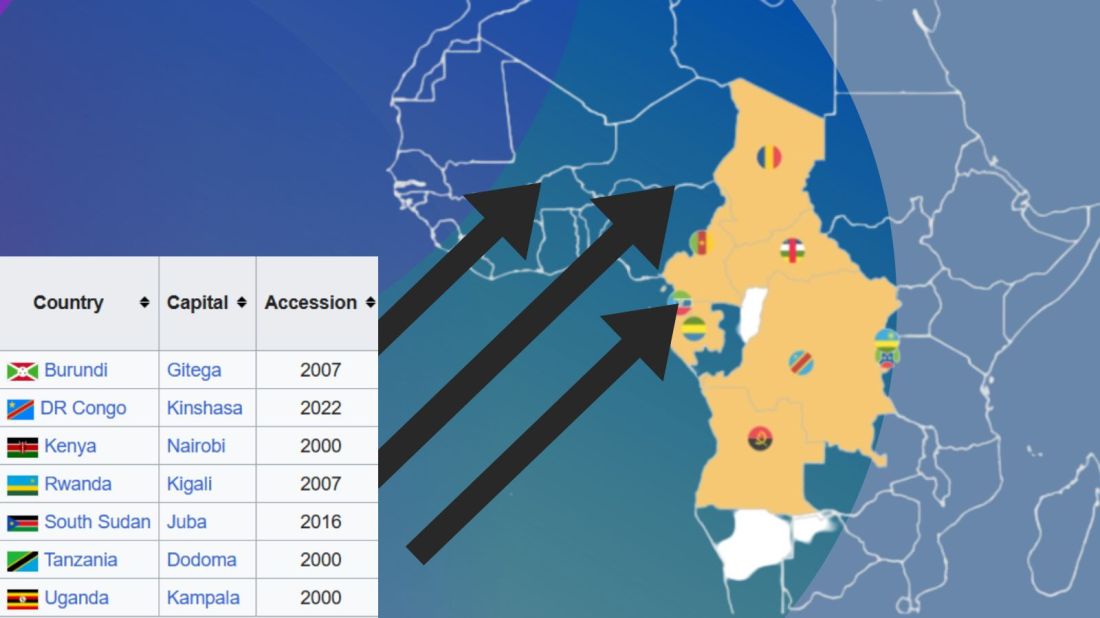
  • AU: The East African Community (EAC) is an REC a customs union where member states (Burundi, Kenya, Rwanda, South Sudan, Tanzania, and Uganda) have eliminated customs duties and adopted a common external tariff for trade with non-member countries.
  • EU: The EU’s Single Market is a customs union where goods can move freely without customs duties or other barriers across member states.

Common Market:

  • AU: Many RECs such the Southern African Development Community (SADC) is working towards establishing a common market that allows for the free movement of goods, services, capital, and labor among its member states.
  • EU: The EU is a prime example of a common market, where not only goods and services, but also people and capital, can move freely across member countries.

Economic Union:

  • AU: The West African Economic and Monetary Union (WAEMU) is moving towards an economic union with shared economic policies, a common currency (West African CFA franc), and coordination of monetary and fiscal policies.
  • EU: Has coordinated economic policies and a single currency (Euro) used by several member states.

The achievement of a political union on the continent is seen as the ultimate objective in many African countries (Hartzenberg, 2011: 2), such as the EU with its EU Parliament, Council, Commission and common foreign policy.

According to a 2012 UNCTAD report, “progress towards regional integration has, to date, been uneven, with some countries integrating better at the regional and/or subregional level and others less so”.

So over this blog, series, we will look at the RECs and see how they are contributing to African integration.

We can use the rvest package to scrape the countries and information from each Wiki page. Click here to read more about the rvest package and web scraping:

First we will look at the Arab Maghreb Union (AMU). We feed the AMU wikipedia page into the read_html() function.

With `[[`(3) we can choose the third table on the Wikipedia page.

With the janitor package, we can can clean the names (such as remove capital letters and awkward spaces) and ensure more uniform variable names.

We pull() the country variable and it becomes a vector, then turn it into a data frame with as.data.frame() . Alternatively we can just select this variable with the select() function.

We create some more variables for each REC group when we merge them all together later.

We will use the str_detect() function from the stringr package to filter out the total AMU column row as it is non-country.

read_html("https://en.wikipedia.org/wiki/Arab_Maghreb_Union") %>% 
  html_table(header = TRUE, fill = TRUE) %>% 
  `[[`(3) %>%  
  clean_names()  %>% 
  pull(country) %>% 
  as.data.frame() %>% 
  mutate(rec = "Arab Meghreb Union",
         geo = "Maghreb", 
         rec_abbrev = "AMU") %>% 
  select(country = '.', everything()) %>% 
  filter(!str_detect(country, fixed("Arab Maghreb", ignore_case = TRUE))) -> amu

We can see in the table on the Wikipedia page, that it contains a row for all the Arab Maghreb Union countries at the end. But we do not want this.

We use the str_detect() function to check if the “country” variable contains the string pattern we feed in. The ignore_case = TRUE makes the pattern matching case-insensitive.

The ! before str_detect() means that we remove this row that matches our string pattern.

We can use the fixed() function to make sure that we match a string as a literal pattern rather than a regular expression pattern / special regex symbols. This is not necessary in this situation, but it is always good to know.

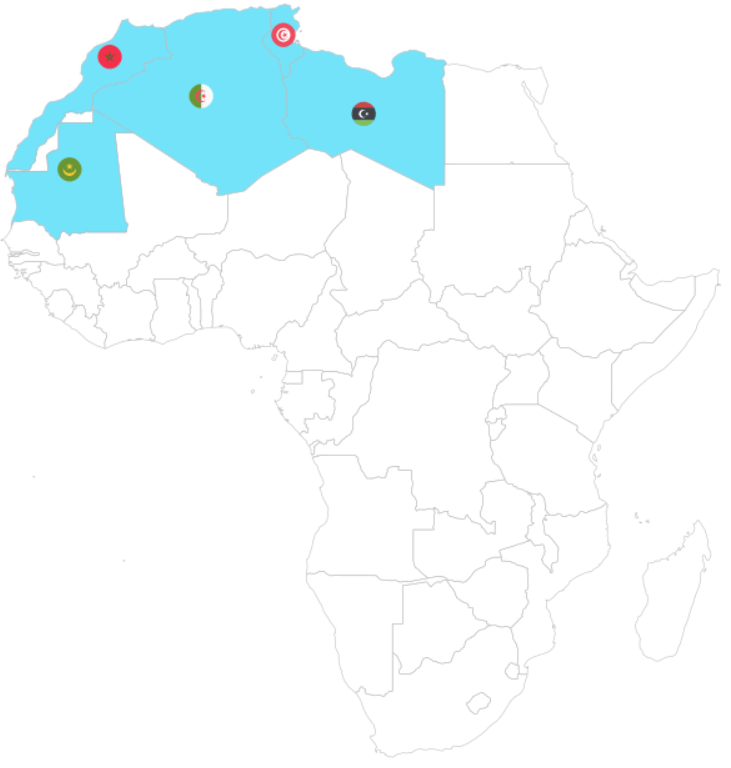
For this example, I will paste the code to make a map of the countries with country flags.

Click here to read more about adding flags to maps in R

First we download a map object from the rnaturalearth package

world_map <- ne_countries(scale = "medium", returnclass = "sf")

To add the flags on the map, we need longitude and latitude coordinates to feed into the x and y arguments in the geom_flag(). We can scrape these from the web too.

We add iso2 character codes in all lower case (very important for the geom_flag() step)) with the countrycode() function.

Click here to read more about the countrycode package.

read_html("https://developers.google.com/public-data/docs/canonical/countries_csv") %>%
  html_table(header = TRUE, fill = TRUE) %>% 
  `[[`(1) %>% 
  select(latitude, 
         longitude, 
         iso_a2 = country) %>% 
  right_join(world_map, by = c("iso_a2" = "iso_a2")) %>% 
  left_join(amu, by = c("admin" = "country")) %>% 
  select(latitude, longitude, iso_a2, geometry, admin, region_un, rec, rec_abbrev) %>% 
  mutate(amu_map = ifelse(!is.na(rec), 1, 0),
         iso_a2 = tolower(iso_a2)) %>%
  filter(region_un == "Africa") -> amu_map

Set a consistent theme for the maps.

theme_set(bbplot::bbc_style() +   theme(legend.position = "none",
                                        axis.text.x = element_blank(),
                                        axis.text.y = element_blank(),
                                        axis.title.x = element_blank(),
                                        axis.title.y = element_blank()))

And we can create the map of AMU countries with the following code:

amu_map %>% 
  ggplot() + 
  geom_sf(aes(geometry = geometry,
              fill = as.factor(amu_map), 
              alpha = 0.9),
          position = "identity",
          color = "black") + 
  ggflags::geom_flag(data = . %>% filter(rec_abbrev == "AMU"), 
                     aes(x = longitude,
                         y = latitude + 0.5,
                         country = iso_a2), 
                     size = 6) +
  scale_fill_manual(values = c("#FFFFFF", "#b766b4")) 

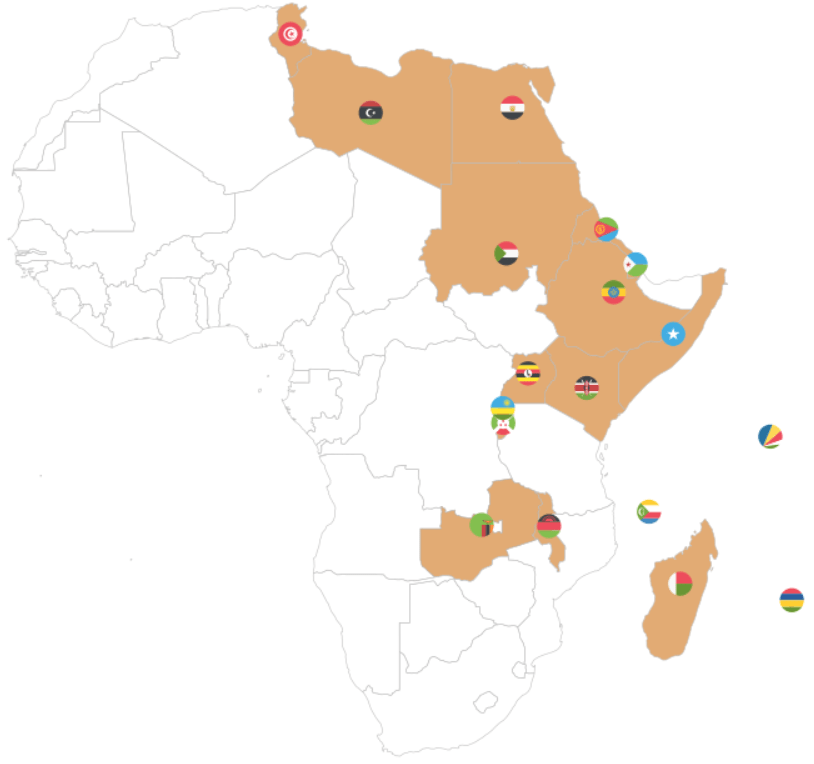
Next we will look at the Common Market for Eastern and Southern Africa.

If we don’t want to scrape the data from the Wikipedia article, we can feed in the vector of countries – separated by commas – into a data.frame() function.

Then we can separate the vector of countries into rows, and a cell for each country.

data.frame(country = "Djibouti, 
           Eritrea, 
           Ethiopia,
           Somalia,
           Egypt,
           Libya,
           Sudan,
           Tunisia,
           Comoros,
           Madagascar,
           Mauritius,
           Seychelles,
           Burundi,
           Kenya,
           Malawi,
           Rwanda,
           Uganda,
           Eswatini,
           Zambia") %>% 
  separate_rows(country, sep = ",") %>%  
  mutate(country = trimws(country)) %>%
  mutate(rec = "Common Market for Eastern and Southern Africa", 
         geo = "Eastern and Southern Africa",
         rec_abbrev = "COMESA") -> comesa

The separate_rows() function comes from the tidyr package.

We use this to split a single column with comma-separated values into multiple rows, creating a “long” format.

With the mutate(country = trimws(country)) we can remove any spaces with whitespace trimming.

Onto the third REC – the Community of Sahel-Sahara States.

read_html("https://en.wikipedia.org/wiki/Community_of_Sahel%E2%80%93Saharan_States") %>% 
  html_table(header = TRUE, fill = TRUE) %>% 
  `[[`(5) %>%  
  janitor::clean_names()  %>% 
  pull() %>% as.data.frame() %>%
  select(country = '.', everything()) %>% 
  mutate(country = str_replace_all(country, "\\\n", ",")) %>% 
  separate_rows(country, sep = ",") %>% # create a column of words from the one cell vector of words!
  mutate(country = trimws(country)) %>%  # remove the white space
  mutate(rec = "Community of Sahel–Saharan States",
         geo = "Sahel Saharan States", 
         rec_abbrev = "CEN-SAD") -> censad

Fourth, onto the East African Community REC.

read_html("https://en.wikipedia.org/wiki/East_African_Community") %>% 
    html_table(header = TRUE, fill = TRUE) %>% 
    `[[`(2) %>%  
    janitor::clean_names() %>%
    pull(country) %>% 
    as.data.frame() %>% 
    mutate(rec = "East African Community",
           geo = "East Africa", 
           rec_abbrev = "EAC") %>% 
    select(country = '.', everything()) %>% 
  filter(str_trim(country) != "") -> eac

Fifth, we look at ECOWAS

read_html("https://en.wikipedia.org/wiki/Economic_Community_of_West_African_States") %>% 
  html_table(header = TRUE, fill = TRUE) %>% 
  `[[`(2) %>%  
  janitor::clean_names() %>%
  pull(country) %>% 
  as.data.frame() %>% 
  mutate(rec = "Economic Community of West African States",
         geo = "West Africa", 
         rec_abbrev = "ECOWAS") %>%
  select(country = '.', everything()) %>% 
  filter(str_trim(country) != "")  %>% 
  filter(str_trim(country) != "Total")  -> ecowas

Next the Economic Community of Central African States

read_html("https://en.wikipedia.org/wiki/Economic_Community_of_Central_African_States") %>% 
  html_table(header = TRUE, fill = TRUE) %>% 
  `[[`(4) %>%  
  janitor::clean_names() %>% 
  pull(country) %>% 
  as.data.frame() %>% 
    mutate(rec = "Economic Community of Central African States",
           geo = "Central Africa", 
           rec_abbrev = "ECCAS") %>% 
  select(country = '.', everything()) -> eccas

Seventh, we look at the Intergovernmental Authority on Development (IGAD)

data.frame(country = "Djibouti, Ethiopia, Somalia, Eritrea, Sudan, South Sudan, Kenya, Uganda") %>%  
separate_rows(country, sep = ",") %>%  
mutate(rec = "Intergovernmental Authority on Development", 
           geo = "Horn, Nile, Great Lakes",
           rec_abbrev = "IGAD") -> igad

Last, we will scrape Southern African Development Community (SADC)

read_html("https://en.wikipedia.org/wiki/Southern_African_Development_Community") %>% 
  html_table(header = TRUE, fill = TRUE) %>% 
  `[[`(3) %>%  
  janitor::clean_names() %>% 
  pull(country) %>% 
  as.data.frame() %>% 
  select(country = '.', everything()) %>% 
  mutate(country = sub("\\[.*", "", country),
    rec = "Southern African Development Community",
         geo = "Southern Africa", 
         rec_abbrev = "SADC") %>% 
  filter(!str_detect(country, fixed("Country", ignore_case = FALSE))) -> sadc

We can combine them all together with rbind to make a full dataset of all the countries.

  rbind(amu, censad, comesa, eac, eccas, ecowas, igad, sadc) %>% 
  mutate(country = trimws(country)) %>% 
  mutate(rec_abbrev = tolower(rec_abbrev)) -> rec

In the next blog post, we will complete the dataset (most importantly, clean up the country duplicates and make data visualisations / some data analysis with political and economic data!

References

Hartzenberg, T. (2011). Regional integration in Africa. World Trade Organization Publications: Economic Research and Statistics Division Staff Working Paper (ERSD-2011-14). PDF available

PDF available

UNCTAD (United Nations Conference on Trade and Development) (2021). Economic Development in Africa Report 2021: Reaping the Potential Benefits of the African Continental Free Trade Area for Inclusive Growth. PDF available

Songwe, V. (2019). Intra-African trade: A path to economic diversification and inclusion. Coulibaly, Brahima S, Foresight Africa: Top Priorities for the Continent in, 97-116. PDF available

How to tidy up messy Wikipedia data with dplyr in R

Packages we will need:

library(rvest)
library(magrittr)
library(tidyverse)
library(waffle)
library(wesanderson)
library(ggthemes)
library(countrycode)
library(forcats)
library(stringr)
library(tidyr)
library(janitor)
library(knitr)

To see another blog post that focuses on cleaning messy strings and dates, click here to read

We are going to look at Irish embassies and missions around the world. Where are the embassies, and which country has the most missions (including embassies, consulates and representational offices)?

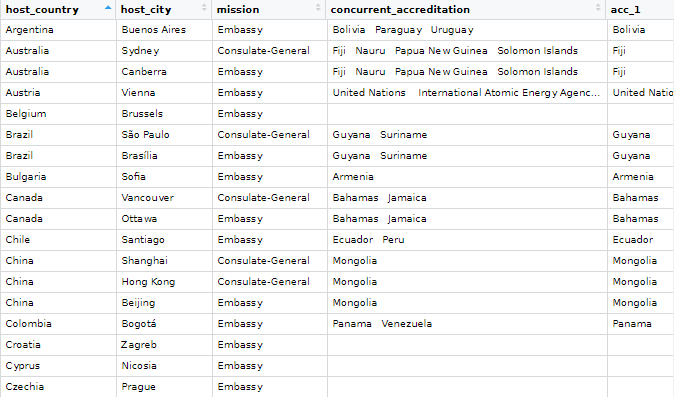
Let’s first scrape the embassy data from the Wikipedia page. Here is how it looks on the webpage.

It is a bit confusing because Ireland does not have a mission in every country. Argentina, for example, is the embassy for Bolivia, Paraguay and Uruguay.

Also, there are some consulates-general and other mission types.

Some countries have more than one mission, such as UK, Canada, US etc. So we are going to try and clean up this data.

Click here to read more about scraping data with the rvest package

embassies_html <- read_html("https://en.wikipedia.org/wiki/List_of_diplomatic_missions_of_Ireland")

embassies_tables <- embassies_html %>% html_table(header = TRUE, fill = TRUE)

We will extract the data from the different continent tables and then bind them all together at the end.

africa_emb <- embassies_tables[[1]]

africa_emb %<>% 
  mutate(continent = "Africa")

americas_emb <- embassies_tables[[2]]

americas_emb %<>% 
  mutate(continent = "Americas")

asia_emb <- embassies_tables[[3]]

asia_emb %<>% 
  mutate(continent = "Asia")

europe_emb <- embassies_tables[[4]]

europe_emb %<>% 
  mutate(continent = "Europe")

oceania_emb <- embassies_tables[[5]]

oceania_emb %<>% 
  mutate(continent = "Oceania")

Last, we bind all the tables together by rows, with rbind()

ire_emb <- rbind(africa_emb, 
                 americas_emb,
                 asia_emb,
                 europe_emb,
                 oceania_emb)

And clean up the names with the janitor package

ire_emb %<>% 
  janitor::clean_names() 

There is a small typo with a hypen and so there are separate Consulate General and Consulate-General… so we will clean that up to make one single factor level.

ire_emb %<>% 
  mutate(mission = ifelse(mission == "Consulate General", "Consulate-General", mission))

We can count out how many of each type of mission there are

ire_emb %>% 
  group_by(mission) %>% 
  count() %>% 
  arrange(desc(n)) %>% 
  knitr::kable(format = "html")
mission n
Embassy 69
Consulate-General 17
Liaison office 1
Representative office 1

A quick waffle plot

ire_emb %>% 
  group_by(mission) %>%
  count() %>% 
  arrange(desc(n)) %>% 
  ungroup() %>% 
  ggplot(aes(fill = mission, values = n)) +
  geom_waffle(color = "white", size = 1.5, 
              n_rows = 20, flip = TRUE) + 
  bbplot::bbc_style() +
  scale_fill_manual(values= wes_palette("Darjeeling1", n = 4))

We can remove the notes in brackets with the sub() function.

Square brackets equire a regex code \\[.*

ire_emb %<>% 
  select(!ref) %>%
  mutate(host_country = sub("\\[.*", "", host_country))

We delete the subheadings from the concurrent_accreditation column with the str_remove() function from the stringr package

ire_emb %<>%
  mutate(concurrent_accreditation = stringr::str_remove(concurrent_accreditation, "International Organizations:\n")) %>% 
  mutate(concurrent_accreditation = stringr::str_remove(concurrent_accreditation, "Countries:\n"))

After that, we will tackle the columns with many countries. The many variables in one cell violates the principles of tidy data.

Tonight Show Help GIF by The Tonight Show Starring Jimmy Fallon - Find & Share on GIPHY

For example, we saw above that Argentina is the embassy for three other countries.

We will use the separate() function from the tidyr package to make a column for each country that shares an embassy with the host country.

This separate() function has six arguments:

First we indicate the column with will separate out with the col argument

Next with into, we write the new names of the columns we will create. Nigeria has the most countries for which it is accredited to be the designated embassy with nine. So I create nine accredited countries columns to accommodate this max number.

The point I want to cut up the original column is at the \n which is regex for a large space

I don’t want to remove the original column so I set remove to FALSE

ire_emb %<>%
  separate(
    col = "concurrent_accreditation",
    into = c("acc_1", "acc_2", "acc_3", "acc_4", "acc_5", "acc_6", "acc_7", "acc_8", "acc_9"),
    sep = "\n",
    remove = FALSE,
    extra = "warn",
    fill = "warn") %>% 
  mutate(across(where(is.character), str_trim)) 

Some countries have more than one type of mission, so I want to count each type of mission for each country and create a new variable with the distinct() and pivot_wider() functions

Click here to read more about turning long to wide format data

With the across() function we can replace all numeric variables with NA to zeros

Click here to read more about the across() function

ire_emb %>% 
  group_by(host_country, mission) %>% 
  mutate(number_missions = n())  %>% 
  distinct(host_country, mission, .keep_all = TRUE) %>% 
  ungroup() %>% 
  pivot_wider(!c(host_city, concurrent_accreditation:count_accreditation), 
              names_from = mission, 
              values_from = number_missions) %>% 
  janitor::clean_names() %>% 
  mutate(across(where(is.numeric), ~ replace_na(., 0))) %>% 
  select(!host_country) -> ire_wide

Before we bind the two datasets together, we need to only have one row for each country.

ire_emb %>% 
  distinct(host_country, .keep_all = TRUE) -> ire_dist

And bind them together:

ire_full <- cbind(ire_dist, ire_wide) 
Excited Aubrey Plaza GIF by Film Independent Spirit Awards - Find & Share on GIPHY

We can graph out where the embassies are with the geom_polygon() in ggplot

First we download the map data from dplyr and add correlates of war codes so we can easily join the datasets together with right_join()

First, we add correlates of war codes

Click here to read more about the countrycode package

ire_full %<>%
    mutate(cown = countrycode(host_country, "country.name", "cown")) 
world_map <- map_data("world")

world_map %<>% 
  mutate(cown = countrycode::countrycode(region, "country.name", "cown"))

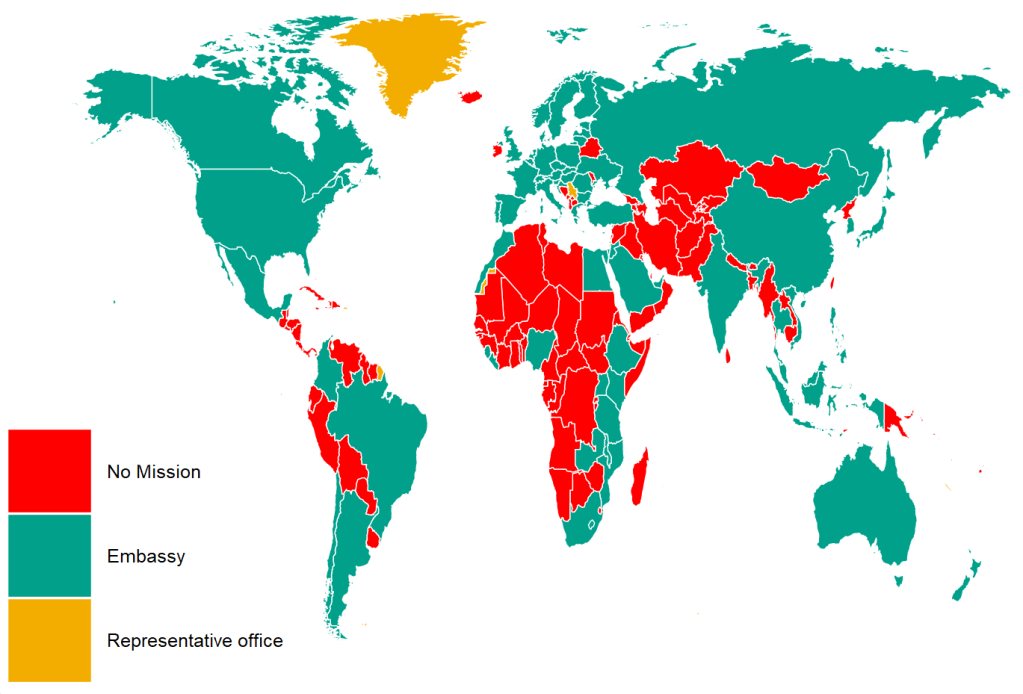
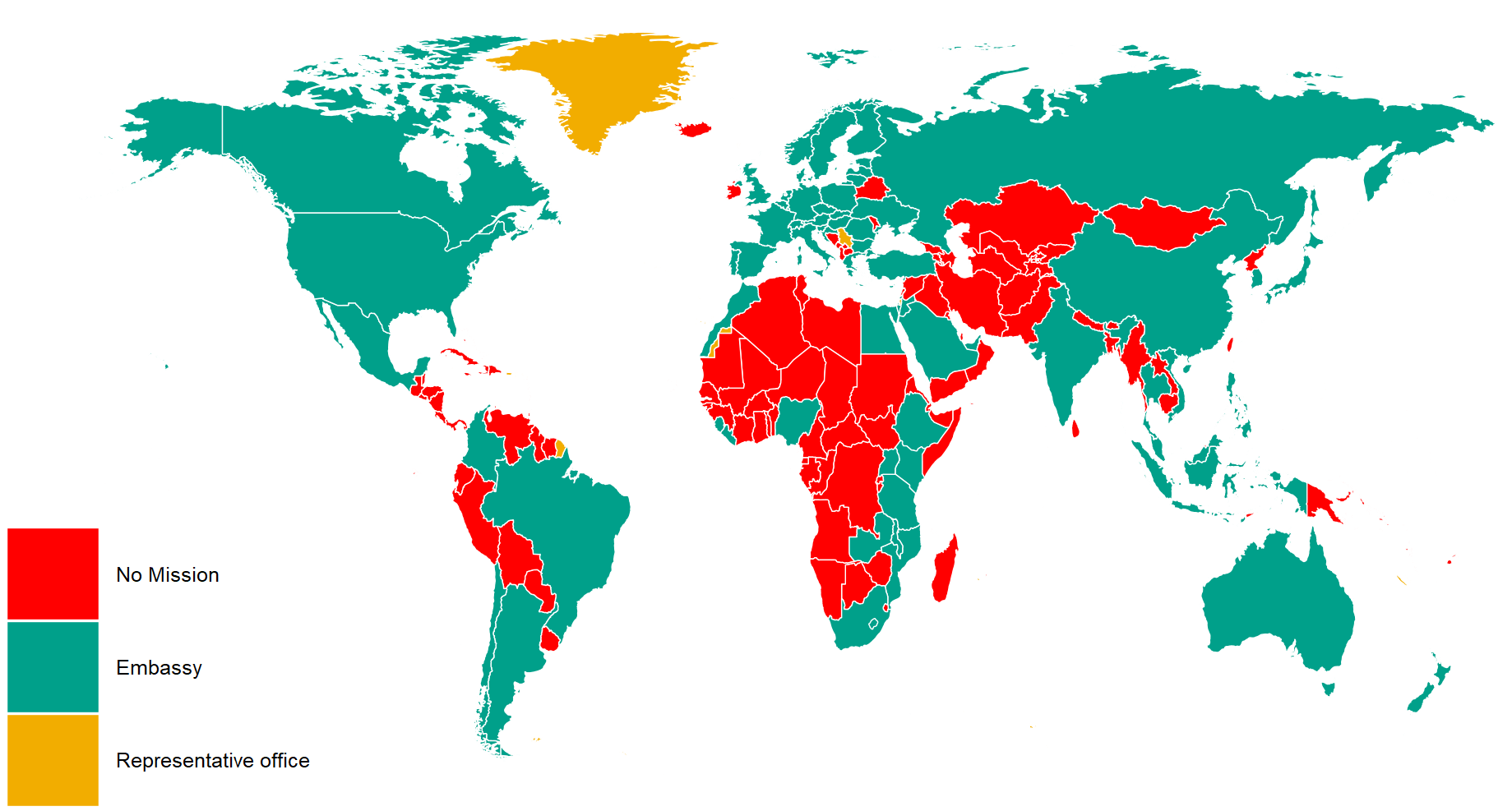
I reorder the variables with the fct_relevel() function from the forcats package. This is just so they can better match the color palette from wesanderson package. Green means embassy, red for no mission and orange for representative office.

ire_full %>%
  right_join(world_map, by = "cown") %>% 
  filter(region != "Antarctica") %>% 
  mutate(mission = ifelse(is.na(mission), replace_na("No Mission"), mission)) %>% 
  mutate(mission = forcats::fct_relevel(mission,c("No Mission", "Embassy","Representative office"))) %>%
  ggplot(aes(x = long, y = lat, group = group)) + 
  geom_polygon(aes(fill = mission), color = "white", size = 0.5)  -> ire_map

And we can change how the map looks with the ggthemes package and colors from wesanderson package

  ire_map + ggthemes::theme_map() +
  theme(legend.key.size = unit(3, "cm"),
        text = element_text(size = 30),
        legend.title = element_blank()) + 
  scale_fill_manual(values = wes_palette("Darjeeling1", n = 4))

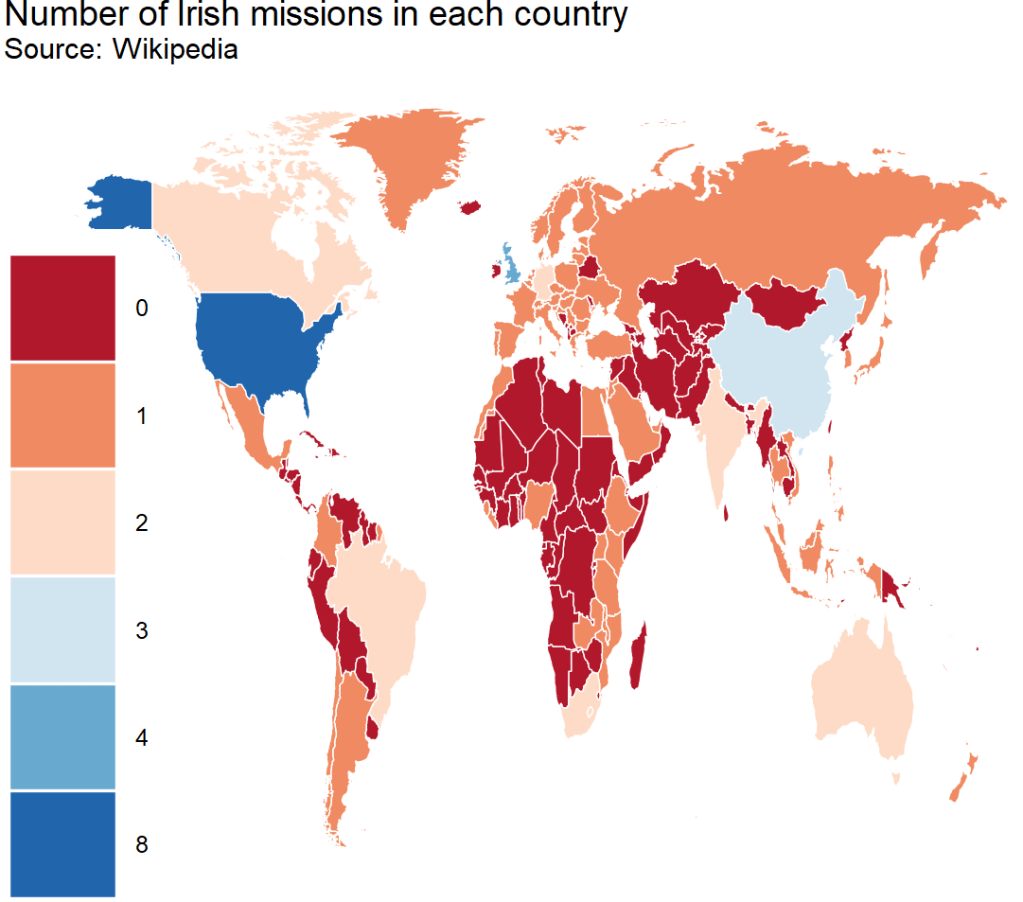
And we can count how many missions there are in each country

US has the hightest number with 8 offices, followed by UK with 4 and China with 3

ire_full %>%
  right_join(world_map, by = "cown") %>% 
  filter(region != "Antarctica") %>% 
  mutate(sum_missions = rowSums(across(embassy:representative_office))) %>% 
  mutate(sum_missions = replace_na(sum_missions, 0)) %>%  
  ggplot(aes(x = long, y = lat, group = group)) + 
  geom_polygon(aes(fill = as.factor(sum_missions)), color = "white", size = 0.5)  +
  ggthemes::theme_map() +
  theme(legend.key.size = unit(3, "cm"),
        text = element_text(size = 30),
        legend.title = element_blank()) + 
scale_fill_brewer(palette = "RdBu") + 
  ggtitle("Number of Irish missions in each country",
          subtitle = "Source: Wikipedia")

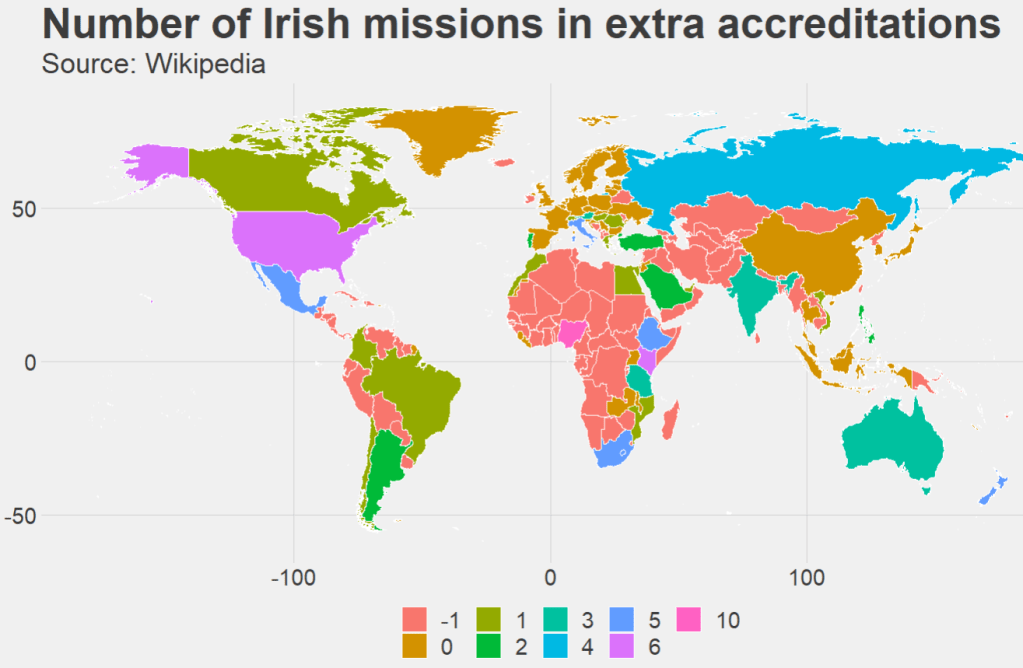
Last we can count the number of accredited countries that each embassy has. Nigeria has the most, in charge of 10 other countries across northern and central Africa.

ire_full %>% 
  right_join(world_map, by = "cown") %>% 
  filter(region != "Antarctica") %>%
  mutate(count_accreditation = str_count(concurrent_accreditation, pattern = "\n")) %>% 
  mutate(count_accreditation = replace_na(count_accreditation, -1)) %>%  
  ggplot(aes(x = long, y = lat, group = group)) + 
  geom_polygon(aes(fill = as.factor(count_accreditation)), color = "white", size = 0.5)  +
  ggthemes::theme_fivethirtyeight() +
  theme(legend.key.size = unit(1, "cm"),
        text = element_text(size = 30),
        legend.title = element_blank()) + 
  ggtitle("Number of Irish missions in extra accreditations",
          subtitle = "Source: Wikipedia")
Happy Maya Rudolph GIF - Find & Share on GIPHY