Graphing female politicians in Irish parliament with R PART 2: Trends and Maps

Packages we will need

library(tidyverse)
library(magrittr)
library(waffle)
library(geojsonio)
library(sf)

In PART 1, we looked at the gender package to help count the number of women in the 33rd Irish Parliament.

I repeated that for every session since 1921. The first and second Dail are special in Ireland as they are technically pre-partition.

Cleaned up the data aaaand now we have a full dataset with constituencies data.

If anyone wants a copy of the dataset, I can upload it here for those who are curious ~

So first… a simple pie chart!

First we calculate proportion of seats held by women

dail %>% 
  mutate(decade = substr(year, 1, 3)) %>% 
  mutate(decade = paste0(decade, "0s")) %>%
  group_by(decade) %>% 
  ungroup() %>% 
  group_by(decade, gender) %>% 
  count() %>% 
  group_by(decade) %>% 
  mutate(proportion = n / sum(n)) -> dail_pie
# A tibble: 22 × 4
# Groups:   decade [11]
   decade gender     n proportion
   <chr>  <chr>  <int>      <dbl>
 1 1920s  female    20     0.0261
 2 1920s  male     747     0.974 
 3 1930s  female    10     0.0172
 4 1930s  male     572     0.983 
 5 1940s  female    12     0.0284
 6 1940s  male     411     0.972 
 7 1950s  female    16     0.0363
 8 1950s  male     425     0.964 
 9 1960s  female    11     0.0255
10 1960s  male     421     0.975 
# 12 more rows

We will be looking at how proportions changed over the decades.

When using facet_wrap() with coord_polar(), it’s a pain in the arse.

This is because coord_polar() does not automatically allow each facet to have a different scale. Instead, coord_polar() treats all facets as having the same axis limits.

This will mess everything up.

If we don’t change the coord_polar(), we will just distort pie charts when the facet groups have different total values. There will be weird gaps and make some phantom pacman non-charts.

function() TRUE is an anonymous function that always returns TRUE.

my_coord_polar$is_free <- function() TRUE forces coord_polar() to allow different scales for each facet.

In our case, we call my_coord_polar$is_free, which means that whenever ggplot2 checks whether the coordinate system allows free scales across facets, it will now always return TRUE!!!

Overriding is_free() to always return TRUE signals to ggplot2 that coord_polar() means that our pie charts NOOWW will respect the "free" scaling specified in facet_wrap(scales = "free").

my_coord_polar <- coord_polar(theta = "y")
my_coord_polar$is_free <- function() TRUE

If you want to look more at this, check out this blog:

And we can go and create the ggplot:

dail_pie %>%
  ggplot(aes(x = "", 
         y = proportion, 
         fill = as.factor(gender))) +

  geom_bar(stat="identity", width = 1) +
  
  geom_text(
    data = . %>% filter(gender == "female"), aes(label = scales::percent(proportion, 
    accuracy = 0.1)), 
    color = "white",
    size = 8) +
  
  my_coord_polar +

  facet_wrap(~decade, scales = "free") + 
  scale_fill_manual(values =c("#bc4749", "#003049")) +
  # my_style() +
  theme(axis.text.x = element_blank(),
        panel.grid.major = element_blank(),
        panel.grid.minor = element_blank(),
        panel.grid = element_blank(), 
        panel.background = element_blank(), 
        axis.text = element_blank(), 
        axis.ticks = element_blank()) 
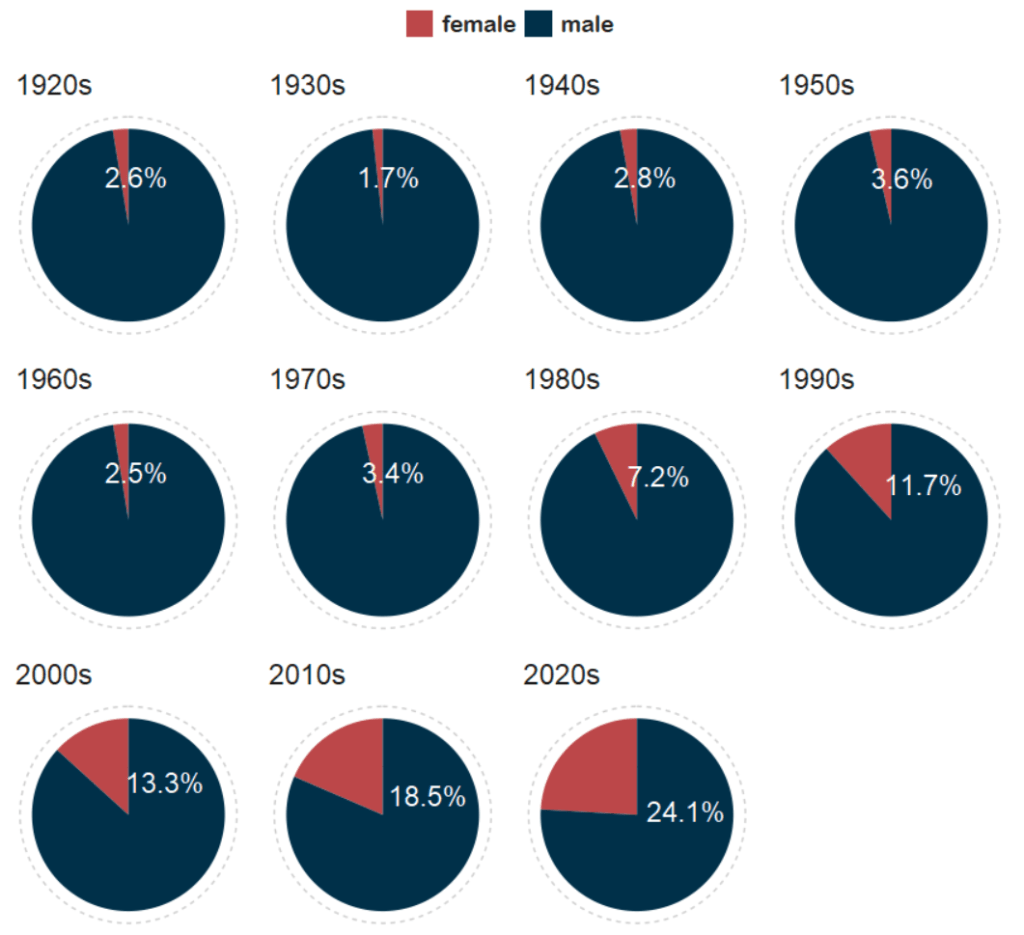
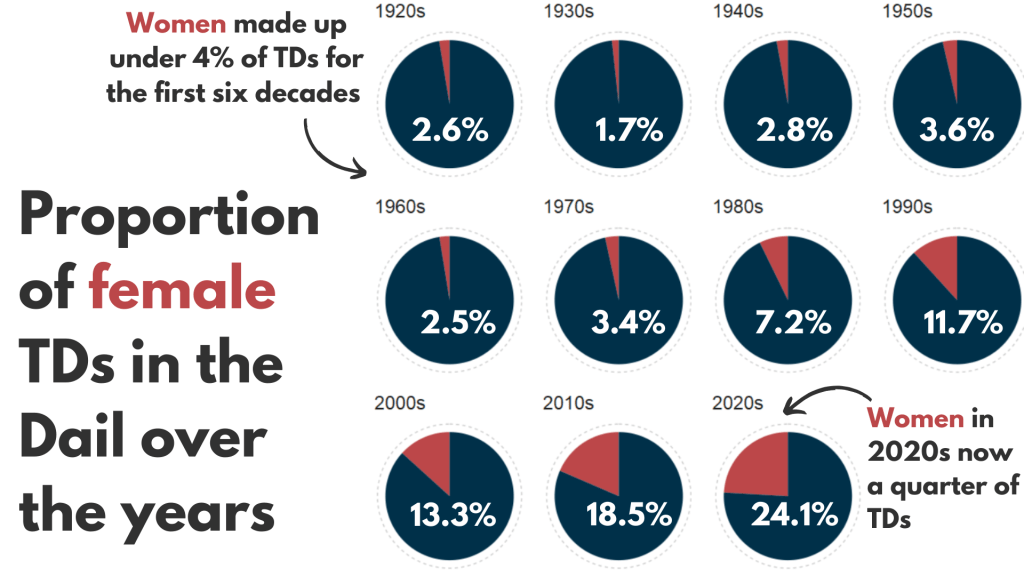
And with Canva, I add the arrows and titles~

Sorry I couldn’t figure it out in R. I just hate all the times I need to re-run graphics to move a text or number by a nano-centimeter. Websites like Canva are just far better for my sanity and short attention span.
Next, we can make a facetted waffle plot!

dail %>% 
  group_by(decade) %>% 
  ungroup() %>% 
  group_by(decade, gender) %>% 
  count() %>% 
  ggplot(aes(fill = as.factor(gender), values = n)) +
  waffle::geom_waffle(color = "white", 
                      size = 0.5, 
                      n_rows = 10, 
                      flip = TRUE) +
  facet_wrap(~decade, nrow = 1, strip.position = "bottom") +
# my_style  +
  scale_fill_manual(values =c("#003049", "#bc4749")) +
  theme(axis.text.x.bottom = element_blank(),
        text = element_text(size = 40))

And mea culpa, I finished the annotation and titles are with Canva.

Once again, life is too short to be messing with annotation in ggplot.

Next, we can make a simple trend line of the top Irish parties and see how they have fared with women TDs.

Let’s get a dataframe with average number of TDs elected to each party over the decades

dail %>% 
  filter(constituency != "National University") %>% 
  filter(party %in% c("Fianna Fáil", "Fine Gael", "Labour", "Sinn Féin")) %>% 
  group_by(party, decade) %>% 
  summarise(avg_female = mean(gender == "female")) -> dail_avg
# A tibble: 39 × 3
# Groups:   party [4]
   party       decade avg_female
   <chr>       <chr>       <dbl>
 1 Fianna Fáil 1920s     0.0198 
 2 Fianna Fáil 1930s     0.00685
 3 Fianna Fáil 1940s     0.0284 
 4 Fianna Fáil 1950s     0.0425 
 5 Fianna Fáil 1960s     0.0230 
 6 Fianna Fáil 1970s     0.0327 
 7 Fianna Fáil 1980s     0.0510 
 8 Fianna Fáil 1990s     0.0897 
 9 Fianna Fáil 2000s     0.0943 
10 Fianna Fáil 2010s     0.0938 
# 29 more rows

We create a new mini data.frame of four values so that we can have the geom_text() only at the end of the year (so similar to the final position of the graph).

final_positions <- dail_avg %>%
  group_by(party) %>%
  filter(decade == "2020s")  %>% 
  mutate(color = ifelse(party == "Sinn Féin", "#2fb66a",
         ifelse(party == "Fine Gael","#6699ff",
         ifelse(party == "Fianna Fáil","#ee9f27", 
         ifelse(party == "Labour", "#780000", "#495051")))))
# A tibble: 4 × 4
# Groups:   party [4]
  party       decade avg_female color  
  <chr>       <chr>       <dbl> <chr>  
1 Fianna Fáil 2020s       0.140 #ee9f27
2 Fine Gael   2020s       0.219 #6699ff
3 Labour      2020s       0.118 #780000
4 Sinn Féin   2020s       0.368 #2fb66a

A hex colour for each major party

party_pal <- c("Sinn Féin" = "#2fb66a",
                "Fine Gael" = "#6699ff",
                "Fianna Fáil" = "#ee9f27", 
                "Labour" = "#780000")

And a geom_bump() layer in the plot using the ggbump() package for more wavy lines.

dail_avg %>% 
  ggplot(aes(x = decade,
             y = avg_female, 
             group = party, 
             color = party)) + 

  ggbump::geom_bump(aes(color = party),
            smooth = 5,
            alpha = 0.5,
            size = 4)  +

  geom_point(color = "white", 
             size = 7, 
             stroke = 4) + 

  geom_point(size = 6) +

  ggrepel::geom_text_repel(data = final_positions,
            aes(color = party,
                y = avg_female,
                x = decade,
            label = party),
            family = "Arial Rounded MT Bold",
            vjust = -2,
            hjust = -1,
            size = 15) +
# my_style() 
  scale_color_manual(values = party_pal) +
  scale_y_continuous(labels = scales::label_percent()) +
  scale_x_discrete(expand = expansion(add = c(0.2, 2))) +
  theme(legend.position = "none") 

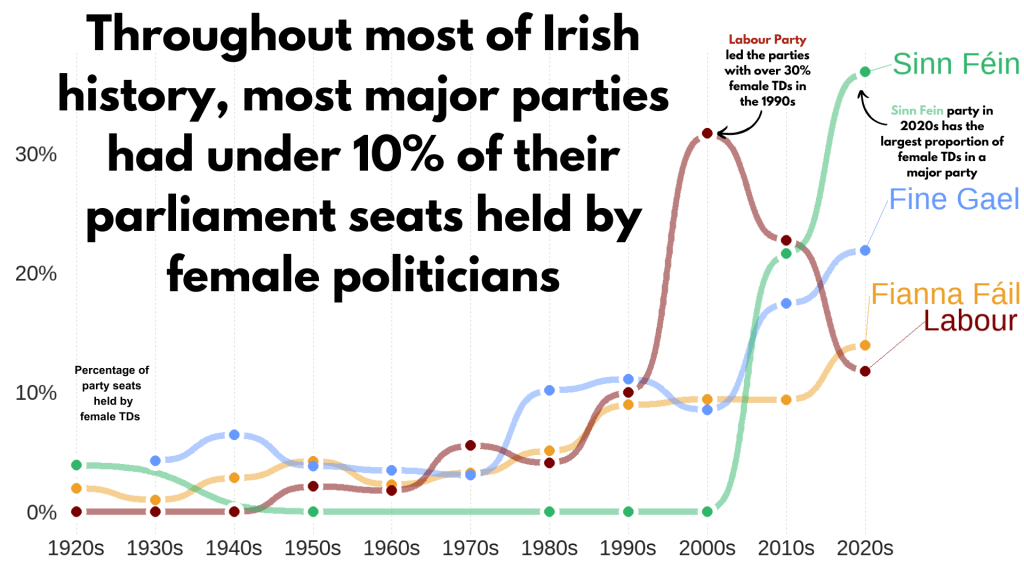
This graph looks at major Irish political parties from the 1920s to the 2020s.

For most of Irish history, female representation remained under 10%.

The Labour Party surged ahead like crazy in the 1990s; it got over 30% female TDs!

Now in the 2020s, Sinn Féin has the largest proportion of female TDs and goes way above and beyond the other major parties.

Now, onto constituency maps.

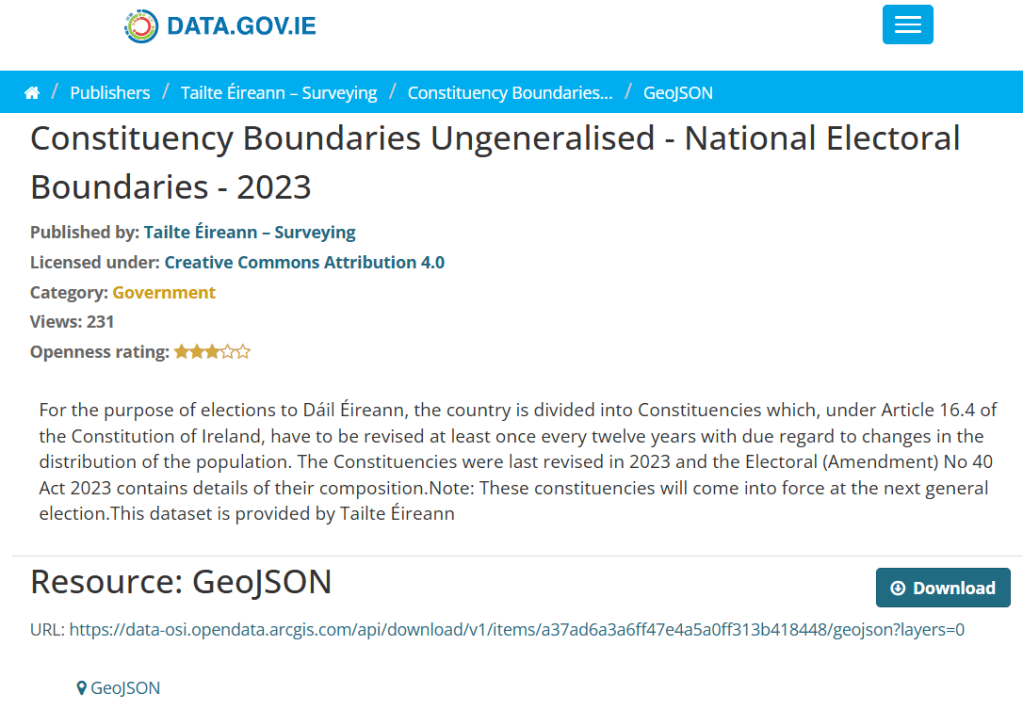
We can go to the Irish government’s website with heaps of data! Yay free data.

This page brings us to the election constituencies GeoJSON map data.
For more information about making GeoJSON and SF maps click here to read about how to create maps in R ~

So we read in the data and convert to SF dataframe.

constituency_map <- geojson_read(file.choose(), what = "sp")

constituency_sf <- st_as_sf(constituency_map)

This constituency_sf has 64 variables but most of them are meta-data info like the dates that each variable was updated. The vaaast majority, we don’t need so we can just pull out the consituency var for our use:

constituency_sf %>% 
  select(constituency = ENG_NAME_VALUE, 
         geometry) -> mini_constituency_sf
Simple feature collection with 1072 features and 1 field
Geometry type: POLYGON
Dimension:     XY
Bounding box:  xmin: 417437.9 ymin: 516356.4 xmax: 734489.6 ymax: 966899.7
Projected CRS: IRENET95 / Irish Transverse Mercator
First 10 features:
          constituency                       geometry
1  Cork South-West (3) POLYGON ((501759.8 527442.6...
2            Kerry (5) POLYGON ((451686.2 558529.2...
3            Kerry (5) POLYGON ((426695 561869.8, ...
4            Kerry (5) POLYGON ((451103.9 555882.8...
5            Kerry (5) POLYGON ((434925.3 572926.2...
6          Donegal (5) POLYGON ((564480.8 917991.7...
7          Donegal (5) POLYGON ((571201.9 892870.7...
8          Donegal (5) POLYGON ((615249.9 944590.2...
9          Donegal (5) POLYGON ((563593.8 897601, ...
10         Donegal (5) POLYGON ((647306 966899.4, ...

As we see, the number of seats in each constituency is in brackets behind the name of the county. So we can separate them and create a seat variable:

  mini_constituency_sf %<>% 
   separate(constituency, 
            into = c("constituency", "seats"), 
            sep = " \\(", fill = "right") %>%
   mutate(seats = as.numeric(gsub("\\)", "", seats))) 

One problem I realised along the way when I was trying to merge the constituency map with the TD politicians data is that one data.frame uses a hyphen and one uses a dash in the constituency variable.

So we can make a quick function to replace en dash (–) with hyphen (-).

 replace_dash <- function(x) {
   if (is.character(x)) {
     gsub("–", "-", x)  
   } else {x}
}

 mini_constituency_sf %<>%
   mutate(across(where(is.character), replace_dash))

And now we can merge!

 dail %<>%
   right_join(mini_constituency_sf, by = "constituency") 

Now a quick map ~

 dail %<>%
  mutate(n = ifelse(is.na(percentage_women), 0, percentage_women)) %>%
   ggplot(aes(geometry = geometry)) +
   geom_sf(aes(fill = percentage_women),
           color = "black") +  s
   labs(title = "Map of Irish Constituencies") +
   # my_style() +
   scale_fill_viridis_c(option = "plasma")  +

    scale_fill_gradient2(low = "#57cc99",
                         mid = "#38a3a5",
                         high = "#22577a") +

   theme(axis.text = element_blank(),
     axis.text.x.bottom = element_blank(),
     legend.key.width = unit(1.5, "cm"), 
     legend.key.height = unit(0.4, "cm"), 
     legend.position = "bottom")
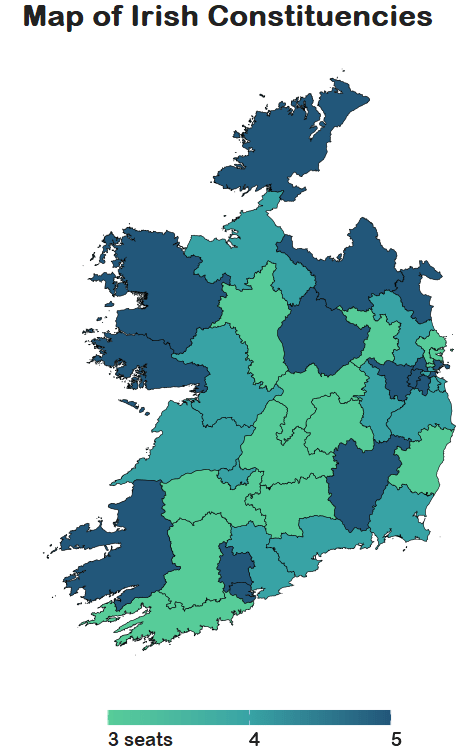
We can see that some constituencies have 3 seats, some 5~

So we cannot directly compare who has more female TDs.

A way to deal with this is scaling the data.

In PART 3, we will look at scaling data and analysing trends across the years!

Yay!
Graphing female politicians in Irish parliament R PART 1: Predicting names

Packages we will be using:

library(gender)
library(tidyverse)
library(stringi)
library(toOrdinal)
library(rvest)
library(janitor)
library(magrittr)

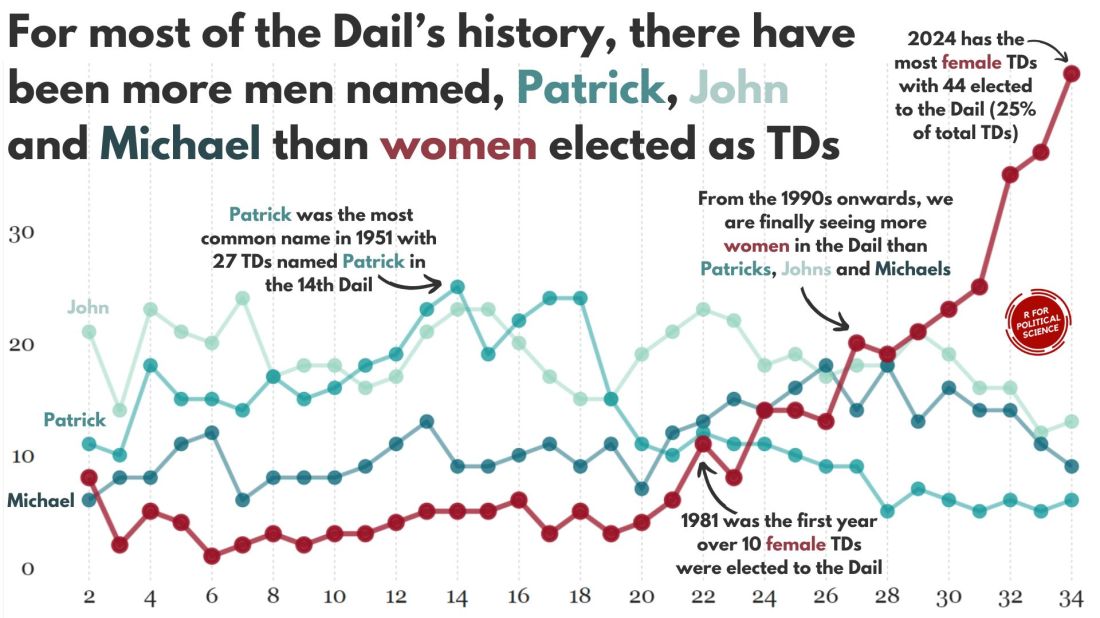
I heard a statistic a while ago that there are more men named Mike than total women in charge of committees in the US Senate.

In this blog, we can whether the number of women in the Irish parliament outnumber any common male name.

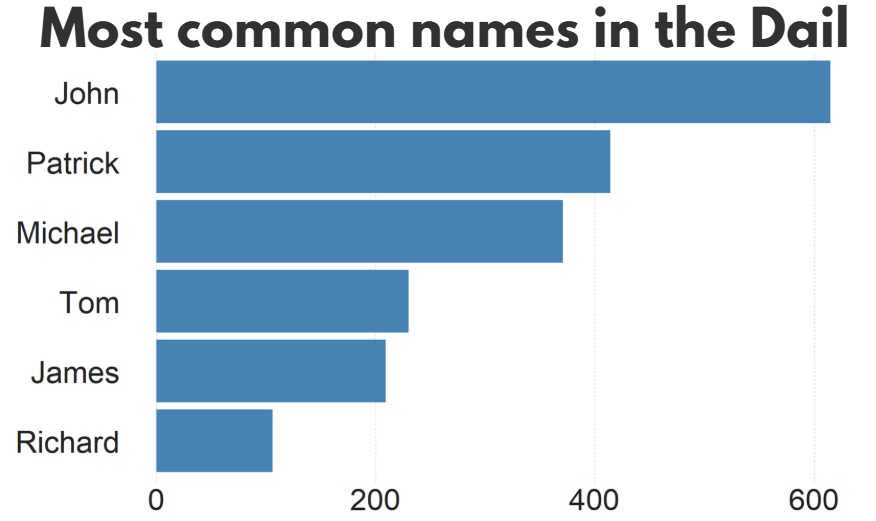
A quick glance on the most common names in the Irish parliament, we can see that from 1921 to 2024, there have been over 600 seats won by someone named John.

There are a LOT of men in Irish politics with the name Patrick (and variants thereof).

Worldcloud made with wordcloud2() package!

So, in this blog, we will:

  1. scrape data on Irish TDs,
  2. predict the gender of each politician and
  3. graph trends on female TDs in the parliament across the years.

The gender package attempts to infer gender (or more precisely, sex assigned at birth) based on first names using historical data.

Of course, gender is a spectrum. It is not binary.

As of 2025, there are no non-binary or transgender politicians in Irish parliament.

In this package, we can use the following method options to predict gender based on the first name:

1. “ssa” method uses U.S. Social Security Administration (SSA) baby name data from 1880 onwards (based on an implementation by Cameron Blevins)

2. “ipums” (Integrated Public Use Microdata Series) method uses U.S. Census data in the Integrated Public Use Microdata Series (contributed by Ben Schmidt)

3. “napp” uses census microdata from Canada, UK, Denmark, Iceland, Norway, and Sweden from 1801 to 1910 created by the North Atlantic Population Project

4. “kantrowitz” method uses the Kantrowitz corpus of male and female names, based on the SSA data.

5. The “genderize” method uses the Genderize.io API based on user profiles from social networks.

We can also add in a “countries” variable for just the NAPP method

For the “ssa” and “ipums” methods, the only valid option is “United States” which will be assumed if no argument is specified. For the “kantrowitz” and “genderize” methods, no country should be specified.

For the “napp” method, you may specify a character vector with any of the following countries: “Canada”, “United Kingdom”, “Denmark”, “Iceland”, “Norway”, “Sweden”.

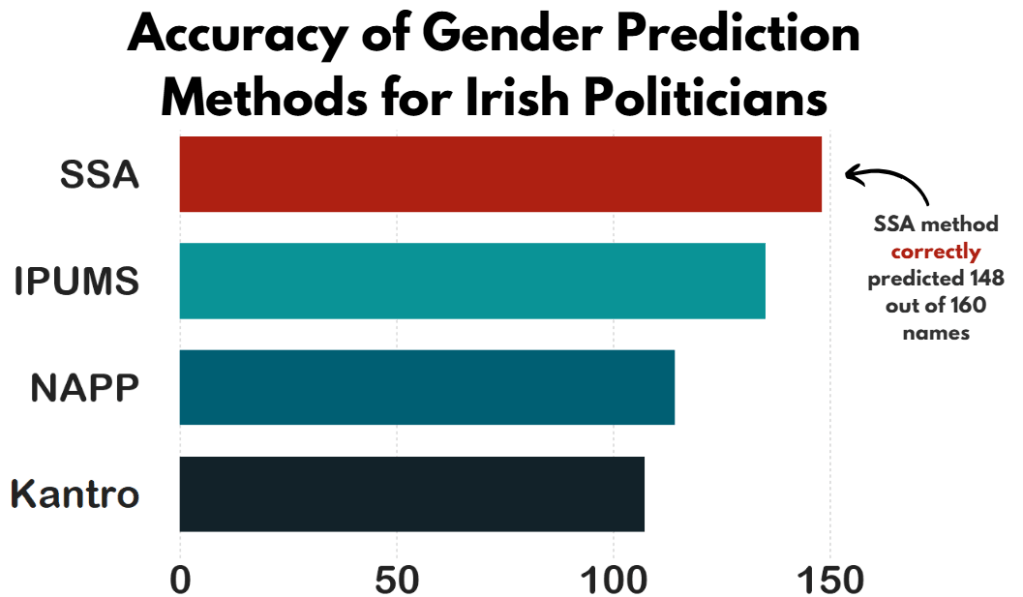
We can compare these different method with the true list of the genders that I manually checked.

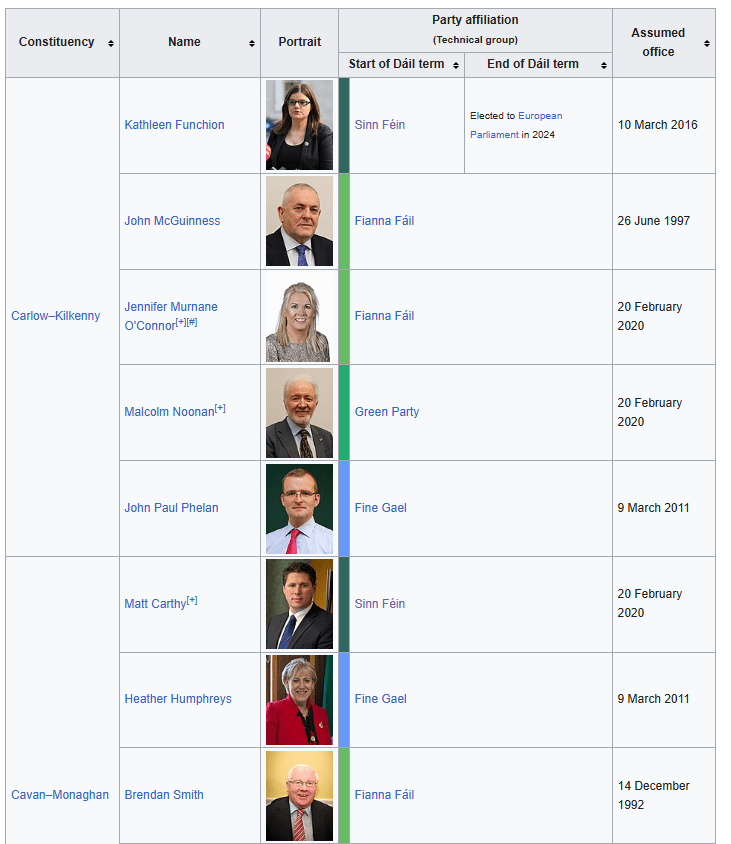
So let’s look at the 33rd Dail from Wikipedia.

https://en.wikipedia.org/wiki/33rd_D%C3%A1il

We can create a new variable with separate() so that it only holds the first name of each politician. We will predict the gender based on this.

dail_33 %<>% 
  separate(
    col = "name",
    into = c("first_name", "rest_name"),
    sep = " ",
    remove = FALSE,
    extra = "merge",
    fill = "warn") 

Irish names often have fadas so we can remove them from the name and make it easier for the prediction function.

remove_fada <- function(x) {
  stri_trans_general(x, id = "Latin-ASCII")
}

dail_33 %<>% 
  mutate(first_name = remove_fada(first_name)) 

Now we’re ready.

We can extract two variables of interest with the gender() function:

  1. gender variable (prediction of male or female name) and
  2. proportion_male (level of certainty about that prediction from 0 to 1).

If the method is confident about predicting male, it will give a higher score.

dail_33 %<>% 
  rowwise() %>%
  mutate(
    gender_ssa = gender(first_name, method = "ssa")$gender[1],  
    prop_male_ssa = gender(first_name, method ="ssa")$proportion_male[1])  

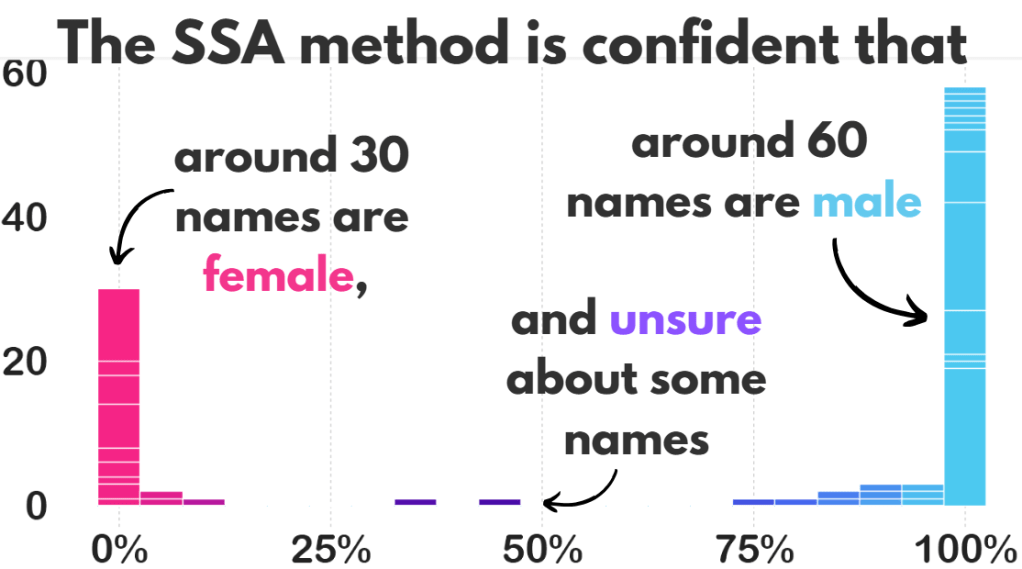
We can add both these to the dail_33 data.frame and check how confident the SSA method is about predicting the gender of all the names.

We can now create a histogram of this level of certainty about the prediction.

Before we graph it out, we

  • filter out the NA values,
  • remove duplicate first names,
  • round up the certainty to three decimal points and
  • choose the bin size for the histogram
  • find some nice hex colours for the graphs
dail_33 %<>% 
  filter(is.finite(prop_male_ssa)) %>% 
  distinct(first_name, .keep_all = TRUE) %>% 
  mutate(
    prop_male_ssa = round(prop_male_ssa, 3),
    bin_category = cut(prop_male_ssa, breaks = 10, labels = FALSE))

 gender_palette <- c("#f72585","#b5179e","#7209b7","#560bad","#480ca8","#3a0ca3","#3f37c9","#4361ee","#4895ef","#4cc9f0")

We can graph it out with the above palette of hex colours.

We can add label_percent() from the scales package for adding percentage signs on the x axis.

dail_33 %>%
  ggplot(aes(x = prop_male_ssa, fill = prop_male_ssa, 
group = prop_male_ssa)) +
  geom_histogram(binwidth = 0.05, color = "white") +  
  scale_fill_gradientn(colors = gender_palette) +  
 # my_style() +
  scale_x_continuous(labels = scales::label_percent()) +
  theme(legend.position = "none")

I added the arrows and texts on Canva.

Don’t judge. I just hate the annotate() part of ggplotting.

Two names that the prediction function was unsure about:

  full_name     prop_male_ssa  gender_ssa
    
Pat Buckley      0.359         female    
Jackie Cahill    0.446         female  

In these two instances, the politicians are both male, so it was good that the method flagged how unsure it was about labeling them as “female”.

And the names that the function had no idea about so assigned them as NA:

Violet-Anne Wynne    
Aindrias Moynihan    
Donnchadh Ó Laoghaire
Bríd Smith           
Sorca Clarke         
Ged Nash             
Peadar Tóibín 

Which is fair.

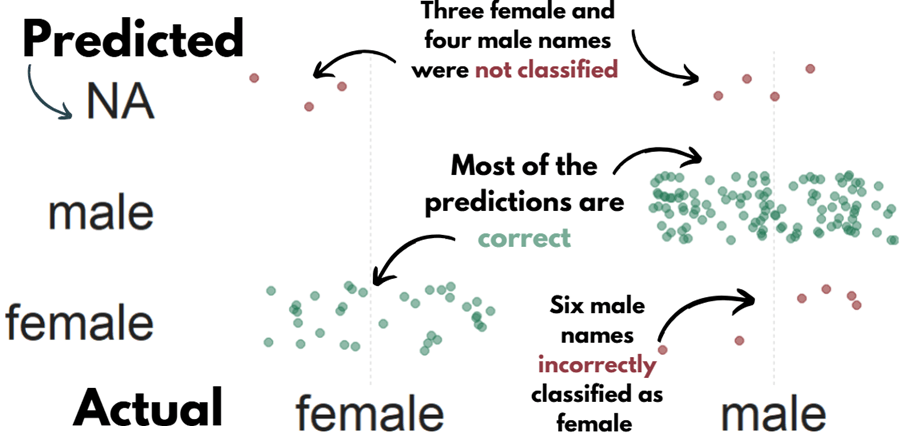
We can graph out whether the SSA predicted gender are the same as the actual genders of the TDs.

So first, we create a new variable that classifies whether the predictions were correct or not. We can also call NA results as incorrect. Although god bless any function attempting to guess what Donnchadh is.

dail_33 %>%
    mutate(correct = ifelse(gender == gender_ssa, "Correct", "Incorrect"), correct = ifelse(is.na(gender_ssa), "Incorrect", correct)) -> dail_correct

And graph it out:

dail_correct %>%
  ggplot(aes(x = gender, y = gender_ssa, color = correct )) +
  geom_jitter(width = 0.3, height = 0.3, alpha = 0.5, size = 4) +
  labs(
    x = "Actual Gender",
    y = "Predicted Gender",
    color = "Prediction") +
  scale_color_manual(values = c("Correct" = "#217653", "Incorrect" = "#780000")) +
  # my_style()

 dail %<>% 
   select(first_name, contains("gender")) %>% 
   distinct(first_name, .keep_all = TRUE) %>%  
   mutate(across(everything(), ~ ifelse(. == "either", NA, .))) 

Now, we can compare the SSA method with the other methods in the gender package and see which one is most accurate.

First, we repeat the same steps with the gender() function like above, and change the method arguments.

dail_33 %<>% 
  rowwise() %>%
  mutate(
    gender_ipums = gender(first_name, method = "ipums")$gender[1])

dail_33 %<>% 
  rowwise() %>%
  mutate(gender_napp = gender(first_name, method = "napp")$gender[1])

dail_33 %<>% 
  rowwise() %>%
  mutate(gender_kantro = gender(first_name, method = "kantrowitz" )$gender[1])

dail_33 %<>% 
  rowwise() %>%
  mutate(gender_ize = gender(first_name, method = "genderize" )$gender[1])

Or we can remove duplicates with purrr package

dail_33 %<>% 
  rowwise() %>%
  mutate(across(
    c("ipums", "napp", "kantrowitz", "genderize"), 
    ~ gender(first_name, method = .x)$gender[1], 
    .names = "gender_{.col}"
  ))

Then we calculate which one is closest to the actual measures.

dail_33 %>% 
summarise(accuracy_ssa = mean(ifelse(is.na(gender == gender_ssa), FALSE, gender == gender_ssa)),

     accuracy_ipums = mean(ifelse(is.na(gender == gender_ipums), FALSE, gender == gender_ipums)),

     accuracy_napp = mean(ifelse(is.na(gender == gender_napp), FALSE, gender == gender_napp)),

     accuracy_kantro = mean(ifelse(is.na(gender == gender_kantro), FALSE, gender == gender_kantro))) -> acc

Or to make it cleaner with across()

acc <- dail_33 %>%
  summarise(across(
    c(gender_ssa, gender_ipums, gender_napp, gender_kantro),
    ~ mean(ifelse(is.na(gender == .x), FALSE, gender == .x)),
    .names = "accuracy_{.col}"
  ))

Pivot the data.frame longer so that each method is in a single variable and each value is in an accuracy method.

acc %<>%
  pivot_longer(cols = everything(), names_to = "method", values_to = "accuracy") %>% 
  mutate(method = fct_reorder(method, accuracy, .desc = TRUE)) %>% 
  mutate(method = factor(method, levels = c("accuracy_kantro", "accuracy_napp", "accuracy_ipums", "accuracy_ssa"))) 

my_pal <- c(
  "accuracy_kantro" = "#122229",
  "accuracy_napp" = "#005f73",
  "accuracy_ipums" = "#0a9396",
  "accuracy_ssa" = "#ae2012")

And then graph it all out!

We can use scale_x_discrete() to change the labels of each different method

# Cairo::CairoWin()

acc %>% 
  ggplot(aes(x = method, y = accuracy, fill = method)) +  
  geom_bar(stat = "identity", width = 0.7) +
  coord_flip() + 
  ylim(c(0,160)) +
  theme(legend.position = "none",
        text = element_text(family = "Arial Rounded MT Bold")) +
  scale_fill_manual(values = sample(my_pal)) +
  scale_x_discrete(labels = c("accuracy_ssa" = "SSA",
                              "accuracy_napp" = "NAPP",
                              "accuracy_ipums" = "IPUMS", 
                              "accuracy_kantro" = "Kantro")) +
# my_style() 

Once again, I added the title and the annotations in Canva. I will never add arrow annotations in R if I have other options.

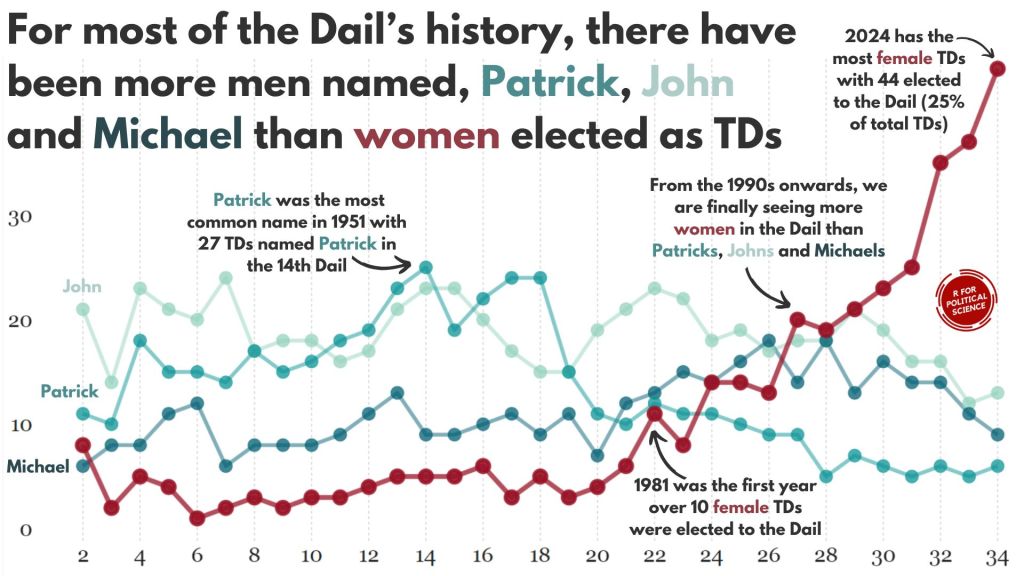
Coming up next, PART 2 on how we can analyse variations on women in the Irish parliament, such as the following graph:

How to web scrape and graph 2024 Irish election data with R

Packages we will use:

library(tidyverse)
library(rvest)
library(janitor)
library(magrittr)
library(ggparliament)
library(ggbump)
library(bbplot)

I am an Irish person living abroad. I did NOT follow the elections last year. So, as penance (as I just mentioned, I am Irish and therefore full of phantom Catholic guilt for neglecting political news back home), we will be graphing some of the election data and familiarise ourselves with the new contours of Irish politics in this blog.

Click here to visit the wikipedia page we will be scraping with the rvest package.

Click here to read more about the rvest package for webscraping.

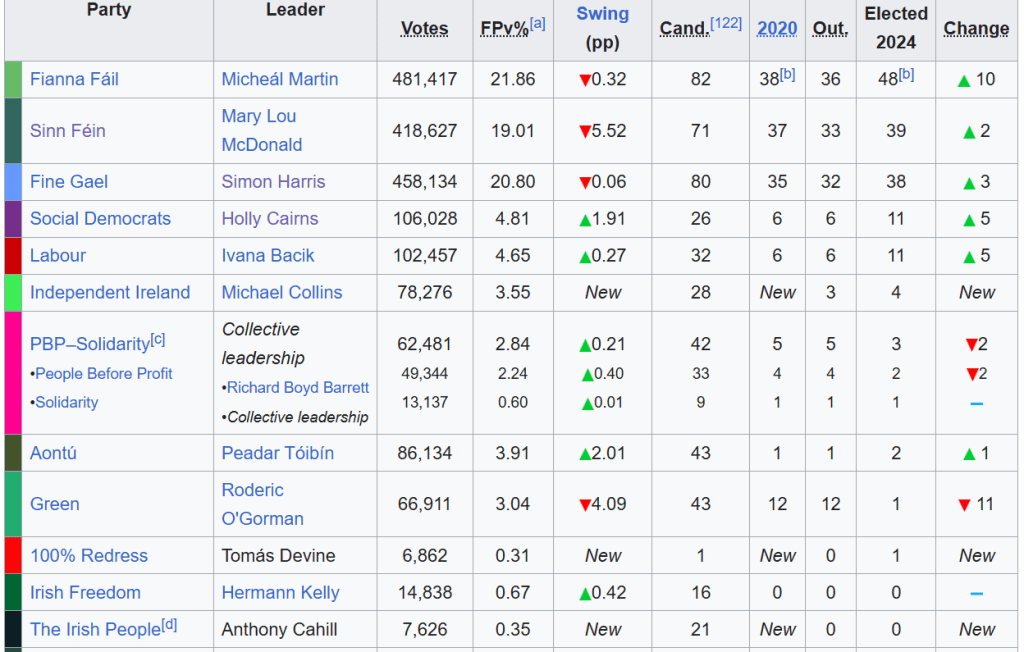
The data we want is in the 11th table on the page:

The columns that we will want are the Party and the Elected 2024 columns.

So using the read_html() function, we can feed in the URL, save all the tables with html_table() and then only keep the eleventh table with `[[`(11)

read_html("https://en.wikipedia.org/wiki/2024_Irish_general_election") %>% 
  html_table(header = TRUE, fill = TRUE) %>% 
  `[[`(11) -> dail_2024

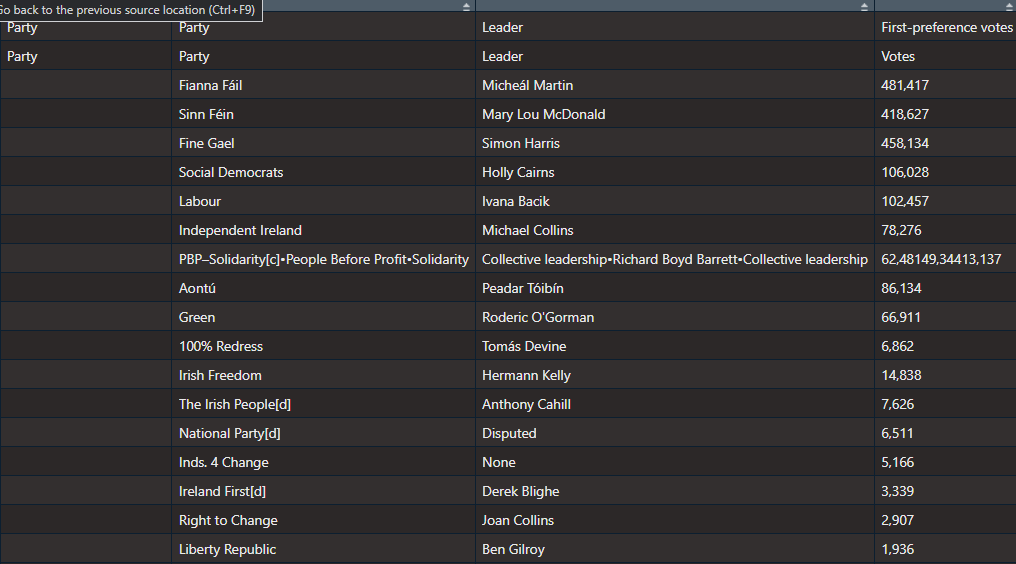
It’s a bit of a hot mess at this stage.

Right now, all the variable names are empty.

We can use the row_to_names() function from the janitor package. This moves a row up to became the variable names. Also we can use clean_names() (also a janitor package staple) to make every variable lowercase snake_case with underscores.

dail_2024 %<>% 
  row_to_names(row_number = 2) %>% 
  clean_names() %>% 

As you can see in the table above, the PBP cell is very crowded. This is due to the fact that many similar left-wing parties formed a loose coaltion when campaigning.

Because they are all in one cell, every number was shoved together without spaces. So instead of each party in the loose grouping, it was all added together. It makes the table wholly incorrect; the PBP coalition did not win trillions of votes.

Things like this highlights the importance of always checking the raw data after web scraping.

So I just brute recode the value according to what is actually on the Wiki page.

dail_2024 %<>% 
  mutate(elected2024 = if_else(party_2 == "PBP–Solidarity[c]•People Before Profit•Solidarity", "3", elected2024))

Next we need to remove the annoying [footnotes in square brackets] on the page with some regex nonsense.

dail_2024 %<>% 
  mutate(across(everything(), ~ str_replace(., "\\[.*$", ""))) 

And finally, we just need to select, rename and change the seat numbers from character to numeric

dail_2024 %<>%  
  select(party = party_2, seats = elected2024)  %>% 
  mutate(seats= parse_number(seats))

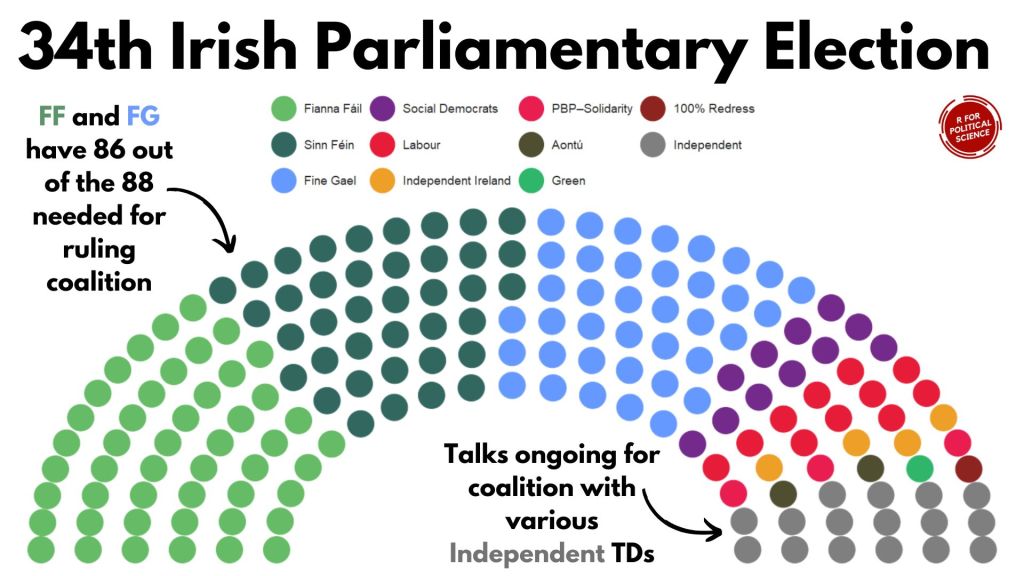
Next, we just need to graph it out with the geom_parliament_seats() layer of the ggplot graph with ggparliament package.

Click here to read more about the ggparliament package:

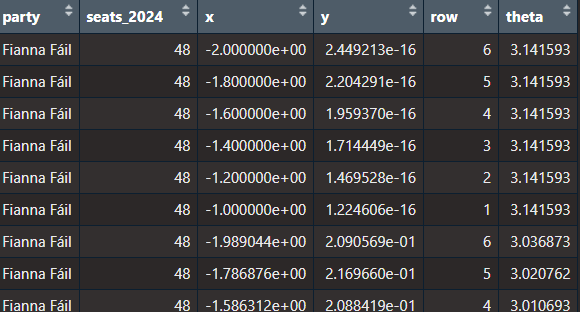
First, we generate the circle coordinates

dail_2024_coord <- parliament_data(election_data = dail_2024,
                   type = "semicircle", 
                   parl_rows = 6,  
                   party_seats = dail_2024$seats_2024)

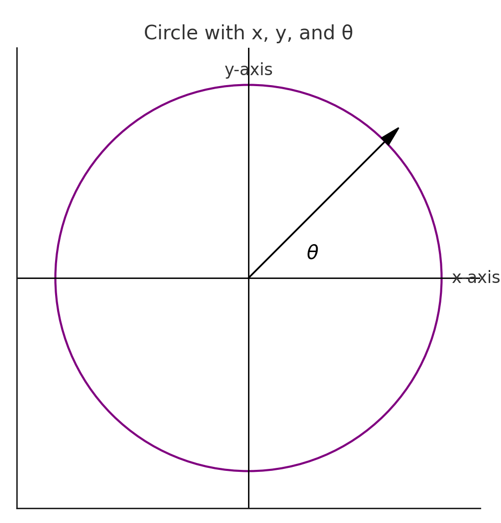
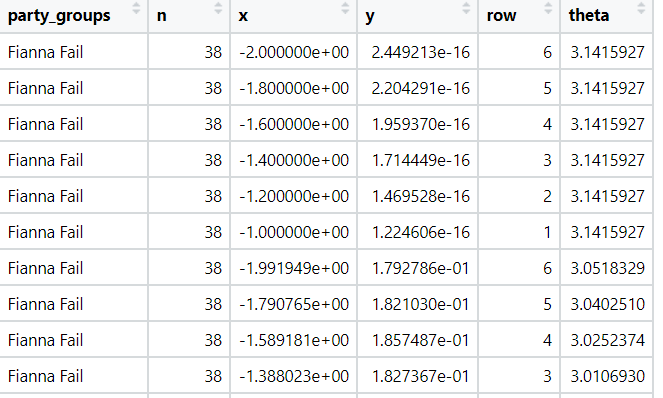
x: the horizontal position of a point in the semi-circle graph.

y: the vertical position of a point in the semi-circle graph.

row: The row or layer of the semi-circle in which the point (seat) is positioned. Rows are arranged from the base (row 1) to the top of the semi-circle.

theta: The angle (in radians) used to calculate the position of each seat in the semi-circle. It determines the angular placement of each point, starting at 0 radians (rightmost point of the semi-circle) and increasing counterclockwise to π\piπ radians (leftmost point of the semi-circle).

We want to have the biggest parties first and the smallest parties at the right of the graph

dail_elected %<>% 
  mutate(party = fct_reorder(party, table(party)[party], .desc = TRUE))

and we can add some hex colors that represent the parties’ representative colours.

dail_elected_coord %<>% 
  mutate(party_colour = case_when(party == "Fianna Fáil" ~ "#66bb66",
                       party == "Fine Gael" ~ "#6699ff",
                       party == "Green" ~ "#2fb66a",
                       party == "Labour" ~ "#e71c38",
                       party == "Sinn Féin" ~ "#326760",
                       party == "PBP–Solidarity" ~ "#e91d50",
                       party ==  "Social Democrats" ~ "#742a8b",
                       party == "Independent Ireland" ~ "#ee9f27",
                       party == "Aontú" ~ "#4f4e31",
                       party == "100% Redress" ~ "#8e2420"))

And we graph out the ggplot with the simple bbc_style() from the bbplot package

dail_elected_coord %>% 
  ggplot(aes(x = x, y = y,
             colour = party)) +
  geom_parliament_seats(size = 13) +
  bbplot::bbc_style()  +
  ggtitle("34th Irish Parliament") +
  theme(text = element_text(size = 50),
        legend.title = element_blank(),
        axis.text.x = element_blank(),
        axis.text.y = element_blank())  +
  scale_colour_manual(values = dail_elected_coord$party_colour,
                      limits = dail_elected_coord$party)

HONESTY TIME… I will admit, I replaced the title as well as the annotated text and arrows with Canva dot comm

Hell is … trying to incrementally make annotations to go to place we want via code. Why would I torment myself when drag-and-drop options are available for free.

Next, let’s compare this year with previous years

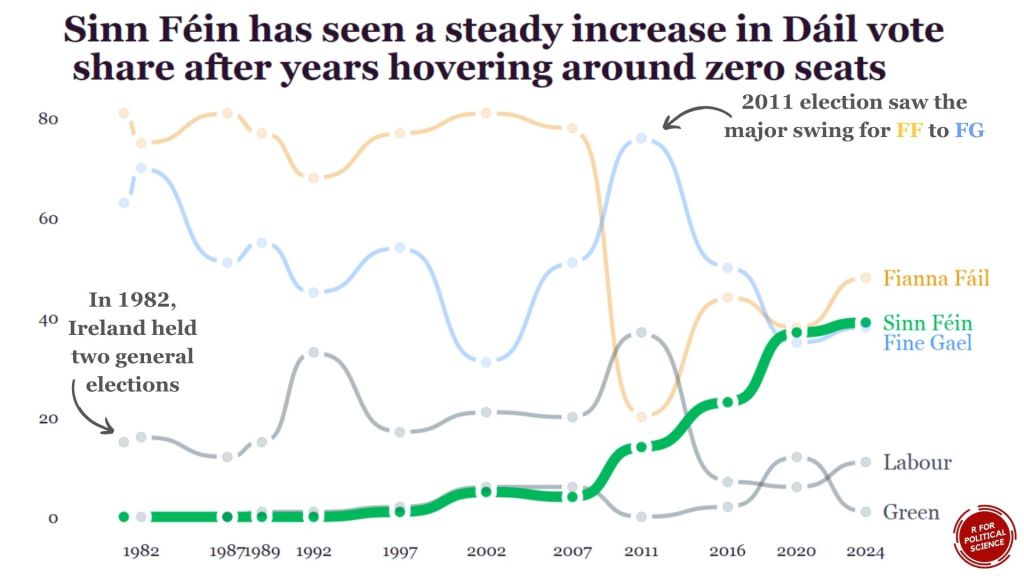
I was also hoping to try replicate this blog post about bump plots with highlighted labels from the r-graph-gallery website.

We can use this kind of graph to highlight a particular trend.

For example, the rise of Sinn Fein as a heavy-hitter in Irish politics.

We will need to go to many of the Wikipedia pages on the elections and scrape seat data for the top parties for each year.

Annoyingly, across the different election pages, the format is different so we have to just go by trial-and-error to find the right table for each election year and to find out what the table labels are for each given year.

Since going to many different pages ends up with repeating lots of code snippets, we can write a process_election_data() function to try cut down on replication.

process_election_data <- function(url, table_index, header_row, party_col, seats_col, top_parties, extra_mutate = NULL) {
  read_html(url) %>%
    html_table(header = TRUE, fill = TRUE) %>%
    `[[`(table_index) %>%
    row_to_names(row_number = header_row) %>%
    clean_names() %>%
    mutate(across(everything(), ~ str_replace(., "\\[.*$", ""))) %>%
    select(party = !!sym(party_col), seats = !!sym(seats_col)) %>%
    mutate(seats = parse_number(seats)) %>%
    filter(party %in% top_parties)
}

In this function, mutate(across(everything(), ~ str_replace(., "\\[.*$", ""))) removes all those annoying footnotes in square brackets from the Wiki table with regex code.

Annoyingly, the table for the 2024 election is labelled differently to the table with the 2016 results on le Wikipedia. So when we are scraping from each webpage, we will need to pop in a sliiiightly different string.

We can use the sym() and the !! to accomodate that.

When we type on !! (which the coder folks call bang-bang), this unquotes the string we feed in. We don’t want the function to treat our string as a string.

After this !! step, we can now add them as variables within the select() function.

We will only look at the biggest parties that have been on the scene since 1980s

top_parties <- c("Fianna Fáil", "Fine Gael", "Sinn Féin", "Labour Party", "Green Party")

Now, we feed in the unique features that are unique for scraping each web page:

dail_2024 <- process_election_data(
  url = "https://en.wikipedia.org/wiki/2024_Irish_general_election
  table_index = 11,
  header_row = 2,
  party_col = "party_2",
  seats_col = "elected2024",
  top_parties = top_parties)

dail_2020 <- process_election_data(
  url = "https://en.wikipedia.org/wiki/2020_Irish_general_election",
  table_index = 10,
  header_row = 2,
  party_col = "party_2",
  seats_col = "elected2020",
  top_parties = top_parties)

dail_2016 <- process_election_data(
  url = "https://en.wikipedia.org/wiki/2016_Irish_general_election",
  table_index = 10,
  header_row = 3,
  party_col = "party_2",
  seats_col = "elected2016_90",
  top_parties = top_parties)

dail_2011 <- process_election_data(
  url = "https://en.wikipedia.org/wiki/2011_Irish_general_election",
  table_index = 14,
  header_row = 2,
  party_col = "party_2",
  seats_col = "t_ds",
  top_parties = top_parties)

dail_2007 <- process_election_data(
  url = "https://en.wikipedia.org/wiki/2007_Irish_general_election",
  table_index = 8,
  header_row = 2,
  party_col = "party_2",
  seats_col = "seats",
  top_parties = top_parties)

dail_2002 <- process_election_data(
  url = "https://en.wikipedia.org/wiki/2002_Irish_general_election",
  table_index = 8,
  header_row = 2,
  party_col = "party_2",
  seats_col = "seats",
  top_parties = top_parties)

dail_1997 <- process_election_data(
  url = "https://en.wikipedia.org/wiki/1997_Irish_general_election",
  table_index = 9,
  header_row = 2,
  party_col = "party_2",
  seats_col = "seats",
  top_parties = top_parties)

dail_1992 <- process_election_data(
  url = "https://en.wikipedia.org/wiki/1992_Irish_general_election",
  table_index = 6,
  header_row = 2,
  party_col = "party_2",
  seats_col = "seats",
  top_parties = top_parties)

dail_1989 <- process_election_data(
  url = "https://en.wikipedia.org/wiki/1989_Irish_general_election",
  table_index = 5,
  header_row = 2,
  party_col = "party_2",
  seats_col = "seats",
  top_parties = top_parties)

dail_1987 <- process_election_data(
  url = "https://en.wikipedia.org/wiki/1987_Irish_general_election",
  table_index = 5,
  header_row = 2,
  party_col = "party_2",
  seats_col = "seats",
  top_parties = top_parties)

dail_1982_11 <- process_election_data(
  url = "https://en.wikipedia.org/wiki/November_1982_Irish_general_election",
  table_index = 5,
  header_row = 2,
  party_col = "party_2",
  seats_col = "seats",
  top_parties = top_parties)

dail_1982_2 <- process_election_data(
  url = "https://en.wikipedia.org/wiki/February_1982_Irish_general_election",
  table_index = 5,
  header_row = 2,
  party_col = "party_2",
  seats_col = "seats",
  top_parties = top_parties)

After we scraped every election, we can join them together

dail_years <- dail_2024 %>% 
  left_join(dail_2020, by = c("party")) %>% 
  left_join(dail_2016, by = c("party")) %>% 
  left_join(dail_2011, by = c("party")) %>% 
  left_join(dail_2007, by = c("party")) %>% 
  left_join(dail_2002, by = c("party")) %>%   
  left_join(dail_1997, by = c("party")) %>% 
  left_join(dail_1992, by = c("party")) %>% 
  left_join(dail_1989, by = c("party")) %>% 
  left_join(dail_1987, by = c("party")) %>% 
  left_join(dail_1982_11, by = c("party")) %>% 
  left_join(dail_1982_2, by = c("party"))

Or I can use a list and iterative left joins.

dail_list <- list(
  dail_2024,
  dail_2020,
  dail_2016,
  dail_2011,
  dail_2007,
  dail_2002,
  dail_1997,
  dail_1992,
  dail_1989,
  dail_1987,
  dail_1982_11,
  dail_1982_2)

dail_years <- reduce(dail_list, left_join, by = "party")

For the x axis ticks, we can quickly make a vector of all the election years we want to highlight on the graph.

election_years <- c(2024, 2020, 2016, 2011, 2007, 2002, 1997, 1992, 1989, 1987, 1982)

Next we pivot the data to long format:

dail_years %>% pivot_longer(
  cols = starts_with("seats_"),
  names_to = "year",
  names_prefix = "seats_",
  values_to = "seats") -> dail_longer

Then we can add specific hex colours for the main parties.

dail_longer %<>%
  mutate(color = ifelse(party == "Sinn Féin", "#2fb66a",
         ifelse(party == "Fine Gael","#6699ff",
         ifelse(party == "Fianna Fáil","#ee9f27","#495051"))))

Next, we can create a final_positions data.frame so that can put the names of the political parties at the end of the trend line instead of having a legend floating at top of the graph.

final_positions <_ dail_longer %>%
  group_by(party) %>%
  filter(year == max(year))  %>% 
  mutate(color = ifelse(party == "Sinn Féin", "#2fb66a",
         ifelse(party == "Fine Gael","#6699ff",
         ifelse(party == "Fianna Fáil","#ee9f27", "#495051")))

Click here to read more about the ggbump package

dail_longer %>% 
  ggplot(aes(x = year, y = seats, group = party)) +

  geom_bump(aes(color = color,
           alpha = ifelse(party == "Sinn Féin", 0.5, 0.2),
           linewidth = ifelse(party == "Sinn Féin", 0.8, 0.7)),
            smooth = 5) +

  geom_text(data = final_positions,
            aes(color = color,
            y = ifelse(party == "Fine Gael", seats - 3, seats),
            label = party,
            family = "Georgia"),
            x = x_position + 1.5,  
            hjust = 0, 
            size = 10) +

  geom_point(color = "white", 
             size = 6, 
             stroke = 3) +
  
  geom_point(aes(color = color,
             alpha = ifelse(party == "Sinn Féin", 0.5, 0.1)),
             size = 4) +

  scale_linewidth_continuous(range = c(2, 5)) +

  scale_alpha_continuous(range = c(0.2, 1)) +

  bbplot::bbc_style()  +

  theme(legend.position = "none",
        plot.title = element_text(size = 48)) +

  scale_color_identity() + 

  scale_x_continuous(limits = c(1980, 2030), breaks = election_years) +

  labs(title = "Sinn Féin has seen a steady increase in Dáil vote\n share after years hovering around zero seats")

How to graph different distributions for political science analysis in R. PART 1: Binomial, Bernoulli and Geometric Distributions.

Packages we will need:

library(tidyverse)

In this blog, we will look at three distributions.

Distributions are fundamental to statistical inference and probability.

Cbc No GIF by Kim's Convenience - Find & Share on GIPHY

The data we will be using is on Irish legislative elections from 1919.

Binomial Distribution

First we can look at the binomial distribution.

We can model the number of successful elections (e.g., a party winning) out of a fixed number of elections (trials).

In R, we use rbinom() to create the distribution.

rbinom(n, size, prob)

We need to feed in three pieces of information into this function

Parameters

  • n: The number of random samples we want.

  • size: The number of trials.

  • prob: The probability of success for each trial.

We can use rbinom() to simulate 100 elections and see how likely there will be a change in the party in power.

ire_leg %>% 
  filter(leg_election_change != "No election") %>% 
  summarise(avg_change = mean(change_binary, na.rm = TRUE))

When we print this, we learn that in 20% of the elections in Ireland, there has been a change in winning party.

So we will use the Binomial distribution to simulate 10 years of elections.

We will do this 100 times and create a graph of change probabilities.

Essentially we can visualise how likely there will we see a change in the party in power.

First, we choose how many times we want to estimate the probability

num_simulations <- 100  

Next, we choose the number of years that we want to look at

years <- 10

Then, we set the probability that an election ends with new party in power :

probability_of_change <- 0.2 

And we throw them all together into the rbinom() function

simulations <- rbinom(n = num_simulations, 
size = years, 
prob = probability_of_change)

proportion_of_changes <- mean(simulations > 0)

We can see that there is an 87% chance that the party in power will change in the next 10 years, according to 100 simulations.

We can use geom_histogram() to examine the distributions

ggplot(data.frame(simulations), aes(x = simulations)) +
  geom_histogram(binwidth = 1, fill = "#023047",
                 color = "black", alpha = 0.7) +
  labs(title = "Distribution of Party Changes",
       x = "Number of Changes",
       y = "Probability") +
  scale_y_continuous(labels = scales::percent_format(scale = 1)) +
  scale_x_continuous(breaks = seq(0, 5, by = 1)) +
  bbplot::bbc_style()

And if we think the probability is high, we can graph that too.

So we can set the probability that the party in power wll change in one year to 0.8

probability_of_change <- 0.8 

Geometric Distribution

While we use the binomial distribution to simulate the number of sucesses in a fixed number of trials, we use the geometric distribution to simulate number of trials needed until the first success (e.g. first instance that a new party comes into power after an election).

It can answer questions like, “On average, how many elections did a party need to contest before winning its first election?”

# Set the probability of that a party will change power in one year
prob_success <- 0.2   

# Generate values for the number of years until the first change in power
trials_values <- 1:20  

# Calculate the PMF values for the geometric distribution
pmf_values <- dgeom(trials_values - 1, prob = prob_success)

# Create a data frame
df <- data.frame(k = trials_values, pmf = pmf_values)

The dgeom() function in R is used to calculate the probability mass function (PMF) for the geometric distribution.

It returns the probability of obtaining a specific number of trials (k) until the first success occurs in a sequence of independent Bernoulli trials.

Each trial has a constant probability of success (p).

In this instance, the dgeom() function calculates the PMF for the number of trials until the first success (from 0 to 10 years).

This is estimated with a success probability of 0.2.

prob_success <- 0.2  

# Generate the number of trials until the first success
trials_values <- 1:20  

# Calculate the PMF values 
pmf_values <- dgeom(trials_values - 1, prob = prob_success)

# Create a data frame
my_dist <- data.frame(k = trials_values, pmf = pmf_values)

And we will graph the geometric distribution

my_dist %>%
  ggplot(aes(x = k,  y = pmf)) +
  geom_bar(stat = "identity", 
           fill = "#023047",
           alpha = 0.7) +
  labs(title = "Geometric Distribution",
    x = "Number of Years Until New Party",
    y = "Probability") +
  my_theme()

To interpret this graph, there is a 20% chance that there will be a new party next year and 10% chance that it will take 3 yaers until we see a new party in power.

Bernoulli Distribution

Nature of Trials

The Bernoulli distribution is the most simple case where each election is considered as an independent Bernoulli trial, resulting in either success (1) or failure (0) based on whether a party wins or loses.

  • The binomial distribution focuses on the number of successful elections out of a fixed number of trials (years).

  • The geometric distribution focuses on the number of trials (year) required until the first success (change of party in power) occurs.

  • The Bernoulli distribution is the simplest case, treating each change as an independent success/failure trial.

Thank you for readdhing. Next we will look at F and T distributiosn in police science resaerch.

How to create semi-circle parliament graphs with the ggparliament package in R

Packages we will need:

library(tidyverse)
library(forcats)
library(ggparliament)

Check out part 1 of this blog where you can follow along how to scrape the data that we will use in this blog. It will create a dataset of the current MPs in the Irish Dail.

In this blog, we will use the ggparliament package, created by Zoe Meers.

The Best Yes GIF - Find & Share on GIPHY

With this dataset of the 33rd Dail, we will reduce it down to get the number of seats that each party holds.

If we don’t want to graph every party, we can lump most of the smaller parties into an “other” category. We can do this with the fct_lump_n() function from the forcats package. I want the top five biggest parties only in the graph. The rest will be colored as “Other”.

Click here to read more about the forcats pacakge and dealing with factors in R.

dail_33 %>% 
  mutate(party_groups  = fct_lump_n(party, n = 5,
         other_level = "Other"))-> dail_lump_count

Next we want to count the number of members per party.

dail_lump_count %>% 
  group_by(party_groups) %>% 
  count() %>%  
  arrange(desc(n)) -> dail_count
  <fct>        <int>
1 Fianna Fail     38
2 Sinn Fein       37
3 Fine Gael       35
4 Independent     19
5 Other           19
6 Green Party     12

Before we graph, I found the hex colors that represent each of the biggest Irish political party. We can create a new party color variables with the case_when() function and add each color.

dail_count %<>% 
  mutate(party_color = case_when(party_groups == "Fianna Fail" ~ "#66bb66",
                                 party_groups == "Fine Gael" ~ "#6699ff",
                                 party_groups == "Green Party" ~ "#44532a",
                                 party_groups == "Independent" ~ "#8e2420",
                                 party_groups == "Sinn Fein" ~ "#326760",
                                 party_groups == "Other" ~ "#ee9f27"))

Now we can dive into the ggparliament package.

We use the parliamenet_data() function to create coordinates for our graph: these are the x and y variables we will plot out.

We feed in the data.frame of all the seat counts into the election_data argument.

We specifiy the type as “semi-circle“. Other options are “horseshoe” and “opposing_benches“.

We can change how many circles we want stacked on top of each other.

I tried it with three and it looked quite strange. So play around with this parl_rows argument to see what suits your data best

And last we feed in the number of seats that each party has with the n we summarised above.

dail_33_coord <- parliament_data(election_data = dail_count,
                                 type = "semicircle", 
                                 parl_rows = 6,  
                                 party_seats = dail_count$n) 

If we view the dail_33_coord data.frame we can see that the parliament_data() function calculated new x and y coordinate variables for the semi-circle graph.

I don’t know what the theta variables is for… But there it is also … maybe to make circular shapes?

We feed the x and y coordinates into the ggplot() function and then add the geom_parliament_seat() layer to produce our graph!

Click here to check out the PDF for the ggparliament package

dail_33_coord %>% 
  ggplot(aes(x = x,
             y = y,
             colour = party_groups)) +
  geom_parliament_seats(size = 20) -> dail_33_plot

And we can make it look more pretty with bbc_style() plot and colors.

Click here to read more about the BBC style graphs.

dail_33_plot +  bbplot::bbc_style() + 
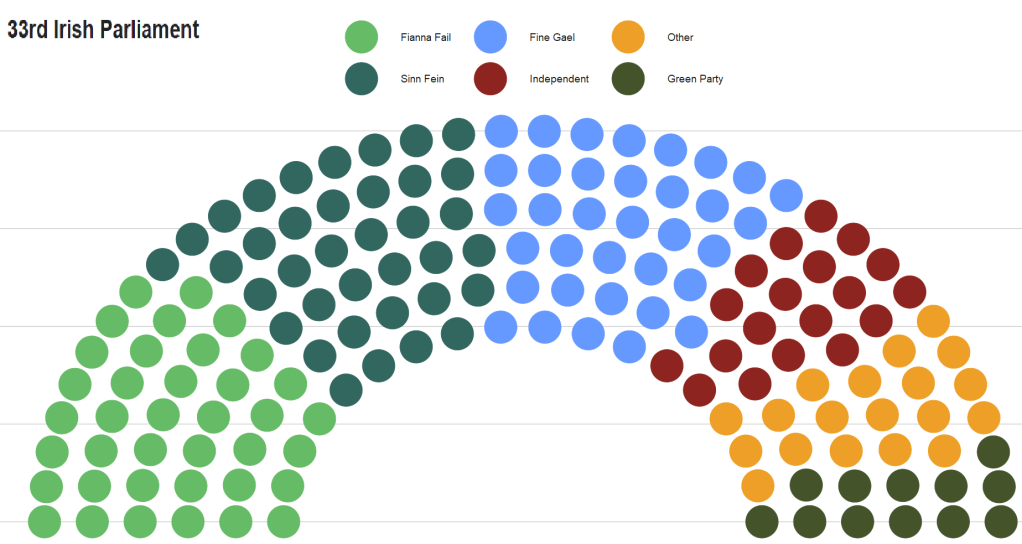
  ggtitle("33rd Irish Parliament") +
  theme(text = element_text(size = 50),
                      legend.title = element_blank(),
                      axis.text.x = element_blank(),
                      axis.text.y = element_blank()) +  
  scale_colour_manual(values = dail_33_coord$party_color,
                    limits = dail_33_coord$party_groups)
Clueless Movie Cherilyn Horowitz GIF - Find & Share on GIPHY

Create a dataset of Irish parliament members

library(rvest)
library(tidyverse)
library(toOrdinal)
library(magrittr)
library(genderizeR)
library(stringi)

This blogpost will walk through how to scrape and clean up data for all the members of parliament in Ireland.

Or we call them in Irish, TDs (or Teachtaí Dála) of the Dáil.

We will start by scraping the Wikipedia pages with all the tables. These tables have information about the name, party and constituency of each TD.

On Wikipedia, these datasets are on different webpages.

This is a pain.

However, we can get around this by creating a list of strings for each number in ordinal form – from1st to 33rd. (because there have been 33 Dáil sessions as of January 2023)

We don’t need to write them all out manually: “1st”, “2nd”, “3rd” … etc.

Instead, we can do this with the toOrdinal() function from the package of the same name.

dail_sessions <- sapply(1:33,toOrdinal)

Next we can feed this vector of strings with the beginning of the HTML web address for Wikipedia as a string.

We paste the HTML string and the ordinal number strings together with the stri_paste() function from the stringi package.

This iterates over the length of the dail_sessions vector (in this case a length of 33) and creates a vector of each Wikipedia page URL.

dail_wikipages <- stri_paste("https://en.wikipedia.org/wiki/Members_of_the_",
           dail_sessions, "_D%C3%A1il")

Now, we can take the most recent Dáil session Wikipedia page and take the fifth table on the webpage using `[[`(5)

We rename the column names with select().

And the last two mutate() lines reomve the footnote numbers in ( ) [ ] brackets from the party and name variables.

dail_wikipages[33] %>%  
  read_html() %>%
  html_table(header = TRUE, fill = TRUE) %>% 
  `[[`(5) %>% 
  rename("ble" = 1, "party" = 2, "name" = 3, "constituency" = 4) %>% 
  select(-ble) %>% 
  mutate(party = gsub(r"{\s*\([^\)]+\)}","",as.character(party))) %>% 
  mutate(name = sub("\\[.*", "", name)) -> dail_33

Last we delete the first row. That just contais a duplicate of the variable names.

dail_33 <- dail_33[-1,]

We want to delete the fadas (long accents on Irish words). We can do this across all the character variables with the across() function.

The stri_trans_general() converts all strings to LATIN ASCII, which turns string to contain only the letters in the English language alphabet.

dail_33 %<>% 
  mutate(across(where(is.character), ~ stri_trans_general(., id = "Latin-ASCII"))) 

We can also separate the first name from the second names of all the TDs and create two variables with mutate() and separate()

dail_33 %<>% 
  mutate(name = str_replace(name, "\\s", "|")) %>% 
  separate(name, into = c("first_name", "last_name"), sep = "\\|") 

With the first_name variable, we can use the new pacakge by Kalimu. This guesses the gender of the name. Later, we can track the number of women have been voted into the Dail over the years.

Of course, this will not be CLOSE to 100% correct … so later we will have to check each person manually and make sure they are accurate.

devtools::install_github("kalimu/genderizeR")

gender = findGivenNames(dail_33$name, progress = TRUE)

gender %>% 
  select(probability, gender)  -> gen_variable

gen_variable %<>% 
  select(name, gender) %>% 
  mutate(name = str_to_sentence(name))

dail_33 %<>% 
  left_join(gen_variable, by = "name") 

Create date variables and decade variables that we can play around with.

dail_df$date_2 <- as.Date(dail_df$date, "%Y-%m-%d")

dail_df$year <- format(dail_df$date_2, "%Y")

dail_df$month <- format(dail_df$date_2, "%b")

dail_df %>% 
  mutate(decade = substr(year, 1, 3)) %>% 
  mutate(decade = paste0(decade, "0s"))

In the next blog, we will graph out the various images to explore these data in more depth. For example, we can make a circle plot with the composition of the current Dail with the ggparliament package.

We can go into more depth with it in the next blog… Stay tuned.

Create density plots with ggridges package in R

Packages we will need:

library(tidyverse)
library(ggridges)
library(ggimage)  # to add png images
library(bbplot)   # for pretty graph themes

We will plot out the favourability opinion polls for the three main political parties in Ireland from 2016 to 2020. Data comes from Louwerse and Müller (2020)

Happy Danny Devito GIF by It's Always Sunny in Philadelphia - Find & Share on GIPHY

Before we dive into the ggridges plotting, we have a little data cleaning to do. First, we extract the last four “characters” from the date string to create a year variable.

I took this quick function from a StackOverflow response:

substrRight <- function(x, n){
  substr(x, nchar(x)-n+1, nchar(x))}

polls_csv$year <- substrRight(polls_csv$Date, 4)

Next, pivot the data from wide to long format.

More information of pivoting data with dplyr can be found here. I tend to check it at least once a month as the arguments refuse to stay in my head.

I only want to take the main parties in Ireland to compare in the plot.

polls <- polls_csv %>%
  select(year, FG:SF) %>% 
  pivot_longer(!year, names_to = "party", values_to = "opinion_poll")

I went online and found the logos for the three main parties (sorry, Labour) and saved them in the working directory I have for my RStudio. That way I can call the file with the prefix “~/**.png” rather than find the exact location they are saved on the computer.

polls %>% 
  filter(party == "FF" | party == "FG" | party == "SF" ) %>% 
  mutate(image = ifelse(party=="FF","~/ff.png",
 ifelse(party=="FG","~/fg.png", "~/sf.png"))) -> polls_three

Now we are ready to plot out the density plots for each party with the geom_density_ridges() function from the ggridges package.

We will add a few arguments into this function.

We add an alpha = 0.8 to make each density plot a little transparent and we can see the plots behind.

The scale = 2 argument pushes all three plots togheter so they are slightly overlapping. If scale =1, they would be totally separate and 3 would have them overlapping far more.

The rel_min_height = 0.01 argument removes the trailing tails from the plots that are under 0.01 density. This is again for aesthetics and just makes the plot look slightly less busy for relatively normally distributed densities

The geom_image takes the images and we place them at the beginning of the x axis beside the labels for each party.

Last, we use the bbplot package BBC style ggplot theme, which I really like as it makes the overall graph look streamlined with large font defaults.

polls_three %>% 
  ggplot(aes(x = opinion_poll, y = as.factor(party))) +  
  geom_density_ridges(aes(fill = party), 
                      alpha = 0.8, 
                      scale = 2,
                      rel_min_height = 0.01) + 
  ggimage::geom_image(aes(y = party, x= 1, image = image), asp = 0.9, size = 0.12) + 
  facet_wrap(~year) + 
  bbplot::bbc_style() +
  scale_fill_manual(values = c("#f2542d", "#edf6f9", "#0e9594")) +
  theme(legend.position = "none") + 
  labs(title = "Favourability Polls for the Three Main Parties in Ireland", subtitle = "Data from Irish Polling Indicator (Louwerse & Müller, 2020)")
Its Always Sunny In Philadelphia Thumbs Up GIF by HULU - Find & Share on GIPHY

Make a timeline graph with dates in ggplot2

We will use the geom_segment layer from ggplot2 to make a timeline graph!

This layer takes

  • x and xend for the start of the segment lines
  • y and yend inputs for the end of the segment lines

For our timeline, the x will be the start of each Irish Taoiseach’s term.

The xend will be the end of their term, when they get kicked out of office.

Taoisigh (plural of Taoiseach) are Irish prime ministers and are in charge of the executive branch when their party is in change.

For Ireland, that means that basically every Taoiseach has been the leader of one of the two main parties – Fianna Fail or Fine Gael.

Not very exciting.

Also they have all been men.

This is also not very exciting.

We have a bit more to go with increasing the diversity in Ireland’s top job.

The y argument is the Taoiseach number in office. Although there have been fifteen men that have held the office of Taoiseach, this does not mean that they only held office for one time only.

Ireland has a parliamentary system so when a party loses an election, the former Taoiseach can become the leader of the opposition and hope in the future they can become Taoiseach again. Some men have been Taoiseach two or three times in non-consecutive terms.

When we are adding the labels with the geom_text() layer, I created an order variable which indicates the first time each man took the office of Taoiseach.

This is so I only have the name of each man only once in the graph. If we don’t do this step, if a man held office more than once, their name appears every time on the graph and the plot becomes a crowded mess.

I add the ifelse statement so that the first name appears after the segment line and therefore text does not take up too much room on the left edge of the graph.

Last we use the scale_color_manual() function with nice hex colors for each of the political parties.

time_line <- df %>% 
 ggplot(aes(x = as.Date(start), y = number, color = party_factor)) +
 geom_segment(aes(xend = as.Date(end), yend = number, color =  party_factor), size = 6) +
 geom_text(aes(label = order, hjust = ifelse(taoiseach_number < 2, -0.7, 1.1)), size = 8, show.legend = FALSE) +
 scale_color_manual(values = c("Fine Gael" = "#004266", "Fianna Fáil" = "#FCB322", "Cumann na nGaedheal" = "#D62828"))

I increase the limits of the graph to accommodate the name labels. Most of the time, these extra bits of code in ggplot2 depend on the type of data you have and what fits on the graph plane nicely!

So this stages is often only finished after trial-and-error.

I add a snazzy theme_fivethirtyeight() theme from ggthemes package.

Last, with the theme() function, we can remove most of the elements of the graph to make the graph cleaner.

time_line <- time_line + 
  expand_limits(x = as.Date("1915-01-01")) +
  theme_fivethirtyeight() +
  theme(legend.position = "top",
        legend.title = element_blank(),
        legend.direction = "vertical",
        axis.title.y = element_blank(),
        axis.text.y = element_blank(),
        text = element_text(size = 20)) +
  labs(title = "Taoiseach Terms in Ireland",
 subtitle = "From 1922 to 2021") 

We can also create the pie chart to see which party has held power longest in Ireland.

With dplyr we can subtract the start date from the end date and add all the Taoiseach durations (in days) together with the cumsum() argument.

We then choose the highest duration value for each party with the slice(which.max()) functions.

I was lazy and I just re-wrote the values in a new data.frame and called it counts.

df %>%
  group_by(party_factor) %>% 
  dplyr::summarise(max_count = cumsum(duration_number)) %>%  
  slice(which.max(max_count)) %>% 
  select(party_factor, max_count) %>% 
  arrange(desc(max_count))

counts <- data.frame(group = c("Cumann na nGaedheal", "Fine Gael" ,"Fianna Fáil"), 
                     value = c(3381, 10143, 22539))

Create proportion values for our pie-chart graph. To do this divide value by the sum of the values and multiply by 100.

data <- counts %>% 
  arrange(desc(group)) %>%
  dplyr::mutate(prop = value / sum(value) * 100) 

Change the numeric variables to factors.

data$duration <- as.factor(data$value)
data$party_factor <- as.factor(data$group)

We use the coord_polar() to create the piechart. To learn more, check out the r-graph-gallery page about creating pie-charts:

pie_chart <- ggplot(data, aes(x = ", y = prop, fill = group)) + geom_bar(stat = "identity", width = 1, color = "white") + coord_polar("y", start = 0) +

theme(legend.position = "none") + scale_fill_manual(values = c("Fine Gael" = "#004266", "Fianna Fáil" = "#FCB322", "Cumann na nGaedheal" = "#D62828")) +
 labs(title = "Which party held the office of Taoiseach longest?", subtitle = "From 1922 to 2021")

We can tidy up the plot and get rid of theme elements we don’t want with theme_void()

pie_chart <- pie_chart + theme_void() + theme(legend.title = element_blank(), legend.position = none, text = element_text(size = 40))

I want to add both graphs together so I can save the pie chart with a transparent background with the ggsave() function. I also make sure the lines are not jagged with the type = "cairo" from with Cairo package.

ggsave(pie_chart, file="pie_chart.png", type="cairo", bg = "transparent", width = 50, height = 50, units = "cm")

And we can use canva.com to add them together and create a single chart

And viola!