How to download OECD datasets in R

Packages we will need:

library(OECD)
library(tidyverse)
library(magrittr)
library(janitor)
library(devtools)
library(readxl)
library(countrycode)
library(scales)
library(ggflags)
library(bbplot)

In this blog post, we are going to look at downloading data from the OECD statsitics and data website.

The Organisation for Economic Co-operation and Development (OECD) provides analysis, and policy recommendations for 38 industrialised countries.

Angry Work GIF by Jess - Find & Share on GIPHY

The 38 countries in the OECD are:

  • Australia
  • Austria
  • Belgium
  • Canada
  • Chile
  • Colombia
  • Czech Republic
  • Denmark
  • Estonia
  • Finland
  • France
  • Germany
  • Hungary
  • Iceland
  • Ireland
  • Israel
  • Italy
  • Japan
  • South Korea
  • Latvia
  • Lithuania
  • Luxembourg
  • Mexico
  • Netherland
  • New Zealand
  • Norway
  • Poland
  • Portugal
  • Slovakia
  • Slovenia
  • Spain
  • Sweden
  • Switzerland
  • Turkey
  • United Kingdom
  • United States
  • European Union

We can download the OCED data package directly from the github repository with install_github()

install_github("expersso/OECD")
library(OECD)

The most comprehensive tutorial for the package comes from this github page. Mostly, it gives a fair bit more information about filtering data

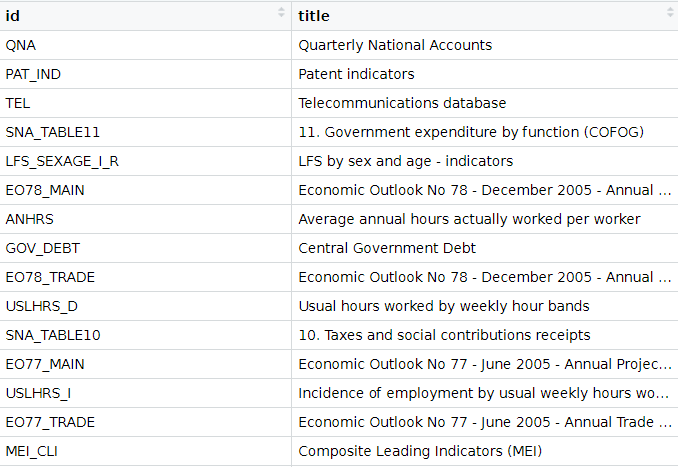
We can look at the all the datasets that we can download from the website via the package with the following get_datasets() function:

titles <- OECD::get_datasets()

This gives us a data.frame with the ID and title for all the OECD datasets we can download into the R console, as we can see below.

In total there are 1662 datasets that we can download.

These datasets all have different variable types, countries, year spans and measurement values. So it is important to check each dataset carefully when we download them.
We can filter key phrases to subset datasets:

 titles %>%  
         filter(grepl("oda", title, ignore.case = TRUE)) %>% View

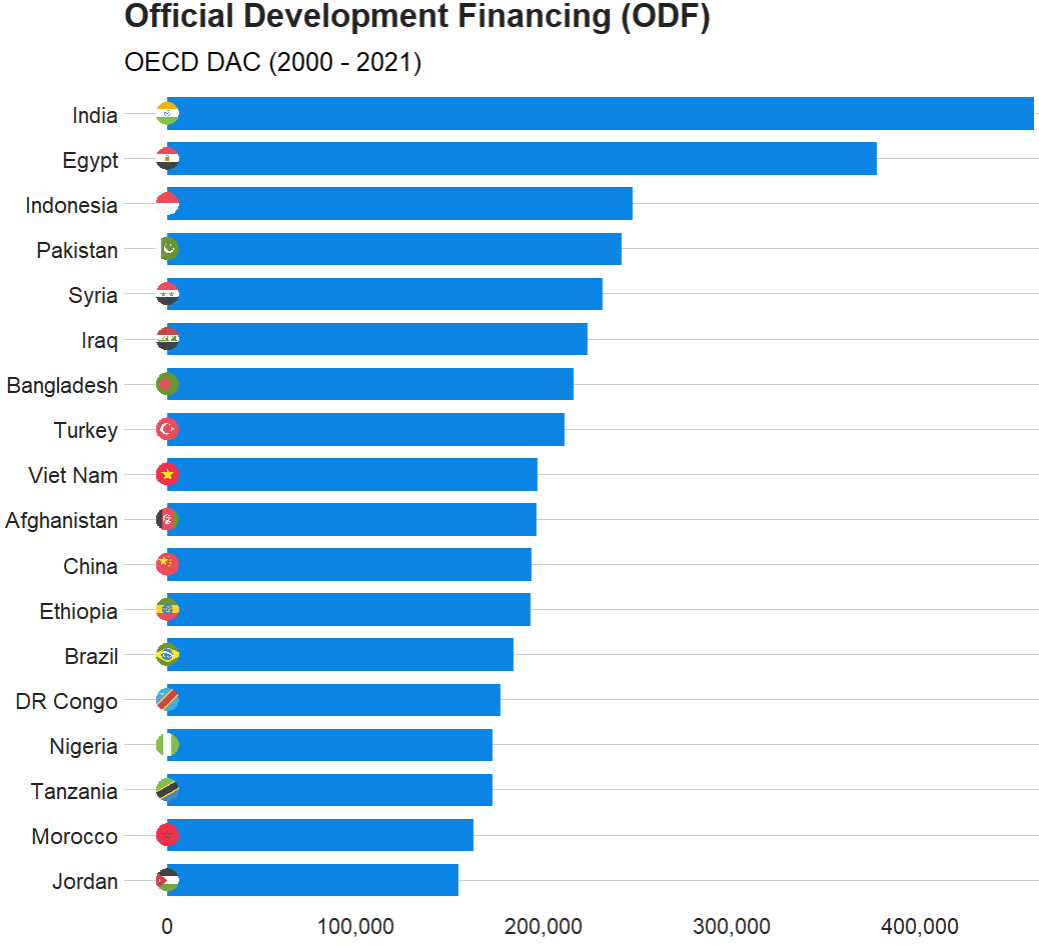
In this blog, we will graph out the Official Development Financing (ODF) for each country.

Official Development Financing measures the sum of RECEIVED (NOT DONATED) aid such as:

  • bilateral ODA aid
  • concessional and non-concessional resources from multilateral sources
  • bilateral other official flows made available for reasons unrelated to trade

Before we can charge into downloading any dataset, it is best to check out the variables it has. We can do that with the get_data_structure() function:

get_data_structure("REF_TOTAL_ODF") %>% 
       str(., max.level = 2)
 $ VAR_DESC       :'data.frame':	10 obs. of  2 variables:
  ..$ id         : chr [1:10] "RECIPIENT" "PART" "AMOUNTTYPE" "TIME" ...
  ..$ description: chr [1:10] "Recipient" "Part" "Amount type" "Year" ...

 $ RECIPIENT      :'data.frame':	301 obs. of  2 variables:
  ..$ id   : chr [1:301] "10200" "10100" "10010" "71" ...
  ..$ label: chr [1:301] "All Recipients, Total" "Developing Countries, Total" "Europe, Total" "Albania" ...

 $ PART           :'data.frame':	2 obs. of  2 variables:
  ..$ id   : chr [1:2] "1" "2"
  ..$ label: chr [1:2] "1 : Part I - Developing Countries" "2 : Part II - Countries in Transition"

 $ AMOUNTTYPE     :'data.frame':	2 obs. of  2 variables:
  ..$ id   : chr [1:2] "A" "D"
  ..$ label: chr [1:2] "Current Prices" "Constant Prices"

 $ TIME           :'data.frame':	62 obs. of  2 variables:
  ..$ id   : chr [1:62] "1960" "1961" "1962" "1963" ...
  ..$ label: chr [1:62] "1960" "1961" "1962" "1963" ...

We will clean up the ODF dataset with the clean_names() function from janitor package.

aid <- get_dataset("REF_TOTAL_ODF")  %>% 
  janitor::clean_names()  %>%
  select(recipient, aid = obs_value, time)

One problem with this dataset is that we only have the DAC country codes in this dataset.

We will need to read in and merge the country code variables into the aid dataset.

dac_code <- readxl::read_excel(file.choose())

We can then clean up the DAC codes to merge with the aid data.

dac_code %<>%
    janitor::clean_names()  %>% 
    mutate(cown = countrycode(recipient_name_e, "country.name", "cown")) %>% 
    select(recipient_code,
         year, 
         cown,
         country = recipient_name_e,
         group_id, 
         dev_group = group_name_e,
         p_group = group_name_f,
         wb_group)

And merge with left_join()

aid %<>% 
  mutate(recipient_code = parse_number(recipient)) %>%  
  left_join(dac_code, by = c("recipient_code" = "recipient_code")) 

Next we can sum up the aid that each country received since 2000.

aid %>% 
  filter(year > 1999) %>%  
  filter(!is.na(country)) %>% 
  mutate(aid = parse_number(aid)) %>% 
  mutate(country = case_when(country == "Syrian Arab Republic" ~ "Syria", 
                             country == "T?rkiye" ~ "Turkey",
                             country == "China (People's Republic of)" ~ "China",
                             country == "Democratic Republic of the Congo" ~ "DR Congo",
                             TRUE ~ as.character(country))) %>% 
  group_by(country) %>% 
  summarise(total_aid = sum(aid, na.rm = TRUE)) %>% 
  ungroup() %>% 
  mutate(iso2 = tolower(countrycode(country, "country.name", "iso2c"))) %>% 
  filter(total_aid > 150000) %>% 
  ggplot(aes(x = reorder(country, total_aid),
             y = total_aid)) + 
  geom_bar(stat = "identity", 
           width = 0.7, 
           color = "#0a85e5", 
           fill = "#0a85e5") +
  ggflags::geom_flag(aes(x = country, y = -1, country = iso2), size = 8) +
  bbplot::bbc_style() + 
  scale_y_continuous(labels = scales::comma_format()) +
  coord_flip() + 
  labs(x = "ODA received", y = "", title = "Official Development Financing (ODF)", subtitle = "OECD DAC (2000 - 2021)")

The TIME_FORMAT can be any of the following types:

  • ‘P1Y’ for annual
  • ‘P6M’ for bi-annual
  • ‘P3M’ for quarterly
  • ‘P1M’ for monthly data.

To access each countries in the datasets, we can use the following codes

oecd_ios3 <- c("AUS", "AUT", "BEL", "CAN", "CHL", "COL", "CZE",
               "DNK", "EST", "FIN", "FRA", "DEU", "GRC", "HUN",
               "ISL", "IRL", "ISR", "ITA", "JPN", "KOR", "LVA", 
               "LTU", "LUX", "MEX", "NLD", "NZL", "NOR", "POL",
               "PRT", "SVK", "SVN", "ESP", "SWE", "CHE", "TUR",
               "GBR", "USA")

Alternatively, we can use only the EU countries that are in the OECD.

eu_oecd_iso3 <- c("AUT", "BEL", "CZE", "DNK", "EST", "FIN", 
                  "FRA", "DEU", "GRC", "HUN", "IRL", "ITA",
                  "LVA", "LTU", "LUX", "NLD", "POL", "PRT",
                  "SVK", "SVN", "ESP", "SWE")
sal_raw %>% 
  janitor::clean_names() %>% 
  filter(age == "Y25T64") %>% 
  filter(grade == "TE") %>% 
  filter(indicator == "NAT_ACTL_YR") %>% 
  filter(isc11 == "L1") %>% 
  filter(sex == "T") %>% 
  select(country, year = time, obs_value) -> sal

Comparing mean values across OECD countries with ggplot

Packages we will need:

library(tidyverse)
library(magrittr) # for pipes
library(ggrepel) # to stop overlapping labels
library(ggflags)
library(countrycode) # if you want create the ISO2C variable

I came across code for this graph by Tanya Shapiro on her github for #TidyTuesday.

Her graph compares Dr. Who actors and their average audience rating across their run as the Doctor on the show. So I have very liberally copied her code for my plot on OECD countries.

That is the beauty of TidyTuesday and the ability to be inspired and taught by other people’s code.

I originally was going to write a blog about how to download data from the OECD R package. However, my attempts to download the data leads to an unpleasant looking error and ends the donwload request.

I will try to work again on that blog in the future when the package is more established.

So, instead, I went to the OECD data website and just directly downloaded data on level of trust that citizens in each of the OECD countries feel about their governments.

Then I cleaned up the data in excel and used countrycode() to add ISO2 and country name data.

Click here to read more about the countrycode() package.

First I will only look at EU countries. I tried with all the countries from the OECD but it was quite crowded and hard to read.

I add region data from another dataset I have. This step is not necessary but I like to colour my graphs according to categories. This time I am choosing geographic regions.

my_df %<>%
  mutate(region = case_when(
    e_regiongeo == 1 ~ "Western",
    e_regiongeo == 2  ~ "Northern",
    e_regiongeo == 3  ~ "Southern", 
    e_regiongeo == 4  ~ "Eastern"))

To make the graph, we need two averages:

  1. The overall average trust level for all countries (avg_trust) and
  2. The average for each country across the years (country_avg_trust),
my_df %<>% 
  mutate(avg_trust = mean(trust, na.rm = TRUE)) %>% 
  group_by(country_name) %>% 
  mutate(country_avg_trust = mean(trust, na.rm = TRUE)) %>%
  ungroup()

When we plot the graph, we need a few geom arguments.

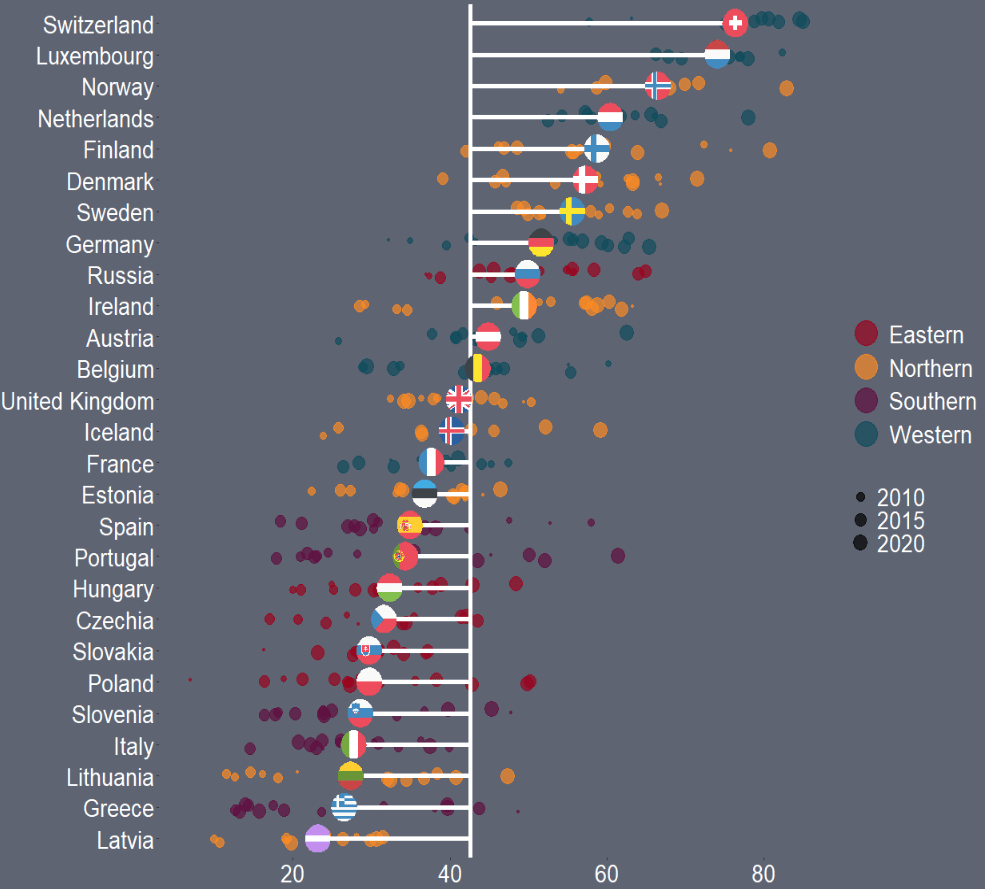
Along the x axis we have all the countries, and reorder them from most trusting of their goverments to least trusting.

We will color the points with one of the four geographic regions.

We use geom_jitter() rather than geom_point() for the different yearly trust values to make the graph a little more interesting.

I also make the sizes scaled to the year in the aes() argument. Again, I did this more to look interesting, rather than to convey too much information about the different values for trust across each country. But smaller circles are earlier years and grow larger for each susequent year.

The geom_hline() plots a vertical line to indicate the average trust level for all countries.

We then use the geom_segment() to horizontally connect the country’s individual average (the yend argument) to the total average (the y arguement). We can then easily see which countries are above or below the total average. The x and xend argument, we supply the country_name variable twice.

Next we use the geom_flag(), which comes from the ggflags package. In order to use this package, we need the ISO 2 character code for each country in lower case!

Click here to read more about the ggflags package.

my_df %>%
ggplot(aes(x = reorder(country_name, trust_score), y = trust_score, color = as.factor(region))) +
geom_jitter(aes(color = as.factor(region), size = year), alpha = 0.7, width = 0.15) +
geom_hline(aes(yintercept = avg_trust), color = "white", size = 2)+
geom_segment(aes(x = country_name, xend = country_name, y = country_avg_trust, yend = avg_trust), size = 2, color = "white") +
ggflags::geom_flag(aes(x = country_name, y = country_avg_trust, country = iso2), size = 10) + 
  coord_flip() + 
  scale_color_manual(values = c("#9a031e","#fb8b24","#5f0f40","#0f4c5c")) -> my_plot

Last we change the aesthetics of the graph with all the theme arguments!

my_plot +
 theme(panel.border = element_blank(),
        legend.position = "right",
        legend.title = element_blank(),
        legend.text = element_text(size = 20),
        legend.background = element_rect(fill = "#5e6472"),
        axis.title = element_blank(),
        axis.text = element_text(color = "white", size = 20),
        text= element_text(size = 15, color = "white"),
        panel.grid.major.y = element_blank(),
        panel.grid.minor.y = element_blank(),
        panel.grid.major.x = element_blank(),
        panel.grid.minor.x = element_blank(),
        legend.key = element_rect(fill = "#5e6472"),
        plot.background = element_rect(fill = "#5e6472"),
        panel.background = element_rect(fill = "#5e6472")) +
  guides(colour = guide_legend(override.aes = list(size=10))) 

And that is the graph.

We can see that countries in southern Europe are less trusting of their governments than in other regions. Western countries seem to occupy the higher parts of the graph, with France being the least trusting of their government in the West.

There is a large variation in Northern countries. However, if we look at the countries, we can see that the Scandinavian countries are more trusting and the Baltic countries are among the least trusting. This shows they are more similar in their trust levels to other Post-Soviet countries.

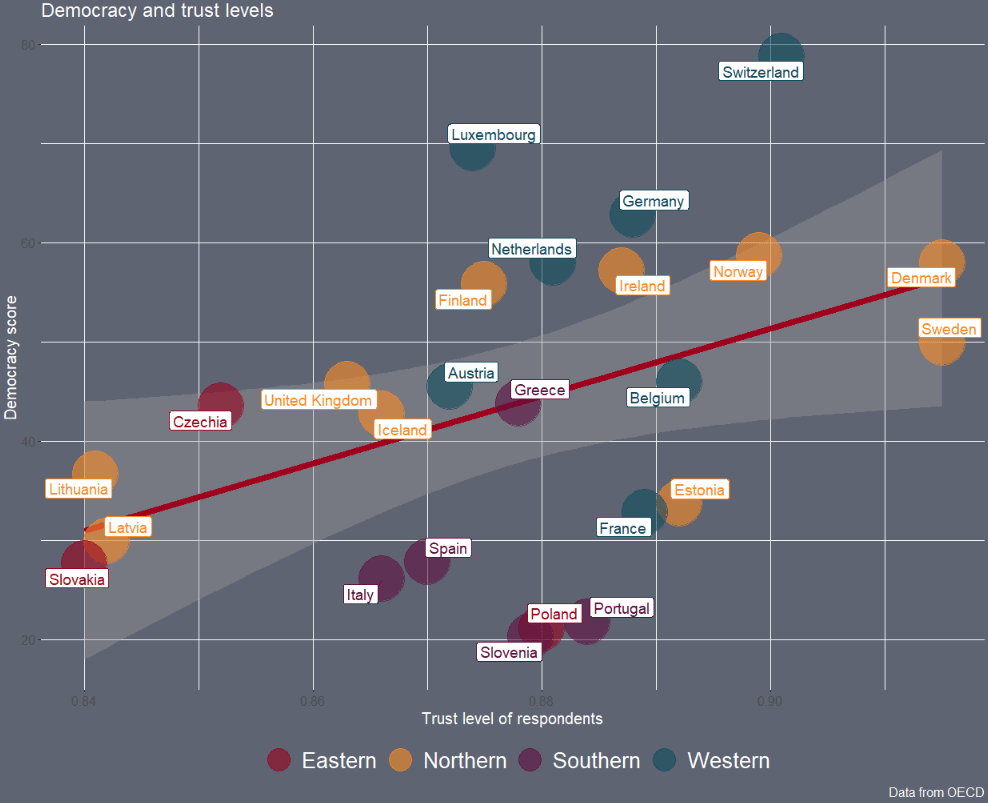
Next we can look into see if there is a relationship between democracy scores and level of trust in the goverment with a geom_point() scatterplot

The geom_smooth() argument plots a linear regression OLS line, with a standard error bar around.

We want the labels for the country to not overlap so we use the geom_label_repel() from the ggrepel package. We don’t want an a in the legend, so we add show.legend = FALSE to the arguments


my_df %>% 
  filter(!is.na(trust_score)) %>% 
  ggplot(aes(x = democracy_score, y = trust_score)) +
  geom_smooth(method = "lm", color = "#a0001c", size = 3) +
  geom_point(aes(color = as.factor(region)), size = 20, alpha = 0.6) +
 geom_label_repel(aes(label = country_name, color = as.factor(region)), show.legend = FALSE, size = 5) + 
scale_color_manual(values = c("#9a031e","#fb8b24","#5f0f40","#0f4c5c")) -> scatter_plot

And we change the theme and add labels to the plot.

scatter_plot + theme(panel.border = element_blank(),
        legend.position = "bottom",
        legend.title = element_blank(),
        legend.text = element_text(size = 20),
        legend.background = element_rect(fill = "#5e6472"),
        text= element_text(size = 15, color = "white"),

        legend.key = element_rect(fill = "#5e6472"),
        plot.background = element_rect(fill = "#5e6472"),
        panel.background = element_rect(fill = "#5e6472")) +
  guides(colour = guide_legend(override.aes = list(size=10)))  +
  labs(title = "Democracy and trust levels", 
       y = "Democracy score",
       x = "Trust level of respondents",
       caption="Data from OECD") 

We can filter out the two countries with low democracy and examining the consolidated democracies.

Thank you for reading!

Pop Tv Comedy GIF by Schitt's Creek - Find & Share on GIPHY

Lollipop plots with ggplot2 in R

Packages we will need:

library(tidyverse)
library(rvest)
library(ggflags)
library(countrycode)
library(ggpubr)

We will plot out a lollipop plot to compare EU countries on their level of income inequality, measured by the Gini coefficient.

A Gini coefficient of zero expresses perfect equality, where all values are the same (e.g. where everyone has the same income). A Gini coefficient of one (or 100%) expresses maximal inequality among values (e.g. for a large number of people where only one person has all the income or consumption and all others have none, the Gini coefficient will be nearly one).

To start, we will take data on the EU from Wikipedia. With rvest package, scrape the table about the EU countries from this Wikipedia page.

Click here to read more about the rvest pacakge

With the gsub() function, we can clean up the different variables with some regex. Namely delete the footnotes / square brackets and change the variable classes.

eu_site <- read_html("https://en.wikipedia.org/wiki/Member_state_of_the_European_Union")

eu_tables <- eu_site %>% html_table(header = TRUE, fill = TRUE)

eu_members <- eu_tables[[3]]

eu_members %<>% janitor::clean_names()  %>% 
  filter(!is.na(accession))

eu_members$iso3 <- countrycode::countrycode(eu_members$geo, "country.name", "iso3c")

eu_members$accession <- as.numeric(gsub("([0-9]+).*$", "\\1",eu_members$accession))

eu_members$name_clean <- gsub("\\[.*?\\]", "", eu_members$name)

eu_members$gini_clean <- gsub("\\[.*?\\]", "", eu_members$gini)

Next some data cleaning and grouping the year member groups into different decades. This indicates what year each country joined the EU. If we see clustering of colours on any particular end of the Gini scale, this may indicate that there is a relationship between the length of time that a country was part of the EU and their domestic income inequality level. Are the founding members of the EU more equal than the new countries? Or conversely are the newer countries that joined from former Soviet countries in the 2000s more equal. We can visualise this with the following mutations:

eu_members %>%
  filter(name_clean != "Totals/Averages") %>% 
  mutate(gini_numeric = as.numeric(gini_clean)) %>% 
  mutate(accession_decades = ifelse(accession < 1960, "1957", ifelse(accession > 1960 & accession < 1990, "1960s-1980s", ifelse(accession == 1995, "1990s", ifelse(accession > 2003, "2000s", accession))))) -> eu_clean 

To create the lollipop plot, we will use the geom_segment() functions. This requires an x and xend argument as the country names (with the fct_reorder() function to make sure the countries print out in descending order) and a y and yend argument with the gini number.

All the countries in the EU have a gini score between mid 20s to mid 30s, so I will start the y axis at 20.

We can add the flag for each country when we turn the ISO2 character code to lower case and give it to the country argument.

Click here to read more about the ggflags package

eu_clean %>% 
ggplot(aes(x= name_clean, y= gini_numeric, color = accession_decades)) +
  geom_segment(aes(x = forcats::fct_reorder(name_clean, -gini_numeric), 
                   xend = name_clean, y = 20, yend = gini_numeric, color = accession_decades), size = 4, alpha = 0.8) +
  geom_point(aes(color = accession_decades), size= 10) +
  geom_flag(aes(y = 20, x = name_clean, country = tolower(iso_3166_1_alpha_2)), size = 10) +
  ggtitle("Gini Coefficients of the EU countries") -> eu_plot

Last we add various theme changes to alter the appearance of the graph

eu_plot + 
coord_flip() +
ylim(20, 40) +
  theme(panel.border = element_blank(),
        legend.title = element_blank(),
        axis.title = element_blank(),
        axis.text = element_text(color = "white"),
        text= element_text(size = 35, color = "white"),
        legend.text = element_text(size = 20),
        legend.key = element_rect(colour = "#001219", fill = "#001219"),
        legend.key.width = unit(3, 'cm'),
        legend.position = "bottom",
        panel.grid.major.y = element_line(linetype="dashed"),
        plot.background = element_rect(fill = "#001219"),
        panel.background = element_rect(fill = "#001219"),
        legend.background = element_rect(fill = "#001219") )

We can see there does not seem to be a clear pattern between the year a country joins the EU and their level of domestic income inequality, according to the Gini score.

Of course, the Gini coefficient is not a perfect measurement, so take it with a grain of salt.

Another option for the lolliplot plot comes from the ggpubr package. It does not take the familiar aesthetic arguments like you can do with ggplot2 but it is very quick and the defaults look good!

eu_clean %>% 
  ggdotchart( x = "name_clean", y = "gini_numeric",
              color = "accession_decades",
              sorting = "descending",                      
              rotate = TRUE,                                
              dot.size = 10,   
              y.text.col = TRUE,
              ggtheme = theme_pubr()) + 
  ggtitle("Gini Coefficients of the EU countries") + 
  theme(panel.border = element_blank(),
        legend.title = element_blank(),
        axis.title = element_blank(),
        axis.text = element_text(color = "white"),
        text= element_text(size = 35, color = "white"),
        legend.text = element_text(size = 20),
        legend.key = element_rect(colour = "#001219", fill = "#001219"),
        legend.key.width = unit(3, 'cm'),
        legend.position = "bottom",
        panel.grid.major.y = element_line(linetype="dashed"),
        plot.background = element_rect(fill = "#001219"),
        panel.background = element_rect(fill = "#001219"),
        legend.background = element_rect(fill = "#001219") )