Top R packages for downloading political science and economics datasets

  1. WDI
  2. peacesciencer
  3. eurostat
  4. vdem
  5. democracyData
  6. icpsrdata
  7. Quandl
  8. essurvey
  9. manifestoR
  10. unvotes
  11. gravity

1. WDI

The World Development Indicators (WDI) package by Vincent Arel-Bundock provides access to a database of hundreds of economic development indicators from the World Bank.

Examples of variables include population, GDP, education, health, and poverty, school attendance rates.

Reference: Arel-Bundock, V. (2017). WDI: World Development Indicators (R Package Version 2.7.1).

2. peacesciencer

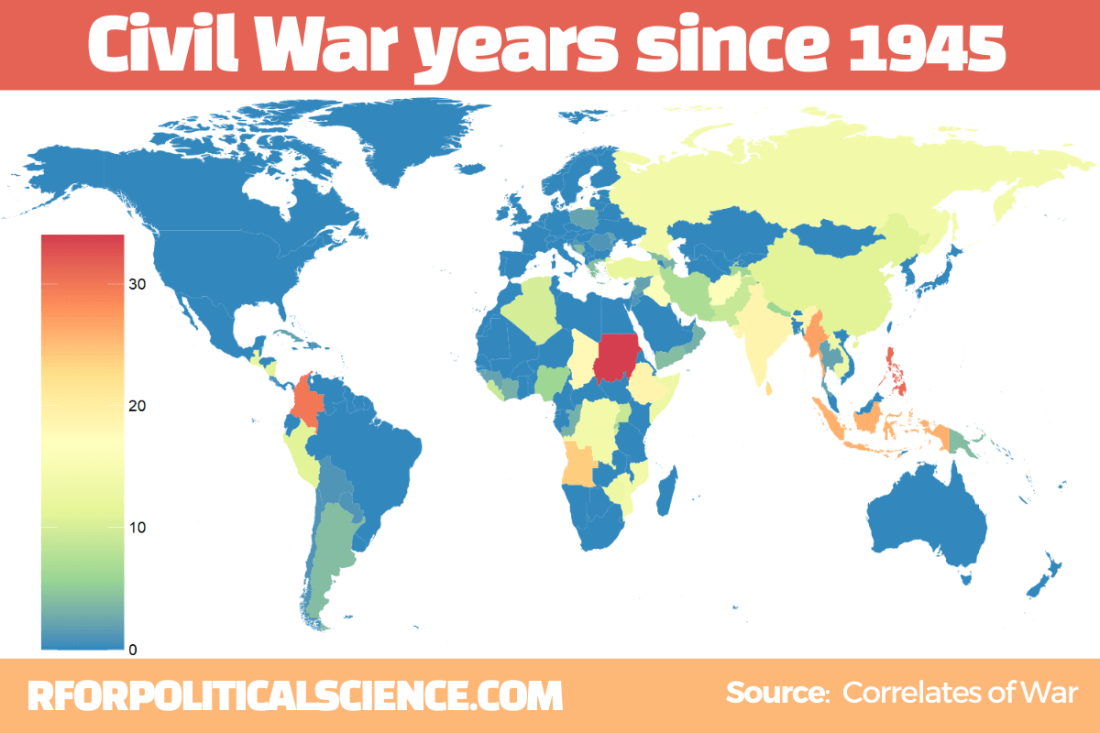
This package by Steve Miller helps you download data related to peace and conflict studies, including the Correlates of War project.

Examples of variables include Alliance Treaty Obligations and Provisions (ATOP), Thompson and Dreyer’s (2012) strategic rivalry data, fractionalization/polarization estimates from the Composition of Religious and Ethnic Groups (CREG) Project, and Uppsala Conflict Data Program (UCDP) data on civil and inter-state conflicts.

Data can come in either country-year, event-level or dyadic-level.

Reference: Steve Miller (2020). peacesciencer: Tools for Peace Scientists (R Package Version 0.2.2). Website retrieved at http://svmiller.com/peacesciencer/ms.html

3. eurostat

eurostat provides access to a wide range of statistics and data on the European Union and its member states, covering topics such as population, economics, society, and the environment.

Examples of variables include employment, inflation, education, crime, and air pollution. The package was authored by Leo Lahti.

Reference: eurostat (2018). eurostat: Eurostat Open Data (R Package Version 3.6.0), CRAN PDF retrieved at https://cran.r-project.org/web/packages/eurostat/eurostat.pdf

4. vdemdata

The Varieties of Democracy package by Staffan I. Lindberg et al. provides data on a range of indicators related to democracy and governance in countries around the world, including measures of electoral democracy, civil liberties, and human rights.

Click here to read more about downloading the package

Examples of variables include freedom of speech, rule of law, corruption, government transparency, and voter turnout.

Reference: Lindberg, S. I., & Stepanova, N. (2020). vdem: Varieties of Democracy Project (R Package Version 1.6).

5. democracyData

This package by Xavier Marquez: provides data on a range of variables related to democracy, including elections, political parties, and civil liberties.

Examples of variables include regime type, democracy scores (Freedom House, PolityIV etc,  Geddes, Wright, and Frantz’ autocratic regimes dataset, the Lexical Index of Electoral Democracy, the DD/ACLP/PACL/CGV dataset), axxording to the Github page

6. icpsrdata

This package by Frederick Solt provides a simple way to download and import data from the Inter-university Consortium for Political and Social Research (ICPSR) archive into R. This is for easy replication and sharing of data. The package includes datasets from different fields of study, including sociology, political science, and economics.

Reference: Solt, F. (2020). icpsrdata: Reproducible Data Retrieval from the ICPSR Archive (R Package Version 0.5.0).

7. Quandl

This R package by Quandl provides an interface to access financial and economic data from over 20 different sources. Examples of variables include stock prices, futures, options, and macroeconomic indicators. The package includes functions to easily download data directly into R and perform tasks such as plotting, transforming, and aggregating data. Additional functions for managing and exploring data, such as search tools and data caching features, are also available.

Here are five examples of variables in the Quandl package:

  • “AAPL” (Apple Inc. stock price)
  • “CHRIS/CME_CL1” (Crude Oil Futures)
  • “FRED/GDP” (US GDP)
  • “BCHAIN/MKPRU” (Bitcoin Market Price)
  • “USTREASURY/YIELD” (US Treasury Yield Curve Rates)

Reference: Quandl. (2021). Quandl: A library of economic and financial data. Retrieved from https://www.quandl.com/tools/r.

8. essurvey

The essurvey package is an R package that provides access to data from the European Social Survey (ESS), which is a large-scale survey that collects data on attitudes, values, and behavior across Europe. The package includes functions to easily download, read, and analyze data from the ESS, and also includes documentation and sample code to help users get started.

Examples of variables in the ESS dataset include political interest, trust in political institutions, social class, education level, and income. The package was authored by David Winter and includes a variety of useful functions for working with ESS data.

Reference: Winter, D. (2021). essurvey: Download Data from the European Social Survey on the Fly. R package version 3.4.4. Retrieved from https://cran.r-project.org/package=essurvey.

9. manifestoR

manifestoR is an R package that provides access to data from the Comparative Manifesto Project (CMP), which is a cross-national research project that analyzes political party manifestos. The package allows users to easily download and analyze data from the CMP, including party positions on various policy issues and the salience of those issues across time and space.

Examples of variables in the CMP dataset include party positions on taxation, immigration, the environment, healthcare, and education. The package was authored by Jörg Matthes, Marcelo Jenny, and Carsten Schwemmer.

Reference: Matthes, J., Jenny, M., & Schwemmer, C. (2018). manifestoR: Access and Process Data and Documents of the Manifesto Project. R package version 1.2.1. Retrieved from https://cran.r-project.org/package=manifestoR.

10. unvotes

The unvotes data package provides historical voting data of the United Nations General Assembly, including votes for each country in each roll call, as well as descriptions and topic classifications for each vote.

The classifications included in the dataset cover a wide range of issues, including human rights, disarmament, decolonization, and Middle East-related issues.

Reference: The package was created by David Robinson and Nicholas Goguen-Compagnoni and is available on the Comprehensive R Archive Network (CRAN) at https://cran.r-project.org/web/packages/unvotes/unvotes.pdf.

11. gravity

The gravity package in R, created by Anna-Lena Woelwer, provides a set of functions for estimating gravity models, which are used to analyze bilateral trade flows between countries. The package includes the gravity_data dataset, which contains information on trade flows between pairs of countries.

Examples of variables that may affect trade in the dataset are GDP, distance, and the presence of regional trade agreements, contiguity, common official language, and common currency.

iso_o: ISO-Code of country of origin
iso_d: ISO-Code of country of destination
distw: weighted distance
gdp_o: GDP of country of origin
gdp_d: GDP of country of destination
rta: regional trade agreement
flow: trade flow
contig: contiguity
comlang_off: common official language
comcur: common currency

The package PDF CRAN is available at http://cran.nexr.com/web/packages/gravity/gravity.pdf
Examining Ireland’s foreign policy in pictures with R

Packages we will need:

library(peacesciencer)  
library(forcats)
library(ggflags)
library(tidyverse)
library(magrittr)
library(waffle)
library(bbplot)
library(rvest)

In January 2015, the Irish government published a review of Ireland’s foreign policy. The document, The Global Island: Ireland’s Foreign Policy for a Changing World offers a perspective on Ireland’s place in the world.

In this blog, we will graph out some of the key features of Ireland’ foreign policy and so we can have a quick overview of the key relationships and trends.

Excited Season 4 GIF by The Office - Find & Share on GIPHY

First, we will look at the aid that Ireland gives to foreign countries. This read.csv(file.choose()) will open up the file window and you can navigate to the file and data that you can download from DAC OECD website: https://data.oecd.org/oda/net-oda.htm

dac <- read.csv(file.choose())

We will filter only Ireland and clean the names with the clean_names() function from the janitor package:

dac %<>% 
  filter(Donor == "Ireland") %>% 
  clean_names()

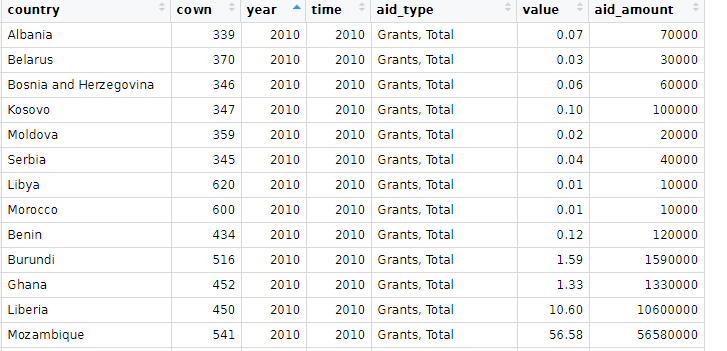
And change the variables, adding the Correlates of War codes and cleaning up some of the countries’ names.

dac %<>% 
  mutate(cown = countrycode(recipient_2, "country.name", "cown"),
         aid_amount = value*1000000) %>%  
  select(country = recipient_2, cown,
         year, time, aid_type, value, aid_amount) %>%
  mutate(cown = ifelse(country == "West Bank and Gaza Strip", 6666,
         ifelse(country == "Serbia", 345, 
         ifelse(country == "Micronesia", 987,cown))))%>%
  filter(!is.na(cown)) 

Next we can convert dataframe to wider format so we have a value column for each aid type

dac %>% 
  distinct(country, cown, year, time, aid_type, value, .keep_all = TRUE)  %>%  
  pivot_wider(names_from = "aid_type", values_from = "aid_amount") %>% 
  mutate(across(where(is.numeric), ~ replace_na(., 0))) %>% 
  clean_names() -> dac_wider

And we graph out the three main types of aid:

dac_wider %>%
  group_by(year) %>% 
  summarise(total_humanitarian = sum(humanitarian_aid, na.rm = TRUE),
  total_technical = sum(technical_cooperation, na.rm = TRUE),
  total_development_food_aid = sum(development_food_aid)) %>% 
  ungroup() %>% 
  pivot_longer(!year, names_to = "aid_type", values_to = "aid_value") %>% 
  ggplot(aes(x = year, y = aid_value, groups = aid_type)) + 
  geom_line(aes(color = aid_type), size = 2, show_guide  = FALSE) +
  geom_point(aes(color = aid_type), fill = "white", shape = 21, size = 3, stroke = 2) +
  bbplot::bbc_style()  +
  scale_y_continuous(labels = scales::comma) + 
  scale_x_discrete(limits = c(2010:2018)) +
  labs(title = "Irish foreign aid by aid type (2010 - 2018)",
       subtitle = ("Source: OECD DAC")) +
  scale_color_discrete(name = "Aid type", 
        labels = c("Development and Food", "Humanitarian", "Technical"))

We will look at total ODA aid:

dac %>% 
  count(aid_type) %>% 
  arrange(desc(n)) %>% 
  knitr::kable(format = "html")
aid_type n
Imputed Multilateral ODA 2298
Memo: ODA Total, excl. Debt 1292
Memo: ODA Total, Gross disbursements 1254
ODA: Total Net 1249
Grants, Total 1203
Technical Cooperation 541
ODA per Capita 532
Humanitarian Aid 518
ODA as % GNI (Recipient) 504
Development Food Aid 9

And get some pretty hex colours:

pal_10 <- c("#001219","#005f73","#0a9396","#94d2bd","#e9d8a6","#ee9b00","#ca6702","#bb3e03","#ae2012","#9b2226")

And download some regime, democracy, region and continent data from the PACL datase with the democracyData() package

pacl <- redownload_pacl() 

pacl %<>% 
  mutate(regime_name = ifelse(regime == 0, "Parliamentary democracies",
         ifelse(regime == 1, "Mixed democracies",
         ifelse(regime == 2, "Presidential democracies",
         ifelse(regime == 3, "Civilian autocracies",
         ifelse(regime == 4, "Military dictatorships",
         ifelse(regime ==  5,"Royal dictatorships", regime))))))) %>%
  mutate(regime = as.factor(regime)) 

pacl %<>% 
  select(year, country = pacl_country, 
         democracy, regime_name,
         region_name = un_region_name, 
         continent_name = un_continent_name)

pacl %<>% 
  mutate(cown = countrycode(country, "country.name", "cown")) %>% 
  select(!country)

Summarise the total aid for each country across the years and choose the top 20 countries

dac %>% 
  filter(aid_type == "Memo: ODA Total, Gross disbursements") %>% 
  group_by(country) %>% 
  summarise(total_country_aid = sum(aid_amount, na.rm = TRUE)) %>% 
  ungroup() %>% 
  top_n(n = 20) %>% 
  mutate(cown = countrycode::countrycode(country, "country.name", "cown")) %>% 
  inner_join(pacl, by = "cown") %>%  
  mutate(region_name = ifelse(country == "West Bank and Gaza Strip", "Western Asia", region_name)) %>% 
  mutate(region_name = ifelse(region_name == "Western Asia", "Middle East", region_name)) %>% 
  mutate(country = ifelse(country == "West Bank and Gaza Strip", "Palestine",
  ifelse(country == "Democratic Republic of the Congo", "DR Congo",
  ifelse(country == "Syrian Arab Republic", "Syria", country)))) %>% 
  mutate(iso2 = tolower(countrycode::countrycode(country, "country.name", "iso2c"))) %>% 
  ggplot(aes(x = forcats::fct_reorder(country, total_country_aid), y = total_country_aid)) + 
  geom_bar(aes(fill = region_name), stat = "identity", width = 0.7) + 
  coord_flip() + bbplot::bbc_style() + 
  geom_flag(aes(x = country, y = -100, country = iso2), size = 12) +
  scale_fill_manual(values = pal_10) +
  labs(title = "Ireland's largest ODA foreign aid recipients, 2010 - 2018",
       subtitle = ("Source: OECD DAC")) + 
  xlab("") + ylab("") + 
  scale_x_continuous(labels = scales::comma)

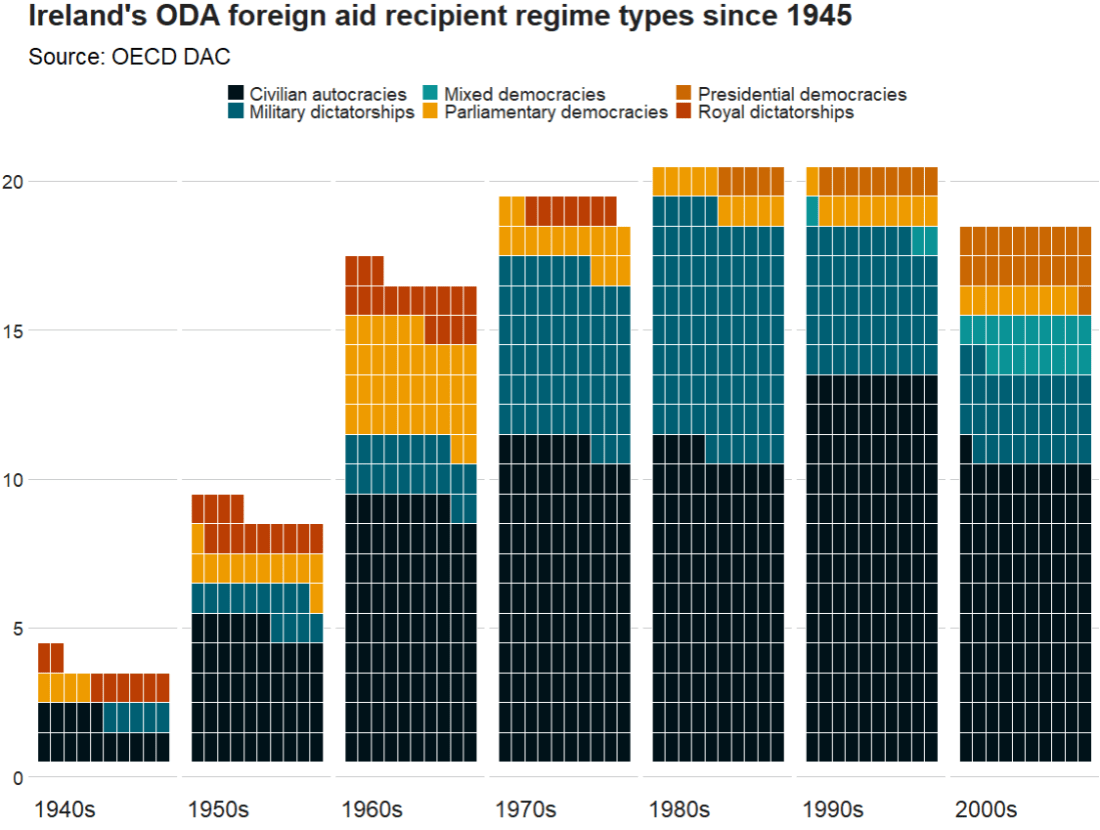
We can make a waffle plot to look at the different types of regimes to which the Irish government gave aid over the decades

 dac %>% 
  mutate(decade = substr(year, 1, 3)) %>% 
  mutate(decade = paste0(decade, "0s")) %>% 
  group_by(decade) %>% 
  count(regime_name) %>% 
  ggplot(aes(fill = regime_name, values = n)) +
  geom_waffle(color = "white", size = 0.3, n_rows = 10, flip = TRUE) +
  facet_wrap(~decade, nrow = 1, strip.position = "bottom") + 
  bbplot::bbc_style()  +
  scale_fill_manual(values = pal_10) +
   scale_x_discrete(breaks = round(seq(0, 1, by = 0.2),3)) +
  labs(title = "Ireland's ODA foreign aid recipient regime types since 1945",
       subtitle = ("Source: OECD DAC"))  

Next, we will download dyadic foreign policy similarity measures from peacesciencer.

Peacesciencer package has tools and data sets for the study of quantitative peace science. 

Click here to read more about the peacesciencer package by Steven Miller

fp_similar_df <- peacesciencer::create_dyadyears() %>% 
  add_gwcode_to_cow() %>% 
  add_fpsim()	

I am only looking at dyadic foreign policy similarity with Ireland, so filter by Ireland’s Correlates of War code, 205.

Click here to find out all countries’ COW code

fp_similar_df %<>% 
  filter(ccode1 == 205)

Data on alliance portfolios comes from the Correlates of War and is used to calculate similarity of foreign policy positions (see Altfeld & Mesquita, 1979).

The assumption is that similar alliance portfolios are the result of similar foreign policy positions.

With increasing in level of commitment, the strength of alliance commitments can be:

  1. no commitment
  2. entente
  3. neutrality or nonaggression pact
  4. defense pact

We will map out alliance similarity. This will use the measurement calculated with Cohen’s Kappa. Check out Hage’s (2011) article to read more about the different ways to measure alliance similarity.

Next we can look at UN similarity.

The UN voting variable calculates three values:

1 = Yes

2 = Abstain

3 = No

Based on these data, if two countries in a similar way on the same UN resolutions, this is a measure of the degree to which dyad members’ foreign policy positions are similar.

fp_similarity_df %>% 
  mutate(country = countrycode::countrycode(ccode2, "cown", "country.name")) %>% 
  select(country, ccode2, year,
         un_similar = kappavv) %>% 
  filter(year > 1989) %>% 
  filter(!is.na(country)) %>%
  mutate(iso2 = tolower(countrycode::countrycode(country, "country.name", "iso2c"))) %>% 
  group_by(country) %>% 
  mutate(avg_un = mean(un_similar, na.rm = TRUE)) %>%
  distinct(country, avg_un, iso2, .keep_all = FALSE) %>% 
  ungroup() %>% 
  top_n(n = 10)  -> top_un_similar

And graph out the top ten

  top_un_similar %>%
  ggplot(aes(x = forcats::fct_reorder(country, avg_un), 
             y = avg_un)) + 
  geom_bar(stat = "identity",
           width = 0.7, 
           color = "#0a85e5", 
           fill = "#0a85e5") +
  ggflags::geom_flag(aes(x = country, y = 0, country = iso2), size = 15) +
  coord_flip() + bbplot::bbc_style()  +
  ggtitle("UN voting similarity with Ireland since 1990")

If we change the top_n() to negative, we can get the bottom 10

top_n(n = -10)

We can quickly scrape data about the EU countries with the rvest package


eu_members_html <- read_html("https://en.wikipedia.org/wiki/European_Union")
eu_members_tables <- eu_members_html %>% html_table(header = TRUE, fill = TRUE)

eu_member <- eu_members_tables[[6]]

eu_member %<>% 
  janitor::clean_names()

eu_member %>% distinct(state) %>%  pull(state) -> eu_state

Last we are going to look at globalization scores. The data comes from the the KOF Globalisation Index. This measures the economic, social and political dimensions of globalisation. Globalisation in the economic, social and political fields has been on the rise since the 1970s, receiving a particular boost after the end of the Cold War.

Click here for data that you can download comes from the KOF website

kof %>%
  filter(country %in% eu_state) -> kof_eu

And compare Ireland to other EU countries on financial KOF index scores. We will put Ireland in green and the rest of the countries as grey to make it pop.

Ireland appears to follow the general EU trends and is not an outlier for financial globalisation scores.

kof_eu %>% 
  ggplot(aes(x = year,  y = finance, groups = country)) + 
  geom_line(color = ifelse(kof_eu$country == "Ireland",     "#2a9d8f", "#8d99ae"),
  size = ifelse(kof_eu$country == "Ireland", 3, 2), 
  alpha = ifelse(kof_eu$country == "Ireland", 0.9, 0.3)) +
  bbplot::bbc_style() + 
  ggtitle("Financial Globalization in Ireland, 1970 to 2020", 
          subtitle = "Source: KOF")

References

Häge, F. M. (2011). Choice or circumstance? Adjusting measures of foreign policy similarity for chance agreement. Political Analysis19(3), 287-305.

Dreher, Axel (2006): Does Globalization Affect Growth? Evidence from a new Index of Globalizationcall_made, Applied Economics 38, 10: 1091-​1110.

Download and graph UN votes data with the unvotes package in R

Packages we will need:

library(unvotes)
library(lubridate)
library(tidyverse)
library(magrittr)
library(bbplot)
library(waffle)

How to download UN votes to R.

This package was created by David Robinson. Click here to read the CRAN PDF.

Pop Tv Congrats GIF by Schitt's Creek - Find & Share on GIPHY

We will download both the votes roll calls and the issues. Then we can use the inner_join() variable to add them together by the ID.

un_votes <- unvotes::un_roll_calls

un_votes_issues <- unvotes::un_roll_call_issues

un_votes %<>% 
  inner_join(un_votes_issues, by = "rcid")

We can create a year variable with the format() function and extract the year with “%Y”

un_votes %<>% 
  mutate(year = format(date, format = "%Y")) 

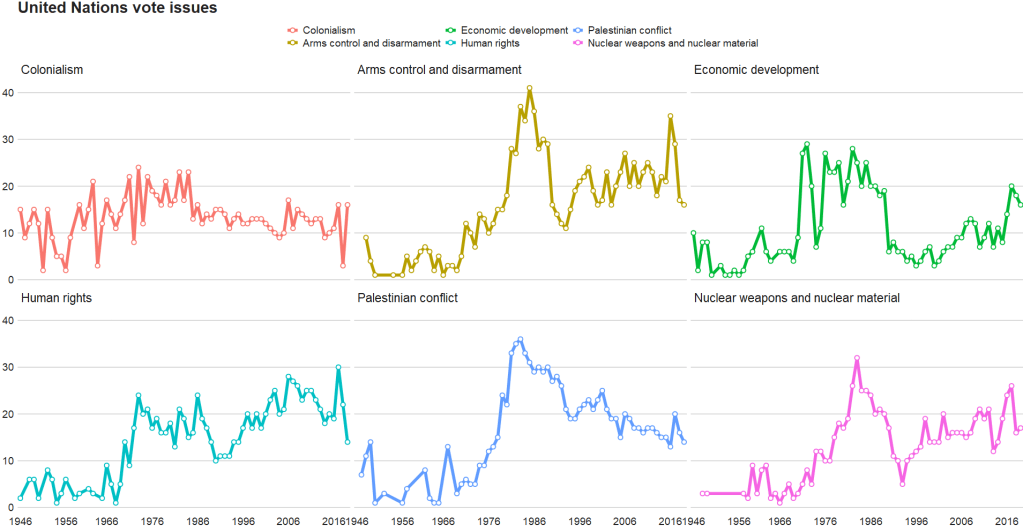
And graph out the count of each type of UN vote issue

un_votes %>% 
  group_by(year) %>% 
  count(issue) %>% 
  ggplot(aes(x = year, y = n, group = issue, color = issue)) + 
  geom_line(size = 2) + 
  geom_point(aes(color = issue), fill = "white", 
             shape = 21, size = 2, stroke = 1) +
  scale_x_discrete(breaks = round(seq(min(un_votes$year), max(un_votes$year), by = 10),1)) +
  bbplot::bbc_style() + facet_wrap(~issue)

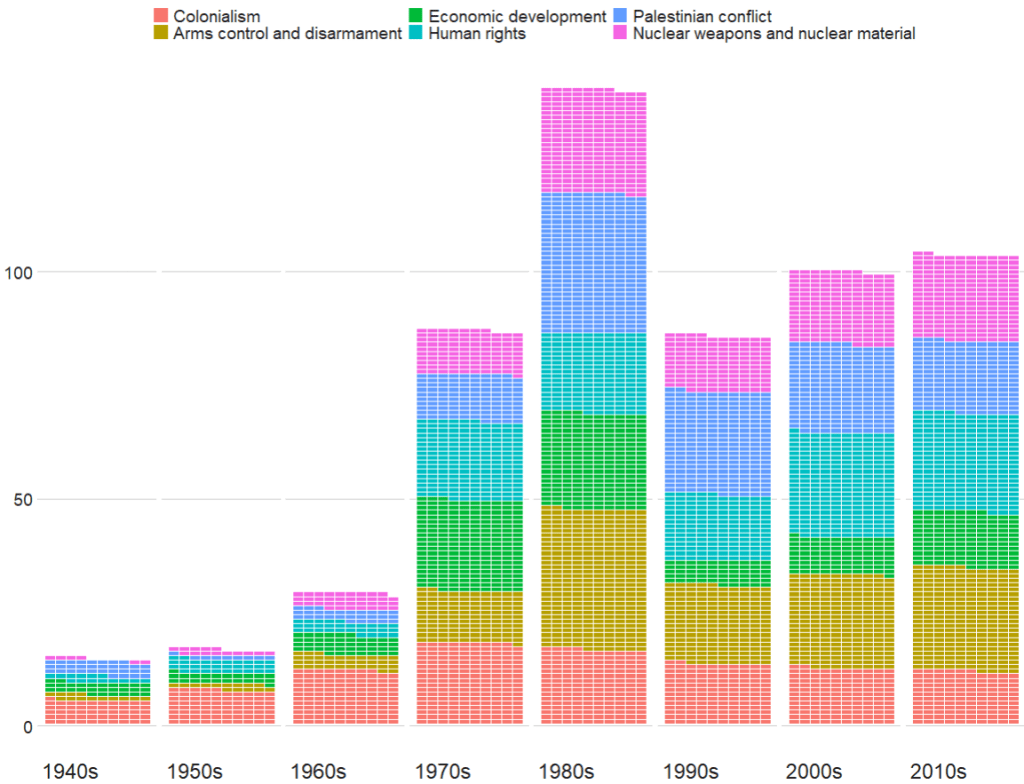
Next we can look at which decade had the most votes across the issues with the waffle package

Click here to read more about the waffle package

un_votes %>% 
  mutate(decade = substr(year, 1, 3)) %>% 
  mutate(decade = paste0(decade, "0s")) %>% 
  
  group_by(decade) %>% 
  count(issue) %>% 
  
  ggplot(aes(fill = issue, values = n)) +
  geom_waffle(color = "white",
              size = 0.3,
              n_rows = 10, 
              flip = TRUE) +
  facet_wrap(~decade, nrow = 1, strip.position = "bottom") + 
  bbplot::bbc_style()  +
  scale_x_discrete(breaks = round(seq(0, 1, by = 0.2),3)) 

The 1980s were a prolific time for the UNGA with voting, with arms control being the largest share of votes. And it has stablised in the decades since.

Well Done Applause GIF by CBC - Find & Share on GIPHY

Next we can look at votes in total

un_votes %>% 
  mutate(issue = case_when(issue == "Nuclear weapons and nuclear material" ~ "Nukes",
                           issue == "Arms control and disarmament" ~ "Arms",
                           issue == "Palestinian conflict" ~ "Palestine",
                           TRUE ~ as.character(issue))) %>% 
  count(issue) %>%  
  ggplot(aes(x = reorder(issue, n), y = n, fill = as.factor(issue))) + 
  geom_bar(stat = "identity") + 
  coord_polar("x", start = 0, direction = -1)  + 
  ggthemes::theme_pander()  +
  bbplot::bbc_style() + 
    theme(axis.text = element_blank(),
          axis.title.x = element_blank(),
          axis.title.y = element_blank(),
          axis.ticks = element_blank(),
          text = element_text(size = 25),
          panel.grid = element_blank()) + 
    ggtitle(label = "UN Votes by issue ", 
            subtitle = "Source: unvotes package")

Wrangling and graphing UN Secretaries-General data with R

Packages we will need:

library(tidyverse)
library(janitor)
library(rvest)
library(countrycode)
library(magrittr)
library(lubridate)
library(ggflags)
library(scales)

According to Urquhart (1995) in his article, “Selecting the World’s CEO”,

From the outset, the U.N. secretary
general has been an important part of the
institution, not only as its chief executive,
but as both symbol and guardian of the
original vision of the organization.
There, however, specific agreement has
ended. The United Nations, like any
important organization, needs strong and
independent leadership, but it is an inter-
governmental organization, and govern
ments have no intention of giving up
control of it. While the secretary-general
can be extraordinarily useful in times of
crisis, the office inevitably embodies
something more than international coop
eration, sometimes even an unwelcome
hint of supranationalism. Thus, the atti-
tude of governments toward the United
Nations’ chief and only elected official is
and has been necessarily ambivalent.

(Urquhart, 1995: 21)

So who are these World CEOs? We’ll examine more in this dataset.

First, we will scrape the data from the Wikipedia

sg_html <- read_html("https://en.wikipedia.org/wiki/Secretary-General_of_the_United_Nations")
sg_tables <- sg_html %>% html_table(header = TRUE, fill = TRUE)
sg <- sg_tables[[2]]

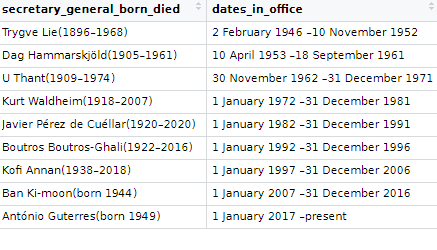
The table we scrape is a bit of a hot mess in this state …. but we can fix it

Donald Glover Pizza GIF - Find & Share on GIPHY

We can first use the clean_names() function from the janitor package

A quick way to clean up the table and keep only the rows with the names of the Secretaries-General is to use the distinct() function. Last we filter out the rows and select out the columns we don’t want.

sg %>% 
  clean_names() %>% 
  distinct(no, .keep_all = TRUE) %>% 
  filter(no != "–") %>% 
  select(!c(portrait, ref))-> sg_clean

Already we can see a much cleaner table. However, the next problem is that the names and their years of birth / death are in one cell.

Also the dates in office are combined together.

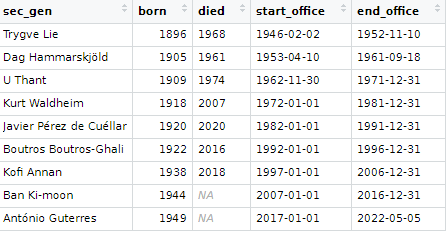
So we can use the separate() function from tidyr to make new variables for each piece of information.

First we will separate the name of the Secretary-General from their date of birth and death.

We supply the two new variable names to the into = argument.

We then use the regex code pattern [()] to indicate where we want to separate the character string into two separate columns. In this instance the regex pattern is for what is after the round brackets (

I want to remove the original cluttered varaible so remove = TRUE

sg_clean %<>% 
  separate(
    col = secretary_general_born_died,
    into = c("sec_gen", "born_died"),
    sep = '[()]',
    remove = TRUE) 

We can repeat this step to create a separate born and died variable. This time the separator symbol is a hyphen And so we do not need regex pattern; we can just indicate a hyphen.

sg_clean %<>% 
  separate(
    col = born_died,
    into = c("born", "died"),
    sep = '–',
    remove = TRUE)  

And I want to ignore the “present” variable, so I extract the numbers with the parse_number() function, converting things from characters to numbers

sg_clean %<>% 
  mutate(born = parse_number(born))

Last, we repeat with the dates in office. This is also easily seperated by indicating the hyphen.

sg_clean %<>% 
  separate(
    col = dates_in_office,
    into = c("start_office", "end_office"),
    sep = '–',
    remove = TRUE)  

We convert the word “present” to the actual present date

sg_clean %<>% 
  mutate(end_office = ifelse(end_office == "present", "5 May 2022", end_office))

We use the lubridate dmy() function to convert the character strings to date class variables.

sg_clean %<>% 
  mutate(start_office = dmy(start_office),
         end_office = dmy(end_office))

We can calculate the length of time that each Secretary-General was in office with the difftime() function.

sg_clean %<>% 
  mutate(duration_days = difftime(end_office, start_office, units = "days"),
         duration_years = round(duration_days / 365, 2),
         duration_years = as.integer(duration_years))

Next we can compare the different durations and see which Secretary-General was longest or shortest in office.

sg_clean %>% 
  mutate(duration_days = difftime(end_office, start_office)) %>%  
  mutate(iso2 = tolower(countrycode::countrycode(country_of_origin, "country.name", "iso2c"))) %>% 
  ggplot(aes(x = forcats::fct_reorder(sec_gen, duration_days), y = duration_days)) + 
  geom_bar(aes(fill = un_regional_group), stat = "identity", width = 0.7) + 
  coord_flip() + bbplot::bbc_style() + 
  ggflags::geom_flag(aes(x = sec_gen, y = -100, country = iso2), size = 12) +
  scale_fill_manual(values = le_palette) +
  labs(title = "Longest serving UN Secretaries General",
       subtitle = ("Source: Wikipedia")) + 
  xlab("") + ylab("") 

We can make a quick pie-chart to compare regions. We can see that Secretaries-General from the West have had the most time in office

sg_text <- sg_count %>% 
  arrange(desc(un_regional_group)) %>%
  mutate(prop = sum_days / sum(sg_count$sum_days) *100) %>%
  mutate(ypos = cumsum(prop)- 0.5*prop )

sg_text %>% 
  count(un_regional_group)

sg_text %>%
  mutate(region = case_when(un_regional_group == "Western European & others" ~ "Europe",
         un_regional_group == "Latin American& Caribbean" ~ "Latin America",
         un_regional_group == "Asia & Pacific" ~ "Asia", 
         TRUE ~ as.character(un_regional_group))) %>% 
  ggplot(aes(x = "", y = prop, fill = region)) +
  geom_bar(stat = "identity", width = 1) +
  geom_text(aes(y = ypos + 1, label = round(prop, 0)), color = "white", size = 15) +
  coord_polar("y", start = 0) +
  theme_void() +
  ggtitle("Length of Secretaries General in office across regions") + 
  scale_fill_manual(values = le_palette) + 
  theme(legend.title = element_blank(),
        legend.text = element_text(size = 20), 
        plot.title = element_text(size = 30))

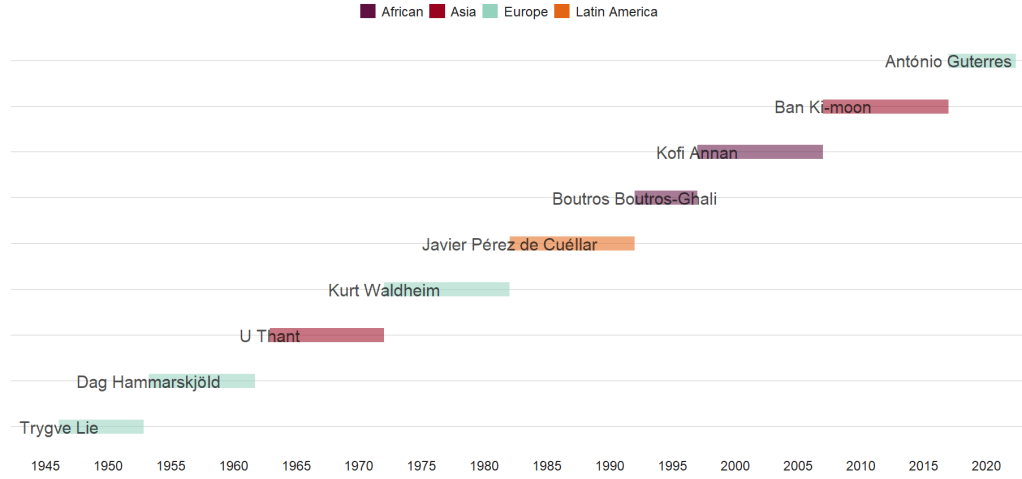
We can create a Gantt-like chart to track the timeline for the different men (all men!)

Click here to read more about timelines in R

sg_clean %>% 
  mutate(region = case_when(un_regional_group == "Western European & others" ~ "Europe",un_regional_group == "Latin American& Caribbean" ~ "Latin America",un_regional_group == "Asia & Pacific" ~ "Asia", TRUE ~ as.character(un_regional_group))) %>%
  ggplot(aes(x = as.Date(start_office), 
             y = no, 
             color = region)) +
  geom_segment(aes(xend = as.Date(end_office), 
                   yend = no, alpha = 0.9,
                   color = region), size = 9)  +
  geom_text(aes(label = sec_gen), 
            color = "black", 
            alpha = 0.7,
            size = 8, show.legend = FALSE) +
  bbplot::bbc_style() +
  scale_color_manual(values = le_palette) + 
  scale_x_date(breaks = scales::breaks_pretty(15))
Confused Donald Glover GIF - Find & Share on GIPHY

References

Urquhart, B. (1995). Selecting the world’s CEO: Remembering the Secretaries-General. Foreign Affairs, 21-26.

Donald Glover Community GIF - Find & Share on GIPHY