

Click here for part two on the REC dataset.
Packages we will need:
library(tidyverse)
library(rvest)
library(janitor)
library(ggflags)
library(countrycode)
The Economic Community of West African States (ECOWAS) has been in the news recently. The regional bloc is openly discussing military options in response to the coup unfolding in the capital of Niger.
This made me realise that I know VERY VERY LITTLE about the regional economic communities (REC) in Africa.
Ernest Aniche (2015: 41) argues, “the ghost of [the 1884] Berlin Conference” led to a quasi-balkanisation of African economies into spheres of colonial influence. He argues that this ghost “continues to haunt Africa […] via “neo-colonial ties” today.
To combat this balkanisation and forge a new pan-Africanist approach to the continent’s development, the African Union (AU) has focused on regional integration.
This integration was more concretely codified with 1991’s Abuja Treaty.
One core pillar on this agreement highlights a need for increasing flows of intra-African trade and decreasing the reliance on commodity exports to foreign markets (Songwe, 2019: 97)
Broadly they aim mirror the integration steps of the EU. That translates into a roadmap towards the development of:
Free Trade Areas:
- AU : The African Continental Free Trade Area (AfCFTA) aims to create a single market for goods and services across the African continent, with the goal of boosting intra-African trade.
- EU : The European Free Trade Association (EFTA) is a free trade area consisting of four European countries (Iceland, Liechtenstein, Norway, and Switzerland) that have agreed to remove barriers to trade among themselves.
Customs Union:
- AU: The East African Community (EAC) is an REC a customs union where member states (Burundi, Kenya, Rwanda, South Sudan, Tanzania, and Uganda) have eliminated customs duties and adopted a common external tariff for trade with non-member countries.
- EU: The EU’s Single Market is a customs union where goods can move freely without customs duties or other barriers across member states.
Common Market:
- AU: Many RECs such the Southern African Development Community (SADC) is working towards establishing a common market that allows for the free movement of goods, services, capital, and labor among its member states.
- EU: The EU is a prime example of a common market, where not only goods and services, but also people and capital, can move freely across member countries.
Economic Union:
- AU: The West African Economic and Monetary Union (WAEMU) is moving towards an economic union with shared economic policies, a common currency (West African CFA franc), and coordination of monetary and fiscal policies.
- EU: Has coordinated economic policies and a single currency (Euro) used by several member states.
The achievement of a political union on the continent is seen as the ultimate objective in many African countries (Hartzenberg, 2011: 2), such as the EU with its EU Parliament, Council, Commission and common foreign policy.
According to a 2012 UNCTAD report, “progress towards regional integration has, to date, been uneven, with some countries integrating better at the regional and/or subregional level and others less so”.
So over this blog, series, we will look at the RECs and see how they are contributing to African integration.
We can use the rvest package to scrape the countries and information from each Wiki page. Click here to read more about the rvest package and web scraping:
First we will look at the Arab Maghreb Union (AMU). We feed the AMU wikipedia page into the read_html() function.
With `[[`(3) we can choose the third table on the Wikipedia page.
With the janitor package, we can can clean the names (such as remove capital letters and awkward spaces) and ensure more uniform variable names.
We pull() the country variable and it becomes a vector, then turn it into a data frame with as.data.frame() . Alternatively we can just select this variable with the select() function.
We create some more variables for each REC group when we merge them all together later.
We will use the str_detect() function from the stringr package to filter out the total AMU column row as it is non-country.
read_html("https://en.wikipedia.org/wiki/Arab_Maghreb_Union") %>%
  html_table(header = TRUE, fill = TRUE) %>%
  `[[`(3) %>%
  clean_names()  %>%
  pull(country) %>%
  as.data.frame() %>%
  mutate(rec = "Arab Meghreb Union",
         geo = "Maghreb",
         rec_abbrev = "AMU") %>%
  select(country = '.', everything()) %>%
  filter(!str_detect(country, fixed("Arab Maghreb", ignore_case = TRUE))) -> amu
We can see in the table on the Wikipedia page, that it contains a row for all the Arab Maghreb Union countries at the end. But we do not want this.

We use the str_detect() function to check if the “country” variable contains the string pattern we feed in. The ignore_case = TRUE makes the pattern matching case-insensitive.
The ! before str_detect() means that we remove this row that matches our string pattern.
We can use the fixed() function to make sure that we match a string as a literal pattern rather than a regular expression pattern / special regex symbols. This is not necessary in this situation, but it is always good to know.
For this example, I will paste the code to make a map of the countries with country flags.
Click here to read more about adding flags to maps in R
First we download a map object from the rnaturalearth package
world_map <- ne_countries(scale = "medium", returnclass = "sf")To add the flags on the map, we need longitude and latitude coordinates to feed into the x and y arguments in the geom_flag(). We can scrape these from the web too.
We add iso2 character codes in all lower case (very important for the geom_flag() step)) with the countrycode() function.
Click here to read more about the countrycode package.
read_html("https://developers.google.com/public-data/docs/canonical/countries_csv") %>%
  html_table(header = TRUE, fill = TRUE) %>%
  `[[`(1) %>%
  select(latitude,
         longitude,
         iso_a2 = country) %>%
  right_join(world_map, by = c("iso_a2" = "iso_a2")) %>%
  left_join(amu, by = c("admin" = "country")) %>%
  select(latitude, longitude, iso_a2, geometry, admin, region_un, rec, rec_abbrev) %>%
  mutate(amu_map = ifelse(!is.na(rec), 1, 0),
         iso_a2 = tolower(iso_a2)) %>%
  filter(region_un == "Africa") -> amu_map
Set a consistent theme for the maps.
theme_set(bbplot::bbc_style() +   theme(legend.position = "none",
                                        axis.text.x = element_blank(),
                                        axis.text.y = element_blank(),
                                        axis.title.x = element_blank(),
                                        axis.title.y = element_blank()))
And we can create the map of AMU countries with the following code:
amu_map %>%
  ggplot() +
  geom_sf(aes(geometry = geometry,
              fill = as.factor(amu_map),
              alpha = 0.9),
          position = "identity",
          color = "black") +
  ggflags::geom_flag(data = . %>% filter(rec_abbrev == "AMU"),
                     aes(x = longitude,
                         y = latitude + 0.5,
                         country = iso_a2),
                     size = 6) +
scale_fill_manual(values = c("#FFFFFF", "#b766b4")) 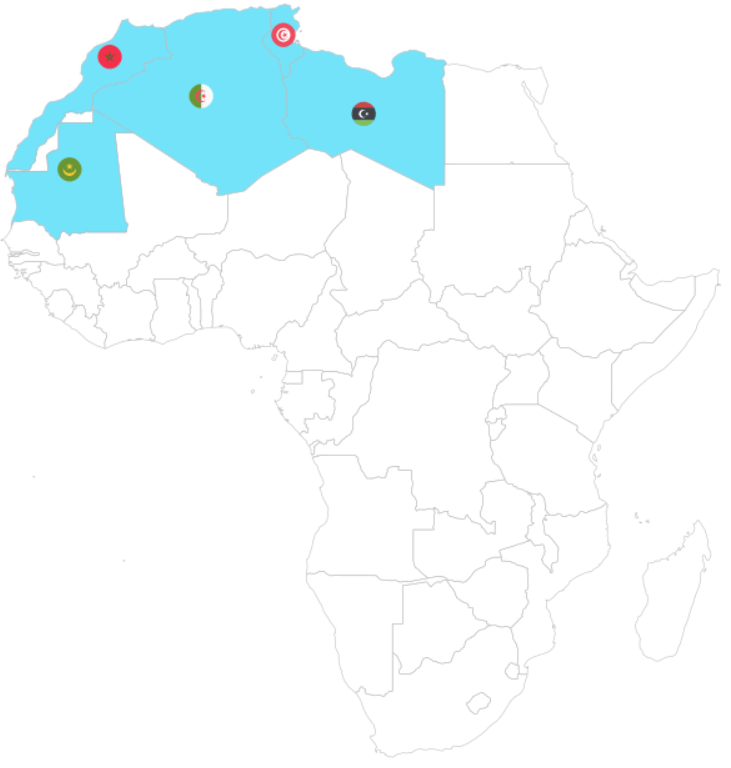
Next we will look at the Common Market for Eastern and Southern Africa.
If we don’t want to scrape the data from the Wikipedia article, we can feed in the vector of countries – separated by commas – into a data.frame() function.
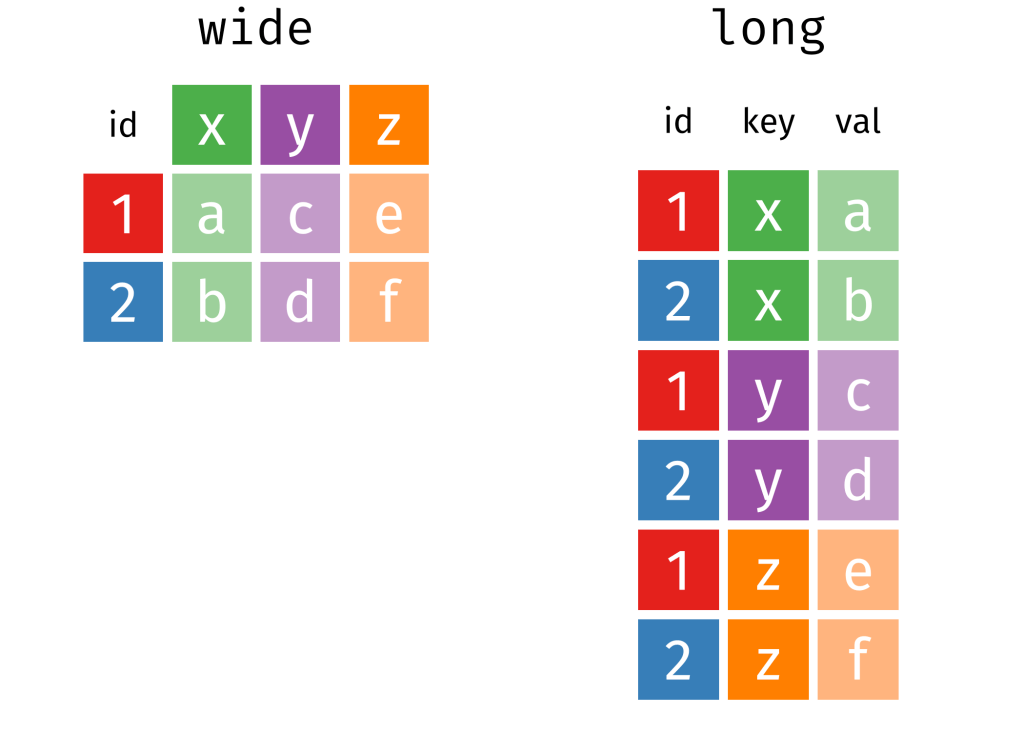
Then we can separate the vector of countries into rows, and a cell for each country.
data.frame(country = "Djibouti,
           Eritrea,
           Ethiopia,
           Somalia,
           Egypt,
           Libya,
           Sudan,
           Tunisia,
           Comoros,
           Madagascar,
           Mauritius,
           Seychelles,
           Burundi,
           Kenya,
           Malawi,
           Rwanda,
           Uganda,
           Eswatini,
           Zambia") %>%
  separate_rows(country, sep = ",") %>%
  mutate(country = trimws(country)) %>%
  mutate(rec = "Common Market for Eastern and Southern Africa",
         geo = "Eastern and Southern Africa",
         rec_abbrev = "COMESA") -> comesa
The separate_rows() function comes from the tidyr package.
We use this to split a single column with comma-separated values into multiple rows, creating a “long” format.
With the mutate(country = trimws(country)) we can remove any spaces with whitespace trimming.
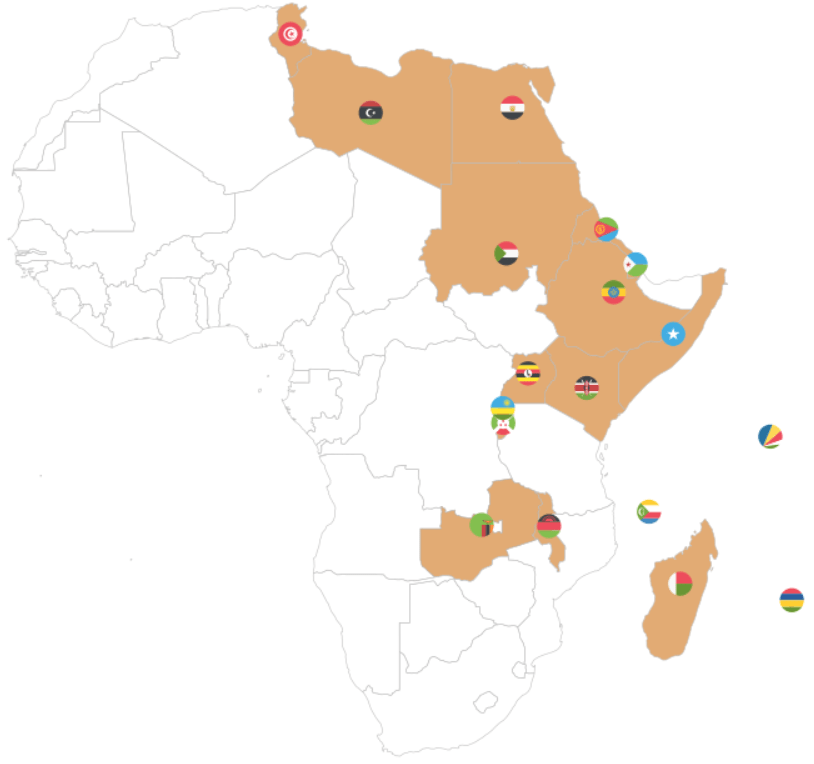
Onto the third REC – the Community of Sahel-Sahara States.
read_html("https://en.wikipedia.org/wiki/Community_of_Sahel%E2%80%93Saharan_States") %>%
  html_table(header = TRUE, fill = TRUE) %>%
  `[[`(5) %>%
  janitor::clean_names()  %>%
  pull() %>% as.data.frame() %>%
  select(country = '.', everything()) %>%
  mutate(country = str_replace_all(country, "\\\n", ",")) %>%
  separate_rows(country, sep = ",") %>% # create a column of words from the one cell vector of words!
  mutate(country = trimws(country)) %>%  # remove the white space
  mutate(rec = "Community of Sahel–Saharan States",
         geo = "Sahel Saharan States",
         rec_abbrev = "CEN-SAD") -> censad
Fourth, onto the East African Community REC.
read_html("https://en.wikipedia.org/wiki/East_African_Community") %>%
    html_table(header = TRUE, fill = TRUE) %>%
    `[[`(2) %>%
    janitor::clean_names() %>%
    pull(country) %>%
    as.data.frame() %>%
    mutate(rec = "East African Community",
           geo = "East Africa",
           rec_abbrev = "EAC") %>%
    select(country = '.', everything()) %>%
  filter(str_trim(country) != "") -> eac
Fifth, we look at ECOWAS
read_html("https://en.wikipedia.org/wiki/Economic_Community_of_West_African_States") %>%
  html_table(header = TRUE, fill = TRUE) %>%
  `[[`(2) %>%
  janitor::clean_names() %>%
  pull(country) %>%
  as.data.frame() %>%
  mutate(rec = "Economic Community of West African States",
         geo = "West Africa",
         rec_abbrev = "ECOWAS") %>%
  select(country = '.', everything()) %>%
  filter(str_trim(country) != "")  %>%
  filter(str_trim(country) != "Total")  -> ecowas
Next the Economic Community of Central African States
read_html("https://en.wikipedia.org/wiki/Economic_Community_of_Central_African_States") %>%
  html_table(header = TRUE, fill = TRUE) %>%
  `[[`(4) %>%
  janitor::clean_names() %>%
  pull(country) %>%
  as.data.frame() %>%
    mutate(rec = "Economic Community of Central African States",
           geo = "Central Africa",
           rec_abbrev = "ECCAS") %>%
  select(country = '.', everything()) -> eccas
Seventh, we look at the Intergovernmental Authority on Development (IGAD)
data.frame(country = "Djibouti, Ethiopia, Somalia, Eritrea, Sudan, South Sudan, Kenya, Uganda") %>%
separate_rows(country, sep = ",") %>%
mutate(rec = "Intergovernmental Authority on Development",
           geo = "Horn, Nile, Great Lakes",
           rec_abbrev = "IGAD") -> igad
Last, we will scrape Southern African Development Community (SADC)
read_html("https://en.wikipedia.org/wiki/Southern_African_Development_Community") %>%
  html_table(header = TRUE, fill = TRUE) %>%
  `[[`(3) %>%
  janitor::clean_names() %>%
  pull(country) %>%
  as.data.frame() %>%
  select(country = '.', everything()) %>%
  mutate(country = sub("\\[.*", "", country),
    rec = "Southern African Development Community",
         geo = "Southern Africa",
         rec_abbrev = "SADC") %>%
  filter(!str_detect(country, fixed("Country", ignore_case = FALSE))) -> sadc
We can combine them all together with rbind to make a full dataset of all the countries.
  rbind(amu, censad, comesa, eac, eccas, ecowas, igad, sadc) %>%
  mutate(country = trimws(country)) %>%
  mutate(rec_abbrev = tolower(rec_abbrev)) -> rec
In the next blog post, we will complete the dataset (most importantly, clean up the country duplicates and make data visualisations / some data analysis with political and economic data!
References
Hartzenberg, T. (2011). Regional integration in Africa. World Trade Organization Publications: Economic Research and Statistics Division Staff Working Paper (ERSD-2011-14). PDF available
UNCTAD (United Nations Conference on Trade and Development) (2021). Economic Development in Africa Report 2021: Reaping the Potential Benefits of the African Continental Free Trade Area for Inclusive Growth. PDF available
Songwe, V. (2019). Intra-African trade: A path to economic diversification and inclusion. Coulibaly, Brahima S, Foresight Africa: Top Priorities for the Continent in, 97-116. PDF available









 R Functions and Packages for Political Science Analysis