How to create a Regional Economic Communities dataset. PART ONE: Scraping data with rvest in R

Click here for part two on the REC dataset.

Packages we will need:

library(tidyverse)
library(rvest)
library(janitor)
library(ggflags)
library(countrycode)

The Economic Community of West African States (ECOWAS) has been in the news recently. The regional bloc is openly discussing military options in response to the coup unfolding in the capital of Niger.

This made me realise that I know VERY VERY LITTLE about the regional economic communities (REC) in Africa.

Ernest Aniche (2015: 41) argues, “the ghost of [the 1884] Berlin Conference” led to a quasi-balkanisation of African economies into spheres of colonial influence. He argues that this ghost “continues to haunt Africa […] via “neo-colonial ties” today.

To combat this balkanisation and forge a new pan-Africanist approach to the continent’s development, the African Union (AU) has focused on regional integration.

This integration was more concretely codified with 1991’s Abuja Treaty.

One core pillar on this agreement highlights a need for increasing flows of intra-African trade and decreasing the reliance on commodity exports to foreign markets (Songwe, 2019: 97)

Broadly they aim mirror the integration steps of the EU. That translates into a roadmap towards the development of:

Free Trade Areas:

  • AU : The African Continental Free Trade Area (AfCFTA) aims to create a single market for goods and services across the African continent, with the goal of boosting intra-African trade.
  • EU : The European Free Trade Association (EFTA) is a free trade area consisting of four European countries (Iceland, Liechtenstein, Norway, and Switzerland) that have agreed to remove barriers to trade among themselves.

Customs Union:

  • AU: The East African Community (EAC) is an REC a customs union where member states (Burundi, Kenya, Rwanda, South Sudan, Tanzania, and Uganda) have eliminated customs duties and adopted a common external tariff for trade with non-member countries.
  • EU: The EU’s Single Market is a customs union where goods can move freely without customs duties or other barriers across member states.

Common Market:

  • AU: Many RECs such the Southern African Development Community (SADC) is working towards establishing a common market that allows for the free movement of goods, services, capital, and labor among its member states.
  • EU: The EU is a prime example of a common market, where not only goods and services, but also people and capital, can move freely across member countries.

Economic Union:

  • AU: The West African Economic and Monetary Union (WAEMU) is moving towards an economic union with shared economic policies, a common currency (West African CFA franc), and coordination of monetary and fiscal policies.
  • EU: Has coordinated economic policies and a single currency (Euro) used by several member states.

The achievement of a political union on the continent is seen as the ultimate objective in many African countries (Hartzenberg, 2011: 2), such as the EU with its EU Parliament, Council, Commission and common foreign policy.

According to a 2012 UNCTAD report, “progress towards regional integration has, to date, been uneven, with some countries integrating better at the regional and/or subregional level and others less so”.

So over this blog, series, we will look at the RECs and see how they are contributing to African integration.

We can use the rvest package to scrape the countries and information from each Wiki page. Click here to read more about the rvest package and web scraping:

First we will look at the Arab Maghreb Union (AMU). We feed the AMU wikipedia page into the read_html() function.

With `[[`(3) we can choose the third table on the Wikipedia page.

With the janitor package, we can can clean the names (such as remove capital letters and awkward spaces) and ensure more uniform variable names.

We pull() the country variable and it becomes a vector, then turn it into a data frame with as.data.frame() . Alternatively we can just select this variable with the select() function.

We create some more variables for each REC group when we merge them all together later.

We will use the str_detect() function from the stringr package to filter out the total AMU column row as it is non-country.

read_html("https://en.wikipedia.org/wiki/Arab_Maghreb_Union") %>% 
  html_table(header = TRUE, fill = TRUE) %>% 
  `[[`(3) %>%  
  clean_names()  %>% 
  pull(country) %>% 
  as.data.frame() %>% 
  mutate(rec = "Arab Meghreb Union",
         geo = "Maghreb", 
         rec_abbrev = "AMU") %>% 
  select(country = '.', everything()) %>% 
  filter(!str_detect(country, fixed("Arab Maghreb", ignore_case = TRUE))) -> amu

We can see in the table on the Wikipedia page, that it contains a row for all the Arab Maghreb Union countries at the end. But we do not want this.

We use the str_detect() function to check if the “country” variable contains the string pattern we feed in. The ignore_case = TRUE makes the pattern matching case-insensitive.

The ! before str_detect() means that we remove this row that matches our string pattern.

We can use the fixed() function to make sure that we match a string as a literal pattern rather than a regular expression pattern / special regex symbols. This is not necessary in this situation, but it is always good to know.

For this example, I will paste the code to make a map of the countries with country flags.

Click here to read more about adding flags to maps in R

First we download a map object from the rnaturalearth package

world_map <- ne_countries(scale = "medium", returnclass = "sf")

To add the flags on the map, we need longitude and latitude coordinates to feed into the x and y arguments in the geom_flag(). We can scrape these from the web too.

We add iso2 character codes in all lower case (very important for the geom_flag() step)) with the countrycode() function.

Click here to read more about the countrycode package.

read_html("https://developers.google.com/public-data/docs/canonical/countries_csv") %>%
  html_table(header = TRUE, fill = TRUE) %>% 
  `[[`(1) %>% 
  select(latitude, 
         longitude, 
         iso_a2 = country) %>% 
  right_join(world_map, by = c("iso_a2" = "iso_a2")) %>% 
  left_join(amu, by = c("admin" = "country")) %>% 
  select(latitude, longitude, iso_a2, geometry, admin, region_un, rec, rec_abbrev) %>% 
  mutate(amu_map = ifelse(!is.na(rec), 1, 0),
         iso_a2 = tolower(iso_a2)) %>%
  filter(region_un == "Africa") -> amu_map

Set a consistent theme for the maps.

theme_set(bbplot::bbc_style() +   theme(legend.position = "none",
                                        axis.text.x = element_blank(),
                                        axis.text.y = element_blank(),
                                        axis.title.x = element_blank(),
                                        axis.title.y = element_blank()))

And we can create the map of AMU countries with the following code:

amu_map %>% 
  ggplot() + 
  geom_sf(aes(geometry = geometry,
              fill = as.factor(amu_map), 
              alpha = 0.9),
          position = "identity",
          color = "black") + 
  ggflags::geom_flag(data = . %>% filter(rec_abbrev == "AMU"), 
                     aes(x = longitude,
                         y = latitude + 0.5,
                         country = iso_a2), 
                     size = 6) +
  scale_fill_manual(values = c("#FFFFFF", "#b766b4")) 
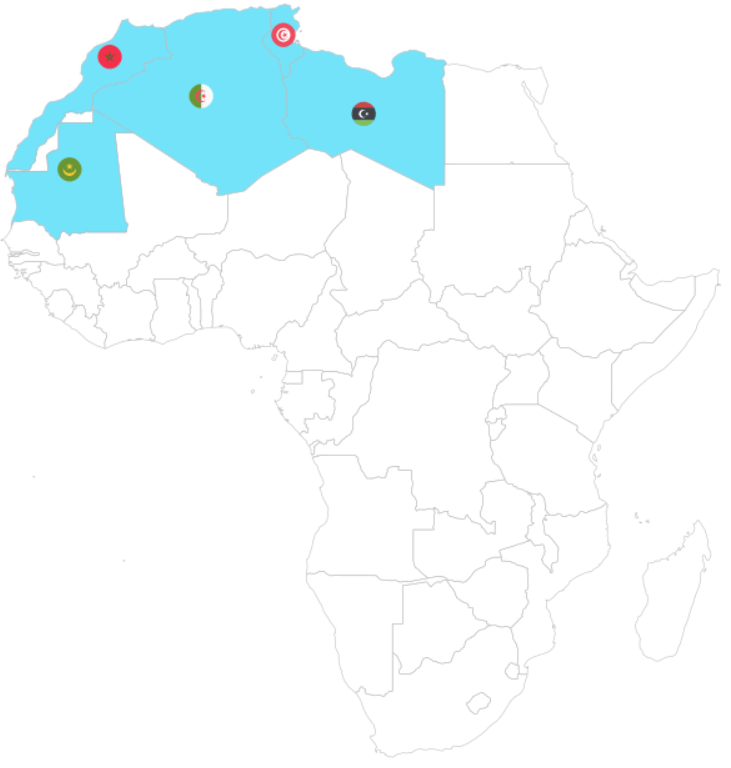
Next we will look at the Common Market for Eastern and Southern Africa.

If we don’t want to scrape the data from the Wikipedia article, we can feed in the vector of countries – separated by commas – into a data.frame() function.

Then we can separate the vector of countries into rows, and a cell for each country.

data.frame(country = "Djibouti, 
           Eritrea, 
           Ethiopia,
           Somalia,
           Egypt,
           Libya,
           Sudan,
           Tunisia,
           Comoros,
           Madagascar,
           Mauritius,
           Seychelles,
           Burundi,
           Kenya,
           Malawi,
           Rwanda,
           Uganda,
           Eswatini,
           Zambia") %>% 
  separate_rows(country, sep = ",") %>%  
  mutate(country = trimws(country)) %>%
  mutate(rec = "Common Market for Eastern and Southern Africa", 
         geo = "Eastern and Southern Africa",
         rec_abbrev = "COMESA") -> comesa

The separate_rows() function comes from the tidyr package.

We use this to split a single column with comma-separated values into multiple rows, creating a “long” format.

With the mutate(country = trimws(country)) we can remove any spaces with whitespace trimming.
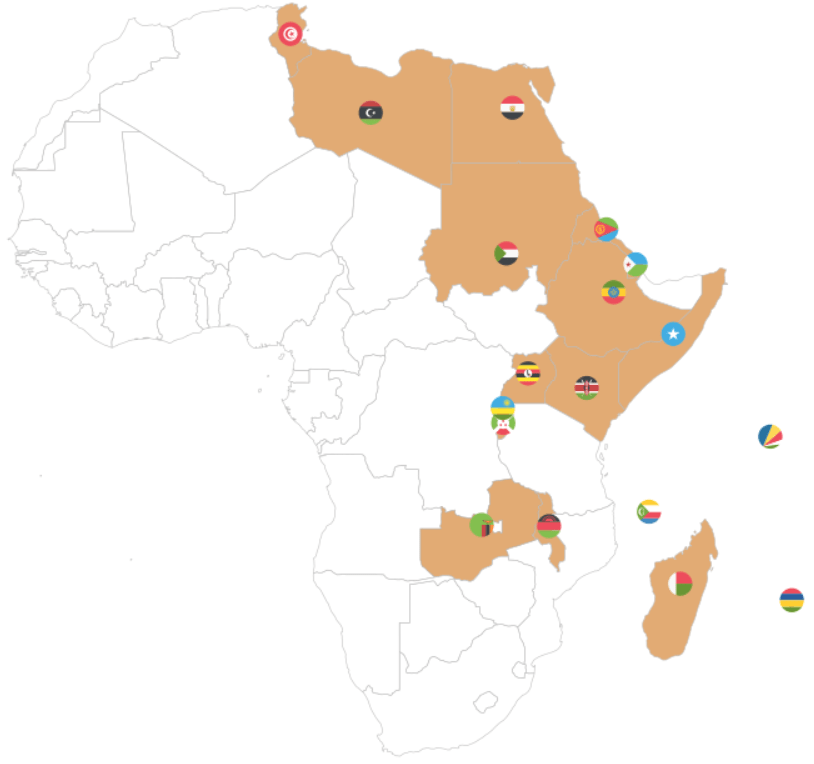
Onto the third REC – the Community of Sahel-Sahara States.

read_html("https://en.wikipedia.org/wiki/Community_of_Sahel%E2%80%93Saharan_States") %>% 
  html_table(header = TRUE, fill = TRUE) %>% 
  `[[`(5) %>%  
  janitor::clean_names()  %>% 
  pull() %>% as.data.frame() %>%
  select(country = '.', everything()) %>% 
  mutate(country = str_replace_all(country, "\\\n", ",")) %>% 
  separate_rows(country, sep = ",") %>% # create a column of words from the one cell vector of words!
  mutate(country = trimws(country)) %>%  # remove the white space
  mutate(rec = "Community of Sahel–Saharan States",
         geo = "Sahel Saharan States", 
         rec_abbrev = "CEN-SAD") -> censad

Fourth, onto the East African Community REC.

read_html("https://en.wikipedia.org/wiki/East_African_Community") %>% 
    html_table(header = TRUE, fill = TRUE) %>% 
    `[[`(2) %>%  
    janitor::clean_names() %>%
    pull(country) %>% 
    as.data.frame() %>% 
    mutate(rec = "East African Community",
           geo = "East Africa", 
           rec_abbrev = "EAC") %>% 
    select(country = '.', everything()) %>% 
  filter(str_trim(country) != "") -> eac

Fifth, we look at ECOWAS

read_html("https://en.wikipedia.org/wiki/Economic_Community_of_West_African_States") %>% 
  html_table(header = TRUE, fill = TRUE) %>% 
  `[[`(2) %>%  
  janitor::clean_names() %>%
  pull(country) %>% 
  as.data.frame() %>% 
  mutate(rec = "Economic Community of West African States",
         geo = "West Africa", 
         rec_abbrev = "ECOWAS") %>%
  select(country = '.', everything()) %>% 
  filter(str_trim(country) != "")  %>% 
  filter(str_trim(country) != "Total")  -> ecowas

Next the Economic Community of Central African States

read_html("https://en.wikipedia.org/wiki/Economic_Community_of_Central_African_States") %>% 
  html_table(header = TRUE, fill = TRUE) %>% 
  `[[`(4) %>%  
  janitor::clean_names() %>% 
  pull(country) %>% 
  as.data.frame() %>% 
    mutate(rec = "Economic Community of Central African States",
           geo = "Central Africa", 
           rec_abbrev = "ECCAS") %>% 
  select(country = '.', everything()) -> eccas

Seventh, we look at the Intergovernmental Authority on Development (IGAD)

data.frame(country = "Djibouti, Ethiopia, Somalia, Eritrea, Sudan, South Sudan, Kenya, Uganda") %>%  
separate_rows(country, sep = ",") %>%  
mutate(rec = "Intergovernmental Authority on Development", 
           geo = "Horn, Nile, Great Lakes",
           rec_abbrev = "IGAD") -> igad

Last, we will scrape Southern African Development Community (SADC)

read_html("https://en.wikipedia.org/wiki/Southern_African_Development_Community") %>% 
  html_table(header = TRUE, fill = TRUE) %>% 
  `[[`(3) %>%  
  janitor::clean_names() %>% 
  pull(country) %>% 
  as.data.frame() %>% 
  select(country = '.', everything()) %>% 
  mutate(country = sub("\\[.*", "", country),
    rec = "Southern African Development Community",
         geo = "Southern Africa", 
         rec_abbrev = "SADC") %>% 
  filter(!str_detect(country, fixed("Country", ignore_case = FALSE))) -> sadc

We can combine them all together with rbind to make a full dataset of all the countries.

  rbind(amu, censad, comesa, eac, eccas, ecowas, igad, sadc) %>% 
  mutate(country = trimws(country)) %>% 
  mutate(rec_abbrev = tolower(rec_abbrev)) -> rec

In the next blog post, we will complete the dataset (most importantly, clean up the country duplicates and make data visualisations / some data analysis with political and economic data!

References

Hartzenberg, T. (2011). Regional integration in Africa. World Trade Organization Publications: Economic Research and Statistics Division Staff Working Paper (ERSD-2011-14). PDF available

PDF available

UNCTAD (United Nations Conference on Trade and Development) (2021). Economic Development in Africa Report 2021: Reaping the Potential Benefits of the African Continental Free Trade Area for Inclusive Growth. PDF available

Songwe, V. (2019). Intra-African trade: A path to economic diversification and inclusion. Coulibaly, Brahima S, Foresight Africa: Top Priorities for the Continent in, 97-116. PDF available
Top R packages for downloading political science and economics datasets

  1. WDI
  2. peacesciencer
  3. eurostat
  4. vdem
  5. democracyData
  6. icpsrdata
  7. Quandl
  8. essurvey
  9. manifestoR
  10. unvotes
  11. gravity

1. WDI

The World Development Indicators (WDI) package by Vincent Arel-Bundock provides access to a database of hundreds of economic development indicators from the World Bank.

Examples of variables include population, GDP, education, health, and poverty, school attendance rates.

Reference: Arel-Bundock, V. (2017). WDI: World Development Indicators (R Package Version 2.7.1).

2. peacesciencer

This package by Steve Miller helps you download data related to peace and conflict studies, including the Correlates of War project.

Examples of variables include Alliance Treaty Obligations and Provisions (ATOP), Thompson and Dreyer’s (2012) strategic rivalry data, fractionalization/polarization estimates from the Composition of Religious and Ethnic Groups (CREG) Project, and Uppsala Conflict Data Program (UCDP) data on civil and inter-state conflicts.

Data can come in either country-year, event-level or dyadic-level.

Reference: Steve Miller (2020). peacesciencer: Tools for Peace Scientists (R Package Version 0.2.2). Website retrieved at http://svmiller.com/peacesciencer/ms.html

3. eurostat

eurostat provides access to a wide range of statistics and data on the European Union and its member states, covering topics such as population, economics, society, and the environment.

Examples of variables include employment, inflation, education, crime, and air pollution. The package was authored by Leo Lahti.

Reference: eurostat (2018). eurostat: Eurostat Open Data (R Package Version 3.6.0), CRAN PDF retrieved at https://cran.r-project.org/web/packages/eurostat/eurostat.pdf

4. vdemdata

The Varieties of Democracy package by Staffan I. Lindberg et al. provides data on a range of indicators related to democracy and governance in countries around the world, including measures of electoral democracy, civil liberties, and human rights.

Click here to read more about downloading the package

Examples of variables include freedom of speech, rule of law, corruption, government transparency, and voter turnout.

Reference: Lindberg, S. I., & Stepanova, N. (2020). vdem: Varieties of Democracy Project (R Package Version 1.6).

5. democracyData

This package by Xavier Marquez: provides data on a range of variables related to democracy, including elections, political parties, and civil liberties.

Examples of variables include regime type, democracy scores (Freedom House, PolityIV etc,  Geddes, Wright, and Frantz’ autocratic regimes dataset, the Lexical Index of Electoral Democracy, the DD/ACLP/PACL/CGV dataset), axxording to the Github page

6. icpsrdata

This package by Frederick Solt provides a simple way to download and import data from the Inter-university Consortium for Political and Social Research (ICPSR) archive into R. This is for easy replication and sharing of data. The package includes datasets from different fields of study, including sociology, political science, and economics.

Reference: Solt, F. (2020). icpsrdata: Reproducible Data Retrieval from the ICPSR Archive (R Package Version 0.5.0).

7. Quandl

This R package by Quandl provides an interface to access financial and economic data from over 20 different sources. Examples of variables include stock prices, futures, options, and macroeconomic indicators. The package includes functions to easily download data directly into R and perform tasks such as plotting, transforming, and aggregating data. Additional functions for managing and exploring data, such as search tools and data caching features, are also available.

Here are five examples of variables in the Quandl package:

  • “AAPL” (Apple Inc. stock price)
  • “CHRIS/CME_CL1” (Crude Oil Futures)
  • “FRED/GDP” (US GDP)
  • “BCHAIN/MKPRU” (Bitcoin Market Price)
  • “USTREASURY/YIELD” (US Treasury Yield Curve Rates)

Reference: Quandl. (2021). Quandl: A library of economic and financial data. Retrieved from https://www.quandl.com/tools/r.

8. essurvey

The essurvey package is an R package that provides access to data from the European Social Survey (ESS), which is a large-scale survey that collects data on attitudes, values, and behavior across Europe. The package includes functions to easily download, read, and analyze data from the ESS, and also includes documentation and sample code to help users get started.

Examples of variables in the ESS dataset include political interest, trust in political institutions, social class, education level, and income. The package was authored by David Winter and includes a variety of useful functions for working with ESS data.

Reference: Winter, D. (2021). essurvey: Download Data from the European Social Survey on the Fly. R package version 3.4.4. Retrieved from https://cran.r-project.org/package=essurvey.

9. manifestoR

manifestoR is an R package that provides access to data from the Comparative Manifesto Project (CMP), which is a cross-national research project that analyzes political party manifestos. The package allows users to easily download and analyze data from the CMP, including party positions on various policy issues and the salience of those issues across time and space.

Examples of variables in the CMP dataset include party positions on taxation, immigration, the environment, healthcare, and education. The package was authored by Jörg Matthes, Marcelo Jenny, and Carsten Schwemmer.

Reference: Matthes, J., Jenny, M., & Schwemmer, C. (2018). manifestoR: Access and Process Data and Documents of the Manifesto Project. R package version 1.2.1. Retrieved from https://cran.r-project.org/package=manifestoR.

10. unvotes

The unvotes data package provides historical voting data of the United Nations General Assembly, including votes for each country in each roll call, as well as descriptions and topic classifications for each vote.

The classifications included in the dataset cover a wide range of issues, including human rights, disarmament, decolonization, and Middle East-related issues.

Reference: The package was created by David Robinson and Nicholas Goguen-Compagnoni and is available on the Comprehensive R Archive Network (CRAN) at https://cran.r-project.org/web/packages/unvotes/unvotes.pdf.

11. gravity

The gravity package in R, created by Anna-Lena Woelwer, provides a set of functions for estimating gravity models, which are used to analyze bilateral trade flows between countries. The package includes the gravity_data dataset, which contains information on trade flows between pairs of countries.

Examples of variables that may affect trade in the dataset are GDP, distance, and the presence of regional trade agreements, contiguity, common official language, and common currency.

iso_o: ISO-Code of country of origin
iso_d: ISO-Code of country of destination
distw: weighted distance
gdp_o: GDP of country of origin
gdp_d: GDP of country of destination
rta: regional trade agreement
flow: trade flow
contig: contiguity
comlang_off: common official language
comcur: common currency

The package PDF CRAN is available at http://cran.nexr.com/web/packages/gravity/gravity.pdf

Scraping and wrangling UN peacekeeping data with tidyr package in R

Packages we will need:

library(tidyverse)
library(rvest)
library(magrittr)
library(tidyr)
library(countrycode)
library(democracyData)
library(janitor)
library(waffle)

For this blog post, we will look at UN peacekeeping missions and compare across regions.

Despite the criticisms about some operations, the empirical record for UN peacekeeping records has been robust in the academic literature

“In short, peacekeeping intervenes in the most difficult
cases, dramatically increases the chances that peace will
last, and does so by altering the incentives of the peacekept,
by alleviating their fear and mistrust of each other, by
preventing and controlling accidents and misbehavior by
hard-line factions, and by encouraging political inclusion”
(Goldstone, 2008: 178).

The data on the current and previous PKOs (peacekeeping operations) will come from the Wikipedia page. But the variables do not really lend themselves to analysis as they are.

Amy Coney Barrett Snl GIF by Saturday Night Live - Find & Share on GIPHY

Once we have the url, we scrape all the tables on the Wikipedia page in a few lines

pko_members <- read_html("https://en.wikipedia.org/wiki/List_of_United_Nations_peacekeeping_missions")
pko_tables <- pko_members %>% html_table(header = TRUE, fill = TRUE)

Click here to read more about the rvest package for scraping data from websites.

pko_complete_africa <- pko_tables[[1]]
pko_complete_americas <- pko_tables[[2]]
pko_complete_asia <- pko_tables[[3]]
pko_complete_europe <- pko_tables[[4]]
pko_complete_mena <- pko_tables[[5]]

And then we bind them together! It’s very handy that they all have the same variable names in each table.

rbind(pko_complete_africa, pko_complete_americas, pko_complete_asia, pko_complete_europe, pko_complete_mena) -> pko_complete

Next, we will add a variable to indicate that all the tables of these missions are completed.

pko_complete %<>% 
  mutate(complete = ifelse(!is.na(pko_complete$Location), "Complete", "Current"))

We do the same with the current missions that are ongoing:

pko_current_africa <- pko_tables[[6]]
pko_current_asia <- pko_tables[[7]]
pko_current_europe <- pko_tables[[8]]
pko_current_mena <- pko_tables[[9]]

rbind(pko_current_europe, pko_current_mena, pko_current_asia, pko_current_africa) -> pko_current

pko_current %<>% 
  mutate(complete = ifelse(!is.na(pko_current$Location), "Current", "Complete"))

We then bind the completed and current mission data.frames

rbind(pko_complete, pko_current) -> pko

Then we clean the variable names with the function from the janitor package.

pko_df <-  pko %>% 
  janitor::clean_names()

Next we’ll want to create some new variables.

We can make a new row for each country that is receiving a peacekeeping mission. We can paste all the countries together and then use the separate function from the tidyr package to create new variables.

 pko_df %>%
  group_by(conflict) %>%
  mutate(location = paste(location, collapse = ', ')) %>% 
  separate(location,  into = c("country_1", "country_2", "country_3", "country_4", "country_5"), sep = ", ")  %>% 
  ungroup() %>% 
  distinct(conflict, .keep_all = TRUE) %>% 

Next we can create a new variable that only keeps the acroynm for the operation name. I took these regex codes from the following stack overflow link

pko_df %<>% 
  mutate(acronym = str_extract_all(name_of_operation, "\\([^()]+\\)")) %>% 
  mutate(acronym = substring(acronym, 2, nchar(acronym)-1)) %>% 
  separate(dates_of_operation, c("start_date", "end_date"), "–")

I will fill in the end data for the current missions that are still ongoing in 2022

pko_df %<>% 
  mutate(end_date = ifelse(complete == "Current", 2022, end_date)) 

And next we can calculate the duration for each operation

pko_df %<>% 
  mutate(end_date = as.integer(end_date)) %>% 
  mutate(start_date = as.integer(start_date)) %>% 
  mutate(duration = ifelse(!is.na(end_date), end_date - start_date, 1)) 

I want to compare regions and graph out the different operations around the world.

We can download region data with democracyData package (best package ever!)

Snl Season 47 GIF by Saturday Night Live - Find & Share on GIPHY
pacl <- redownload_pacl()

pacl %>% 
  select(cown = pacl_cowcode,
        un_region_name, un_continent_name) %>% 
  distinct(cown, .keep_all = TRUE) -> pacl_region

We join the datasets together with the inner_join() and add Correlates of War country codes.

pko_df %<>% 
  mutate(cown = countrycode(country_1, "country.name", "cown")) %>%   mutate(cown = ifelse(country_1 == "Western Sahara", 605, 
                       ifelse(country_1 == "Serbia", 345, cown))) %>% 
  inner_join(pacl_region, by = "cown")

Now we can start graphing our duration data:

pko_df %>% 
  ggplot(mapping = aes(x = forcats::fct_reorder(un_region_name, duration), 
                       y = duration, 
                       fill = un_region_name)) +
  geom_boxplot(alpha = 0.4) +
  geom_jitter(aes(color = un_region_name),
              size = 6, alpha = 0.8, width = 0.15) +
  coord_flip() + 
  bbplot::bbc_style() + ggtitle("Duration of Peacekeeping Missions")
Years

We can see that Asian and “Western Asian” – i.e. Middle East – countries have the longest peacekeeping missions in terns of years.

pko_countries %>% 
  filter(un_continent_name == "Asia") %>%
  unite("country_names", country_1:country_5, remove = TRUE,  na.rm = TRUE, sep = ", ") %>% 
  arrange(desc(duration)) %>% 
  knitr::kable("html")
Start End Duration Region Country
1949 2022 73 Southern Asia India, Pakistan
1964 2022 58 Western Asia Cyprus, Northern Cyprus
1974 2022 48 Western Asia Israel, Syria, Lebanon
1978 2022 44 Western Asia Lebanon
1993 2009 16 Western Asia Georgia
1991 2003 12 Western Asia Iraq, Kuwait
1994 2000 6 Central Asia Tajikistan
2006 2012 6 South-Eastern Asia East Timor
1988 1991 3 Southern Asia Iran, Iraq
1988 1990 2 Southern Asia Afghanistan, Pakistan
1965 1966 1 Southern Asia Pakistan, India
1991 1992 1 South-Eastern Asia Cambodia, Cambodia
1999 NA 1 South-Eastern Asia East Timor, Indonesia, East Timor, Indonesia, East Timor
1958 NA 1 Western Asia Lebanon
1963 1964 1 Western Asia North Yemen
2012 NA 1 Western Asia Syria

Next we can compare the decades

pko_countries %<>% 
  mutate(decade = substr(start_date, 1, 3)) %>% 
  mutate(decade = paste0(decade, "0s")) 

And graph it out:

pko_countries %>% 
  ggplot(mapping = aes(x = decade, 
                       y = duration, 
                       fill = decade)) +
  geom_boxplot(alpha = 0.4) +
  geom_jitter(aes(color = decade),
              size = 6, alpha = 0.8, width = 0.15) +
   coord_flip() + 
  geom_curve(aes(x = "1950s", y = 60, xend = "1940s", yend = 72),
  arrow = arrow(length = unit(0.1, "inch")), size = 0.8, color = "black",
   curvature = -0.4) +
  annotate("text", label = "First Mission to Kashmir",
           x = "1950s", y = 49, size = 8, color = "black") +
  geom_curve(aes(x = "1990s", y = 46, xend = "1990s", yend = 32),
             arrow = arrow(length = unit(0.1, "inch")), size = 0.8, color = "black",curvature = 0.3) +
  annotate("text", label = "Most Missions after the Cold War",
           x = "1990s", y = 60, size = 8, color = "black") +

  bbplot::bbc_style() + ggtitle("Duration of Peacekeeping Missions")
Years

Following the end of the Cold War, there were renewed calls for the UN to become the agency for achieving world peace, and the agency’s peacekeeping dramatically increased, authorizing more missions between 1991 and 1994 than in the previous 45 years combined.

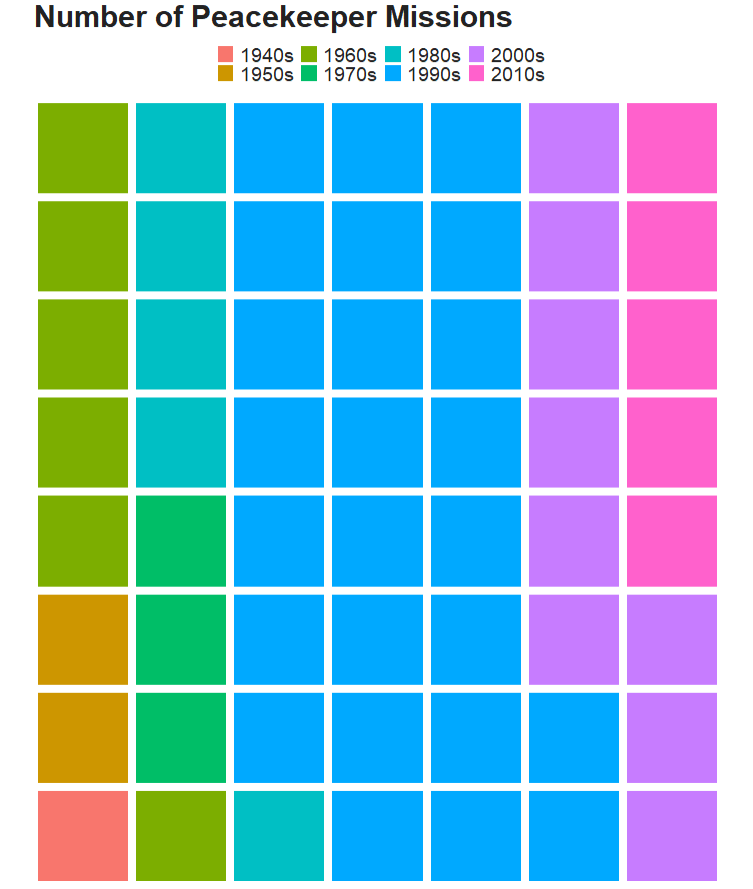
We can use a waffle plot to see which decade had the most operation missions. Waffle plots are often seen as more clear than pie charts.

Click here to read more about waffle charts in R

To get the data ready for a waffle chart, we just need to count the number of peacekeeping missions (i.e. the number of rows) in each decade. Then we fill the groups (i.e. decade) and enter the n variable we created as the value.

pko_countries %>% 
  group_by(decade) %>% 
  count() %>%  
  ggplot(aes(fill = decade, values = n)) + 
  waffle::geom_waffle(color = "white", size= 3, n_rows = 8) +
  scale_x_discrete(expand=c(0,0)) +
  scale_y_discrete(expand=c(0,0)) +
  coord_equal() +
  labs(title = "Number of Peacekeeper Missions") + bbplot::bbc_style() 
Cecily Strong Snl GIF by Saturday Night Live - Find & Share on GIPHY

If we want to add more information, we can go to the UN Peacekeeping website and download more data on peacekeeping troops and operations.

We can graph the number of peacekeepers per country

Click here to learn more about adding flags to graphs!

le_palette <- c("#5f0f40", "#9a031e", "#94d2bd", "#e36414", "#0f4c5c")

pkt %>%
  mutate(contributing_country = ifelse(contributing_country == "United Republic of Tanzania", "Tanzania",ifelse(contributing_country == "Côte d’Ivoire", "Cote d'Ivoire", contributing_country))) %>% 
  mutate(iso2 = tolower(countrycode::countrycode(contributing_country, "country.name", "iso2c"))) %>% 
  mutate(cown = countrycode::countrycode(contributing_country, "country.name", "cown")) %>% 
  inner_join(pacl_region, by = "cown") %>% 
  mutate(un_region_name = case_when(grepl("Africa", un_region_name) ~ "Africa",grepl("Eastern Asia", un_region_name) ~ "South-East Asia",
 un_region_name == "Western Africa" ~ "Middle East",TRUE ~ as.character(un_region_name))) %>% 
  filter(total_uniformed_personnel > 700) %>% 
  ggplot(aes(x = reorder(contributing_country, total_uniformed_personnel),
             y = total_uniformed_personnel)) + 
  geom_bar(stat = "identity", width = 0.7, aes(fill = un_region_name), color = "white") +
  coord_flip() +
  ggflags::geom_flag(aes(x = contributing_country, y = -1, country = iso2), size = 8) +
  # geom_text(aes(label= values), position = position_dodge(width = 0.9), hjust = -0.5, size = 5, color = "#000500") + 
  scale_fill_manual(values = le_palette) +
  labs(title = "Total troops serving as peacekeepers",
       subtitle = ("Across countries"),
       caption = "         Source: UN ") +
  xlab("") + 
  ylab("") + bbplot::bbc_style()

We can see that Bangladesh, Nepal and India have the most peacekeeper troops!