Top R packages for downloading political science and economics datasets

  1. WDI
  2. peacesciencer
  3. eurostat
  4. vdem
  5. democracyData
  6. icpsrdata
  7. Quandl
  8. essurvey
  9. manifestoR
  10. unvotes
  11. gravity

1. WDI

The World Development Indicators (WDI) package by Vincent Arel-Bundock provides access to a database of hundreds of economic development indicators from the World Bank.

Examples of variables include population, GDP, education, health, and poverty, school attendance rates.

Reference: Arel-Bundock, V. (2017). WDI: World Development Indicators (R Package Version 2.7.1).

2. peacesciencer

This package by Steve Miller helps you download data related to peace and conflict studies, including the Correlates of War project.

Examples of variables include Alliance Treaty Obligations and Provisions (ATOP), Thompson and Dreyer’s (2012) strategic rivalry data, fractionalization/polarization estimates from the Composition of Religious and Ethnic Groups (CREG) Project, and Uppsala Conflict Data Program (UCDP) data on civil and inter-state conflicts.

Data can come in either country-year, event-level or dyadic-level.

Reference: Steve Miller (2020). peacesciencer: Tools for Peace Scientists (R Package Version 0.2.2). Website retrieved at http://svmiller.com/peacesciencer/ms.html

3. eurostat

eurostat provides access to a wide range of statistics and data on the European Union and its member states, covering topics such as population, economics, society, and the environment.

Examples of variables include employment, inflation, education, crime, and air pollution. The package was authored by Leo Lahti.

Reference: eurostat (2018). eurostat: Eurostat Open Data (R Package Version 3.6.0), CRAN PDF retrieved at https://cran.r-project.org/web/packages/eurostat/eurostat.pdf

4. vdemdata

The Varieties of Democracy package by Staffan I. Lindberg et al. provides data on a range of indicators related to democracy and governance in countries around the world, including measures of electoral democracy, civil liberties, and human rights.

Click here to read more about downloading the package

Examples of variables include freedom of speech, rule of law, corruption, government transparency, and voter turnout.

Reference: Lindberg, S. I., & Stepanova, N. (2020). vdem: Varieties of Democracy Project (R Package Version 1.6).

5. democracyData

This package by Xavier Marquez: provides data on a range of variables related to democracy, including elections, political parties, and civil liberties.

Examples of variables include regime type, democracy scores (Freedom House, PolityIV etc,  Geddes, Wright, and Frantz’ autocratic regimes dataset, the Lexical Index of Electoral Democracy, the DD/ACLP/PACL/CGV dataset), axxording to the Github page

6. icpsrdata

This package by Frederick Solt provides a simple way to download and import data from the Inter-university Consortium for Political and Social Research (ICPSR) archive into R. This is for easy replication and sharing of data. The package includes datasets from different fields of study, including sociology, political science, and economics.

Reference: Solt, F. (2020). icpsrdata: Reproducible Data Retrieval from the ICPSR Archive (R Package Version 0.5.0).

7. Quandl

This R package by Quandl provides an interface to access financial and economic data from over 20 different sources. Examples of variables include stock prices, futures, options, and macroeconomic indicators. The package includes functions to easily download data directly into R and perform tasks such as plotting, transforming, and aggregating data. Additional functions for managing and exploring data, such as search tools and data caching features, are also available.

Here are five examples of variables in the Quandl package:

  • “AAPL” (Apple Inc. stock price)
  • “CHRIS/CME_CL1” (Crude Oil Futures)
  • “FRED/GDP” (US GDP)
  • “BCHAIN/MKPRU” (Bitcoin Market Price)
  • “USTREASURY/YIELD” (US Treasury Yield Curve Rates)

Reference: Quandl. (2021). Quandl: A library of economic and financial data. Retrieved from https://www.quandl.com/tools/r.

8. essurvey

The essurvey package is an R package that provides access to data from the European Social Survey (ESS), which is a large-scale survey that collects data on attitudes, values, and behavior across Europe. The package includes functions to easily download, read, and analyze data from the ESS, and also includes documentation and sample code to help users get started.

Examples of variables in the ESS dataset include political interest, trust in political institutions, social class, education level, and income. The package was authored by David Winter and includes a variety of useful functions for working with ESS data.

Reference: Winter, D. (2021). essurvey: Download Data from the European Social Survey on the Fly. R package version 3.4.4. Retrieved from https://cran.r-project.org/package=essurvey.

9. manifestoR

manifestoR is an R package that provides access to data from the Comparative Manifesto Project (CMP), which is a cross-national research project that analyzes political party manifestos. The package allows users to easily download and analyze data from the CMP, including party positions on various policy issues and the salience of those issues across time and space.

Examples of variables in the CMP dataset include party positions on taxation, immigration, the environment, healthcare, and education. The package was authored by Jörg Matthes, Marcelo Jenny, and Carsten Schwemmer.

Reference: Matthes, J., Jenny, M., & Schwemmer, C. (2018). manifestoR: Access and Process Data and Documents of the Manifesto Project. R package version 1.2.1. Retrieved from https://cran.r-project.org/package=manifestoR.

10. unvotes

The unvotes data package provides historical voting data of the United Nations General Assembly, including votes for each country in each roll call, as well as descriptions and topic classifications for each vote.

The classifications included in the dataset cover a wide range of issues, including human rights, disarmament, decolonization, and Middle East-related issues.

Reference: The package was created by David Robinson and Nicholas Goguen-Compagnoni and is available on the Comprehensive R Archive Network (CRAN) at https://cran.r-project.org/web/packages/unvotes/unvotes.pdf.

11. gravity

The gravity package in R, created by Anna-Lena Woelwer, provides a set of functions for estimating gravity models, which are used to analyze bilateral trade flows between countries. The package includes the gravity_data dataset, which contains information on trade flows between pairs of countries.

Examples of variables that may affect trade in the dataset are GDP, distance, and the presence of regional trade agreements, contiguity, common official language, and common currency.

iso_o: ISO-Code of country of origin
iso_d: ISO-Code of country of destination
distw: weighted distance
gdp_o: GDP of country of origin
gdp_d: GDP of country of destination
rta: regional trade agreement
flow: trade flow
contig: contiguity
comlang_off: common official language
comcur: common currency

The package PDF CRAN is available at http://cran.nexr.com/web/packages/gravity/gravity.pdf

Cleaning up messy World Bank data

Packages we will need:

library(tidyverse)
library(tidyr)
library(janitor)
library(magrittr)
library(democracyData)
library(countrycode)
library(ggimage)

When you come across data from the World Bank, often it is messy.

So this blog will go through how to make it more tidy and more manageable in R

For this blog, we will look at World Bank data on financial aid. Specifically, we will be using values for net ODA received as percentage of each country’s GNI. These figures come from the Development Assistance Committee of the Organisation for Economic Co-operation and Development (DAC OECD).

If we look at the World Bank data downloaded from the website, we have a column for each year and the names are quite messy.

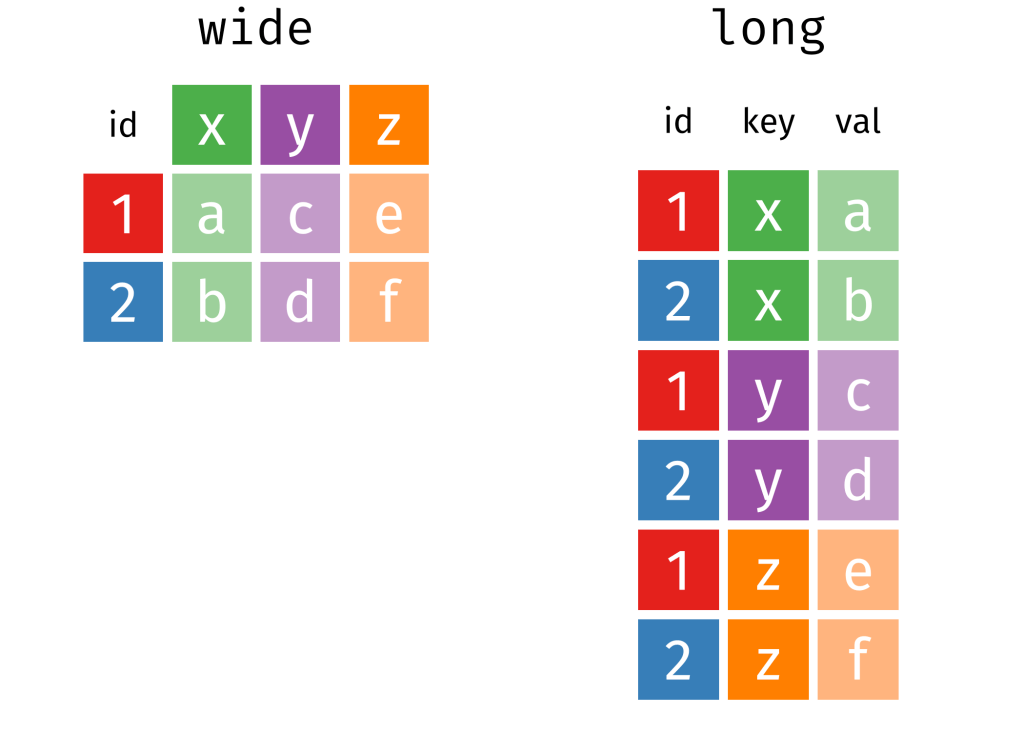
This data is wide form.

Unacceptable.

So we will change the data from wide to long data.

Instead of a column for each year, we will have a row for each country-year.

Before doing that, we can clean up the variable names with the janitor package function: clean_names().

sdg %<>% 
  clean_names() 

ALSO, before we pivot the dataset to longer format, we choose the variables we want to keep (i.e. only country, year and ODA value)

sdg %<>% 
  select(country_name, x1990_yr1990:x2015_yr2015) 

Now we are ready to turn the data from wide to long.

We can use the pivot_longer() function from the tidyr package.

Instead of 286 rows and 27 columns, we will ultimately end up with 6968 rows and only 3 columns.

Source: Garrick Aden-Buie’s (@grrrckTidy Animated Verbs

Thank you to Mr. Aden-Buie for your page visualising all the different ways to transform datasets with dplyr. Click the link to check out more.

Back to the pivoting, we want to create a row for each year, 1990, 1991, 1992 …. up to 2015

And we will have a separate cell for each value of the ODA variable for each country-year value.

In the pivot_longer() function we exclude the country names,

We want a new row for each year, so we make a “year” variable with the names_to() argument.

And we create a separate value for each ODA as a percentage of GNI with the values_to() argument.

sdg %>% 
  pivot_longer(!country_name, names_to = "year", 
               values_to = "oda_gni") -> oda

The year values are character strings, not numbers. So we will convert with parse_number(). This parses the first number it finds, dropping any non-numeric characters before the first number and all characters after the first number.

oda %>% 
     mutate(year = parse_number(year)) -> oda 

Next we will move from the year variable to ODA variable. There are many ODA values that are empty. We can see that there are 145 instances of empty character strings.

oda %>% 
  count(oda_gni) %>% 
  arrange(oda_gni)

So we can replace the empty character strings with NA values using the na_if() function. Then we can use the parse_number() function to turn the character into a string.

oda %>%
  mutate(oda_gni = na_if(oda_gni, "")) %>% 
  mutate(oda_gni = parse_number(oda_gni)) -> oda

Now we need to delete the year variables that have no values.

oda %<>% 
  filter(!is.na(year))

Also we need to delete non-countries.

The dataset has lots of values for regions that are not actual countries. If you only want to look at politically sovereign countries, we can filter out countries that do not have a Correlates of War value.

oda %<>%
  mutate(cow = countrycode(oda$country_name, "country.name", 'cown')) %>% 
  filter(!is.na(cow))

We can also make a variable for each decade (1990s, 2000s etc).

oda %>% 
  mutate(decade = substr(year, 1, 3)) %>% 
  mutate(decade = paste0(decade, "0s"))

And download data for countries’ region, continent and govenment regime. To do this we use the democracyData package and download the PACL dataset.

Click here to read more about this package.

pacl <- democracyData::redownload_pacl()

pacl %>% 
  select(cow = pacl_cowcode,
         year,
         region = un_region_name,
         continent = un_continent_name,
         demo_dummy = democracy,
         regime = regime
         ) -> pacl_subset

We use the left_join() function to join both datasets together with Correlates of War code and year variables.

oda %>% 
  left_join(pacl_subset, by = c("cow", "year")) -> oda_pacl

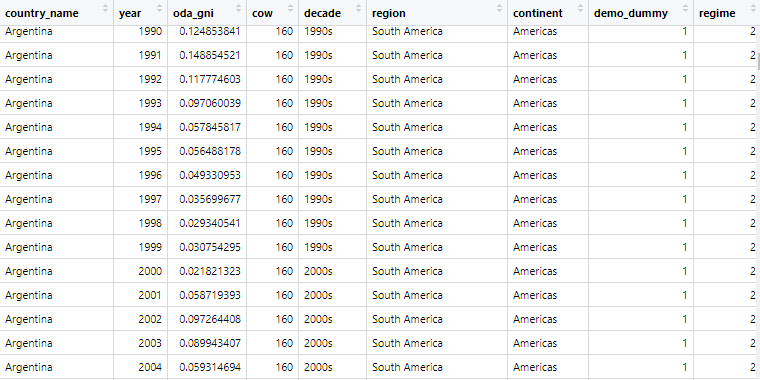
Now if we look at the dataset, we can see that it is much tidier and we can start analysing.

Below we can create a bar chart of the top ten countries that received the most aid as a percentage of their economic income (gross national income)

First we need to get the average oda per country with the group_by() and summarise() functions

oda_pacl %>%
  mutate(oda_gni = ifelse(is.na(oda_gni), 0, oda_gni)) %>%  
  group_by(country_name,region, continent) %>% 
  summarise(avg_oda = mean(oda_gni, na.rm = TRUE)) -> oda_mean

We use the slice() function to only have the top ten countries

oda_mean %>% 
  arrange(desc(avg_oda)) %>%
  ungroup() %>% 
  slice(1:10) -> oda_slice

We add an ISO code for each country for the flags

Click here to read more about the ggimage package

oda_slice %<>% 
  mutate(iso2 = countrycode(country_name, "country.name", "iso2c"))

And some nice hex colours

my_palette <- c( "#44bec7", "#ffc300", "#fa3c4c")

And finally, plot it out with ggplot()

oda_slice %>%
  ggplot(aes(x = reorder(country_name, avg_oda),
             y = avg_oda, fill = continent)) + 
  geom_bar(stat = "identity") + 
  ggimage::geom_flag(aes(image = iso2), size = 0.1)  +
  coord_flip() +
  scale_fill_manual(values = my_palette) + 
  labs(title = "ODA aid as % GNI ",
       subtitle = "Source: OECD DAC via World Bank",
       x = "Donor Country",
       y = "ODA per capita") + bbplot::bbc_style()

Convert event-level data to panel-level data with tidyr in R

Packages we will need:

library(tidyverse)
library(magrittr)
library(lubridate)
library(tidyr)
library(rvest)
library(janitor)

In this post, we are going to scrape NATO accession data from Wikipedia and turn it into panel data. This means turning a list of every NATO country and their accession date into a time-series, cross-sectional dataset with information about whether or not a country is a member of NATO in any given year.

This is helpful for political science analysis because simply a dummy variable indicating whether or not a country is in NATO would lose information about the date they joined. The UK joined NATO in 1948 but North Macedonia only joined in 2020. A simple binary variable would not tell us this if we added it to our panel data.

Consoling 30 Rock GIF - Find & Share on GIPHY

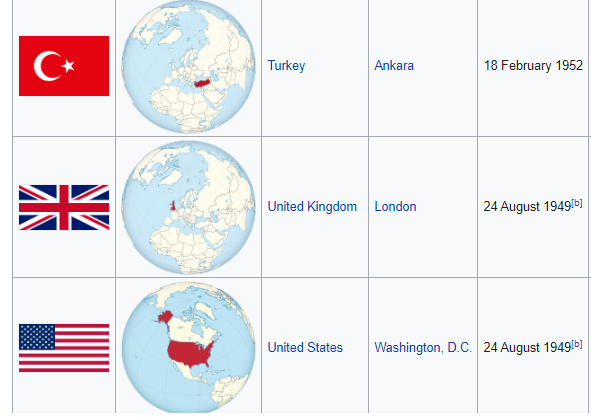
We will first scrape a table from the Wikipedia page on NATO member states with a few functions form the rvest pacakage.

Click here to read more about the rvest package:

nato_members <- read_html("https://en.wikipedia.org/wiki/Member_states_of_NATO")

nato_tables <- nato_members %>% html_table(header = TRUE, fill = TRUE)

nato_member_joined <- nato_tables[[1]]

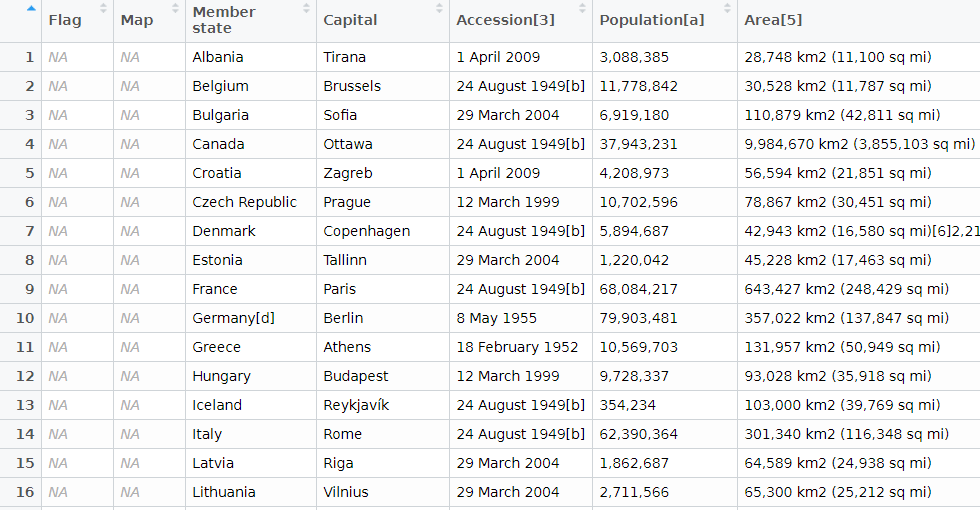
We have information about each country and the date they joined. In total there are 30 rows, one for each member of NATO.

Next we are going to clean up the data, remove the numbers in the [square brackets], and select the columns that we want.

A very handy function from the janitor package cleans the variable names. They are lower_case_with_underscores rather than how they are on Wikipedia.

Next we remove the square brackets and their contents with sub("\\[.*", "", insert_variable_name)

And the accession date variable is a bit tricky because we want to convert it to date format, extract the year and convert back to an integer.

nato_member_joined %<>% 
  clean_names() %>% 
  select(country = member_state, 
         accession = accession_3) %>% 
  mutate(member_2020 = 2020,
         country = sub("\\[.*", "", country),
         accession = sub("\\[.*", "", accession),
         accession = parse_date_time(accession, "dmy"),
         accession = format(as.Date(accession, format = "%d/%m/%Y"),"%Y"),
         accession = as.numeric(as.character(accession)))

When we have our clean data, we will pivot the data to longer form. This will create one event column that has a value of accession or member in 2020.

This gives us the start and end year of our time variable for each country.

nato_member_joined %<>% 
  pivot_longer(!country, names_to = "event", values_to = "year") 

Our dataset now has 60 observations. We see Albania joined in 2009 and is still a member in 2020, for example.

Next we will use the complete() function from the tidyr package to fill all the dates in between 1948 until 2020 in the dataset. This will increase our dataset to 2,160 observations and a row for each country each year.

Nect we will group the dataset by country and fill the nato_member status variable down until the most recent year.

nato_member_joined %<>% 
  mutate(year = as.Date(as.character(year), format = "%Y")) %>% 
  mutate(year = ymd(year)) %>% 
  complete(country, year = seq.Date(min(year), max(year), by = "year")) %>% 
  mutate(nato_member = ifelse(event == "accession", 1, 
                              ifelse(event == "member_2020", 1, 0))) %>% 
  group_by(country) %>% 
  fill(nato_member, .direction = "down") %>%
  ungroup()

Last, we will use the ifelse() function to mutate the event variable into one of three categories: 'accession‘, 'member‘ or ‘not member’.

nato_member_joined %>%
  mutate(nato_member = replace_na(nato_member, 0),
         year = parse_number(as.character(year)),
         event = ifelse(nato_member == 0, "not member", event),
         event = ifelse(nato_member == 1 & is.na(event), "member", event),
         event = ifelse(event == "member_2020", "member", event))  %>% 
  distinct(country, year, .keep_all = TRUE) -> nato_panel
High Five 30 Rock GIF - Find & Share on GIPHY

Ethnicity Dataset

epr_indo <- read_csv('/mnt/data/epr_indo.csv')

# Expand the data to have a row for each year for each group
epr_indo_expanded <- epr_indo %>%
  rowwise() %>%
  mutate(year = list(seq(from, to))) %>% 
  unnest(year) %>%
  select(-from, -to)

# Pivot the data to wide format with separate ethnicity, share, and broad_cat columns
epr_indo_wide <- epr_indo_expanded %>%
  group_by(statename, year) %>%
  mutate(index = row_number()) %>%
  ungroup() %>%
  pivot_wider(
    id_cols = c(statename, year),
    names_from = index,
    values_from = c(group, size, broad_cat),
    names_sep = "_"
  ) %>%
  # Renaming the columns for ethnicity, share, and broad category
  rename_with(~ str_replace(., "group_", "ethnicity_"), starts_with("group_")) %>%
  rename_with(~ str_replace(., "size_", "share_"), starts_with("size_")) %>%
  rename_with(~ str_replace(., "broad_cat_", "broad_cat_"), starts_with("broad_cat_"))