According to the CRAN package for installr, “While for Linux users, the installation process of new software may be just running a short line of code, for the regular Windows user it often includes
browsing online,
finding the latest version,
downloading it,
running the installer, and
deleting the installation file.
All of these steps are automatically done using functions in this package.”
The installr package offers a set of R functions for the installation and updating of software (currently, only on Windows OS), with a special focus on R itself. This package has two main goals:
To make updating R (on windows) as easy as running a function.
To make it as easy as possible to install all of the needed software for R development (such as git, RTools, etc),
          used (Mb)     gc trigger   (Mb)     max used      (Mb)
Ncells  646,297 34.6    1,234,340    66.0     1,019,471     54.5
Vcells 1,902,221 14.6  213,407,768   1628.2   255,567,715   1949.9
Ncells Memory used by R’s internal bookkeeping: environments, expressions, symbols. Usually stable and not a worry~
Vcells Memory used by your data: vectors, data frames, strings, lists. So when I think “R ran out of memory,” it almost always mean Vcells are too high~
If I look at the columns:
used: memory currently in use after garbage collection
gc trigger: threshold at which R will automatically run GC next
max used: peak memory usage since the session started
As an aside, I can see from the table also that my session at one time or another used around 2 GB of memory, even though it now uses ~15 MB.
The official R documentation is explicit that reporting, not memory recovery, is the primary reason we should use gc()
“the primary purpose of calling gc is for the report on memory usage”
The documentition also says it can be useful to call gc() after a large object has been removed, as this may prompt R to return memory to the operating system.
Also if I turn on garbage collection logging with gcinfo()
gcinfo(TRUE)
This starts printing a log every time I execute a function:
Garbage collection 80 = 53+6+21 (level 0) ... 74.8 Mbytes of cons cells used (57%) 58.8 Mbytes of vectors used (14%)
I typed this into ChatGPT, and this is what the AI overlord told me was in this output:
1. Garbage collection 80
This is the 80th garbage collection since the R session started.
GC runs automatically when memory pressure crosses a trigger threshold.
A high number here usually reflects:
long sessions
repeated allocation and copying
large or complex objects being created and discarded
On its own, “80” is not a problem; it is contextual.
2. = 53+6+21
This is a breakdown of GC events by type, accumulated so far:
53: minor (level-0) collections → clean up recently allocated objects only
6: level-1 collections → more aggressive; scan more of the heap
21: level-2 collections → full, expensive sweeps of memory
The sum equals 80.
Interpretation:
Most collections are cheap and local (good)
But 21 full GCs indicates some sustained memory pressure over time
3. (level 0)
This refers to the current GC event that just ran:
Level 0 = minor collection
Triggered by short-term allocation pressure
Typically fast
This is not a warning. It means R handled it without escalating.
4. 74.8 Mbytes of cons cells used (57%)
Cons cells (Ncells) = internal R objects:
environments
symbols
expressions
74.8 MB is currently in use
This represents 57% of the current GC trigger threshold
Interpretation:
Ncells usage is moderate
Well below the trigger
Not your bottleneck
5. 58.8 Mbytes of vectors used (14%)
Vector cells (Vcells) = your actual data:
vectors, data frames, strings
58.8 MB currently in use
Only 14% of the trigger threshold
Interpretation:
Data memory pressure is low
R is very far from running out of vector space
This GC was likely triggered by allocation churn, not dataset size
rm() for ReMoving objects
rm(my_uncessesarily_big_df)
gc()
A quick way to make sure there isn’t a ton of memory leakage here and there, we can use rm() to remove the object reference and gc() helps clean up unreachable memory.
gc does not delete any variables that you are still using- it only frees up the memory for ones that you no longer have access to (whether removed using rm() or, say, created in a function that has since returned). Running gc() will never make you lose variables.
object.size()
object.size(my_suspiciously_big_df)
object.size(another_suspiciously_big_df) / 1024^2  # size in MB
ls() + sapply() — Crude but Effective Audits
sapply(ls(), function(x) object.size(get(x)))
This reveals which objects dominate memory.
pryr::mem_used() (Optional, Cleaner Output)
pryr::mem_used()
Thank you for reading along with me to help understand some of the diagnostics we can use in R. Hopefully that can help our poor computers aviod booting up the fan and suffer with overheating~
And at the end of the day, the R Documentation stresses that session restarts as mandatory hygiene better than relying on gc() or rm()!
The first instinct for many R users (especially those coming from other programming languages) is to use run of the mill for loop:
for (i in 1:8) {
  col_name <- paste0("country_", i)

  if (col_name %in% colnames(press_releases_speech)) {
    press_releases_speech[[col_name]] <- countrycode(press_releases_speech[[col_name]], "country.name", "cown")
  }
}
This works fine.
It loops through country_1 to country_8, checks if each column exists, and converts the country names into COW codes.
Buuut there’s another way to do this.
Enter purrr and dplyr
Instead of writing out a loop, we can use the across() function from dplyr (which works with purrr) to apply the conversion to all relevant columns at once:
Use purrr::map to convert all country columns from country name to COW code
#Max number of country columns
country_columns <- paste0("country_", 1:8)

press_releases_speech <- press_releases_speech %>%
  mutate(across(all_of(country_columns), ~ countrycode(.x, "country.name", "cown")))
country_columns <- paste0("country_", 1:8)
This creates a vector of column names: "country_1", "country_2", …, "country_8".
across(all_of(country_columns), ...): selects only country_1 to country_8 columns.
~ countrycode(.x, "country.name", "cown"): uses countrycode() to convert country names to COW codes.
Why purrr is Easier than a For Loop
Less Typing, More Doing
No need to manually track column names or index values.
across() applies the function to all specified columns at once.
More Readable
The mutate(across(...)) approach is way easier to scan than a loop.
Anyone reading your code will immediately understand, “Oh, we’re applying countrycode() to multiple columns.”
Vectorized Processing = Faster Execution
R is optimized for vectorized operations, meaning functions like mutate(across(...)) are generally faster than loops.
Instead of processing one column at a time, across() processes them all at once in a more efficient way.
Scalability
Need to apply the function to 10 or 100 country columns instead of 8? No problem! Just update country_columns, and you’re good to go.
With a for loop, you’d have to adjust your loop range (1:100) and manually ensure it still works.
When Should You Still Use a For Loop?
To be fair, for loops aren’t evil—they’re just not always the best tool for the job. If you need more custom logic (e.g., different transformations depending on the column), a loop might be the better choice. But for straightforward “apply this function to multiple columns” situations, purrr or across() is the way to go..
# A tibble: 22 × 4
# Groups:   decade [11]
   decade gender     n proportion
   <chr>  <chr>  <int>      <dbl>
 1 1920s  female    20     0.0261
 2 1920s  male     747     0.974
 3 1930s  female    10     0.0172
 4 1930s  male     572     0.983
 5 1940s  female    12     0.0284
 6 1940s  male     411     0.972
 7 1950s  female    16     0.0363
 8 1950s  male     425     0.964
 9 1960s  female    11     0.0255
10 1960s  male     421     0.975
# 12 more rows
We will be looking at how proportions changed over the decades.
When using facet_wrap() with coord_polar(), it’s a pain in the arse.
This is because coord_polar() does not automatically allow each facet to have a different scale. Instead, coord_polar() treats all facets as having the same axis limits.
This will mess everything up.
If we don’t change the coord_polar(), we will just distort pie charts when the facet groups have different total values. There will be weird gaps and make some phantom pacman non-charts.
function() TRUE is an anonymous function that always returns TRUE.
my_coord_polar$is_free <- function() TRUE forces coord_polar() to allow different scales for each facet.
In our case, we call my_coord_polar$is_free, which means that whenever ggplot2 checks whether the coordinate system allows free scales across facets, it will now always return TRUE!!!
Overriding is_free() to always return TRUE signals to ggplot2 that coord_polar() means that our pie charts NOOWW will respect the "free" scaling specified in facet_wrap(scales = "free").
Sorry I couldn’t figure it out in R. I just hate all the times I need to re-run graphics to move a text or number by a nano-centimeter. Websites like Canva are just far better for my sanity and short attention span.
# A tibble: 39 × 3
# Groups:   party [4]
   party       decade avg_female
   <chr>       <chr>       <dbl>
 1 Fianna Fáil 1920s     0.0198
 2 Fianna Fáil 1930s     0.00685
 3 Fianna Fáil 1940s     0.0284
 4 Fianna Fáil 1950s     0.0425
 5 Fianna Fáil 1960s     0.0230
 6 Fianna Fáil 1970s     0.0327
 7 Fianna Fáil 1980s     0.0510
 8 Fianna Fáil 1990s     0.0897
 9 Fianna Fáil 2000s     0.0943
10 Fianna Fáil 2010s     0.0938
# 29 more rows
We create a new mini data.frame of four values so that we can have the geom_text()only at the end of the year (so similar to the final position of the graph).
# A tibble: 4 × 4
# Groups:   party [4]
  party       decade avg_female color
  <chr>       <chr>       <dbl> <chr>
1 Fianna Fáil 2020s       0.140 #ee9f27
2 Fine Gael   2020s       0.219 #6699ff
3 Labour      2020s       0.118 #780000
4 Sinn Féin   2020s       0.368 #2fb66a
So we read in the data and convert to SF dataframe.
constituency_map <- geojson_read(file.choose(), what = "sp")

constituency_sf <- st_as_sf(constituency_map)
This constituency_sf has 64 variables but most of them are meta-data info like the dates that each variable was updated. The vaaast majority, we don’t need so we can just pull out the consituency var for our use:
As we see, the number of seats in each constituency is in brackets behind the name of the county. So we can separate them and create a seat variable:
  mini_constituency_sf %<>%
   separate(constituency,
            into = c("constituency", "seats"),
            sep = " \\(", fill = "right") %>%
   mutate(seats = as.numeric(gsub("\\)", "", seats)))
One problem I realised along the way when I was trying to merge the constituency map with the TD politicians data is that one data.frame uses a hyphen and one uses a dash in the constituency variable.
So we can make a quick function to replace en dash (–) with hyphen (-).
It’s super easy but different from ggplot in many ways.
Instead of all the ifelse() statements and mutate(), we can alternatively use a case_when() function!
ireland_sf %<>%
  mutate(county = name,
         county = recode(county, "Laoighis" = "Laois"),
         province = case_when(
           county %in% leinster ~ "Leinster",
           county %in% munster  ~ "Munster",
           county %in% connacht ~ "Connacht",
           county %in% ulster   ~ "Ulster",
           TRUE ~ NA_character_))
We can add colours using the colorFactor() function from the leaflet package. In colorFactor() specifies the set of possible input values that will be mapped to colours.
In this blog, we can whether the number of women in the Irish parliament outnumber any common male name.
A quick glance on the most common names in the Irish parliament, we can see that from 1921 to 2024, there have been over 600 seats won by someone named John.
There are a LOT of men in Irish politics with the name Patrick (and variants thereof).
Worldcloud made with wordcloud2() package!
So, in this blog, we will:
scrape data on Irish TDs,
predict the gender of each politician and
graph trends on female TDs in the parliament across the years.
The gender package attempts to infer gender (or more precisely, sex assigned at birth) based on first names using historical data.
Of course, gender is a spectrum. It is not binary.
As of 2025, there are no non-binary or transgender politicians in Irish parliament.
In this package, we can use the following method options to predict gender based on the first name:
1. “ssa” method uses U.S. Social Security Administration (SSA) baby name data from 1880 onwards (based on an implementation by Cameron Blevins)
2. “ipums” (Integrated Public Use Microdata Series) method uses U.S. Census data in the Integrated Public Use Microdata Series (contributed by Ben Schmidt)
3. “napp” uses census microdata from Canada, UK, Denmark, Iceland, Norway, and Sweden from 1801 to 1910 created by the North Atlantic Population Project
4. “kantrowitz” method uses the Kantrowitz corpus of male and female names, based on the SSA data.
5. The “genderize” method uses the Genderize.io API based on user profiles from social networks.
We can also add in a “countries” variable for just the NAPP method
For the “ssa” and “ipums” methods, the only valid option is “United States” which will be assumed if no argument is specified. For the “kantrowitz” and “genderize” methods, no country should be specified.
For the “napp” method, you may specify a character vector with any of the following countries: “Canada”, “United Kingdom”, “Denmark”, “Iceland”, “Norway”, “Sweden”.
We can compare these different method with the true list of the genders that I manually checked.
In these two instances, the politicians are both male, so it was good that the method flagged how unsure it was about labeling them as “female”.
And the names that the function had no idea about so assigned them as NA:
Violet-Anne Wynne
Aindrias Moynihan
Donnchadh Ó Laoghaire
Bríd Smith
Sorca Clarke
Ged Nash
Peadar Tóibín
Which is fair.
We can graph out whether the SSA predicted gender are the same as the actual genders of the TDs.
So first, we create a new variable that classifies whether the predictions were correct or not. We can also call NA results as incorrect. Although god bless any function attempting to guess what Donnchadh is.
I am an Irish person living abroad. I did NOT follow the elections last year. So, as penance (as I just mentioned, I am Irish and therefore full of phantom Catholic guilt for neglecting political news back home), we will be graphing some of the election data and familiarise ourselves with the new contours of Irish politics in this blog.
We can use the row_to_names() function from the janitor package. This moves a row up to became the variable names. Also we can use clean_names() (also a janitor package staple) to make every variable lowercase snake_case with underscores.
As you can see in the table above, the PBP cell is very crowded. This is due to the fact that many similar left-wing parties formed a loose coaltion when campaigning.
Because they are all in one cell, every number was shoved together without spaces. So instead of each party in the loose grouping, it was all added together. It makes the table wholly incorrect; the PBP coalition did not win trillions of votes.
Things like this highlights the importance of always checking the raw data after web scraping.
So I just brute recode the value according to what is actually on the Wiki page.
x: the horizontal position of a point in the semi-circle graph.
y: the vertical position of a point in the semi-circle graph.
row: The row or layer of the semi-circle in which the point (seat) is positioned. Rows are arranged from the base (row 1) to the top of the semi-circle.
theta: The angle (in radians) used to calculate the position of each seat in the semi-circle. It determines the angular placement of each point, starting at 0 radians (rightmost point of the semi-circle) and increasing counterclockwise to π\piπ radians (leftmost point of the semi-circle).
We want to have the biggest parties first and the smallest parties at the right of the graph
HONESTY TIME… I will admit, I replaced the title as well as the annotated text and arrows with Canva dot comm
Hell is … trying to incrementally make annotations to go to place we want via code. Why would I torment myself when drag-and-drop options are available for free.
We can use this kind of graph to highlight a particular trend.
For example, the rise of Sinn Fein as a heavy-hitter in Irish politics.
We will need to go to many of the Wikipedia pages on the elections and scrape seat data for the top parties for each year.
Annoyingly, across the different election pages, the format is different so we have to just go by trial-and-error to find the right table for each election year and to find out what the table labels are for each given year.
Since going to many different pages ends up with repeating lots of code snippets, we can write a process_election_data() function to try cut down on replication.
In this function, mutate(across(everything(), ~ str_replace(., "\\[.*$", ""))) removes all those annoying footnotes in square brackets from the Wiki table with regex code.
Annoyingly, the table for the 2024 election is labelled differently to the table with the 2016 results on le Wikipedia. So when we are scraping from each webpage, we will need to pop in a sliiiightly different string.
We can use the sym() and the !! to accomodate that.
When we type on !! (which the coder folks call bang-bang), this unquotes the string we feed in. We don’t want the function to treat our string as a string.
After this !! step, we can now add them as variables within the select() function.
We will only look at the biggest parties that have been on the scene since 1980s
Next, we can create a final_positions data.frame so that can put the names of the political parties at the end of the trend line instead of having a legend floating at top of the graph.
First, we set up our panel regression model and choose our independent variables.
In the ols_dependent_vars, I will look at three ways to look at Civil Society Organisations (how the are created, whether they are repressed, whether they are consulted by the state).
We will use the ols_model_names at the end for pretty regression output with the modelsummary table
Now that we have our function, we can set up the parallel processing for quicker model running.
We first need to chose the number of cores to run concurrently.
num_cores <- detectCores() - 1
This sets up the number of CPU cores that we will use for parallel processing.
detectCores() finds out how many CPU cores your computer has.
When we subtract 1 from this number, we leave one core free.
This one free core avoids overloading the system, so the computer can do other things while we are parallel processing.
Like playing Tetris.
With 15 cores, a CPU can manage loads of processes at the same time,
We can check how many cores the computer that we’re using has with detectCores()
detectCores()
[1] 16
My computer has 16 cores.
Next, we will set up the parallel processing for our model.
We first need to set up a cluster of worker nodes that can execute multiple tasks at the same time.
cl <- makeCluster(num_cores)
makeCluster(num_cores) initialises a cluster of our 15 cores.
The cluster indicates specified number of worker nodes.
cl stores our cluster object, which will be used to manage and distribute tasks among the worker nodes.
Next, we register the cl object
registerDoParallel(cl)
By registering the parallel backend, we enable the distribution of tasks across the 15 cores.
This speeds up the computation process and improves efficiency.
Why bother register the parallel backend?
When you use the foreach() package for parallel processing, it needs to know which parallel backend to use. By registering the cluster with registerDoParallel(cl), you inform the foreach() function below to use the specified cluster (cl) for executing tasks in parallel.
This step is essential for enabling parallel execution of the code inside the foreach() loop.
Before we can perform parallel processing, we need to ensure that all the worker nodes in our cluster have access to the necessary data and functions.
This is achieved using the clusterExport() function.
clusterExport() exports variables from the master R session to each worker node in the cluster.
It ensures that all worker nodes have the required data and functions to perform the computations.
In our example, the varlist argument specifies:
dataframe “vdem_df”
package “plm”
function “run_plm”
vector of variables “ols_dependent_vars”
Why export variables?
In a parallel processing setup, each worker node runs as an independent and separate R session.
By default, these sessions do not share the environment of the master session.
Boo.
Therefore, any data or functions needed for the computation must be explicitly exported to the workers.
To make sure that these workers can perform the necessary tasks, we need to load the required packages in each of the separate worker’s environment. We can do this by using the clusterEvalQ function:
By using clusterEvalQ(cl, library(plm)), we can see that each of the 15 nodes is set up with panel regression package – that we will use in our run_plm function defined above – as it returns TRUE fifteen times.
foreach() iterate over a list in parallel rather than sequentially.
Woo ~
In this function, we initialise all the variables we need in the model.
dependent_var = ols_dependent_vars: This part initialises the loop by setting dependent_var to each element in the ols_dependent_vars vector.
Next we combine the results
.combine = list means that the results of each iteration will be stored as elements in a list.
.multicombine = TRUE allows foreach to combine results in stages – this can improve efficiency with a huuuuuge dataset or complex model.
.packages = 'plm' makes sure that the plm package is loaded in each worker’s environment. We will need this when we are running the run_plm function!
The strange-looking %dopar%indicates that the loop is executed in parallel.
Quick! Quick! Quick!
{ run_plm(dependent_var) } is the actual operation performed in each iteration of the loop. The run_plm function is called with dependent_var as its argument. This function fits a regression model for the current dependent variable and returns the result.
The code snippet runs the run_plm function for each dependent variable in the ols_dependent_vars vector in parallel. Here’s a step-by-step explanation:
Stopping the cluster with stopCluster(cl) is an essential step in parallel processing:
stopCluster(cl)
Stopping the cluster ensures that these resources are properly cleaned up and we get our 15 cores back!
We assign names to the three models when we print them out
names(plm_results) <- ols_model_names
And we print out the models with the modelsummary() function
When I am running a bunch of regressions, I can get bogged down with lines and lines of code.
As a result, it is annoying if I want to change just one part of the formula.
This means I have to go to EACH model and change the variable (or year range or lags or regions or model type) again and again.
We can make this much easier!
If we separately make a formula string, we can feed that string into the models.
Now, if we want to change the models, we only have to change it in one string.
So let’s make a function to run a panel linear regression model.
A plm takes in many arguments including:
the formula,
the dataset
the panel data index
the model type (i.e. “within“, “random“, “between” or “pooling“)
In our argument code below, we can set the index and model type default.
the index for the dataset are “country_cown” and “year“
the model type (I default it to “within“)
Then, we create the handy run_panel_model function:
run_panel_model <- function(formula_string,
                            data,
                            index = c("country_cown", "year"),
                            model_type = "within") {
  formula <- as.formula(formula_string)
  model <- plm(formula, data = data, index = index, model = model_type)
  return(model)
}
With the following base_formula, we can now add the variables we want to put into our models.
Now, whenever we want, we can change the formula of independent variables that we plug into the model
If we want to change the dependent variable, we add in the variable name – as a string in inverted commas – into the specific model formula using paste().
Since we am looking a civil society levels as the main dependent variable, we can name it civil_society_formula
This dynamically creates a regional average for each of the six regions in the dataset.
!! and as.symbol()
These are used to programmatically refer to variable names that are provided as strings.
This method is part of tidy evaluation, a system used in the tidyverse to make functions that work with dplyr more programmable.
as.symbol(): This function converts a string into a symbol, which is necessary because dplyr operations need to work with expressions directly rather than strings.
!! (bang-bang): This operator is used to force the evaluation of the symbol in the context where it is used. It effectively tells R, “Don’t treat this as a name of a variable, but rather evaluate it as the variable it represents.”
It ensures that the value of the symbol (i.e., the variable it refers to) is used in the computation.
!!regional_avg_name :=
The := operator within mutate() allows you to assign values to dynamically named variables.
This is particularly useful when you want to create new variables whose names are stored in another variable.
Below is for logistic regression in panel data!
# I want to only keep the df data.frame in my environment
all_objects <- ls()
objects_to_remove <- setdiff(all_objects, "df")
rm(list = objects_to_remove, envir = .GlobalEnv)

# Function
fit_model <- function(dependent_variable) {
  formula <- as.formula(paste(dependent_variable, "~ polity + log(gdp) + log(pop)
  pglm::pglm(formula,
             data = df,
             index = c("COWcode", "year"),
             family = binomial(link = "logit"))
}

# DVs
dependent_variables <- c("dummy_1", "dummy_2", "dummy_3")

# Model
models <- lapply(dependent_variables, fit_model)

# Labels
names(all_my_models) <- c("First Model", "Second Model", "Third Model")

# Summary
modelsummary::modelsummary(all_my_models, stars = TRUE)
This shows the 27 ghibli colour palettes available in the package! We can print off and browse through the colours to choose what to add to our plot:
To add the colours, we just need to add scale_colour_ghibli_d("MononokeMedium") to the plot object. I choose the pretty Mononoke Medium palette. The d at the end means we are using discrete data.
Additionally, I will add a plot theme from the ggthemes package.
The themes for these plots come from Neal Grantham. They offer dark or black backgrounds; I always think this makes plots and charts look more professional, I don’t know why.
Next we will look at LaCroixColoRpalettes. I’ll be honest, I have never lived in a country that sells this drink in the store so I’ve never tried it. But it looks pretty.
In this blog post, we will download the V-DEM datasets with their vdemdata package. It is still in development, so we will use the install_github() function from the devtools package
1: Eastern Europe and Central Asia (including Mongolia and German Democratic Republic)
2: Latin America and the Caribbean
3: The Middle East and North Africa (including Israel and Türkiye, excluding Cyprus)
4: Sub-Saharan Africa
5: Western Europe and North America (including Cyprus, Australia and New Zealand, but excluding German Democratic Republic)
6: Asia and Pacific (excluding Australia and New Zealand; see 5)"
For our analysis, we can focus on the years 1900 to 2022.
vdem %<>%
  filter(year %in% c(1900:2022))
And we will create a ggplot() object that also uses the Five Thirty Eight theme from the ggthemes package.
The breaks argument of scale_y_continuous() is set using a custom function that takes limits as input (which represents the range of the y-axis determined by ggplot2 based on your data).
seq() generates a sequence from the floor (rounded down) of the minimum limit to the ceiling (rounded up) of the maximum limit, with a step size of 1.
This ensures that the sequence includes only whole integers.
Using floor() for the start of the sequence ensures you start at a whole number not greater than the smallest data point, and ceiling() for the end of the sequence ensures you end at a whole number not less than the largest data point.
This approach allows the y-axis to dynamically adapt to your data’s range while ensuring that only whole integers are used as ticks, suitable for counts or other integer-valued data.
pko %>%
  pivot_longer(!c(cown, year),
               names_to = "organization",
               values_to = "troops") %>%
  group_by(year, organization) %>%
  summarise(sum_troops = sum(troops, na.rm = TRUE)) %>%
  ungroup() -> yo


pal <- c("totals_intl" = "#DE2910",
         "totals_reg" = "#3C3B6E",
         "totals_un" = "#FFD900")

yo %>%
  ggplot(aes(x = year, y = sum_troops,
             group = organization,
             color = organization)) +
  geom_point(size = 3) +
  geom_line(size = 2, alpha = 0.7)  +
  scale_y_continuous(labels = scales::label_comma()) +
  # scale_y_continuous(limits = c(0, max(yo$n, na.rm = TRUE))) +
  scale_x_continuous(breaks = seq(min(yo$year, na.rm = TRUE),
                                  max(yo$year, na.rm = TRUE),
                                  by = 2)) +
  ggthemes::theme_fivethirtyeight() +
  scale_color_manual(values =  pal,
                     name = "Organization Type",
                     labels = c("International",
                                "Regional",
                                "United Nations")) +
  labs(title = "Peacekeeping Operations",
       subtitle = "Number of troops per organization type",
       caption = "Source: Bara 2020",
       x = "Year",
       y = "Number of troops") +

  guides(color = guide_legend(override.aes = list(size = 8))) +
  theme(text = element_text(size = 12),  # Default text size for all text elements
        plot.title = element_text(size = 20, face="bold"),  # Plot title
        axis.title = element_text(size = 16),  # Axis titles (both x and y)
        axis.text = element_text(size = 14),  # Axis text (both x and y)
        legend.title = element_text(size = 14),  # Legend title
        legend.text = element_text(size = 12))  # Legend items

Cairo::CairoWin()
Next, we will look at changing colors in our maps.
We have a map and we want to make the colors pop more.
data = data.frame(value = seq(0, 1, length.out = length(colors)))
This line creates a data.frame with a single column named value. The column contains a sequence of values from 0 to 1. The length.out parameter is set to the length of the colors vector, meaning the sequence will be of the same length as the number of colors you have defined. This ensures that the gradient will have the same number of distinct colors as are in your colors vector.
geom_tile()
geom_tile(aes(x = 1, y = value, fill = value), show.legend = FALSE)
geom_tile() is used here to create a series of rectangles (tiles). Each tile will have its y position set to the corresponding value from the sequence created earlier. The x position is fixed at 1, so all tiles will be in a straight line. The fill aesthetic is mapped to the value, so each tile’s fill color will be determined by its y value. The show.legend = FALSE parameter hides the legend for this layer, which is typically used when you want to create a custom legend.
scale_fill_gradientn() creates a color scale for the fill aesthetic based on the colors vector that we supplied.
The breaks argument is set with scales::pretty_breaks(n = length(colors)), which calculates ‘pretty’ breaks for the scale, basically nice round numbers within the range of your data, and it is set to create as many breaks as there are colors.
The labels argument is set with scales::number_format(accuracy = 2), which specifies how the labels on the legend should be formatted. The accuracy = 2 parameter means that the labels will be formatted to one decimal place
v2x_jucon: To what extent does the executive respect the constitution and comply with court rulings, and to what extent is the judiciary able to act in an independent fashion?
v2x_corr: : How pervasive is political corruption?
rowwise(): This function is used to indicate that operations following it should be applied row by row instead of column by column (which is the default behavior in dplyr).
Within the mutate() function, sum(c_across(contains("totals_"))) computes the sum of all columns for each row that contain the pattern “totals_”.
The na.rm = TRUE argument is used to ignore NA values in the sum. c_across() is used to select columns within rowwise() context.
ungroup(): This function is used to remove the rowwise grouping imposed by rowwise(), returning the dataframe to a standard tbl_df.
Usually I forget to ungroup. Oops. But this is important for performance reasons and because most dplyr functions expect data not to be in a rowwise format.
Create a rowwise binary variable
data <- data %>%
  rowwise() %>%
  mutate(has_ruler = as.integer(any(c_across(starts_with("broad_cat_")) == "ruler"))) %>%
  ungroup()
In this blog, I just want to keep the code that removes the Varieties of Democracy variables that are not the continuous variables and the run exploratory correlation analysis.
The str_extract() function from the stringr package is used to extract matches to a regex regular expression pattern from a string.
The pattern"_\\w+$" will match any substring in the column names that starts with an underscore and is followed by one or more word characters until the end of the string.
Essentially, this pattern is designed to extract suffixes from the column names that follow an underscore.
_nr: Numeric Rating – Indicates the numeric value assigned to a particular measure or indicator within the V-Dem dataset. This is typically used for quantifying various aspects of democracy or governance.
_codehigh: Code High – Represents the highest value that can be assigned to a specific indicator within the V-Dem dataset. This establishes the upper limit of the scale used for measuring a particular aspect of democracy.
_codelow: Code Low – Indicates the lowest value that can be assigned to a specific indicator within the V-Dem dataset. This establishes the lower limit of the scale used for measuring a particular aspect of democracy.
_mean: Mean – Represents the average value of a specific indicator across all observations within the V-Dem dataset. It provides a measure of central tendency for the distribution of values.
_sd: Standard Deviation – Indicates the measure of dispersion or variability of values around the mean for a specific indicator within the V-Dem dataset.
_ord: Ordinal – Denotes that the variable is measured on an ordinal scale, where responses are ranked or ordered based on a defined criteria.
_ord_codehigh: Ordinal Code High – Represents the highest value on the ordinal scale for a particular indicator within the V-Dem dataset.
_ord_codelow: Ordinal Code Low – Represents the lowest value on the ordinal scale for a particular indicator within the V-Dem dataset.
_osp: Ordinal Scale Point – Indicates the midpoint of the ordinal scale used to measure a particular indicator within the V-Dem dataset.
_osp_codehigh: Ordinal Scale Point Code High – Represents the highest value on the ordinal scale for a particular indicator within the V-Dem dataset.
_osp_codelow: Ordinal Scale Point Code Low – Represents the lowest value on the ordinal scale for a particular indicator within the V-Dem dataset.
_osp_sd: Ordinal Scale Point Standard Deviation – Indicates the standard deviation of values around the midpoint of the ordinal scale for a specific indicator within the V-Dem dataset.
I also want to keep here my code to create correlations:
We will look at the v2xed_ed_ptcon variable.
It is the variable that measures patriotic indoctrination content in education.
The V-DEM question asks to what extent is the indoctrination content in education patriotic?
They argue that patriotism is a key tool that regimes can use to build political support for the broader political community. This v2xed_ed_ptcon index measures the extent of patriotic content in education by focusing on patriotic content in the curriculum as well as the celebration of patriotic symbols in schools more generally.
target_var <- vdem_sub$v2xed_ed_ptcon
Next we will run the correlations;
We run a safe_cor because there could be instances of two variables being NA.
That would throw a proverbial spanner in the correlations.
safe_cor <- possibly(function(x, y) cor(x, y, use = "complete.obs"), otherwise = NA_real_)
The possibly() function from the purrr package creates a new function that wraps around an existing one, but with an important difference: it allows the new function to return a default value when an error occurs, instead of stopping execution and throwing an error message.
It’s useful when we are mapping a function over a list or vector and some of the function might fail.
The map_dbl() function comes from the purrr package that we will use to iterate over the database.
The tilda ~ create an anonymous function within map_dbl().
And cor(target_var, .x, use = "complete.obs") is the function being applied.
Here, cor() is used to calculate the correlation between our target_var and each element of vdem_sub.
The .x is a placeholder that represents each variable of vdem_sub as map_dbl() iterates over it.
If we add use = "complete.obs" is an argument passed to cor(), we secify the correlation should be calculated using complete cases only, i.e., pairs of observations where neither is missing (NA).
envir: The environment in which to place the new variable. If not specified, it defaults to the current environment. .GlobalEnv is often used to assign variables in the global environment.
Generate variables with dynamic names in a loop.
for (i in 1:3) {
  assign(paste("var", i, sep = "_"), i^2)
}

var_3
9
Next, we will make a for loop that iterates over each element in the years vector.
The paste0() function concatenates its arguments into a single string without any separator.
Here, it is used to dynamically create variable names by combining the string "sales_" with the current year. For example, if year is 2020, the result would be "sales_2020".
data.frame(month = 1:12, sales = sample(100:200, 12, replace = TRUE)) creates a new data frame for each iteration of the loop. The data frame has two columns:
month 1 to 12 and a random sample of 12 numbers (with replacement) from the integers between 100 and 200. This simulates monthly sales data.
The assign() function assigns a value to a variable in the R environment. The first argument is the name of the variable (as a string), and the second argument is the value to assign. In this snippet, assign() is used to create a new variable with the name generated by paste0() and assign the newly created data frame to it. This means that after each iteration, a new variable (e.g., sales_2020) will be created in the global environment, containing the corresponding data frame.
years <- 2018:2022 for (year in years) { assign(paste0("sales_", year), data.frame(month = 1:12, sales = sample(100:200, 12, replace = TRUE))) }
set.seed(1111)
years <- 2000:2005
countries <- c("Country A", "Country B", "Country C")
data <- expand.grid(year = years, country = countries)
data$value <- runif(n = nrow(data), min = 100, max = 200)
data_list
$`2018`
   year  country    value
1  2018  Austria 146.5503
6  2018 Bahamams 197.6327
11 2018   Canada 100.1690
16 2018  Denmark 115.9363

$`2019`
   year  country    value
2  2019  Austria 141.2925
7  2019 Bahamams 187.9960
12 2019   Canada 174.8958
17 2019  Denmark 191.6828

$`2020`
   year  country    value
3  2020  Austria 190.7003
8  2020 Bahamams 111.6784
13 2020   Canada 175.0958
18 2020  Denmark 155.7007

$`2021`
   year  country    value
4  2021  Austria 113.7105
9  2021 Bahamams 154.6289
14 2021   Canada 163.3406
19 2021  Denmark 190.0419

$`2022`
   year  country    value
5  2022  Austria 173.8817
10 2022 Bahamams 114.0116
15 2022   Canada 186.8168
20 2022  Denmark 176.5887
env <- .GlobalEnv
Now we can dynamically create variables within the environment
assign_year_country_dataframes <- function(data, year_col, country_col, env) {
  # Get unique combinations of year and country
  combinations <- unique(data[, c(year_col, country_col)])

  # Iterate over each combination
  for (i in 1:nrow(combinations)) {
    combination <- combinations[i, ]
    year <- combination[[year_col]]
    country <- combination[[country_col]]

    # Subset the data for the current combination
    data_subset <- data[data[[year_col]] == year & data[[country_col]] == country, ]

    # Create a dynamic variable name based on year and country
    variable_name <- paste0(gsub(" ", "_", country), year)

    # Assign the subset data to a dynamically named variable in the specified environment
    assign(x = variable_name, value = data_subset, envir = env)
  }
}
Now we can run the function and put all the country-year pairs into the global environment
We use the grid_latin_hypercube() function from the dials package in R is used to generate a sampling grid for tuning hyperparameters using a Latin hypercube sampling method.
Latin hypercube sampling (LHS) is a way to generate a sample of plausible, semi-random collections of parameter values from a distribution.
This method is used to ensure that each parameter is uniformly sampled across its range of values. LHS is systematic and stratified, but within each stratum, it employs randomness.
Inside the grid_latin_hypercube() function,we can set the ranges for the model parameters,
trees(range = c(500, 1500))
This parameter specifies the number of trees in the model
We can set a sampling range from 500 to 1500 trees.
tree_depth(range = c(3, 10))
This defines the maximum depth of each tree
We set values ranging from 3 to 10.
learn_rate(range = c(0.01, 0.1))
This parameter controls the learning rate, or the step size at each iteration while moving toward a minimum of a loss function.
It’s specified to vary between 0.01 and 0.1.
size = 20
We want the Latin Hypercube Sampling to generate 20 unique combinations of the specified parameters. Each of these combinations will be used to train a model, allowing for a systematic exploration of how different parameter settings impact model performance.
So next, we will combine our recipe, model specification, and resampling method in a workflow, and use tune_grid() to find the best hyperparameters based on RMSE.
The tune_grid() function does the hyperparameter tuning. We will make different combinations of hyperparameters specified in grid using cross-validation.
After tuning, we can extract and examine the best models.
show_best(tuning_results, metric = "rmse")
  trees tree_depth learn_rate .metric .estimator  mean     n std_err .config
  <int>      <int>      <dbl> <chr>   <chr>      <dbl> <int>   <dbl> <chr>
1   593          4       1.11 rmse    standard   0.496    10  0.0189 Preprocessor1_Model03
2   677          3       1.25 rmse    standard   0.500    10  0.0216 Preprocessor1_Model02
3  1296          6       1.04 rmse    standard   0.501    10  0.0238 Preprocessor1_Model09
4  1010          5       1.15 rmse    standard   0.501    10  0.0282 Preprocessor1_Model08
5  1482          5       1.05 rmse    standard   0.502    10  0.0210 Preprocessor1_Model05
The best model is model number 3!
Finally, we can plot it out.
We use collect_metrics() to pull out the RMSE and other metrics from our samples.
It automatically aggregates the results across all resampling iterations for each unique combination of model hyperparameters, providing mean performance metrics (e.g., mean accuracy, mean RMSE) and their standard errors.
In this blog post, we are going to run boosted decision trees with xgboost in tidymodels.
Boosted decision trees are a type of ensemble learning technique.
Ensemble learning methods combine the predictions from multiple models to create a final prediction that is often more accurate than any single model’s prediction.
The ensemble consists of a series of decision trees added sequentially, where each tree attempts to correct the errors of the preceding ones.
Similar to the previous blog, we will use Varieties of Democracy data and we will examine the relationship between judicial corruption and public sector theft.
mode specifies the type of predictive modeling that we are running.
Common modes are:
"regression" for predicting numeric outcomes,
"classification" for predicting categorical outcomes,
"censored" for time-to-event (survival) models.
The mode we choose is regression.
Next we add the number of trees to include in the ensemble.
More trees can improve model accuracy but also increase computational cost and risk of overfitting. The choice of how many trees to use depends on the complexity of the dataset and the diminishing returns of adding more trees.
We will choose 1000 trees.
tree_depth indicates the maximum depth of each tree. The depth of a tree is the length of the longest path from a root to a leaf, and it controls the complexity of the model.
Deeper trees can model more complex relationships but also increase the risk of overfitting. A smaller tree depth helps keep the model simpler and more generalizable.
Our model is quite simple, so we can choose 3.
When your model is very simple, for instance, having only one independent variable, the need for deep trees diminishes. This is because there are fewer interactions between variables to consider (in fact, no interactions in the case of a single variable), and the complexity that a model can or should capture is naturally limited.
For a model with a single predictor, starting with a lower max_depth value (e.g., 3 to 5) is sensible. This setting can provide a balance between model simplicity and the ability to capture non-linear relationships in the data.
The best way to determine the optimal max_depth is with cross-validation. This involves training models with different values of max_depth and evaluating their performance on a validation set. The value that results in the best cross-validated metric (e.g., RMSE for regression, accuracy for classification) is the best choice.
We will look at RMSE at the end of the blog.
Next we look at the min_n, which is the minimum number of data points allowed in a node to attempt a new split. This parameter controls overfitting by preventing the model from learning too much from the noise in the training data. Higher values result in simpler models.
We choose min_n of 10.
loss_reduction is the minimum loss reduction required to make a further partition on a leaf node of the tree. It’s a way to control the complexity of the model; larger values result in simpler models by making the algorithm more conservative about making additional splits.
We input a loss_reduction of 0.01.
A low value (like 0.01) means that the model will be more inclined to make splits as long as they provide even a slight improvement in loss reduction.
This can be advantageous in capturing subtle nuances in the data but might not be as critical in a simple model where the potential for overfitting is already lower due to the limited number of predictors.
sample_size determines the fraction of data to sample for each tree. This parameter is used for stochastic boosting, where each tree is trained on a random subset of the full dataset. It introduces more variation among the trees, can reduce overfitting, and can improve model robustness.
Our sample_size is 0.5.
While setting sample_size to 0.5 is a common practice in boosting to help with overfitting and improve model generalization, its optimality for a model with a single independent variable may not be suitable.
We can test different values through cross-validation and monitoring the impact on both training and validation metrics
mtry indicates the number of variables randomly sampled as candidates at each split. For regression problems, the default is to use all variables, while for classification, a commonly used default is the square root of the number of variables. Adjusting this parameter can help in controlling model complexity and overfitting.
For this regression, our mtry will equal 2 variables at each split
learn_rate is also known as the learning rate or shrinkage. This parameter scales the contribution of each tree.
We will use a learn_rate = 0.01.
A smaller learning rate requires more trees to model all the relationships but can lead to a more robust model by reducing overfitting.
Finally, engine specifies the computational engine to use for training the model. In this case, "xgboost" package is used, which stands for eXtreme Gradient Boosting.
When to use each argument:
Mode: Always specify this based on the type of prediction task at hand (e.g., regression, classification).
Trees, tree_depth, min_n, and loss_reduction: Adjust these to manage model complexity and prevent overfitting. Start with default or moderate values and use cross-validation to find the best settings.
Sample_size and mtry: Use these to introduce randomness into the model training process, which can help improve model robustness and prevent overfitting. They are especially useful in datasets with a large number of observations or features.
Learn_rate: Start with a low to moderate value (e.g., 0.01 to 0.1) and adjust based on model performance. Smaller values generally require more trees but can lead to more accurate models if tuned properly.
Engine: Choose based on the specific requirements of the dataset, computational efficiency, and available features of the engine.
First we build the model. We will look at whether level of public sector theft can predict the judicial corruption levels.
The model will have three parts
linear_reg() : This is the foundational step indicating the type of regression we want to run
set_engine() : This is used to specify which package or system will be used to fit the model, along with any arguments specific to that software. With a linear regression, we don’t really need any special package.
set_mode("regression") : In our regression model, the model predicts continuous outcomes. If we wanted to use a categorical variable, we would choose “classification“
In regression analysis, Root Mean Square Error (RMSE), R-squared (R²), and Mean Absolute Error (MAE) are metrics used to evaluate the performance and accuracy of regression models.
We use the metrics function from the yardstick package.
predictions represents the predicted values generated by your model. These are typically the values your model predicts for the outcome variable based on the input data.
truth is the actual or true values of the outcome variable. It is what you are trying to predict with your model. In the context of your code, judic_corruption is likely the true values of judicial corruption, against which the predictions are being compared.
The estimate argument is optional. It is used when the predictions are stored under a different name or within a different object.
metrics <- yardstick::metrics(predictions, truth = judic_corruption, estimate = .pred)
And here are the three metrics to judge how “good” our predictions are~
> metrics
# A tibble: 3 × 3
  .metric .estimator .estimate
  <chr>   <chr>          <dbl>
1 rmse    standard       0.774
2 rsq     standard       0.718
3 mae     standard       0.622
Determining whether RMSE, R-squared (R2), and MAE values are “good” depends on several factors, including the context of your specific problem, the scale of the outcome variable, and the performance of other models in the same domain.
RMSE (Root mean square deviation)
rmse <- sqrt(mean(predictions$diff^2))
RMSE measures the average magnitude of the errors between predicted and actual values.
Lower RMSE values indicate better model performance, with 0 representing a perfect fit.
Lower RMSE values indicate better model performance.
It’s common to compare the RMSE of your model to the RMSE of a baseline model or other competing models in the same domain.
The interpretation of “good” RMSE depends on the scale of your outcome variable. A small RMSE relative to the range of the outcome variable suggests better predictive accuracy.
R-squared
Higher R-squared values indicate a better fit of the model to the data.
However, R-squared alone does not indicate whether the model is “good” or “bad” – it should be interpreted in conjunction with other factors.
A high R-squared does not necessarily mean that the model makes accurate predictions.
This is especially if it is overfitting the data.
R-squared represents the proportion of the variance in the dependent variable that is predictable from the independent variables.
Values closer to 1 indicate a better fit, with 1 representing a perfect fit.
MAE (Mean Absolute Error):
Similar to RMSE, lower MAE values indicate better model performance.
MAE is less sensitive to outliers compared to RMSE, which may be advantageous depending on the characteristics of your data.
MAE measures the average absolute difference between predicted and actual values.
Like RMSE, lower MAE values indicate better model performance, with 0 representing a perfect fit.
And now we can plot out the differences between predicted values and actual values for judicial corruption scores
We can add labels for the countries that have the biggest difference between the predicted values and the actual values – i.e. the countries that our model does not predict well. These countries can be examined in more detail.
First we add a variable that calculates the absolute difference between the actual judicial corruption variable and the value that our model predicted.
Then we use filter to choose the top ten countries
And finally in the geom_repel() layer, we use this data to add the labels to the plot
The tidymodels framework in R is a collection of packages for modeling.
Within tidymodels, the parsnip package is primarily responsible for specifying models in a way that is independent of the underlying modeling engines. The set_engine() function in parsnip allows users to specify which computational engine to use for modeling, enabling the same model specification to be used across different packages and implementations.
In this blog series, we will look at some commonly used models and engines within the tidymodels package
Linear Regression (lm): The classic linear regression model, with the default engine being stats, referring to the base R stats package.
Logistic Regression (logistic_reg): Used for binary classification problems, with engines like stats for the base R implementation and glmnet for regularized regression.
Random Forest (rand_forest): A popular ensemble method for classification and regression tasks, with engines like ranger and randomForest.
Boosted Trees (boost_tree): Used for boosting tasks, with engines such as xgboost, lightgbm, and catboost.
Decision Trees (decision_tree): A base model for classification and regression, with engines like rpart and C5.0.
K-Nearest Neighbors (nearest_neighbor): A simple yet effective non-parametric method, with engines like kknn and caret.
Principal Component Analysis (pca): For dimensionality reduction, with the stats engine.
Lasso and Ridge Regression (linear_reg): For regression with regularization, specifying the penalty parameter and using engines like glmnet.
   x y x_mult_2
1 13 m       26
2 14 n       28
3 15 o       30
4 16 p       32
Before we combine all the data.frames, we can make an ID variable for each df with the following function:
add_id_variable <- function(df_list) {
  for (i in seq_along(df_list)) {
    df_list[[i]]$id <- i}
  return(df_list)}
Add a year variable
add_year_variable <- function(df_list) {
  years <- 2017:2020
  for (i in seq_along(df_list)) {
    df_list[[i]]$year <- rep(years[i], nrow(df_list[[i]]))}
 return(df_list)}
The rep(years[i], nrow(df_list[[i]])) repeats the i-th year from the years vector (years[i]) for nrow(df_list[[i]]) times.
nrow(df_list[[i]]) is the number of rows in the selected data frame.
We can run the function with the df_list
df_list <- add_id_variable(df_list)
Now we can convert the list into a data.frame with the do.call() function in R
all_df_pr <- do.call(rbind, df_list)
do.call() runs a function with a list of arguments we supply.
do.call(fun, args)
For us, we can feed in the rbind() function with all the data.frames in the df_list. It is quicker than writing out all the data.frames names into the rbind() function direction.
I use this post to keep code bits all in one place so I can check back here when I inevitably forget them.
For most of the snippets, we can use a map data.frame that we can download from the rnaturalearth package. So the code below downloads a map of the world.
map_summary_stats <- function(list_of_data, var, grouping_var) { result <- map(list_of_data, ~ summary_stats_fun(.x, var = var, grouping_var = grouping_var)) return(result)
We will use Women Business and the Law Index Score as our dependent variable.
The index measures how laws and regulations affect women’s economic opportunity. Overall scores are calculated by taking the average score of each index (Mobility, Workplace, Pay, Marriage, Parenthood, Entrepreneurship, Assets and Pension), with 100 representing the highest possible score.
And then a few independent variables for the model
We can see that all the years up to 2018 have most of the row categorised. After 2019, it all goes awry; most of the aid rows are not categorised at all. Messy.
Although, I prefer the waffle charts, because it also shows a quick distribution of aid rows across years (only 1 in 2012 and many in later years), we can also look at pie charts
We can facet_wrap() with pie charts…
… however, there are a few steps to take so that the pie charts do not look like this:
We cannot use the standard coord_polar argument.
Rather, we set a special my_coord_polar to use as a layer in the ggplot.
In this case, we will use the DD (democracies and dictatorships) regime data from PACL dataset on different government regimes.
The DD dataset encompasses annual data points for 199 countries spanning from 1946 to 2008. The visual representations on the left illustrate the outcomes in 1988 and 2008.
Cheibub, Gandhi, and Vreeland devised a six-fold regime classification scheme, giving rise to what they termed the DD datasets. The DD index categorises regimes into two types: democracies and dictatorships.
Democracies are divided into three types: parliamentary, semi-presidential, and presidential democracies.
Dictatorships are subcategorized into monarchic, military, and civilian dictatorship.
democracyData::pacl -> pacl
First, we create a new variable with the regime names, not just the number. The values come from the codebook.
How do people view the state of the economy in the past, present and future for the country and how they view their own economic situation?
Are they highly related concepts? In fact, are all these questions essentially asking about one thing: how optimistic or pessimistic a person is about the economy?
In this blog we will look at different ways to examine whether the questions answered in a survey are similiar to each other and whether they are capturing an underlying construct or operationalising a broader concept.
In our case, the underlying concept relates to levels of optimism about the economy.
We will use Afrobarometer survey responses in this blog post.
First off, we can run a Chronbach’s alpha to examine whether these variables are capturing an underlying construct.
Do survey respondents have an overall positive or overall negative view of the economy (past, present and future) and is it related to respondents’ views of their own economic condition?
The Cronbach’s alpha statistic is a measure of internal consistency reliability for a number of questions in a survey.
Chronbach’s alpha assesses how well the questions in the survey are correlated with each other.
We can interpret the test output and examine the extent to which they measure the same underlying construct – namely the view that people are more optimistic about the economy or not.
When we interpret the output, the main one is the Raw Alpha score.
raw_alpha:
The raw Cronbach’s alpha coefficient ranges from 0 to 1.
For us, the Chronbach’s Alpha is 0.66. Higher values indicate greater internal consistency among the items. So, our score is a bit crappy.
std.alpha:
Standardized Cronbach’s alpha, which adjusts the raw alpha based on the number of items and their intercorrelations. It is also 0.66 because we only have a handful of variables
G6(smc):
The Guttman’s Lambda 6 is alternative estimate of internal consistency that we can consider. For our economic construct, it is 0.62.
Click this link if you want to go into more detail to discuss the differences between the alpha and the Guttman’s Lambda.
For example, they argue that Guttman’s Lambda is sensitive to the factor structure of a test. It is influenced by the degree of “lumpiness” or correlation among the test items.
For tests with a high degree of intercorrelation among items, G6 can be greater than Cronbach’s Alpha (α), which is a more common measure of reliability. In contrast, for tests with items that have very low intercorrelation, G6 can be lower than α
average_r:
The average inter-item correlation, which shows the average correlation between each item and all other items in the scale.
For us, the correation is 0.33. Again, not great. We can examine the individual correlations later.
S/N:
The Signal-to-Noise ratio, which is a measure of the signal (true score variance) relative to the noise (error variance). A higher value indicates better reliability.
For us, it is 2. This is helpful when we are comparing to different permutations of variables.
ase:
The standard error of measurement, which provides an estimate of the error associated with the test scores. A lower score indicates better reliability.
In our case, it is 0.0026. Again, we can compare with different sets of variables if we add or take away questions from the survey.
mean:
The mean score on the scale is 2.7. This means that out of a possible score of 5 across all the questions on the economy, a respondent usually answers on average in the middle (near to the answer that the economy stays the same)
sd:
The standard deviation is 0.89.
median_r:
The median inter-item correlation between the median item and all other items in the economic optimism scale is 0.32.
Looking at the above eight scores, the most important is the Cronbach’s alpha of 0.66 . This only suggests a moderate level of internal consistency reliability for our four questions.
But there is still room for improvement in terms of internal consistency.
lower
alpha
upper
Feldt
0.66
0.66
0.67
Duhachek
0.66
0.66
0.67
Next we will look to see if we can improve the score and increase the Chronbach’s alpha.
Reliability if an item is dropped:
raw_alpha
std.alpha
G6(smc)
Avg_r
S/N
alpha se
var.r
med.r
Econ now
0.52
0.53
0.43
0.27
1.1
0.004
0.004
0.26
My econ
0.59
0.59
0.49
0.33
1.5
0.003
0.001
0.34
Econ past
0.61
0.61
0.53
0.34
1.5
0.003
0.025
0.29
Future
0.65
0.64
0.57
0.38
1.8
0.003
0.017
0.35
Again, we can focus on the raw Chronbach’s alpha score in the first column if that given variable is removed.
We see that if we cut out any one of the the questions, the score goes down.
We don’t want that, because that would decrease the internal consistency of our underlying “optimism about the economy” type construct.
Item
n
raw.r
std.r
r.cor
r.drop
mean
sd
Now
43,702
0.77
0.76
0.67
0.54
2.4
1.3
My econ
43,702
0.71
0.71
0.57
0.45
2.7
1.3
Past
43,702
0.67
0.69
0.52
0.43
2.5
1.1
Future
43,702
0.66
0.65
0.45
0.36
3.2
1.3
These item statistics provide insights into the characteristics of each individual variable
We will look at the first variable in more detail.
state_econ_now
raw.r: The raw correlation between this item and the total score is 0.77, indicating a strong positive relationship with the overall score.
std.r: The standardized correlation is 0.76, showing that this item contributes significantly to the total score’s variance.
r.cor: This is the corrected item-total correlation and is 0.67, suggesting that the item correlates well with the overall construct even after removing it from the total score.
r.drop: The corrected item-total correlation when the item is dropped is 0.54, indicating that the item still has a reasonable correlation even when not included in the total score.
mean: The average response for this item is 2.4.
sd: The standard deviation of responses for this item is 1.3.
Item
1
2
3
4
5
miss
state_econ_now
0.33
0.27
0.12
0.22
0.07
0
my_econ_now
0.23
0.26
0.17
0.27
0.06
0
state_econ_past
0.22
0.32
0.21
0.21
0.03
0
state_econ_future
0.15
0.17
0.16
0.39
0.13
0
Next we will lok at factor analysis.
Factor analysis can be divided into two main types:
exploratory
confirmatory
Exploratory factor analysis (EFA) is good when we want to check out initial psychometric properties of an unknown scale.
Confirmatory factor analysis borrows many of the same concepts from exploratory factor analysis.
However, instead of letting the data tell us the factor structure, we choose the factor structure beforehand and verify the psychometric structure of a previously developed scale.
For us, we are just exploring whether there is an underlying “optimism” about the economy or not.
For the EFA, we will run as Structural Equation Model with the sem() function from the lavaan package
efa_model <- sem(model, data = ab_econ, fixed.x = FALSE)
When we set fixed.x = FALSE, as in your example, it means we are estimating the factor loadings as part of the EFA model.
With fixed.x = FALSE, the factor loadings are allowed to vary freely and are estimated based on the data
This is typical in an exploratory factor analysis, where we are trying to understand the underlying structure of the data, and we let the factor loadings be determined by the analysis.
When we look at this, we evaluate the goodness of fit of the model.
In this case, the test statistic is 0.015, the degrees of freedom is 1, and the p-value is 0.903.
The high p-value (close to 1) suggests that the model fits the data well. Yay! (A non-significant p-value is generally a good sign for model fit).
Parameter Estimates:
The output provides parameter estimates for the latent variables and covariances between them.
The standardized factor loadings (Std.lv) and standardized factor loadings (Std.all) indicate how strongly each observed variable is associated with the latent factors.
For example, “state_econ_now” has a strong loading on “f1” with Std.lv = 1.098 and Std.all = 0.833.
Similarly, “state_econ_pst” and “state_econ_ftr” load on “f2” with different factor loadings.
Covariances:
The covariance between the two latent factors, “f1” and “f2,” is estimated as 0.529. This implies a relationship between the two factors.
Variances:
The estimated variances for the observed variables and latent factors. These variances help explain the amount of variability in each variable or factor.
For example, “state_econ_now” has a variance estimate of 0.530.
Factor Loadings:
High factor loadings (close to 1) suggest that the variables are capturing the same construct.
For our output, we can say that factor loadings of “state_econ_now” and “my_econ_now” on “f1” are relatively high, which indicates that these variables share a common underlying construct. This captures how the respondent thinks about the current economy
Similarly, “state_econ_past” and “state_econ_future” load highly on “f2.”
This means that comparing to different times is a different variable of interest.
Finally, we can run correlations to visualise the different variables:
Last we print out the correlation between the “state of the economy now” and “my economic condition now” variables for each of the 34 countries
correlation_matrix_list <- list()
for (country in country_vector) {
correlation_matrix_list[[country]] <- correlation_matrices[[country]][2]}
correlation_matrix_df %>%
t %>%
as.data.frame() %>%
rownames_to_column(var = "country") %>%
select(country, corr = V1) %>%
arrange(desc(corr)) -> state_econ_my_econ_corr
Let’s look at the different levels of correlation between the respondents’ answers to how the COUNTRY’S economic situation is doing and how the respondent thinks THEIR OWN economic situation.
library(tidyverse)
library(haven) # import SPSS data
library(rnaturalearth) # download map data
library(countrycode) # add country codes for merging
library(gt) # create HTML tables
library(gtExtras) # customise HTML tables
In this blog, we will look at calculating a variation of the Herfindahl-Hirschman Index (HHI) for languages. This will give us a figure that tells us how diverse / how concentrated the languages are in a given country.
We will continue using the Afrobarometer survey in the post!
Click here to read more about downloading the Afrobarometer survey data in part one of the series.
You can use the file.choose() to import the Afrobarometer survey round you downloaded. It is an SPSS file, so we need to use the read_sav() function from have package
ab <- read_sav(file.choose())
First, we can quickly add the country names to the data.frame with the case_when() function
ab %>%
mutate(country_name = case_when(
COUNTRY == 2 ~ "Angola",
COUNTRY == 3 ~ "Benin",
COUNTRY == 4 ~ "Botswana",
COUNTRY == 5 ~ "Burkina Faso",
COUNTRY == 6 ~ "Cabo Verde",
COUNTRY == 7 ~ "Cameroon",
COUNTRY == 8 ~ "Côte d'Ivoire",
COUNTRY == 9 ~ "Eswatini",
COUNTRY == 10 ~ "Ethiopia",
COUNTRY == 11 ~ "Gabon",
COUNTRY == 12 ~ "Gambia",
COUNTRY == 13 ~ "Ghana",
COUNTRY == 14 ~ "Guinea",
COUNTRY == 15 ~ "Kenya",
COUNTRY == 16 ~ "Lesotho",
COUNTRY == 17 ~ "Liberia",
COUNTRY == 19 ~ "Malawi",
COUNTRY == 20 ~ "Mali",
COUNTRY == 21 ~ "Mauritius",
COUNTRY == 22 ~ "Morocco",
COUNTRY == 23 ~ "Mozambique",
COUNTRY == 24 ~ "Namibia",
COUNTRY == 25 ~ "Niger",
COUNTRY == 26 ~ "Nigeria",
COUNTRY == 28 ~ "Senegal",
COUNTRY == 29 ~ "Sierra Leone",
COUNTRY == 30 ~ "South Africa",
COUNTRY == 31 ~ "Sudan",
COUNTRY == 32 ~ "Tanzania",
COUNTRY == 33 ~ "Togo",
COUNTRY == 34 ~ "Tunisia",
COUNTRY == 35 ~ "Uganda",
COUNTRY == 36 ~ "Zambia",
COUNTRY == 37 ~ "Zimbabwe")) -> ab
If we consult the Afrobarometer codebook (check out the previous blog post to access), Q2 asks the survey respondents what is their primary langugage. We will count the responses to see a preview of the languages we will be working with
Most people use Portuguese. This is because Portugese-speaking Angola had twice the number of surveys administered than most other countries. We will try remedy this oversampling later on.
We can start off my mapping the languages of the survey respondents.
We download a map dataset with the geometry data we will need to print out a map
We use right_join() to merge the map to the ab_number_languages dataset
ab_number_languages %>%
mutate(cown = countrycode::countrycode(country_name, "country.name", "cown")) %>%
right_join(map , by = "cown") %>%
ggplot() +
geom_sf(aes(geometry = geometry, fill = n),
position = "identity", color = "grey", linewidth = 0.5) +
scale_fill_gradient2(midpoint = 20, low = "#457b9d", mid = "white",
high = "#780000", space = "Lab") +
theme_minimal() + labs(title = "Total number of languages of respondents")
ab %>% group_by(country_name) %>% count() %>%
arrange(n)
There is an uneven number of respondents across the 34 countries. Angola has the most with 2400 and Mozambique has the fewest with 1110.
One way we can deal with that is to sample the data and run the analyse multiple times. We can the graph out the distribution of Herfindahl Index results.
The Herfindahl-Hirschman Index (HHI) is a measure of market concentration often used in economics and competition analysis. The formula for the HHI is as follows:
HHI = (s1^2 + s2^2 + s3^2 + … + sn^2)
Where:
“s1,” “s2,” “s3,” and so on represent the market shares (expressed as percentages) of individual firms or entities within a given market.
“n” represents the total number of firms or entities in that market.
Each firm’s market share is squared and then summed to calculate the Herfindahl-Hirschman Index. The result is a number that quantifies the concentration of market share within a specific industry or market. A higher HHI indicates greater market concentration, while a lower HHI suggests more competition.
And we see that the linguistic Herfindahl index is 16.4%
lang_hhi
<dbl>
1 0.164
The Herfindahl Index ranges from 0% (perfect diversity) to 100% (perfect concentration).
16% indicates a moderate level of diversity or variation within the sample of 500 survey respondents. It’s not extremely concentrated (e.g., one dominant category) and highlight tht even in a small sample of 500 people, there are many languages spoken in Nigeria.
We can repeat this sampling a number of times and see a distribution of sample index scores.
We can also compare the Herfindahl score between all countries in the survey.
First step, we will create a function to calculate lang_hhi for a single sample, according to the HHI above.
combined_results %>%
ggplot(aes(x = lang_hhi)) +
geom_histogram(binwidth = 0.01,
fill = "#3498db",
alpha = 0.6, color = "#708090") +
facet_wrap(~factor(country_name), scales = "free_y") +
labs(title = "Distribution of Linguistic HHI", x = "HHI") +
theme_minimal()
From the graphs, we can see that the average HHI score in the samples is pretty narrow in countries such as Sudan, Tunisia (we often see that most respondents speak the same language so there is more linguistic concentration) and in countries such as Liberia and Uganda (we often see that the diversity in languages is high and it is rare that we have a sample of 500 survey respondents that speak the same language). Countries such as Zimbabwe and Gabon are in the middle in terms of linguistic diversity and there is relatively more variation (sometimes more of the random survey respondents speak the same langage, sometimes fewer!)
library(tidyverse)
library(haven) # to read in the .sav file
library(magrittr)
In this blog, we will look at some ways to analyse survey data in R.
The data we will use is from the Afrobarometer survey.
This series examines and tracks public attitudes towards democracy, economic markets, and civil society in around 30 countries across the African continent.
Follow this link to download the latest round of data (round 8 from 2022).
Next, we need to manually add the country_name variables.
ab %<>%
mutate(country_name = case_when(
COUNTRY == 2 ~ "Angola",
COUNTRY == 3 ~ "Benin",
COUNTRY == 4 ~ "Botswana",
COUNTRY == 5 ~ "Burkina Faso",
COUNTRY == 6 ~ "Cabo Verde",
COUNTRY == 7 ~ "Cameroon",
COUNTRY == 8 ~ "Côte d'Ivoire",
COUNTRY == 9 ~ "Eswatini",
COUNTRY == 10 ~ "Ethiopia",
COUNTRY == 11 ~ "Gabon",
COUNTRY == 12 ~ "Gambia",
COUNTRY == 13 ~ "Ghana",
COUNTRY == 14 ~ "Guinea",
COUNTRY == 15 ~ "Kenya",
COUNTRY == 16 ~ "Lesotho",
COUNTRY == 17 ~ "Liberia",
COUNTRY == 19 ~ "Malawi",
COUNTRY == 20 ~ "Mali",
COUNTRY == 21 ~ "Mauritius",
COUNTRY == 22 ~ "Morocco",
COUNTRY == 23 ~ "Mozambique",
COUNTRY == 24 ~ "Namibia",
COUNTRY == 25 ~ "Niger",
COUNTRY == 26 ~ "Nigeria",
COUNTRY == 28 ~ "Senegal",
COUNTRY == 29 ~ "Sierra Leone",
COUNTRY == 30 ~ "South Africa",
COUNTRY == 31 ~ "Sudan",
COUNTRY == 32 ~ "Tanzania",
COUNTRY == 33 ~ "Togo",
COUNTRY == 34 ~ "Tunisia",
COUNTRY == 35 ~ "Uganda",
COUNTRY == 36 ~ "Zambia",
COUNTRY == 37 ~ "Zimbabwe")) %>%
select(country_name, everything())
In total, there are 34 countries in the dataset.
We can take a few select survey questions that we want to play with and give short variable names based on the codebook. Click here to read the Nigerian codebook for round 8.
We can visualise the educational status of the respondents across the countries in the survey.
In the codebook, the responses are coded as:
Question Number: Q97 Question: What is your highest level of education? Variable Label: Q97. Education of respondent Values: 0-9, 98, 99, -1 Value Labels: 0=No formal schooling, 1=Informal schooling only (including Koranic schooling), 2=Some primary schooling, 3=Primary school completed, 4=Intermediate school or some secondary school/high school, 5=Secondary school/high school completed, 6=Post-secondary qualifications, other than university, 7=Some university, 8=University completed, 9=Post-graduate, 98=Refused, 99=Don’t know, -1=Missing Source: SAB
Before we graph the education levels, we can make sure they are in the order from the fewest to most years in education (rather than alphabetically).
edu_order <- c("Did not answer / Did not know",
"Informal schooling",
"Primary/Secondary school",
"Post-secondary/Some university",
"University/Post-graduate")
If we don’t add this following step, the pie charts end up incomplete this when we use facet_wrap()
We can reorganise the order of the pie charts according to a specific value. In this case, we will organise from highest percentage of respondents with university-level education to lowest.
And when we add the mutate(uni_country = factor(country_name, levels = uni_order)) line and replace all instances of country_name with uni_country, we can change the order of pie charts.
We can look at the average age of the survey respondents in the countries.
Before we map out the average age per country, we calculate the overall age in the full survey. This is so we can use it as the midpoint for the color gradients for our map!
ab_mid <- ab %>%
summarise(mid = mean(age, na.rm = TRUE))
37.3 years
We calculate the age for each country and graph out the map
ab_mini %>%
filter(age < 100) %>%
group_by(iso) %>%
summarise(mean_age = mean(age, na.rm = TRUE)) %>%
ungroup() %>%
right_join(map, by = "iso") %>%
ggplot() +
geom_sf(aes(geometry = geometry, fill = mean_age),
position = "identity", color = "#333333", linewidth = 0.75) +
scale_fill_gradient2(midpoint = ab_mid$mid, low = "#457b9d", mid = "white",
high = "#780000", space = "Lab") + my_map_theme() +
labs(title = "Average age of survey respondents"
We can compare country means to the overall survey means on the question about how the respondents see the economy in the future.
Question Number: Q6B Question: Looking ahead, do you expect economic conditions in this country to be better or worse in twelve months’ time? Value Labels:
1=Much worse,
2=Worse,
3=Same,
4=Better,
5=Much better,
8=Refused,
9=Don’t know,
-1=Missing
We take the above question and filter out 8 and 9:
Next we calculate the mean for each country – state_econ_future_mean – and then a grand mean for all respondents in the survey regardless of their country – grand_state_econ_mean.
The loess method in ggplot2 fits a smoothing line to our data.
We can do this with the method = "loess" in the geom_smooth() layer.
LOESS stands “Locally Weighted Scatterplot Smoothing.” (I am not sure why it is not called LOWESS … ?)
The loess line can help show non-linear relationships in the scatterplot data, while taking care of stopping the over-influence of outliers.
Loess gives more weight to nearby data points and less weight to distant ones. This means that nearby points have a greater influence on the squiggly-ness of the line.
The degree of smoothing is controlled by the span parameter in the geom_smooth() layer.
When we set the span, we can choose how many nearby data points are considered when estimating the local regression line.
A smaller span (e.g. span = 0.5) results in more local (flexible) smoothing, while a larger span (e.g. span = 1.5) produces more global (smooth) smoothing.
We will take the variables from the Varieties of Democracy dataset and plot the relationship between oil produciton and media freedoms across different regions.
df %>%
ggplot(aes(x = log_avg_oil,
y = avg_media)) +
geom_point(size = 6, alpha = 0.5) +
geom_smooth(aes(color = region),
method = "loess",
span = 2,
se = FALSE,
size = 3,
alpha = 0.6) +
facet_wrap(~region) +
labs(title = "Oil and Media Corruption", subtitle = "VDEM",
x = "Average Oil logged",
y = "Average Media Freedom") +
scale_color_manual(values = my_pal) +
my_theme()
If we change the span to 0.5, we get the following graph:
span = 0.5
When examining the connection between oil production and media freedoms across various regions, there are many ways to draw the line.
If we think the relationship is linear, it is no problem to add method = "lm" to the graph.
However, if outliers might overly distort the linear relationship, method = "rlm" (robust linear model” can help to take away the power from these outliers.
Linear and robust linear models (lm and rlm) can also accommodate parametric non-linear relationships, such as quadratic or cubic, when used with a proper formula specification.
For example, “geom_smooth(method=’lm’, formula = y ~ x + I(x^2))” can be used for estimating a quadratic relationship using lm.
If the outcome variable is binary (such as “is democracy” versus “is not democracy” or “is oil producing” versus “is not oil producing”) we can use method = “glm” (which is generalised linear model). It models the log odds of a oil producing as a linear function of a predictor variable, like age.
If the relationship between age and log odds is non-linear, the gam method is preferred over glm. Both glm and gam can handle outcome variables with more than two categories, count variables, and other complexities.






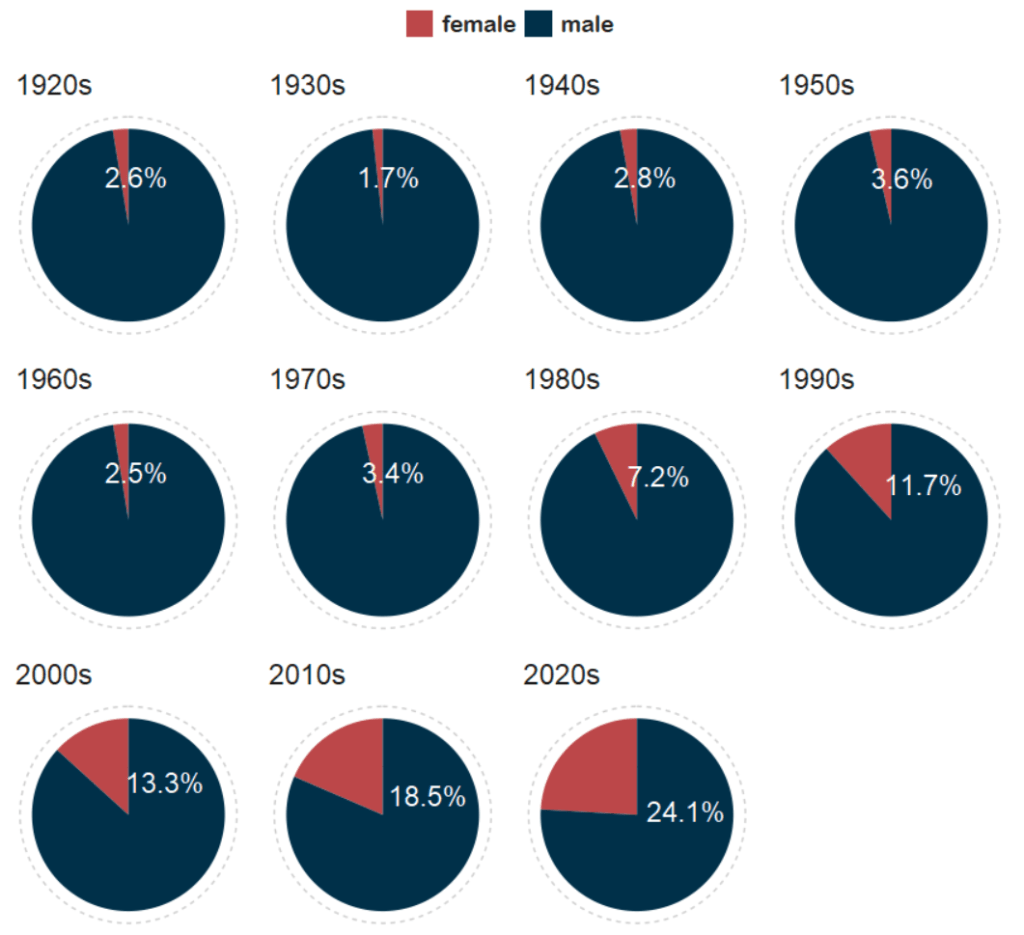
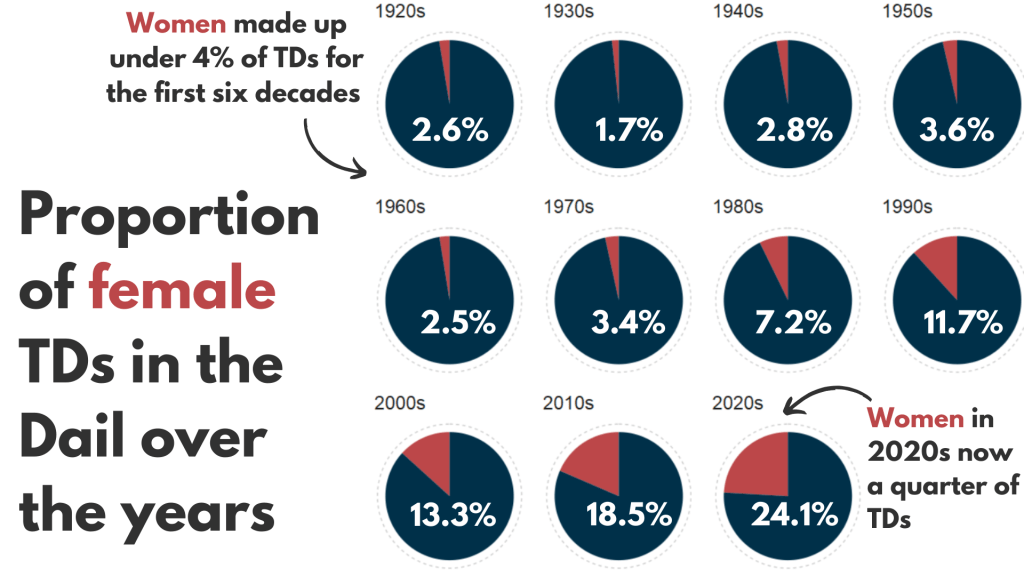

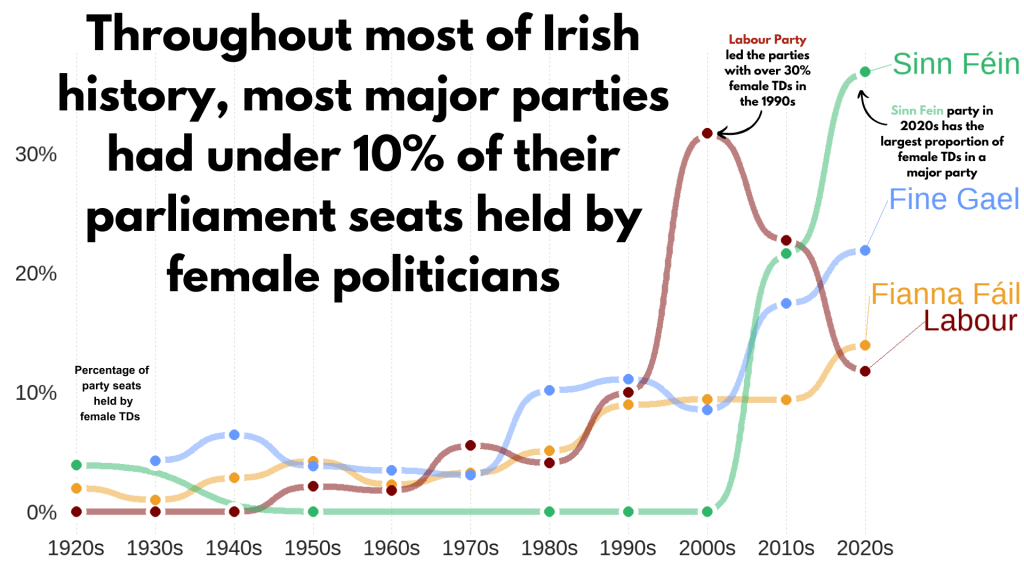

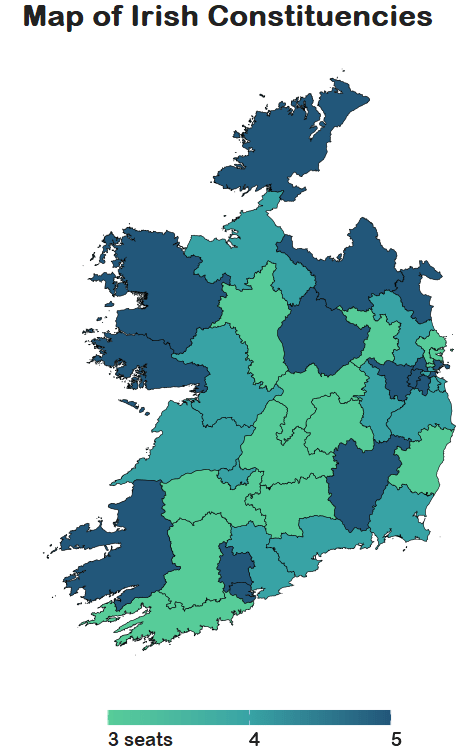
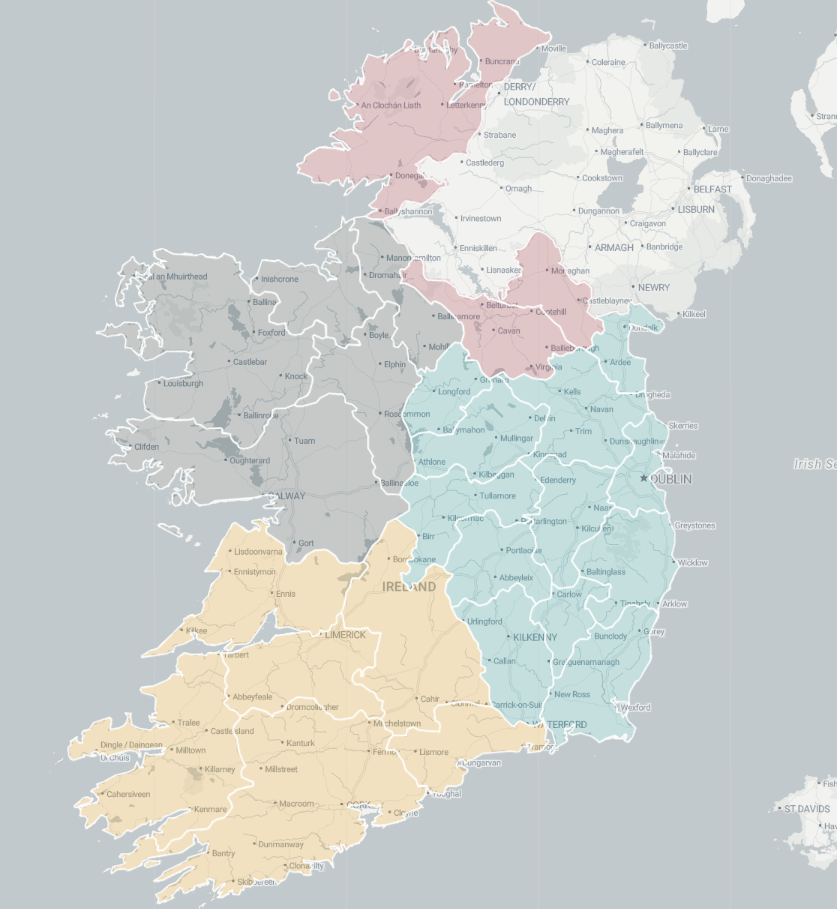
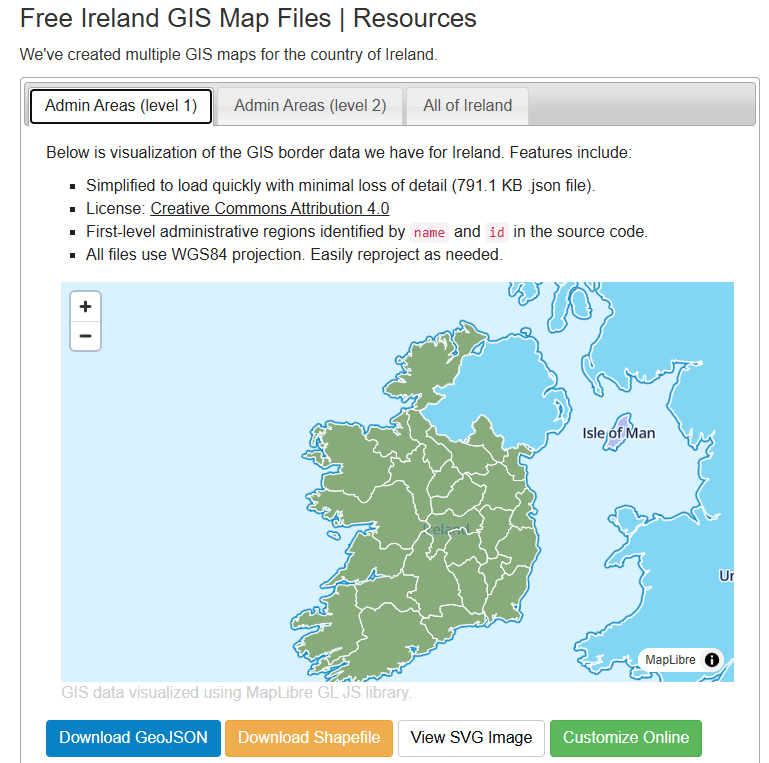
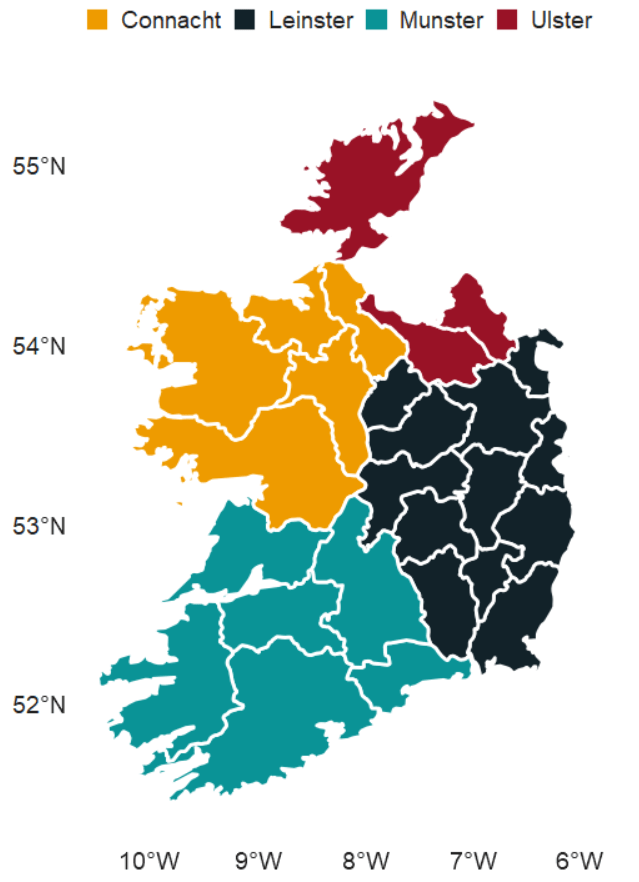
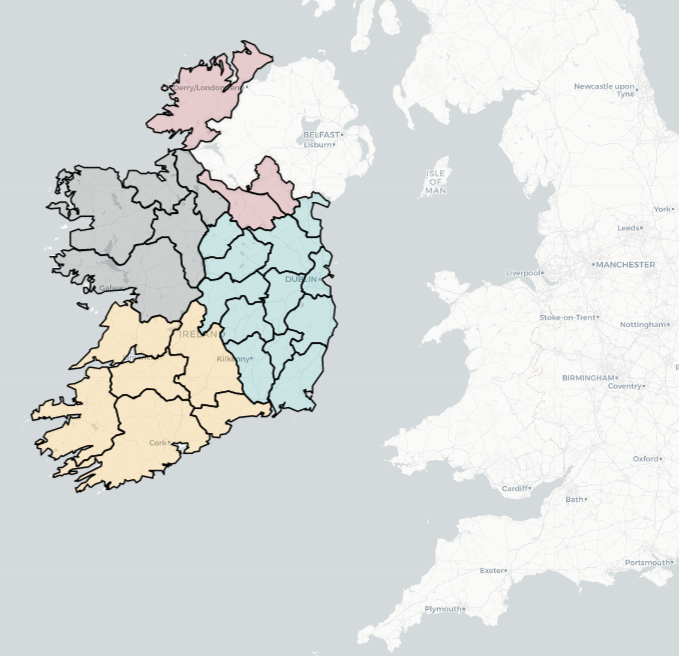
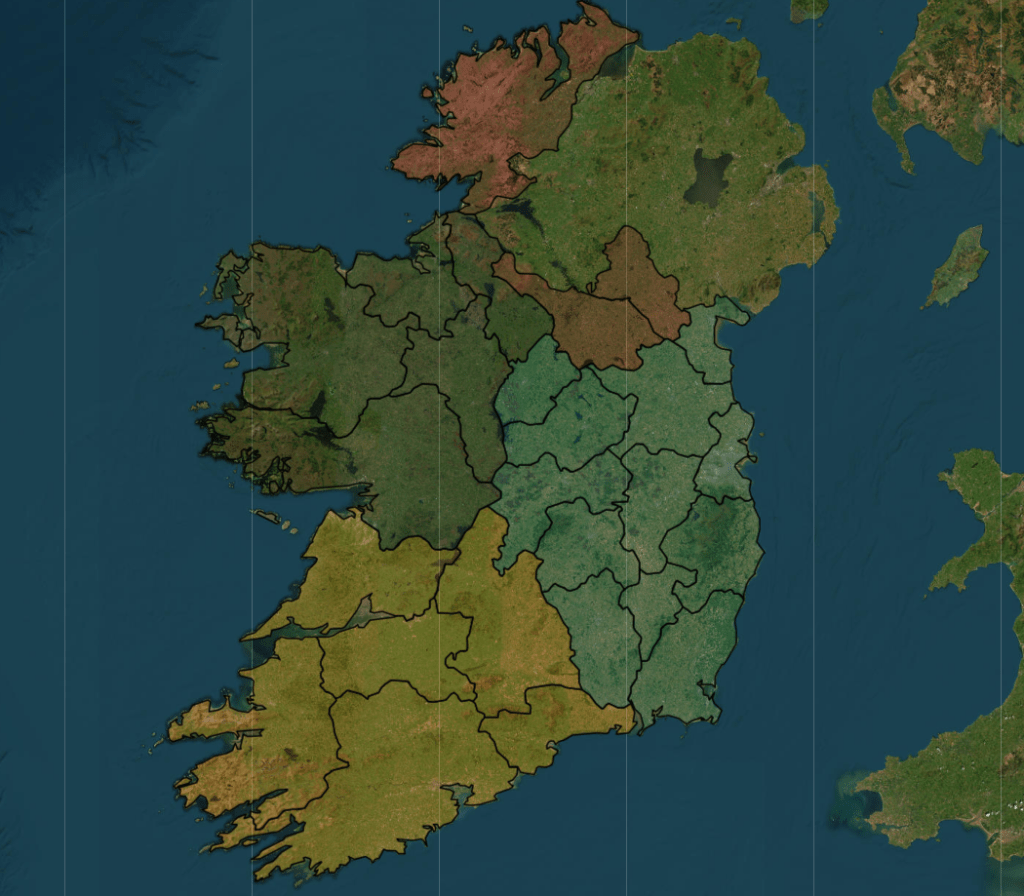
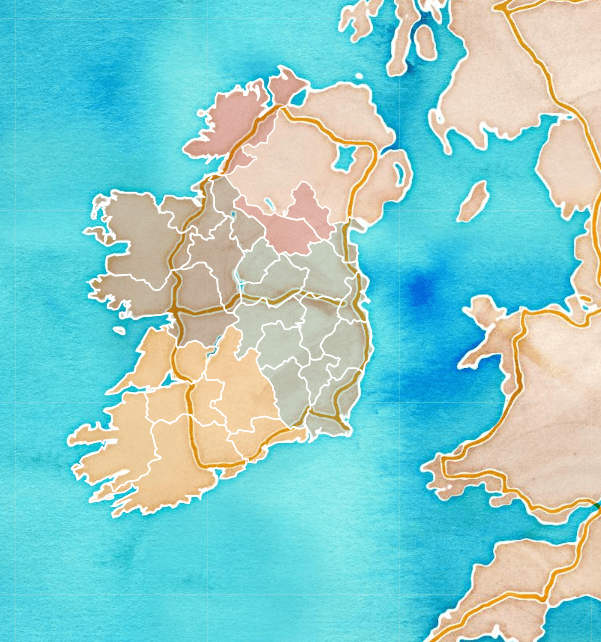
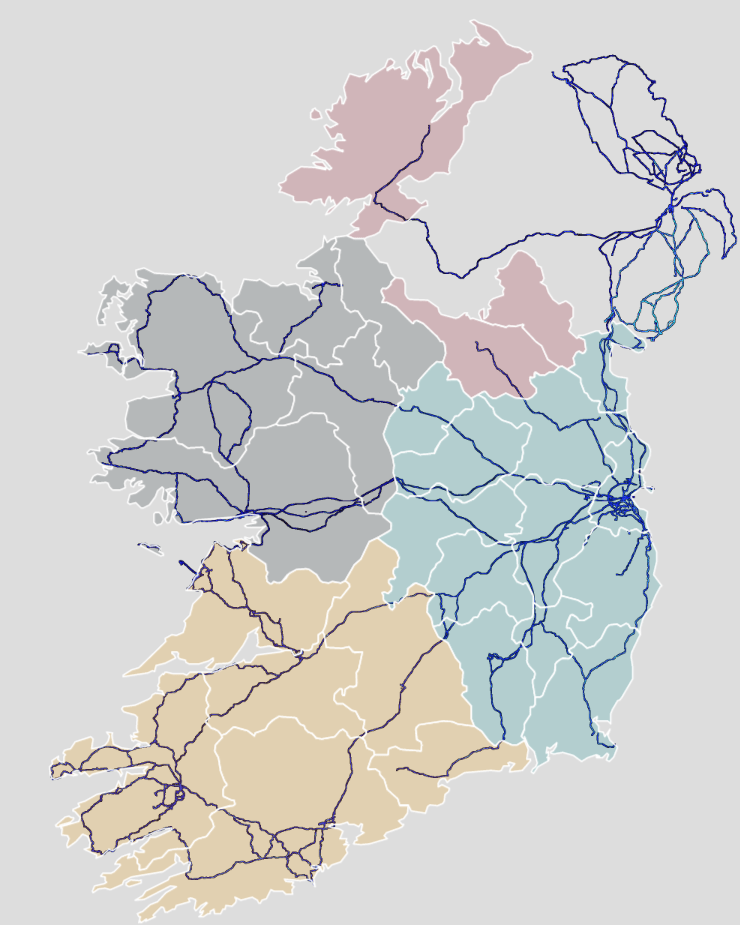
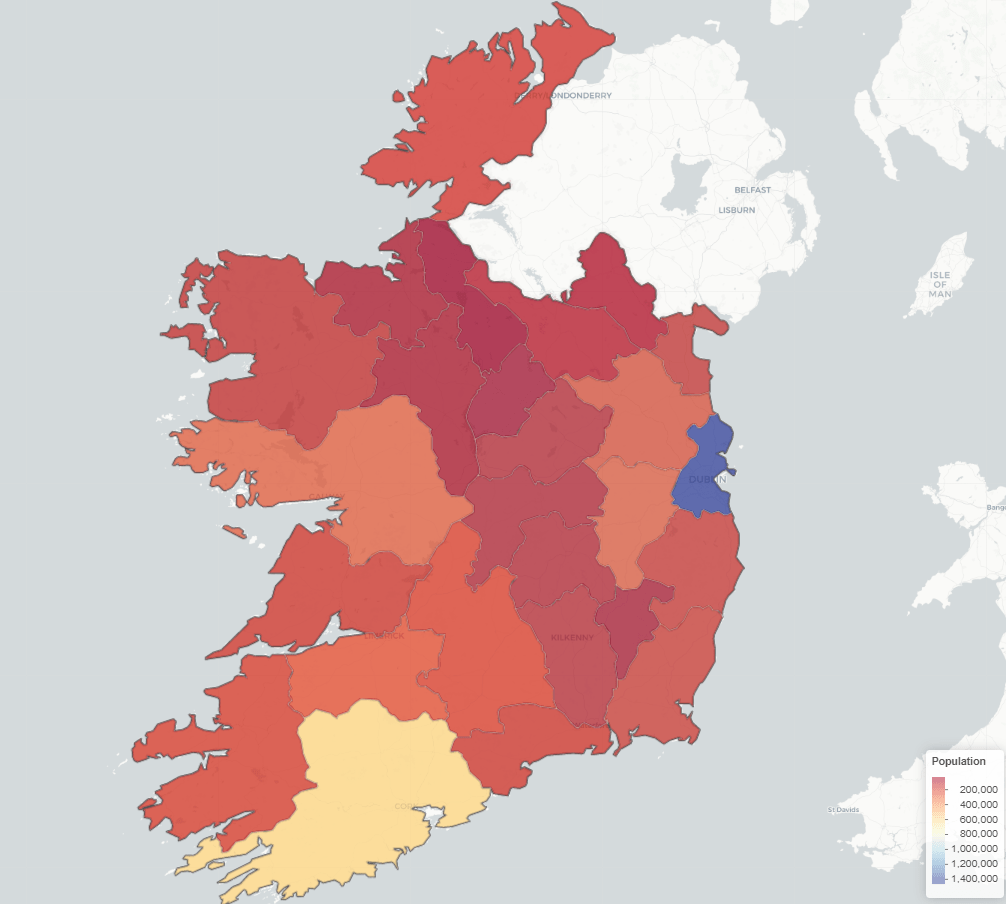
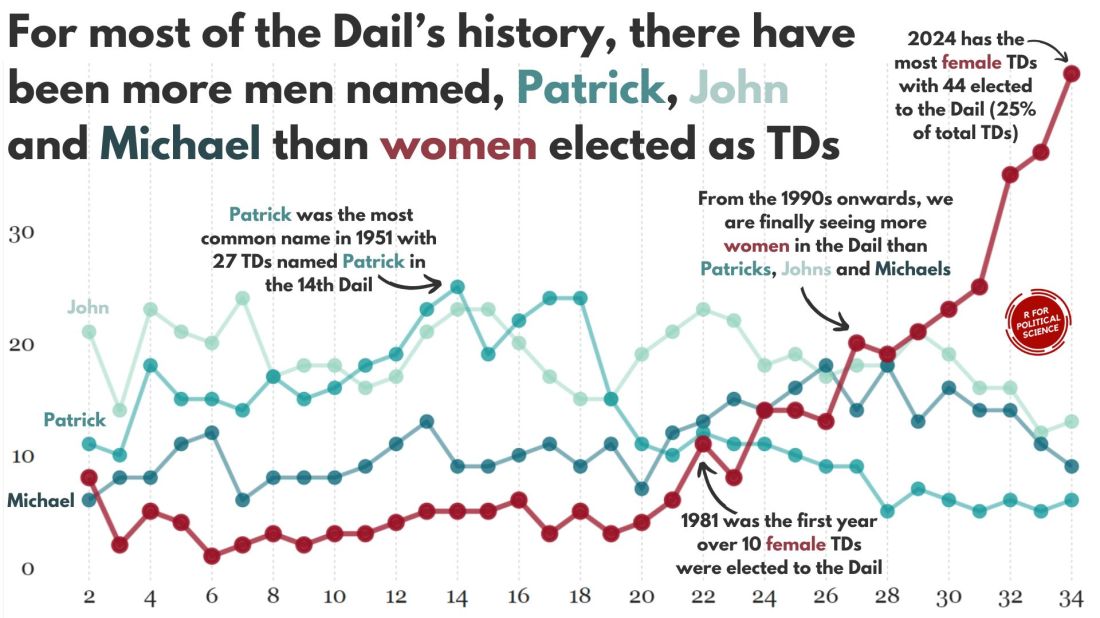
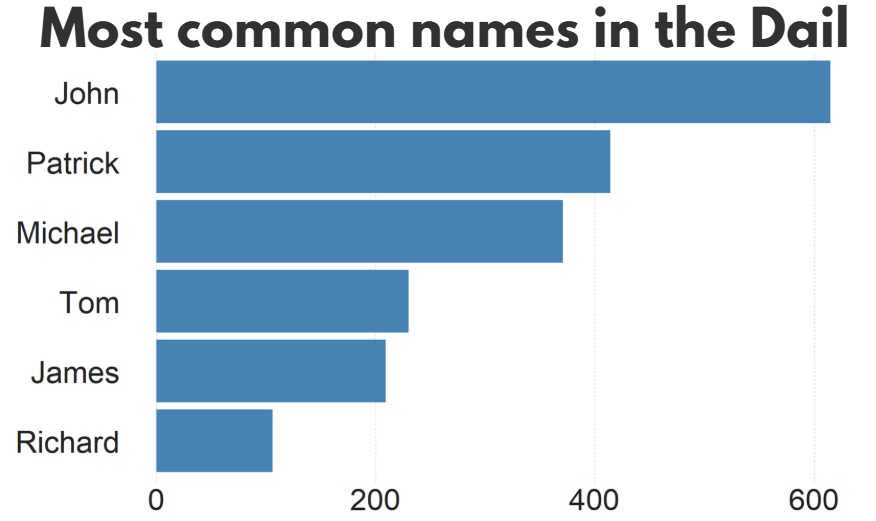


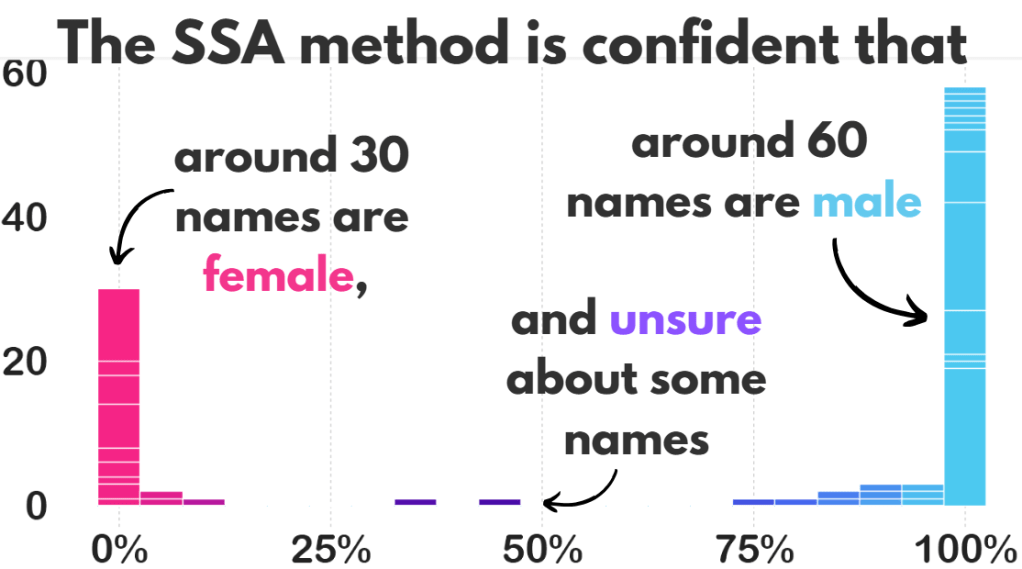
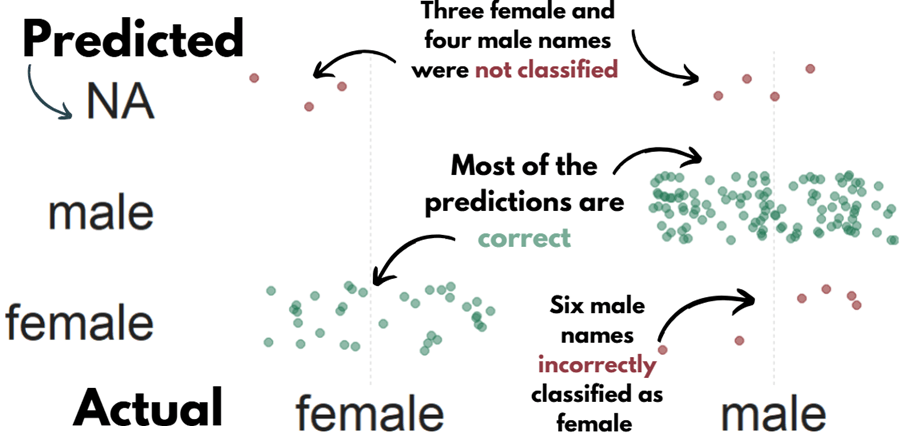
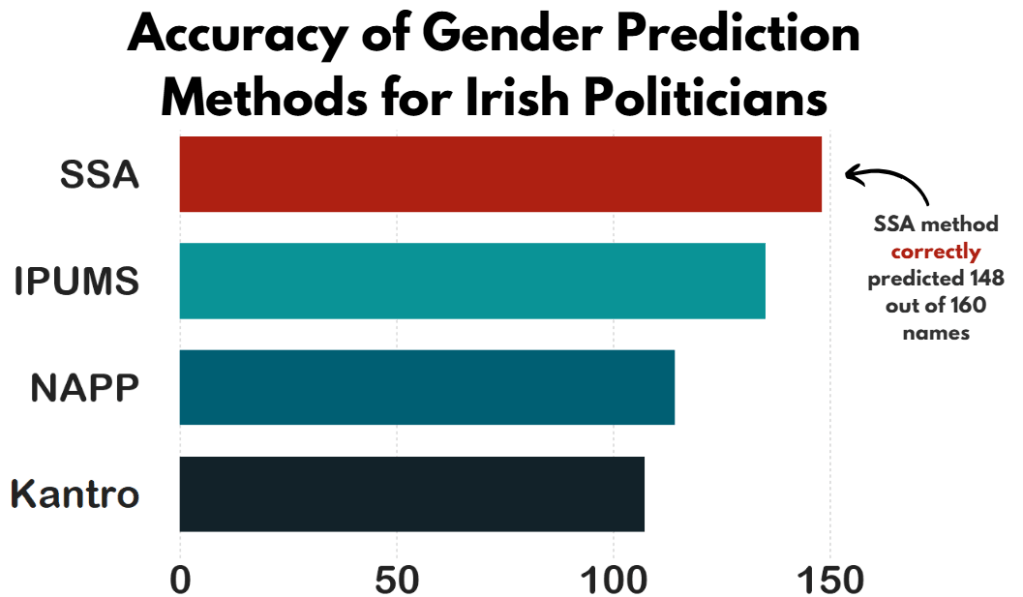
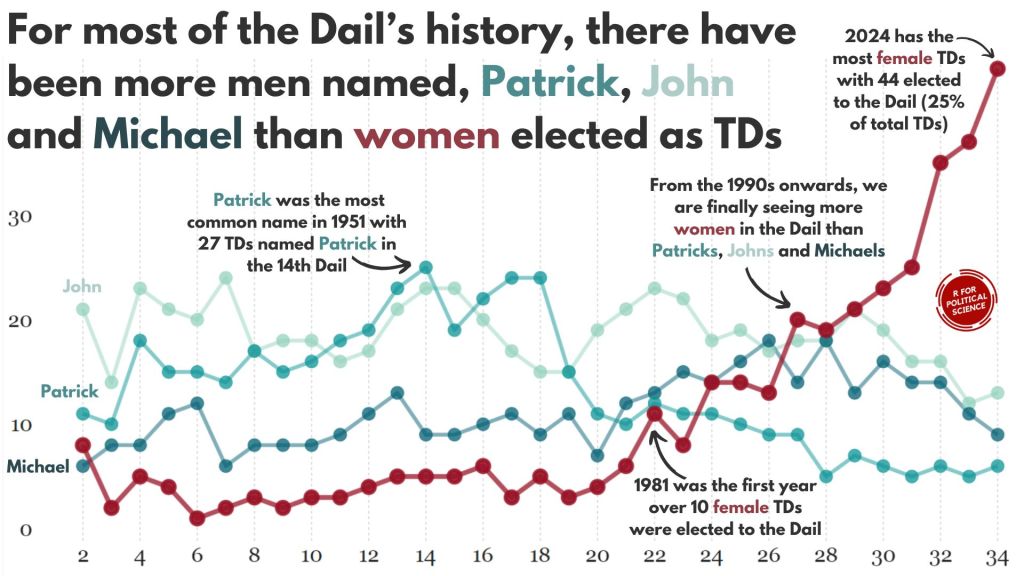

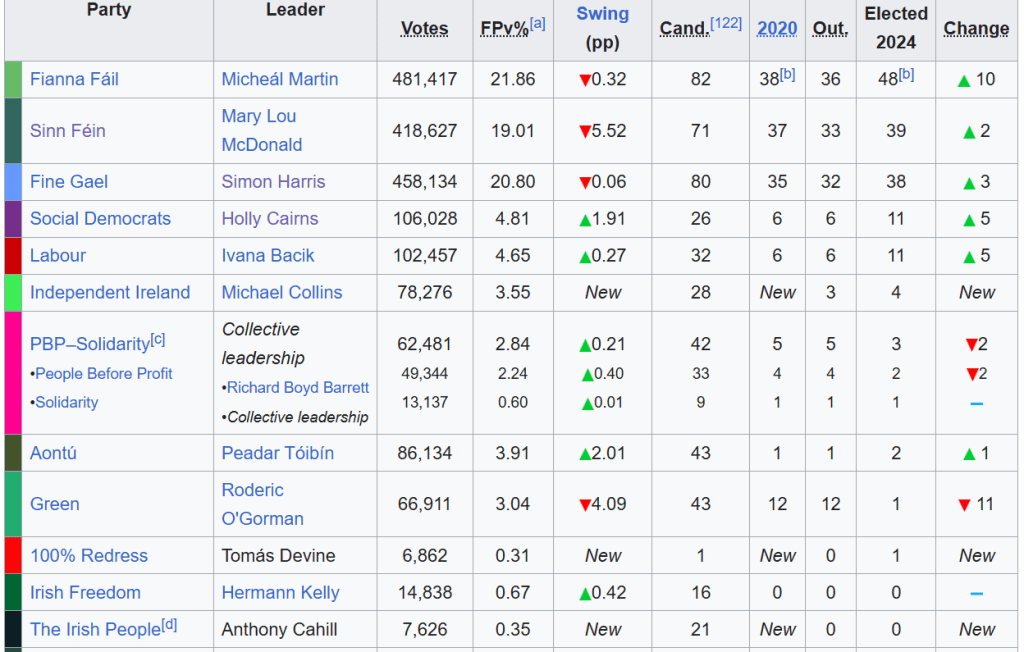
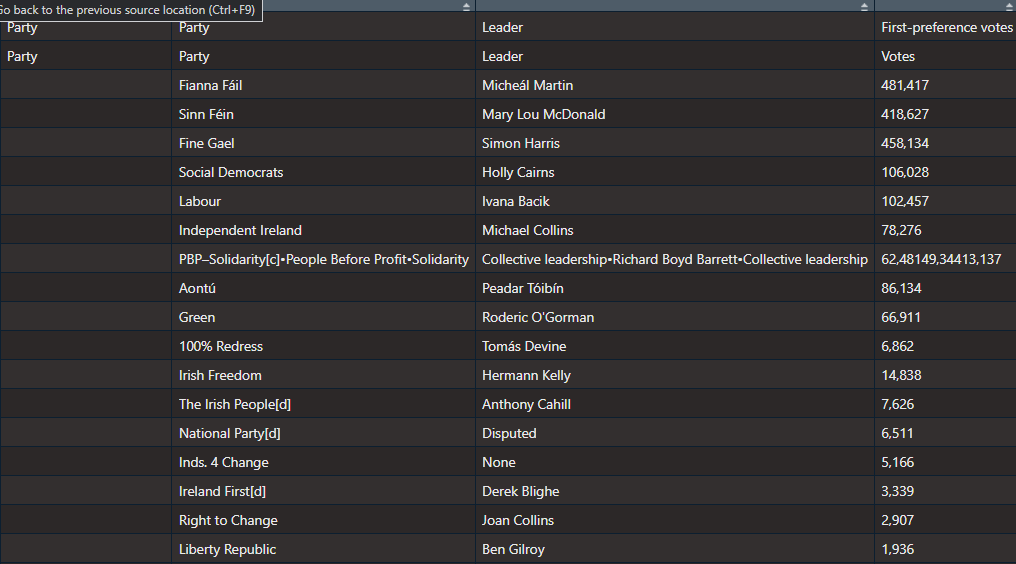
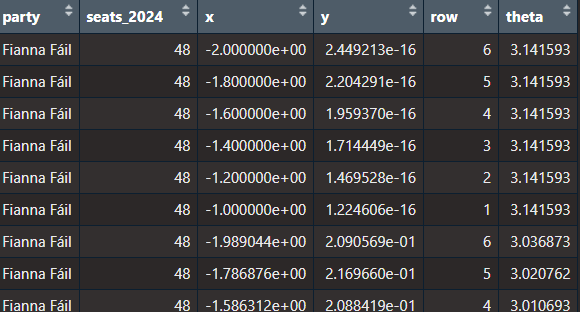
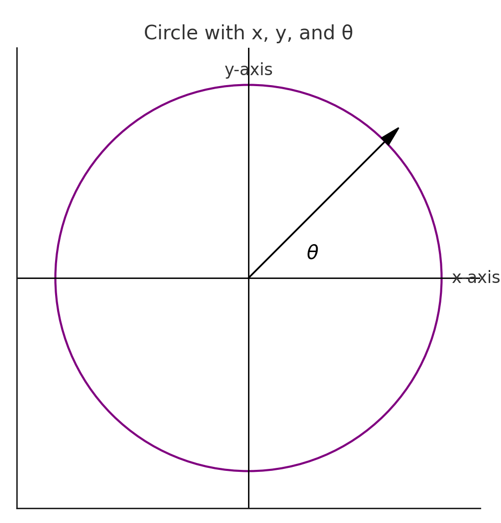
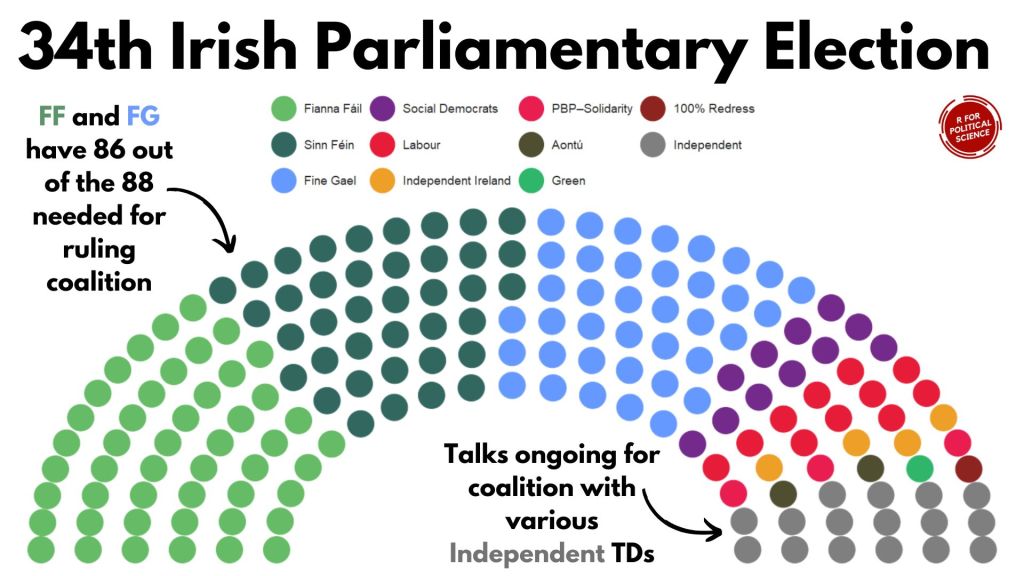
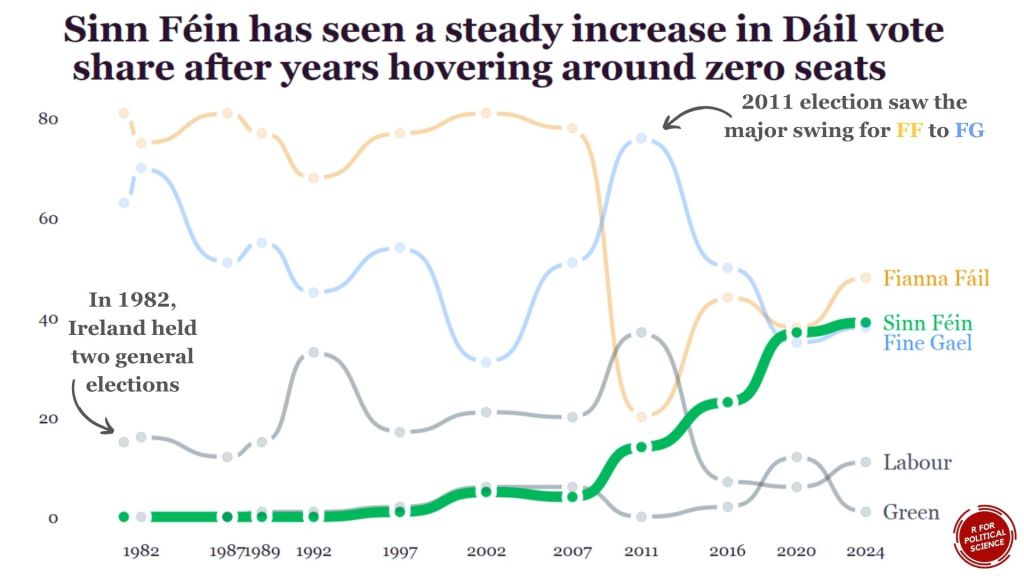


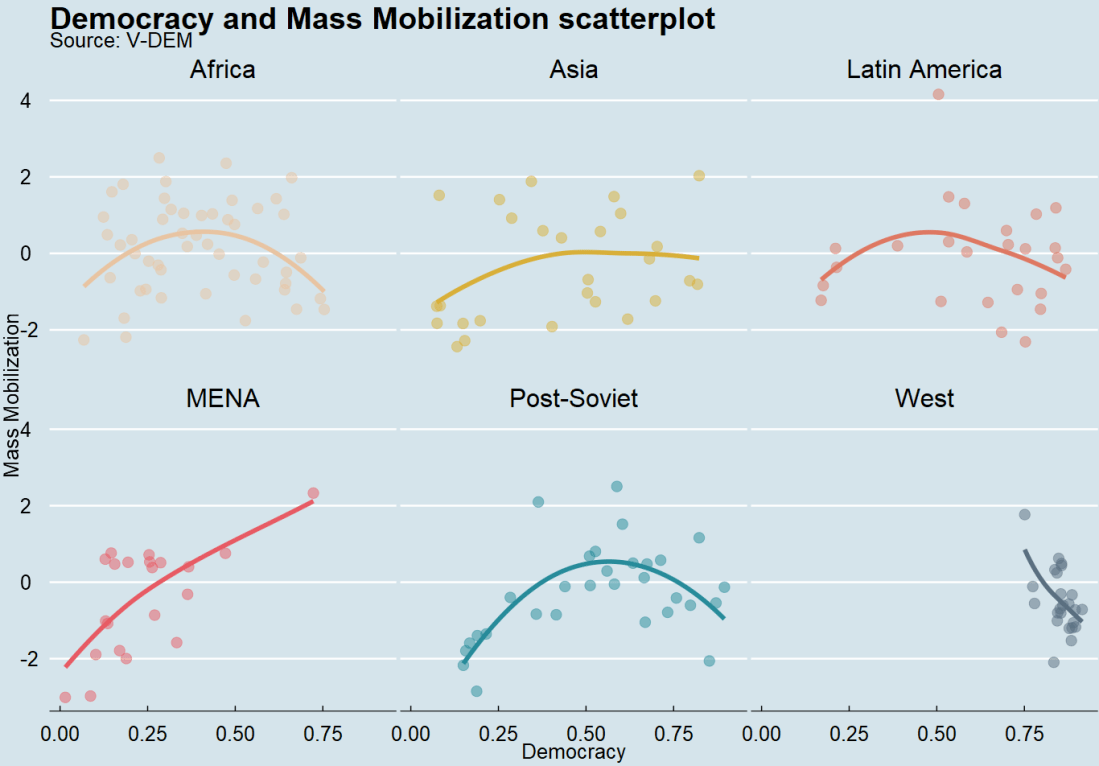
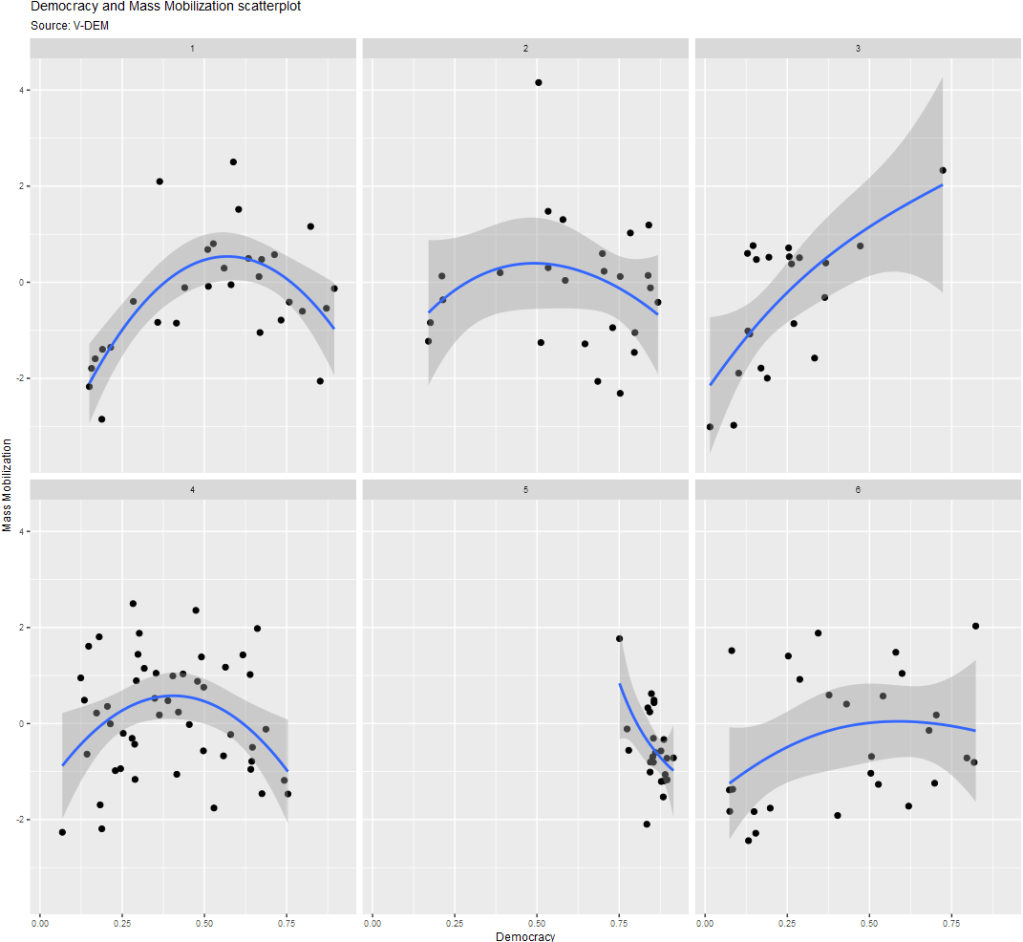
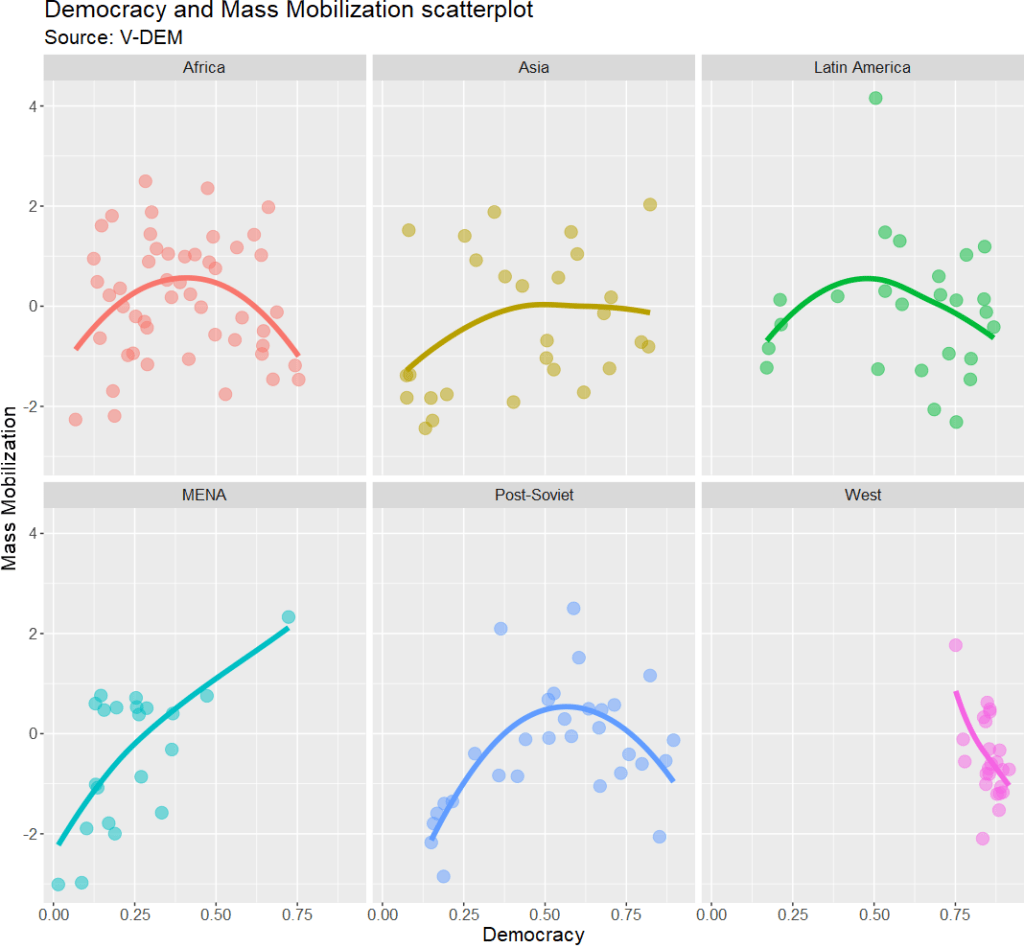




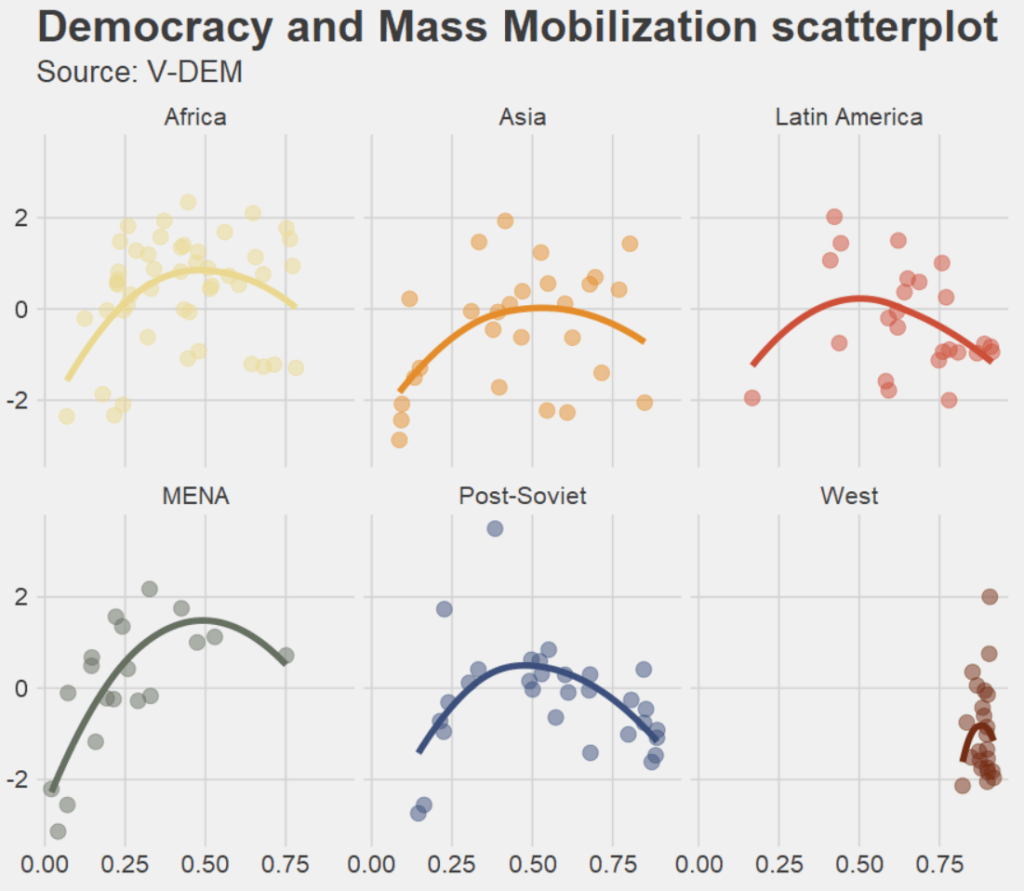
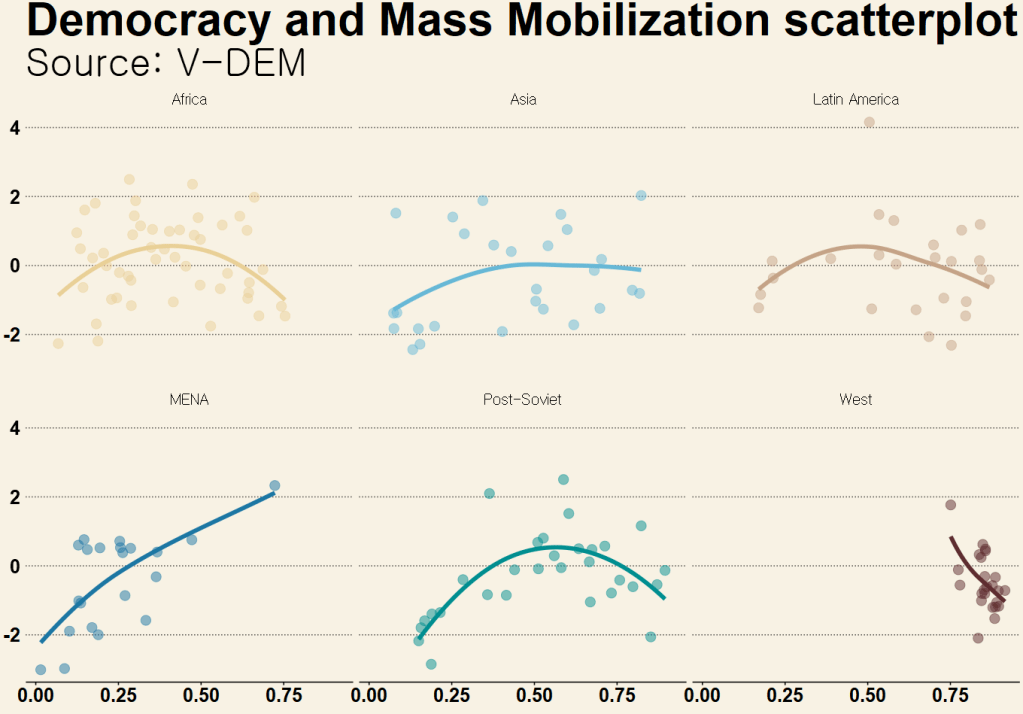
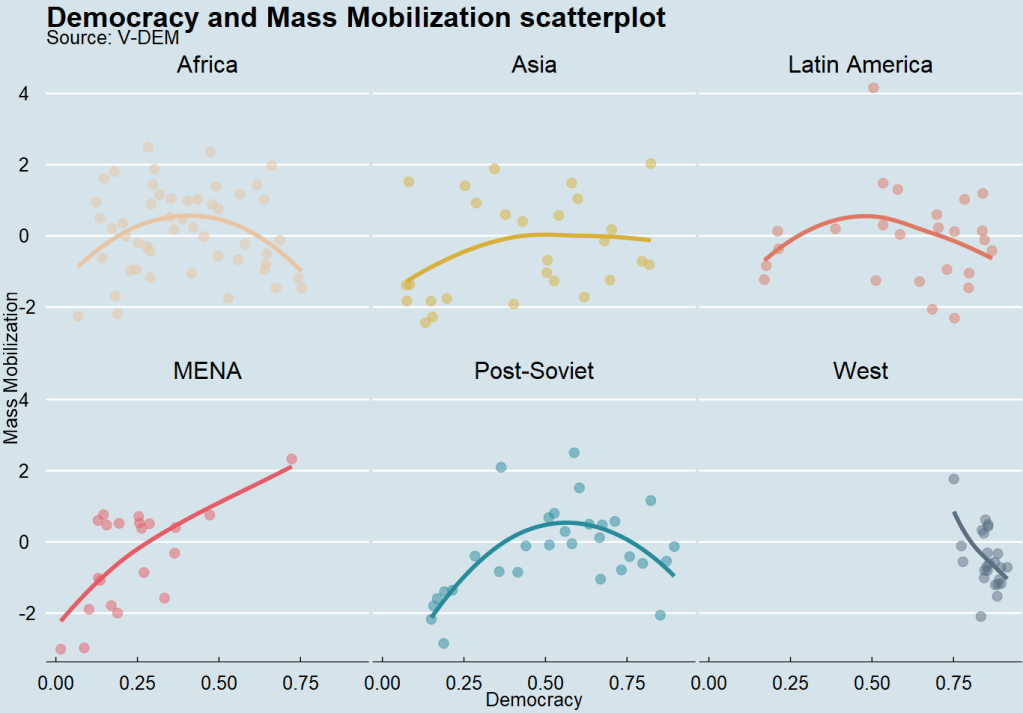
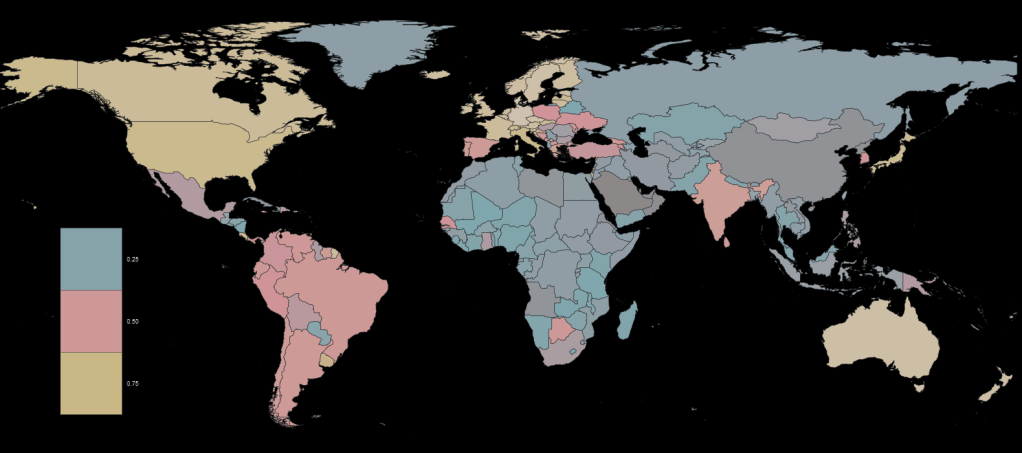

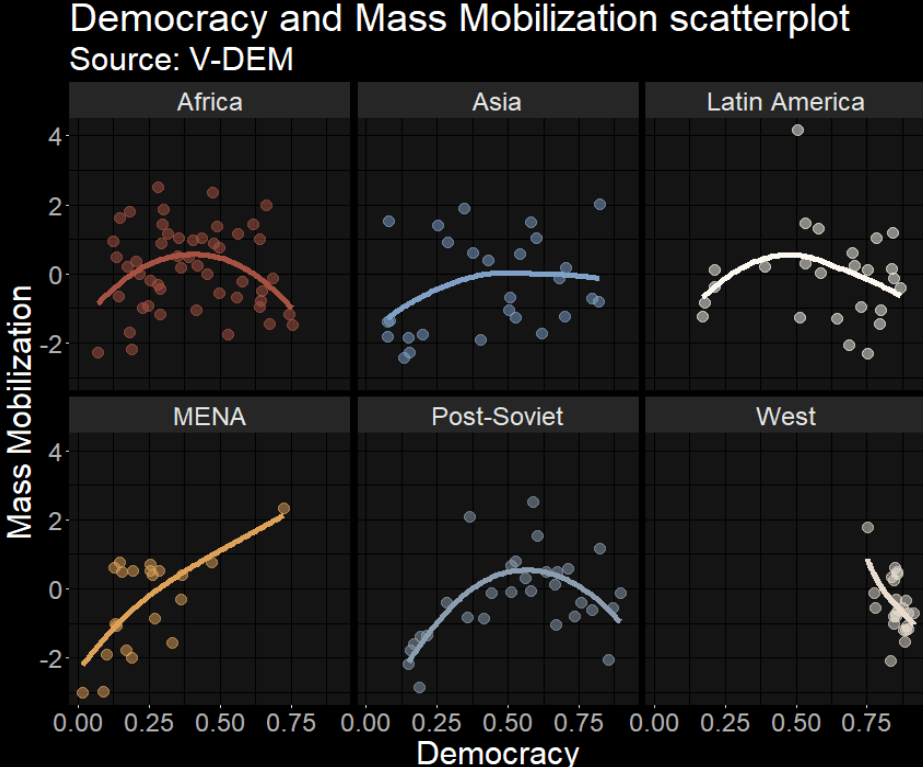

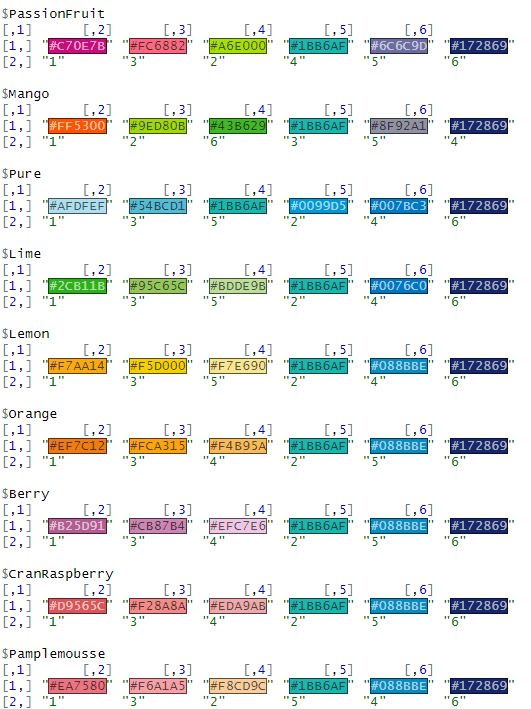
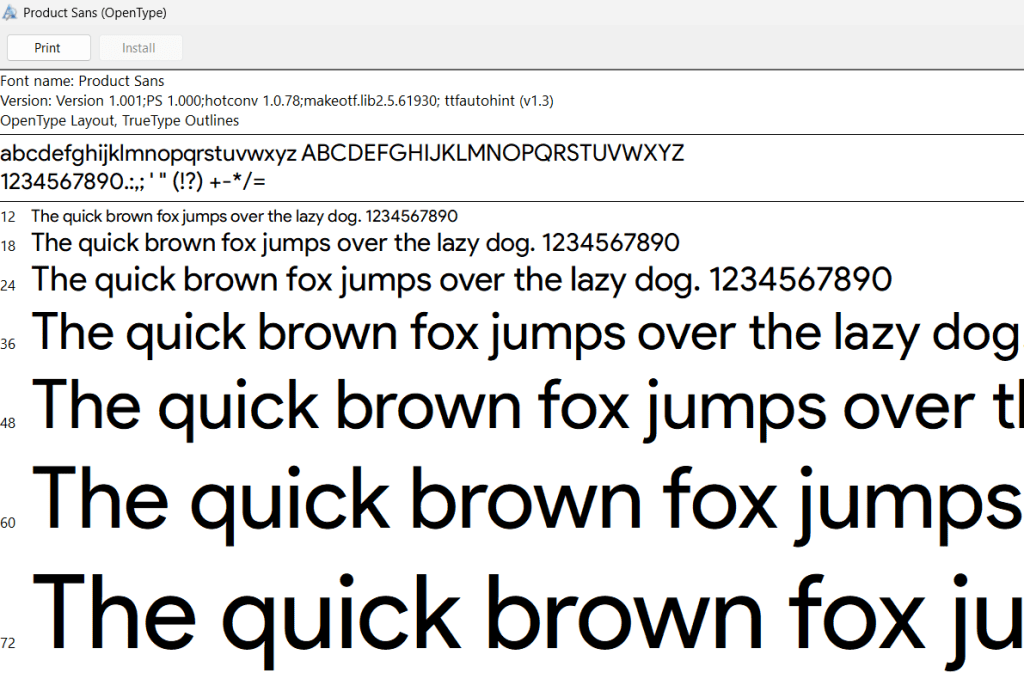
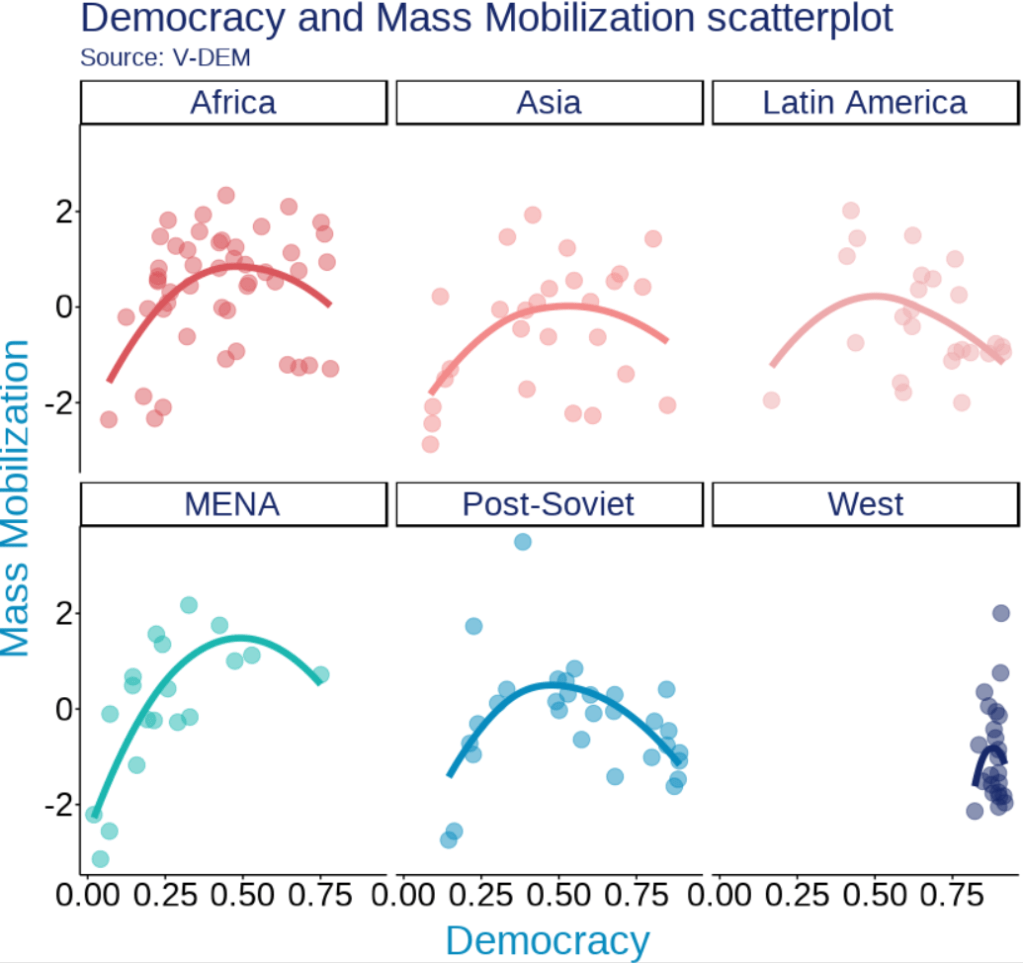
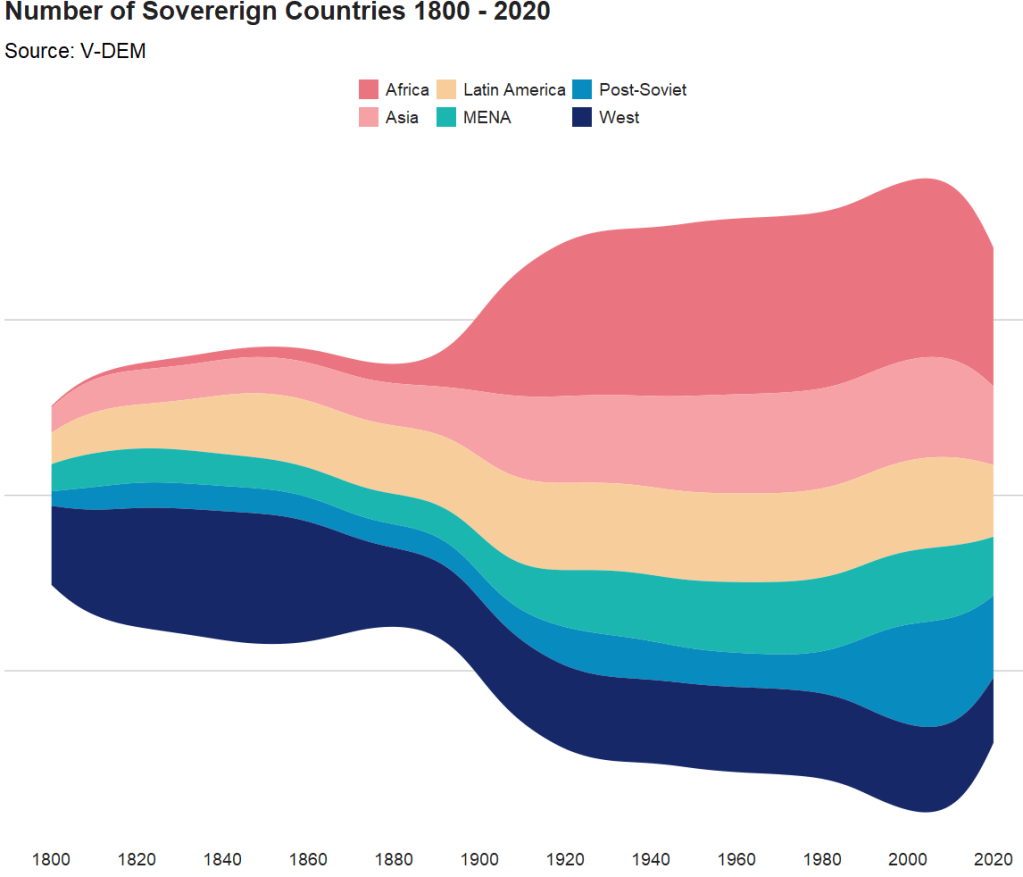
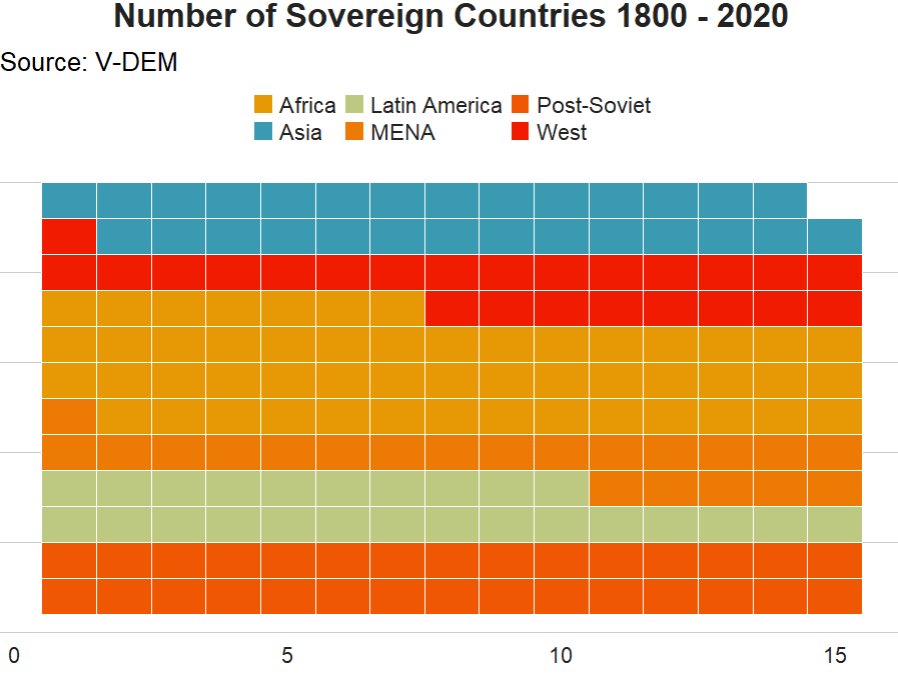
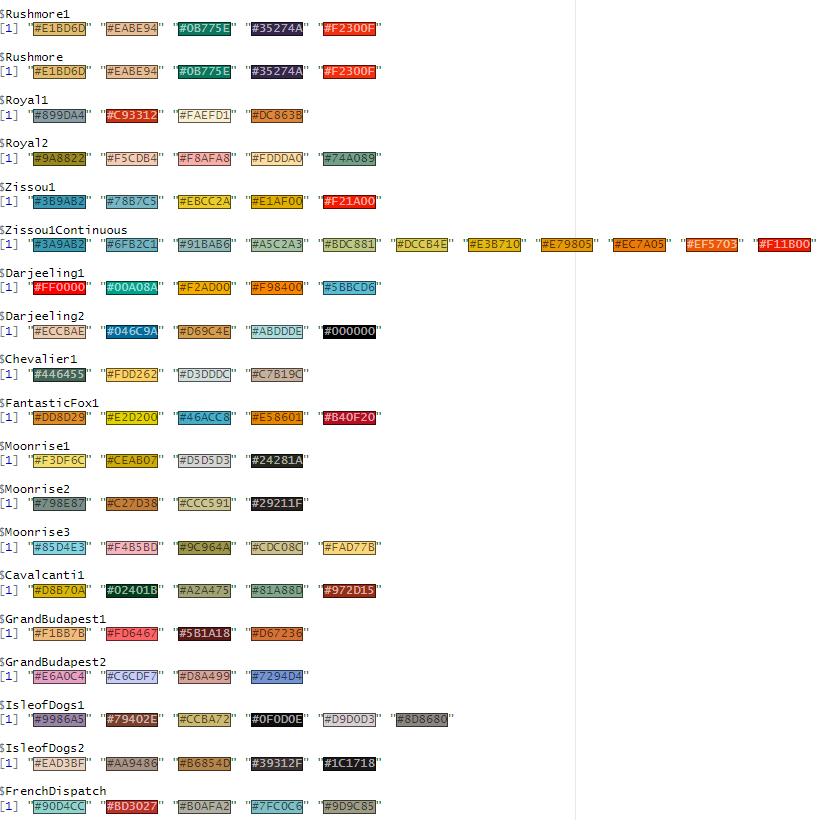


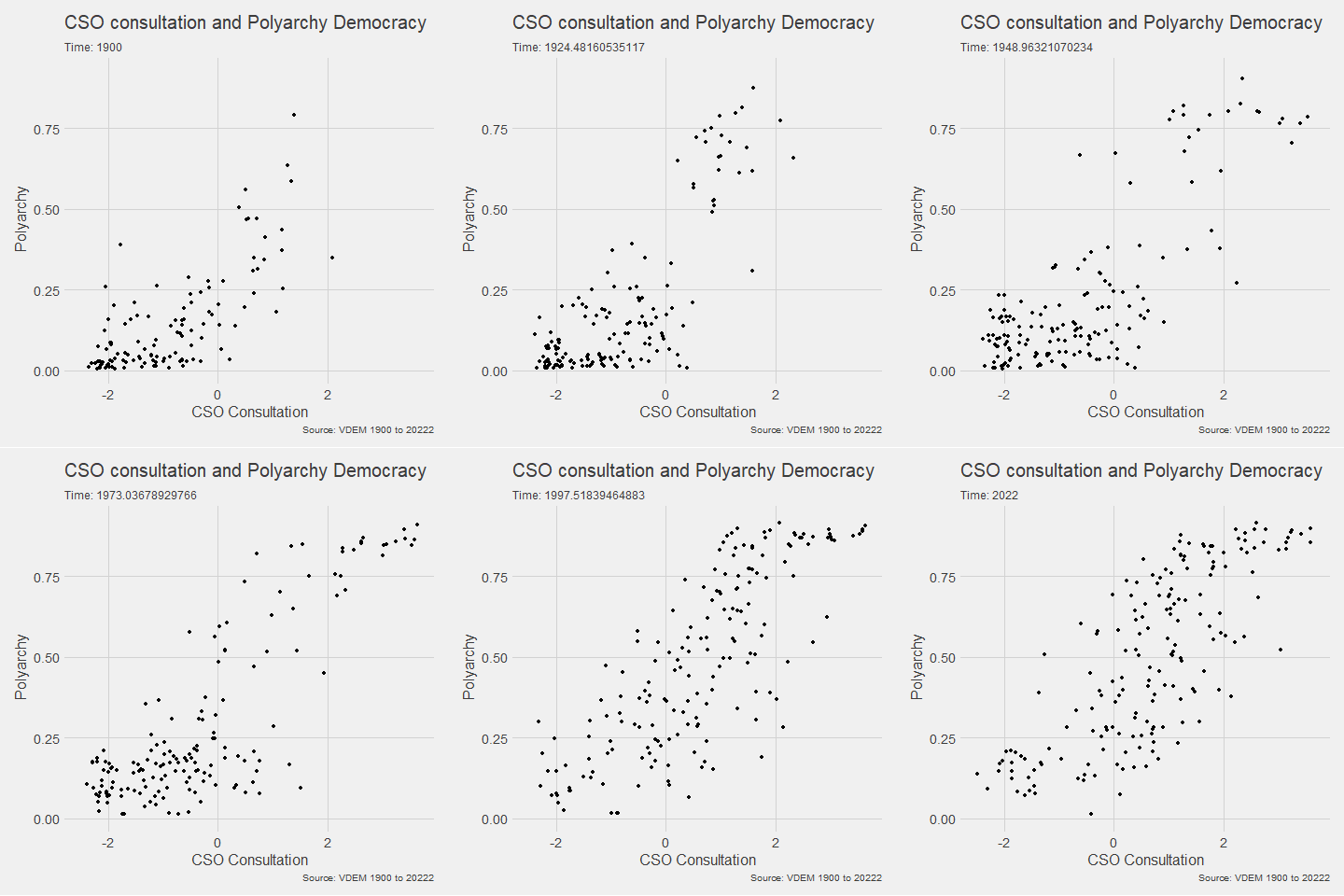



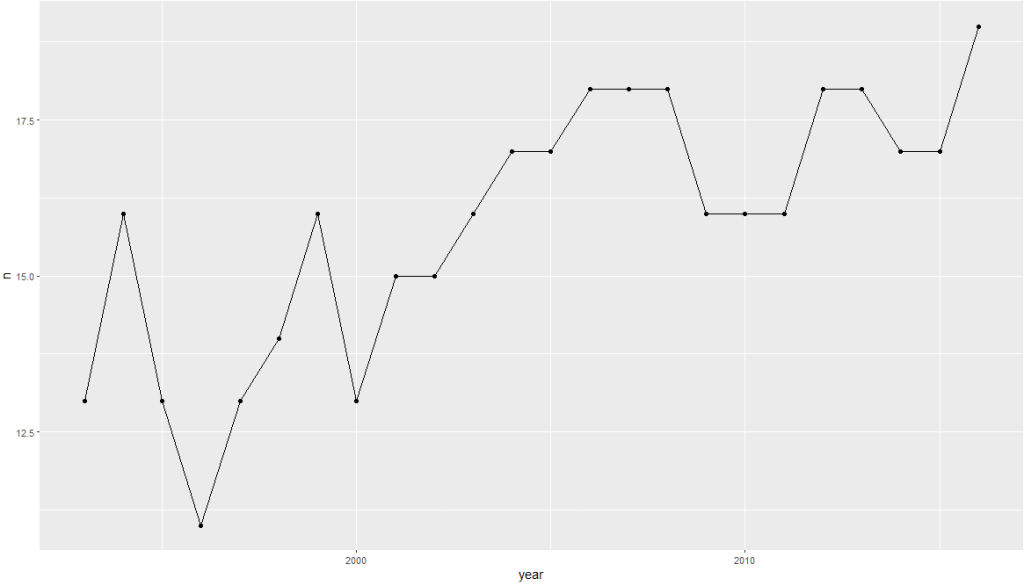
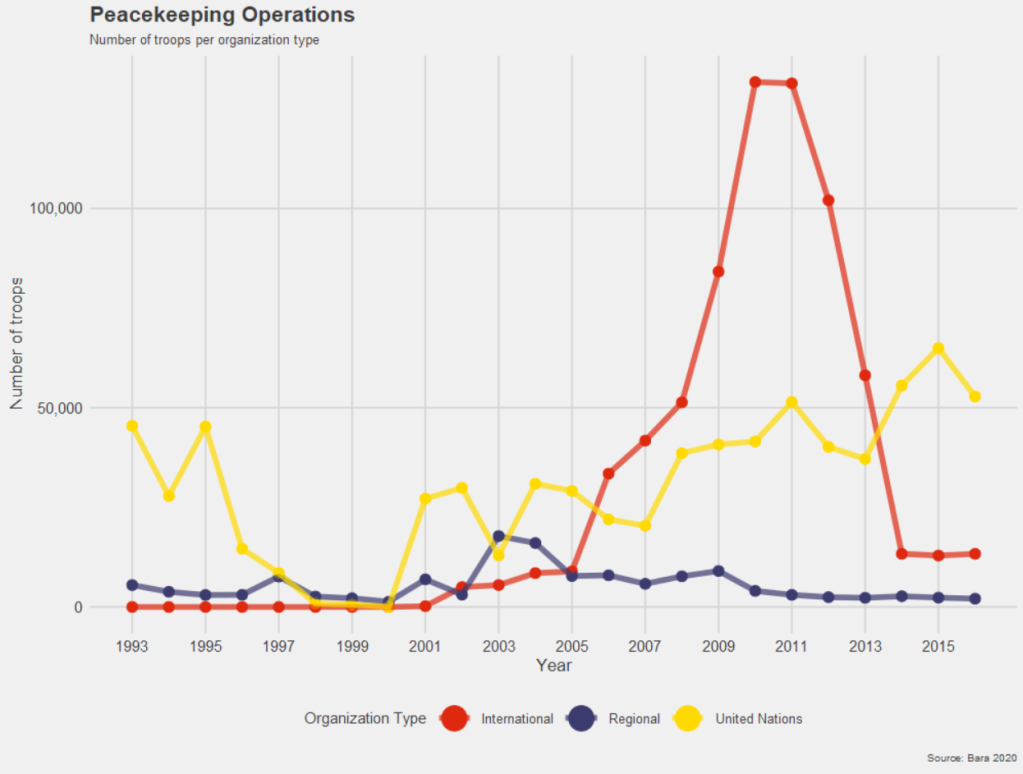






















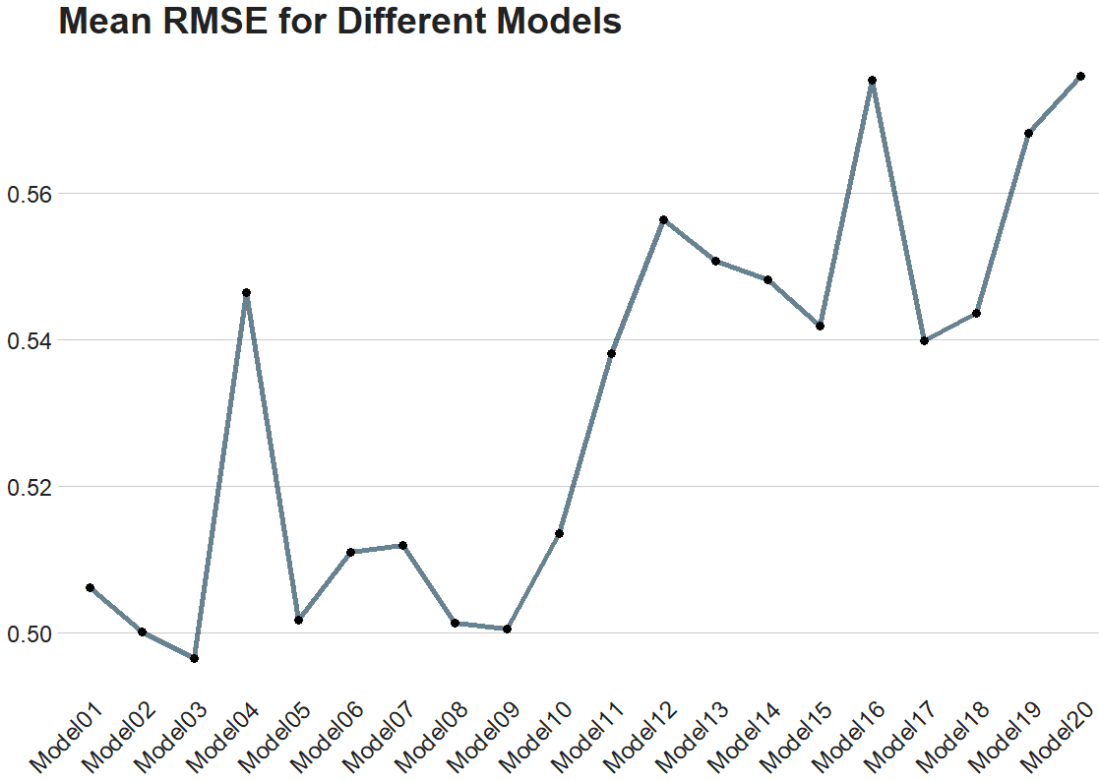



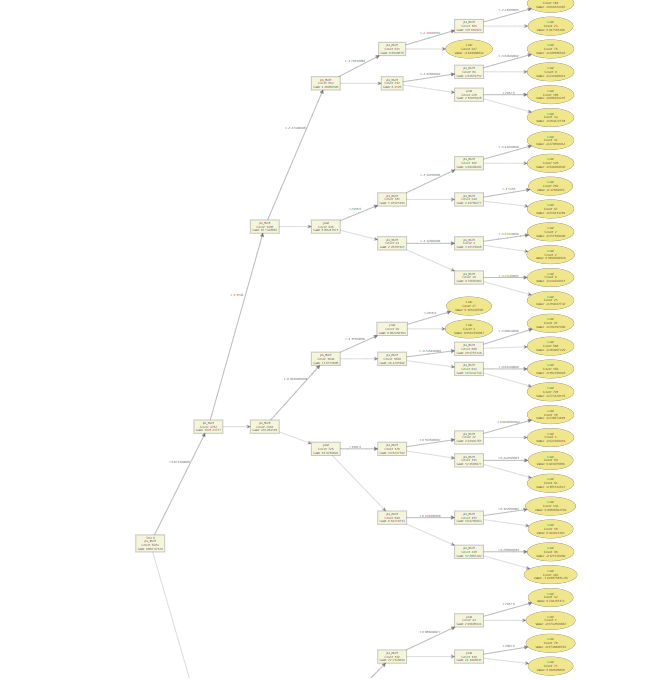



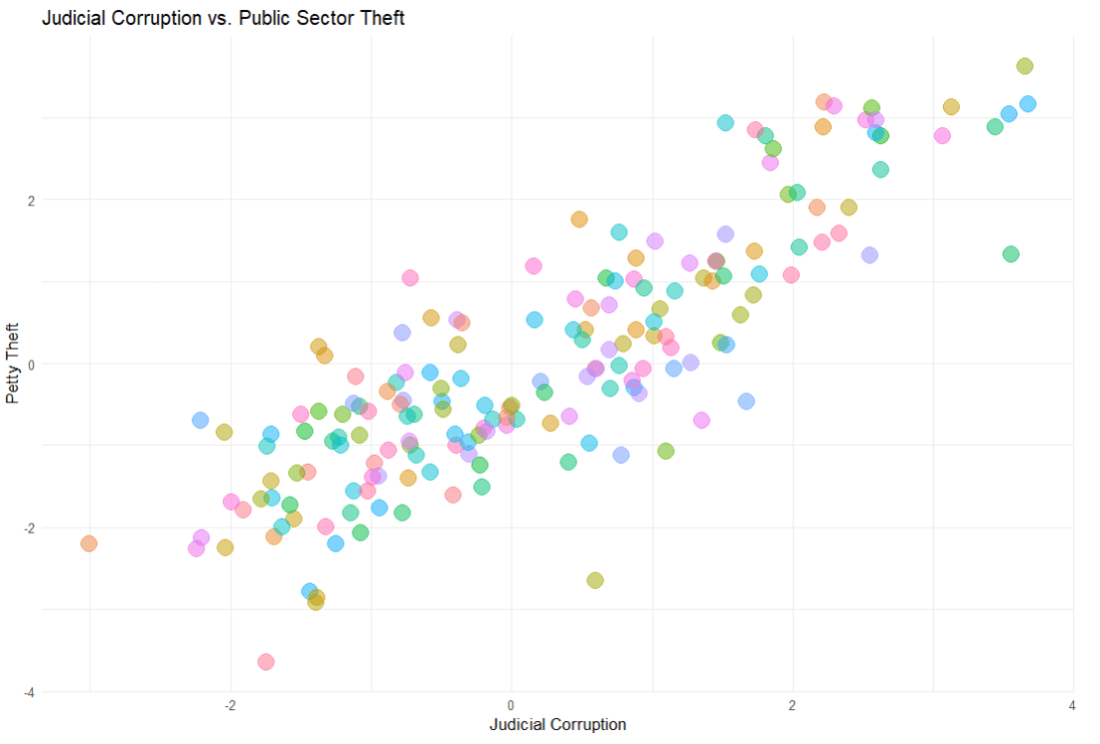










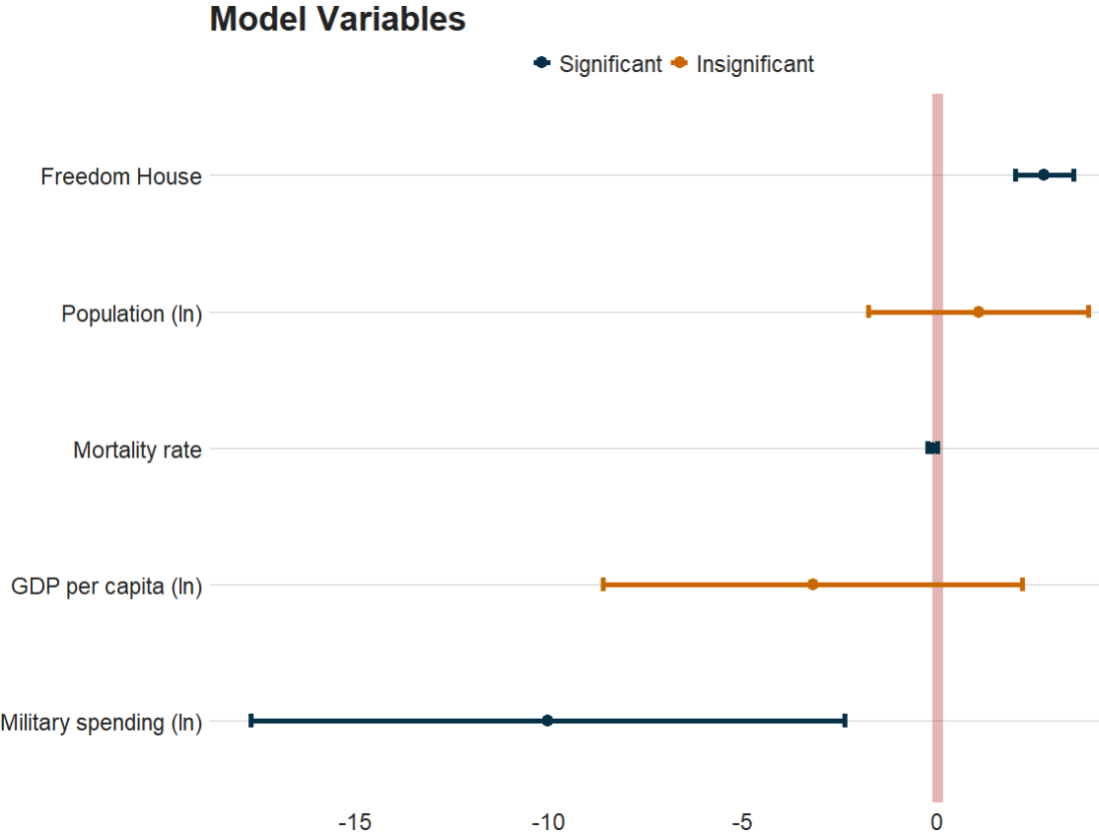

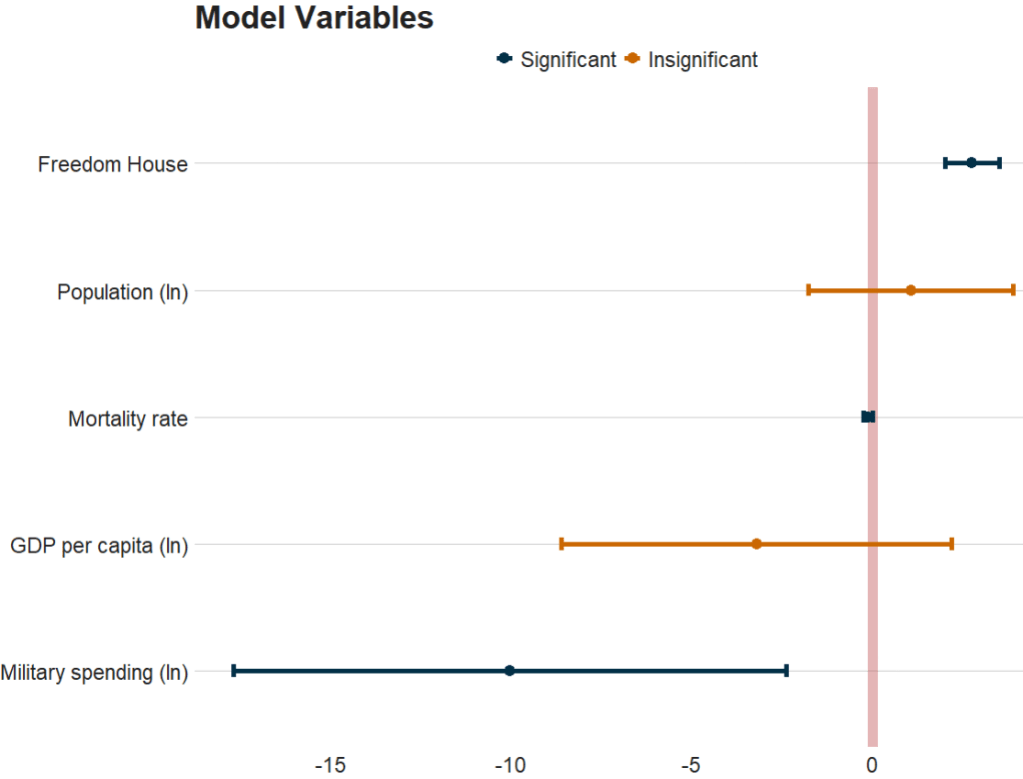



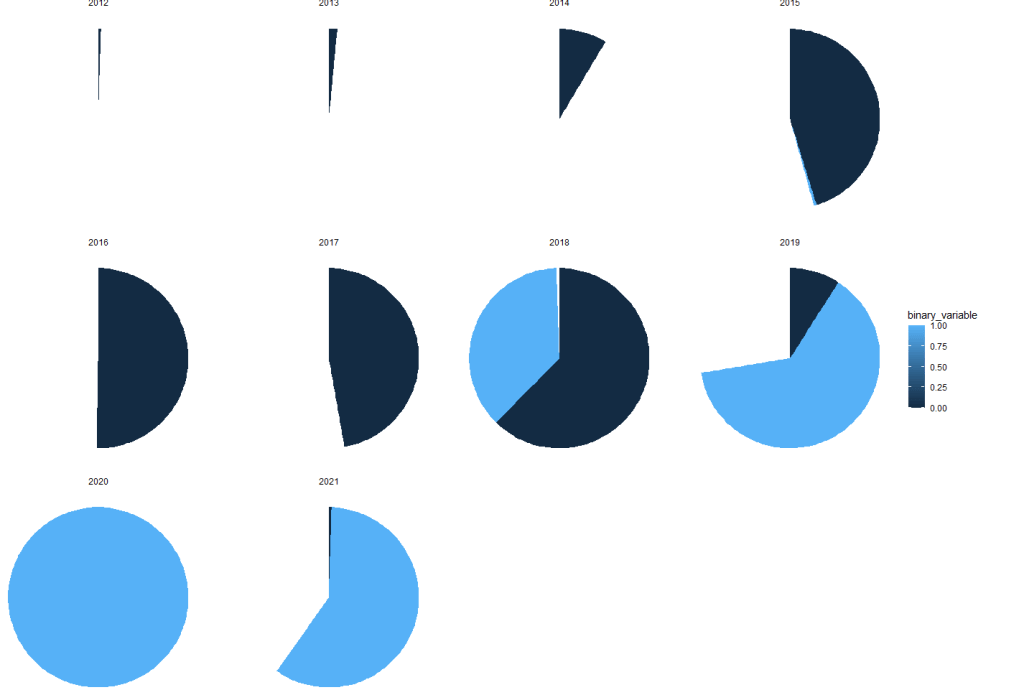

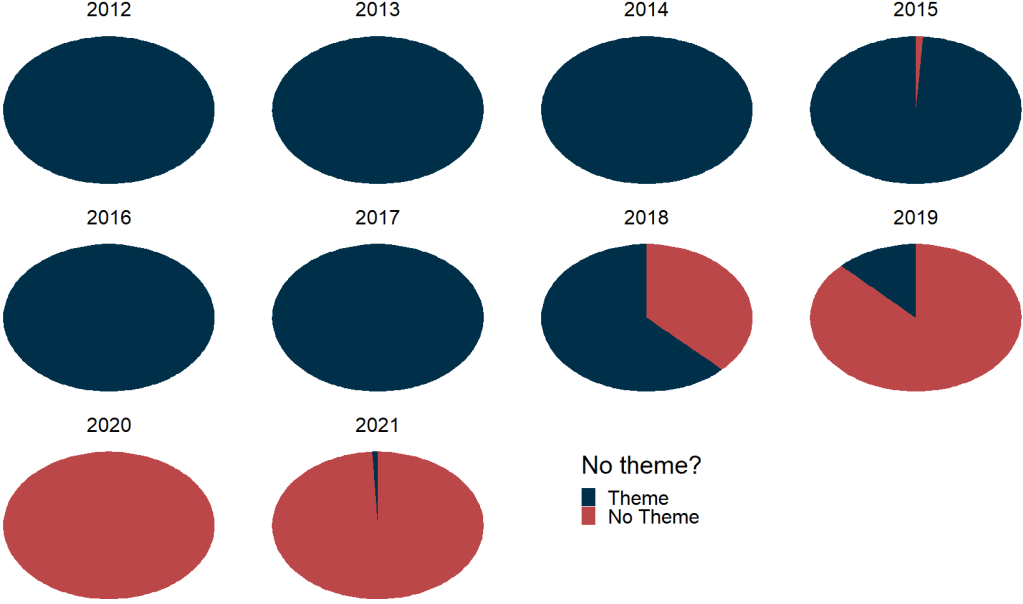








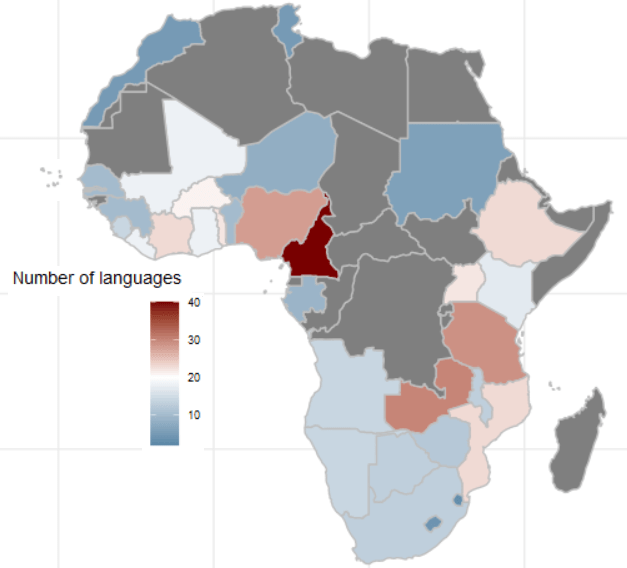


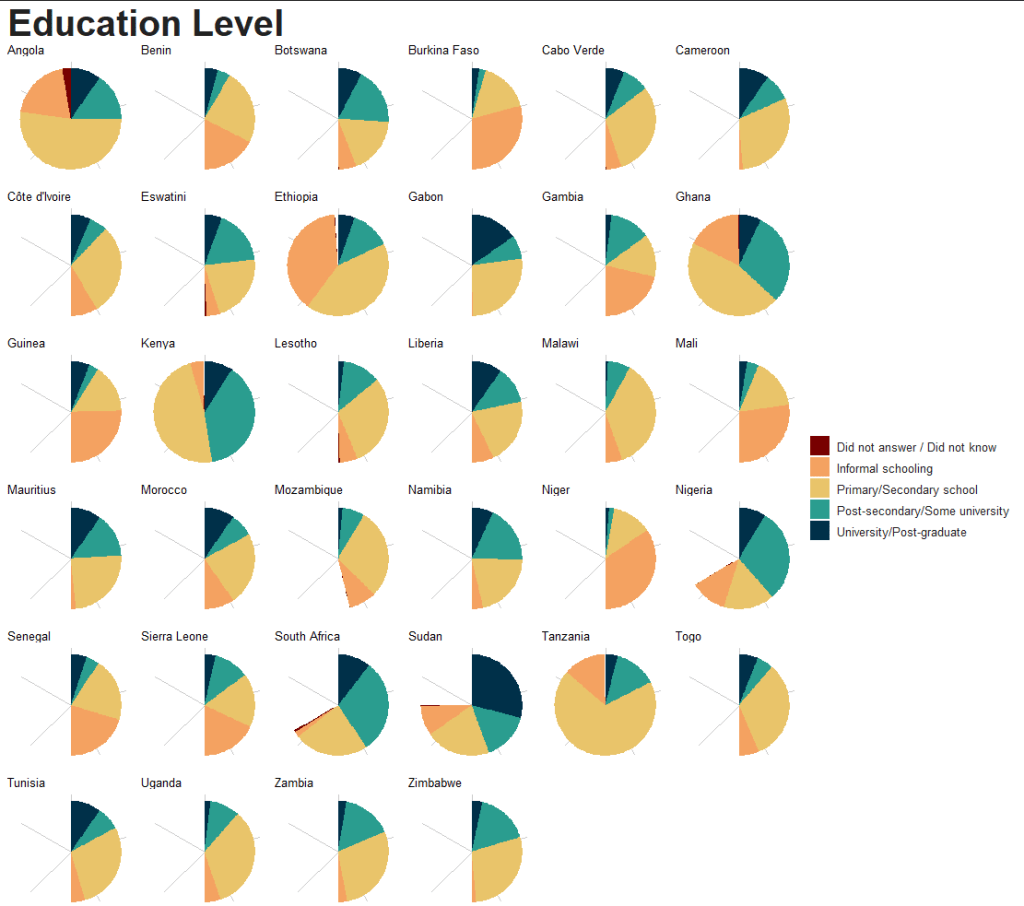



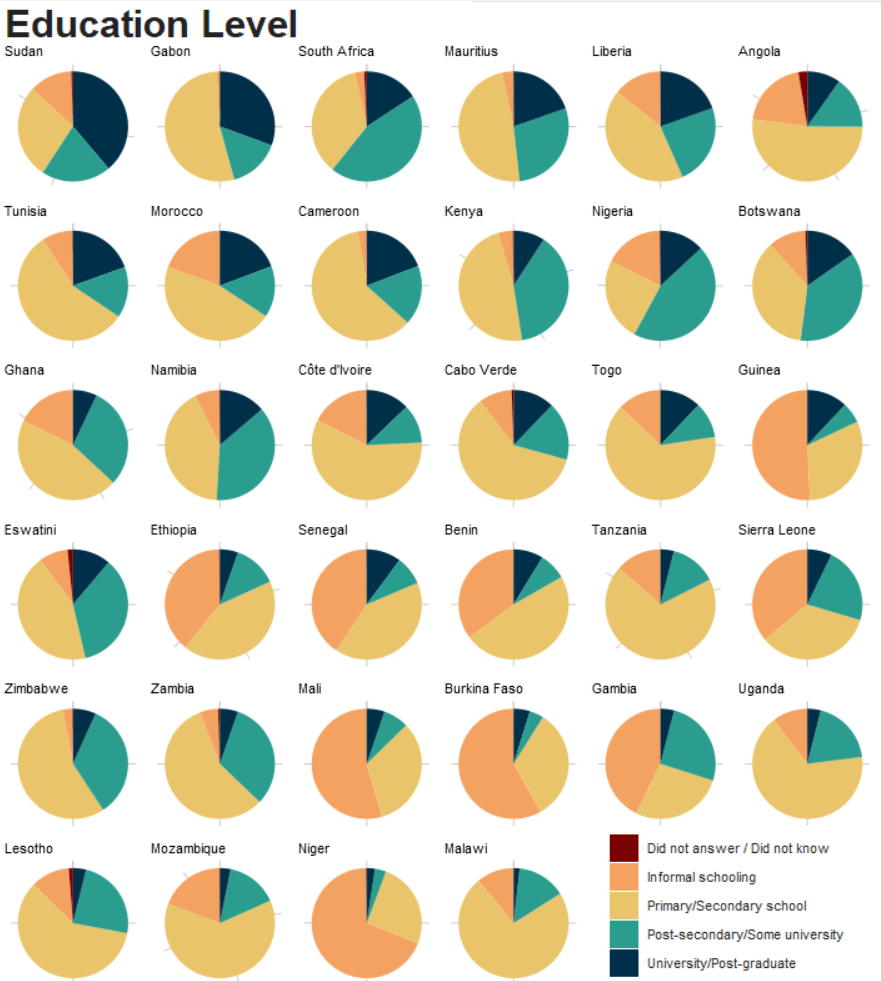


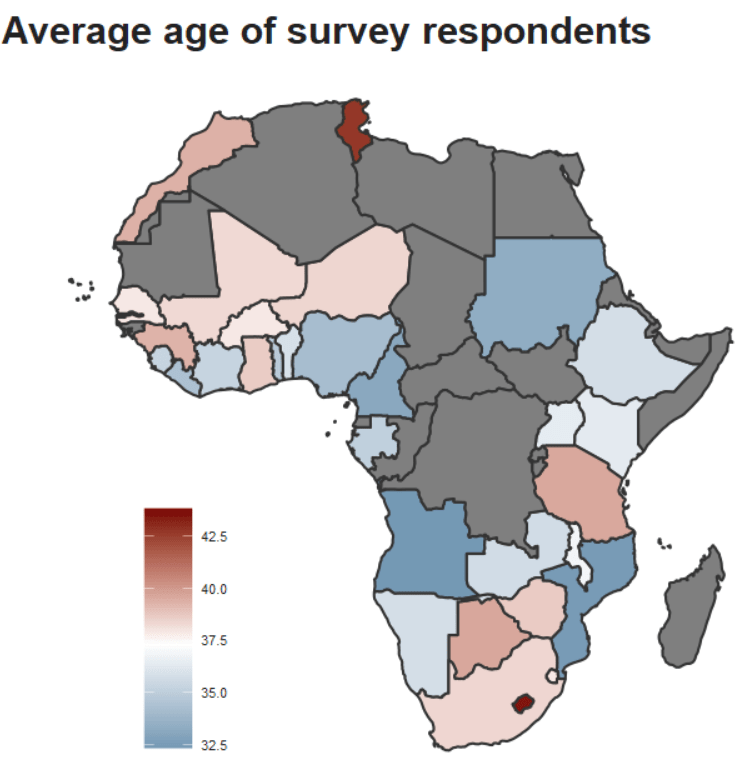



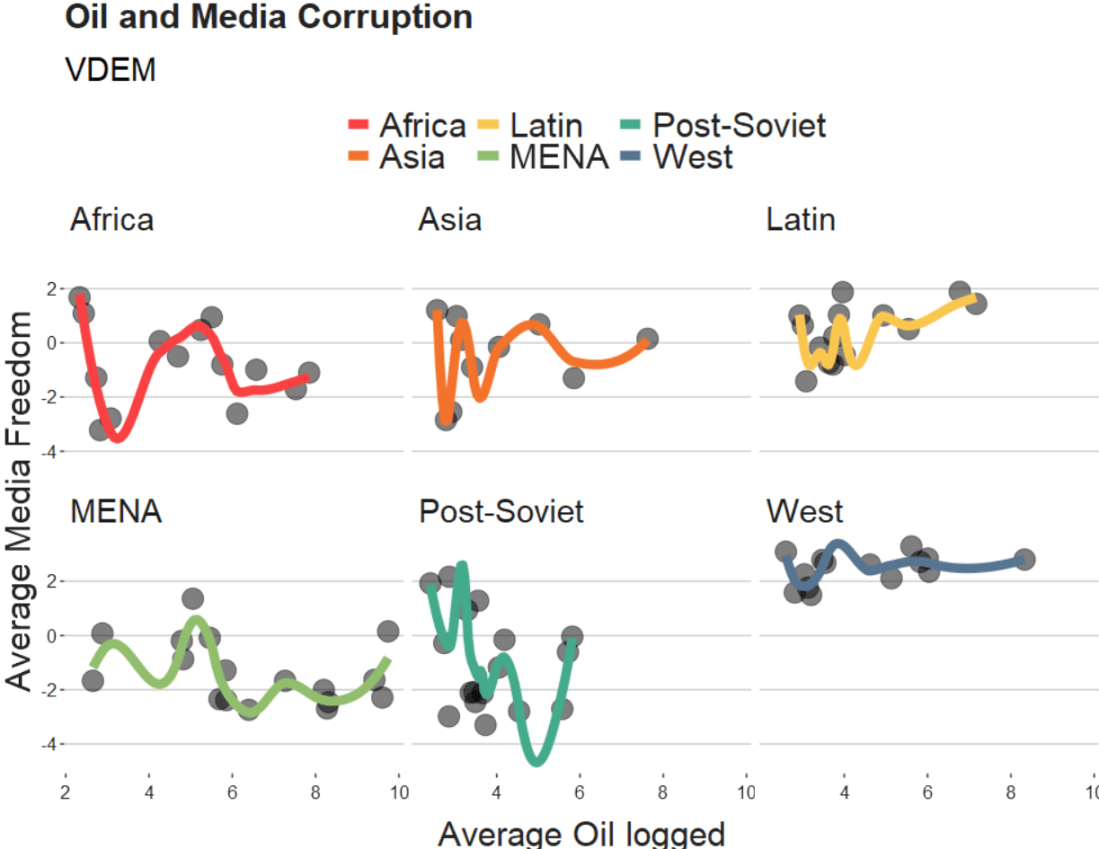

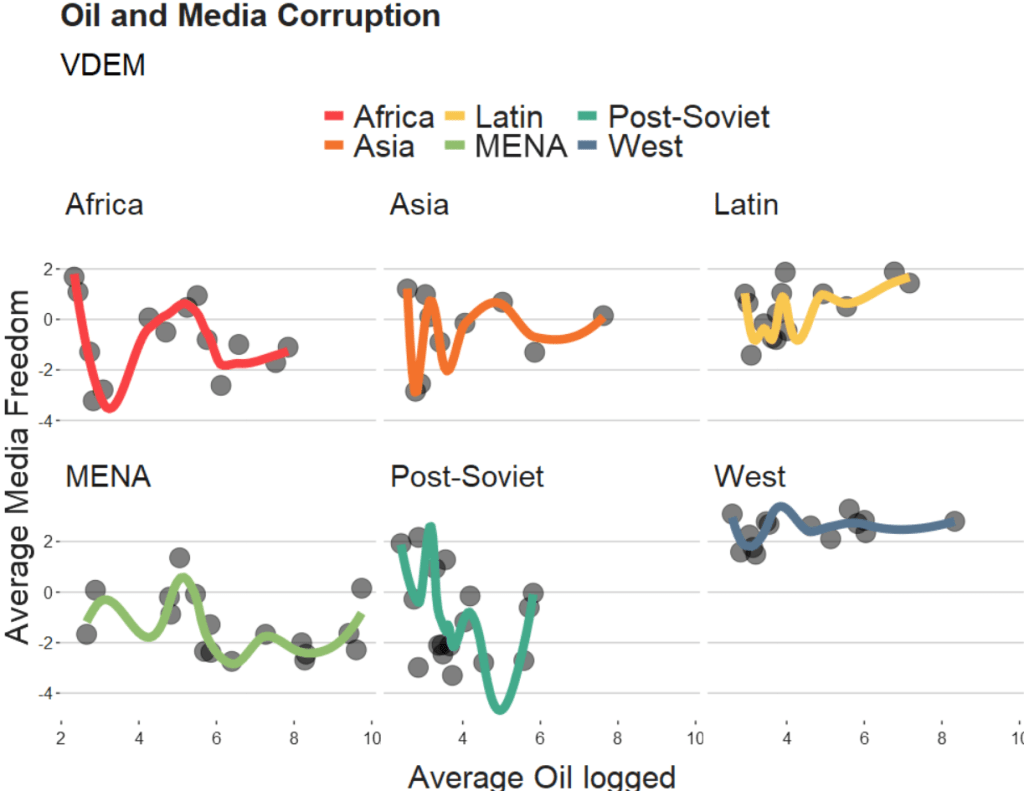

 R Functions and Packages for Political Science Analysis

