Graphing female politicians in Irish parliament with R PART 2: Trends and Maps

Packages we will need

library(tidyverse)
library(magrittr)
library(waffle)
library(geojsonio)
library(sf)

In PART 1, we looked at the gender package to help count the number of women in the 33rd Irish Parliament.

I repeated that for every session since 1921. The first and second Dail are special in Ireland as they are technically pre-partition.

Cleaned up the data aaaand now we have a full dataset with constituencies data.

If anyone wants a copy of the dataset, I can upload it here for those who are curious ~

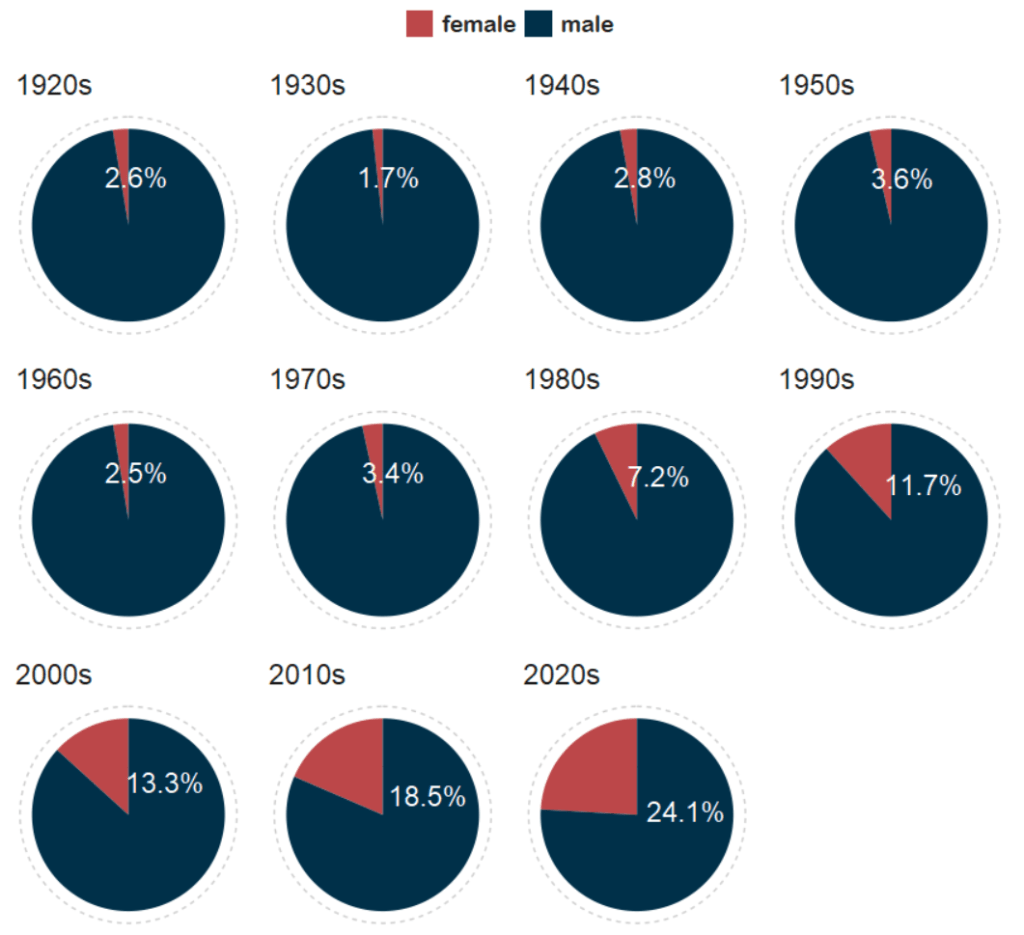
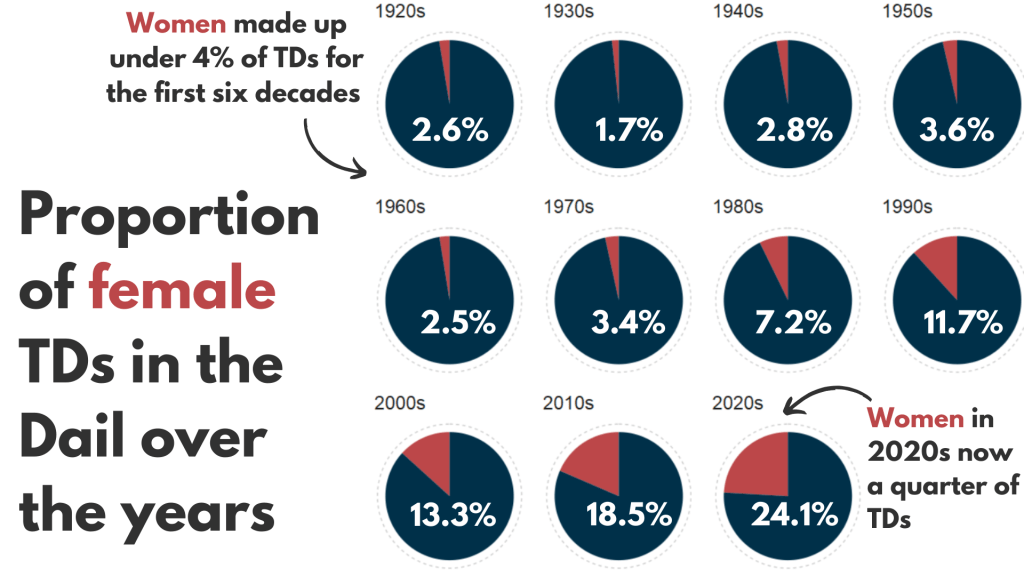
So first… a simple pie chart!

First we calculate proportion of seats held by women

dail %>% 
  mutate(decade = substr(year, 1, 3)) %>% 
  mutate(decade = paste0(decade, "0s")) %>%
  group_by(decade) %>% 
  ungroup() %>% 
  group_by(decade, gender) %>% 
  count() %>% 
  group_by(decade) %>% 
  mutate(proportion = n / sum(n)) -> dail_pie
# A tibble: 22 × 4
# Groups:   decade [11]
   decade gender     n proportion
   <chr>  <chr>  <int>      <dbl>
 1 1920s  female    20     0.0261
 2 1920s  male     747     0.974 
 3 1930s  female    10     0.0172
 4 1930s  male     572     0.983 
 5 1940s  female    12     0.0284
 6 1940s  male     411     0.972 
 7 1950s  female    16     0.0363
 8 1950s  male     425     0.964 
 9 1960s  female    11     0.0255
10 1960s  male     421     0.975 
# 12 more rows

We will be looking at how proportions changed over the decades.

When using facet_wrap() with coord_polar(), it’s a pain in the arse.

This is because coord_polar() does not automatically allow each facet to have a different scale. Instead, coord_polar() treats all facets as having the same axis limits.

This will mess everything up.

If we don’t change the coord_polar(), we will just distort pie charts when the facet groups have different total values. There will be weird gaps and make some phantom pacman non-charts.

function() TRUE is an anonymous function that always returns TRUE.

my_coord_polar$is_free <- function() TRUE forces coord_polar() to allow different scales for each facet.

In our case, we call my_coord_polar$is_free, which means that whenever ggplot2 checks whether the coordinate system allows free scales across facets, it will now always return TRUE!!!

Overriding is_free() to always return TRUE signals to ggplot2 that coord_polar() means that our pie charts NOOWW will respect the "free" scaling specified in facet_wrap(scales = "free").

my_coord_polar <- coord_polar(theta = "y")
my_coord_polar$is_free <- function() TRUE

If you want to look more at this, check out this blog:

And we can go and create the ggplot:

dail_pie %>%
  ggplot(aes(x = "", 
         y = proportion, 
         fill = as.factor(gender))) +

  geom_bar(stat="identity", width = 1) +
  
  geom_text(
    data = . %>% filter(gender == "female"), aes(label = scales::percent(proportion, 
    accuracy = 0.1)), 
    color = "white",
    size = 8) +
  
  my_coord_polar +

  facet_wrap(~decade, scales = "free") + 
  scale_fill_manual(values =c("#bc4749", "#003049")) +
  # my_style() +
  theme(axis.text.x = element_blank(),
        panel.grid.major = element_blank(),
        panel.grid.minor = element_blank(),
        panel.grid = element_blank(), 
        panel.background = element_blank(), 
        axis.text = element_blank(), 
        axis.ticks = element_blank()) 

And with Canva, I add the arrows and titles~

Sorry I couldn’t figure it out in R. I just hate all the times I need to re-run graphics to move a text or number by a nano-centimeter. Websites like Canva are just far better for my sanity and short attention span.

Next, we can make a facetted waffle plot!

dail %>% 
  group_by(decade) %>% 
  ungroup() %>% 
  group_by(decade, gender) %>% 
  count() %>% 
  ggplot(aes(fill = as.factor(gender), values = n)) +
  waffle::geom_waffle(color = "white", 
                      size = 0.5, 
                      n_rows = 10, 
                      flip = TRUE) +
  facet_wrap(~decade, nrow = 1, strip.position = "bottom") +
# my_style  +
  scale_fill_manual(values =c("#003049", "#bc4749")) +
  theme(axis.text.x.bottom = element_blank(),
        text = element_text(size = 40))

And mea culpa, I finished the annotation and titles are with Canva.

Once again, life is too short to be messing with annotation in ggplot.

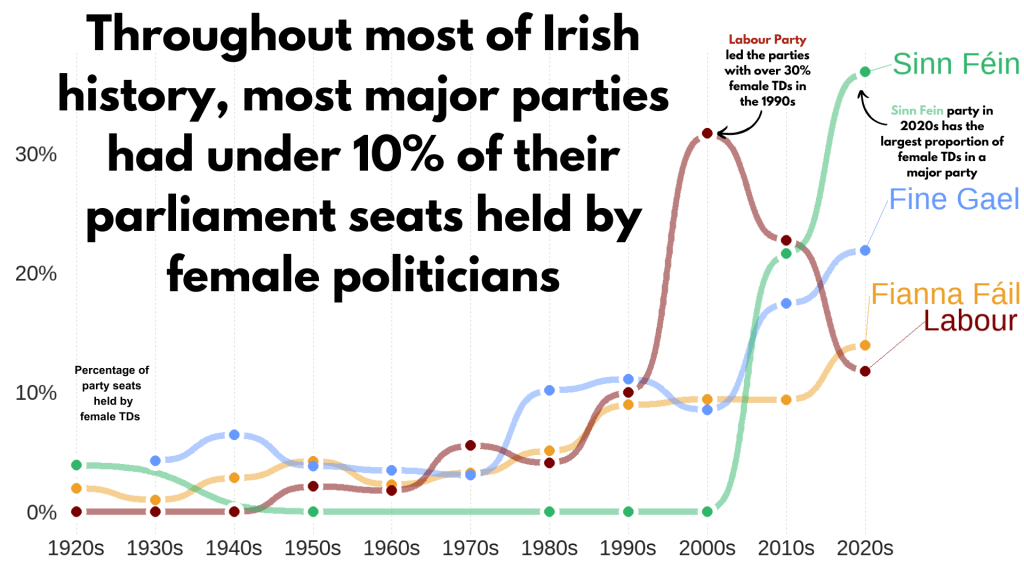
Next, we can make a simple trend line of the top Irish parties and see how they have fared with women TDs.

Let’s get a dataframe with average number of TDs elected to each party over the decades

dail %>% 
  filter(constituency != "National University") %>% 
  filter(party %in% c("Fianna Fáil", "Fine Gael", "Labour", "Sinn Féin")) %>% 
  group_by(party, decade) %>% 
  summarise(avg_female = mean(gender == "female")) -> dail_avg
# A tibble: 39 × 3
# Groups:   party [4]
   party       decade avg_female
   <chr>       <chr>       <dbl>
 1 Fianna Fáil 1920s     0.0198 
 2 Fianna Fáil 1930s     0.00685
 3 Fianna Fáil 1940s     0.0284 
 4 Fianna Fáil 1950s     0.0425 
 5 Fianna Fáil 1960s     0.0230 
 6 Fianna Fáil 1970s     0.0327 
 7 Fianna Fáil 1980s     0.0510 
 8 Fianna Fáil 1990s     0.0897 
 9 Fianna Fáil 2000s     0.0943 
10 Fianna Fáil 2010s     0.0938 
# 29 more rows

We create a new mini data.frame of four values so that we can have the geom_text() only at the end of the year (so similar to the final position of the graph).

final_positions <- dail_avg %>%
  group_by(party) %>%
  filter(decade == "2020s")  %>% 
  mutate(color = ifelse(party == "Sinn Féin", "#2fb66a",
         ifelse(party == "Fine Gael","#6699ff",
         ifelse(party == "Fianna Fáil","#ee9f27", 
         ifelse(party == "Labour", "#780000", "#495051")))))
# A tibble: 4 × 4
# Groups:   party [4]
  party       decade avg_female color  
  <chr>       <chr>       <dbl> <chr>  
1 Fianna Fáil 2020s       0.140 #ee9f27
2 Fine Gael   2020s       0.219 #6699ff
3 Labour      2020s       0.118 #780000
4 Sinn Féin   2020s       0.368 #2fb66a

A hex colour for each major party

party_pal <- c("Sinn Féin" = "#2fb66a",
                "Fine Gael" = "#6699ff",
                "Fianna Fáil" = "#ee9f27", 
                "Labour" = "#780000")

And a geom_bump() layer in the plot using the ggbump() package for more wavy lines.

dail_avg %>% 
  ggplot(aes(x = decade,
             y = avg_female, 
             group = party, 
             color = party)) + 

  ggbump::geom_bump(aes(color = party),
            smooth = 5,
            alpha = 0.5,
            size = 4)  +

  geom_point(color = "white", 
             size = 7, 
             stroke = 4) + 

  geom_point(size = 6) +

  ggrepel::geom_text_repel(data = final_positions,
            aes(color = party,
                y = avg_female,
                x = decade,
            label = party),
            family = "Arial Rounded MT Bold",
            vjust = -2,
            hjust = -1,
            size = 15) +
# my_style() 
  scale_color_manual(values = party_pal) +
  scale_y_continuous(labels = scales::label_percent()) +
  scale_x_discrete(expand = expansion(add = c(0.2, 2))) +
  theme(legend.position = "none") 

This graph looks at major Irish political parties from the 1920s to the 2020s.

For most of Irish history, female representation remained under 10%.

The Labour Party surged ahead like crazy in the 1990s; it got over 30% female TDs!

Now in the 2020s, Sinn Féin has the largest proportion of female TDs and goes way above and beyond the other major parties.


Now, onto constituency maps.

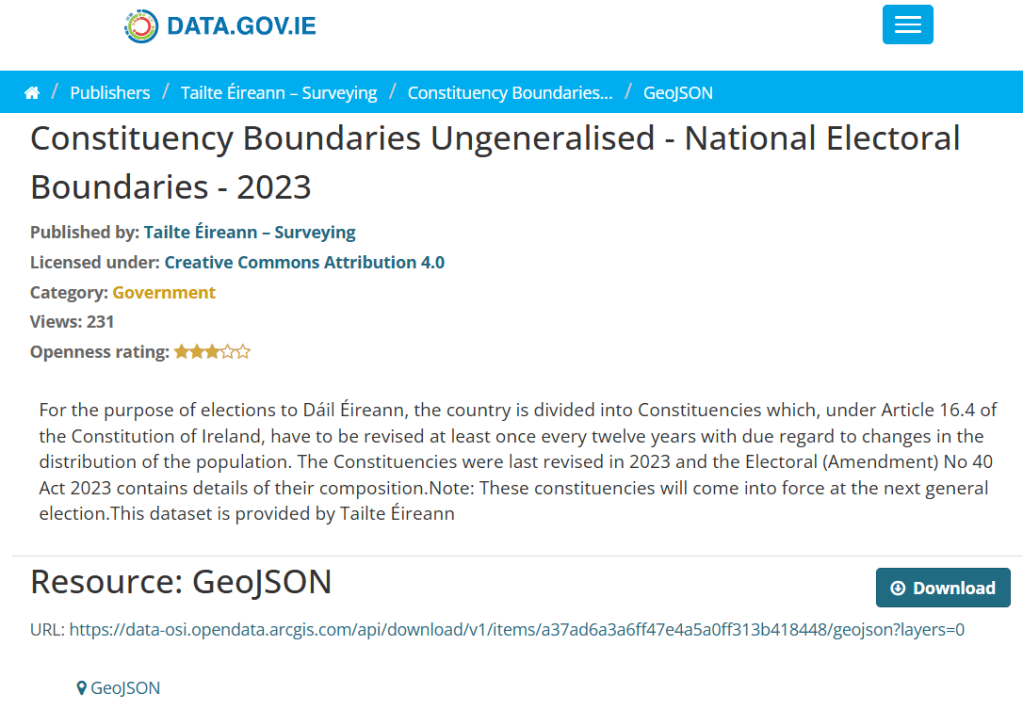
We can go to the Irish government’s website with heaps of data! Yay free data.

This page brings us to the election constituencies GeoJSON map data.

For more information about making GeoJSON and SF maps click here to read about how to create maps in R ~

So we read in the data and convert to SF dataframe.

constituency_map <- geojson_read(file.choose(), what = "sp")

constituency_sf <- st_as_sf(constituency_map)

This constituency_sf has 64 variables but most of them are meta-data info like the dates that each variable was updated. The vaaast majority, we don’t need so we can just pull out the consituency var for our use:

constituency_sf %>% 
  select(constituency = ENG_NAME_VALUE, 
         geometry) -> mini_constituency_sf
Simple feature collection with 1072 features and 1 field
Geometry type: POLYGON
Dimension:     XY
Bounding box:  xmin: 417437.9 ymin: 516356.4 xmax: 734489.6 ymax: 966899.7
Projected CRS: IRENET95 / Irish Transverse Mercator
First 10 features:
          constituency                       geometry
1  Cork South-West (3) POLYGON ((501759.8 527442.6...
2            Kerry (5) POLYGON ((451686.2 558529.2...
3            Kerry (5) POLYGON ((426695 561869.8, ...
4            Kerry (5) POLYGON ((451103.9 555882.8...
5            Kerry (5) POLYGON ((434925.3 572926.2...
6          Donegal (5) POLYGON ((564480.8 917991.7...
7          Donegal (5) POLYGON ((571201.9 892870.7...
8          Donegal (5) POLYGON ((615249.9 944590.2...
9          Donegal (5) POLYGON ((563593.8 897601, ...
10         Donegal (5) POLYGON ((647306 966899.4, ...

As we see, the number of seats in each constituency is in brackets behind the name of the county. So we can separate them and create a seat variable:

  mini_constituency_sf %<>% 
   separate(constituency, 
            into = c("constituency", "seats"), 
            sep = " \\(", fill = "right") %>%
   mutate(seats = as.numeric(gsub("\\)", "", seats))) 

One problem I realised along the way when I was trying to merge the constituency map with the TD politicians data is that one data.frame uses a hyphen and one uses a dash in the constituency variable.

So we can make a quick function to replace en dash (–) with hyphen (-).

 replace_dash <- function(x) {
   if (is.character(x)) {
     gsub("–", "-", x)  
   } else {x}
}

 mini_constituency_sf %<>%
   mutate(across(where(is.character), replace_dash))

And now we can merge!

 dail %<>%
   right_join(mini_constituency_sf, by = "constituency") 

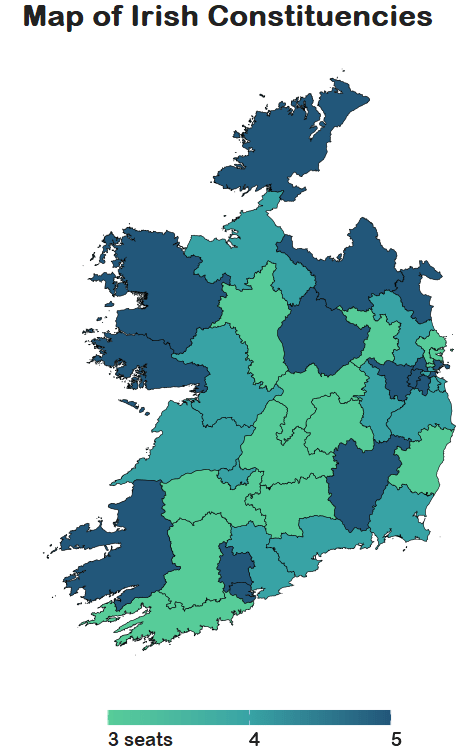
Now a quick map ~

 dail %<>%
  mutate(n = ifelse(is.na(percentage_women), 0, percentage_women)) %>%
   ggplot(aes(geometry = geometry)) +
   geom_sf(aes(fill = percentage_women),
           color = "black") +  s
   labs(title = "Map of Irish Constituencies") +
   # my_style() +
   scale_fill_viridis_c(option = "plasma")  +

    scale_fill_gradient2(low = "#57cc99",
                         mid = "#38a3a5",
                         high = "#22577a") +

   theme(axis.text = element_blank(),
     axis.text.x.bottom = element_blank(),
     legend.key.width = unit(1.5, "cm"), 
     legend.key.height = unit(0.4, "cm"), 
     legend.position = "bottom")

We can see that some constituencies have 3 seats, some 5~

So we cannot directly compare who has more female TDs.

A way to deal with this is scaling the data.

In PART 3, we will look at scaling data and analysing trends across the years!

Yay!

How to download and graph interactive country maps in R

Packages we will be using:

library(tidyverse)
library(geojsonio)
library(sf)

In this blog, we will make maps! Mapppsss!!!

Go to this website and find the country GeoJSON you want to download:

We can choose the country we want.

For example, Ireland

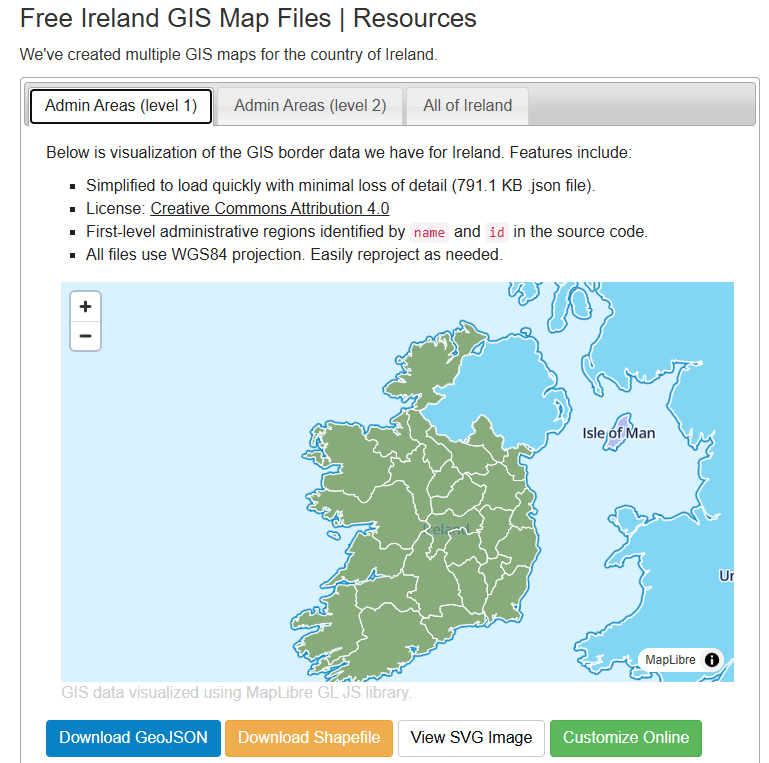
https://simplemaps.com/gis/country/ie#admin1

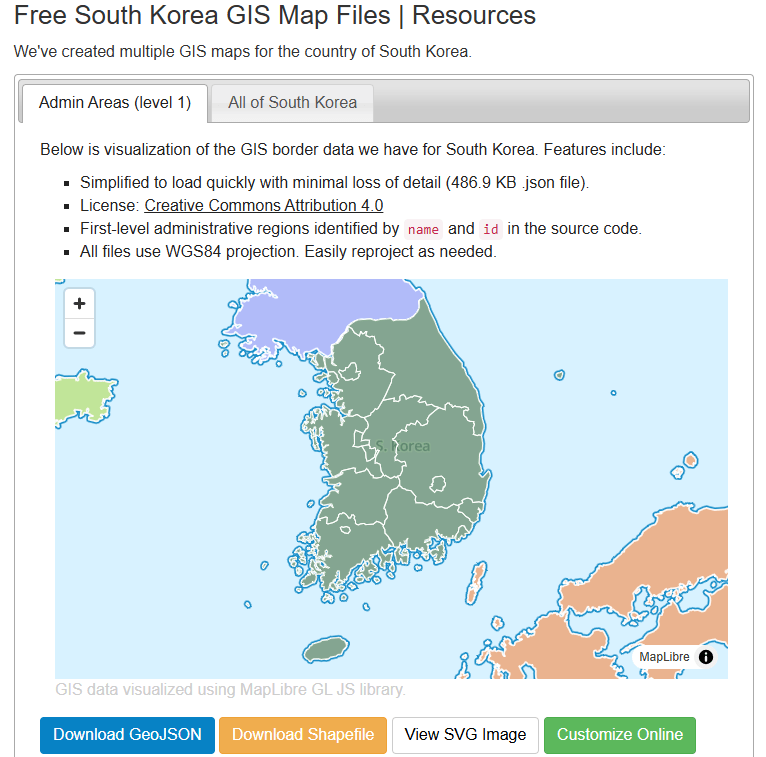
Or South Korea, maybe~

https://simplemaps.com/gis/country/kr#admin1

Click the blue button to download the file.

I saved it on my desktop so it’s easy to read in~

ireland_map <- geojson_read("ie.json", what = "sp")

Next we need to convert a spatial object into an sf (Simple Features) object

ireland_sf <- st_as_sf(ireland_map)

I will be working on the Irish dataset and make a simple map

geojson_read() reads a GeoJSON file (from the geojsonio package).

A GeoJSON file is a file format for map data using JavaScript Object Notation (JSON). 

It’s an open standard used a lot to represent points, lines, and polygonzzz.

"ie.json" will be our GeoJSON file containing Ireland’s geographic data. That will be the 26 counties.

The argument what = "sp" makes it so that the output should be a spatial object (from the sp package).

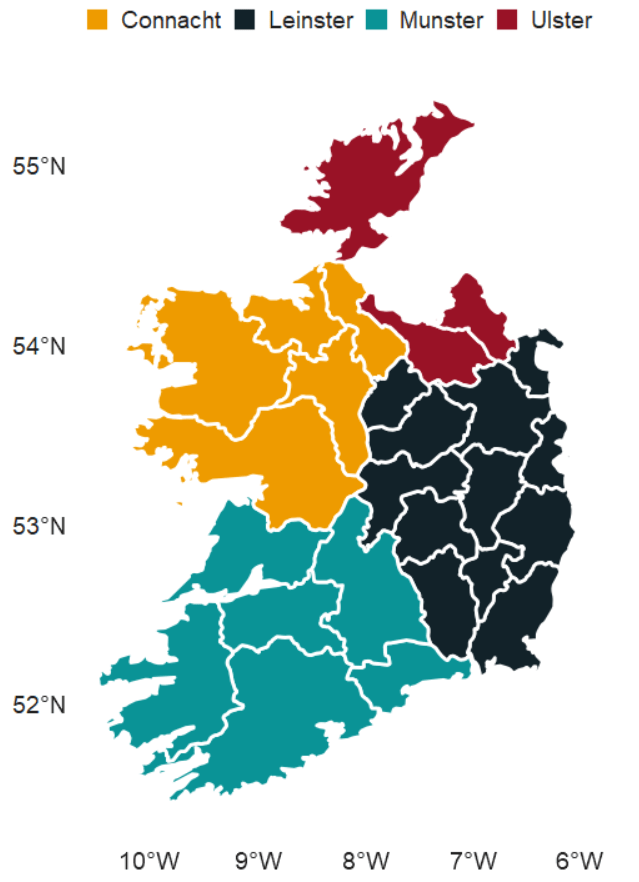
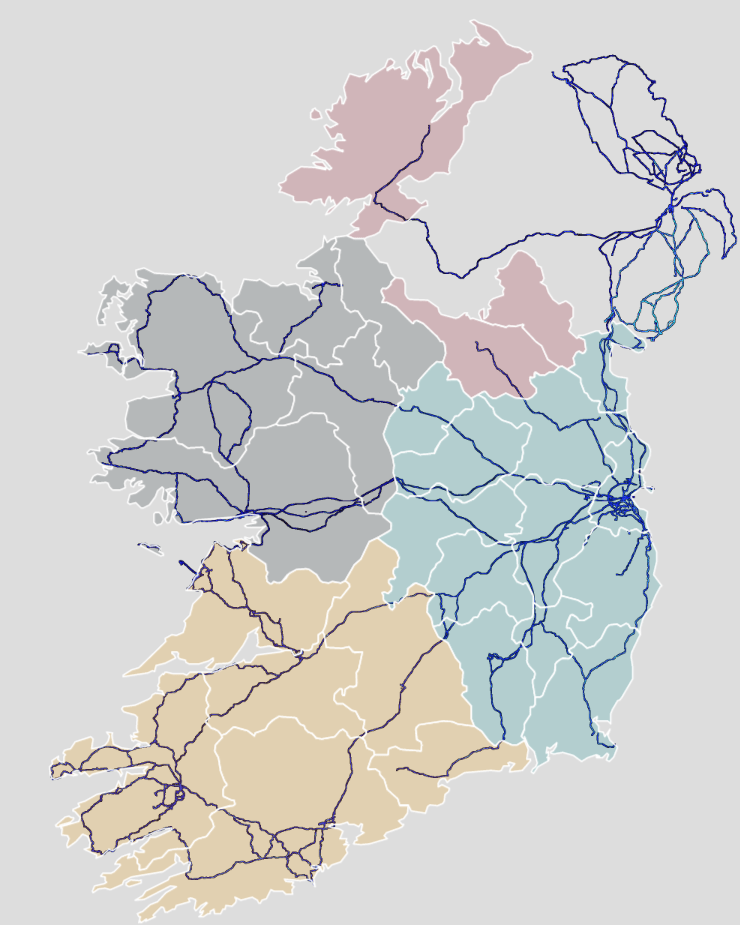
We can add data for the four provinces of Ireland

leinster <- c("Carlow", "Dublin", "Kildare", "Kilkenny", "Laois", "Longford", "Louth", "Meath", "Offaly", "Westmeath", "Wexford", "Wicklow")

munster <- c("Clare", "Cork", "Kerry", "Limerick", "Tipperary", "Waterford")

connacht <- c("Galway", "Leitrim", "Mayo", "Roscommon", "Sligo")

ulster <- c("Cavan", "Donegal", "Monaghan", "Antrim", "Armagh", "Derry", "Down", "Fermanagh", "Tyrone")

And some hex colours for the palette

province_pal <- c(
  "Leinster" = "#122229",
  "Munster" = "#0a9396",
  "Connacht" = "#ee9b00",
  "Ulster" = "#991226") 

And we can add all this data with the geom_sf() to the graph:

ireland_sf %>%
  mutate(county = name) %>% 
  mutate(county = ifelse(county == "Laoighis", "Laois", county)) %>% 
  mutate(province = ifelse(county %in% leinster, "Leinster",
                    ifelse(county %in% munster, "Munster",
                    ifelse(county %in% connacht, "Connacht",
                    ifelse(county %in% ulster, "Ulster", NA))))) %>% 
  ggplot() +
  geom_sf(aes(fill = province),
          linewidth = 1, color = "white") +
  bbplot::bbc_style() +
  scale_fill_manual(values = province_pal)

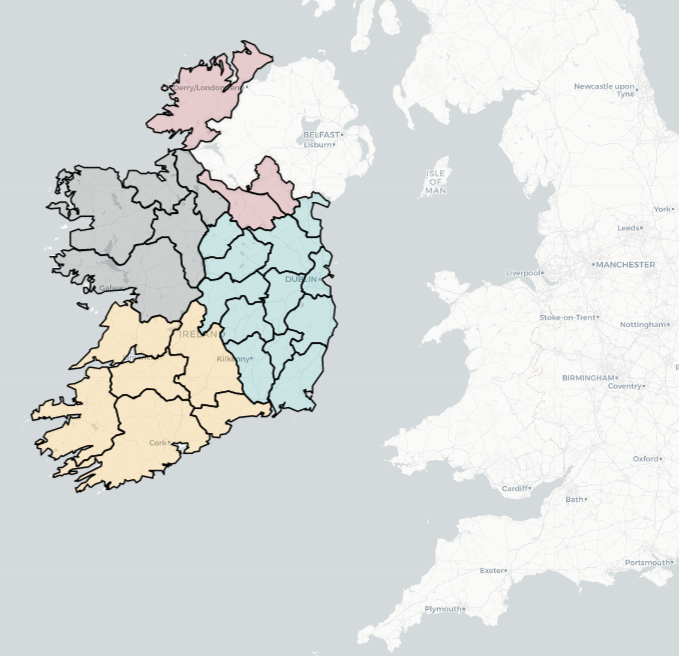
We can also make interactive maps that look like Google maps with the leaflet package!

Click here to read the cran PDF on the leaflet package.

It’s super easy but different from ggplot in many ways.

Instead of all the ifelse() statements and mutate(), we can alternatively use a case_when() function!

ireland_sf %<>% 
  mutate(county = name, 
         county = recode(county, "Laoighis" = "Laois"),
         province = case_when(
           county %in% leinster ~ "Leinster",
           county %in% munster  ~ "Munster",
           county %in% connacht ~ "Connacht",
           county %in% ulster   ~ "Ulster",
           TRUE ~ NA_character_))

We can add colours using the colorFactor() function from the leaflet package.
In colorFactor() specifies the set of possible input values that will be mapped to colours.

province_colorFactor <- colorFactor(
  palette = c("Leinster" = "#122229",
              "Munster"  = "#0a9396",
              "Connacht" = "#ee9b00",
              "Ulster"   = "#991226"), 
  domain = ireland_sf$province)

We can now use the leaflet() function with the input of our SF data.frame.

With the addProviderTiles(), we can choose a map style.

providers$CartoDB.Positron refers to the “Positron” tile set from CartoDB.

When we use the leaflet.extra package, the CartoDB means we can use a clean map style

Next, we add the addPolygons() function adds polygon shapes to the map. For us. these polygons are for each Irish county.

fillColor = ~province_colorFactor(province) sets the fill color of each of the fours province polygon!

Finally, we can add the thickness of the map border lines, color and opacity to make it all pretty!

leaflet(ireland_sf) %>% 
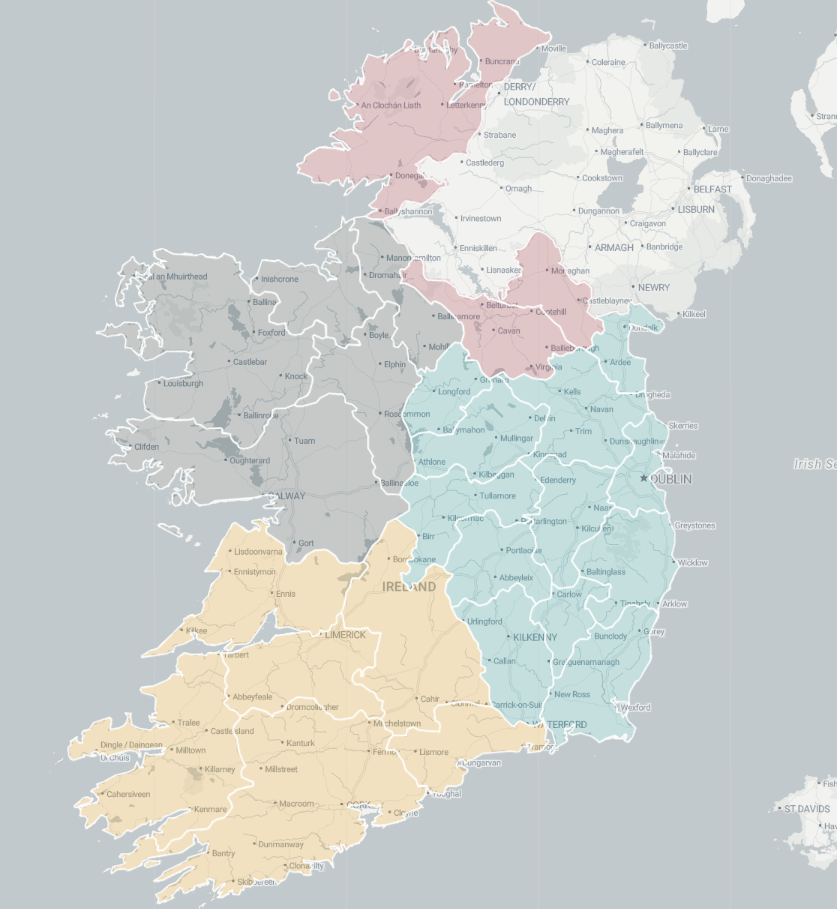
  addProviderTiles(providers$CartoDB.Positron) %>%  
  addPolygons(fillColor = ~province_colorFactor(province),
              weight = 2, 
              color = "black", 
              opacity = 1)

Here are some commonly used provider tiles that we can feed into the addProviderTiles()

  • OpenStreetMap
    • providers$OpenStreetMap.Mapnik
    • providers$OpenStreetMap.DE
    • providers$OpenStreetMap.France
  • Stamen
    • providers$Stamen.Toner
    • providers$Stamen.Watercolor
    • providers$Stamen.Terrain
  • CartoDB
    • providers$CartoDB.Positron
    • providers$CartoDB.DarkMatter
  • Esri
    • providers$Esri.WorldStreetMap
    • providers$Esri.WorldImagery
    • providers$Esri.NatGeoWorldMap
  • Hike & Bike
    • providers$HikeBike.HikeBike
  • Thunderforest
    • providers$Thunderforest.Landscape
    • providers$Thunderforest.Outdoors
  • NASAGIBS
    • providers$NASAGIBS.ModisTerraTrueColorCR
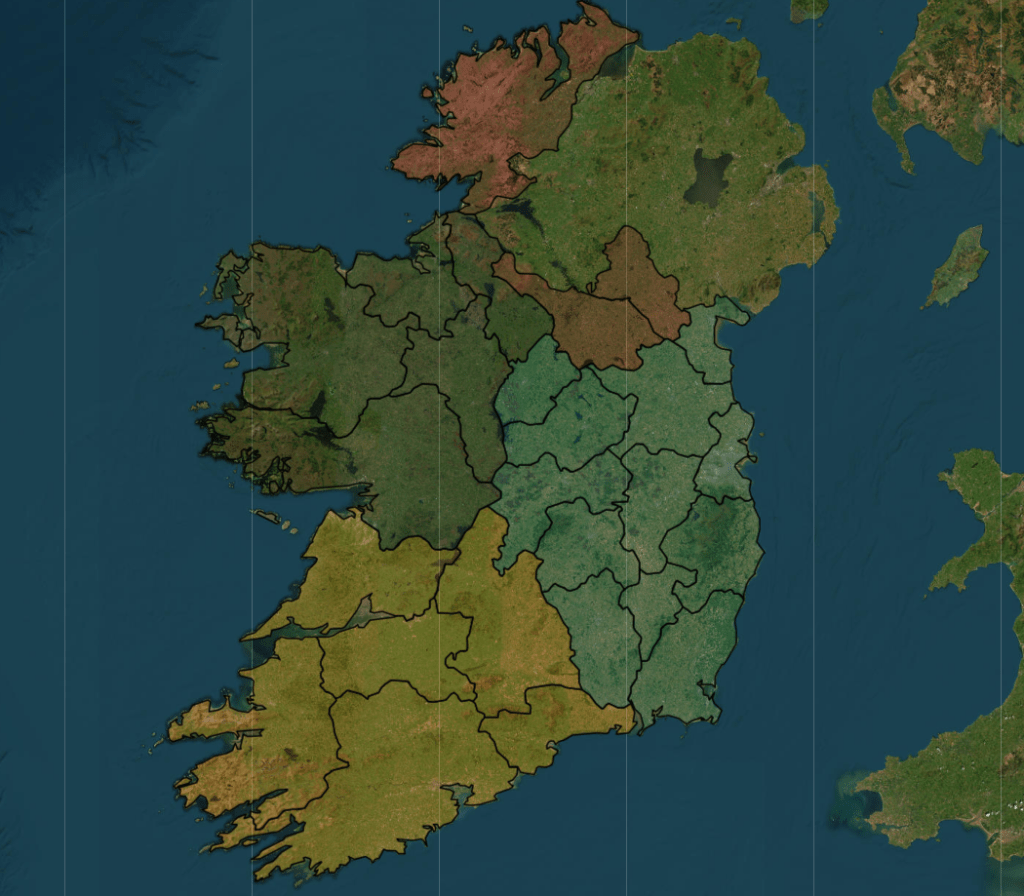
ireland_leaflet %>% 
  addProviderTiles(providers$Esri.WorldImagery)

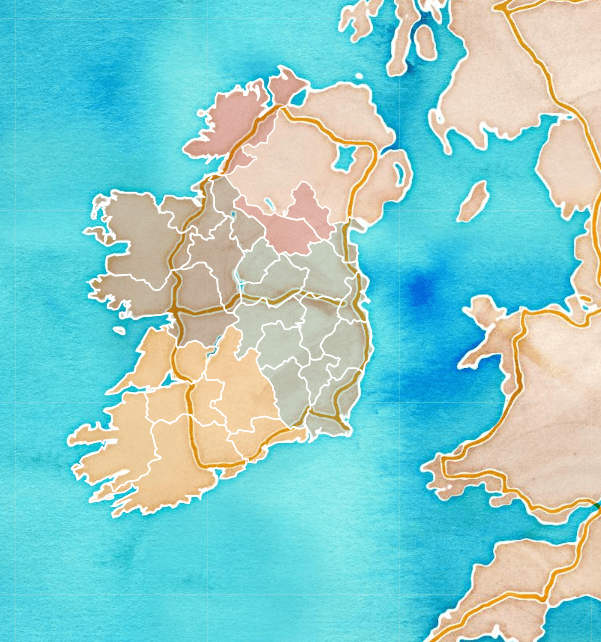
The watercolour style is pretty!

leaflet(ireland_pop_sf) %>%
  addProviderTiles(providers$Stadia.StamenWatercolor) %>%  
  addPolygons(fillColor = ~province_colorFactor(province),
              weight = 2, 
              color = "white", 
              opacity = 1) 

leaflet(ireland_pop_sf) %>%
  addPolygons(fillColor = ~province_colorFactor(province),
              weight = 2, 
              color = "white", 
              opacity = 1) %>% 
  addProviderTiles(providers$SafeCast) 

And we can add the towns and cities with the Stadia as the map provider.


leaflet(ireland_pop_sf) %>%
  addPolygons(fillColor = ~province_colorFactor(province),
              weight = 2, 
              color = "white", 
              opacity = 1) %>% 
  addProviderTiles(providers$Stadia) 

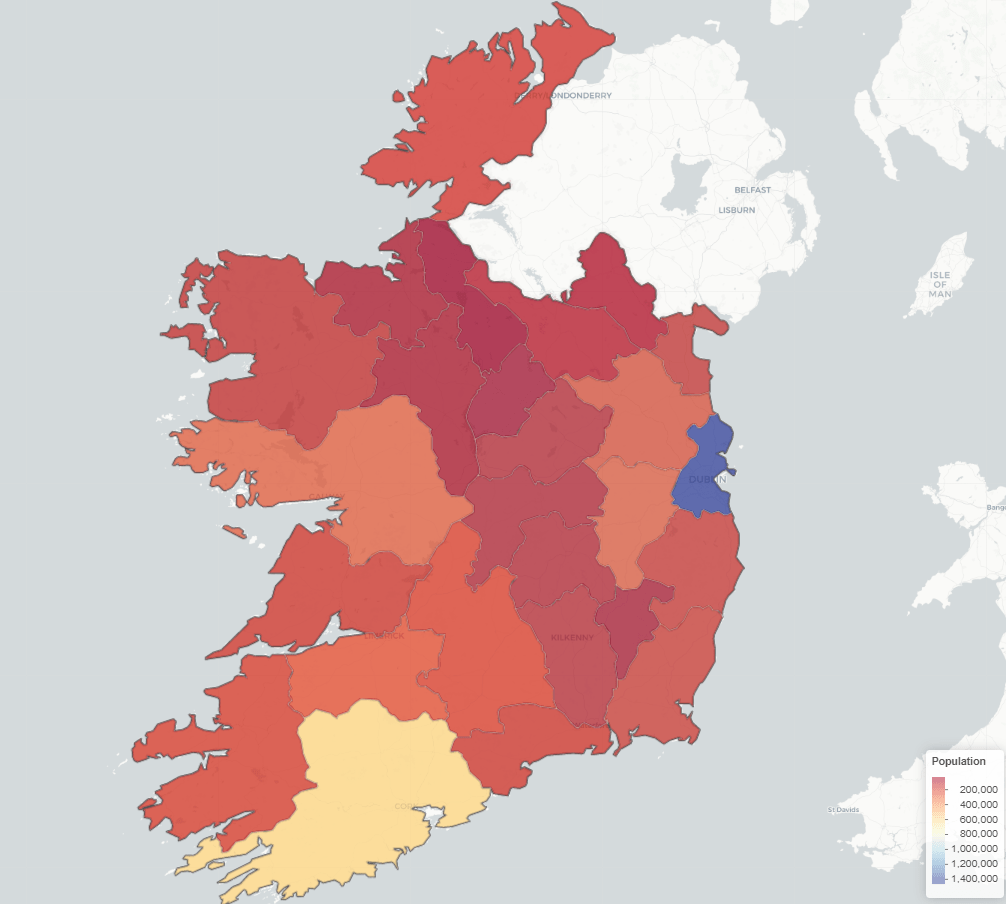
Next we can take 2023 population data for each county from Wikipedia (using rvest's read_html()

read_html("https://en.wikipedia.org/wiki/List_of_Irish_counties_by_population") %>% 
  html_table(header = TRUE, fill = TRUE) %>% 
  `[[`(1) %>% 
  janitor::row_to_names(row_number = 1) %>% 
  janitor::clean_names() %>% 
  mutate(population = as.numeric(gsub(",", "", population)) %>% 
  select(county, population) -> ireland_pop

Add join the population data to the SF map data with the county variable.

ireland_sf %>% 
  inner_join(ireland_pop, by = "county") -> ireland_pop_sf

First, we can prepare a colour palette

pop_pal <- colorNumeric(
  palette = "RdYlBu",
  domain = ireland_pop_sf$population)

We can create a leaflet map object …

leaflet(ireland_pop_sf) %>% 
  addProviderTiles(providers$CartoDB.Positron) -> ireland_leaflet

… and use this to add population data with a legend in the corner

ireland_leaflet %>%
  addPolygons(fillColor = ~pop_pal(population),  # Color by population
              weight = 1, 
              color = "white",
              fillOpacity = 0.7,
              popup = ~paste0("<b>", county, "</b><br>Population: ", population)) %>%
  addLegend(pal = pop_pal, 
            values = ireland_pop_sf$population, 
            title = legend_title, 
            position = "bottomright")

Graphing female politicians in Irish parliament R PART 1: Predicting names

Packages we will be using:

library(gender)
library(tidyverse)
library(stringi)
library(toOrdinal)
library(rvest)
library(janitor)
library(magrittr)

I heard a statistic a while ago that there are more men named Mike than total women in charge of committees in the US Senate.

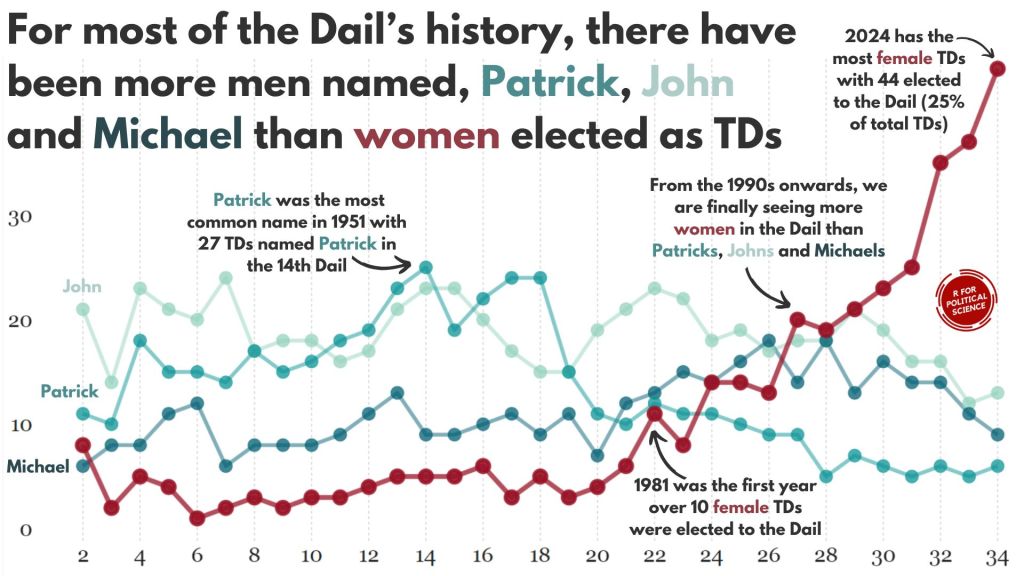
In this blog, we can whether the number of women in the Irish parliament outnumber any common male name.

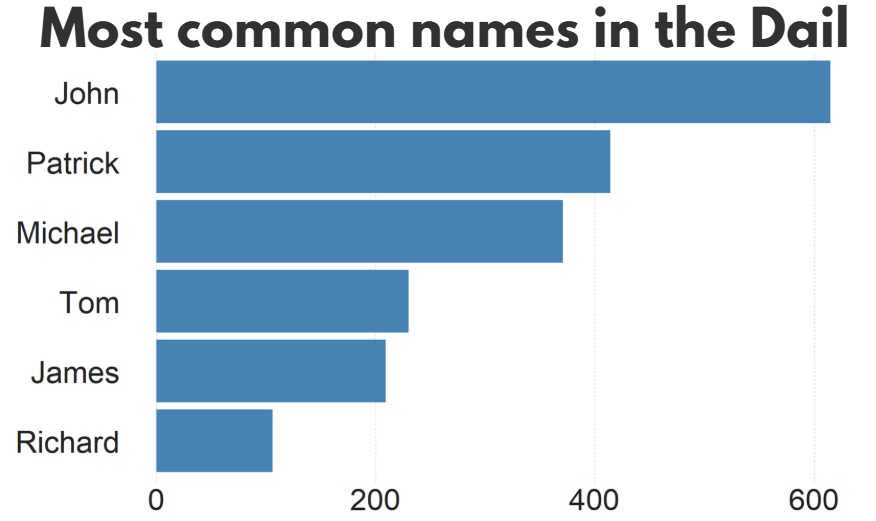
A quick glance on the most common names in the Irish parliament, we can see that from 1921 to 2024, there have been over 600 seats won by someone named John.

There are a LOT of men in Irish politics with the name Patrick (and variants thereof).

Worldcloud made with wordcloud2() package!

So, in this blog, we will:

  1. scrape data on Irish TDs,
  2. predict the gender of each politician and
  3. graph trends on female TDs in the parliament across the years.

The gender package attempts to infer gender (or more precisely, sex assigned at birth) based on first names using historical data.

Of course, gender is a spectrum. It is not binary.

As of 2025, there are no non-binary or transgender politicians in Irish parliament.

In this package, we can use the following method options to predict gender based on the first name:

1. “ssa” method uses U.S. Social Security Administration (SSA) baby name data from 1880 onwards (based on an implementation by Cameron Blevins)

2. “ipums” (Integrated Public Use Microdata Series) method uses U.S. Census data in the Integrated Public Use Microdata Series (contributed by Ben Schmidt)

3. “napp” uses census microdata from Canada, UK, Denmark, Iceland, Norway, and Sweden from 1801 to 1910 created by the North Atlantic Population Project

4. “kantrowitz” method uses the Kantrowitz corpus of male and female names, based on the SSA data.

5. The “genderize” method uses the Genderize.io API based on user profiles from social networks.

We can also add in a “countries” variable for just the NAPP method

For the “ssa” and “ipums” methods, the only valid option is “United States” which will be assumed if no argument is specified. For the “kantrowitz” and “genderize” methods, no country should be specified.

For the “napp” method, you may specify a character vector with any of the following countries: “Canada”, “United Kingdom”, “Denmark”, “Iceland”, “Norway”, “Sweden”.

We can compare these different method with the true list of the genders that I manually checked.

So let’s look at the 33rd Dail from Wikipedia.

https://en.wikipedia.org/wiki/33rd_D%C3%A1il

We can create a new variable with separate() so that it only holds the first name of each politician. We will predict the gender based on this.

dail_33 %<>% 
  separate(
    col = "name",
    into = c("first_name", "rest_name"),
    sep = " ",
    remove = FALSE,
    extra = "merge",
    fill = "warn") 

Irish names often have fadas so we can remove them from the name and make it easier for the prediction function.

remove_fada <- function(x) {
  stri_trans_general(x, id = "Latin-ASCII")
}

dail_33 %<>% 
  mutate(first_name = remove_fada(first_name)) 

Now we’re ready.

We can extract two variables of interest with the gender() function:

  1. gender variable (prediction of male or female name) and
  2. proportion_male (level of certainty about that prediction from 0 to 1).

If the method is confident about predicting male, it will give a higher score.

dail_33 %<>% 
  rowwise() %>%
  mutate(
    gender_ssa = gender(first_name, method = "ssa")$gender[1],  
    prop_male_ssa = gender(first_name, method ="ssa")$proportion_male[1])  

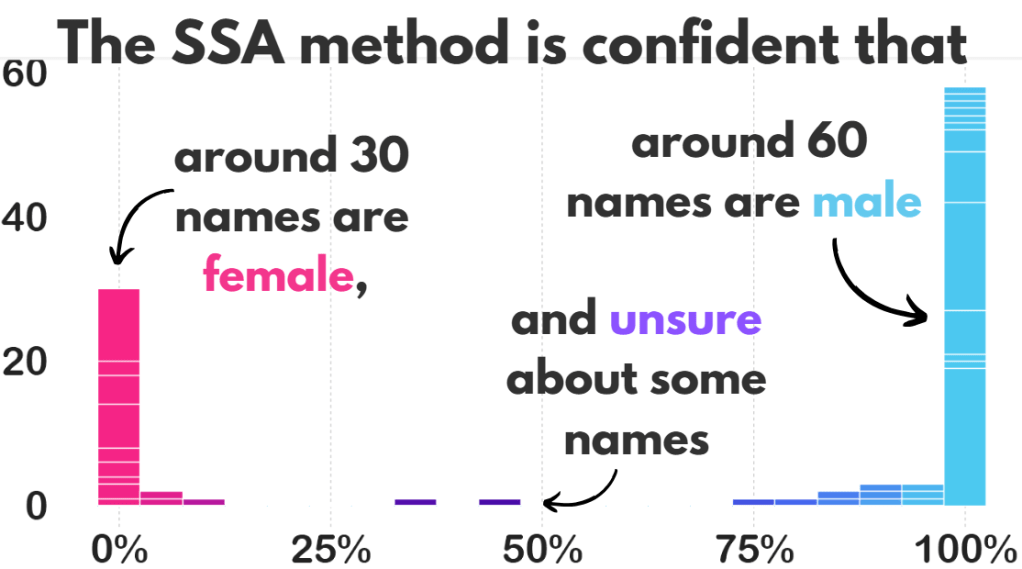
We can add both these to the dail_33 data.frame and check how confident the SSA method is about predicting the gender of all the names.

We can now create a histogram of this level of certainty about the prediction.

Before we graph it out, we

  • filter out the NA values,
  • remove duplicate first names,
  • round up the certainty to three decimal points and
  • choose the bin size for the histogram
  • find some nice hex colours for the graphs
dail_33 %<>% 
  filter(is.finite(prop_male_ssa)) %>% 
  distinct(first_name, .keep_all = TRUE) %>% 
  mutate(
    prop_male_ssa = round(prop_male_ssa, 3),
    bin_category = cut(prop_male_ssa, breaks = 10, labels = FALSE))

 gender_palette <- c("#f72585","#b5179e","#7209b7","#560bad","#480ca8","#3a0ca3","#3f37c9","#4361ee","#4895ef","#4cc9f0")

We can graph it out with the above palette of hex colours.

We can add label_percent() from the scales package for adding percentage signs on the x axis.

dail_33 %>%
  ggplot(aes(x = prop_male_ssa, fill = prop_male_ssa, 
group = prop_male_ssa)) +
  geom_histogram(binwidth = 0.05, color = "white") +  
  scale_fill_gradientn(colors = gender_palette) +  
 # my_style() +
  scale_x_continuous(labels = scales::label_percent()) +
  theme(legend.position = "none")

I added the arrows and texts on Canva.

Don’t judge. I just hate the annotate() part of ggplotting.

Two names that the prediction function was unsure about:

  full_name     prop_male_ssa  gender_ssa
    
Pat Buckley      0.359         female    
Jackie Cahill    0.446         female  

In these two instances, the politicians are both male, so it was good that the method flagged how unsure it was about labeling them as “female”.

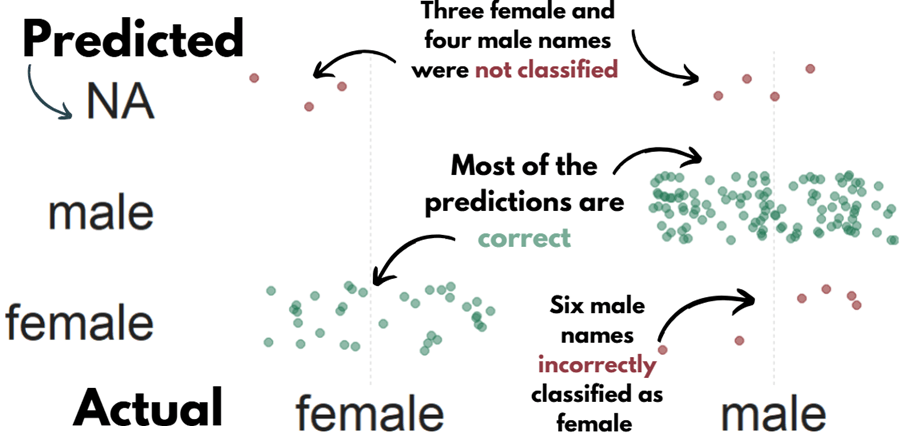
And the names that the function had no idea about so assigned them as NA:

Violet-Anne Wynne    
Aindrias Moynihan    
Donnchadh Ó Laoghaire
Bríd Smith           
Sorca Clarke         
Ged Nash             
Peadar Tóibín 

Which is fair.

We can graph out whether the SSA predicted gender are the same as the actual genders of the TDs.

So first, we create a new variable that classifies whether the predictions were correct or not. We can also call NA results as incorrect. Although god bless any function attempting to guess what Donnchadh is.

dail_33 %>%
    mutate(correct = ifelse(gender == gender_ssa, "Correct", "Incorrect"), correct = ifelse(is.na(gender_ssa), "Incorrect", correct)) -> dail_correct

And graph it out:

dail_correct %>%
  ggplot(aes(x = gender, y = gender_ssa, color = correct )) +
  geom_jitter(width = 0.3, height = 0.3, alpha = 0.5, size = 4) +
  labs(
    x = "Actual Gender",
    y = "Predicted Gender",
    color = "Prediction") +
  scale_color_manual(values = c("Correct" = "#217653", "Incorrect" = "#780000")) +
  # my_style()

 dail %<>% 
   select(first_name, contains("gender")) %>% 
   distinct(first_name, .keep_all = TRUE) %>%  
   mutate(across(everything(), ~ ifelse(. == "either", NA, .))) 

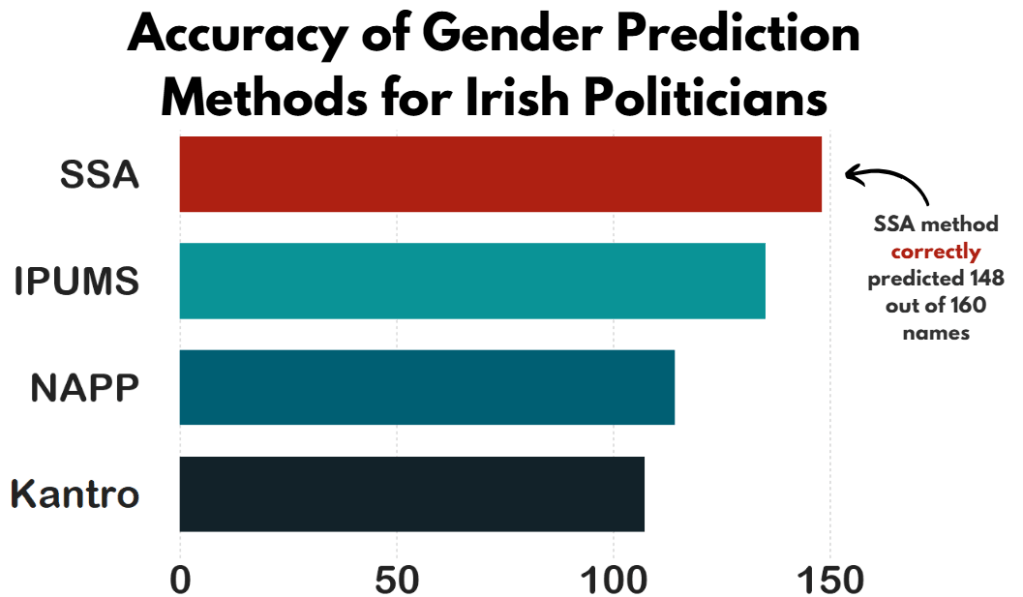
Now, we can compare the SSA method with the other methods in the gender package and see which one is most accurate.

First, we repeat the same steps with the gender() function like above, and change the method arguments.

dail_33 %<>% 
  rowwise() %>%
  mutate(
    gender_ipums = gender(first_name, method = "ipums")$gender[1])

dail_33 %<>% 
  rowwise() %>%
  mutate(gender_napp = gender(first_name, method = "napp")$gender[1])

dail_33 %<>% 
  rowwise() %>%
  mutate(gender_kantro = gender(first_name, method = "kantrowitz" )$gender[1])

dail_33 %<>% 
  rowwise() %>%
  mutate(gender_ize = gender(first_name, method = "genderize" )$gender[1])

Or we can remove duplicates with purrr package

dail_33 %<>% 
  rowwise() %>%
  mutate(across(
    c("ipums", "napp", "kantrowitz", "genderize"), 
    ~ gender(first_name, method = .x)$gender[1], 
    .names = "gender_{.col}"
  ))

Then we calculate which one is closest to the actual measures.

dail_33 %>% 
summarise(accuracy_ssa = mean(ifelse(is.na(gender == gender_ssa), FALSE, gender == gender_ssa)),

     accuracy_ipums = mean(ifelse(is.na(gender == gender_ipums), FALSE, gender == gender_ipums)),

     accuracy_napp = mean(ifelse(is.na(gender == gender_napp), FALSE, gender == gender_napp)),

     accuracy_kantro = mean(ifelse(is.na(gender == gender_kantro), FALSE, gender == gender_kantro))) -> acc

Or to make it cleaner with across()

acc <- dail_33 %>%
  summarise(across(
    c(gender_ssa, gender_ipums, gender_napp, gender_kantro),
    ~ mean(ifelse(is.na(gender == .x), FALSE, gender == .x)),
    .names = "accuracy_{.col}"
  ))

Pivot the data.frame longer so that each method is in a single variable and each value is in an accuracy method.

acc %<>%
  pivot_longer(cols = everything(), names_to = "method", values_to = "accuracy") %>% 
  mutate(method = fct_reorder(method, accuracy, .desc = TRUE)) %>% 
  mutate(method = factor(method, levels = c("accuracy_kantro", "accuracy_napp", "accuracy_ipums", "accuracy_ssa"))) 

my_pal <- c(
  "accuracy_kantro" = "#122229",
  "accuracy_napp" = "#005f73",
  "accuracy_ipums" = "#0a9396",
  "accuracy_ssa" = "#ae2012")

And then graph it all out!

We can use scale_x_discrete() to change the labels of each different method

# Cairo::CairoWin()

acc %>% 
  ggplot(aes(x = method, y = accuracy, fill = method)) +  
  geom_bar(stat = "identity", width = 0.7) +
  coord_flip() + 
  ylim(c(0,160)) +
  theme(legend.position = "none",
        text = element_text(family = "Arial Rounded MT Bold")) +
  scale_fill_manual(values = sample(my_pal)) +
  scale_x_discrete(labels = c("accuracy_ssa" = "SSA",
                              "accuracy_napp" = "NAPP",
                              "accuracy_ipums" = "IPUMS", 
                              "accuracy_kantro" = "Kantro")) +
# my_style() 

Once again, I added the title and the annotations in Canva. I will never add arrow annotations in R if I have other options.

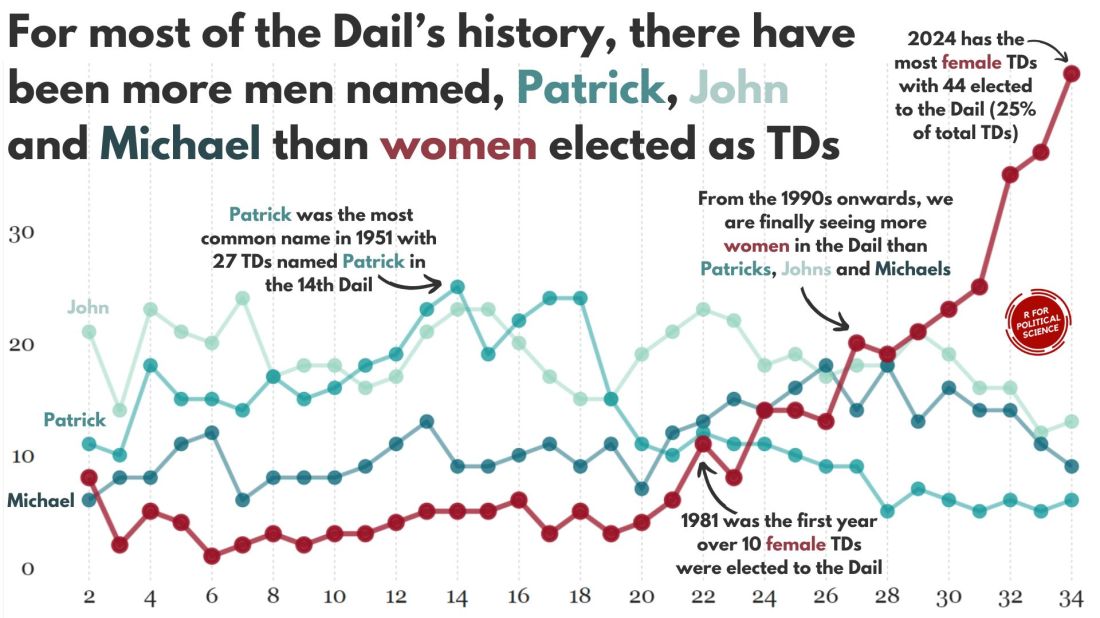
Coming up next, PART 2 on how we can analyse variations on women in the Irish parliament, such as the following graph:

How to web scrape and graph 2024 Irish election data with R

Packages we will use:

library(tidyverse)
library(rvest)
library(janitor)
library(magrittr)
library(ggparliament)
library(ggbump)
library(bbplot)

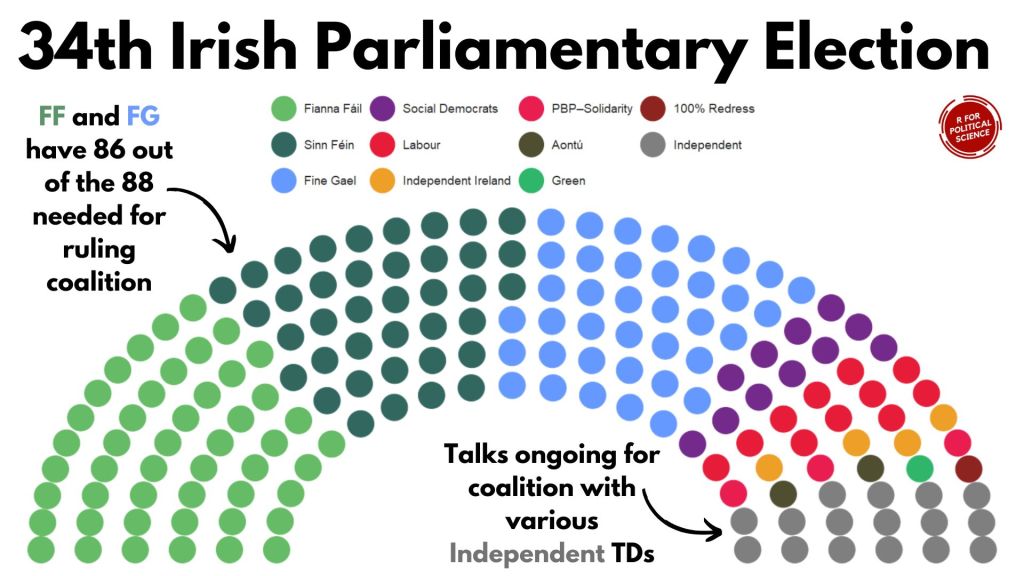
I am an Irish person living abroad. I did NOT follow the elections last year. So, as penance (as I just mentioned, I am Irish and therefore full of phantom Catholic guilt for neglecting political news back home), we will be graphing some of the election data and familiarise ourselves with the new contours of Irish politics in this blog.

Click here to visit the wikipedia page we will be scraping with the rvest package.

Click here to read more about the rvest package for webscraping.

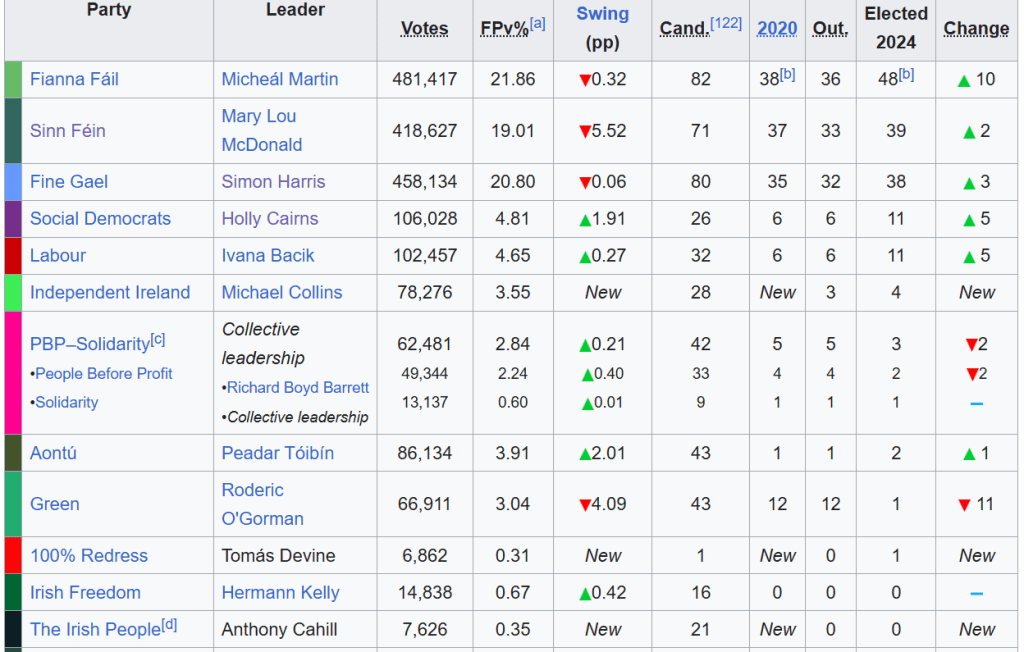
The data we want is in the 11th table on the page:

The columns that we will want are the Party and the Elected 2024 columns.

So using the read_html() function, we can feed in the URL, save all the tables with html_table() and then only keep the eleventh table with `[[`(11)

read_html("https://en.wikipedia.org/wiki/2024_Irish_general_election") %>% 
  html_table(header = TRUE, fill = TRUE) %>% 
  `[[`(11) -> dail_2024

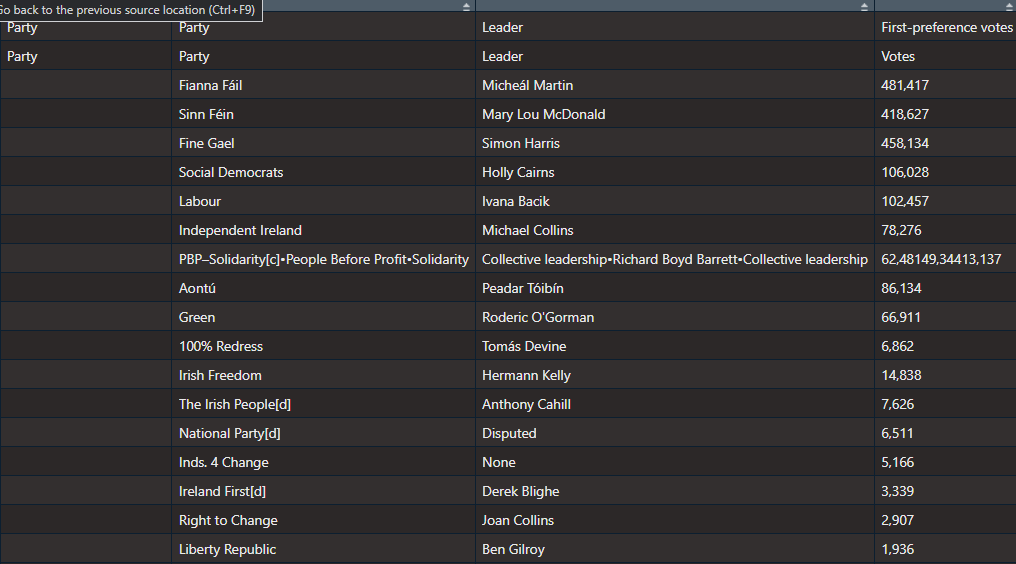
It’s a bit of a hot mess at this stage.

Right now, all the variable names are empty.

We can use the row_to_names() function from the janitor package. This moves a row up to became the variable names. Also we can use clean_names() (also a janitor package staple) to make every variable lowercase snake_case with underscores.

dail_2024 %<>% 
  row_to_names(row_number = 2) %>% 
  clean_names() %>% 

As you can see in the table above, the PBP cell is very crowded. This is due to the fact that many similar left-wing parties formed a loose coaltion when campaigning.

Because they are all in one cell, every number was shoved together without spaces. So instead of each party in the loose grouping, it was all added together. It makes the table wholly incorrect; the PBP coalition did not win trillions of votes.

Things like this highlights the importance of always checking the raw data after web scraping.

So I just brute recode the value according to what is actually on the Wiki page.

dail_2024 %<>% 
  mutate(elected2024 = if_else(party_2 == "PBP–Solidarity[c]•People Before Profit•Solidarity", "3", elected2024))

Next we need to remove the annoying [footnotes in square brackets] on the page with some regex nonsense.

dail_2024 %<>% 
  mutate(across(everything(), ~ str_replace(., "\\[.*$", ""))) 

And finally, we just need to select, rename and change the seat numbers from character to numeric

dail_2024 %<>%  
  select(party = party_2, seats = elected2024)  %>% 
  mutate(seats= parse_number(seats))

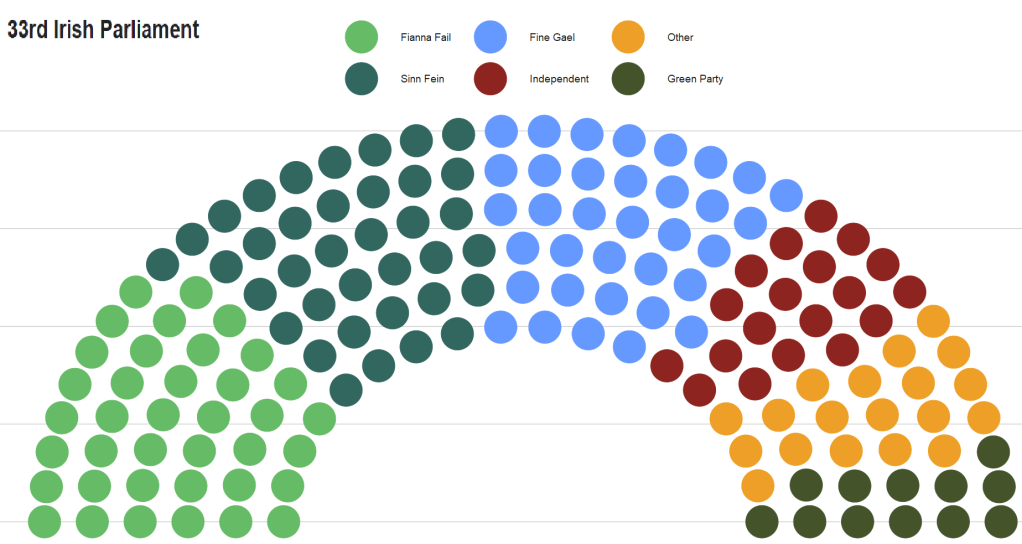
Next, we just need to graph it out with the geom_parliament_seats() layer of the ggplot graph with ggparliament package.

Click here to read more about the ggparliament package:

First, we generate the circle coordinates

dail_2024_coord <- parliament_data(election_data = dail_2024,
                   type = "semicircle", 
                   parl_rows = 6,  
                   party_seats = dail_2024$seats_2024)

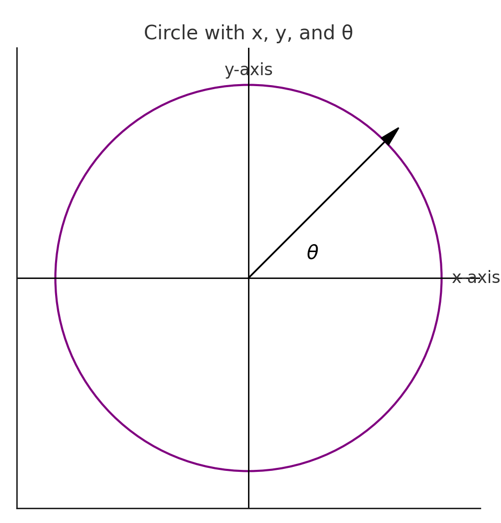
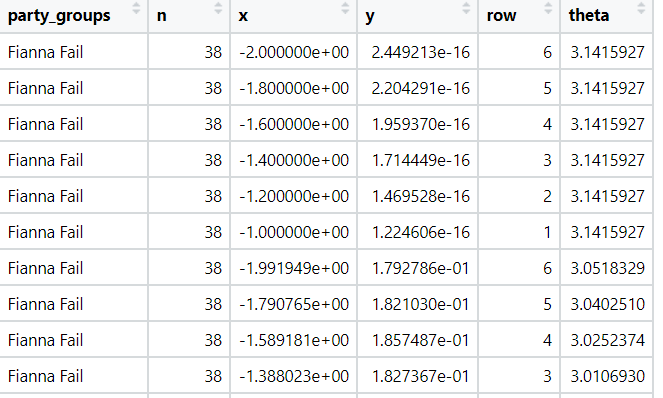
x: the horizontal position of a point in the semi-circle graph.

y: the vertical position of a point in the semi-circle graph.

row: The row or layer of the semi-circle in which the point (seat) is positioned. Rows are arranged from the base (row 1) to the top of the semi-circle.

theta: The angle (in radians) used to calculate the position of each seat in the semi-circle. It determines the angular placement of each point, starting at 0 radians (rightmost point of the semi-circle) and increasing counterclockwise to π\piπ radians (leftmost point of the semi-circle).

We want to have the biggest parties first and the smallest parties at the right of the graph

dail_elected %<>% 
  mutate(party = fct_reorder(party, table(party)[party], .desc = TRUE))

and we can add some hex colors that represent the parties’ representative colours.

dail_elected_coord %<>% 
  mutate(party_colour = case_when(party == "Fianna Fáil" ~ "#66bb66",
                       party == "Fine Gael" ~ "#6699ff",
                       party == "Green" ~ "#2fb66a",
                       party == "Labour" ~ "#e71c38",
                       party == "Sinn Féin" ~ "#326760",
                       party == "PBP–Solidarity" ~ "#e91d50",
                       party ==  "Social Democrats" ~ "#742a8b",
                       party == "Independent Ireland" ~ "#ee9f27",
                       party == "Aontú" ~ "#4f4e31",
                       party == "100% Redress" ~ "#8e2420"))

And we graph out the ggplot with the simple bbc_style() from the bbplot package

dail_elected_coord %>% 
  ggplot(aes(x = x, y = y,
             colour = party)) +
  geom_parliament_seats(size = 13) +
  bbplot::bbc_style()  +
  ggtitle("34th Irish Parliament") +
  theme(text = element_text(size = 50),
        legend.title = element_blank(),
        axis.text.x = element_blank(),
        axis.text.y = element_blank())  +
  scale_colour_manual(values = dail_elected_coord$party_colour,
                      limits = dail_elected_coord$party)

HONESTY TIME… I will admit, I replaced the title as well as the annotated text and arrows with Canva dot comm

Hell is … trying to incrementally make annotations to go to place we want via code. Why would I torment myself when drag-and-drop options are available for free.

Next, let’s compare this year with previous years

I was also hoping to try replicate this blog post about bump plots with highlighted labels from the r-graph-gallery website.

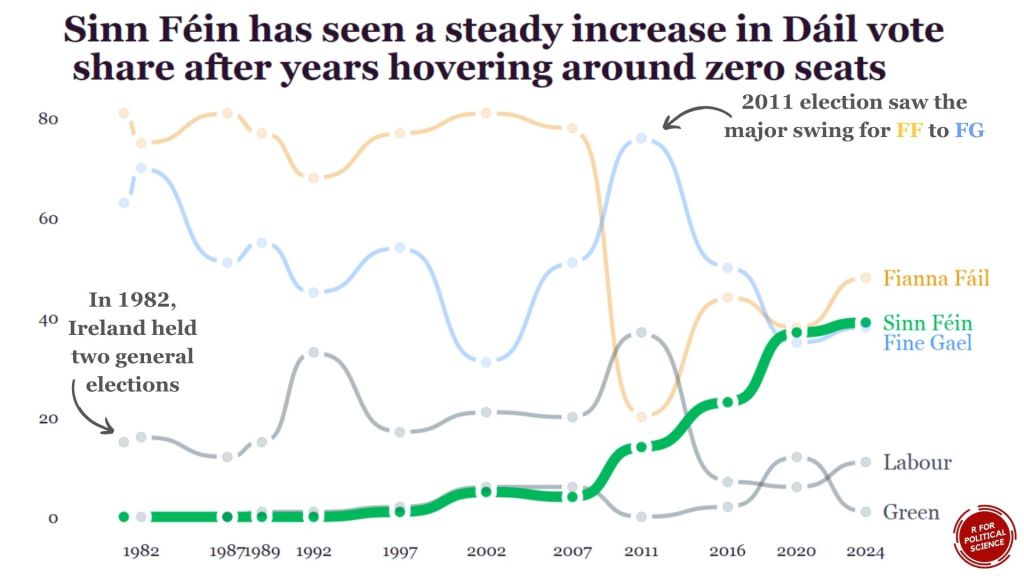
We can use this kind of graph to highlight a particular trend.

For example, the rise of Sinn Fein as a heavy-hitter in Irish politics.

We will need to go to many of the Wikipedia pages on the elections and scrape seat data for the top parties for each year.

Annoyingly, across the different election pages, the format is different so we have to just go by trial-and-error to find the right table for each election year and to find out what the table labels are for each given year.

Since going to many different pages ends up with repeating lots of code snippets, we can write a process_election_data() function to try cut down on replication.

process_election_data <- function(url, table_index, header_row, party_col, seats_col, top_parties, extra_mutate = NULL) {
  read_html(url) %>%
    html_table(header = TRUE, fill = TRUE) %>%
    `[[`(table_index) %>%
    row_to_names(row_number = header_row) %>%
    clean_names() %>%
    mutate(across(everything(), ~ str_replace(., "\\[.*$", ""))) %>%
    select(party = !!sym(party_col), seats = !!sym(seats_col)) %>%
    mutate(seats = parse_number(seats)) %>%
    filter(party %in% top_parties)
}

In this function, mutate(across(everything(), ~ str_replace(., "\\[.*$", ""))) removes all those annoying footnotes in square brackets from the Wiki table with regex code.

Annoyingly, the table for the 2024 election is labelled differently to the table with the 2016 results on le Wikipedia. So when we are scraping from each webpage, we will need to pop in a sliiiightly different string.

We can use the sym() and the !! to accomodate that.

When we type on !! (which the coder folks call bang-bang), this unquotes the string we feed in. We don’t want the function to treat our string as a string.

After this !! step, we can now add them as variables within the select() function.

We will only look at the biggest parties that have been on the scene since 1980s

top_parties <- c("Fianna Fáil", "Fine Gael", "Sinn Féin", "Labour Party", "Green Party")

Now, we feed in the unique features that are unique for scraping each web page:

dail_2024 <- process_election_data(
  url = "https://en.wikipedia.org/wiki/2024_Irish_general_election
  table_index = 11,
  header_row = 2,
  party_col = "party_2",
  seats_col = "elected2024",
  top_parties = top_parties)

dail_2020 <- process_election_data(
  url = "https://en.wikipedia.org/wiki/2020_Irish_general_election",
  table_index = 10,
  header_row = 2,
  party_col = "party_2",
  seats_col = "elected2020",
  top_parties = top_parties)

dail_2016 <- process_election_data(
  url = "https://en.wikipedia.org/wiki/2016_Irish_general_election",
  table_index = 10,
  header_row = 3,
  party_col = "party_2",
  seats_col = "elected2016_90",
  top_parties = top_parties)

dail_2011 <- process_election_data(
  url = "https://en.wikipedia.org/wiki/2011_Irish_general_election",
  table_index = 14,
  header_row = 2,
  party_col = "party_2",
  seats_col = "t_ds",
  top_parties = top_parties)

dail_2007 <- process_election_data(
  url = "https://en.wikipedia.org/wiki/2007_Irish_general_election",
  table_index = 8,
  header_row = 2,
  party_col = "party_2",
  seats_col = "seats",
  top_parties = top_parties)

dail_2002 <- process_election_data(
  url = "https://en.wikipedia.org/wiki/2002_Irish_general_election",
  table_index = 8,
  header_row = 2,
  party_col = "party_2",
  seats_col = "seats",
  top_parties = top_parties)

dail_1997 <- process_election_data(
  url = "https://en.wikipedia.org/wiki/1997_Irish_general_election",
  table_index = 9,
  header_row = 2,
  party_col = "party_2",
  seats_col = "seats",
  top_parties = top_parties)

dail_1992 <- process_election_data(
  url = "https://en.wikipedia.org/wiki/1992_Irish_general_election",
  table_index = 6,
  header_row = 2,
  party_col = "party_2",
  seats_col = "seats",
  top_parties = top_parties)

dail_1989 <- process_election_data(
  url = "https://en.wikipedia.org/wiki/1989_Irish_general_election",
  table_index = 5,
  header_row = 2,
  party_col = "party_2",
  seats_col = "seats",
  top_parties = top_parties)

dail_1987 <- process_election_data(
  url = "https://en.wikipedia.org/wiki/1987_Irish_general_election",
  table_index = 5,
  header_row = 2,
  party_col = "party_2",
  seats_col = "seats",
  top_parties = top_parties)

dail_1982_11 <- process_election_data(
  url = "https://en.wikipedia.org/wiki/November_1982_Irish_general_election",
  table_index = 5,
  header_row = 2,
  party_col = "party_2",
  seats_col = "seats",
  top_parties = top_parties)

dail_1982_2 <- process_election_data(
  url = "https://en.wikipedia.org/wiki/February_1982_Irish_general_election",
  table_index = 5,
  header_row = 2,
  party_col = "party_2",
  seats_col = "seats",
  top_parties = top_parties)

After we scraped every election, we can join them together

dail_years <- dail_2024 %>% 
  left_join(dail_2020, by = c("party")) %>% 
  left_join(dail_2016, by = c("party")) %>% 
  left_join(dail_2011, by = c("party")) %>% 
  left_join(dail_2007, by = c("party")) %>% 
  left_join(dail_2002, by = c("party")) %>%   
  left_join(dail_1997, by = c("party")) %>% 
  left_join(dail_1992, by = c("party")) %>% 
  left_join(dail_1989, by = c("party")) %>% 
  left_join(dail_1987, by = c("party")) %>% 
  left_join(dail_1982_11, by = c("party")) %>% 
  left_join(dail_1982_2, by = c("party"))

Or I can use a list and iterative left joins.

dail_list <- list(
  dail_2024,
  dail_2020,
  dail_2016,
  dail_2011,
  dail_2007,
  dail_2002,
  dail_1997,
  dail_1992,
  dail_1989,
  dail_1987,
  dail_1982_11,
  dail_1982_2)

dail_years <- reduce(dail_list, left_join, by = "party")

For the x axis ticks, we can quickly make a vector of all the election years we want to highlight on the graph.

election_years <- c(2024, 2020, 2016, 2011, 2007, 2002, 1997, 1992, 1989, 1987, 1982)

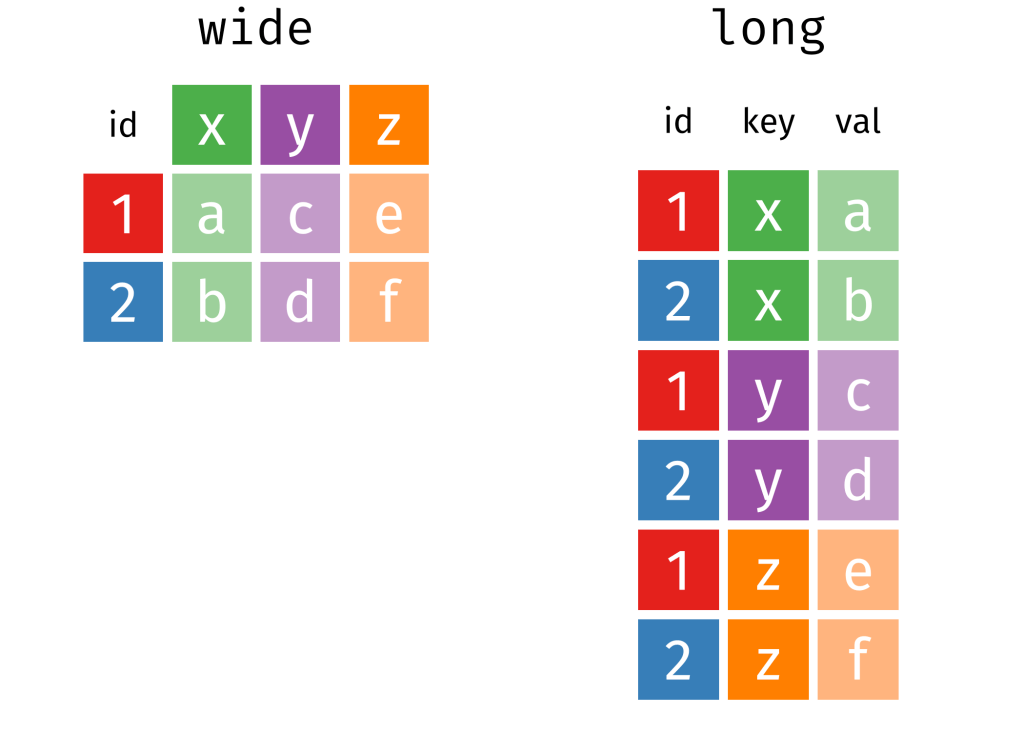
Next we pivot the data to long format:

dail_years %>% pivot_longer(
  cols = starts_with("seats_"),
  names_to = "year",
  names_prefix = "seats_",
  values_to = "seats") -> dail_longer

Then we can add specific hex colours for the main parties.

dail_longer %<>%
  mutate(color = ifelse(party == "Sinn Féin", "#2fb66a",
         ifelse(party == "Fine Gael","#6699ff",
         ifelse(party == "Fianna Fáil","#ee9f27","#495051"))))

Next, we can create a final_positions data.frame so that can put the names of the political parties at the end of the trend line instead of having a legend floating at top of the graph.

final_positions <_ dail_longer %>%
  group_by(party) %>%
  filter(year == max(year))  %>% 
  mutate(color = ifelse(party == "Sinn Féin", "#2fb66a",
         ifelse(party == "Fine Gael","#6699ff",
         ifelse(party == "Fianna Fáil","#ee9f27", "#495051")))

Click here to read more about the ggbump package

dail_longer %>% 
  ggplot(aes(x = year, y = seats, group = party)) +

  geom_bump(aes(color = color,
           alpha = ifelse(party == "Sinn Féin", 0.5, 0.2),
           linewidth = ifelse(party == "Sinn Féin", 0.8, 0.7)),
            smooth = 5) +

  geom_text(data = final_positions,
            aes(color = color,
            y = ifelse(party == "Fine Gael", seats - 3, seats),
            label = party,
            family = "Georgia"),
            x = x_position + 1.5,  
            hjust = 0, 
            size = 10) +

  geom_point(color = "white", 
             size = 6, 
             stroke = 3) +
  
  geom_point(aes(color = color,
             alpha = ifelse(party == "Sinn Féin", 0.5, 0.1)),
             size = 4) +

  scale_linewidth_continuous(range = c(2, 5)) +

  scale_alpha_continuous(range = c(0.2, 1)) +

  bbplot::bbc_style()  +

  theme(legend.position = "none",
        plot.title = element_text(size = 48)) +

  scale_color_identity() + 

  scale_x_continuous(limits = c(1980, 2030), breaks = election_years) +

  labs(title = "Sinn Féin has seen a steady increase in Dáil vote\n share after years hovering around zero seats")

How to improve graphs with themes and palettes: Top packages in R

In this blog, we can look at ways to make our plots and graphs more appealing to the eye.

  1. Adding Studio Ghibli palette and ggthemes themes
  2. Adding Dutch painter palettes and ggdark themes
  3. Adding LaCroix palettes and ggtech themes

Before we go about working on the aesthetics, let’s build and save a typical political science graph.

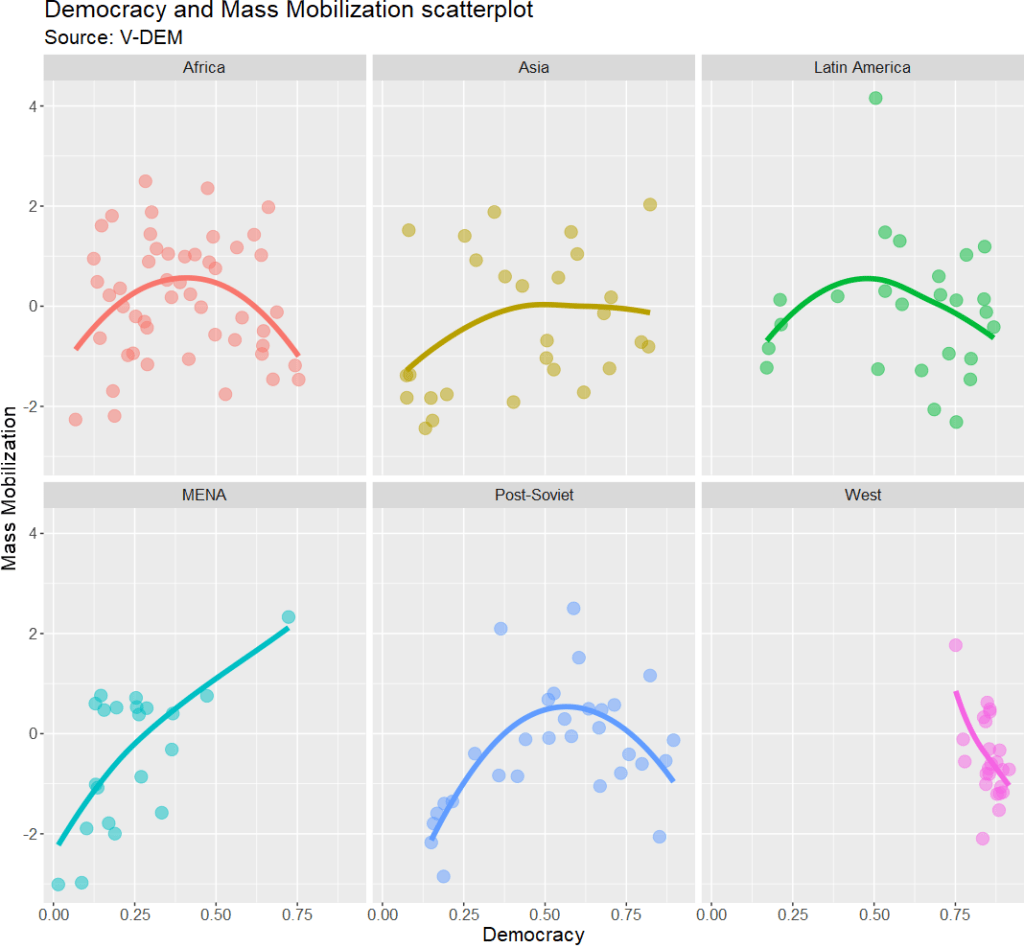
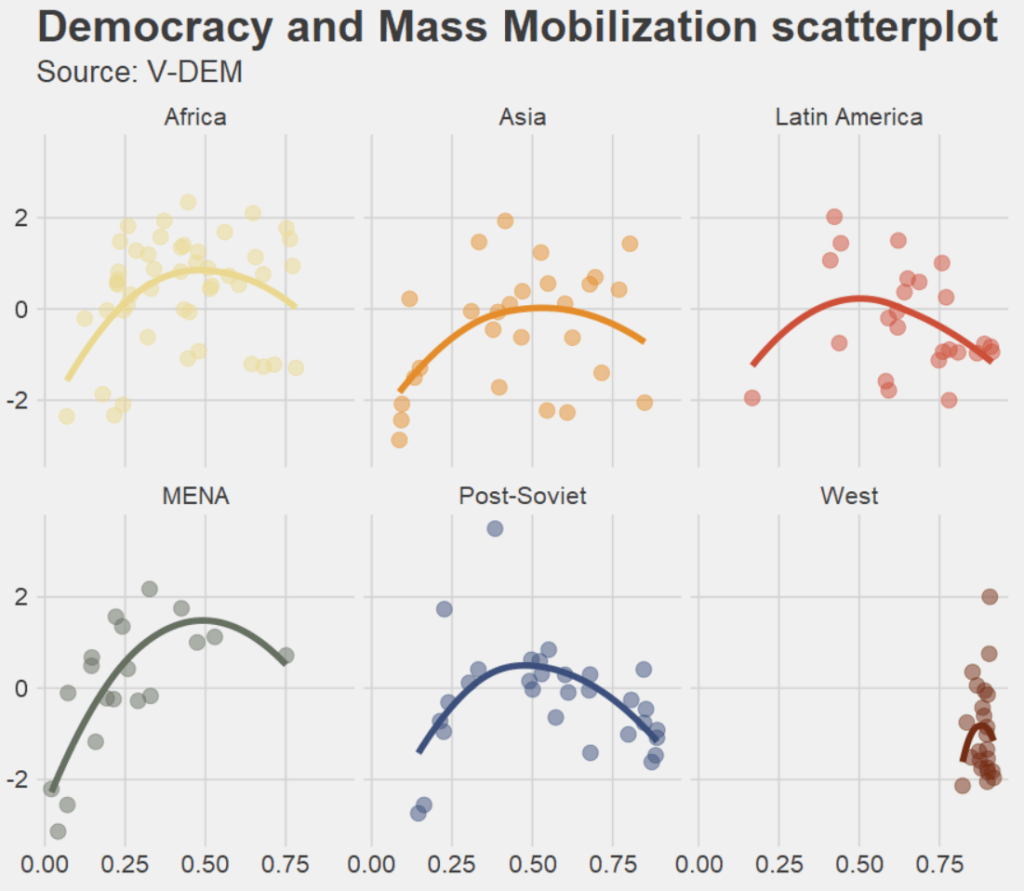
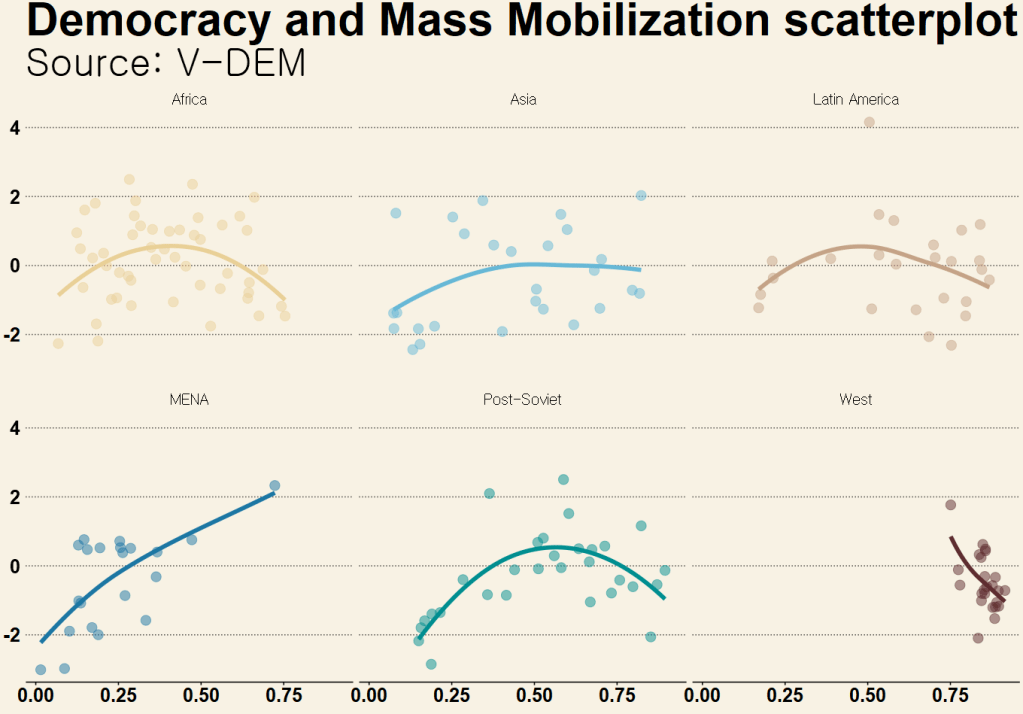
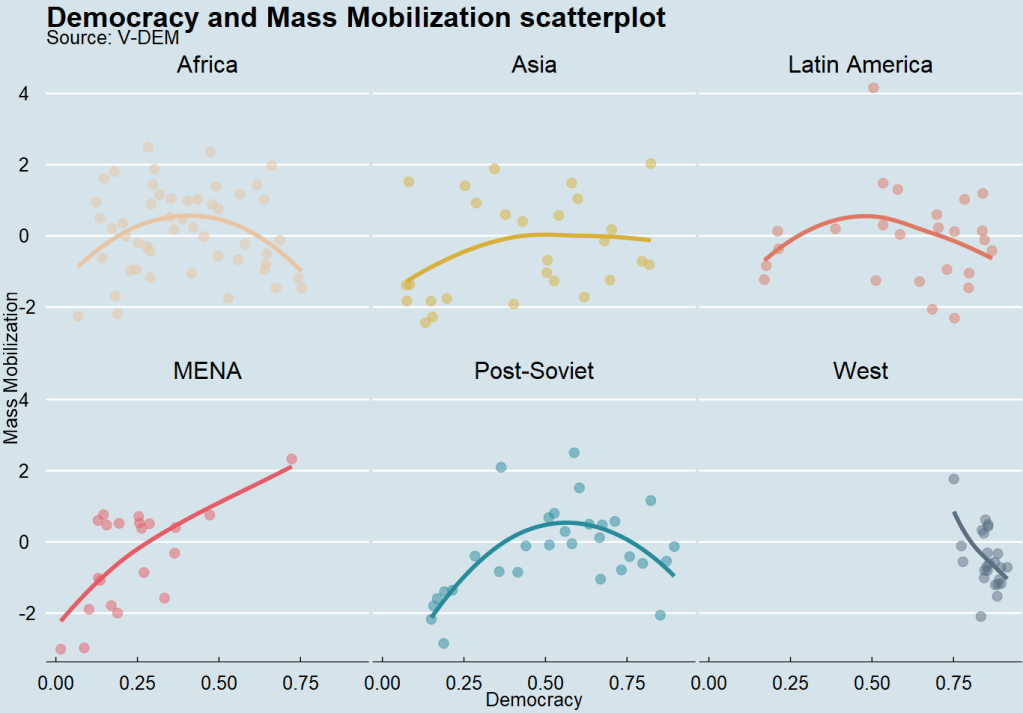
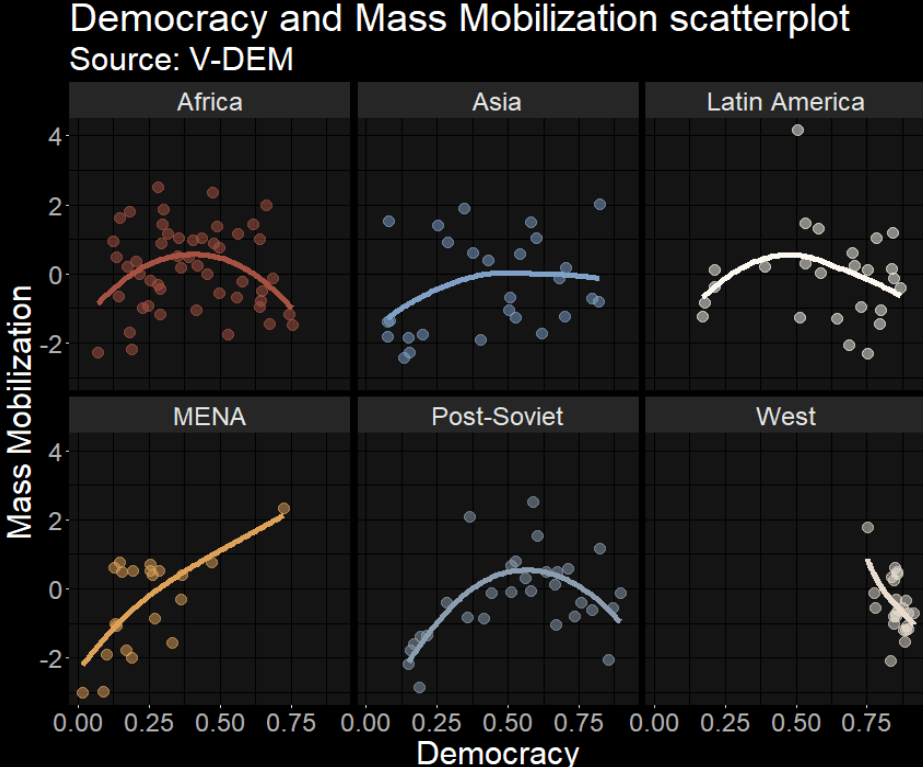
We will examine the inverted U shape between democracy and level of mass mobilization across six different regions.

The data will come from the V-DEM package.

Click here to read more about downloading and animating Varieties of Democracy (V-DEM) variables with the vdemdata package in R.

Packages we will be using to create our initial graph.

library(tidyverse)
library(magrittr) # for the %<>% pipe
library(devtools)
library(vdemdata)

So first, we make a basic plot with all the ggplot defaults:

vdem %>% 
  filter(year == 2010) %>% 
  ggplot(aes(x = v2x_polyarchy, 
             y = v2cademmob)) + 
  geom_point() +
  geom_smooth(method = "gam") +
  labs(title = "Democracy and Mass Mobilization scatterplot", 
       subtitle = "Source: V-DEM",
       x = "Democracy", 
       y = "Mass Mobilization") +
  facet_wrap(~e_regionpol_6C) 

Next, we can add some elements to add color and labels:

vdem %>% 
  mutate(
    e_regionpol_6C = case_when(
      e_regionpol_6C == 1 ~ "Post-Soviet",
      e_regionpol_6C == 2 ~ "Latin America",
      e_regionpol_6C == 3 ~ "MENA",
      e_regionpol_6C == 4 ~ "Africa",
      e_regionpol_6C == 5 ~ "West",
      e_regionpol_6C == 6 ~ "Asia",
      TRUE ~ NA)) %>% 
  filter(year == 2010) %>% 
  ggplot(aes(x = v2x_polyarchy, 
             y = v2cademmob)) +
  geom_smooth(aes(color = as.factor(e_regionpol_6C)), 
              method = "loess", 
              span = 2,
              se = FALSE,
              size = 2,
              alpha = 0.3) + 
  geom_point(aes(color = as.factor(e_regionpol_6C)),
                 size = 4, alpha = 0.5) +
  labs(title = "Democracy and Mass Mobilization scatterplot", 
       subtitle = "Source: V-DEM",
       x = "Democracy", 
       y = "Mass Mobilization") +
  facet_wrap(~e_regionpol_6C) + 
  theme(text = element_text(size = 20),
        legend.position = "none") + 
  guides(fill = guide_legend(keywidth = 3, keyheight = 3)) -> my_plot

Adding Studio Ghibli palette and ggthemes themes

remotes::install_github("ewenme/ghibli")
library(ghibli)

This package comes from ewenme’s github.

ghibli_palettes -> ghibli_palettes_list

This shows the 27 ghibli colour palettes available in the package! We can print off and browse through the colours to choose what to add to our plot:

To add the colours, we just need to add scale_colour_ghibli_d("MononokeMedium") to the plot object. I choose the pretty Mononoke Medium palette. The d at the end means we are using discrete data.

Additionally, I will add a plot theme from the ggthemes package.

devtools::install_github("jrnold/ggthemes")
library(ggthemes)

This package comes from Jeffrey Arnold’s github.

FiveThirtyEight is a polling website with buckets of graphics, such as:

Source: Google Images

To add this theme, we just need to add theme_fivethirtyeight()

my_plot +
  scale_colour_ghibli_d("MononokeMedium") + 
  ggthemes::theme_fivethirtyeight() + 
  theme(text = element_text(size = 25),
        legend.position = "none")

We can mix and match with different palettes and themes.

The following uses a template that resembles the Wall Street Journal graphs and MarnieMedium1 colours!

my_plot +
  scale_colour_ghibli_d("MarnieLight1") + 
  ggthemes::theme_wsj() + 
  theme(text = element_text(size = 25),
        legend.position = "none")

And another mix and match:

Studio Ghibli PonyoMedium palette with the graph style from the Economist magazine

my_plot +
  scale_colour_ghibli_d("PonyoMedium", direction = -1) + 
  ggthemes::theme_economist() +
  theme(text = element_text(size = 25),
        legend.position = "none")

For continous variables, we can use scale_fill_ghibli_c()

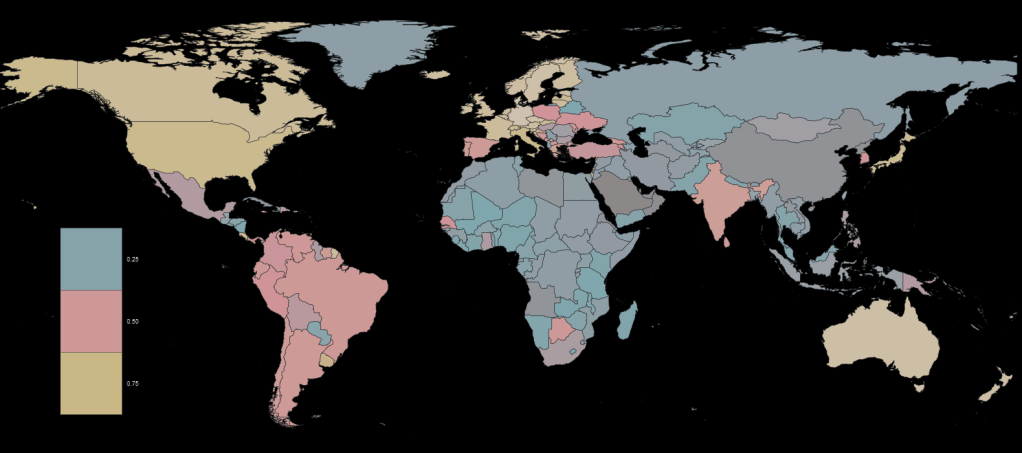
We can look at average democracy scores around the world for all countries between 1945 to 2023.

We need to download a map object from the rnaturalearth package and merge it with the V-DEM dataset.

Click here to learn more about making maps in R

my_map <- ne_countries(scale = "medium", returnclass = "sf")

my_map %<>% 
  mutate(COWcode = countrycode::countrycode(admin, "country.name", "cown"))

vdem_map <- left_join(vdem, my_map, by = c("COWcode"))

vdem_map %>% 
  filter(year %in% c(1945:2023)) %>% 
  filter(sovereignt != "Antarctica") %>% 
  group_by(admin, geometry) %>% 
  summarise(avg_polyarchy = mean(v2x_polyarchy, na.rm = TRUE)) %>% 
  ungroup() %>% 
  ggplot() +
  geom_sf(aes(geometry = geometry, fill = avg_polyarchy),  
          position = "identity", color = "#212529", linewidth = 0.2, alpha = 0.85) +
  ghibli::scale_fill_ghibli_c("PonyoLight") + 
  ggdark::dark_theme_void() +
  theme(legend.title = element_blank(),
        legend.position = "left") + 
  guides(fill = guide_legend(keywidth = 5, keyheight = 5)) 

Adding Dutch painter palettes and ggdark themes

The next palette we will look at comes from Edward Theon and takes the colors from Dutch master painters such as Vermeer and Rembrandt.

devtools::install_github("EdwinTh/dutchmasters")
library(dutchmasters)
Source: Google search

The themes for these plots come from Neal Grantham. They offer dark or black backgrounds; I always think this makes plots and charts look more professional, I don’t know why.

devtools::install_github("nsgrantham/ggdark")
library(ggdark)

So adding this palette and theme, we get:

my_plot + 
  dark_theme_gray() +
  scale_color_dutchmasters(palette = "pearl_earring") +
  theme(text = element_text(size = 25),
        legend.position = "none")

Adding LaCroix palettes and ggtech themes

Next we will look at LaCroixColoRpalettes. I’ll be honest, I have never lived in a country that sells this drink in the store so I’ve never tried it. But it looks pretty.

devtools::install_github("johannesbjork/LaCroixColoR")

LaCroixColoR::lacroix_palettes -> lacroix_palettes_list

This package comes from the brain of Johannes Bjork

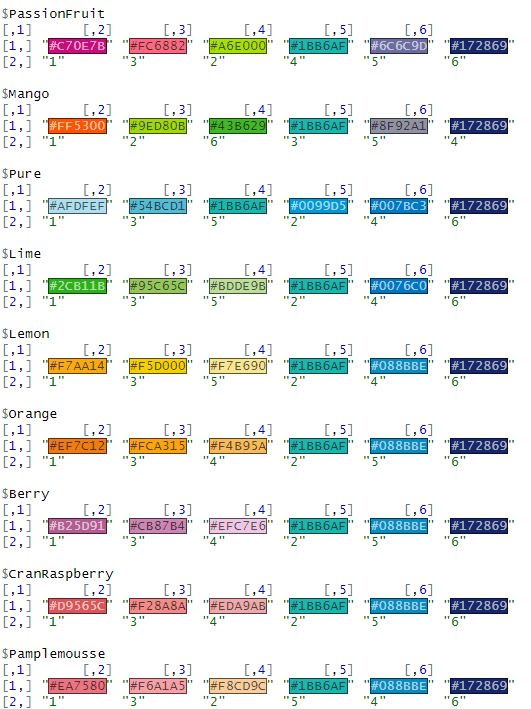
This list contains 21 palettes to choose from such as the following:

For the next few graphs, we will also look at the ggtech package.

They do random tech companies such as Google, AirBnB, Facebook and Etsy.

devtools::install_github("ricardo-bion/ggtech")

If we want to change the font, I have always found it tricky like Run DMC, no matter HOW MANY TIMES I do it.

library(extrafont)
Registering fonts with R

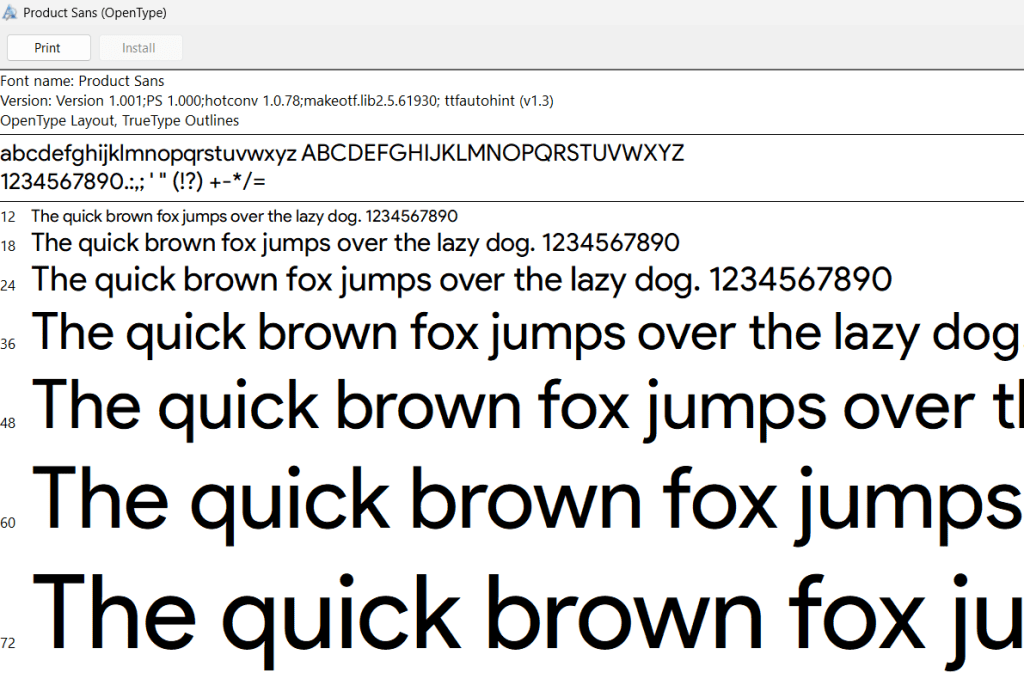
For Google fonts, click the following link:
http://social-fonts.com/assets/fonts/product-sans/product-sans.ttf

And install the font onto your computer.

font_import(pattern = 'product-sans.ttf', prompt = FALSE)

loadfonts(device = "win")

Now, we can make the plot:

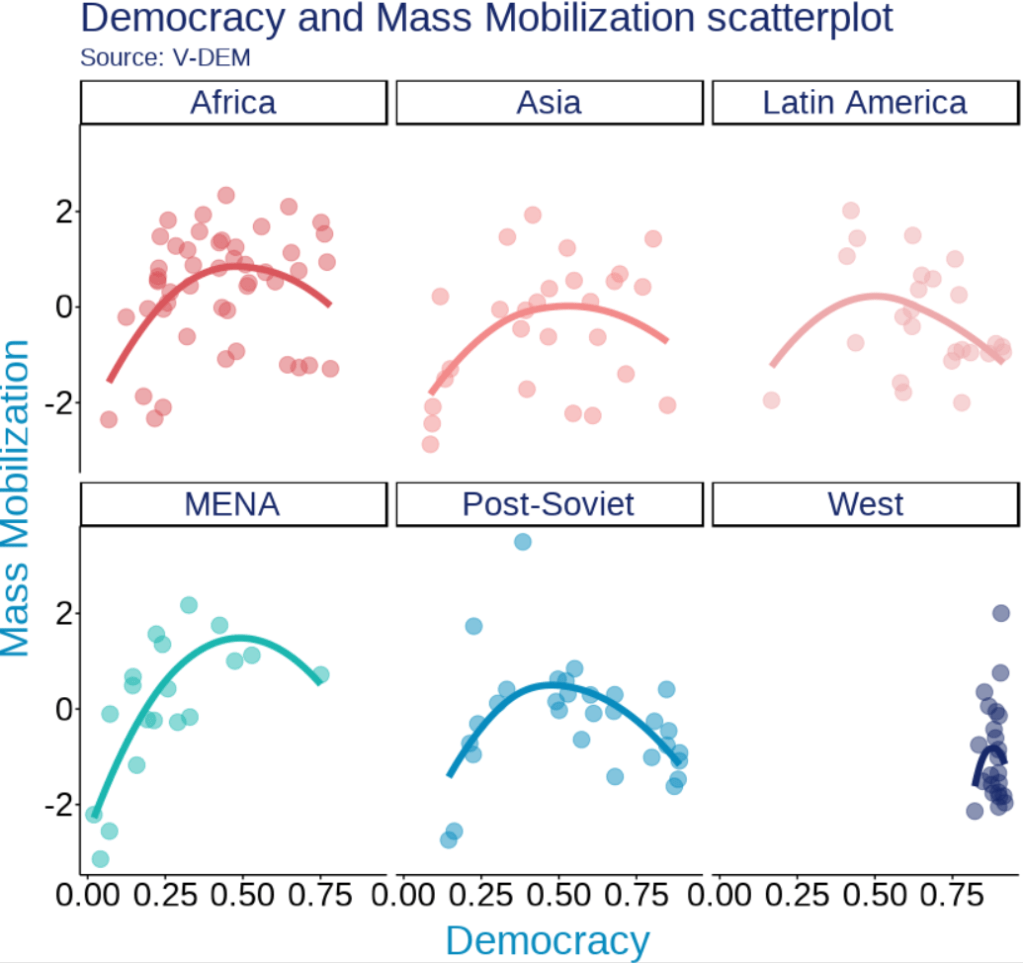
my_plot +
  scale_color_manual(values = LaCroixColoR::lacroix_palette("CranRaspberry")) +
  ggtech::theme_tech(theme = "google") +
  theme(text = element_text(size = 25, 
                            family = "Product Sans"),
        legend.position = "none",
        plot.title = element_text(color="#172869"),
        plot.subtitle = element_text(color="#172869"),
        axis.title.x = element_text(color="#088BBE"),
        axis.title.y = element_text(color="#088BBE"),
        strip.text = element_text(color="#172869"))
       

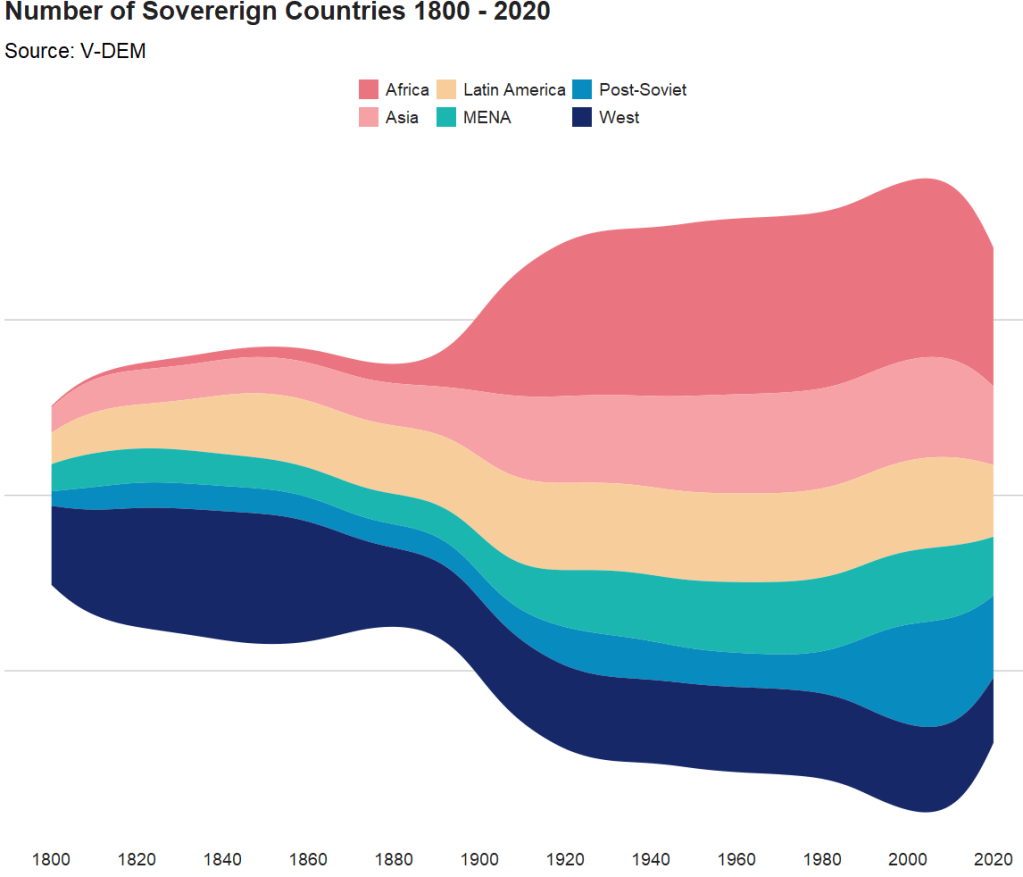
And finally, two of my favorite packages, bbplot and wesanderson for making pretty plots.

Click here to read more about the bbplot package and here to read more about the ggstream package

vdem %>% 
  filter(year %in% c(1800:2020)) %>% 
  group_by(year, e_regionpol_6C) %>% 
  count() -> country_count

country_count %>% 
  mutate(e_regionpol_6C = case_when(
    e_regionpol_6C == 1 ~ "Post-Soviet",
    e_regionpol_6C == 2 ~ "Latin America",
    e_regionpol_6C == 3 ~ "MENA",
    e_regionpol_6C == 4 ~ "Africa",
    e_regionpol_6C == 5 ~ "West",
    e_regionpol_6C == 6 ~ "Asia",
    TRUE ~ NA)) %>% 
  ggplot(aes(x = year, y = n, fill = as.factor(e_regionpol_6C))) +
  ggstream::geom_stream() +
  bbplot::bbc_style() + 
  scale_fill_manual(values = LaCroixColoR::lacroix_palette("Pamplemousse")) +
  scale_x_continuous(breaks = seq(min(country_count$year, na.rm = TRUE), 
                                  max(country_count$year, na.rm = TRUE), 
                                  by = 20)) +
  theme(legend.title = element_blank(),
        axis.text.y = element_blank()) +
  labs(title = "Number of Sovererign Countries 1800 - 2020", 
       subtitle = "Source: V-DEM")

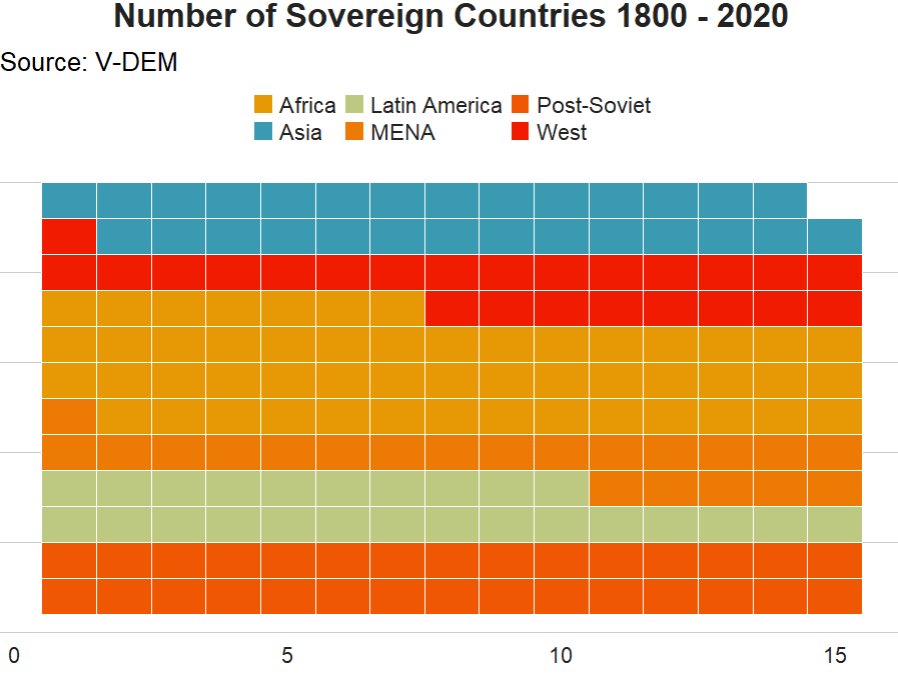
Click here to read more about the wesanderson package and click here to read more about the waffle package in R

country_count %>% 
  ggplot(aes(fill = e_regionpol_6C, values = n)) + 
  waffle::geom_waffle(n_rows = 15, size = 0.5, colour = "white",
                      flip = TRUE, make_proportional = FALSE) + 
  bbplot::bbc_style() +
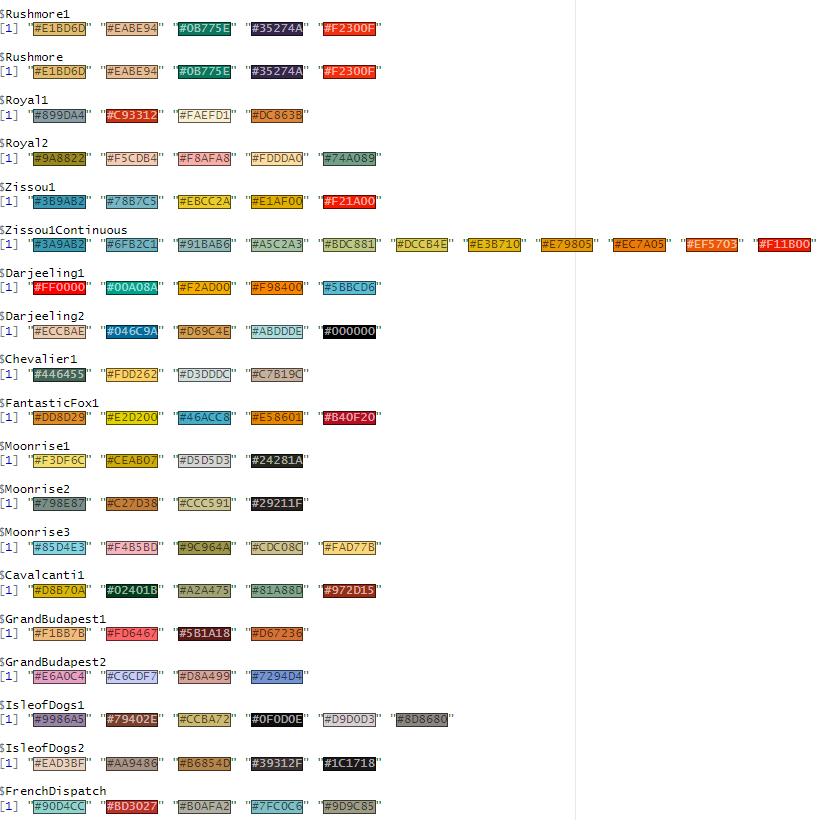
  scale_fill_manual(values = sample(wesanderson::wes_palette("Zissou1Continuous"))) +
  theme(legend.title = element_blank(),
        axis.text.y = element_blank(),
        plot.title = element_text(hjust = 0.5)) +
  labs(title = "Number of Sovereign Countries 1800 - 2020", 
       subtitle = "Source: V-DEM")

A sample of the 24 wesanderson package options

How to download and animate the Varieties of Democracy (V-DEM) dataset in R

In this blog post, we will download the V-DEM datasets with their vdemdata package. It is still in development, so we will use the install_github() function from the devtools package

devtools::install_github("vdeminstitute/vdemdata")

library(vdemdata)

And really quickly we can download the dataset with one line of code

vdemdata::vdem -> vdem

We can use the find_var function to get information on variables based on keywords.

For example, we can look up variables that are concerned with protest mobilization.

vdemdata::find_var("mobilization") -> mob
 mob %>% names
 [1] "question_id"              "question_number"          "metasection"             
 [4] "name"                     "vartype"                  "cb_section"              
 [7] "tag"                      "projectmanager"           "question"                
[10] "clarification"            "responses"                "ordering"                
[13] "scale"                    "answertype"               "sources"                 
[16] "notes"                    "datarelease"              "citation"                
[19] "coverage"                 "subsetof"                 "crosscoder_aggregation"  
[22] "aggregation"              "ccp_tag"                  "clean_tag"               
[25] "survey_id"                "vignettes_used"           "old_tag"                 
[28] "compiler"                 "clarification_historical" "codebook_id"             
[31] "conthistmerge"            "histmerged"               "years"                   
[34] "hist_outside_coding"      "additional_versions"      "cleaning"                
[37] "date_specific"            "available_versions"       "cont_outside_coding"     
[40] "overlap_use_hist"         "is_party"                 "cb_section_type"         
[43] "defaultdate"              "convergence"              "cy_aggregation"          
[46] "no_update" 

Or download the entire codebook:

vdemdata::codebook -> vdem_codebook

And we can look at information for a specific variable

vdemdata::var_info("e_regionpol_6C") -> region_info 
region_info$responses
1: Eastern Europe and Central Asia (including Mongolia and German Democratic Republic)
2: Latin America and the Caribbean
3: The Middle East and North Africa (including Israel and Türkiye, excluding Cyprus)
4: Sub-Saharan Africa
5: Western Europe and North America (including Cyprus, Australia and New Zealand, but excluding German Democratic Republic)
6: Asia and Pacific (excluding Australia and New Zealand; see 5)"

For our analysis, we can focus on the years 1900 to 2022.

vdem %<>% 
  filter(year %in% c(1900:2022))

And we will create a ggplot() object that also uses the Five Thirty Eight theme from the ggthemes package.

Click here to read more about the ggthemes options.

Source: https://yutannihilation.github.io/allYourFigureAreBelongToUs/ggthemes/

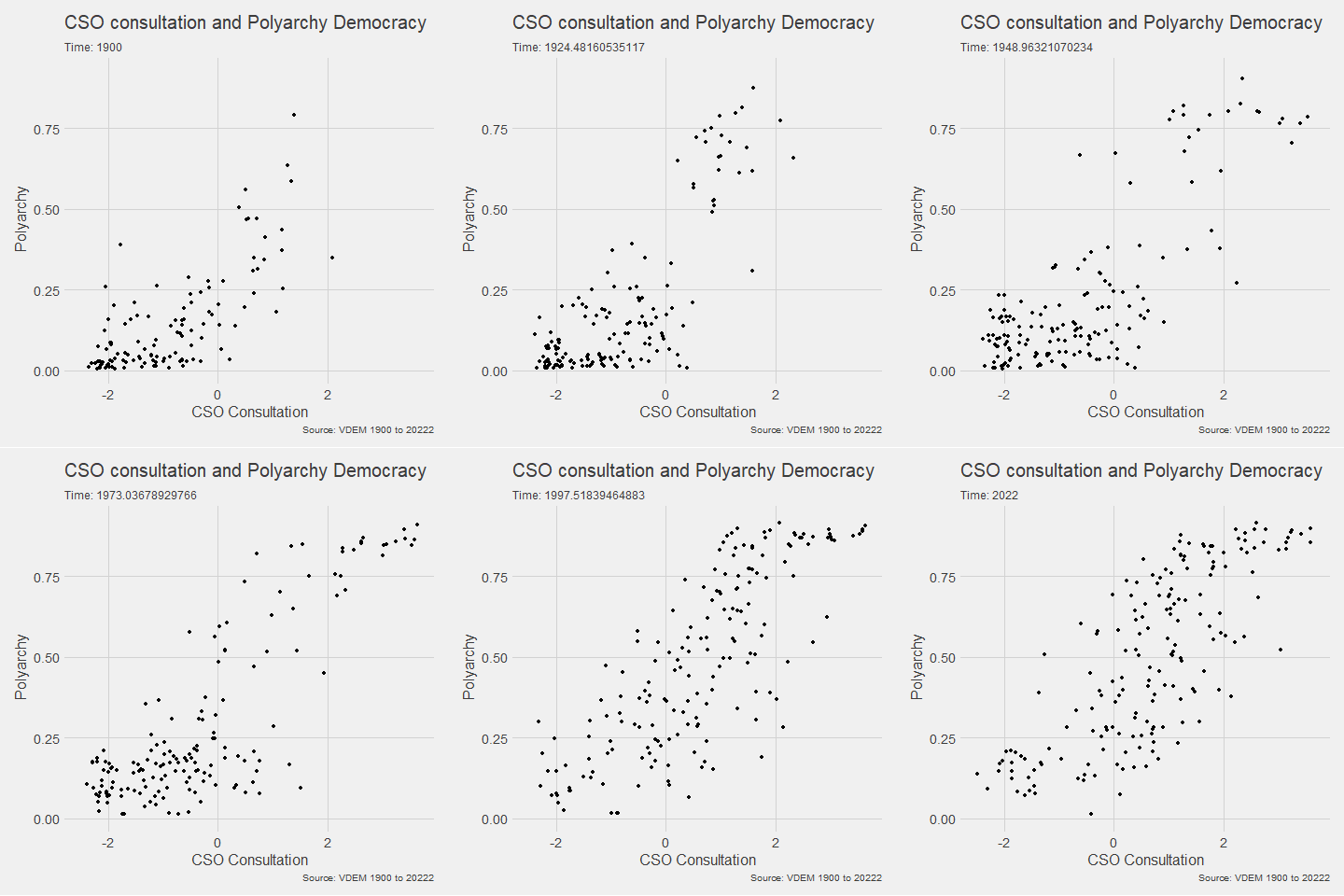
In the V-DEM package, we will look at a scatterplot of CSO consultation (v2cscnsult) and democracy score (v2x_polyarchy).

  • v2cscnsult asks are major civil society organizations (CSOs) routinely consulted by policymakers on policies relevant to their members?
  • v2x_polyarchy examines to what extent is the ideal of electoral democracy in its fullest sense achieved?

First, find below the packages we will need to install and load

install.packages("gganimate")
install.packages("transformr")  # sometimes needed as a dependency

library(gganimate)

And we plot our graph:

my_graph <- ggplot(vdem, aes(x = v2cscnsult, 
                      y = v2x_polyarchy, 
                      group = year)) +
  geom_point()  +
  ggthemes::theme_fivethirtyeight() +
  theme(text = element_text(size = 12),  # Default text size for all text elements
        plot.title = element_text(size = 20, face="bold"),  
        axis.title = element_text(size = 16), 
        axis.text = element_text(size = 14), 
        legend.title = element_text(size = 14),  
        legend.text = element_text(size = 12))  

In the themes argument, we can change the size of the text for the various parts of the ggplot (legends, axes etc.)

To make the ggplot object animated, we use the transition_time(year) function from the gganimate package.

Also we can add a subtitle the displays the year and time frame in the graph.

animated_graph <- my_graph +
  transition_time(year) +
  labs(title = "CSO consultation and Polyarchy Democracy",
       subtitle = "Time: {frame_time}",
       caption = "Source: VDEM 1900 to 2022",
       x = "CSO Consultation",
       y = "Polyarchy")

And we can change how we render the graph with the animate() function.

We choose duration = 15 so that the gif lasts 15 seconds

We set frames per second to 20 fps (the higher the number, the smoother the gif changes, but the longer it takes to load)

And finally we can choose a special renderer that makes the gif more smooth too.

Finally we can save the gif to our computer (so I can upload it here on this blog)

animate(animated_plot, duration = 15, fps = 20, renderer = gifski_renderer()) -> CSO_poly_gif

anim_save("animated_plot.gif", animation = CSO_poly_gif)

We can make a few changes so that it is divided by region and adds colors:

Notice the change to subtitle = "Year: {as.integer(frame_time)}" so it only uses the year, not the year and frame rate.

ggplot(vdem, aes(x = v2cscnsult, 
                      y = v2x_polyarchy, 
                      group = year,
                 size = e_pop, 
                 colour = as.factor(e_regionpol_6C))) +
  geom_point(alpha = 0.7, show.legend = FALSE) +
  ggthemes::theme_fivethirtyeight() +
  theme(text = element_text(size = 12),  
        plot.title = element_text(size = 20, face="bold"), 
        axis.title = element_text(size = 16),  
        axis.text = element_text(size = 14),  
        legend.title = element_text(size = 14),  
        legend.text = element_text(size = 12)) +
  facet_wrap(~e_regionpol_6C) +
  transition_time(year) +
  labs(title = "CSO consultation and Polyarchy Democracy",
       subtitle = "Year: {as.integer(frame_time)}",
       caption = "Source: VDEM 1900 to 2022",
       x = "CSO Consultation",
       y = "Polyarchy")  

Next, we can animate a map

library(sf)
library(rnaturalearth)

First we download a world object with the longitude and latitude data we need.

Click here to read more about the rnaturalearth package

my_map <- ne_countries(scale = "medium", returnclass = "sf")

And we merge the two data.frames together

my_map %<>% 
  mutate(COWcode = countrycode::countrycode(sovereignt, "country.name", "cown"))

vdem_map <- left_join(vdem, my_map, by = c("COWcode"))

Set up some colors for the map

colors <- c("#001427", "#708d81", "#f4d58d", "#bf0603", "#8d0801")

Next we draw the map:

vdem_map %>% 
  filter(year %in% c(1945:2023)) %>% 
  filter(sovereignt != "Antarctica") %>% 
  group_by(country_name, geometry) %>% 
  summarise(avg_polyarchy = mean(v2x_polyarchy, na.rm = TRUE)) %>% 
  ungroup() %>% 
  ggplot() +
  geom_sf(aes(geometry = geometry, fill = avg_polyarchy),  
          position = "identity", color = "#212529", linewidth = 0.2, alpha = 0.85) +
  geom_tile(data = data.frame(value = seq(0, 1, length.out = length(colors))), 
            aes(x = 1, y = value, fill = value), 
            show.legend = FALSE) +
  scale_fill_gradientn(colors = colors, 
                       breaks = scales::pretty_breaks(n = length(colors)),
                       labels = scales::number_format(accuracy = 1)) +
  theme_minimal()

When I made the first attempt to animate the polyarchy democracy data on the map, it was a bit of an affront to the senses:

So attempt number two involved a bit more wrangling!

vdem_map %>% 
  filter(year %in% c(1945:2023)) %>% 
  filter(sovereignt != "Antarctica") %>% 
  ggplot() +
  geom_sf(aes(geometry = geometry, fill = v2x_polyarchy, group = year),  
          position = "identity", color = "#212529", linewidth = 0.2, alpha = 0.85) +
  theme_minimal() +
  scale_fill_gradientn(colors = colors,
                       breaks = scales::pretty_breaks(n = length(colors)),
                       labels = scales::number_format(accuracy = 3)) +
  transition_time(year) + 
  labs(title = "Polyarchy Democracy annual global changes",
       subtitle = "Year: {as.integer(frame_time)}",
       caption = "Source: VDEM 1900 to 2023",
       x = " ",
       y = " ",
       fill = "Democracy Score")  -> my_plot

animate(my_plot, duration = 40, fps = 40,
        renderer = gifski_renderer()) -> map_gif

anim_save("animated_plot_3.gif", animation = map_gif)

Tips and code snippets to improve ggplot graphs and plots in R

Some code snippets to improve graph appearance and readability!

Compare the first basic graph with the second more informative graph.

Happy Birthday Reaction GIF - Find & Share on GIPHY
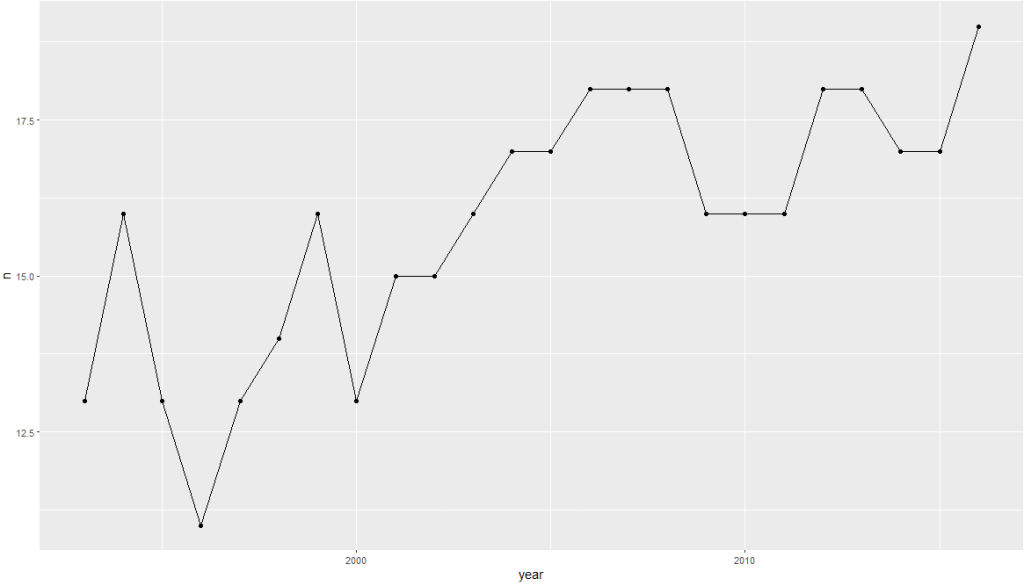
pko %>% 
  group_by(year) %>% 
  count() -> ya

ya %>% 
  ggplot(aes(x = year,
             y = n)) +
  geom_point() + geom_line()

Dealing with the z and y axes can be a pain.

yo %>% 
  ggplot(aes(x = year, y = n)) + 
  geom_point() + 
  geom_line() +
  scale_x_continuous(breaks = seq(min(yo$year, na.rm = TRUE), 
                                  max(yo$year, na.rm = TRUE), 
                                  by = 1)) + 
  scale_y_continuous(limits = c(0, max(yo$n, na.rm = TRUE)),
                     breaks = function(limits) seq(floor(limits[1]), ceiling(limits[2]), by = 1)
  )

In this code:

The breaks argument of scale_y_continuous() is set using a custom function that takes limits as input (which represents the range of the y-axis determined by ggplot2 based on your data).

seq() generates a sequence from the floor (rounded down) of the minimum limit to the ceiling (rounded up) of the maximum limit, with a step size of 1.

This ensures that the sequence includes only whole integers.

Using floor() for the start of the sequence ensures you start at a whole number not greater than the smallest data point, and ceiling() for the end of the sequence ensures you end at a whole number not less than the largest data point.

This approach allows the y-axis to dynamically adapt to your data’s range while ensuring that only whole integers are used as ticks, suitable for counts or other integer-valued data.

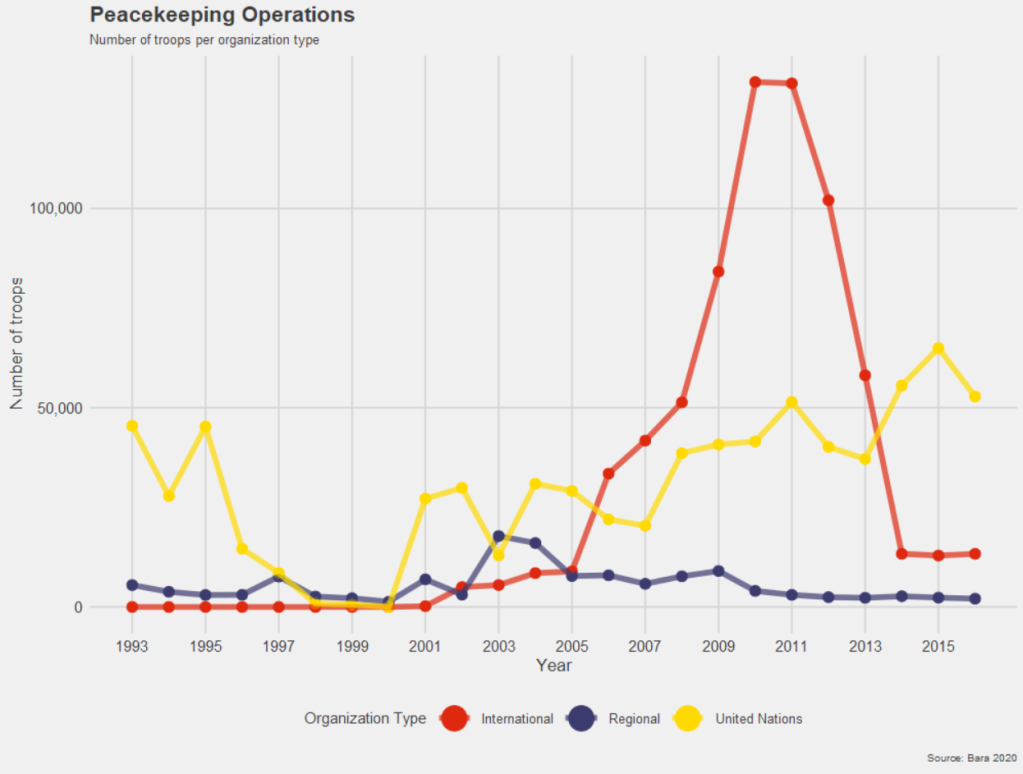
pko %>% 
  pivot_longer(!c(cown, year),
               names_to = "organization",
               values_to = "troops") %>% 
  group_by(year, organization) %>% 
  summarise(sum_troops = sum(troops, na.rm = TRUE)) %>% 
  ungroup() -> yo


pal <- c("totals_intl" = "#DE2910",
         "totals_reg" = "#3C3B6E", 
         "totals_un" = "#FFD900")

yo %>% 
  ggplot(aes(x = year, y = sum_troops,
             group = organization,
             color = organization)) + 
  geom_point(size = 3) +
  geom_line(size = 2, alpha = 0.7)  + 
  scale_y_continuous(labels = scales::label_comma()) + 
  # scale_y_continuous(limits = c(0, max(yo$n, na.rm = TRUE))) +
  scale_x_continuous(breaks = seq(min(yo$year, na.rm = TRUE), 
                                  max(yo$year, na.rm = TRUE), 
                                  by = 2)) +
  ggthemes::theme_fivethirtyeight() +
  scale_color_manual(values =  pal,
                     name = "Organization Type",  
                     labels = c("International",
                                "Regional",
                                "United Nations")) +
  labs(title = "Peacekeeping Operations",
       subtitle = "Number of troops per organization type",
       caption = "Source: Bara 2020",
       x = "Year",
       y = "Number of troops") +
  
  guides(color = guide_legend(override.aes = list(size = 8))) + 
  theme(text = element_text(size = 12),  # Default text size for all text elements
        plot.title = element_text(size = 20, face="bold"),  # Plot title
        axis.title = element_text(size = 16),  # Axis titles (both x and y)
        axis.text = element_text(size = 14),  # Axis text (both x and y)
        legend.title = element_text(size = 14),  # Legend title
        legend.text = element_text(size = 12))  # Legend items

Cairo::CairoWin()    
Happy Season 5 GIF by The Office - Find & Share on GIPHY

Next, we will look at changing colors in our maps.

We have a map and we want to make the colors pop more.

Click here to read about downloading the V-DEM and map data:

   geom_tile(data = data.frame(value = seq(0, 1, length.out = length(colors))), 
             aes(x = 1, y = value, fill = value), 
             show.legend = FALSE) +
   scale_fill_gradientn(colors = colors, 
                        breaks = scales::pretty_breaks(n = length(colors)),
                        labels = scales::number_format(accuracy = 1)) +

Creation of data for geom_tile():

data = data.frame(value = seq(0, 1, length.out = length(colors))) 

This line creates a data.frame with a single column named value. The column contains a sequence of values from 0 to 1. The length.out parameter is set to the length of the colors vector, meaning the sequence will be of the same length as the number of colors you have defined. This ensures that the gradient will have the same number of distinct colors as are in your colors vector.

geom_tile()

geom_tile(aes(x = 1, y = value, fill = value), show.legend = FALSE)

geom_tile() is used here to create a series of rectangles (tiles). Each tile will have its y position set to the corresponding value from the sequence created earlier. The x position is fixed at 1, so all tiles will be in a straight line. The fill aesthetic is mapped to the value, so each tile’s fill color will be determined by its y value. The show.legend = FALSE parameter hides the legend for this layer, which is typically used when you want to create a custom legend.

scale_fill_gradientn()

scale_fill_gradientn(colors = colors, breaks = scales::pretty_breaks(n = length(colors)), labels = scales::number_format(accuracy = 1)) 

scale_fill_gradientn() creates a color scale for the fill aesthetic based on the colors vector that we supplied.

The breaks argument is set with scales::pretty_breaks(n = length(colors)), which calculates ‘pretty’ breaks for the scale, basically nice round numbers within the range of your data, and it is set to create as many breaks as there are colors.

The labels argument is set with scales::number_format(accuracy = 2), which specifies how the labels on the legend should be formatted. The accuracy = 2 parameter means that the labels will be formatted to one decimal place

How to rowwise sum the variables that contain the same variable string pattern in R

This is another blog post so that I can keep a snippet of code for myself! And if you find it helpful too, all the better.

Archie Madekwe Wow GIF by Saltburn - Find & Share on GIPHY

We will be completing rowwise computations, which is not the default in R. Therefore, we need to explicitly state that is what we are hoping to do

Source: https://cmdlinetips.com/2021/06/row-wise-operations-in-r/

In this instance, we will be using c_across() to specify we want to sum across particular columns.

Specifically… all columns that contain a string pattern of “totals_”

df <- df %>% 
  rowwise() %>%
  mutate(totals_sum = sum(c_across(contains("totals_")), na.rm = TRUE)) %>%
  ungroup()  

rowwise(): This function is used to indicate that operations following it should be applied row by row instead of column by column (which is the default behavior in dplyr).

mutate(totals_sum = sum(c_across(contains("totals_")), na.rm = TRUE)):

Within the mutate() function, sum(c_across(contains("totals_"))) computes the sum of all columns for each row that contain the pattern “totals_”.

The na.rm = TRUE argument is used to ignore NA values in the sum. c_across() is used to select columns within rowwise() context.

ungroup(): This function is used to remove the rowwise grouping imposed by rowwise(), returning the dataframe to a standard tbl_df.

Usually I forget to ungroup. Oops. But this is important for performance reasons and because most dplyr functions expect data not to be in a rowwise format.

Oh Yeah Hot Ones GIF by First We Feast - Find & Share on GIPHY

Create a rowwise binary variable

data <- data %>%
  rowwise() %>%
  mutate(has_ruler = as.integer(any(c_across(starts_with("broad_cat_")) == "ruler"))) %>%
  ungroup()

How to run multiple t-tests in a function with the broom package in R

Packages we will need:

library(tidyverse)
library(broom)

We will use the Varieties of Democracy dataset again.

Excited Will Ferrell GIF - Find & Share on GIPHY

We will use a t-test comparing democracies (boix == 1) and non-democracies (boix == 0) in the years 2000 to 2020.

We need to remove the instances where boix is NA.

I choose three t-tests to run simultaneously. Comparing democracies and non-democracies on:

  1. the extent to which the country consults religious groups (relig_consult)
  2. the extent to which the country consults Civil Society Organization (CSO) groups (cso_consult)
  3. level of freedom from judicial corruption (judic_corruption) – higher scores mean that there are FEWER instances of judicial corruption
vdem %>% 
filter(year %in% c(2000:2020)) %>%
filter(!is.na(e_boix_regime)) %>%
group_by(e_boix_regime) %>%
select(relig_consult = v2csrlgcon,
cso_consult = v2cscnsult,
judic_corruption = v2jucorrdc) -> vdem

Next we need to pivot the data from wide to long

  vdem %<>% pivot_longer(!e_boix_regime, 
names_to = "variable",
values_to = "value")

Now we get to iterating over the three variables and conducting a t-test on each variable across democracies versus non-democracies

Excited Elf GIF - Find & Share on GIPHY
vdem %>%
group_by(variable) %>%
nest() %>%
mutate(t_test = map(data, ~t.test(value ~ e_boix_regime, data = .x)),
tidy = map(t_test, broom::tidy)) %>%
select(variable, tidy) %>%
unnest(tidy) -> ttest_results

If we look closely at the line

mutate(t_test = map(data, ~t.test(value ~ e_boix_regime, data = .x))):

Here, mutate() adds a new column named t_test to the grouped and nested data.

map() is used to apply a function to each element of the list-column (here, each nested data frame).

The function applied is t.test(value ~ e_boix_regime, data = .x).

This function performs a t-test comparing the means of value across two groups defined by e_boix_regime within each nested data frame.

.x represents each nested data frame in turn.

And here are the tidy results:

If we save the above results in a data.frame, we can graph the following:

ttest_results %>%
ggplot(aes(x = variable, y = estimate, ymin = conf.low, ymax = conf.high)) +
geom_point() +
geom_errorbar(width = 0.2) +
coord_flip() +
labs(title = "T-Test Estimates with Confidence Intervals",
x = "Variable",
y = "Estimate Difference") +
theme_minimal()

Add some colors to highlight magnitude of difference

  ggplot(aes(x = variable, y = estimate, ymin = conf.low, ymax = conf.high, color = color_value)) +
geom_point() +
geom_errorbar(width = 0.7, size = 3) +
scale_color_gradientn(colors = c("#0571b0", "#92c5de", "#f7f7f7", "#f4a582", "#ca0020")) +
coord_flip() +
labs(title = "T-Test Estimates with Confidence Intervals",
x = "Variable",
y = "Estimate Difference") +
theme_minimal() +
guides(color = guide_colorbar(title = ""))

Sometimes vdem variables are reverse scored or on different scales

  # mutate(across(judic_corruption, ~ 1- .x)) %>% 
# mutate(across(everything(), ~(.x - mean(.x, na.rm = TRUE)) / sd(.x, na.rm = TRUE), .names = "z_{.col}")) %>%
# select(contains("z_"))

How to run cross-validation of decision-tree models with xgboost in R (PART 4 Tidymodels series)

In this blog post, we will cross-validate different boosted tree models and find the one with best root mean square error (RMSE).

Specifically, part 2 goes into more detail about RMSE as a way to choose the best model

Click here to read part 1, part 2 or part 3 of this series on tidymodel package stuff.

Packages we will need:

library(tidymodels)
library(tidyverse)

Our resampling method will be 10-fold cross-validation.

Click here to watch a Youtube explainer by StatQuest on the fundamentals of cross validation. StatQuest is the cat’s pyjamas.

We can use the vfold_cv() function to create a set of “V-fold” cross-validation with 11 splits.

My favorite number is 11 so I’ll set that as the seed too.

set.seed(11) 
cross_folds <- vfold_cv(vdem_1990_2019, v = 11)

We put our formula into the recipe function and run the pre-processing steps: in this instance, we are just normalizing the variables.

my_recipe <- recipe(judic_corruption ~ freedom_religion + polarization, 
data = vdem_1990_2019) %>%
step_normalize(all_predictors(), -all_outcomes())

Here, we will initially define a boost_tree() model without setting any hyperparameters.

This is our baseline model with defaults.

With the vfolds, we be tuning them and choosing the best parameters.

For us, our mode is “regression” (not categorical “classification”)

my_tree <- boost_tree(
mode = "regression",
engine = "xgboost") %>%
set_engine("xgboost") %>%
set_mode("regression")

Next we will set up a grid to explore a range of hyperparameters.

my_grid <- grid_latin_hypercube(
trees(range = c(500, 1500)),
tree_depth(range = c(3, 10)),
learn_rate(range = c(0.01, 0.1)),
size = 20)

We use the grid_latin_hypercube() function from the dials package in R is used to generate a sampling grid for tuning hyperparameters using a Latin hypercube sampling method.

Latin hypercube sampling (LHS) is a way to generate a sample of plausible, semi-random collections of parameter values from a distribution.

This method is used to ensure that each parameter is uniformly sampled across its range of values. LHS is systematic and stratified, but within each stratum, it employs randomness.

Source: https://www.youtube.com/watch?app=desktop&v=Evua529dAgc

Inside the grid_latin_hypercube() function,we can set the ranges for the model parameters,

trees(range = c(500, 1500))

This parameter specifies the number of trees in the model

We can set a sampling range from 500 to 1500 trees.

tree_depth(range = c(3, 10))

This defines the maximum depth of each tree

We set values ranging from 3 to 10.

learn_rate(range = c(0.01, 0.1))

This parameter controls the learning rate, or the step size at each iteration while moving toward a minimum of a loss function.

It’s specified to vary between 0.01 and 0.1.

size = 20

We want the Latin Hypercube Sampling to generate 20 unique combinations of the specified parameters. Each of these combinations will be used to train a model, allowing for a systematic exploration of how different parameter settings impact model performance.

> my_grid

# A tibble: 20 × 3
   trees tree_depth learn_rate
   <int>      <int>      <dbl>
 1   803          7       1.03
 2   981          7       1.18
 3   862          6       1.09
 4  1185          9       1.06
 5   763          8       1.13
 6   593          4       1.11
 7   524          7       1.22
 8   743          3       1.17
 9  1347          5       1.07
10  1010          5       1.15
11   677          3       1.25
12  1482          5       1.05
13  1446          8       1.12
14   917          4       1.23
15  1296          6       1.04
16  1391          8       1.23
17  1106          9       1.18
18  1203          5       1.14
19   606         10       1.20
20  1088          9       1.10

So next, we will combine our recipe, model specification, and resampling method in a workflow, and use tune_grid() to find the best hyperparameters based on RMSE.

my_workflow <- workflow() %>%
add_recipe(my_recipe) %>%
add_model(my_tree)

The tune_grid() function does the hyperparameter tuning. We will make different combinations of hyperparameters specified in grid using cross-validation.

tuning_results <- my_workflow %>%
tune_grid(
resamples = cv_folds,
grid = my_grid,
metrics = metric_set(rmse))
# Tuning results
# 10-fold cross-validation 
# A tibble: 10 × 4
   splits             id     .metrics         .notes          
   <list>             <chr>  <list>           <list>          
 1 <split [3200/356]> Fold01 <tibble [1 × 4]> <tibble [0 × 3]>
 2 <split [3200/356]> Fold02 <tibble [1 × 4]> <tibble [0 × 3]>
 3 <split [3200/356]> Fold03 <tibble [1 × 4]> <tibble [0 × 3]>
 4 <split [3200/356]> Fold04 <tibble [1 × 4]> <tibble [0 × 3]>
 5 <split [3200/356]> Fold05 <tibble [1 × 4]> <tibble [0 × 3]>
 6 <split [3200/356]> Fold06 <tibble [1 × 4]> <tibble [0 × 3]>
 7 <split [3201/355]> Fold07 <tibble [1 × 4]> <tibble [0 × 3]>
 8 <split [3201/355]> Fold08 <tibble [1 × 4]> <tibble [0 × 3]>
 9 <split [3201/355]> Fold09 <tibble [1 × 4]> <tibble [0 × 3]>
10 <split [3201/355]> Fold10 <tibble [1 × 4]> <tibble [0 × 3]>

After tuning, we can extract and examine the best models.

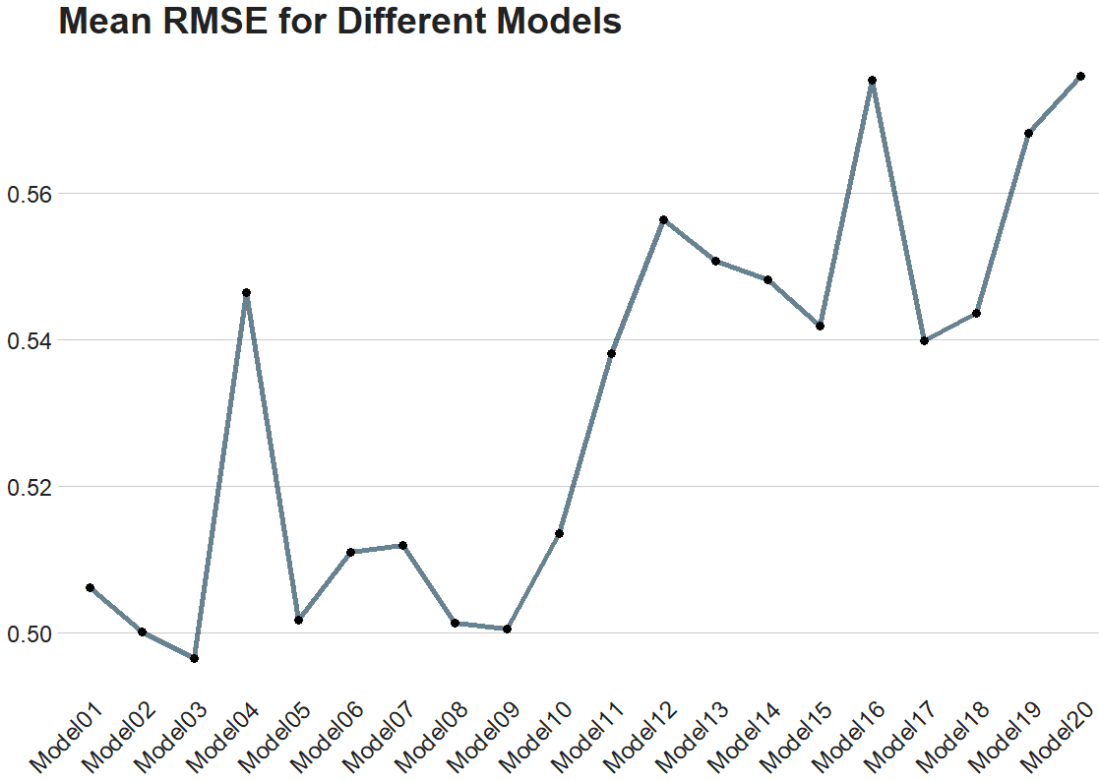
show_best(tuning_results, metric = "rmse")
  trees tree_depth learn_rate .metric .estimator  mean     n std_err .config              
  <int>      <int>      <dbl> <chr>   <chr>      <dbl> <int>   <dbl> <chr>                
1   593          4       1.11 rmse    standard   0.496    10  0.0189 Preprocessor1_Model03
2   677          3       1.25 rmse    standard   0.500    10  0.0216 Preprocessor1_Model02
3  1296          6       1.04 rmse    standard   0.501    10  0.0238 Preprocessor1_Model09
4  1010          5       1.15 rmse    standard   0.501    10  0.0282 Preprocessor1_Model08
5  1482          5       1.05 rmse    standard   0.502    10  0.0210 Preprocessor1_Model05

The best model is model number 3!

The Fresh Prince Of Bel Air Reaction GIF - Find & Share on GIPHY

Finally, we can plot it out.

We use collect_metrics() to pull out the RMSE and other metrics from our samples.

It automatically aggregates the results across all resampling iterations for each unique combination of model hyperparameters, providing mean performance metrics (e.g., mean accuracy, mean RMSE) and their standard errors.

rmse_results <- tuning_results %>%
collect_metrics() %>%
filter(.metric == "rmse")
rmse_results %>%
mutate(.config = str_replace(.config, "^Preprocessor1_", "")) %>%
ggplot(aes(x = .config, y = mean)) +
geom_line(aes(group = 1), color = "#023047", size = 2, alpha = 0.6) +
geom_point(size = 3) +
bbplot::bbc_style() +
labs(title = "Mean RMSE for Different Models") +
theme(axis.text.x = element_text(angle = 45, hjust = 1))

How to run decision tree analysis with xgboost in R (Tidymodels Series PART 3)

Packages we will need:

library(tidymodels)
library(tidyverse)

In this blog post, we are going to run boosted decision trees with xgboost in tidymodels.

Boosted decision trees are a type of ensemble learning technique.

Ensemble learning methods combine the predictions from multiple models to create a final prediction that is often more accurate than any single model’s prediction.

The ensemble consists of a series of decision trees added sequentially, where each tree attempts to correct the errors of the preceding ones.

Source: https://towardsdatascience.com/10-decision-trees-are-better-than-1-719406680564

Similar to the previous blog, we will use Varieties of Democracy data and we will examine the relationship between judicial corruption and public sector theft.

Click here to read Part 1 of the tidymodels series

vdem <- read.csv(file.choose))

vdem %>%
select(judic_corruption = v2jucorrdc,
ps_theft = v2exthftps,
country_name,
year) -> vdem_vars

vdem_vars <- na.omit(vdem_vars)

We will divide the dataset into one from years 1990 to 2019 and a separate 2020 dataset.

vdem_vars %>% 
filter(year > 1989 & year < 2020) -> vdem_1990_2019

vdem_vars %>%
filter(year == 2020) -> vdem_2020

Now we will create our recipe with the model formula and any steps to mutate the variables

recipe_spec <- recipe(judic_corruption ~ ps_theft, 
data = vdem_1990_2019) %>%
step_normalize(all_predictors(), -all_outcomes())

Next we will set our decision tree.

boost_tree_spec <- boost_tree(
mode = "regression",
trees = 1000,
tree_depth = 3,
min_n = 10,
loss_reduction = 0.01,
sample_size = 0.5,
mtry = 2,
learn_rate = 0.01,
engine = "xgboost"
)

Let’s take a look at each part of this big step.

mode specifies the type of predictive modeling that we are running.

Common modes are:

  • "regression" for predicting numeric outcomes,
  • "classification" for predicting categorical outcomes,
  • "censored" for time-to-event (survival) models.

The mode we choose is regression.

Next we add the number of trees to include in the ensemble.

More trees can improve model accuracy but also increase computational cost and risk of overfitting. The choice of how many trees to use depends on the complexity of the dataset and the diminishing returns of adding more trees.

We will choose 1000 trees.

tree_depth indicates the maximum depth of each tree. The depth of a tree is the length of the longest path from a root to a leaf, and it controls the complexity of the model.

Deeper trees can model more complex relationships but also increase the risk of overfitting. A smaller tree depth helps keep the model simpler and more generalizable.

Our model is quite simple, so we can choose 3.

When your model is very simple, for instance, having only one independent variable, the need for deep trees diminishes. This is because there are fewer interactions between variables to consider (in fact, no interactions in the case of a single variable), and the complexity that a model can or should capture is naturally limited.

For a model with a single predictor, starting with a lower max_depth value (e.g., 3 to 5) is sensible. This setting can provide a balance between model simplicity and the ability to capture non-linear relationships in the data.

The best way to determine the optimal max_depth is with cross-validation. This involves training models with different values of max_depth and evaluating their performance on a validation set. The value that results in the best cross-validated metric (e.g., RMSE for regression, accuracy for classification) is the best choice.

We will look at RMSE at the end of the blog.

Next we look at the min_n, which is the minimum number of data points allowed in a node to attempt a new split. This parameter controls overfitting by preventing the model from learning too much from the noise in the training data. Higher values result in simpler models.

We choose min_n of 10.

loss_reduction is the minimum loss reduction required to make a further partition on a leaf node of the tree. It’s a way to control the complexity of the model; larger values result in simpler models by making the algorithm more conservative about making additional splits.

We input a loss_reduction of 0.01.

A low value (like 0.01) means that the model will be more inclined to make splits as long as they provide even a slight improvement in loss reduction.

This can be advantageous in capturing subtle nuances in the data but might not be as critical in a simple model where the potential for overfitting is already lower due to the limited number of predictors.

sample_size determines the fraction of data to sample for each tree. This parameter is used for stochastic boosting, where each tree is trained on a random subset of the full dataset. It introduces more variation among the trees, can reduce overfitting, and can improve model robustness.

Our sample_size is 0.5.

While setting sample_size to 0.5 is a common practice in boosting to help with overfitting and improve model generalization, its optimality for a model with a single independent variable may not be suitable.

We can test different values through cross-validation and monitoring the impact on both training and validation metrics

mtry indicates the number of variables randomly sampled as candidates at each split. For regression problems, the default is to use all variables, while for classification, a commonly used default is the square root of the number of variables. Adjusting this parameter can help in controlling model complexity and overfitting.

For this regression, our mtry will equal 2 variables at each split

learn_rate is also known as the learning rate or shrinkage. This parameter scales the contribution of each tree.

We will use a learn_rate = 0.01.

A smaller learning rate requires more trees to model all the relationships but can lead to a more robust model by reducing overfitting.

Finally, engine specifies the computational engine to use for training the model. In this case, "xgboost" package is used, which stands for eXtreme Gradient Boosting.

Season 6 Nbc GIF - Find & Share on GIPHY

When to use each argument:

Mode: Always specify this based on the type of prediction task at hand (e.g., regression, classification).

Trees, tree_depth, min_n, and loss_reduction: Adjust these to manage model complexity and prevent overfitting. Start with default or moderate values and use cross-validation to find the best settings.

Sample_size and mtry: Use these to introduce randomness into the model training process, which can help improve model robustness and prevent overfitting. They are especially useful in datasets with a large number of observations or features.

Learn_rate: Start with a low to moderate value (e.g., 0.01 to 0.1) and adjust based on model performance. Smaller values generally require more trees but can lead to more accurate models if tuned properly.

Engine: Choose based on the specific requirements of the dataset, computational efficiency, and available features of the engine.

NOW, we add the two steps together in the oven.

Season 5 Cooking GIF by Living Single - Find & Share on GIPHY
workflow_spec <- workflow() %>%
add_recipe(recipe_spec) %>%
add_model(boost_tree_spec)

And we fit the model with the data

fit <- workflow_spec %>%
fit(data = vdem_1990_2019)
══ Workflow [trained] 
Preprocessor: Recipe
Model: boost_tree()

── Preprocessor 
1 Recipe Step

• step_normalize()

── Model 
##### xgb.Booster
raw: 2.2 Mb 
call:
  xgboost::xgb.train(params = list(eta = 0.01, 
                                                             max_depth = 6, 
                                                             gamma = 0.01, 
colsample_bytree = 1, 
colsample_bynode = 1, 
min_child_weight = 10, 
subsample = 0.5), 
data = x$data, 
nrounds = 1000,
watchlist = x$watchlist, 
verbose = 0, 
nthread = 1, 
objective = "reg:squarederror")

params (as set within xgb.train):
eta = "0.01", 
max_depth = "6", 
gamma = "0.01", 
colsample_bytree = "1", 
colsample_bynode = "1", 
min_child_weight = "10", 
subsample = "0.5", 
nthread = "1", 
objective = "reg:squarederror", 
validate_parameters = "TRUE"
xgb.attributes: niter
callbacks: cb.evaluation.log()
# of features: 1 
niter: 1000
nfeatures : 1 
evaluation_log:
     iter training_rmse
    <num>         <num>
        1     1.5329271
        2     1.5206092
---                    
      999     0.4724800
     1000     0.4724075

We can now see how well our model can predict year 2020 data.

predictions <- predict(fit, new_data = vdem_2020)
predicted_values <- predictions$.pred

predicted_probabilities <- predict(fit, new_data = new_data, type = "prob") 
# For probabilities

Evaluating regression model performance using true values of judicial corruption

  actual_vs_predicted <- vdem_2020 %>%
select(judic_corruption) %>%
bind_cols(predictions)

Finally, we calculate metrics like RMSE, MAE, etc., using `yardstick`

  metrics <- actual_vs_predicted %>%
metrics(truth = judic_corruption, estimate = .pred)

rmse_val <- actual_vs_predicted %>%
rmse(truth = judic_corruption, estimate = .pred)

mae_val <- actual_vs_predicted %>%
mae(truth = judic_corruption, estimate = .pred)

print(metrics)
print(rmse_val)
print(mae_val)
.metric .estimator .estimate
  <chr>   <chr>          <dbl>
1 rmse    standard       0.661
2 rsq     standard       0.796
3 mae     standard       0.525

How to run linear regression analysis with tidymodels in R for temporal prediction (Tidymodels Series PART 2)

Packages we will need:

library(tidyverse)
library(tidymodels)
library(magrittr)

We will look at Varieties of Democracy dataset

vdem %>% 
select(judic_corruption = v2jucorrdc,
corruption = v2xnp_regcorr,
freedom_kill= v2clkill,
freedom_torture = v2cltort,
freedom_religion = v2clrelig,
ps_theft = v2exthftps,
country_name,
year) -> vdem

We will create two datasets: one for all years EXCEPT 2020 and one for only 2020

vdem %>% 
filter(year > 1989 & year < 2020) -> vdem_1990_2019

vdem %>%
filter(year == 2020) -> vdem_2020

First we build the model. We will look at whether level of public sector theft can predict the judicial corruption levels.

The model will have three parts

linear_reg() : This is the foundational step indicating the type of regression we want to run

set_engine() : This is used to specify which package or system will be used to fit the model, along with any arguments specific to that software. With a linear regression, we don’t really need any special package.

set_mode("regression") : In our regression model, the model predicts continuous outcomes. If we wanted to use a categorical variable, we would choose “classification

linear_spec <- linear_reg() %>%
set_engine("lm") %>%
set_mode("regression")

If we print out the linear_spec object, it gives us information about the model specifications we had just fed in!

> linear_spec
Linear Regression Model Specification (regression)

Computational engine: lm 

class(linear_spec)
[1] "linear_reg" "model_spec"

Now we create a “recipe” with our model formula and any steps we take to change the variables.

recipe_spec <- recipe(judic_corruption ~ ps_theft, data = vdem_1990_2019) %>%
step_normalize(all_predictors(), -all_outcomes())

Click here to look at all the possible steps we can add to the regression recipe

https://recipes.tidymodels.org/reference

When we print this out, it shows us the stages in our lm “recipe”

── Recipe 

── Inputs 
Number of variables by role
outcome:   1
predictor: 2

── Operations 
• Centering and scaling for: all_predictors(), 

Finally, we are going to feed the recipe and the model specification into the workflow “oven”, if we want to keep the cooking metaphor going.

linear_workflow <- workflow() %>%
add_recipe(recipe_spec) %>%
add_model(linear_spec) %>%
fit(data = vdem_1990_2019)

We can tidy up the results of the linear regression with the tidy() function

linear_workflow %>% tidy()

Printing out a tidy version of the data

linear_workflow %>% tidy()
# A tibble: 31 × 5
   term                   estimate std.error statistic p.value
   <chr>                     <dbl>     <dbl>     <dbl>   <dbl>
 1 (Intercept)            0.0822      0.0584   1.41      0.160
 2 ps_theft                    1.29        0.0105 123.        0    
 3 year-1.57179471038752 -0.0175      0.0825  -0.212     0.832
 4 year-1.45612480773099 -0.0119      0.0824  -0.144     0.885
 5 year-1.34045490507446 -0.0321      0.0823  -0.390     0.697
 6 year-1.22478500241793  0.00679     0.0823   0.0825    0.934
 7 year-1.1091150997614   0.000206    0.0823   0.00250   0.998
 8 year-0.99344519710487 -0.00175     0.0823  -0.0213    0.983
 9 year-0.87777529444834  0.00339     0.0823   0.0412    0.967
10 year-0.76210539179181 -0.00774     0.0822  -0.0942    0.925
# ℹ 21 more rows
# ℹ Use `print(n = ...)` to see more rows

Now we can see does the model from 1990 to 2019 predict the values in 2020?

Natasha Lyonne GIF by Golden Globes - Find & Share on GIPHY
predictions <- predict(linear_workflow, new_data = vdem_2020) %>%
bind_cols(vdem_2020)
> predictions
# A tibble: 179 × 6
    .pred judic_corruption ps_theft country_name   year  diff
    <dbl>            <dbl>    <dbl> <chr>         <int> <dbl>
 1 -0.447           -2.21    -0.693 Pakistan       2020  1.77
 2  1.03            -0.722    1.04  Tunisia        2020  1.76
 3  0.319           -1.38     0.205 Burkina Faso   2020  1.70
 4  0.228           -1.33     0.098 Bolivia        2020  1.56
 5 -0.569           -2.05    -0.837 Comoros        2020  1.48
 6 -1.73            -3.01    -2.19  Azerbaijan     2020  1.28
 7  0.469           -0.781    0.381 Peru           2020  1.25
 8  0.623           -0.578    0.562 Burma/Myanmar  2020  1.20
 9  1.64             0.478    1.76  Benin          2020  1.16
10  2.65             1.52     2.94  Luxembourg     2020  1.13
# ℹ 169 more rows
# ℹ Use `print(n = ...)` to see more rows

We can look at the RMSE, R square and MAE scores

In regression analysis, Root Mean Square Error (RMSE), R-squared (R²), and Mean Absolute Error (MAE) are metrics used to evaluate the performance and accuracy of regression models.

We use the metrics function from the yardstick package.

predictions represents the predicted values generated by your model. These are typically the values your model predicts for the outcome variable based on the input data.

truth is the actual or true values of the outcome variable. It is what you are trying to predict with your model. In the context of your code, judic_corruption is likely the true values of judicial corruption, against which the predictions are being compared.

The estimate argument is optional. It is used when the predictions are stored under a different name or within a different object.

metrics <- yardstick::metrics(predictions, truth = judic_corruption, estimate = .pred)

And here are the three metrics to judge how “good” our predictions are~

> metrics
# A tibble: 3 × 3
  .metric .estimator .estimate
  <chr>   <chr>          <dbl>
1 rmse    standard       0.774
2 rsq     standard       0.718
3 mae     standard       0.622

Determining whether RMSE, R-squared (R2), and MAE values are “good” depends on several factors, including the context of your specific problem, the scale of the outcome variable, and the performance of other models in the same domain.

RMSE (Root mean square deviation)

rmse <- sqrt(mean(predictions$diff^2))
  • RMSE measures the average magnitude of the errors between predicted and actual values.
  • Lower RMSE values indicate better model performance, with 0 representing a perfect fit.
  • Lower RMSE values indicate better model performance.
  • It’s common to compare the RMSE of your model to the RMSE of a baseline model or other competing models in the same domain.
  • The interpretation of “good” RMSE depends on the scale of your outcome variable. A small RMSE relative to the range of the outcome variable suggests better predictive accuracy.

R-squared

  • Higher R-squared values indicate a better fit of the model to the data.
  • However, R-squared alone does not indicate whether the model is “good” or “bad” – it should be interpreted in conjunction with other factors.
  • A high R-squared does not necessarily mean that the model makes accurate predictions.
  • This is especially if it is overfitting the data.
  • R-squared represents the proportion of the variance in the dependent variable that is predictable from the independent variables.
  • Values closer to 1 indicate a better fit, with 1 representing a perfect fit.

MAE (Mean Absolute Error):

  • Similar to RMSE, lower MAE values indicate better model performance.
  • MAE is less sensitive to outliers compared to RMSE, which may be advantageous depending on the characteristics of your data.
  • MAE measures the average absolute difference between predicted and actual values.
  • Like RMSE, lower MAE values indicate better model performance, with 0 representing a perfect fit.

And now we can plot out the differences between predicted values and actual values for judicial corruption scores

We can add labels for the countries that have the biggest difference between the predicted values and the actual values – i.e. the countries that our model does not predict well. These countries can be examined in more detail.

First we add a variable that calculates the absolute difference between the actual judicial corruption variable and the value that our model predicted.

Then we use filter to choose the top ten countries

And finally in the geom_repel() layer, we use this data to add the labels to the plot

predictions <- predictions %>%
mutate(difference = abs(judic_corruption - .pred),
rank = rank(-difference))

top_countries <- predictions %>%
filter(rank <= 10)

predictions %>%
ggplot(aes(x = judic_corruption, y = .pred)) +
geom_point(color = "#1d3557", alpha = 0.6, size = 4) +
ggrepel::geom_label_repel(data = top_countries, aes(label = country_name),
nudge_y = 0.15, color = "#14213d", size = 3.5, alpha = 0.7) +
geom_abline(intercept = 0, slope = 1, linetype = "dashed",
color = "#6a040f", size = 3, alpha = 0.75) +
ggtitle("Actual vs. Predicted Judicial Corruption Scores") +
xlab("Actual Scores") +
ylab("Predicted Scores") +
xlim(c(-3, 3)) +
ylim(c(-3, 3)) +
bbplot::bbc_style() +
theme(plot.title = element_text(hjust = 0.5))

How to run regressions with the tidymodels package in R: PART 1


The tidymodels framework in R is a collection of packages for modeling.

Within tidymodels, the parsnip package is primarily responsible for specifying models in a way that is independent of the underlying modeling engines. The set_engine() function in parsnip allows users to specify which computational engine to use for modeling, enabling the same model specification to be used across different packages and implementations.

 - Find & Share on GIPHY

In this blog series, we will look at some commonly used models and engines within the tidymodels package

  1. Linear Regression (lm): The classic linear regression model, with the default engine being stats, referring to the base R stats package.
  2. Logistic Regression (logistic_reg): Used for binary classification problems, with engines like stats for the base R implementation and glmnet for regularized regression.
  3. Random Forest (rand_forest): A popular ensemble method for classification and regression tasks, with engines like ranger and randomForest.
  4. Boosted Trees (boost_tree): Used for boosting tasks, with engines such as xgboost, lightgbm, and catboost.
  5. Decision Trees (decision_tree): A base model for classification and regression, with engines like rpart and C5.0.
  6. K-Nearest Neighbors (nearest_neighbor): A simple yet effective non-parametric method, with engines like kknn and caret.
  7. Principal Component Analysis (pca): For dimensionality reduction, with the stats engine.
  8. Lasso and Ridge Regression (linear_reg): For regression with regularization, specifying the penalty parameter and using engines like glmnet.

Click here for some resources I found:

  1. https://rviews.rstudio.com/2019/06/19/a-gentle-intro-to-tidymodels
  2. https://rpubs.com/chenx/tidymodels_tutorial
  3. https://bookdown.org/paul/ai_ml_for_social_scientists/06_01_ml_with_tidymodels.html

How to use the mget() function in R

The mget() fuction is a multiple get() function

We use mget() to retrieve multiple objects by their names

I have found this helpful when I want to perform operations on many df (with similar names) without having to type out each name.

For example, I can create four data.frames. They all have similar name patterns. The only difference is the number.

df_1_pr <- data.frame(x = 1:4, y = letters[1:4])
df_2_pr <- data.frame(x = 5:8, y = letters[5:8])
df_3_pr <- data.frame(x = 9:12, y = letters[9:12])
df_4_pr <- data.frame(x = 13:16, y = letters[13:16])

Here is a quick look at the df1 data.frame

      x    y   
1    1    a      
2    2    b      
3    3    c      
4    4    d      

We can make a list of the four data.frames using mget()

df_list <- mget(c("df_1_pr", "df_2_pr", "df_3_pr", "df_4_pr))

Or we can alternatively add paste0() and feed in a sequence from 1:4 to write the code more quickly in mget() instead

df_list <- mget(paste0("df_", 1:4, "_pr"))

We can make a function to create a new column to each data frame in the list

df_list <- lapply(df_list, function(df) { 
df$x_mult_2 <- df$x * 2
return(df) })

We can look at the fourth data.frame in the list,

df_list[4]
   x y x_mult_2
1 13 m       26
2 14 n       28
3 15 o       30
4 16 p       32

Before we combine all the data.frames, we can make an ID variable for each df with the following function:

add_id_variable <- function(df_list) {
for (i in seq_along(df_list)) {
df_list[[i]]$id <- i}
return(df_list)}

Add a year variable

add_year_variable <- function(df_list) {
years <- 2017:2020
for (i in seq_along(df_list)) {
df_list[[i]]$year <- rep(years[i], nrow(df_list[[i]]))}
return(df_list)}

The rep(years[i], nrow(df_list[[i]])) repeats the i-th year from the years vector (years[i]) for nrow(df_list[[i]]) times.

nrow(df_list[[i]]) is the number of rows in the selected data frame.

We can run the function with the df_list

df_list <- add_id_variable(df_list)

Now we can convert the list into a data.frame with the do.call() function in R

all_df_pr <- do.call(rbind, df_list)

do.call() runs a function with a list of arguments we supply.

do.call(fun, args)

For us, we can feed in the rbind() function with all the data.frames in the df_list. It is quicker than writing out all the data.frames names into the rbind() function direction.

Birthday Party Cute Dog GIF by DOGTV - Find & Share on GIPHY

How to graph model variables with the tidy package in R

Packages we will need:

library(tidyverse)
library(broom)
library(stargazer)
library(janitor)
library(democracyData)
library(WDI)

We will make a linear regression model and graph the coefficients to show which variables are statistically significant in the regression with ggplot.

First we will download some variables from the World Bank Indicators package.

Click here to read more about the WDI package.

We will use Women Business and the Law Index Score as our dependent variable.

The index measures how laws and regulations affect women’s economic opportunity. Overall scores are calculated by taking the average score of each index (Mobility, Workplace, Pay, Marriage, Parenthood, Entrepreneurship, Assets and Pension), with 100 representing the highest possible score.

And then a few independent variables for the model

women_business = WDI(indicator = "SG.LAW.INDX")

gdp_percap = WDI(indicator = "NY.GDP.PCAP.KD")
pop <- WDI(indicator = "SP.POP.TOTL")
mil_spend_gdp = WDI(indicator = "MS.MIL.XPND.ZS")
mortality = WDI(indicator = "SP.DYN.IMRT.IN")

We will merge them all together and rename the columns with inner_join()

women_business %>%
filter(year > 1999) %>%
inner_join(mortality) %>%
inner_join(mil_spend_gdp) %>%
inner_join(gdp_percap) %>%
inner_join(pop) %>%
inner_join(mortality) %>%
select(country, year, iso2c,
pop = SP.POP.TOTL,
fem_bus = SG.LAW.INDX,
mortality = SP.DYN.IMRT.IN,
gdp_percap = NY.GDP.PCAP.KD,
mil_gdp = MS.MIL.XPND.ZS) -> wdi

We will remove all NA values and take a summary of all the variables.

Finally, we will filter out al the variables that are not countries according to the Correlates of War project.

  wdi %>%  mutate_all(~ifelse(is.nan(.), NA, .)) %>% 
select(-year) %>%
group_by(country, iso2c) %>%
summarize(across(where(is.numeric), mean,
na.rm = TRUE, .names = "mean_{col}")) %>%
ungroup() %>%
mutate(cown = countrycode::countrycode(iso2c, "iso2c", "cown")) %>%
filter(!is.na(cown)) -> wdi_summary

Next we will also download Freedom House values from the democracyData package.

fh <- download_fh()

fh %>%
group_by(fh_country) %>%
filter(year > 1999) %>%
summarise(mean_fh = mean(fh_total, na.rm = TRUE)) %>%
mutate(cown = countrycode::countrycode(fh_country, "country.name", "cown")) %>%
mutate_all(~ifelse(is.nan(.), NA, .)) %>%
filter(!is.na(cown)) -> fh_summary

If you want to find resources for more data packages, click here.

We merge the Freedom House and World Bank data

fh_summary %>%
inner_join(wdi_summary, by = "cown") %>%
select (-c(cown, iso2c, fh_country)) -> wdi_fh

We can look at the summarise of all the variables with the skimr package.

wdi_fh %>% 
skim()

And we will take the log of some of the following variables:

wdi_fh %<>% 
mutate(log_mean_pop = log10(mean_pop),
log_mean_gdp_percap = log10(mean_gdp_percap),
log_mean_mil_gdp = log10(mean_mil_gdp)) %>%
select(!c(country, mean_pop, mean_gdp_percap, mean_mil_gdp))

Next, we run a quick linear regression model

wdi_fh %>% 
lm(mean_fem_bus ~ ., data = .) -> my_model

We can print the model output with the stargazer package

my_model %>% 
stargazer(type = "html")
Dependent variable:
mean_fem_bus
mean_fh2.762***
(0.381)
mean_mortality-0.131**
(0.065)
log_mean_pop1.065
(1.434)
log_mean_gdp_percap-3.201
(2.735)
log_mean_mil_gdp-10.038**
(3.870)
Constant61.030***
(16.263)
Observations154
R20.566
Adjusted R20.551
Residual Std. Error11.912 (df = 148)
F Statistic38.544*** (df = 5; 148)
Note:*p<0.1; **p<0.05; ***p<0.01

And we will use the tidy() function from the broom package to extract the estimates and confidence intervals from the model

my_model %>%
tidy(., conf.int = TRUE) %>%
filter(term != "(Intercept)") %>%
janitor::clean_names() %>%
mutate(term = ifelse(term == "log_mean_mil_gdp", "Military spending (ln)",
ifelse(term == "log_mean_gdp_percap", "GDP per capita (ln)",
ifelse(term == "log_mean_pop", "Population (ln)",
ifelse(term == "mean_mortality", "Mortality rate",
ifelse(term == "mean_fh", "Freedom House", "Other")))))) -> tidy_model

And we can plot the tidy values

tidy_model %>% 
ggplot(aes(x = reorder(term, estimate), y = estimate)) +
geom_hline(yintercept = 0, color = "#bc4749", size = 4, alpha = 0.4) +
geom_errorbar(aes(ymin = conf_low, ymax = conf_high,
color = ifelse(conf_low * conf_high > 0, "#023047",
ifelse(term == "Mortality rate", "#ca6702", "#ca6702"))), width = 0.1, size = 2) +
geom_point(aes(color = ifelse(conf_low * conf_high > 0, "#023047",
ifelse(term == "Mortality rate", "#ca6702", "#ca6702"))), size = 4) +
coord_flip() +
scale_color_manual(labels = c("Significant", "Insignificant"), values = c("#023047", "#ca6702")) +
labs(title = "Model Variables", x = "", y = "", caption = "Source: Your Data Source") + bbplot::bbc_style()

How to graph proportions with the waffle and treemapify packages in R

Packages we will need:

library(tidyverse)
library(magrittr)
library(waffle)
library(treemapify)

In this blog, we will look at visualising proportions in a few lines.

I have some aid data and I want to see what proportion of the aid does not have a theme category.

This can be useful to visualise incomplete data across years or across categories.

First, we can make a waffle chart with the waffle package.

30 Rock Pizza GIF - Find & Share on GIPHY

First, we will create a binary variable that has 1 if the theme is “Other Theme” and 0 if it has a theme value. We will do this for every year.

aid_data %>% 
  group_by(start_year) %>% 
  mutate(binary_variable = as.numeric(theme_1 == "Other Theme")) %>% 
  ungroup() %>% count()
# Groups:   start_year [10]
   start_year     n
        <int> <int>
 1       2012     1
 2       2013     3
 3       2014    17
 4       2015    91
 5       2016   100
 6       2017    94
 7       2018   198
 8       2019   144
 9       2020   199
10       2021   119

Then we will count the number of 0 and 1s for each year with group_by(start_year, binary_variable)

aid_data %>% 
  group_by(start_year) %>% 
  mutate(binary_variable = as.numeric(theme_1 == "Other Theme")) %>%
  ungroup() %>% 
  group_by(start_year, binary_variable) %>% 
  count() %>% 
# A tibble: 14 × 3
# Groups:   start_year, binary_variable [14]
   start_year binary_variable     n
        <int>           <dbl> <int>
 1       2012               0     1
 2       2013               0     3
 3       2014               0    17
 4       2015               0    90
 5       2015               1     1
 6       2016               0   100
 7       2017               0    94
 8       2018               0   124
 9       2018               1    74
10       2019               0    18
11       2019               1   126
12       2020               1   199
13       2021               0     1
14       2021               1   118

We can do the two steps above together in one step and then create the ggplot object with the geom_waffle() layer.

For the ggplot layers:

We use the binary_variable in the fill argument.

We use the n variable in the values argument.

We will facet_wrap() with the start_year argument.

aid_date %>%
 group_by(start_year) %>% 
  mutate(binary_variable = as.numeric(theme_1 == "Other Theme")) %>%
  ungroup() %>% 
  group_by(start_year, binary_variable) %>% 
  count() %>% 
  ggplot(aes(fill = as.factor(binary_variable), values = n)) +
  geom_waffle(color = "white", size = 0.3, n_rows = 10, flip = TRUE) +
  facet_wrap(~start_year, nrow = 1, strip.position = "bottom") + 
  bbplot::bbc_style() +
  scale_fill_manual(values =c("#003049", "#bc4749"),
                    name = "No theme?",
                    labels = c("Theme", "No Theme")) +
  theme(axis.text.x.bottom = element_blank(),
        text = element_text(size = 40))

We can see that all the years up to 2018 have most of the row categorised. After 2019, it all goes awry; most of the aid rows are not categorised at all. Messy.

Although, I prefer the waffle charts, because it also shows a quick distribution of aid rows across years (only 1 in 2012 and many in later years), we can also look at pie charts

We can facet_wrap() with pie charts…

… however, there are a few steps to take so that the pie charts do not look like this:

Get Out Ugh GIF - Find & Share on GIPHY

We cannot use the standard coord_polar argument.

Rather, we set a special my_coord_polar to use as a layer in the ggplot.

my_coord_polar <- coord_polar(theta = "y")
my_coord_polar$is_free <- function() TRUE

Then we use the same count variables as above.

We also must change the facet_wrap() to include scales = "free"

aid_data %>%
  group_by(start_year) %>% 
  mutate(binary_variable = as.numeric(theme_1 == "Other Theme")) %>% 
  ungroup() %>% 
  group_by(start_year, binary_variable) %>% 
  count() %>% 
  ungroup() %>% 
  ggplot(aes(x = "", y = n, fill = as.factor(binary_variable))) +
  geom_bar(stat="identity", width=1) +
  my_coord_polar +
  theme_void() + 
  facet_wrap(~start_year, scales = "free")+ 
  scale_fill_manual(values =c("#003049", "#bc4749"),
                    name = "No theme?",
                    labels = c("Theme", "No Theme"))

And we can create a treemap to see the relative proportion of regions that receieve an allocation of aid:

First some nice hex colors.

pal <- c("#005f73", "#006f57", "#94d2bd", "#ee9b00", "#ca6702", "#8f2d56", "#ae2012")

Then we create characters strings for the numeric region variable and use it for the fill argument in the ggplot.

aid_data %>% 
  mutate(region = case_when(
    pol_region_6 == 1 ~ "Post-Soviet",
    pol_region_6 == 2 ~ "Latin America",
    pol_region_6 == 3 ~ "MENA",
    pol_region_6 == 4 ~ "Africa",
    pol_region_6 == 5 ~ "West",
    pol_region_6 == 6 ~ "Asia",
    TRUE ~ "Other"))  %>% 
  group_by(region) %>% 
  count() %>% 
  ggplot(aes(area = n, fill = region, 
             label = paste(region, n, sep = "\n"))) +
  geom_treemap(color = "white", size = 3) +
  geom_treemap_text(
    place = "centre",
    size = 20) +
  theme(legend.position = "none")  +
  scale_fill_manual(values = sample(pal))

How to graph bubble charts and treemap charts in R

Packages we will need:

library(tidyverse)
library(bubbles)
library(treemapify)
library(democracyData)
library(magrittr)

In this blog, we will look at different types of charts that we can run in R.

Approve Always Sunny GIF by It's Always Sunny in Philadelphia - Find & Share on GIPHY

Both the bubble and treemap charts are simple to run.

Before we begin, we will choose some hex colors for the palette. I always use the coolors palettes website to find nice colours.

pal <- c("#bc4749", "#005f73", 
         "#0a9396", "#94d2bd", 
         "#bb3e03","#003049",
         "#fca311", "#99d98c",
         "#9a5059", "#ee9b00")

First, we can download the data we will graph.

In this case, we will use the DD (democracies and dictatorships) regime data from PACL dataset on different government regimes.

The DD dataset encompasses annual data points for 199 countries spanning from 1946 to 2008. The visual representations on the left illustrate the outcomes in 1988 and 2008.

Cheibub, Gandhi, and Vreeland devised a six-fold regime classification scheme, giving rise to what they termed the DD datasets. The DD index categorises regimes into two types: democracies and dictatorships.

Democracies are divided into three types: parliamentary, semi-presidential, and presidential democracies.

Dictatorships are subcategorized into monarchic, military, and civilian dictatorship.

democracyData::pacl -> pacl

First, we create a new variable with the regime names, not just the number. The values come from the codebook.

Tv Show Drinking GIF - Find & Share on GIPHY
pacl %<>% 
  mutate(regime_name = ifelse(regime == 0, "Parliamentary democracies",
                 ifelse(regime == 1, "Mixed democracies",
                 ifelse(regime == 2, "Presidential democracies",
                 ifelse(regime == 3, "Civilian autocracies",
                 ifelse(regime == 4, "Military dictatorships",
                 ifelse(regime ==  5,"Royal dictatorships", regime))))))) %>%
  mutate(regime = as.factor(regime)) 
  order pacl_country  year regime_name        
  <dbl> <chr>        <dbl> <chr>              
1     1 Afghanistan   1946 Royal dictatorships
2     2 Afghanistan   1947 Royal dictatorships
3     3 Afghanistan   1948 Royal dictatorships
4     4 Afghanistan   1949 Royal dictatorships
5     5 Afghanistan   1950 Royal dictatorships
6     6 Afghanistan   1951 Royal dictatorships

We want to count the number of different regime types.

pacl %>% 
  group_by(regime_name) %>% 
  count() -> pacl_count

We can graph out the geom_treemap() layer in the ggplot() object

pacl_count %>% 
  ggplot(aes(area = n, fill = regime_name, 
           label = paste(regime_name, n, sep = "\n"))) +
  geom_treemap(color = "white", size = 3) +
  geom_treemap_text(
    place = "centre",
    size = 20) +
  theme(legend.position = "none") + 
  scale_fill_manual(values = sample(pal)) 

And we can use the bubbles() function from the bubbles package.

Unfortunately, it is not pipable into ggplot, so it is hard to edit factors such as the font size.

bubbles::bubbles(label = pacl_count$regime_name,
                 value = pacl_count$n, 
                 color = sample(pal, size = length(pacl_count$regime_name)))

Thank you for reading!

How to analyse Afrobarometer survey data with R. PART 3: Cronbach’s Alpha, Exploratory Factor Analysis and Correlation Matrices

Packages we will need:

library(tidyverse)
library(psych)
library(ggcorrplot)
library(lavaan)
library(gt)
library(gtExtras)
library(skimr)

How do people view the state of the economy in the past, present and future for the country and how they view their own economic situation?

Are they highly related concepts? In fact, are all these questions essentially asking about one thing: how optimistic or pessimistic a person is about the economy?

In this blog we will look at different ways to examine whether the questions answered in a survey are similiar to each other and whether they are capturing an underlying construct or operationalising a broader concept.

In our case, the underlying concept relates to levels of optimism about the economy.

We will use Afrobarometer survey responses in this blog post.

Click here to follow links to download Afrobarometer data and to recode the country variables.

First, we can make a mini data.frame to look at only the variables that ask the respondents to describe how they think:

  1. the state of the economy is now (state_econ_now),
  2. their own economic condition is now (my_econ_now),
  3. the economy was a year ago (state_econ_past),
  4. the economy will be in a year (state_econ_future)

In the data, variables range from:

1 = Very bad, 2 = Fairly bad, 3 = Neither good nor bad, 4 = Fairly good, 5 = Very good.

or in the variables comparing the past and the future:

1 = Much worse, 2 = Worse, 3 = Same, 4 = Better, 5 = Much better

The variables we want to remove:

8 = Refused, 9 = Don’t know, -1 = Missing

ab %>% 
  select(country_name,
         state_econ_now = Q4A,
         my_econ_now = Q4B,
         state_econ_past = Q6A,
         state_econ_future = Q6B)  %>% 
  filter(across(where(is.numeric), ~ . <= 7)) -> ab_econ

With the skim() package and gt() package we can look at some descriptive statistics.

Click here to read more about the gtExtras() theme options:

ab_econ %>%  
  select(!country_name) %>% 
  skimr::skim(.) %>%
  mutate(across(where(is.numeric), ~ round(., 2))) %>% 
  rename_with(~ sub("numeric\\.|skim_", "", .), everything()) %>% 
  gt::gt() %>% 
  gtExtras::gt_theme_nytimes() %>% gt::as_raw_html()
type variable n_missing complete_rate mean sd p0 p25 p50 p75 p100 hist
numeric state_econ_now 0 1 2.41 1.32 1 1 2 4 5 ▇▆▃▅▂
numeric my_econ_now 0 1 2.68 1.28 1 2 3 4 5 ▇▇▅▇▂
numeric state_econ_past 0 1 2.51 1.15 1 2 2 3 5 ▆▇▆▅▁
numeric state_econ_future 0 1 3.18 1.29 1 2 4 4 5 ▃▃▃▇▃

First off, we can run a Chronbach’s alpha to examine whether these variables are capturing an underlying construct.

Do survey respondents have an overall positive or overall negative view of the economy (past, present and future) and is it related to respondents’ views of their own economic condition?

The Cronbach’s alpha statistic is a measure of internal consistency reliability for a number of questions in a survey.

Chronbach’s alpha assesses how well the questions in the survey are correlated with each other.

We can interpret the test output and examine the extent to which they measure the same underlying construct – namely the view that people are more optimistic about the economy or not.

ab_econ %>% 
  select(!country_name) %>% 
  psych::alpha() -> cronbach_results
raw_alpha std.alpha G6(smc) Avg_r S/N ase mean sd median_r
0.66 0.66 0.62 0.33 2 0.0026 2.7 0.89 0.32


When we interpret the output, the main one is the Raw Alpha score.

raw_alpha:

The raw Cronbach’s alpha coefficient ranges from 0 to 1.

For us, the Chronbach’s Alpha is 0.66. Higher values indicate greater internal consistency among the items. So, our score is a bit crappy.

Season 1 Netflix GIF by Gilmore Girls  - Find & Share on GIPHY

std.alpha:

Standardized Cronbach’s alpha, which adjusts the raw alpha based on the number of items and their intercorrelations. It is also 0.66 because we only have a handful of variables

G6(smc):

The Guttman’s Lambda 6 is alternative estimate of internal consistency that we can consider. For our economic construct, it is 0.62.

Click this link if you want to go into more detail to discuss the differences between the alpha and the Guttman’s Lambda.

For example, they argue that Guttman’s Lambda is sensitive to the factor structure of a test. It is influenced by the degree of “lumpiness” or correlation among the test items.

For tests with a high degree of intercorrelation among items, G6 can be greater than Cronbach’s Alpha (α), which is a more common measure of reliability. In contrast, for tests with items that have very low intercorrelation, G6 can be lower than α

average_r:

The average inter-item correlation, which shows the average correlation between each item and all other items in the scale.

For us, the correation is 0.33. Again, not great. We can examine the individual correlations later.

S/N:

The Signal-to-Noise ratio, which is a measure of the signal (true score variance) relative to the noise (error variance). A higher value indicates better reliability.

For us, it is 2. This is helpful when we are comparing to different permutations of variables.

ase:

The standard error of measurement, which provides an estimate of the error associated with the test scores. A lower score indicates better reliability.

In our case, it is 0.0026. Again, we can compare with different sets of variables if we add or take away questions from the survey.

mean:

The mean score on the scale is 2.7. This means that out of a possible score of 5 across all the questions on the economy, a respondent usually answers on average in the middle (near to the answer that the economy stays the same)

sd:

The standard deviation is 0.89.

median_r:

The median inter-item correlation between the median item and all other items in the economic optimism scale is 0.32.

Looking at the above eight scores, the most important is the Cronbach’s alpha of 0.66 . This only suggests a moderate level of internal consistency reliability for our four questions.

But there is still room for improvement in terms of internal consistency.

lower alpha upper
Feldt 0.66 0.66 0.67
Duhachek 0.66 0.66 0.67

Next we will look to see if we can improve the score and increase the Chronbach’s alpha.

Reliability if an item is dropped:

raw_alpha std.alpha G6(smc) Avg_r S/N alpha se var.r med.r
Econ now 0.52 0.53 0.43 0.27 1.1 0.004 0.004 0.26
My econ 0.59 0.59 0.49 0.33 1.5 0.003 0.001 0.34
Econ past 0.61 0.61 0.53 0.34 1.5 0.003 0.025 0.29
Future 0.65 0.64 0.57 0.38 1.8 0.003 0.017 0.35

Again, we can focus on the raw Chronbach’s alpha score in the first column if that given variable is removed.

We see that if we cut out any one of the the questions, the score goes down.

We don’t want that, because that would decrease the internal consistency of our underlying “optimism about the economy” type construct.

Item n raw.r std.r r.cor r.drop mean sd
Now 43,702 0.77 0.76 0.67 0.54 2.4 1.3
My econ 43,702 0.71 0.71 0.57 0.45 2.7 1.3
Past 43,702 0.67 0.69 0.52 0.43 2.5 1.1
Future 43,702 0.66 0.65 0.45 0.36 3.2 1.3

These item statistics provide insights into the characteristics of each individual variable

We will look at the first variable in more detail.

state_econ_now

  • raw.r: The raw correlation between this item and the total score is 0.77, indicating a strong positive relationship with the overall score.
  • std.r: The standardized correlation is 0.76, showing that this item contributes significantly to the total score’s variance.
  • r.cor: This is the corrected item-total correlation and is 0.67, suggesting that the item correlates well with the overall construct even after removing it from the total score.
  • r.drop: The corrected item-total correlation when the item is dropped is 0.54, indicating that the item still has a reasonable correlation even when not included in the total score.
  • mean: The average response for this item is 2.4.
  • sd: The standard deviation of responses for this item is 1.3.

Item 1 2 3 4 5 miss
state_econ_now 0.33 0.27 0.12 0.22 0.07 0
my_econ_now 0.23 0.26 0.17 0.27 0.06 0
state_econ_past 0.22 0.32 0.21 0.21 0.03 0
state_econ_future 0.15 0.17 0.16 0.39 0.13 0

Next we will lok at factor analysis.

Factor analysis can be divided into two main types: 

  1. exploratory
  2. confirmatory  

Exploratory factor analysis (EFA) is good when we want to check out initial psychometric properties of an unknown scale.

Confirmatory factor analysis borrows many of  the same concepts from exploratory factor analysis.

However, instead of letting the data tell us the factor structure, we choose the factor structure beforehand and verify the psychometric structure of a previously developed scale.

For us, we are just exploring whether there is an underlying “optimism” about the economy or not.

For the EFA, we will run as Structural Equation Model with the sem() function from the lavaan package

efa_model <- sem(model, data = ab_econ, fixed.x = FALSE)

When we set fixed.x = FALSE, as in your example, it means we are estimating the factor loadings as part of the EFA model.

With fixed.x = FALSE, the factor loadings are allowed to vary freely and are estimated based on the data

This is typical in an exploratory factor analysis, where we are trying to understand the underlying structure of the data, and we let the factor loadings be determined by the analysis.

Next let’s look at a summary of the EFA model:

summary(efa_model, standardized = TRUE)
table { font-family: Arial, sans-serif; border-collapse: collapse; width: 100%; } th { background-color: #f2f2f2; } th, td { border: 1px solid #dddddd; text-align: left; padding: 8px; } tr:nth-child(even) { background-color: #f2f2f2; }
lavaan 0.6.16 ended normally after 33 iterations
Estimator: ML
Optimization method: NLMINB
Number of model parameters: 9
Number of observations: 43,702
Model Test User Model:
Test statistic: 0.015
Degrees of freedom: 1
P-value (Chi-square): 0.903
Parameter Estimates:
Standard errors: Standard
Information: Expected
Information saturated (h1) model: Structured

Time for interpreting the output.

Model Test (Chi-Square Test):

  • When we look at this, we evaluate the goodness of fit of the model.
  • In this case, the test statistic is 0.015, the degrees of freedom is 1, and the p-value is 0.903.
  • The high p-value (close to 1) suggests that the model fits the data well. Yay! (A non-significant p-value is generally a good sign for model fit).

Parameter Estimates:

  • The output provides parameter estimates for the latent variables and covariances between them.
  • The standardized factor loadings (Std.lv) and standardized factor loadings (Std.all) indicate how strongly each observed variable is associated with the latent factors.
  • For example, “state_econ_now” has a strong loading on “f1” with Std.lv = 1.098 and Std.all = 0.833.
  • Similarly, “state_econ_pst” and “state_econ_ftr” load on “f2” with different factor loadings.

Covariances:

  • The covariance between the two latent factors, “f1” and “f2,” is estimated as 0.529. This implies a relationship between the two factors.

Variances:

  • The estimated variances for the observed variables and latent factors. These variances help explain the amount of variability in each variable or factor.
  • For example, “state_econ_now” has a variance estimate of 0.530.

Factor Loadings:

High factor loadings (close to 1) suggest that the variables are capturing the same construct.

For our output, we can say that factor loadings of “state_econ_now” and “my_econ_now” on “f1” are relatively high, which indicates that these variables share a common underlying construct. This captures how the respondent thinks about the current economy

Similarly, “state_econ_past” and “state_econ_future” load highly on “f2.”

This means that comparing to different times is a different variable of interest.

Finally, we can run correlations to visualise the different variables:

ab %>% 
  select(country_name,
         state_econ_now = Q4A,
         my_econ_now = Q4B,
         state_econ_past = Q6A,
         state_econ_future = Q6B)  %>% 
  filter(across(where(is.numeric), ~ . <= 7)) -> ab_econ

cor_matrix <- ab_econ %>% 
  select(!country_name) %>% 
  cor(., method = "spearman") %>% 
  ggcorrplot(, type = "lower", lab = TRUE) +
  theme_minimal() +
  labs(x = " ", y = " ")

We can breakdown the correlations in each country to see if they differ.

We will pull out a vector of country that we can use to iterate over in our for loop below.

country_vector <- ab_econ %>% 
  distinct(country_name) %>% pull()

Adter, we create an empty list to store our correlation matrices

 correlation_matrices <- list()

Then we iterate over the countries in the country_vector and create correlation matrices

for (country in country_vector) {
    country_data <- ab_mini %>% 
    filter(country_name == country)
    cor_matrix <- country_data %>%
    select(-country_name) %>%
    cor(method = "spearman")
    round(., 2)
    correlation_matrices[[country]] <- cor_matrix
}

Last we print out the correlation between the “state of the economy now” and “my economic condition now” variables for each of the 34 countries

 correlation_matrix_list <- list()
  for (country in country_vector) {
   correlation_matrix_list[[country]] <- correlation_matrices[[country]][2]}

 correlation_matrix_df %>% 
   t %>% 
  as.data.frame() %>% 
  rownames_to_column(var = "country") %>% 
  select(country, corr = V1) %>% 
  arrange(desc(corr)) -> state_econ_my_econ_corr

Let’s look at the different levels of correlation between the respondents’ answers to how the COUNTRY’S economic situation is doing and how the respondent thinks THEIR OWN economic situation.

state_econ_my_econ_corr %>%  
   gt() %>% 
  gtExtras::gt_theme_nytimes() %>% gt::as_raw_html()
country corr
Nigeria 0.7316334
Ghana 0.6650589
Morocco 0.6089823
Togo 0.6079971
Guinea 0.6047750
Ethiopia 0.5851686
Lesotho 0.5787015
Sierra Leone 0.5684559
Zimbabwe 0.5666740
Malawi 0.5610069
Angola 0.5551344
Niger 0.5234742
Uganda 0.5182954
Mauritius 0.4950726
Gambia 0.4904879
Liberia 0.4878153
Benin 0.4871915
Kenya 0.4821280
Côte d’Ivoire 0.4800034
Tanzania 0.4787999
Burkina Faso 0.4749373
Zambia 0.4460212
Mali 0.4264943
Cameroon 0.4239547
Sudan 0.4005615
Namibia 0.3981573
Senegal 0.3902534
South Africa 0.3342683
Botswana 0.3146411
Tunisia 0.3109102
Cabo Verde 0.2881491
Mozambique 0.2793023
Gabon 0.2771796
Eswatini 0.2724921

Thank you for reading!

Season 3 Netflix GIF by Gilmore Girls  - Find & Share on GIPHY

How to graph Locally Weighted Scatterplot Smoothing (LOESS) in R

The loess method in ggplot2 fits a smoothing line to our data.

We can do this with the method = "loess" in the geom_smooth() layer.

LOESS stands “Locally Weighted Scatterplot Smoothing.” (I am not sure why it is not called LOWESS … ?)

The loess line can help show non-linear relationships in the scatterplot data, while taking care of stopping the over-influence of outliers.

Loess gives more weight to nearby data points and less weight to distant ones. This means that nearby points have a greater influence on the squiggly-ness of the line.

The degree of smoothing is controlled by the span parameter in the geom_smooth() layer.

When we set the span, we can choose how many nearby data points are considered when estimating the local regression line.

A smaller span (e.g. span = 0.5) results in more local (flexible) smoothing, while a larger span (e.g. span = 1.5) produces more global (smooth) smoothing.

We will take the variables from the Varieties of Democracy dataset and plot the relationship between oil produciton and media freedoms across different regions.

df %>% 
  ggplot(aes(x = log_avg_oil,
             y = avg_media)) +
  geom_point(size = 6, alpha = 0.5) + 
  geom_smooth(aes(color = region), 
              method = "loess", 
              span = 2,
              se = FALSE,
              size = 3,
              alpha = 0.6) + 
  facet_wrap(~region) + 
  labs(title = "Oil and Media Corruption", subtitle = "VDEM",
       x = "Average Oil logged",
       y = "Average Media Freedom") +
  scale_color_manual(values = my_pal) + 
  my_theme()

If we change the span to 0.5, we get the following graph:

              span = 0.5
George Costanza Dancing GIF by Crave - Find & Share on GIPHY

When examining the connection between oil production and media freedoms across various regions, there are many ways to draw the line.

If we think the relationship is linear, it is no problem to add method = "lm" to the graph.

However, if outliers might overly distort the linear relationship, method = "rlm" (robust linear model” can help to take away the power from these outliers.

Linear and robust linear models (lm and rlm) can also accommodate parametric non-linear relationships, such as quadratic or cubic, when used with a proper formula specification.

For example, “geom_smooth(method=’lm’, formula = y ~ x + I(x^2))” can be used for estimating a quadratic relationship using lm.

If the outcome variable is binary (such as “is democracy” versus “is not democracy” or “is oil producing” versus “is not oil producing”) we can use method = “glm” (which is generalised linear model). It models the log odds of a oil producing as a linear function of a predictor variable, like age.

If the relationship between age and log odds is non-linear, the gam method is preferred over glm. Both glm and gam can handle outcome variables with more than two categories, count variables, and other complexities.

How to graph different distributions for political science analysis in R. PART 1: Binomial, Bernoulli and Geometric Distributions.

Packages we will need:

library(tidyverse)

In this blog, we will look at three distributions.

Distributions are fundamental to statistical inference and probability.

Cbc No GIF by Kim's Convenience - Find & Share on GIPHY

The data we will be using is on Irish legislative elections from 1919.

Binomial Distribution

First we can look at the binomial distribution.

We can model the number of successful elections (e.g., a party winning) out of a fixed number of elections (trials).

In R, we use rbinom() to create the distribution.

rbinom(n, size, prob)

We need to feed in three pieces of information into this function

Parameters

  • n: The number of random samples we want.

  • size: The number of trials.

  • prob: The probability of success for each trial.

We can use rbinom() to simulate 100 elections and see how likely there will be a change in the party in power.

ire_leg %>% 
  filter(leg_election_change != "No election") %>% 
  summarise(avg_change = mean(change_binary, na.rm = TRUE))

When we print this, we learn that in 20% of the elections in Ireland, there has been a change in winning party.

So we will use the Binomial distribution to simulate 10 years of elections.

We will do this 100 times and create a graph of change probabilities.

Essentially we can visualise how likely there will we see a change in the party in power.

First, we choose how many times we want to estimate the probability

num_simulations <- 100  

Next, we choose the number of years that we want to look at

years <- 10

Then, we set the probability that an election ends with new party in power :

probability_of_change <- 0.2 

And we throw them all together into the rbinom() function

simulations <- rbinom(n = num_simulations, 
size = years, 
prob = probability_of_change)

proportion_of_changes <- mean(simulations > 0)

We can see that there is an 87% chance that the party in power will change in the next 10 years, according to 100 simulations.

We can use geom_histogram() to examine the distributions

ggplot(data.frame(simulations), aes(x = simulations)) +
  geom_histogram(binwidth = 1, fill = "#023047",
                 color = "black", alpha = 0.7) +
  labs(title = "Distribution of Party Changes",
       x = "Number of Changes",
       y = "Probability") +
  scale_y_continuous(labels = scales::percent_format(scale = 1)) +
  scale_x_continuous(breaks = seq(0, 5, by = 1)) +
  bbplot::bbc_style()

And if we think the probability is high, we can graph that too.

So we can set the probability that the party in power wll change in one year to 0.8

probability_of_change <- 0.8 

Geometric Distribution

While we use the binomial distribution to simulate the number of sucesses in a fixed number of trials, we use the geometric distribution to simulate number of trials needed until the first success (e.g. first instance that a new party comes into power after an election).

It can answer questions like, “On average, how many elections did a party need to contest before winning its first election?”

# Set the probability of that a party will change power in one year
prob_success <- 0.2   

# Generate values for the number of years until the first change in power
trials_values <- 1:20  

# Calculate the PMF values for the geometric distribution
pmf_values <- dgeom(trials_values - 1, prob = prob_success)

# Create a data frame
df <- data.frame(k = trials_values, pmf = pmf_values)

The dgeom() function in R is used to calculate the probability mass function (PMF) for the geometric distribution.

It returns the probability of obtaining a specific number of trials (k) until the first success occurs in a sequence of independent Bernoulli trials.

Each trial has a constant probability of success (p).

In this instance, the dgeom() function calculates the PMF for the number of trials until the first success (from 0 to 10 years).

This is estimated with a success probability of 0.2.

prob_success <- 0.2  

# Generate the number of trials until the first success
trials_values <- 1:20  

# Calculate the PMF values 
pmf_values <- dgeom(trials_values - 1, prob = prob_success)

# Create a data frame
my_dist <- data.frame(k = trials_values, pmf = pmf_values)

And we will graph the geometric distribution

my_dist %>%
  ggplot(aes(x = k,  y = pmf)) +
  geom_bar(stat = "identity", 
           fill = "#023047",
           alpha = 0.7) +
  labs(title = "Geometric Distribution",
    x = "Number of Years Until New Party",
    y = "Probability") +
  my_theme()

To interpret this graph, there is a 20% chance that there will be a new party next year and 10% chance that it will take 3 yaers until we see a new party in power.

Bernoulli Distribution

Nature of Trials

The Bernoulli distribution is the most simple case where each election is considered as an independent Bernoulli trial, resulting in either success (1) or failure (0) based on whether a party wins or loses.

  • The binomial distribution focuses on the number of successful elections out of a fixed number of trials (years).

  • The geometric distribution focuses on the number of trials (year) required until the first success (change of party in power) occurs.

  • The Bernoulli distribution is the simplest case, treating each change as an independent success/failure trial.

Thank you for readdhing. Next we will look at F and T distributiosn in police science resaerch.

How to create a Regional Economic Communities dataset. PART TWO: consolidating string variables to dummy variables

Click here to read PART ONE of the blog series on creating the Regional Economic Communities dataset

Packages we will need:

library(tidyverse)
library(countrycode)
library(WDI)

There are eight RECs in Africa. Some countries are only in one of the RECs, some are in many. Kenya is the winner with membership in four RECs: CEN-SAD, COMESA, EAC and IGAD.

In this blog, we will create a consolidated dataset for all 54 countries in Africa that are in a REC (or TWO or THREE or FOUR groups). Instead of a string variable for each group, we will create eight dummy group variables for each country.

To do this, we first make a vector of all the eight RECs.

patterns <- c("amu", "cen-sad", "comesa", "eac", "eccas", "ecowas", "igad", "sadc")

We put the vector of patterns in a for-loop to create a new binary variable column for each REC group.

We use the str_detect(rec_abbrev, pattern)) to see if the rec_abbrev column MATCHES the one of the above strings in the patterns vector.

The new variable will equal 1 if the variable string matches the pattern in the vector. Otherwise it will be equal to 0.

The double exclamation marks (!!) are used for unquoting, allowing the value of var_name to be treated as a variable name rather than a character string.

Then, we are able to create a variable name that were fed in from the vector dynamically into the for-loop. We can automatically do this for each REC group.

In this case, the iterated !!var_name will be replaced with the value stored in the var_name (AMU, CEN-SAD etc).

We can use the := to assign a new variable to the data frame.

The symbol := is called the “walrus operator” and we use it make or change variables without using quotation marks.

for (pattern in patterns) {
  var_name <- paste0(pattern, "_binary")
  rec <- rec %>%
    mutate(!!var_name := as.integer(str_detect(rec_abbrev, pattern)))
}

This is the dataset now with a binary variables indicating whether or not a country is in any one of the REC groups.

However, we quickly see the headache.

We do not want four rows for Kenya in the dataset. Rather, we only want one entry for each country and a 1 or a 0 for each REC.

We use the following summarise() function to consolidate one row per country.

rec %>%
group_by(country) %>%
  summarise(
    geo = first(geo),
    rec_abbrev = paste(rec_abbrev, collapse = ", "),
    across(ends_with("_binary"), ~ as.integer(any(. == 1)))) ->  rec_consolidated

The first() function extracts the first value in the geo variable for each country. This first() function is typically used with group_by() and summarise() to get the value from the first row of each group.

We use the the across() function to select all columns in the dataset that end with "_binary".

The ~ as.integer(any(. == 1)) checks if there’s any value equal to 1 within the binary variables. If they have a value of 1, the summarised data for each country will be 1; otherwise, it will be 0.

The following code can summarise each filtered group and add them to a new dataset that we can graph:

summ_group_pop <- function(my_df, filter_var, rec_name) {
  my_df %>%
    filter({{ filter_var }} == 1) %>% 
    summarize(total_population = sum(pop, na.rm = TRUE)) %>% 
    mutate(group = rec_name)
}

filter_vars <- c("amu_binary", "cen.sad_binary", "comesa_binary", 
                 "eac_binary", "eccas_binary", "ecowas_binary",
                 "igad_binary", "sadc_binary")
group_names <- c("AMU", "CEN-SAD", "COMESA", "EAC", "ECCAS", "ECOWAS",
                 "IGAD", "SADC")

rec_pop_summary <- data.frame()

for (i in seq_along(filter_vars)) {
  summary_df <- summ_group_pop(rec_wdi, !!as.name(filter_vars[i]), group_names[i])
  rec_pop_summary <- bind_rows(rec_pop_summary, summary_df)
}

And we graph it with geom_bar()

rec_pop_summary %>% 
  ggplot(aes(x = reorder(group, total_population),
             y = total_population)) + 
  geom_bar(stat = "identity", 
           width = 0.7, 
           color = "#0a85e5", 
           fill = "#0a85e5") +
  bbplot::bbc_style() + 
  scale_y_continuous(labels = scales::comma_format()) +
  coord_flip() + 
  labs(x = "RECs", 
       y = "Population", 
       title = "Population of REC groups in Africa", 
       subtitle = "Source: World Bank, 2022")

Cline Center Coup d’État Project Dataset

tailwind_palette <- c("001219","005f73","0a9396","94d2bd","e9d8a6","ee9b00","ca6702","bb3e03","ae2012","9b2226")

add_hashtag <- function(my_vec){
    hash_vec <-  paste0('#', my_vec)
    return(hash_vec)
  
  tailwind_hash <- add_hashtag(tailwind_palette)

Coups per million people in each REC

create_stateyears(system = "cow") %>% 
    add_democracy() -> demo

rec_wdi %>% 
  select(!c(year, country)) %>% 
  left_join(demo, by = c("cown" = "ccode")) %>% 
  filter(year > 1989) %>% 
  filter(amu_binary == 1) %>% 
  group_by(year) %>% 
  summarize(mean_demo = mean(v2x_polyarchy, na.rm = TRUE)) %>% 
  mutate(rec = "AMU") -> demo_amu

We can use a function to repeat the above code with all eight REC groups:

 create_demo_summary <- function(my_df, filter_var, group_name) {
  my_df %>%
    select(!c(year, country)) %>% 
    left_join(demo, by = c("cown" = "ccode")) %>% 
    filter(year > 1989) %>% 
    filter({{ filter_var }} == 1) %>% 
    group_by(year) %>% 
    summarize(mean_demo = mean(v2x_polyarchy, na.rm = TRUE)) %>% 
    mutate(rec = group_name)
}

rec_democracy_df <- data.frame()

for (i in seq_along(filter_vars)) {
  summary_df <- create_demo_summary(rec_wdi, !!as.name(filter_vars[i]), group_names[i])
  rec_democracy_df <- bind_rows(rec_democracy_df, summary_df)
}

And we graph out the average democracy scores cross the years

rec_democracy_df %>% 
  ggplot(aes(x = year, y = mean_demo, group = rec)) + 
  geom_line(aes(fill = rec, color = rec), size = 2, alpha = 0.8) + 
  # geom_point(aes(fill = rec, color = rec), size = 4) + 
  geom_label(data = . %>% group_by(rec) %>% filter(year == 2019), 
             aes(label = rec, 
                 fill = rec, 
                 x = 2019), color = "white",
             legend = FALSE, size = 3) +  
  scale_color_manual(values = tailwind_hash) + 
  scale_fill_manual(values = tailwind_hash) + 
  theme(legend.position = "none")

How to create a Regional Economic Communities dataset. PART ONE: Scraping data with rvest in R

Click here for part two on the REC dataset.

Packages we will need:

library(tidyverse)
library(rvest)
library(janitor)
library(ggflags)
library(countrycode)

The Economic Community of West African States (ECOWAS) has been in the news recently. The regional bloc is openly discussing military options in response to the coup unfolding in the capital of Niger.

This made me realise that I know VERY VERY LITTLE about the regional economic communities (REC) in Africa.

Ernest Aniche (2015: 41) argues, “the ghost of [the 1884] Berlin Conference” led to a quasi-balkanisation of African economies into spheres of colonial influence. He argues that this ghost “continues to haunt Africa […] via “neo-colonial ties” today.

To combat this balkanisation and forge a new pan-Africanist approach to the continent’s development, the African Union (AU) has focused on regional integration.

This integration was more concretely codified with 1991’s Abuja Treaty.

One core pillar on this agreement highlights a need for increasing flows of intra-African trade and decreasing the reliance on commodity exports to foreign markets (Songwe, 2019: 97)

Broadly they aim mirror the integration steps of the EU. That translates into a roadmap towards the development of:

Free Trade Areas:

  • AU : The African Continental Free Trade Area (AfCFTA) aims to create a single market for goods and services across the African continent, with the goal of boosting intra-African trade.
  • EU : The European Free Trade Association (EFTA) is a free trade area consisting of four European countries (Iceland, Liechtenstein, Norway, and Switzerland) that have agreed to remove barriers to trade among themselves.

Customs Union:

  • AU: The East African Community (EAC) is an REC a customs union where member states (Burundi, Kenya, Rwanda, South Sudan, Tanzania, and Uganda) have eliminated customs duties and adopted a common external tariff for trade with non-member countries.
  • EU: The EU’s Single Market is a customs union where goods can move freely without customs duties or other barriers across member states.

Common Market:

  • AU: Many RECs such the Southern African Development Community (SADC) is working towards establishing a common market that allows for the free movement of goods, services, capital, and labor among its member states.
  • EU: The EU is a prime example of a common market, where not only goods and services, but also people and capital, can move freely across member countries.

Economic Union:

  • AU: The West African Economic and Monetary Union (WAEMU) is moving towards an economic union with shared economic policies, a common currency (West African CFA franc), and coordination of monetary and fiscal policies.
  • EU: Has coordinated economic policies and a single currency (Euro) used by several member states.

The achievement of a political union on the continent is seen as the ultimate objective in many African countries (Hartzenberg, 2011: 2), such as the EU with its EU Parliament, Council, Commission and common foreign policy.

According to a 2012 UNCTAD report, “progress towards regional integration has, to date, been uneven, with some countries integrating better at the regional and/or subregional level and others less so”.

So over this blog, series, we will look at the RECs and see how they are contributing to African integration.

We can use the rvest package to scrape the countries and information from each Wiki page. Click here to read more about the rvest package and web scraping:

First we will look at the Arab Maghreb Union (AMU). We feed the AMU wikipedia page into the read_html() function.

With `[[`(3) we can choose the third table on the Wikipedia page.

With the janitor package, we can can clean the names (such as remove capital letters and awkward spaces) and ensure more uniform variable names.

We pull() the country variable and it becomes a vector, then turn it into a data frame with as.data.frame() . Alternatively we can just select this variable with the select() function.

We create some more variables for each REC group when we merge them all together later.

We will use the str_detect() function from the stringr package to filter out the total AMU column row as it is non-country.

read_html("https://en.wikipedia.org/wiki/Arab_Maghreb_Union") %>% 
  html_table(header = TRUE, fill = TRUE) %>% 
  `[[`(3) %>%  
  clean_names()  %>% 
  pull(country) %>% 
  as.data.frame() %>% 
  mutate(rec = "Arab Meghreb Union",
         geo = "Maghreb", 
         rec_abbrev = "AMU") %>% 
  select(country = '.', everything()) %>% 
  filter(!str_detect(country, fixed("Arab Maghreb", ignore_case = TRUE))) -> amu

We can see in the table on the Wikipedia page, that it contains a row for all the Arab Maghreb Union countries at the end. But we do not want this.

We use the str_detect() function to check if the “country” variable contains the string pattern we feed in. The ignore_case = TRUE makes the pattern matching case-insensitive.

The ! before str_detect() means that we remove this row that matches our string pattern.

We can use the fixed() function to make sure that we match a string as a literal pattern rather than a regular expression pattern / special regex symbols. This is not necessary in this situation, but it is always good to know.

For this example, I will paste the code to make a map of the countries with country flags.

Click here to read more about adding flags to maps in R

First we download a map object from the rnaturalearth package

world_map <- ne_countries(scale = "medium", returnclass = "sf")

To add the flags on the map, we need longitude and latitude coordinates to feed into the x and y arguments in the geom_flag(). We can scrape these from the web too.

We add iso2 character codes in all lower case (very important for the geom_flag() step)) with the countrycode() function.

Click here to read more about the countrycode package.

read_html("https://developers.google.com/public-data/docs/canonical/countries_csv") %>%
  html_table(header = TRUE, fill = TRUE) %>% 
  `[[`(1) %>% 
  select(latitude, 
         longitude, 
         iso_a2 = country) %>% 
  right_join(world_map, by = c("iso_a2" = "iso_a2")) %>% 
  left_join(amu, by = c("admin" = "country")) %>% 
  select(latitude, longitude, iso_a2, geometry, admin, region_un, rec, rec_abbrev) %>% 
  mutate(amu_map = ifelse(!is.na(rec), 1, 0),
         iso_a2 = tolower(iso_a2)) %>%
  filter(region_un == "Africa") -> amu_map

Set a consistent theme for the maps.

theme_set(bbplot::bbc_style() +   theme(legend.position = "none",
                                        axis.text.x = element_blank(),
                                        axis.text.y = element_blank(),
                                        axis.title.x = element_blank(),
                                        axis.title.y = element_blank()))

And we can create the map of AMU countries with the following code:

amu_map %>% 
  ggplot() + 
  geom_sf(aes(geometry = geometry,
              fill = as.factor(amu_map), 
              alpha = 0.9),
          position = "identity",
          color = "black") + 
  ggflags::geom_flag(data = . %>% filter(rec_abbrev == "AMU"), 
                     aes(x = longitude,
                         y = latitude + 0.5,
                         country = iso_a2), 
                     size = 6) +
  scale_fill_manual(values = c("#FFFFFF", "#b766b4")) 

Next we will look at the Common Market for Eastern and Southern Africa.

If we don’t want to scrape the data from the Wikipedia article, we can feed in the vector of countries – separated by commas – into a data.frame() function.

Then we can separate the vector of countries into rows, and a cell for each country.

data.frame(country = "Djibouti, 
           Eritrea, 
           Ethiopia,
           Somalia,
           Egypt,
           Libya,
           Sudan,
           Tunisia,
           Comoros,
           Madagascar,
           Mauritius,
           Seychelles,
           Burundi,
           Kenya,
           Malawi,
           Rwanda,
           Uganda,
           Eswatini,
           Zambia") %>% 
  separate_rows(country, sep = ",") %>%  
  mutate(country = trimws(country)) %>%
  mutate(rec = "Common Market for Eastern and Southern Africa", 
         geo = "Eastern and Southern Africa",
         rec_abbrev = "COMESA") -> comesa

The separate_rows() function comes from the tidyr package.

We use this to split a single column with comma-separated values into multiple rows, creating a “long” format.

With the mutate(country = trimws(country)) we can remove any spaces with whitespace trimming.

Onto the third REC – the Community of Sahel-Sahara States.

read_html("https://en.wikipedia.org/wiki/Community_of_Sahel%E2%80%93Saharan_States") %>% 
  html_table(header = TRUE, fill = TRUE) %>% 
  `[[`(5) %>%  
  janitor::clean_names()  %>% 
  pull() %>% as.data.frame() %>%
  select(country = '.', everything()) %>% 
  mutate(country = str_replace_all(country, "\\\n", ",")) %>% 
  separate_rows(country, sep = ",") %>% # create a column of words from the one cell vector of words!
  mutate(country = trimws(country)) %>%  # remove the white space
  mutate(rec = "Community of Sahel–Saharan States",
         geo = "Sahel Saharan States", 
         rec_abbrev = "CEN-SAD") -> censad

Fourth, onto the East African Community REC.

read_html("https://en.wikipedia.org/wiki/East_African_Community") %>% 
    html_table(header = TRUE, fill = TRUE) %>% 
    `[[`(2) %>%  
    janitor::clean_names() %>%
    pull(country) %>% 
    as.data.frame() %>% 
    mutate(rec = "East African Community",
           geo = "East Africa", 
           rec_abbrev = "EAC") %>% 
    select(country = '.', everything()) %>% 
  filter(str_trim(country) != "") -> eac

Fifth, we look at ECOWAS

read_html("https://en.wikipedia.org/wiki/Economic_Community_of_West_African_States") %>% 
  html_table(header = TRUE, fill = TRUE) %>% 
  `[[`(2) %>%  
  janitor::clean_names() %>%
  pull(country) %>% 
  as.data.frame() %>% 
  mutate(rec = "Economic Community of West African States",
         geo = "West Africa", 
         rec_abbrev = "ECOWAS") %>%
  select(country = '.', everything()) %>% 
  filter(str_trim(country) != "")  %>% 
  filter(str_trim(country) != "Total")  -> ecowas

Next the Economic Community of Central African States

read_html("https://en.wikipedia.org/wiki/Economic_Community_of_Central_African_States") %>% 
  html_table(header = TRUE, fill = TRUE) %>% 
  `[[`(4) %>%  
  janitor::clean_names() %>% 
  pull(country) %>% 
  as.data.frame() %>% 
    mutate(rec = "Economic Community of Central African States",
           geo = "Central Africa", 
           rec_abbrev = "ECCAS") %>% 
  select(country = '.', everything()) -> eccas

Seventh, we look at the Intergovernmental Authority on Development (IGAD)

data.frame(country = "Djibouti, Ethiopia, Somalia, Eritrea, Sudan, South Sudan, Kenya, Uganda") %>%  
separate_rows(country, sep = ",") %>%  
mutate(rec = "Intergovernmental Authority on Development", 
           geo = "Horn, Nile, Great Lakes",
           rec_abbrev = "IGAD") -> igad

Last, we will scrape Southern African Development Community (SADC)

read_html("https://en.wikipedia.org/wiki/Southern_African_Development_Community") %>% 
  html_table(header = TRUE, fill = TRUE) %>% 
  `[[`(3) %>%  
  janitor::clean_names() %>% 
  pull(country) %>% 
  as.data.frame() %>% 
  select(country = '.', everything()) %>% 
  mutate(country = sub("\\[.*", "", country),
    rec = "Southern African Development Community",
         geo = "Southern Africa", 
         rec_abbrev = "SADC") %>% 
  filter(!str_detect(country, fixed("Country", ignore_case = FALSE))) -> sadc

We can combine them all together with rbind to make a full dataset of all the countries.

  rbind(amu, censad, comesa, eac, eccas, ecowas, igad, sadc) %>% 
  mutate(country = trimws(country)) %>% 
  mutate(rec_abbrev = tolower(rec_abbrev)) -> rec

In the next blog post, we will complete the dataset (most importantly, clean up the country duplicates and make data visualisations / some data analysis with political and economic data!

References

Hartzenberg, T. (2011). Regional integration in Africa. World Trade Organization Publications: Economic Research and Statistics Division Staff Working Paper (ERSD-2011-14). PDF available

PDF available

UNCTAD (United Nations Conference on Trade and Development) (2021). Economic Development in Africa Report 2021: Reaping the Potential Benefits of the African Continental Free Trade Area for Inclusive Growth. PDF available

Songwe, V. (2019). Intra-African trade: A path to economic diversification and inclusion. Coulibaly, Brahima S, Foresight Africa: Top Priorities for the Continent in, 97-116. PDF available

How to download OECD datasets in R

Packages we will need:

library(OECD)
library(tidyverse)
library(magrittr)
library(janitor)
library(devtools)
library(readxl)
library(countrycode)
library(scales)
library(ggflags)
library(bbplot)

In this blog post, we are going to look at downloading data from the OECD statsitics and data website.

The Organisation for Economic Co-operation and Development (OECD) provides analysis, and policy recommendations for 38 industrialised countries.

Angry Work GIF by Jess - Find & Share on GIPHY

The 38 countries in the OECD are:

  • Australia
  • Austria
  • Belgium
  • Canada
  • Chile
  • Colombia
  • Czech Republic
  • Denmark
  • Estonia
  • Finland
  • France
  • Germany
  • Hungary
  • Iceland
  • Ireland
  • Israel
  • Italy
  • Japan
  • South Korea
  • Latvia
  • Lithuania
  • Luxembourg
  • Mexico
  • Netherland
  • New Zealand
  • Norway
  • Poland
  • Portugal
  • Slovakia
  • Slovenia
  • Spain
  • Sweden
  • Switzerland
  • Turkey
  • United Kingdom
  • United States
  • European Union

We can download the OCED data package directly from the github repository with install_github()

install_github("expersso/OECD")
library(OECD)

The most comprehensive tutorial for the package comes from this github page. Mostly, it gives a fair bit more information about filtering data

We can look at the all the datasets that we can download from the website via the package with the following get_datasets() function:

titles <- OECD::get_datasets()

This gives us a data.frame with the ID and title for all the OECD datasets we can download into the R console, as we can see below.

In total there are 1662 datasets that we can download.

These datasets all have different variable types, countries, year spans and measurement values. So it is important to check each dataset carefully when we download them.

We can filter key phrases to subset datasets:

 titles %>%  
         filter(grepl("oda", title, ignore.case = TRUE)) %>% View

In this blog, we will graph out the Official Development Financing (ODF) for each country.

Official Development Financing measures the sum of RECEIVED (NOT DONATED) aid such as:

  • bilateral ODA aid
  • concessional and non-concessional resources from multilateral sources
  • bilateral other official flows made available for reasons unrelated to trade

Before we can charge into downloading any dataset, it is best to check out the variables it has. We can do that with the get_data_structure() function:

get_data_structure("REF_TOTAL_ODF") %>% 
       str(., max.level = 2)
 $ VAR_DESC       :'data.frame':	10 obs. of  2 variables:
  ..$ id         : chr [1:10] "RECIPIENT" "PART" "AMOUNTTYPE" "TIME" ...
  ..$ description: chr [1:10] "Recipient" "Part" "Amount type" "Year" ...

 $ RECIPIENT      :'data.frame':	301 obs. of  2 variables:
  ..$ id   : chr [1:301] "10200" "10100" "10010" "71" ...
  ..$ label: chr [1:301] "All Recipients, Total" "Developing Countries, Total" "Europe, Total" "Albania" ...

 $ PART           :'data.frame':	2 obs. of  2 variables:
  ..$ id   : chr [1:2] "1" "2"
  ..$ label: chr [1:2] "1 : Part I - Developing Countries" "2 : Part II - Countries in Transition"

 $ AMOUNTTYPE     :'data.frame':	2 obs. of  2 variables:
  ..$ id   : chr [1:2] "A" "D"
  ..$ label: chr [1:2] "Current Prices" "Constant Prices"

 $ TIME           :'data.frame':	62 obs. of  2 variables:
  ..$ id   : chr [1:62] "1960" "1961" "1962" "1963" ...
  ..$ label: chr [1:62] "1960" "1961" "1962" "1963" ...

We will clean up the ODF dataset with the clean_names() function from janitor package.

aid <- get_dataset("REF_TOTAL_ODF")  %>% 
  janitor::clean_names()  %>%
  select(recipient, aid = obs_value, time)

One problem with this dataset is that we only have the DAC country codes in this dataset.

We will need to read in and merge the country code variables into the aid dataset.

dac_code <- readxl::read_excel(file.choose())

We can then clean up the DAC codes to merge with the aid data.

dac_code %<>%
    janitor::clean_names()  %>% 
    mutate(cown = countrycode(recipient_name_e, "country.name", "cown")) %>% 
    select(recipient_code,
         year, 
         cown,
         country = recipient_name_e,
         group_id, 
         dev_group = group_name_e,
         p_group = group_name_f,
         wb_group)

And merge with left_join()

aid %<>% 
  mutate(recipient_code = parse_number(recipient)) %>%  
  left_join(dac_code, by = c("recipient_code" = "recipient_code")) 

Next we can sum up the aid that each country received since 2000.

aid %>% 
  filter(year > 1999) %>%  
  filter(!is.na(country)) %>% 
  mutate(aid = parse_number(aid)) %>% 
  mutate(country = case_when(country == "Syrian Arab Republic" ~ "Syria", 
                             country == "T?rkiye" ~ "Turkey",
                             country == "China (People's Republic of)" ~ "China",
                             country == "Democratic Republic of the Congo" ~ "DR Congo",
                             TRUE ~ as.character(country))) %>% 
  group_by(country) %>% 
  summarise(total_aid = sum(aid, na.rm = TRUE)) %>% 
  ungroup() %>% 
  mutate(iso2 = tolower(countrycode(country, "country.name", "iso2c"))) %>% 
  filter(total_aid > 150000) %>% 
  ggplot(aes(x = reorder(country, total_aid),
             y = total_aid)) + 
  geom_bar(stat = "identity", 
           width = 0.7, 
           color = "#0a85e5", 
           fill = "#0a85e5") +
  ggflags::geom_flag(aes(x = country, y = -1, country = iso2), size = 8) +
  bbplot::bbc_style() + 
  scale_y_continuous(labels = scales::comma_format()) +
  coord_flip() + 
  labs(x = "ODA received", y = "", title = "Official Development Financing (ODF)", subtitle = "OECD DAC (2000 - 2021)")

The TIME_FORMAT can be any of the following types:

  • ‘P1Y’ for annual
  • ‘P6M’ for bi-annual
  • ‘P3M’ for quarterly
  • ‘P1M’ for monthly data.

To access each countries in the datasets, we can use the following codes

oecd_ios3 <- c("AUS", "AUT", "BEL", "CAN", "CHL", "COL", "CZE",
               "DNK", "EST", "FIN", "FRA", "DEU", "GRC", "HUN",
               "ISL", "IRL", "ISR", "ITA", "JPN", "KOR", "LVA", 
               "LTU", "LUX", "MEX", "NLD", "NZL", "NOR", "POL",
               "PRT", "SVK", "SVN", "ESP", "SWE", "CHE", "TUR",
               "GBR", "USA")

Alternatively, we can use only the EU countries that are in the OECD.

eu_oecd_iso3 <- c("AUT", "BEL", "CZE", "DNK", "EST", "FIN", 
                  "FRA", "DEU", "GRC", "HUN", "IRL", "ITA",
                  "LVA", "LTU", "LUX", "NLD", "POL", "PRT",
                  "SVK", "SVN", "ESP", "SWE")
sal_raw %>% 
  janitor::clean_names() %>% 
  filter(age == "Y25T64") %>% 
  filter(grade == "TE") %>% 
  filter(indicator == "NAT_ACTL_YR") %>% 
  filter(isc11 == "L1") %>% 
  filter(sex == "T") %>% 
  select(country, year = time, obs_value) -> sal

Top R packages for downloading political science and economics datasets

  1. WDI
  2. peacesciencer
  3. eurostat
  4. vdem
  5. democracyData
  6. icpsrdata
  7. Quandl
  8. essurvey
  9. manifestoR
  10. unvotes
  11. gravity

1. WDI

The World Development Indicators (WDI) package by Vincent Arel-Bundock provides access to a database of hundreds of economic development indicators from the World Bank.

Examples of variables include population, GDP, education, health, and poverty, school attendance rates.

Reference: Arel-Bundock, V. (2017). WDI: World Development Indicators (R Package Version 2.7.1).

2. peacesciencer

This package by Steve Miller helps you download data related to peace and conflict studies, including the Correlates of War project.

Examples of variables include Alliance Treaty Obligations and Provisions (ATOP), Thompson and Dreyer’s (2012) strategic rivalry data, fractionalization/polarization estimates from the Composition of Religious and Ethnic Groups (CREG) Project, and Uppsala Conflict Data Program (UCDP) data on civil and inter-state conflicts.

Data can come in either country-year, event-level or dyadic-level.

Reference: Steve Miller (2020). peacesciencer: Tools for Peace Scientists (R Package Version 0.2.2). Website retrieved at http://svmiller.com/peacesciencer/ms.html

3. eurostat

eurostat provides access to a wide range of statistics and data on the European Union and its member states, covering topics such as population, economics, society, and the environment.

Examples of variables include employment, inflation, education, crime, and air pollution. The package was authored by Leo Lahti.

Reference: eurostat (2018). eurostat: Eurostat Open Data (R Package Version 3.6.0), CRAN PDF retrieved at https://cran.r-project.org/web/packages/eurostat/eurostat.pdf

4. vdemdata

The Varieties of Democracy package by Staffan I. Lindberg et al. provides data on a range of indicators related to democracy and governance in countries around the world, including measures of electoral democracy, civil liberties, and human rights.

Click here to read more about downloading the package

Examples of variables include freedom of speech, rule of law, corruption, government transparency, and voter turnout.

Reference: Lindberg, S. I., & Stepanova, N. (2020). vdem: Varieties of Democracy Project (R Package Version 1.6).

5. democracyData

This package by Xavier Marquez: provides data on a range of variables related to democracy, including elections, political parties, and civil liberties.

Examples of variables include regime type, democracy scores (Freedom House, PolityIV etc,  Geddes, Wright, and Frantz’ autocratic regimes dataset, the Lexical Index of Electoral Democracy, the DD/ACLP/PACL/CGV dataset), axxording to the Github page

6. icpsrdata

This package by Frederick Solt provides a simple way to download and import data from the Inter-university Consortium for Political and Social Research (ICPSR) archive into R. This is for easy replication and sharing of data. The package includes datasets from different fields of study, including sociology, political science, and economics.

Reference: Solt, F. (2020). icpsrdata: Reproducible Data Retrieval from the ICPSR Archive (R Package Version 0.5.0).

7. Quandl

This R package by Quandl provides an interface to access financial and economic data from over 20 different sources. Examples of variables include stock prices, futures, options, and macroeconomic indicators. The package includes functions to easily download data directly into R and perform tasks such as plotting, transforming, and aggregating data. Additional functions for managing and exploring data, such as search tools and data caching features, are also available.

Here are five examples of variables in the Quandl package:

  • “AAPL” (Apple Inc. stock price)
  • “CHRIS/CME_CL1” (Crude Oil Futures)
  • “FRED/GDP” (US GDP)
  • “BCHAIN/MKPRU” (Bitcoin Market Price)
  • “USTREASURY/YIELD” (US Treasury Yield Curve Rates)

Reference: Quandl. (2021). Quandl: A library of economic and financial data. Retrieved from https://www.quandl.com/tools/r.

8. essurvey

The essurvey package is an R package that provides access to data from the European Social Survey (ESS), which is a large-scale survey that collects data on attitudes, values, and behavior across Europe. The package includes functions to easily download, read, and analyze data from the ESS, and also includes documentation and sample code to help users get started.

Examples of variables in the ESS dataset include political interest, trust in political institutions, social class, education level, and income. The package was authored by David Winter and includes a variety of useful functions for working with ESS data.

Reference: Winter, D. (2021). essurvey: Download Data from the European Social Survey on the Fly. R package version 3.4.4. Retrieved from https://cran.r-project.org/package=essurvey.

9. manifestoR

manifestoR is an R package that provides access to data from the Comparative Manifesto Project (CMP), which is a cross-national research project that analyzes political party manifestos. The package allows users to easily download and analyze data from the CMP, including party positions on various policy issues and the salience of those issues across time and space.

Examples of variables in the CMP dataset include party positions on taxation, immigration, the environment, healthcare, and education. The package was authored by Jörg Matthes, Marcelo Jenny, and Carsten Schwemmer.

Reference: Matthes, J., Jenny, M., & Schwemmer, C. (2018). manifestoR: Access and Process Data and Documents of the Manifesto Project. R package version 1.2.1. Retrieved from https://cran.r-project.org/package=manifestoR.

10. unvotes

The unvotes data package provides historical voting data of the United Nations General Assembly, including votes for each country in each roll call, as well as descriptions and topic classifications for each vote.

The classifications included in the dataset cover a wide range of issues, including human rights, disarmament, decolonization, and Middle East-related issues.

Reference: The package was created by David Robinson and Nicholas Goguen-Compagnoni and is available on the Comprehensive R Archive Network (CRAN) at https://cran.r-project.org/web/packages/unvotes/unvotes.pdf.

11. gravity

The gravity package in R, created by Anna-Lena Woelwer, provides a set of functions for estimating gravity models, which are used to analyze bilateral trade flows between countries. The package includes the gravity_data dataset, which contains information on trade flows between pairs of countries.

Examples of variables that may affect trade in the dataset are GDP, distance, and the presence of regional trade agreements, contiguity, common official language, and common currency.

iso_o: ISO-Code of country of origin
iso_d: ISO-Code of country of destination
distw: weighted distance
gdp_o: GDP of country of origin
gdp_d: GDP of country of destination
rta: regional trade agreement
flow: trade flow
contig: contiguity
comlang_off: common official language
comcur: common currency

The package PDF CRAN is available at http://cran.nexr.com/web/packages/gravity/gravity.pdf

Create infographics with the Irish leader dataset in R and Canva

Click here to download the Irish leader datatset. This file details information on all Taoisigh since 1922.

Source: Wikipedia

Tentative Codebook

Variable NameVariable Description
noTaoiseach number
nameName
partyPolitical party
constituencyElectoral constituency
bornDate of birth
diedDate of death
first_electedDate first entered the Dail
entered_officeDate entering office of Taoiseach
left_officeDate leaving office of Taoiseach
left_dailDate left the Dail
cum_daysTotal number of days in Dail
cum_yearsTotal number of years in Dail
second_levelSecondary school Taoiseach attended
third_levelUniversity Taoiseach attended
periodNumber of times the person was Taoiseach
before_after_taoiseachTitle of cabinet positions held by the Taoiseach when he was not holding office of Taoiseach
while_taoiseachTitle of cabinet positions held by the Taoiseach when he was in office as Taoiseach
no_pos_before_afterNumber of cabinet positions the man held when he was not holding office of Taoiseach
no_pos_durNumber of cabinet positions the man held when he was Taoiseach
county_bornThe county the Taoiseach was born in
ageAge of Taoiseach
age_enterAge the man entered office of Taoiseach
genderGender

Packages we will need:

library(tidyverse)
library(ggthemes)
library(readr)
library(sf)
library(tmap)


With the dataset, we can add map data and plot the 26 counties of Ireland.

If you follow this link below, you can download county map data from the following website by Chris Brundson

https://rpubs.com/chrisbrunsdon/part1

Thank you to Chris for the tutorial and data access!

Read in the simple features data with the st_read() from the sf package.

setwd("C:/Users/my_name/Desktop")

county_geom <- sf::st_read("counties.json") %>% 
   clean_names() %>% 
   mutate(county = stringr::str_to_title(county))

Next we count the number of counties that have given Ireland a Taoiseach with the group_by() and count() functions.

One Taoiseach, Eamon DeValera, was born in New York City, so he will not be counted in the graph.

Sorry Dev.

Sad Friends Tv GIF - Find & Share on GIPHY

We can join the Taoisech dataset to the county_geom dataframe by the county variable. The geometric data has the counties in capital letters, so we convert tolower() letters.

Add the geometry variable in the main ggplot() function.

We can play around with the themes arguments and add the theme_map() from the ggthemes package to get the look you want.

I added a few hex colors to indicate the different number of countries.

If you want a transparent background, we save it with the ggsave() function and set the bg argument to “transparent”

full_taois %>% 
  select(county = county_born, everything()) %>% 
  distinct(name, .keep_all = TRUE) %>% 
  group_by(county) %>% 
  count() %>% 
  ungroup() %>% 
  right_join(county_geom, by = c("county" = "county")) %>%
  replace(is.na(.), 0) %>% 
  ggplot(aes(geometry = geometry, fill = factor(n))) +  
  geom_sf(linewidth = 1, color = "white") +
  ggthemes::theme_map() + 
  theme(panel.background = element_rect(fill = 'transparent'),  
    legend.title = element_blank(),
    legend.text = element_text(size = 20) )  + 
scale_fill_manual(values = c("#8d99ae", "#a8dadc", "#457b9d", "#e63946", "#1d3557")) 

ggsave('county_map.png', county_map, bg = 'transparent')

Counties that have given us Taoisigh

Source: Wikipedia

Next we can graph the ages of the Taoiseach when they first entered office. With the reorder() function, we can compare how old they were.

full_taois %>%
  mutate(party = case_when(party == "Cumann na nGaedheal" ~ "CnG",
                           TRUE ~ as.character(party))) %>% 
  distinct(name, .keep_all = TRUE) %>% 
  mutate(age_enter = round(age_enter, digits = 0)) %>% 
  ggplot(aes(x = reorder(name, age_enter),
             y = age_enter,
             fill = party)) + 
  geom_bar(stat = "identity") +
  coord_flip() + 
  scale_fill_manual(values = c( "#8e2420","#66bb66","#6699ff")) + 
  theme(text = element_text(size = 40),
    axis.title.x = element_blank(), 
    axis.title.y = element_blank(), 
    panel.background = element_rect(fill = 'transparent'),  
    plot.background = element_rect(fill = 'transparent', color = NA), 
    panel.grid.major = element_blank(), 
    panel.grid.minor = element_blank(),
    legend.background = element_rect(fill = 'transparent'), #transparent legend bg
    legend.key.size = unit(2, 'cm'),
    legend.key.height = unit(2, 'cm'),
    legend.key.width = unit(2, 'cm'), 
    legend.title = element_blank(),
    legend.text = element_text(size = 20) ) 

ggsave('age_chart.png', age_chart, bg = 'transparent')

Ages of the Taoiseach entering office for the first time

Source: Wikipedia

We can calculate to see which party has held the office of Taoiseach the longest with a special, but slightly mad-looking pie chart

Click here to learn more about creating these plots.

full_taois %>% 
  distinct(name, .keep_all = TRUE) %>% 
  group_by(party) %>% 
  summarise(total_cum = sum(cum_days)) %>% 
    ggplot(aes(reorder(total_cum, party), total_cum, fill = as.factor(party))) + 
  geom_bar(stat = "identity") + 
  coord_polar("x", start = 0, direction = - 1)  + 
  scale_fill_manual(values = c( "#8e2420","#66bb66","#6699ff")) + 
  ggthemes::theme_map()

Number of years each party held the office of Taoiseach

Source: Wikipedia

Fianna Fail has held the office over twice as long as Fine Fail and much more than the one term of W Cosgrove (the only CnG Taoiseach)

Last we can create an icon waffle plots. We can use little man icons to create a waffle plot of all the men (only men) in the office, colored by political party.

I got the code and tutorial for making these waffle plots from the following website:

https://www.listendata.com/2019/06/create-infographics-with-r.html

It was very helpful in walking step by step through how to download the FontAwesome icons into the correct font folder on the PC. I had a heap of issues with the wrong versions of the htmltools.

remotes::install_github("JohnCoene/echarts4r")

remotes::install_github("hrbrmstr/waffle")

devtools::install_github("JohnCoene/echarts4r.assets")

remotes::install_github("hrbrmstr/waffle")

library(echarts4r)
library(extrafont)
library(showtext)
library(magrittr)
library(echarts4r.assets)
library(htmltools)
library(waffle)

extrafont::font_import(path = "C:/Users/my_name/Desktop",  pattern = "fa-", prompt =  FALSE)

extrafont::loadfonts(device="win")

font_add(family = "FontAwesome5Free-Solid", regular = "C:/Users/my_name/Desktop/fa-solid-900.ttf")
font_add(family = "FontAwesome5Free-Regular", regular = "C:/Users/my_name/Desktop/fa-regular-400.ttf")
font_add(family = "FontAwesome5Brands-Regular", regular = "C:/Users/my_name/Desktop/fa-brands-400.ttf")

showtext_auto()

Next we will find out the number of Taoisigh from each party:

And we fill a vector of values into the waffle() function. We can play around with the number of rows. Three seems like a nice fit for the number of icons (glyphs).

Also, we choose the type of glyph image we want with the the use_glyph() argument.

The options are the glyphs that come with the Font Awesome package we downloaded with extrafonts.

waffle(
  c( Cumann na nGaedheal = 1      ` = 1,
      `Fianna Fail = 8    ` = 8, 
      `Fine Gael = 6    ` = 6), 
  rows = 3, 
  colors = c("#8e2420", "#66bb66",  "#6699ff"),
  use_glyph = "male", 
  glyph_size = 25, 
  legend_pos = "bottom")

Click below to download the infographic that was edited and altered with Canva.com.

Jimmy Fallon Dancing GIF by The Tonight Show Starring Jimmy Fallon - Find & Share on GIPHY

How to create semi-circle parliament graphs with the ggparliament package in R

Packages we will need:

library(tidyverse)
library(forcats)
library(ggparliament)

Check out part 1 of this blog where you can follow along how to scrape the data that we will use in this blog. It will create a dataset of the current MPs in the Irish Dail.

In this blog, we will use the ggparliament package, created by Zoe Meers.

The Best Yes GIF - Find & Share on GIPHY

With this dataset of the 33rd Dail, we will reduce it down to get the number of seats that each party holds.

If we don’t want to graph every party, we can lump most of the smaller parties into an “other” category. We can do this with the fct_lump_n() function from the forcats package. I want the top five biggest parties only in the graph. The rest will be colored as “Other”.

Click here to read more about the forcats pacakge and dealing with factors in R.

dail_33 %>% 
  mutate(party_groups  = fct_lump_n(party, n = 5,
         other_level = "Other"))-> dail_lump_count

Next we want to count the number of members per party.

dail_lump_count %>% 
  group_by(party_groups) %>% 
  count() %>%  
  arrange(desc(n)) -> dail_count
  <fct>        <int>
1 Fianna Fail     38
2 Sinn Fein       37
3 Fine Gael       35
4 Independent     19
5 Other           19
6 Green Party     12

Before we graph, I found the hex colors that represent each of the biggest Irish political party. We can create a new party color variables with the case_when() function and add each color.

dail_count %<>% 
  mutate(party_color = case_when(party_groups == "Fianna Fail" ~ "#66bb66",
                                 party_groups == "Fine Gael" ~ "#6699ff",
                                 party_groups == "Green Party" ~ "#44532a",
                                 party_groups == "Independent" ~ "#8e2420",
                                 party_groups == "Sinn Fein" ~ "#326760",
                                 party_groups == "Other" ~ "#ee9f27"))

Now we can dive into the ggparliament package.

We use the parliamenet_data() function to create coordinates for our graph: these are the x and y variables we will plot out.

We feed in the data.frame of all the seat counts into the election_data argument.

We specifiy the type as “semi-circle“. Other options are “horseshoe” and “opposing_benches“.

We can change how many circles we want stacked on top of each other.

I tried it with three and it looked quite strange. So play around with this parl_rows argument to see what suits your data best

And last we feed in the number of seats that each party has with the n we summarised above.

dail_33_coord <- parliament_data(election_data = dail_count,
                                 type = "semicircle", 
                                 parl_rows = 6,  
                                 party_seats = dail_count$n) 

If we view the dail_33_coord data.frame we can see that the parliament_data() function calculated new x and y coordinate variables for the semi-circle graph.

I don’t know what the theta variables is for… But there it is also … maybe to make circular shapes?

We feed the x and y coordinates into the ggplot() function and then add the geom_parliament_seat() layer to produce our graph!

Click here to check out the PDF for the ggparliament package

dail_33_coord %>% 
  ggplot(aes(x = x,
             y = y,
             colour = party_groups)) +
  geom_parliament_seats(size = 20) -> dail_33_plot

And we can make it look more pretty with bbc_style() plot and colors.

Click here to read more about the BBC style graphs.

dail_33_plot +  bbplot::bbc_style() + 
  ggtitle("33rd Irish Parliament") +
  theme(text = element_text(size = 50),
                      legend.title = element_blank(),
                      axis.text.x = element_blank(),
                      axis.text.y = element_blank()) +  
  scale_colour_manual(values = dail_33_coord$party_color,
                    limits = dail_33_coord$party_groups)
Clueless Movie Cherilyn Horowitz GIF - Find & Share on GIPHY

Create a dataset of Irish parliament members

library(rvest)
library(tidyverse)
library(toOrdinal)
library(magrittr)
library(genderizeR)
library(stringi)

This blogpost will walk through how to scrape and clean up data for all the members of parliament in Ireland.

Or we call them in Irish, TDs (or Teachtaí Dála) of the Dáil.

We will start by scraping the Wikipedia pages with all the tables. These tables have information about the name, party and constituency of each TD.

On Wikipedia, these datasets are on different webpages.

This is a pain.

However, we can get around this by creating a list of strings for each number in ordinal form – from1st to 33rd. (because there have been 33 Dáil sessions as of January 2023)

We don’t need to write them all out manually: “1st”, “2nd”, “3rd” … etc.

Instead, we can do this with the toOrdinal() function from the package of the same name.

dail_sessions <- sapply(1:33,toOrdinal)

Next we can feed this vector of strings with the beginning of the HTML web address for Wikipedia as a string.

We paste the HTML string and the ordinal number strings together with the stri_paste() function from the stringi package.

This iterates over the length of the dail_sessions vector (in this case a length of 33) and creates a vector of each Wikipedia page URL.

dail_wikipages <- stri_paste("https://en.wikipedia.org/wiki/Members_of_the_",
           dail_sessions, "_D%C3%A1il")

Now, we can take the most recent Dáil session Wikipedia page and take the fifth table on the webpage using `[[`(5)

We rename the column names with select().

And the last two mutate() lines reomve the footnote numbers in ( ) [ ] brackets from the party and name variables.

dail_wikipages[33] %>%  
  read_html() %>%
  html_table(header = TRUE, fill = TRUE) %>% 
  `[[`(5) %>% 
  rename("ble" = 1, "party" = 2, "name" = 3, "constituency" = 4) %>% 
  select(-ble) %>% 
  mutate(party = gsub(r"{\s*\([^\)]+\)}","",as.character(party))) %>% 
  mutate(name = sub("\\[.*", "", name)) -> dail_33

Last we delete the first row. That just contais a duplicate of the variable names.

dail_33 <- dail_33[-1,]

We want to delete the fadas (long accents on Irish words). We can do this across all the character variables with the across() function.

The stri_trans_general() converts all strings to LATIN ASCII, which turns string to contain only the letters in the English language alphabet.

dail_33 %<>% 
  mutate(across(where(is.character), ~ stri_trans_general(., id = "Latin-ASCII"))) 

We can also separate the first name from the second names of all the TDs and create two variables with mutate() and separate()

dail_33 %<>% 
  mutate(name = str_replace(name, "\\s", "|")) %>% 
  separate(name, into = c("first_name", "last_name"), sep = "\\|") 

With the first_name variable, we can use the new pacakge by Kalimu. This guesses the gender of the name. Later, we can track the number of women have been voted into the Dail over the years.

Of course, this will not be CLOSE to 100% correct … so later we will have to check each person manually and make sure they are accurate.

devtools::install_github("kalimu/genderizeR")

gender = findGivenNames(dail_33$name, progress = TRUE)

gender %>% 
  select(probability, gender)  -> gen_variable

gen_variable %<>% 
  select(name, gender) %>% 
  mutate(name = str_to_sentence(name))

dail_33 %<>% 
  left_join(gen_variable, by = "name") 

Create date variables and decade variables that we can play around with.

dail_df$date_2 <- as.Date(dail_df$date, "%Y-%m-%d")

dail_df$year <- format(dail_df$date_2, "%Y")

dail_df$month <- format(dail_df$date_2, "%b")

dail_df %>% 
  mutate(decade = substr(year, 1, 3)) %>% 
  mutate(decade = paste0(decade, "0s"))

In the next blog, we will graph out the various images to explore these data in more depth. For example, we can make a circle plot with the composition of the current Dail with the ggparliament package.

We can go into more depth with it in the next blog… Stay tuned.

Cleaning up messy World Bank data

Packages we will need:

library(tidyverse)
library(tidyr)
library(janitor)
library(magrittr)
library(democracyData)
library(countrycode)
library(ggimage)

When you come across data from the World Bank, often it is messy.

So this blog will go through how to make it more tidy and more manageable in R

For this blog, we will look at World Bank data on financial aid. Specifically, we will be using values for net ODA received as percentage of each country’s GNI. These figures come from the Development Assistance Committee of the Organisation for Economic Co-operation and Development (DAC OECD).

If we look at the World Bank data downloaded from the website, we have a column for each year and the names are quite messy.

This data is wide form.

Unacceptable.

So we will change the data from wide to long data.

Instead of a column for each year, we will have a row for each country-year.

Before doing that, we can clean up the variable names with the janitor package function: clean_names().

sdg %<>% 
  clean_names() 

ALSO, before we pivot the dataset to longer format, we choose the variables we want to keep (i.e. only country, year and ODA value)

sdg %<>% 
  select(country_name, x1990_yr1990:x2015_yr2015) 

Now we are ready to turn the data from wide to long.

We can use the pivot_longer() function from the tidyr package.

Instead of 286 rows and 27 columns, we will ultimately end up with 6968 rows and only 3 columns.

Source: Garrick Aden-Buie’s (@grrrckTidy Animated Verbs

Thank you to Mr. Aden-Buie for your page visualising all the different ways to transform datasets with dplyr. Click the link to check out more.

Back to the pivoting, we want to create a row for each year, 1990, 1991, 1992 …. up to 2015

And we will have a separate cell for each value of the ODA variable for each country-year value.

In the pivot_longer() function we exclude the country names,

We want a new row for each year, so we make a “year” variable with the names_to() argument.

And we create a separate value for each ODA as a percentage of GNI with the values_to() argument.

sdg %>% 
  pivot_longer(!country_name, names_to = "year", 
               values_to = "oda_gni") -> oda

The year values are character strings, not numbers. So we will convert with parse_number(). This parses the first number it finds, dropping any non-numeric characters before the first number and all characters after the first number.

oda %>% 
     mutate(year = parse_number(year)) -> oda 

Next we will move from the year variable to ODA variable. There are many ODA values that are empty. We can see that there are 145 instances of empty character strings.

oda %>% 
  count(oda_gni) %>% 
  arrange(oda_gni)

So we can replace the empty character strings with NA values using the na_if() function. Then we can use the parse_number() function to turn the character into a string.

oda %>%
  mutate(oda_gni = na_if(oda_gni, "")) %>% 
  mutate(oda_gni = parse_number(oda_gni)) -> oda

Now we need to delete the year variables that have no values.

oda %<>% 
  filter(!is.na(year))

Also we need to delete non-countries.

The dataset has lots of values for regions that are not actual countries. If you only want to look at politically sovereign countries, we can filter out countries that do not have a Correlates of War value.

oda %<>%
  mutate(cow = countrycode(oda$country_name, "country.name", 'cown')) %>% 
  filter(!is.na(cow))

We can also make a variable for each decade (1990s, 2000s etc).

oda %>% 
  mutate(decade = substr(year, 1, 3)) %>% 
  mutate(decade = paste0(decade, "0s"))

And download data for countries’ region, continent and govenment regime. To do this we use the democracyData package and download the PACL dataset.

Click here to read more about this package.

pacl <- democracyData::redownload_pacl()

pacl %>% 
  select(cow = pacl_cowcode,
         year,
         region = un_region_name,
         continent = un_continent_name,
         demo_dummy = democracy,
         regime = regime
         ) -> pacl_subset

We use the left_join() function to join both datasets together with Correlates of War code and year variables.

oda %>% 
  left_join(pacl_subset, by = c("cow", "year")) -> oda_pacl

Now if we look at the dataset, we can see that it is much tidier and we can start analysing.

Below we can create a bar chart of the top ten countries that received the most aid as a percentage of their economic income (gross national income)

First we need to get the average oda per country with the group_by() and summarise() functions

oda_pacl %>%
  mutate(oda_gni = ifelse(is.na(oda_gni), 0, oda_gni)) %>%  
  group_by(country_name,region, continent) %>% 
  summarise(avg_oda = mean(oda_gni, na.rm = TRUE)) -> oda_mean

We use the slice() function to only have the top ten countries

oda_mean %>% 
  arrange(desc(avg_oda)) %>%
  ungroup() %>% 
  slice(1:10) -> oda_slice

We add an ISO code for each country for the flags

Click here to read more about the ggimage package

oda_slice %<>% 
  mutate(iso2 = countrycode(country_name, "country.name", "iso2c"))

And some nice hex colours

my_palette <- c( "#44bec7", "#ffc300", "#fa3c4c")

And finally, plot it out with ggplot()

oda_slice %>%
  ggplot(aes(x = reorder(country_name, avg_oda),
             y = avg_oda, fill = continent)) + 
  geom_bar(stat = "identity") + 
  ggimage::geom_flag(aes(image = iso2), size = 0.1)  +
  coord_flip() +
  scale_fill_manual(values = my_palette) + 
  labs(title = "ODA aid as % GNI ",
       subtitle = "Source: OECD DAC via World Bank",
       x = "Donor Country",
       y = "ODA per capita") + bbplot::bbc_style()

How to interpret linear models with the broom package in R

Packages you will need:

library(tidyverse)
library(magrittr)     # for pipes

library(broom)        # add model variables
library(easystats)    # diagnostic graphs

library(WDI)           # World Bank data
library(democracyData) # Freedom House data

library(countrycode)   # add ISO codes
library(bbplot)        # pretty themes
library(ggthemes)      # pretty colours
library(knitr)         # pretty tables
library(kableExtra)    # make pretty tables prettier

This blog will look at the augment() function from the broom package.

After we run a liner model, the augment() function gives us more information about how well our model can accurately preduct the model’s dependent variable.

It also gives us lots of information about how does each observation impact the model. With the augment() function, we can easily find observations with high leverage on the model and outlier observations.

For our model, we are going to use the “women in business and law” index as the dependent variable.

According to the World Bank, this index measures how laws and regulations affect women’s economic opportunity.

Overall scores are calculated by taking the average score of each index (Mobility, Workplace, Pay, Marriage, Parenthood, Entrepreneurship, Assets and Pension), with 100 representing the highest possible score.

Into the right-hand side of the model, our independent variables will be child mortality, military spending by the government as a percentage of GDP and Freedom House (democracy) Scores.

First we download the World Bank data and summarise the variables across the years.

Click here to read more about the WDI package and downloading variables from the World Bank website.

women_business = WDI(indicator = "SG.LAW.INDX")
mortality = WDI(indicator = "SP.DYN.IMRT.IN")
military_spend_gdp <- WDI(indicator = "MS.MIL.XPND.ZS")

We get the average across 60 ish years for three variables. I don’t want to run panel data regression, so I get a single score for each country. In total, there are 160 countries that have all observations. I use the countrycode() function to add Correlates of War codes. This helps us to filter out non-countries and regions that the World Bank provides. And later, we will use COW codes to merge the Freedom House scores.

women_business %>%
  filter(year > 1999) %>% 
  inner_join(mortality) %>% 
  inner_join(military_spend_gdp) %>% 
  select(country, year, iso2c, 
         fem_bus = SG.LAW.INDX, 
         mortality = SP.DYN.IMRT.IN,
         mil_gdp = MS.MIL.XPND.ZS)  %>% 
  mutate_all(~ifelse(is.nan(.), NA, .)) %>% 
  select(-year) %>% 
  group_by(country, iso2c) %>% 
  summarize(across(where(is.numeric), mean,  
   na.rm = TRUE, .names = "mean_{col}")) %>% 
  ungroup() %>% 
  mutate(cown = countrycode::countrycode(iso2c, "iso2c", "cown")) %>% 
  filter(!is.na(cown)) -> wdi_summary

Next we download the Freedom House data with the democracyData package.

Click here to read more about this package.

fh <- download_fh()

fh %>% 
  group_by(fh_country) %>% 
  filter(year > 1999) %>% 
  summarise(mean_fh = mean(fh_total, na.rm = TRUE)) %>% 
  mutate(cown = countrycode::countrycode(fh_country, "country.name", "cown")) %>% 
  mutate_all(~ifelse(is.nan(.), NA, .)) %>% 
  filter(!is.na(cown))  -> fh_summary

We join both the datasets together with the inner_join() functions:

fh_summary %>%
  inner_join(wdi_summary, by = "cown") %>% 
  select (-c(cown, iso2c, fh_country)) -> wdi_fh

Before we model the data, we can look at the correlation matrix with the corrplot package:

wdi_fh %>% 
  drop_na() %>% 
  select(-country)  %>% 
  select(`Females in business` = mean_fem_bus,
        `Mortality rate` = mean_mortality,
        `Freedom House` = mean_fh,
        `Military spending GDP` = mean_mil_gdp)  %>% 
  cor() %>% 
  corrplot(method = 'number',
           type = 'lower',
           number.cex = 2, 
           tl.col = 'black',
           tl.srt = 30,
           diag = FALSE)

Next, we run a simple OLS linear regression. We don’t want the country variables so omit it from the list of independent variables.

fem_bus_lm <- lm(mean_fem_bus ~ . - country, data = wdi_fh)
Dependent variable:
mean_fem_bus
mean_fh-2.807***
(0.362)
mean_mortality-0.078*
(0.044)
mean_mil_gdp-0.416**
(0.205)
Constant94.684***
(2.024)
Observations160
R20.557
Adjusted R20.549
Residual Std. Error11.964 (df = 156)
F Statistic65.408*** (df = 3; 156)
Note:*p<0.1; **p<0.05; ***p<0.01

We can look at some preliminary diagnostic plots.

Click here to read more about the easystat package. I found it a bit tricky to download the first time.

performance::check_model(fem_bus_lm)

The line is not flat at the beginning so that is not ideal..

We will look more into this later with the variables we create with augment() a bit further down this blog post.

None of our variables have a VIF score above 5, so that is always nice to see!

From the broom package, we can use the augment() function to create a whole heap of new columns about the variables in the model.

fem_bus_pred <- broom::augment(fem_bus_lm)

  • .fitted = this is the model prediction value for each country’s dependent variable score. Ideally we want them to be as close to the actual scores as possible. If they are totally different, this means that our independent variables do not do a good job explaining the variance in our “women in business” index.

  • .resid = this is actual dependent variable value minus the .fitted value.

We can look at the fitted values that the model uses to predict the dependent variable – level of women in business – and compare them to the actual values.

The third column in the table is the difference between the predicted and actual values.

fem_bus_pred %>% 
  mutate(across(where(is.numeric), ~round(., 2))) %>%
  arrange(mean_fem_bus) %>% 
  select(Country = country,
    `Fem in bus (Actual)` = mean_fem_bus,
    `Fem in bus (Predicted)` = .fitted,
    `Fem in bus (Difference)` = .resid,
                  `Mortality rate` = mean_mortality,
                  `Freedom House` = mean_fh,
                  `Military spending GDP` = mean_mil_gdp)  %>% 
  kbl(full_width = F) 
Country Leverage of country Fem in bus (Actual) Fem in bus (Predicted)
Austria 0.02 88.92 88.13
Belgium 0.02 92.13 87.65
Costa Rica 0.02 79.80 87.84
Denmark 0.02 96.36 87.74
Finland 0.02 94.23 87.74
Iceland 0.02 96.36 88.90
Ireland 0.02 95.80 88.18
Luxembourg 0.02 94.32 88.33
Sweden 0.02 96.45 87.81
Switzerland 0.02 83.81 87.78

And we can graph them out:

fem_bus_pred %>%
  mutate(fh_category = cut(mean_fh, breaks =  5,
  labels = c("full demo ", "high", "middle", "low", "no demo"))) %>%         ggplot(aes(x = .fitted, y = mean_fem_bus)) + 
  geom_point(aes(color = fh_category), size = 4, alpha = 0.6) + 
  geom_smooth(method = "loess", alpha = 0.2, color = "#20948b") + 
  bbplot::bbc_style() + 
  labs(x = '', y = '', title = "Fitted values versus actual values")

In addition to the predicted values generated by the model, other new columns that the augment function adds include:

  • .hat = this is a measure of the leverage of each variable.

  • .cooksd = this is the Cook’s Distance. It shows how much actual influence the observation had on the model. Combines information from .residual and .hat.

  • .sigma = this is the estimate of residual standard deviation if that observation is dropped from model

  • .std.resid = standardised residuals

If we look at the .hat observations, we can examine the amount of leverage that each country has on the model.

fem_bus_pred %>% 
  mutate(dplyr::across(where(is.numeric), ~round(., 2))) %>%
  arrange(desc(.hat)) %>% 
  select(Country = country,
         `Leverage of country` = .hat,
         `Fem in bus (Actual)` = mean_fem_bus,
         `Fem in bus (Predicted)` = .fitted)  %>% 
  kbl(full_width = F) %>%
  kable_material_dark()

Next, we can look at Cook’s Distance. This is an estimate of the influence of a data point.  According to statisticshowto website, Cook’s D is a combination of each observation’s leverage and residual values; the higher the leverage and residuals, the higher the Cook’s distance.

  1. If a data point has a Cook’s distance of more than three times the mean, it is a possible outlier
  2. Any point over 4/n, where n is the number of observations, should be examined
  3. To find the potential outlier’s percentile value using the F-distribution. A percentile of over 50 indicates a highly influential point
fem_bus_pred %>% 
  mutate(fh_category = cut(mean_fh, 
breaks =  5,
  labels = c("full demo ", "high", "middle", "low", "no demo"))) %>%  
  mutate(outlier = ifelse(.cooksd > 4/length(fem_bus_pred), 1, 0)) %>% 
  ggplot(aes(x = .fitted, y = .resid)) +
  geom_point(aes(color = fh_category), size = 4, alpha = 0.6) + 
  ggrepel::geom_text_repel(aes(label = ifelse(outlier == 1, country, NA))) + 
  labs(x ='', y = '', title = 'Influential Outliers') + 
  bbplot::bbc_style() 

We can decrease from 4 to 0.5 to look at more outliers that are not as influential.

Also we can add a horizontal line at zero to see how the spread is.

fem_bus_pred %>% 
  mutate(fh_category = cut(mean_fh, breaks =  5,
labels = c("full demo ", "high", "middle", "low", "no demo"))) %>%  
  mutate(outlier = ifelse(.cooksd > 0.5/length(fem_bus_pred), 1, 0)) %>% 
  ggplot(aes(x = .fitted, y = .resid)) +
  geom_point(aes(color = fh_category), size = 4, alpha = 0.6) + 
  geom_hline(yintercept = 0, color = "#20948b", size = 2, alpha = 0.5) + 
  ggrepel::geom_text_repel(aes(label = ifelse(outlier == 1, country, NA)), size = 6) + 
  labs(x ='', y = '', title = 'Influential Outliers') + 
  bbplot::bbc_style() 

To look at the model-level data, we can use the tidy()function

fem_bus_tidy <- broom::tidy(fem_bus_lm)

And glance() to examine things such as the R-Squared value, the overall resudial standard deviation of the model (sigma) and the AIC scores.

broom::glance(fem_bus_lm)

An R squared of 0.55 is not that hot ~ so this model needs a fair bit more work.

We can also use the broom packge to graph out the assumptions of the linear model. First, we can check that the residuals are normally distributed!

fem_bus_pred %>% 
  ggplot(aes(x = .resid)) + 
  geom_histogram(bins = 15, fill = "#20948b") + 
  labs(x = '', y = '', title = 'Distribution of Residuals') +
  bbplot::bbc_style()

Next we can plot the predicted versus actual values from the model with and without the outliers.

First, all countries, like we did above:

fem_bus_pred %>%
  mutate(fh_category = cut(mean_fh, breaks =  5,
  labels = c("full demo ", "high", "middle", "low", "no demo"))) %>%         ggplot(aes(x = .fitted, y = mean_fem_bus)) + 
  geom_point(aes(color = fh_category), size = 4, alpha = 0.6) + 
  geom_smooth(method = "loess", alpha = 0.2, color = "#20948b") + 
  bbplot::bbc_style() + 
  labs(x = '', y = '', title = "Fitted values versus actual values")

And how to plot looks like if we drop the outliers that we spotted earlier,

fem_bus_pred %>%
  filter(country != "Eritrea") %>% 
   filter(country != "Belarus") %>% 
  mutate(fh_category = cut(mean_fh, breaks =  5,
                           labels = c("full demo ", "high", "middle", "low", "no demo"))) %>%         ggplot(aes(x = .fitted, y = mean_fem_bus)) + 
  geom_point(aes(color = fh_category), size = 4, alpha = 0.6) + 
  geom_smooth(method = "loess", alpha = 0.2, color = "#20948b") + 
  bbplot::bbc_style() + 
  labs(x = '', y = '', title = "Fitted values versus actual values")

How to recreate Pew opinion graphs with ggplot2 in R

Packages we will need

library(HH)
library(tidyverse)
library(bbplot)
library(haven)

In this blog post, we are going to recreate Pew Opinion poll graphs.

This is the plot we will try to recreate on gun control opinions of Americans:

To do this, we will download the data from the Pew website by following the link below:

atp <- read.csv(file.choose())

We then select the variables related to gun control opinions

atp %>% 
  select(GUNPRIORITY1_b_W87:GUNPRIORITY2_j_W87) -> gun_df

I want to rename the variables so I don’t forget what they are.

Then, we convert them all to factor variables because haven labelled class variables are sometimes difficult to wrangle…

gun_df %<>%
  select(mental_ill = GUNPRIORITY1_b_W87,
         assault_rifle = GUNPRIORITY1_c_W87, 
         gun_database = GUNPRIORITY1_d_W87,
         high_cap_mag = GUNPRIORITY1_e_W87,
         gunshow_bkgd_check = GUNPRIORITY1_f_W87,
         conceal_gun =GUNPRIORITY2_g_W87,
         conceal_gun_no_permit = GUNPRIORITY2_h_W87,
         teacher_gun = GUNPRIORITY2_i_W87,
         shorter_waiting = GUNPRIORITY2_j_W87) %>% 
  mutate(across(everything()), haven::as_factor(.))

Also we can convert the “Refused” to answer variables to NA if we want, so it’s easier to filter out.

gun_df %<>% 
  mutate(across(where(is.factor), ~na_if(., "Refused")))

Next we will pivot the variables to long format. The new names variable will be survey_question and the responses (Strongly agree, Somewhat agree etc) will go to the new response variable!

gun_df %>% 
  pivot_longer(everything(), names_to = "survey_question", values_to = "response") -> gun_long

And next we calculate counts and frequencies for each variable

gun_long %<>% 
  group_by(survey_question, response) %>% 
  summarise(n = n()) %>%
  mutate(freq = n / sum(n)) %>% 
  ungroup() 

Then we want to reorder the levels of the factors so that they are in the same order as the original Pew graph.

gun_long %>% 
  mutate(survey_question = as.factor(survey_question))   %>% 
   mutate(survey_question_reorder = factor(survey_question, 
          levels =  c( 
           "conceal_gun_no_permit",
           "shorter_waiting",
           "teacher_gun",
           "conceal_gun",
           "assault_rifle",
           "high_cap_mag",
           "gun_database",
           "gunshow_bkgd_check",
           "mental_ill"
           ))) -> gun_reordered

And we use the hex colours from the original graph … very brown… I used this hex color picker website to find the right hex numbers: https://imagecolorpicker.com/en

brown_palette <- c("Strongly oppose" = "#8c834b",
                   "Somewhat oppose" = "#beb88f",
                   "Somewhat favor" = "#dfc86c",
                   "Strongly favor" = "#caa31e")

And last, we use the geom_bar() – with position = "stack" and stat = "identity" arguments – to create the bar chart.

To add the numbers, write geom_text() function with label = frequency within aes() and then position = position_stack() with hjust and vjust to make sure you’re happy with where the numbers are

gun_reordered %>% 
  filter(!is.na(response)) %>% 
  mutate(frequency = round(freq * 100), 0) %>% 
  ggplot(aes(x = survey_question_reorder, 
             y = frequency, fill = response)) +
  geom_bar(position = "stack",
           stat = "identity") + 
  coord_flip() + 
  scale_fill_manual(values = brown_palette) +
  geom_text(aes(label = frequency), size = 10, 
            color = "black", 
            position = position_stack(vjust = 0.5)) +
  bbplot::bbc_style() + 
  labs(title = "Broad support for barring people with mental illnesses 
       \n from obtaining guns, expanded background checks",
       subtitle = "% who", 
       caption = "Note: No answer resposes not shown.\n Source: Survey of U.S. adults conducted April 5-11 2021.") + 
  scale_x_discrete(labels = c(
    "Allowing people to carry conealed \n guns without a person",
    "Shortening waiting periods for people \n who want to buy guns leagally",
    "Allowing reachers and school officials \n to carry guns in K-12 school",
    "Allowing people to carry \n concealed guns in more places",
    "Banning assault-style weapons",
    "Banning high capacity ammunition \n magazines that hold more than 10 rounds",
    "Creating a federal government \n database to track all gun sales",
    "Making private gun sales \n subject to background check",
    "Preventing people with mental \n illnesses from purchasing guns"
    ))
Stephen Colbert Waiting GIF - Find & Share on GIPHY

Unfortunately this does not have diverving stacks from the middle of the graph

We can make a diverging stacked bar chart using function likert() from the HH package.

For this we want to turn the dataset back to wider with a column for each of the responses (strongly agree, somewhat agree etc) and find the frequency of each response for each of the questions on different gun control measures.

Then with the likert() function, we take the survey question variable and with the ~tilda~ make it the product of each response. Because they are the every other variable in the dataset we can use the shorthand of the period / fullstop.

We use positive.order = TRUE because we want them in a nice descending order to response, not in alphabetical order or something like that

gun_reordered %<>%
    filter(!is.na(response)) %>%  
  select(survey_question, response, freq) %>%  
  pivot_wider(names_from = response, values_from = freq ) %>%
  ungroup() %>% 
  HH::likert(survey_question ~., positive.order = TRUE,
            main =  "Broad support for barring people with mental illnesses
            \n from obtaining guns, expanded background checks")

With this function, it is difficult to customise … but it is very quick to make a diverging stacked bar chart.

Angry Stephen Colbert GIF by The Late Show With Stephen Colbert - Find & Share on GIPHY

If we return to ggplot2, which is more easy to customise … I found a solution on Stack Overflow! Thanks to this answer! The solution is to put two categories on one side of the centre point and two categories on the other!
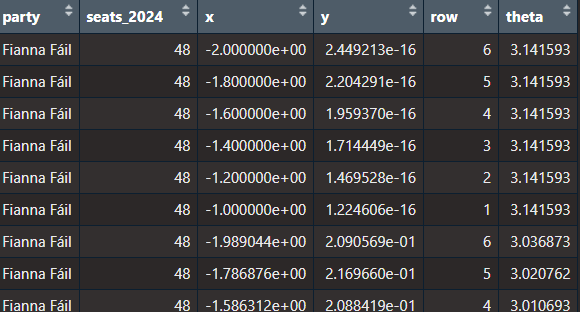
gun_reordered %>% 
filter(!is.na(response)) %>% 
  mutate(frequency = round(freq * 100), 0) -> gun_final

And graph out

ggplot(data = gun_final, aes(x = survey_question_reorder, 
            fill = response)) +
  geom_bar(data = subset(gun_final, response %in% c("Strongly favor",
           "Somewhat favor")),
           aes(y = -frequency), position="stack", stat="identity") +
  geom_bar(data = subset(gun_final, !response %in% c("Strongly favor",
            "Somewhat favor")), 
           aes(y = frequency), position="stack", stat="identity") +
  coord_flip() + 
  scale_fill_manual(values = brown_palette) +
  geom_text(data = gun_final, aes(y = frequency, label = frequency), size = 10, color = "black", position = position_stack(vjust = 0.5)) +
  bbplot::bbc_style() + 
  labs(title = "Broad support for barring people with mental illnesses 
       \n from obtaining guns, expanded background checks",
       subtitle = "% who", 
       caption = "Note: No answer resposes not shown.\n Source: Survey of U.S. adults conducted April 5-11 2021.") + 
  scale_x_discrete(labels = c(
    "Allowing people to carry conealed \n guns without a person",
    "Shortening waiting periods for people \n who want to buy guns leagally",
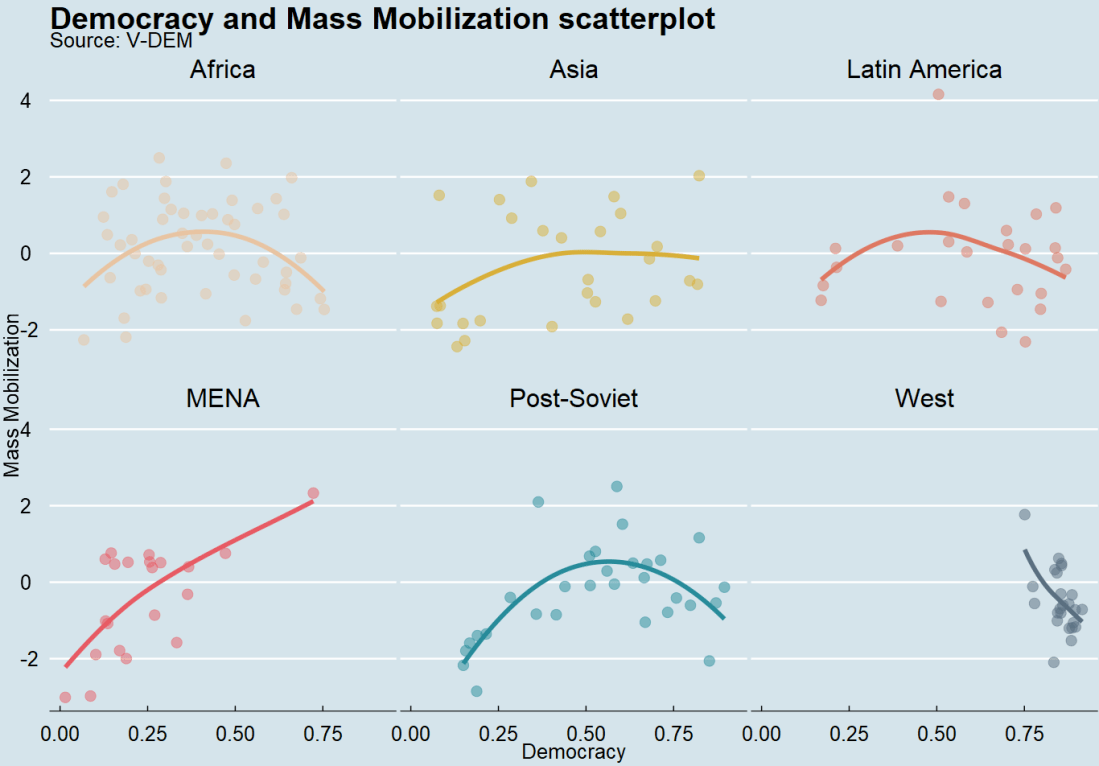
    "Allowing reachers and school officials \n to carry guns in K-12 school",
    "Allowing people to carry \n concealed guns in more places",
    "Banning assault-style weapons",
    "Banning high capacity ammunition \n magazines that hold more than 10 rounds",
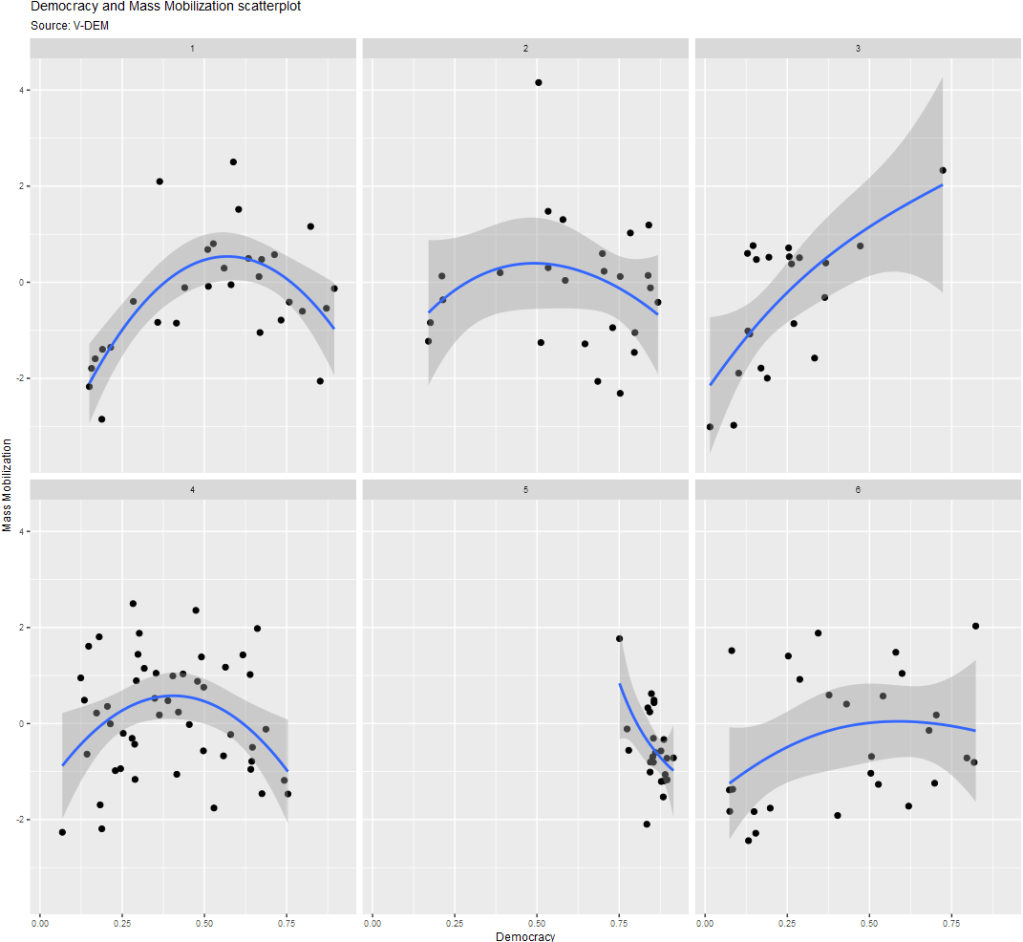
    "Creating a federal government \n database to track all gun sales",

    "Making private gun sales \n subject to background check",
    "Preventing people with mental \n illnesses from purchasing guns"
  ))
High Five Stephen Colbert GIF - Find & Share on GIPHY

Next to complete in PART 2 of this graph, I need to figure out how to add lines to graphs and add the frequency in the correct place