Examining Ireland’s foreign policy in pictures with R

Packages we will need:

library(peacesciencer)  
library(forcats)
library(ggflags)
library(tidyverse)
library(magrittr)
library(waffle)
library(bbplot)
library(rvest)

In January 2015, the Irish government published a review of Ireland’s foreign policy. The document, The Global Island: Ireland’s Foreign Policy for a Changing World offers a perspective on Ireland’s place in the world.
In this blog, we will graph out some of the key features of Ireland’ foreign policy and so we can have a quick overview of the key relationships and trends.

Excited Season 4 GIF by The Office - Find & Share on GIPHY

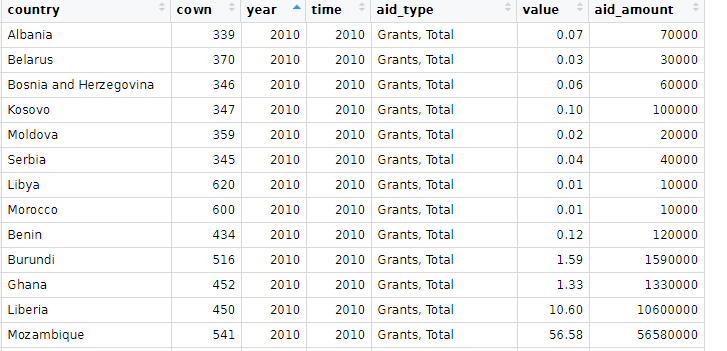
First, we will look at the aid that Ireland gives to foreign countries. This read.csv(file.choose()) will open up the file window and you can navigate to the file and data that you can download from DAC OECD website: https://data.oecd.org/oda/net-oda.htm

dac <- read.csv(file.choose())

We will filter only Ireland and clean the names with the clean_names() function from the janitor package:

dac %<>% 
  filter(Donor == "Ireland") %>% 
  clean_names()

And change the variables, adding the Correlates of War codes and cleaning up some of the countries’ names.

dac %<>% 
  mutate(cown = countrycode(recipient_2, "country.name", "cown"),
         aid_amount = value*1000000) %>%  
  select(country = recipient_2, cown,
         year, time, aid_type, value, aid_amount) %>%
  mutate(cown = ifelse(country == "West Bank and Gaza Strip", 6666,
         ifelse(country == "Serbia", 345, 
         ifelse(country == "Micronesia", 987,cown))))%>%
  filter(!is.na(cown)) 

Next we can convert dataframe to wider format so we have a value column for each aid type

dac %>% 
  distinct(country, cown, year, time, aid_type, value, .keep_all = TRUE)  %>%  
  pivot_wider(names_from = "aid_type", values_from = "aid_amount") %>% 
  mutate(across(where(is.numeric), ~ replace_na(., 0))) %>% 
  clean_names() -> dac_wider

And we graph out the three main types of aid:

dac_wider %>%
  group_by(year) %>% 
  summarise(total_humanitarian = sum(humanitarian_aid, na.rm = TRUE),
  total_technical = sum(technical_cooperation, na.rm = TRUE),
  total_development_food_aid = sum(development_food_aid)) %>% 
  ungroup() %>% 
  pivot_longer(!year, names_to = "aid_type", values_to = "aid_value") %>% 
  ggplot(aes(x = year, y = aid_value, groups = aid_type)) + 
  geom_line(aes(color = aid_type), size = 2, show_guide  = FALSE) +
  geom_point(aes(color = aid_type), fill = "white", shape = 21, size = 3, stroke = 2) +
  bbplot::bbc_style()  +
  scale_y_continuous(labels = scales::comma) + 
  scale_x_discrete(limits = c(2010:2018)) +
  labs(title = "Irish foreign aid by aid type (2010 - 2018)",
       subtitle = ("Source: OECD DAC")) +
  scale_color_discrete(name = "Aid type", 
        labels = c("Development and Food", "Humanitarian", "Technical"))

We will look at total ODA aid:

dac %>% 
  count(aid_type) %>% 
  arrange(desc(n)) %>% 
  knitr::kable(format = "html")
aid_type n
Imputed Multilateral ODA 2298
Memo: ODA Total, excl. Debt 1292
Memo: ODA Total, Gross disbursements 1254
ODA: Total Net 1249
Grants, Total 1203
Technical Cooperation 541
ODA per Capita 532
Humanitarian Aid 518
ODA as % GNI (Recipient) 504
Development Food Aid 9

And get some pretty hex colours:

pal_10 <- c("#001219","#005f73","#0a9396","#94d2bd","#e9d8a6","#ee9b00","#ca6702","#bb3e03","#ae2012","#9b2226")

And download some regime, democracy, region and continent data from the PACL datase with the democracyData() package

pacl <- redownload_pacl() 

pacl %<>% 
  mutate(regime_name = ifelse(regime == 0, "Parliamentary democracies",
         ifelse(regime == 1, "Mixed democracies",
         ifelse(regime == 2, "Presidential democracies",
         ifelse(regime == 3, "Civilian autocracies",
         ifelse(regime == 4, "Military dictatorships",
         ifelse(regime ==  5,"Royal dictatorships", regime))))))) %>%
  mutate(regime = as.factor(regime)) 

pacl %<>% 
  select(year, country = pacl_country, 
         democracy, regime_name,
         region_name = un_region_name, 
         continent_name = un_continent_name)

pacl %<>% 
  mutate(cown = countrycode(country, "country.name", "cown")) %>% 
  select(!country)

Summarise the total aid for each country across the years and choose the top 20 countries

dac %>% 
  filter(aid_type == "Memo: ODA Total, Gross disbursements") %>% 
  group_by(country) %>% 
  summarise(total_country_aid = sum(aid_amount, na.rm = TRUE)) %>% 
  ungroup() %>% 
  top_n(n = 20) %>% 
  mutate(cown = countrycode::countrycode(country, "country.name", "cown")) %>% 
  inner_join(pacl, by = "cown") %>%  
  mutate(region_name = ifelse(country == "West Bank and Gaza Strip", "Western Asia", region_name)) %>% 
  mutate(region_name = ifelse(region_name == "Western Asia", "Middle East", region_name)) %>% 
  mutate(country = ifelse(country == "West Bank and Gaza Strip", "Palestine",
  ifelse(country == "Democratic Republic of the Congo", "DR Congo",
  ifelse(country == "Syrian Arab Republic", "Syria", country)))) %>% 
  mutate(iso2 = tolower(countrycode::countrycode(country, "country.name", "iso2c"))) %>% 
  ggplot(aes(x = forcats::fct_reorder(country, total_country_aid), y = total_country_aid)) + 
  geom_bar(aes(fill = region_name), stat = "identity", width = 0.7) + 
  coord_flip() + bbplot::bbc_style() + 
  geom_flag(aes(x = country, y = -100, country = iso2), size = 12) +
  scale_fill_manual(values = pal_10) +
  labs(title = "Ireland's largest ODA foreign aid recipients, 2010 - 2018",
       subtitle = ("Source: OECD DAC")) + 
  xlab("") + ylab("") + 
  scale_x_continuous(labels = scales::comma)

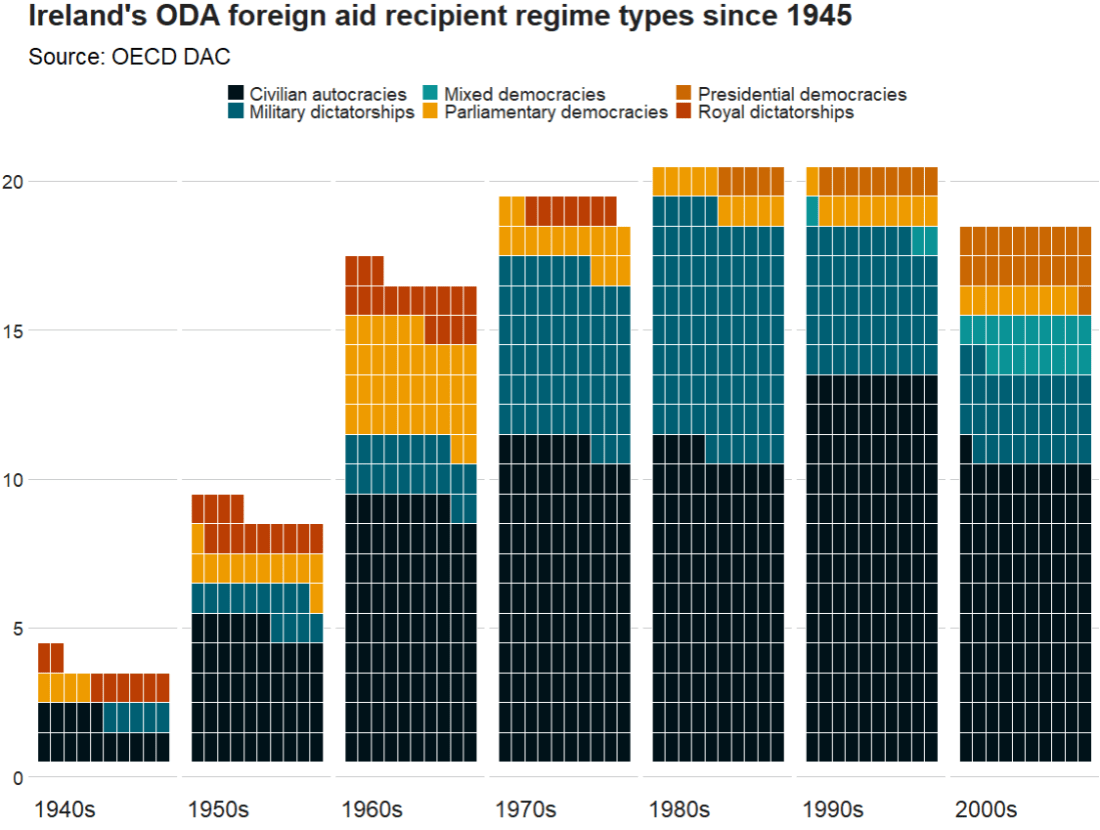
We can make a waffle plot to look at the different types of regimes to which the Irish government gave aid over the decades

 dac %>% 
  mutate(decade = substr(year, 1, 3)) %>% 
  mutate(decade = paste0(decade, "0s")) %>% 
  group_by(decade) %>% 
  count(regime_name) %>% 
  ggplot(aes(fill = regime_name, values = n)) +
  geom_waffle(color = "white", size = 0.3, n_rows = 10, flip = TRUE) +
  facet_wrap(~decade, nrow = 1, strip.position = "bottom") + 
  bbplot::bbc_style()  +
  scale_fill_manual(values = pal_10) +
   scale_x_discrete(breaks = round(seq(0, 1, by = 0.2),3)) +
  labs(title = "Ireland's ODA foreign aid recipient regime types since 1945",
       subtitle = ("Source: OECD DAC"))  

Next, we will download dyadic foreign policy similarity measures from peacesciencer.

Peacesciencer package has tools and data sets for the study of quantitative peace science. 

Click here to read more about the peacesciencer package by Steven Miller

fp_similar_df <- peacesciencer::create_dyadyears() %>% 
  add_gwcode_to_cow() %>% 
  add_fpsim()	

I am only looking at dyadic foreign policy similarity with Ireland, so filter by Ireland’s Correlates of War code, 205.

Click here to find out all countries’ COW code

fp_similar_df %<>% 
  filter(ccode1 == 205)

Data on alliance portfolios comes from the Correlates of War and is used to calculate similarity of foreign policy positions (see Altfeld & Mesquita, 1979).

The assumption is that similar alliance portfolios are the result of similar foreign policy positions.

With increasing in level of commitment, the strength of alliance commitments can be:

  1. no commitment
  2. entente
  3. neutrality or nonaggression pact
  4. defense pact

We will map out alliance similarity. This will use the measurement calculated with Cohen’s Kappa. Check out Hage’s (2011) article to read more about the different ways to measure alliance similarity.

Next we can look at UN similarity.

The UN voting variable calculates three values:

1 = Yes

2 = Abstain

3 = No

Based on these data, if two countries in a similar way on the same UN resolutions, this is a measure of the degree to which dyad members’ foreign policy positions are similar.

fp_similarity_df %>% 
  mutate(country = countrycode::countrycode(ccode2, "cown", "country.name")) %>% 
  select(country, ccode2, year,
         un_similar = kappavv) %>% 
  filter(year > 1989) %>% 
  filter(!is.na(country)) %>%
  mutate(iso2 = tolower(countrycode::countrycode(country, "country.name", "iso2c"))) %>% 
  group_by(country) %>% 
  mutate(avg_un = mean(un_similar, na.rm = TRUE)) %>%
  distinct(country, avg_un, iso2, .keep_all = FALSE) %>% 
  ungroup() %>% 
  top_n(n = 10)  -> top_un_similar

And graph out the top ten

  top_un_similar %>%
  ggplot(aes(x = forcats::fct_reorder(country, avg_un), 
             y = avg_un)) + 
  geom_bar(stat = "identity",
           width = 0.7, 
           color = "#0a85e5", 
           fill = "#0a85e5") +
  ggflags::geom_flag(aes(x = country, y = 0, country = iso2), size = 15) +
  coord_flip() + bbplot::bbc_style()  +
  ggtitle("UN voting similarity with Ireland since 1990")

If we change the top_n() to negative, we can get the bottom 10

top_n(n = -10)

We can quickly scrape data about the EU countries with the rvest package


eu_members_html <- read_html("https://en.wikipedia.org/wiki/European_Union")
eu_members_tables <- eu_members_html %>% html_table(header = TRUE, fill = TRUE)

eu_member <- eu_members_tables[[6]]

eu_member %<>% 
  janitor::clean_names()

eu_member %>% distinct(state) %>%  pull(state) -> eu_state

Last we are going to look at globalization scores. The data comes from the the KOF Globalisation Index. This measures the economic, social and political dimensions of globalisation. Globalisation in the economic, social and political fields has been on the rise since the 1970s, receiving a particular boost after the end of the Cold War.

Click here for data that you can download comes from the KOF website

kof %>%
  filter(country %in% eu_state) -> kof_eu

And compare Ireland to other EU countries on financial KOF index scores. We will put Ireland in green and the rest of the countries as grey to make it pop.

Ireland appears to follow the general EU trends and is not an outlier for financial globalisation scores.

kof_eu %>% 
  ggplot(aes(x = year,  y = finance, groups = country)) + 
  geom_line(color = ifelse(kof_eu$country == "Ireland",     "#2a9d8f", "#8d99ae"),
  size = ifelse(kof_eu$country == "Ireland", 3, 2), 
  alpha = ifelse(kof_eu$country == "Ireland", 0.9, 0.3)) +
  bbplot::bbc_style() + 
  ggtitle("Financial Globalization in Ireland, 1970 to 2020", 
          subtitle = "Source: KOF")

References

Häge, F. M. (2011). Choice or circumstance? Adjusting measures of foreign policy similarity for chance agreement. Political Analysis19(3), 287-305.

Dreher, Axel (2006): Does Globalization Affect Growth? Evidence from a new Index of Globalizationcall_made, Applied Economics 38, 10: 1091-​1110.

How to tidy up messy Wikipedia data with dplyr in R

Packages we will need:

library(rvest)
library(magrittr)
library(tidyverse)
library(waffle)
library(wesanderson)
library(ggthemes)
library(countrycode)
library(forcats)
library(stringr)
library(tidyr)
library(janitor)
library(knitr)

To see another blog post that focuses on cleaning messy strings and dates, click here to read

We are going to look at Irish embassies and missions around the world. Where are the embassies, and which country has the most missions (including embassies, consulates and representational offices)?

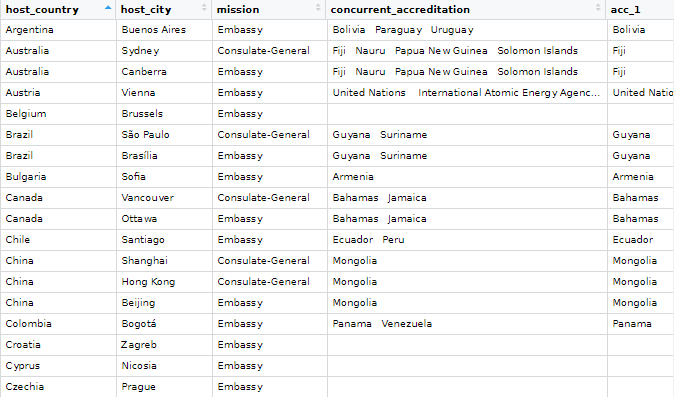
Let’s first scrape the embassy data from the Wikipedia page. Here is how it looks on the webpage.

It is a bit confusing because Ireland does not have a mission in every country. Argentina, for example, is the embassy for Bolivia, Paraguay and Uruguay.

Also, there are some consulates-general and other mission types.

Some countries have more than one mission, such as UK, Canada, US etc. So we are going to try and clean up this data.

Click here to read more about scraping data with the rvest package

embassies_html <- read_html("https://en.wikipedia.org/wiki/List_of_diplomatic_missions_of_Ireland")

embassies_tables <- embassies_html %>% html_table(header = TRUE, fill = TRUE)

We will extract the data from the different continent tables and then bind them all together at the end.

africa_emb <- embassies_tables[[1]]

africa_emb %<>% 
  mutate(continent = "Africa")

americas_emb <- embassies_tables[[2]]

americas_emb %<>% 
  mutate(continent = "Americas")

asia_emb <- embassies_tables[[3]]

asia_emb %<>% 
  mutate(continent = "Asia")

europe_emb <- embassies_tables[[4]]

europe_emb %<>% 
  mutate(continent = "Europe")

oceania_emb <- embassies_tables[[5]]

oceania_emb %<>% 
  mutate(continent = "Oceania")

Last, we bind all the tables together by rows, with rbind()

ire_emb <- rbind(africa_emb, 
                 americas_emb,
                 asia_emb,
                 europe_emb,
                 oceania_emb)

And clean up the names with the janitor package

ire_emb %<>% 
  janitor::clean_names() 

There is a small typo with a hypen and so there are separate Consulate General and Consulate-General… so we will clean that up to make one single factor level.

ire_emb %<>% 
  mutate(mission = ifelse(mission == "Consulate General", "Consulate-General", mission))

We can count out how many of each type of mission there are

ire_emb %>% 
  group_by(mission) %>% 
  count() %>% 
  arrange(desc(n)) %>% 
  knitr::kable(format = "html")
mission n
Embassy 69
Consulate-General 17
Liaison office 1
Representative office 1

A quick waffle plot

ire_emb %>% 
  group_by(mission) %>%
  count() %>% 
  arrange(desc(n)) %>% 
  ungroup() %>% 
  ggplot(aes(fill = mission, values = n)) +
  geom_waffle(color = "white", size = 1.5, 
              n_rows = 20, flip = TRUE) + 
  bbplot::bbc_style() +
  scale_fill_manual(values= wes_palette("Darjeeling1", n = 4))

We can remove the notes in brackets with the sub() function.

Square brackets equire a regex code \\[.*

ire_emb %<>% 
  select(!ref) %>%
  mutate(host_country = sub("\\[.*", "", host_country))

We delete the subheadings from the concurrent_accreditation column with the str_remove() function from the stringr package

ire_emb %<>%
  mutate(concurrent_accreditation = stringr::str_remove(concurrent_accreditation, "International Organizations:\n")) %>% 
  mutate(concurrent_accreditation = stringr::str_remove(concurrent_accreditation, "Countries:\n"))

After that, we will tackle the columns with many countries. The many variables in one cell violates the principles of tidy data.

Tonight Show Help GIF by The Tonight Show Starring Jimmy Fallon - Find & Share on GIPHY

For example, we saw above that Argentina is the embassy for three other countries.

We will use the separate() function from the tidyr package to make a column for each country that shares an embassy with the host country.

This separate() function has six arguments:

First we indicate the column with will separate out with the col argument

Next with into, we write the new names of the columns we will create. Nigeria has the most countries for which it is accredited to be the designated embassy with nine. So I create nine accredited countries columns to accommodate this max number.

The point I want to cut up the original column is at the \n which is regex for a large space

I don’t want to remove the original column so I set remove to FALSE

ire_emb %<>%
  separate(
    col = "concurrent_accreditation",
    into = c("acc_1", "acc_2", "acc_3", "acc_4", "acc_5", "acc_6", "acc_7", "acc_8", "acc_9"),
    sep = "\n",
    remove = FALSE,
    extra = "warn",
    fill = "warn") %>% 
  mutate(across(where(is.character), str_trim)) 

Some countries have more than one type of mission, so I want to count each type of mission for each country and create a new variable with the distinct() and pivot_wider() functions

Click here to read more about turning long to wide format data

With the across() function we can replace all numeric variables with NA to zeros

Click here to read more about the across() function

ire_emb %>% 
  group_by(host_country, mission) %>% 
  mutate(number_missions = n())  %>% 
  distinct(host_country, mission, .keep_all = TRUE) %>% 
  ungroup() %>% 
  pivot_wider(!c(host_city, concurrent_accreditation:count_accreditation), 
              names_from = mission, 
              values_from = number_missions) %>% 
  janitor::clean_names() %>% 
  mutate(across(where(is.numeric), ~ replace_na(., 0))) %>% 
  select(!host_country) -> ire_wide

Before we bind the two datasets together, we need to only have one row for each country.

ire_emb %>% 
  distinct(host_country, .keep_all = TRUE) -> ire_dist

And bind them together:

ire_full <- cbind(ire_dist, ire_wide) 
Excited Aubrey Plaza GIF by Film Independent Spirit Awards - Find & Share on GIPHY

We can graph out where the embassies are with the geom_polygon() in ggplot

First we download the map data from dplyr and add correlates of war codes so we can easily join the datasets together with right_join()

First, we add correlates of war codes

Click here to read more about the countrycode package

ire_full %<>%
    mutate(cown = countrycode(host_country, "country.name", "cown")) 
world_map <- map_data("world")

world_map %<>% 
  mutate(cown = countrycode::countrycode(region, "country.name", "cown"))

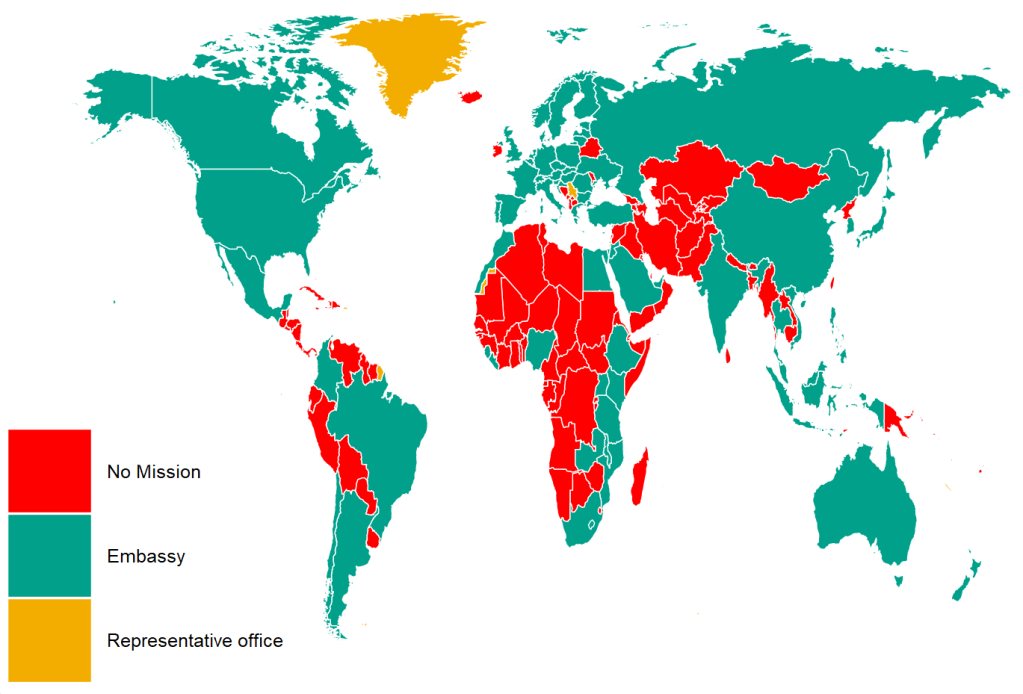
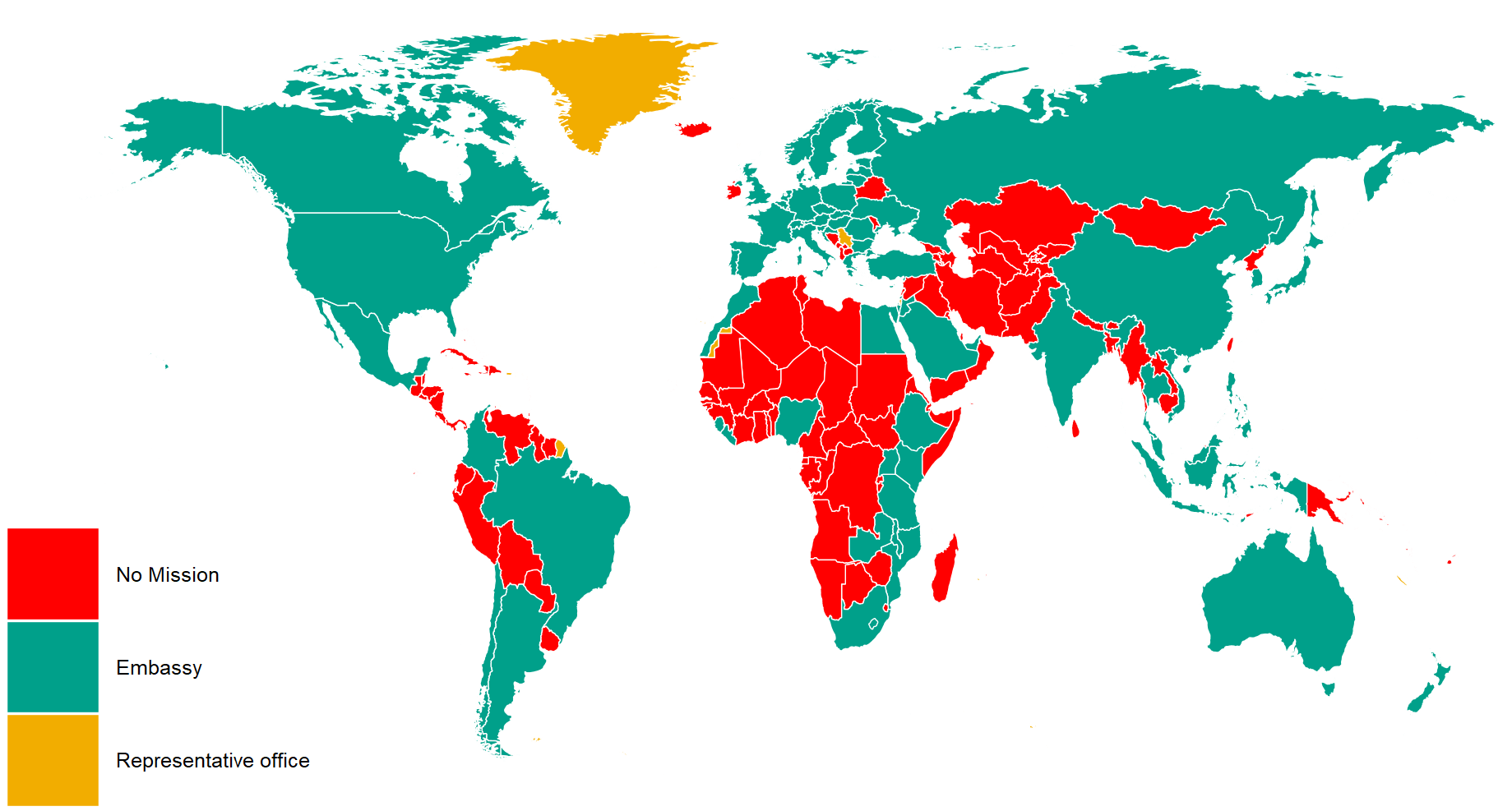
I reorder the variables with the fct_relevel() function from the forcats package. This is just so they can better match the color palette from wesanderson package. Green means embassy, red for no mission and orange for representative office.

ire_full %>%
  right_join(world_map, by = "cown") %>% 
  filter(region != "Antarctica") %>% 
  mutate(mission = ifelse(is.na(mission), replace_na("No Mission"), mission)) %>% 
  mutate(mission = forcats::fct_relevel(mission,c("No Mission", "Embassy","Representative office"))) %>%
  ggplot(aes(x = long, y = lat, group = group)) + 
  geom_polygon(aes(fill = mission), color = "white", size = 0.5)  -> ire_map

And we can change how the map looks with the ggthemes package and colors from wesanderson package

  ire_map + ggthemes::theme_map() +
  theme(legend.key.size = unit(3, "cm"),
        text = element_text(size = 30),
        legend.title = element_blank()) + 
  scale_fill_manual(values = wes_palette("Darjeeling1", n = 4))

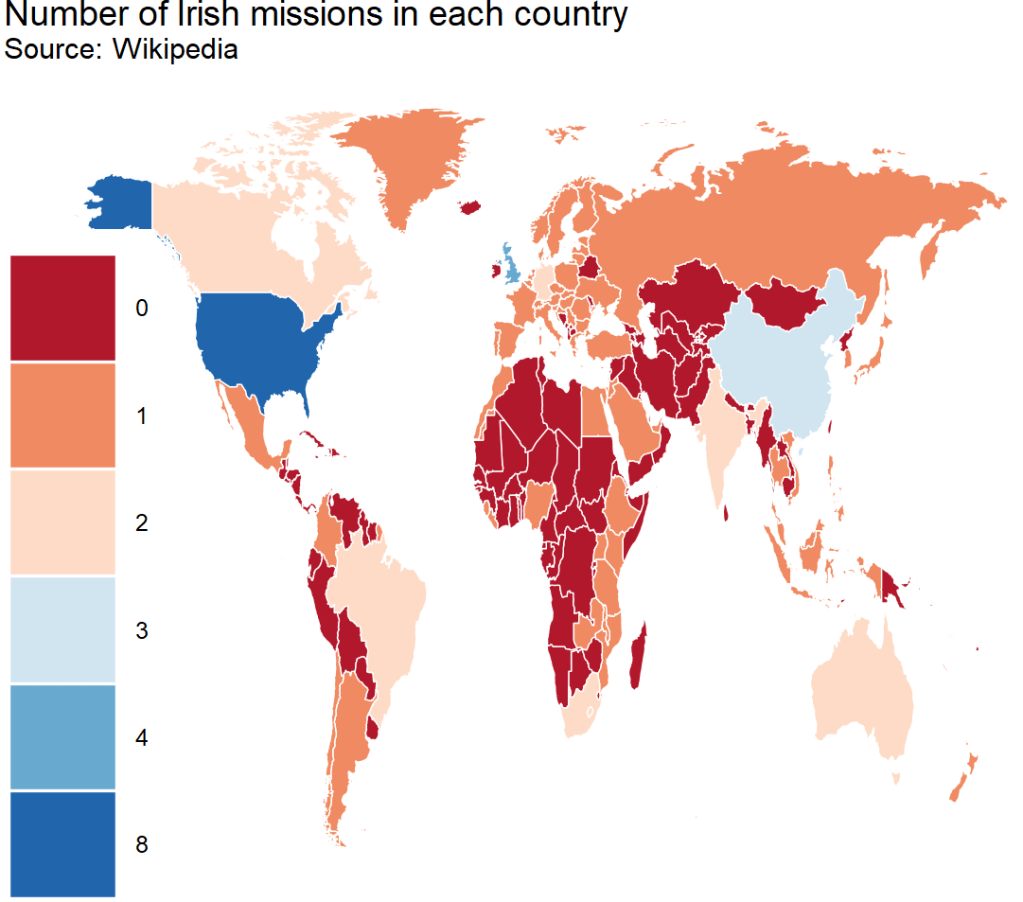
And we can count how many missions there are in each country

US has the hightest number with 8 offices, followed by UK with 4 and China with 3

ire_full %>%
  right_join(world_map, by = "cown") %>% 
  filter(region != "Antarctica") %>% 
  mutate(sum_missions = rowSums(across(embassy:representative_office))) %>% 
  mutate(sum_missions = replace_na(sum_missions, 0)) %>%  
  ggplot(aes(x = long, y = lat, group = group)) + 
  geom_polygon(aes(fill = as.factor(sum_missions)), color = "white", size = 0.5)  +
  ggthemes::theme_map() +
  theme(legend.key.size = unit(3, "cm"),
        text = element_text(size = 30),
        legend.title = element_blank()) + 
scale_fill_brewer(palette = "RdBu") + 
  ggtitle("Number of Irish missions in each country",
          subtitle = "Source: Wikipedia")

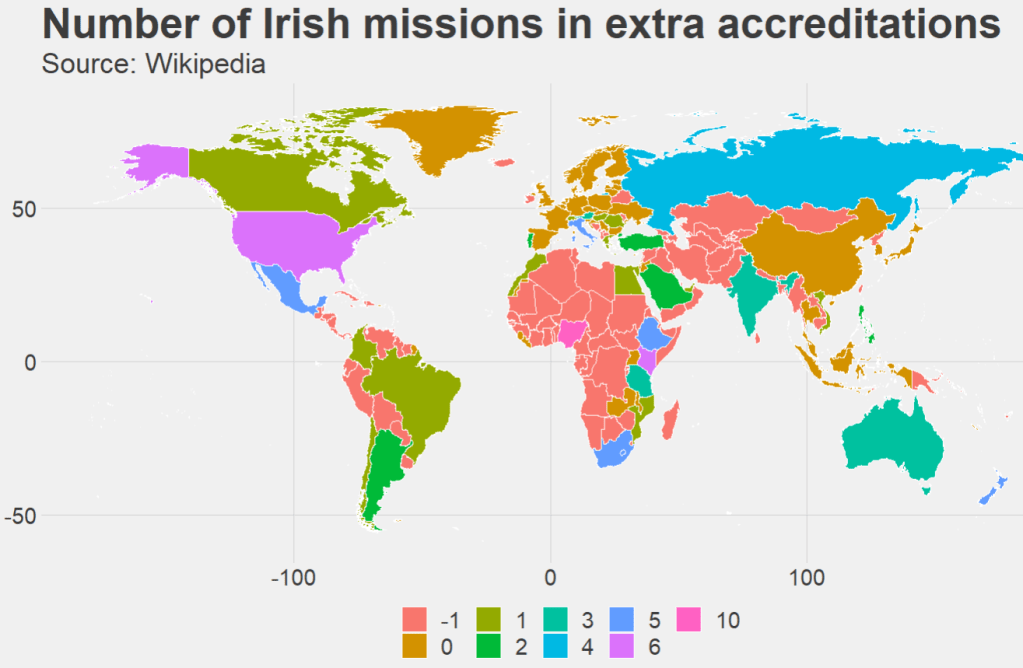
Last we can count the number of accredited countries that each embassy has. Nigeria has the most, in charge of 10 other countries across northern and central Africa.

ire_full %>% 
  right_join(world_map, by = "cown") %>% 
  filter(region != "Antarctica") %>%
  mutate(count_accreditation = str_count(concurrent_accreditation, pattern = "\n")) %>% 
  mutate(count_accreditation = replace_na(count_accreditation, -1)) %>%  
  ggplot(aes(x = long, y = lat, group = group)) + 
  geom_polygon(aes(fill = as.factor(count_accreditation)), color = "white", size = 0.5)  +
  ggthemes::theme_fivethirtyeight() +
  theme(legend.key.size = unit(1, "cm"),
        text = element_text(size = 30),
        legend.title = element_blank()) + 
  ggtitle("Number of Irish missions in extra accreditations",
          subtitle = "Source: Wikipedia")
Happy Maya Rudolph GIF - Find & Share on GIPHY

Running tidy t-tests with the infer package in R

Packages we will need:

library(tidyverse)
library(tidyr)
library(infer)
library(bbplot)
library(ggthemes)

For this t-test, we will compare US millenials and non-millenials and their views of the UK’s influence in the world.

The data will come from Chicago Council Survey of American Public Opinion on U.S. Foreign Policy

Click here to download 2017 policy survey data

The survey investigates American public opinion on foreign policy. It focuses on respondents’ opinions of the United States’ leadership role in the world and the challenges the country faces domestically and internationally.

The question on the UK’s influence asks how much influence you think the UK has in the world. Please answer on a 0 to 10 scale; with 0 meaning they are not at all influential and 10 meaning they are extremely influential.

First we select and recreate the variables

fp %>%
  select(
    milennial = XMILLENIALSSAMPLEFLAG,
    uk_influence = Q50_10) %>%
  separate(
    col = milennial,
    into = c("milennial_num", "milennial_char"),
    sep = '[)]',
    remove = TRUE) %>% 
  mutate(
     uk_influence = as.character(uk_influence),
     uk_influence = parse_number(uk_influence)) %>% 
  filter(uk_influence != -1) %>% 
  tidyr::drop_na(milennial_char) -> mil_fp

With the infer package, we can run a t-test:

mil_fp %>% 
  t_test(formula = uk_influence ~ milennial_char,
         alternative = "less")%>% 
  kable(format = "html")
statistic t_df p_value alternative estimate lower_ci upper_ci
-3.048249 1329.469 0.0011736 less -0.3274509 -Inf -0.1506332

There is a statistically significant difference between milennials and non-milennials.

We can graph a box plot.

mil_fp %>% 
  ggplot(mapping = aes(x = milennial_char,
                       y = uk_influence,
                       fill = milennial_char)) +
  geom_jitter(aes(color = milennial_char),
              size = 2, alpha = 0.5, width = 0.3) +
  geom_boxplot(alpha = 0.4) +
  coord_flip() + bbplot::bbc_style() +
  scale_fill_manual(values = my_palette) + 
  scale_color_manual(values = my_palette)

And a quick graph to compare UK with other countries: Germany and South Korea

mil_fp %>% 
  select(milennial_char, uk_influence, sk_influence, ger_influence) %>% 
  pivot_longer(!milennial_char, names_to = "survey_question", values_to = "response")  %>% 
  group_by(survey_question, response) %>% 
  summarise(n = n()) %>%
  mutate(freq = n / sum(n)) %>% 
  ungroup() %>% 
  filter(!is.na(response)) %>% 
  mutate(survey_question = case_when(survey_question == "uk_influence" ~ "UK",
survey_question == "ger_influence" ~ "Germany",
survey_question == "sk_influence" ~ "South Korea",
TRUE ~ as.character(survey_question))) %>% 
  ggplot() +
  geom_bar(aes(x = forcats::fct_reorder(survey_question, freq), 
               y = freq, fill = as.factor(response)), 
           color = "#e5e5e5", 
           size = 2, 
           position = "stack",
           stat = "identity") + 
  coord_flip() + 
  scale_fill_brewer(palette = "RdBu") + 
  ggthemes::theme_fivethirtyeight() + 
  ggtitle("View of Influence in the world?") +
  theme(legend.title = element_blank(),
        legend.position = "top",
        legend.key.size = unit(0.78, "cm"),
        text = element_text(size = 25),
        legend.text = element_text(size = 20))

Check model assumptions with easystats package in R

Packages we will need:

install.packages("easystats", repos = "https://easystats.r-universe.dev")
library(easystats)
easystats::install_suggested()

Easystats is a collection of R packages, which aims to provide a framework to tame the scary R statistics and their pesky models, according to their github repo.

Click here to browse the github and here to go to the specific perfomance package CRAN PDF

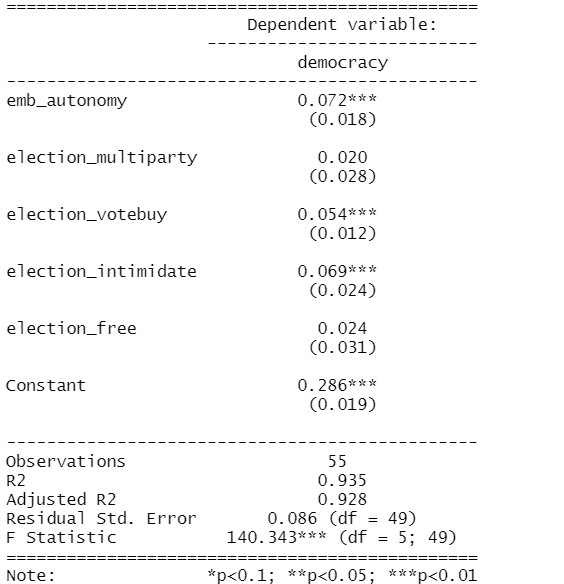
First run your regression. I will try to explain variance is Civil Society Organization participation (CSOs) with the independent variables in my model with Varieties of Democracy data in 1990.

cso_model <- lm(cso_part ~ education_level + mortality_rate + democracy,data = vdem_90)
Dependent variable:
cso_part
education_level-0.017**
(0.007)
mortality_rate-0.00001
(0.00004)
democracy0.913***
(0.064)
Constant0.288***
(0.054)
Observations134
R20.690
Adjusted R20.682
Residual Std. Error0.154 (df = 130)
F Statistic96.243*** (df = 3; 130)
Note:*p<0.1; **p<0.05; ***p<0.01
Excited Season 2 GIF by The Office - Find & Share on GIPHY

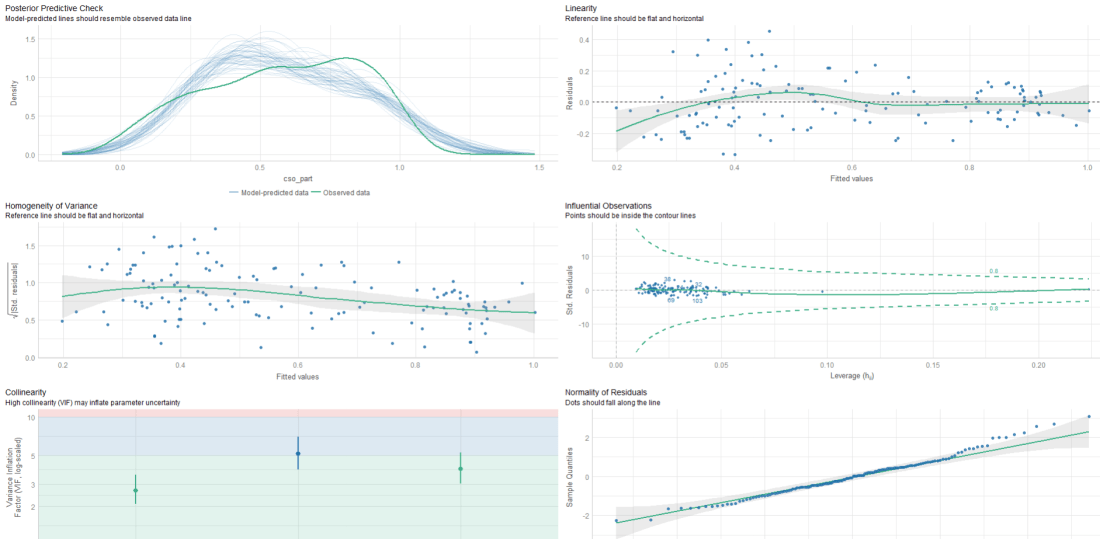
Then we check the assumptions:

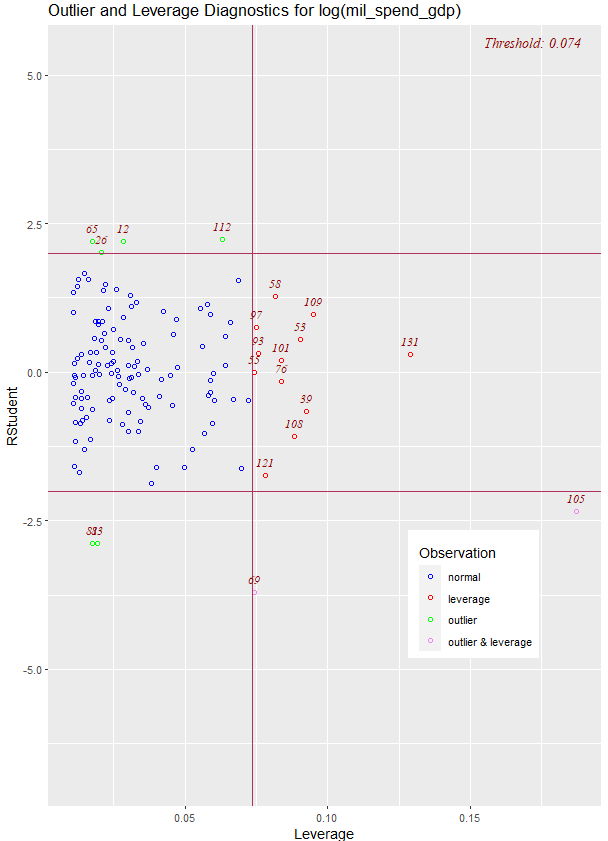
performance::check_model(cso_model)

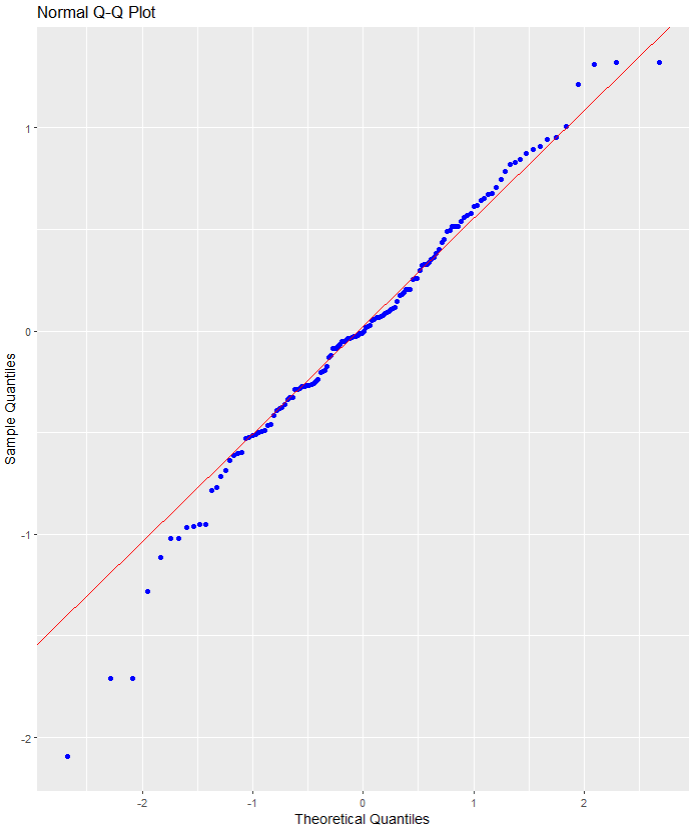
Comparing North and South Korean UN votes at the General Assembly with unvotes package

Packages we will use

Llibrary(unvotes)
library(lubridate)
library(tidyverse)
library(magrittr)
library(bbplot)
library(waffle)
library(stringr)
library(wordcloud)
library(waffle)
library(wesanderson)

Last September 17th 2021 marked the 30th anniversary of the entry of North Korea and South Korea into full membership in the United Nations. Prior to this, they were only afforded observer status.

keia.org

The Two Koreas Mark 30 Years of UN Membership: The Road to Membership

Let’s look at the types of voting that both countries have done in the General Assembly since 1991.

First we can download the different types of UN votes from the unvotes package

un_votes <- unvotes::un_roll_calls

un_votes_issues <- unvotes::un_roll_call_issues

unvotes::un_votes -> country_votes 

Join them all together and filter out any country that does not have the word “Korea” in its name.

un_votes %>% 
  inner_join(un_votes_issues, by = "rcid") %>% 
  inner_join(country_votes, by = "rcid") %>% 
  mutate(year = format(date, format = "%Y")) %>%
  filter(grepl("Korea", country)) -> korea_un

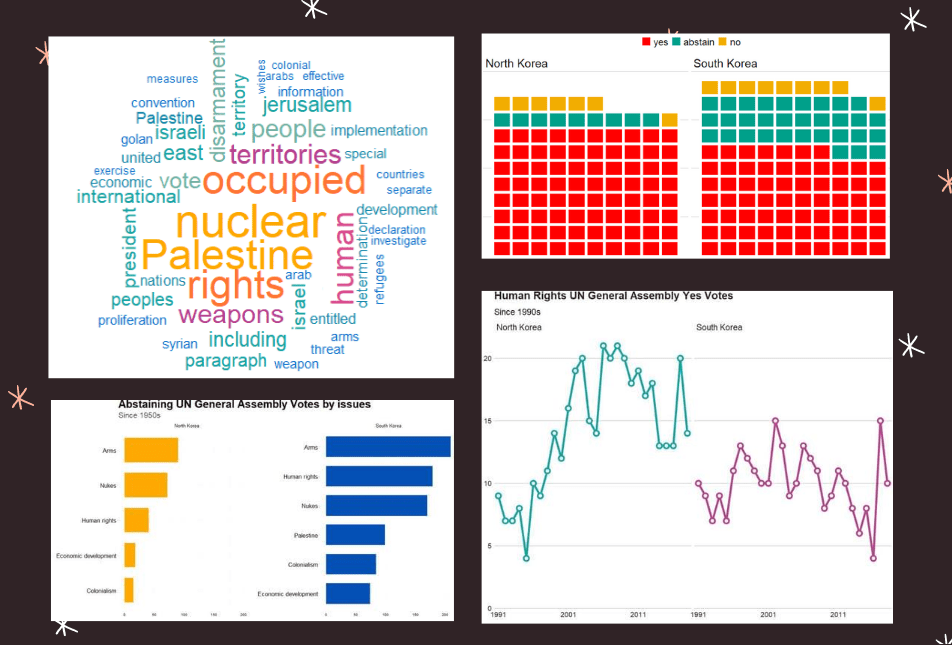
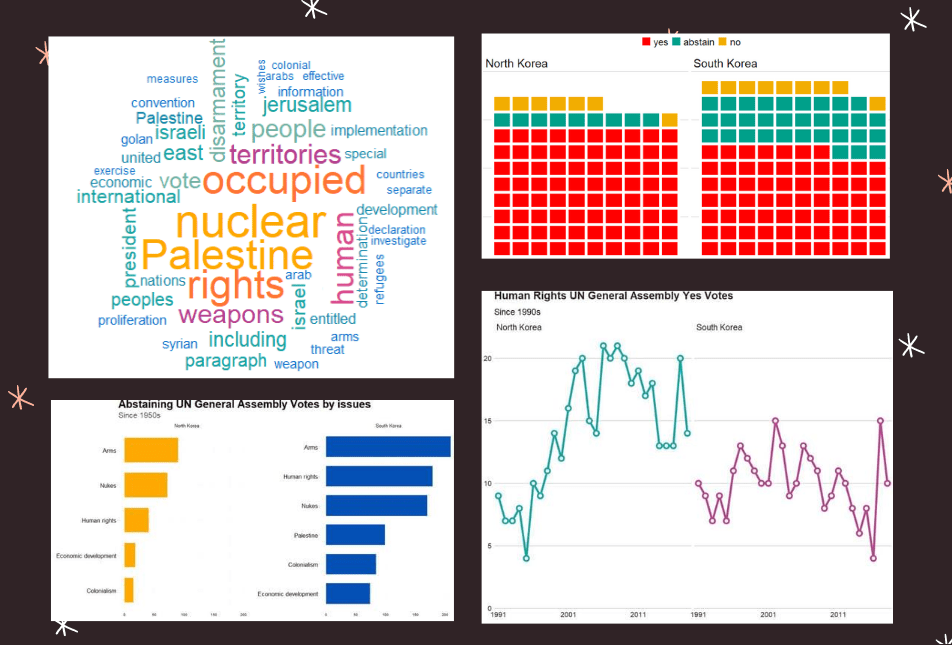
First we can make a wordcloud of all the different votes for which they voted YES. Is there a discernable difference in the types of votes that each country supported?

First, download the stop words that we can remove (such as the, and, if)

data("stop_words") 

Then I will make a North Korean dataframe of all the votes for which this country voted YES. I remove some of the messy formatting with the gsub argument and count the occurence of each word. I get rid of a few of the procedural words that are more related to the technical wording of the resolutions, rather than related to the tpoic of the vote.

nk_yes_votes <- korea_un %>% 
  filter(country == "North Korea") %>% 
  filter(vote == "yes") %>%  
  select(descr, year) %>% 
  mutate(decade = substr(year, 1, 3)) %>% 
  mutate(decade = paste0(decade, "0s")) %>% 
  # group_by(decade) %>% 
  unnest_tokens(word, descr) %>% 
  mutate(word = gsub(" ", "", word)) %>% 
  mutate(word = gsub('_', '', word)) %>% 
  count(word, sort = TRUE) %>% 
  ungroup() %>% 
  anti_join(stop_words)  %>% 
  mutate(word = case_when(grepl("palestin", word) ~ "Palestine", 
                          grepl("nucl", word) ~ "nuclear",
                          TRUE ~ as.character(word)))  %>%
  filter(word != "resolution") %>% 
  filter(word != "assembly") %>% 
  filter(word != "draft") %>% 
  filter(word != "committee") %>% 
  filter(word != "requested") %>% 
  filter(word != "report") %>% 
  filter(word != "practices") %>% 
  filter(word != "affecting") %>% 
  filter(word != "follow") %>% 
  filter(word != "acting") %>% 
  filter(word != "adopted") 

Next, we count the number of each word


nk_yes_votes %<>% 
  count(word) %>% 
  arrange(desc(n))

We want to also remove the numbers

nums <- nk_yes_votes %>% filter(str_detect(word, "^[0-9]")) %>% select(word) %>% unique()

And remove the stop words

nk_yes_votes %<>%
  anti_join(nums, by = "word")

Choose some nice colours

my_colors <- c("#0450b4", "#046dc8", "#1184a7","#15a2a2", "#6fb1a0", 
               "#b4418e", "#d94a8c", "#ea515f", "#fe7434", "#fea802")

And lastly, plot the wordcloud with the top 50 words

wordcloud(nk_yes_votes$word, 
   nk_yes_votes$n, 
   random.order = FALSE, 
   max.words = 50, 
   colors = my_colors)

If we repeat the above code with South Korea:

There doesn’t seem to be a huge difference. But this is not a very scientfic approach; I just like the look of them!

Next we will compare the two countries how many votes they voted yes, no or abstained from…

korea_un %>% 
  group_by(country, vote) %>% 
  count() %>% 
  mutate(count_ten = n /25) %>% 
  ungroup() %>% 
  ggplot(aes(fill = vote, values = count_ten)) +
  geom_waffle(color = "white",
              size = 2.5,
              n_rows = 10,
              flip = TRUE) +
  facet_wrap(~country) + bbplot::bbc_style() +
  scale_fill_manual(values = wesanderson::wes_palette("Darjeeling1"))

AND some tweaking with Canva

Next we can look more in detail at the votes that they countries abstained from voting in.

We can use the tidytext function that reorders the geom_bar in each country. You can read the blog of Julie Silge to learn more about the functions, it is a bit tricky but it fixes the problem of randomly ordered bars across facets.

https://juliasilge.com/blog/reorder-within/

korea_un %>%
  filter(vote == "abstain") %>% 
  mutate(issue = case_when(issue == "Nuclear weapons and nuclear material" ~ "Nukes",
issue == "Arms control and disarmament" ~ "Arms",
issue == "Palestinian conflict" ~ "Palestine",
TRUE ~ as.character(issue))) %>% 
  select(country, issue, year) %>% 
  group_by(issue, country) %>% 
  count() %>% 
  ungroup() %>% 
  group_by(country) %>% 
  mutate(country = as.factor(country),
         issue = reorder_within(issue, n, country)) %>%
  ggplot(aes(x = reorder(issue, n), y = n)) + 
  geom_bar(stat = "identity", width = 0.7, aes(fill = country)) + 
  labs(title = "Abstaining UN General Assembly Votes by issues",
       subtitle = ("Since 1950s"),
       caption = "         Source: unvotes ") +
  xlab("") + 
  ylab("") +
  facet_wrap(~country, scales = "free_y") +
  scale_x_reordered() +
  coord_flip() + 
  expand_limits(y = 65) + 
  ggthemes::theme_pander() + 
  scale_fill_manual(values = sample(my_colors)) + 
 theme(plot.background = element_rect(color = "#f5f9fc"),
        panel.grid = element_line(colour = "#f5f9fc"),
        # axis.title.x = element_blank(),
        # axis.text.x = element_blank(),
        axis.text.y = element_text(color = "#000500", size = 16),
       legend.position = "none",
        # axis.title.y = element_blank(),
        axis.ticks.x = element_blank(),
        text = element_text(family = "Gadugi"),
        plot.title = element_text(size = 28, color = "#000500"),
        plot.subtitle = element_text(size = 20, color = "#484e4c"),
        plot.caption = element_text(size = 20, color = "#484e4c"))

South Korea was far more likely to abstain from votes that North Korea on all issues

Next we can simply plot out the Human Rights votes that each country voted to support. Even though South Korea has far higher human rights scores, North Korea votes in support of more votes on this topic.

korea_un %>% 
  filter(year < 2019) %>% 
  filter(issue == "Human rights") %>% 
  filter(vote == "yes") %>% 
  group_by(country, year) %>% 
  count() %>% 
  ggplot(aes(x = year, y = n, group = country, color = country)) + 
  geom_line(size = 2) + 
  geom_point(aes(color = country), fill = "white", shape = 21, size = 3, stroke = 2.5) +
  scale_x_discrete(breaks = round(seq(min(korea_un$year), max(korea_un$year), by = 10),1)) +
  scale_y_continuous(expand = c(0, 0), limits = c(0, 22)) + 
  bbplot::bbc_style() + facet_wrap(~country) + 
  theme(legend.position = "none") + 
  scale_color_manual(values = sample(my_colors)) + 
  labs(title = "Human Rights UN General Assembly Yes Votes ",
       subtitle = ("Since 1990s"),
       caption = "         Source: unvotes ")

All together:

Download and graph UN votes data with the unvotes package in R

Packages we will need:

library(unvotes)
library(lubridate)
library(tidyverse)
library(magrittr)
library(bbplot)
library(waffle)

How to download UN votes to R.

This package was created by David Robinson. Click here to read the CRAN PDF.

Pop Tv Congrats GIF by Schitt's Creek - Find & Share on GIPHY

We will download both the votes roll calls and the issues. Then we can use the inner_join() variable to add them together by the ID.

un_votes <- unvotes::un_roll_calls

un_votes_issues <- unvotes::un_roll_call_issues

un_votes %<>% 
  inner_join(un_votes_issues, by = "rcid")

We can create a year variable with the format() function and extract the year with “%Y”

un_votes %<>% 
  mutate(year = format(date, format = "%Y")) 

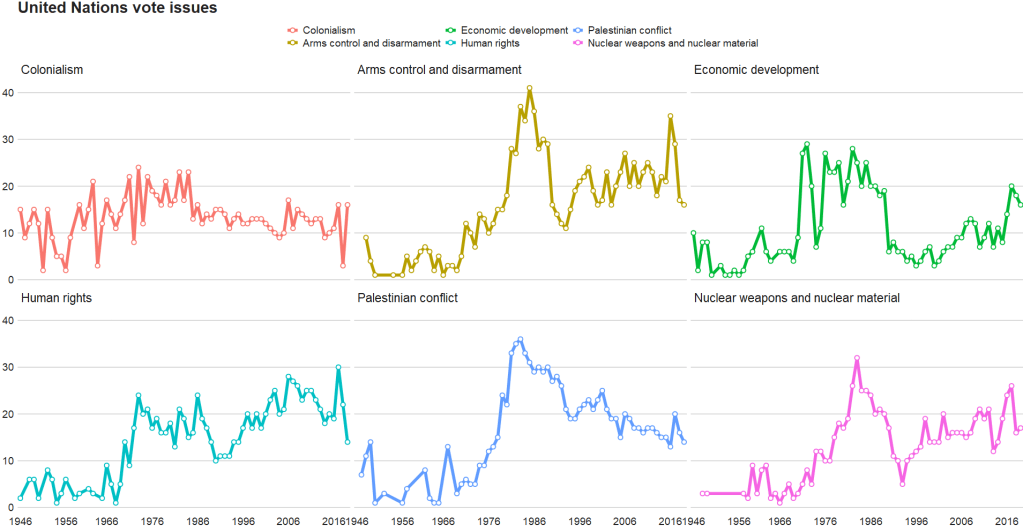
And graph out the count of each type of UN vote issue

un_votes %>% 
  group_by(year) %>% 
  count(issue) %>% 
  ggplot(aes(x = year, y = n, group = issue, color = issue)) + 
  geom_line(size = 2) + 
  geom_point(aes(color = issue), fill = "white", 
             shape = 21, size = 2, stroke = 1) +
  scale_x_discrete(breaks = round(seq(min(un_votes$year), max(un_votes$year), by = 10),1)) +
  bbplot::bbc_style() + facet_wrap(~issue)

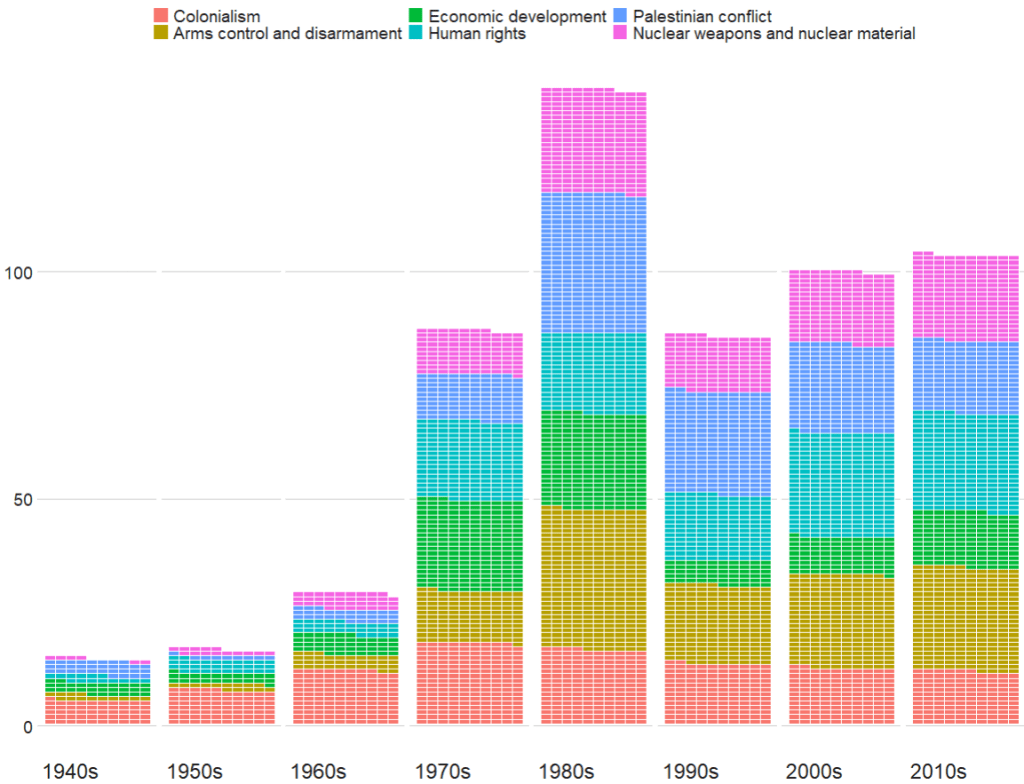
Next we can look at which decade had the most votes across the issues with the waffle package

Click here to read more about the waffle package

un_votes %>% 
  mutate(decade = substr(year, 1, 3)) %>% 
  mutate(decade = paste0(decade, "0s")) %>% 
  
  group_by(decade) %>% 
  count(issue) %>% 
  
  ggplot(aes(fill = issue, values = n)) +
  geom_waffle(color = "white",
              size = 0.3,
              n_rows = 10, 
              flip = TRUE) +
  facet_wrap(~decade, nrow = 1, strip.position = "bottom") + 
  bbplot::bbc_style()  +
  scale_x_discrete(breaks = round(seq(0, 1, by = 0.2),3)) 

The 1980s were a prolific time for the UNGA with voting, with arms control being the largest share of votes. And it has stablised in the decades since.

Well Done Applause GIF by CBC - Find & Share on GIPHY

Next we can look at votes in total

un_votes %>% 
  mutate(issue = case_when(issue == "Nuclear weapons and nuclear material" ~ "Nukes",
                           issue == "Arms control and disarmament" ~ "Arms",
                           issue == "Palestinian conflict" ~ "Palestine",
                           TRUE ~ as.character(issue))) %>% 
  count(issue) %>%  
  ggplot(aes(x = reorder(issue, n), y = n, fill = as.factor(issue))) + 
  geom_bar(stat = "identity") + 
  coord_polar("x", start = 0, direction = -1)  + 
  ggthemes::theme_pander()  +
  bbplot::bbc_style() + 
    theme(axis.text = element_blank(),
          axis.title.x = element_blank(),
          axis.title.y = element_blank(),
          axis.ticks = element_blank(),
          text = element_text(size = 25),
          panel.grid = element_blank()) + 
    ggtitle(label = "UN Votes by issue ", 
            subtitle = "Source: unvotes package")

Grouping, counting words and making wordclouds

library(tidytext)
library(wordcloud)
library(knitr)
library(kableExtra)

How to make wordclouds in R!

First, download stop words (such as and, the, of) to filter out of the dataset

data("stop_words")

Then we will will unnest tokens and count the occurences of each word in each decade.

tokens <- democracy_aid %>%
  select(description, year) %>% 
  mutate(decade = substr(year, 1, 3)) %>% 
  mutate(decade = paste0(decade, "0s")) %>% 
  group_by(decade) %>% 
  unnest_tokens(word, activity_description) %>% 
  count(word, sort = TRUE) %>% 
  ungroup() %>% 
  anti_join(stop_words) 

nums <- tokens %>% filter(str_detect(word, "^[0-9]")) %>% select(word) %>% unique()

tokens %<>%
  anti_join(nums, by = "word") 

And with the kable() function we can make a HTML table that I copy and paste to this blog. Below I rewrite the HTML to change the headings

tokens %>% 
    group_by(decade) %>% 
    top_n(n = 10,
          wt = n)  %>%
    arrange(decade, desc(n)) %>%
    arrange(desc(n)) %>%
    knitr::kable("html")
decade word n
2010s rights 4541
2010s local 3981
2010s youth 3778
2010s promote 3679
2010s democratic 3618
2010s public 3444
2010s national 3060
2010s political 3020
2010s human 3009
2010s organization 2711
2000s rights 2548
2000s human 1745
2000s local 1544
2000s conduct 1381
2000s political 1257
2000s training 1217
2000s promote 1142
2000s public 1121
2000s democratic 1071
2000s national 988

Create a vector of colors:

my_colors <- c("#0450b4", "#046dc8", "#1184a7","#15a2a2", "#6fb1a0", 
               "#b4418e", "#d94a8c", "#ea515f", "#fe7434", "#fea802")
Always Sunny Reaction GIF - Find & Share on GIPHY
tokens %<>% 
  mutate(word = ifelse(grepl("democr", word), "democracy", 
                ifelse(grepl("politi", word), "politics", 
                ifelse(grepl("institut", word), "institution", 
                ifelse(grepl("govern", word), "government", 
                ifelse(grepl("organiz", word), "organization", 
                ifelse(grepl("elect", word), "election", word))))))) 

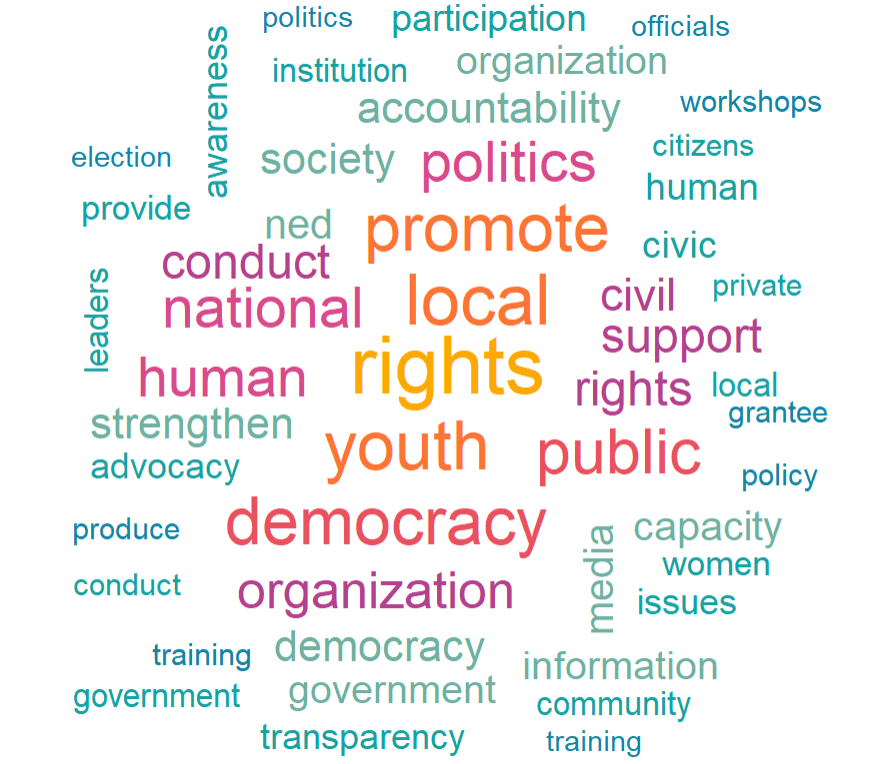
wordcloud(tokens$word, tokens$n, random.order = FALSE, max.words = 50, colors = my_colors)
2010s Decade Word Count
2010s rights 4541
2010s local 3981
2010s youth 3778
2010s promote 3679
2010s democratic 3618
2010s public 3444
2010s national 3060
2010s political 3020
2010s human 3009
2010s organization 2711
2000s Decade Word Count
2000s rights 2548
2000s human 1745
2000s local 1544
2000s conduct 1381
2000s political 1257
2000s training 1217
2000s promote 1142
2000s public 1121
2000s democratic 1071
2000s national 988

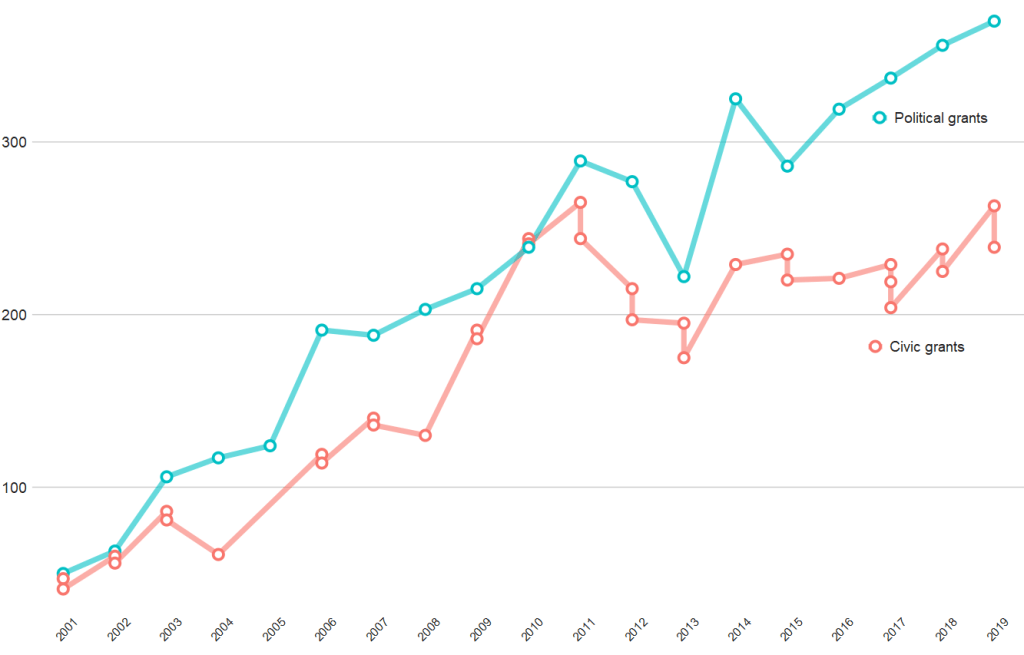
And if we compare civic versus politically-oriented aid, we can see that more money goes towards projects that have political or electoral aims rather than civic or civil society education goals

tokens %>% 
  group_by(year) %>% 
  top_n(n = 20,
        wt = n) %>% 
  mutate(word = case_when(word == "party" ~ "political",
                          word == "parties" ~ "political",
                          word == "election" ~ "political",
                          word == "electoral" ~ "political",
                          word == "civil" ~ "civic", 
                          word == "civic" ~ "civic",
                          word == "social" ~ "civic",
                          word == "education" ~ "civic",
                          word == "society" ~ "civic", 
                          TRUE ~ as.character(word))) %>% 
  filter(word == "political" | word == "civic") %>% 
  ggplot(aes(x = year, y = n, group = word)) + 
  geom_line(aes(color = word ), size = 2.5,alpha = 0.6)  +
  geom_point(aes(color = word ), fill = "white", 
             shape = 21, size = 3, stroke = 2) +
  bbplot::bbc_style() + 
  scale_x_discrete(limits = c(2001:2019)) +
  theme(axis.text.x= element_text(size = 15,
                                  angle = 45)) +
  scale_color_discrete(name = "Aid type", labels = c("Civic grants", "Political grants"))

Wrangling and graphing UN Secretaries-General data with R

Packages we will need:

library(tidyverse)
library(janitor)
library(rvest)
library(countrycode)
library(magrittr)
library(lubridate)
library(ggflags)
library(scales)

According to Urquhart (1995) in his article, “Selecting the World’s CEO”,

From the outset, the U.N. secretary
general has been an important part of the
institution, not only as its chief executive,
but as both symbol and guardian of the
original vision of the organization.
There, however, specific agreement has
ended. The United Nations, like any
important organization, needs strong and
independent leadership, but it is an inter-
governmental organization, and govern
ments have no intention of giving up
control of it. While the secretary-general
can be extraordinarily useful in times of
crisis, the office inevitably embodies
something more than international coop
eration, sometimes even an unwelcome
hint of supranationalism. Thus, the atti-
tude of governments toward the United
Nations’ chief and only elected official is
and has been necessarily ambivalent.

(Urquhart, 1995: 21)

So who are these World CEOs? We’ll examine more in this dataset.

First, we will scrape the data from the Wikipedia

sg_html <- read_html("https://en.wikipedia.org/wiki/Secretary-General_of_the_United_Nations")
sg_tables <- sg_html %>% html_table(header = TRUE, fill = TRUE)
sg <- sg_tables[[2]]

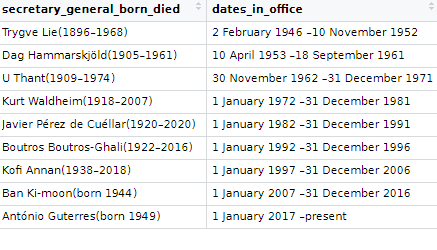
The table we scrape is a bit of a hot mess in this state …. but we can fix it

Donald Glover Pizza GIF - Find & Share on GIPHY

We can first use the clean_names() function from the janitor package

A quick way to clean up the table and keep only the rows with the names of the Secretaries-General is to use the distinct() function. Last we filter out the rows and select out the columns we don’t want.

sg %>% 
  clean_names() %>% 
  distinct(no, .keep_all = TRUE) %>% 
  filter(no != "–") %>% 
  select(!c(portrait, ref))-> sg_clean

Already we can see a much cleaner table. However, the next problem is that the names and their years of birth / death are in one cell.

Also the dates in office are combined together.

So we can use the separate() function from tidyr to make new variables for each piece of information.

First we will separate the name of the Secretary-General from their date of birth and death.

We supply the two new variable names to the into = argument.

We then use the regex code pattern [()] to indicate where we want to separate the character string into two separate columns. In this instance the regex pattern is for what is after the round brackets (

I want to remove the original cluttered varaible so remove = TRUE

sg_clean %<>% 
  separate(
    col = secretary_general_born_died,
    into = c("sec_gen", "born_died"),
    sep = '[()]',
    remove = TRUE) 

We can repeat this step to create a separate born and died variable. This time the separator symbol is a hyphen And so we do not need regex pattern; we can just indicate a hyphen.

sg_clean %<>% 
  separate(
    col = born_died,
    into = c("born", "died"),
    sep = '–',
    remove = TRUE)  

And I want to ignore the “present” variable, so I extract the numbers with the parse_number() function, converting things from characters to numbers

sg_clean %<>% 
  mutate(born = parse_number(born))

Last, we repeat with the dates in office. This is also easily seperated by indicating the hyphen.

sg_clean %<>% 
  separate(
    col = dates_in_office,
    into = c("start_office", "end_office"),
    sep = '–',
    remove = TRUE)  

We convert the word “present” to the actual present date

sg_clean %<>% 
  mutate(end_office = ifelse(end_office == "present", "5 May 2022", end_office))

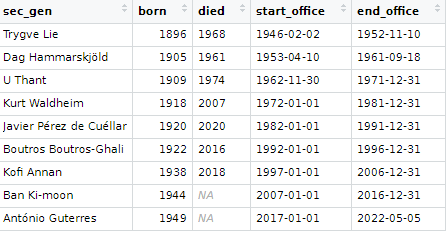
We use the lubridate dmy() function to convert the character strings to date class variables.

sg_clean %<>% 
  mutate(start_office = dmy(start_office),
         end_office = dmy(end_office))

We can calculate the length of time that each Secretary-General was in office with the difftime() function.

sg_clean %<>% 
  mutate(duration_days = difftime(end_office, start_office, units = "days"),
         duration_years = round(duration_days / 365, 2),
         duration_years = as.integer(duration_years))

Next we can compare the different durations and see which Secretary-General was longest or shortest in office.

sg_clean %>% 
  mutate(duration_days = difftime(end_office, start_office)) %>%  
  mutate(iso2 = tolower(countrycode::countrycode(country_of_origin, "country.name", "iso2c"))) %>% 
  ggplot(aes(x = forcats::fct_reorder(sec_gen, duration_days), y = duration_days)) + 
  geom_bar(aes(fill = un_regional_group), stat = "identity", width = 0.7) + 
  coord_flip() + bbplot::bbc_style() + 
  ggflags::geom_flag(aes(x = sec_gen, y = -100, country = iso2), size = 12) +
  scale_fill_manual(values = le_palette) +
  labs(title = "Longest serving UN Secretaries General",
       subtitle = ("Source: Wikipedia")) + 
  xlab("") + ylab("") 

We can make a quick pie-chart to compare regions. We can see that Secretaries-General from the West have had the most time in office

sg_text <- sg_count %>% 
  arrange(desc(un_regional_group)) %>%
  mutate(prop = sum_days / sum(sg_count$sum_days) *100) %>%
  mutate(ypos = cumsum(prop)- 0.5*prop )

sg_text %>% 
  count(un_regional_group)

sg_text %>%
  mutate(region = case_when(un_regional_group == "Western European & others" ~ "Europe",
         un_regional_group == "Latin American& Caribbean" ~ "Latin America",
         un_regional_group == "Asia & Pacific" ~ "Asia", 
         TRUE ~ as.character(un_regional_group))) %>% 
  ggplot(aes(x = "", y = prop, fill = region)) +
  geom_bar(stat = "identity", width = 1) +
  geom_text(aes(y = ypos + 1, label = round(prop, 0)), color = "white", size = 15) +
  coord_polar("y", start = 0) +
  theme_void() +
  ggtitle("Length of Secretaries General in office across regions") + 
  scale_fill_manual(values = le_palette) + 
  theme(legend.title = element_blank(),
        legend.text = element_text(size = 20), 
        plot.title = element_text(size = 30))

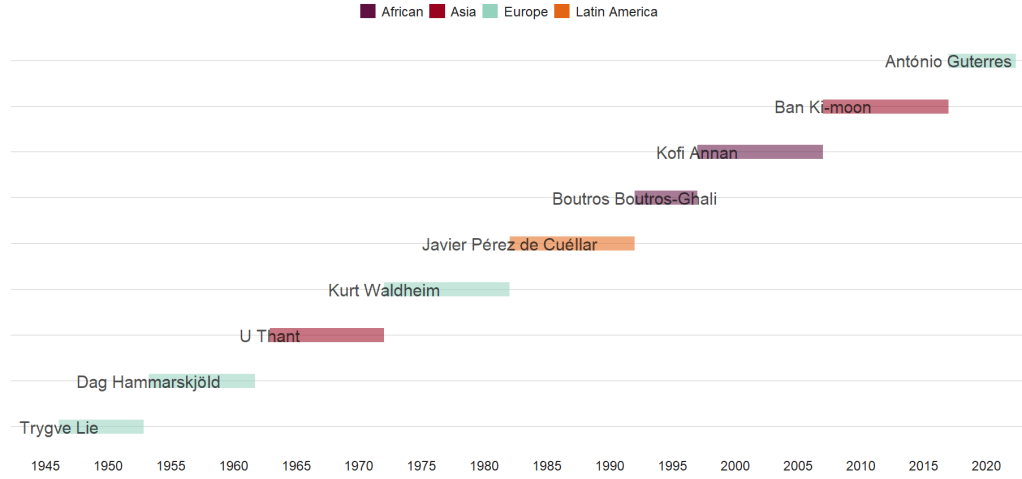
We can create a Gantt-like chart to track the timeline for the different men (all men!)

Click here to read more about timelines in R

sg_clean %>% 
  mutate(region = case_when(un_regional_group == "Western European & others" ~ "Europe",un_regional_group == "Latin American& Caribbean" ~ "Latin America",un_regional_group == "Asia & Pacific" ~ "Asia", TRUE ~ as.character(un_regional_group))) %>%
  ggplot(aes(x = as.Date(start_office), 
             y = no, 
             color = region)) +
  geom_segment(aes(xend = as.Date(end_office), 
                   yend = no, alpha = 0.9,
                   color = region), size = 9)  +
  geom_text(aes(label = sec_gen), 
            color = "black", 
            alpha = 0.7,
            size = 8, show.legend = FALSE) +
  bbplot::bbc_style() +
  scale_color_manual(values = le_palette) + 
  scale_x_date(breaks = scales::breaks_pretty(15))
Confused Donald Glover GIF - Find & Share on GIPHY

References

Urquhart, B. (1995). Selecting the world’s CEO: Remembering the Secretaries-General. Foreign Affairs, 21-26.

Donald Glover Community GIF - Find & Share on GIPHY

Scraping and wrangling UN peacekeeping data with tidyr package in R

Packages we will need:

library(tidyverse)
library(rvest)
library(magrittr)
library(tidyr)
library(countrycode)
library(democracyData)
library(janitor)
library(waffle)

For this blog post, we will look at UN peacekeeping missions and compare across regions.

Despite the criticisms about some operations, the empirical record for UN peacekeeping records has been robust in the academic literature

“In short, peacekeeping intervenes in the most difficult
cases, dramatically increases the chances that peace will
last, and does so by altering the incentives of the peacekept,
by alleviating their fear and mistrust of each other, by
preventing and controlling accidents and misbehavior by
hard-line factions, and by encouraging political inclusion”
(Goldstone, 2008: 178).

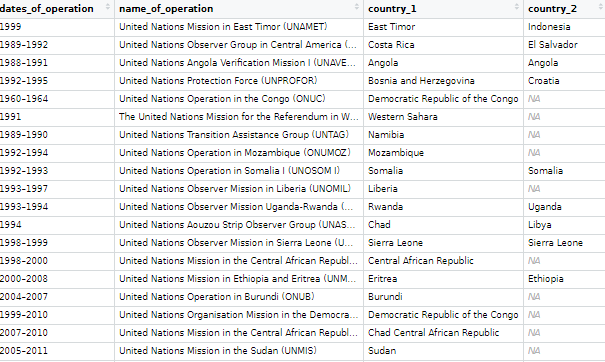
The data on the current and previous PKOs (peacekeeping operations) will come from the Wikipedia page. But the variables do not really lend themselves to analysis as they are.

Amy Coney Barrett Snl GIF by Saturday Night Live - Find & Share on GIPHY

Once we have the url, we scrape all the tables on the Wikipedia page in a few lines

pko_members <- read_html("https://en.wikipedia.org/wiki/List_of_United_Nations_peacekeeping_missions")
pko_tables <- pko_members %>% html_table(header = TRUE, fill = TRUE)

Click here to read more about the rvest package for scraping data from websites.

pko_complete_africa <- pko_tables[[1]]
pko_complete_americas <- pko_tables[[2]]
pko_complete_asia <- pko_tables[[3]]
pko_complete_europe <- pko_tables[[4]]
pko_complete_mena <- pko_tables[[5]]

And then we bind them together! It’s very handy that they all have the same variable names in each table.

rbind(pko_complete_africa, pko_complete_americas, pko_complete_asia, pko_complete_europe, pko_complete_mena) -> pko_complete

Next, we will add a variable to indicate that all the tables of these missions are completed.

pko_complete %<>% 
  mutate(complete = ifelse(!is.na(pko_complete$Location), "Complete", "Current"))

We do the same with the current missions that are ongoing:

pko_current_africa <- pko_tables[[6]]
pko_current_asia <- pko_tables[[7]]
pko_current_europe <- pko_tables[[8]]
pko_current_mena <- pko_tables[[9]]

rbind(pko_current_europe, pko_current_mena, pko_current_asia, pko_current_africa) -> pko_current

pko_current %<>% 
  mutate(complete = ifelse(!is.na(pko_current$Location), "Current", "Complete"))

We then bind the completed and current mission data.frames

rbind(pko_complete, pko_current) -> pko

Then we clean the variable names with the function from the janitor package.

pko_df <-  pko %>% 
  janitor::clean_names()

Next we’ll want to create some new variables.

We can make a new row for each country that is receiving a peacekeeping mission. We can paste all the countries together and then use the separate function from the tidyr package to create new variables.

 pko_df %>%
  group_by(conflict) %>%
  mutate(location = paste(location, collapse = ', ')) %>% 
  separate(location,  into = c("country_1", "country_2", "country_3", "country_4", "country_5"), sep = ", ")  %>% 
  ungroup() %>% 
  distinct(conflict, .keep_all = TRUE) %>% 

Next we can create a new variable that only keeps the acroynm for the operation name. I took these regex codes from the following stack overflow link

pko_df %<>% 
  mutate(acronym = str_extract_all(name_of_operation, "\\([^()]+\\)")) %>% 
  mutate(acronym = substring(acronym, 2, nchar(acronym)-1)) %>% 
  separate(dates_of_operation, c("start_date", "end_date"), "–")

I will fill in the end data for the current missions that are still ongoing in 2022

pko_df %<>% 
  mutate(end_date = ifelse(complete == "Current", 2022, end_date)) 

And next we can calculate the duration for each operation

pko_df %<>% 
  mutate(end_date = as.integer(end_date)) %>% 
  mutate(start_date = as.integer(start_date)) %>% 
  mutate(duration = ifelse(!is.na(end_date), end_date - start_date, 1)) 

I want to compare regions and graph out the different operations around the world.

We can download region data with democracyData package (best package ever!)

Snl Season 47 GIF by Saturday Night Live - Find & Share on GIPHY
pacl <- redownload_pacl()

pacl %>% 
  select(cown = pacl_cowcode,
        un_region_name, un_continent_name) %>% 
  distinct(cown, .keep_all = TRUE) -> pacl_region

We join the datasets together with the inner_join() and add Correlates of War country codes.

pko_df %<>% 
  mutate(cown = countrycode(country_1, "country.name", "cown")) %>%   mutate(cown = ifelse(country_1 == "Western Sahara", 605, 
                       ifelse(country_1 == "Serbia", 345, cown))) %>% 
  inner_join(pacl_region, by = "cown")

Now we can start graphing our duration data:

pko_df %>% 
  ggplot(mapping = aes(x = forcats::fct_reorder(un_region_name, duration), 
                       y = duration, 
                       fill = un_region_name)) +
  geom_boxplot(alpha = 0.4) +
  geom_jitter(aes(color = un_region_name),
              size = 6, alpha = 0.8, width = 0.15) +
  coord_flip() + 
  bbplot::bbc_style() + ggtitle("Duration of Peacekeeping Missions")
Years

We can see that Asian and “Western Asian” – i.e. Middle East – countries have the longest peacekeeping missions in terns of years.

pko_countries %>% 
  filter(un_continent_name == "Asia") %>%
  unite("country_names", country_1:country_5, remove = TRUE,  na.rm = TRUE, sep = ", ") %>% 
  arrange(desc(duration)) %>% 
  knitr::kable("html")
Start End Duration Region Country
1949 2022 73 Southern Asia India, Pakistan
1964 2022 58 Western Asia Cyprus, Northern Cyprus
1974 2022 48 Western Asia Israel, Syria, Lebanon
1978 2022 44 Western Asia Lebanon
1993 2009 16 Western Asia Georgia
1991 2003 12 Western Asia Iraq, Kuwait
1994 2000 6 Central Asia Tajikistan
2006 2012 6 South-Eastern Asia East Timor
1988 1991 3 Southern Asia Iran, Iraq
1988 1990 2 Southern Asia Afghanistan, Pakistan
1965 1966 1 Southern Asia Pakistan, India
1991 1992 1 South-Eastern Asia Cambodia, Cambodia
1999 NA 1 South-Eastern Asia East Timor, Indonesia, East Timor, Indonesia, East Timor
1958 NA 1 Western Asia Lebanon
1963 1964 1 Western Asia North Yemen
2012 NA 1 Western Asia Syria

Next we can compare the decades

pko_countries %<>% 
  mutate(decade = substr(start_date, 1, 3)) %>% 
  mutate(decade = paste0(decade, "0s")) 

And graph it out:

pko_countries %>% 
  ggplot(mapping = aes(x = decade, 
                       y = duration, 
                       fill = decade)) +
  geom_boxplot(alpha = 0.4) +
  geom_jitter(aes(color = decade),
              size = 6, alpha = 0.8, width = 0.15) +
   coord_flip() + 
  geom_curve(aes(x = "1950s", y = 60, xend = "1940s", yend = 72),
  arrow = arrow(length = unit(0.1, "inch")), size = 0.8, color = "black",
   curvature = -0.4) +
  annotate("text", label = "First Mission to Kashmir",
           x = "1950s", y = 49, size = 8, color = "black") +
  geom_curve(aes(x = "1990s", y = 46, xend = "1990s", yend = 32),
             arrow = arrow(length = unit(0.1, "inch")), size = 0.8, color = "black",curvature = 0.3) +
  annotate("text", label = "Most Missions after the Cold War",
           x = "1990s", y = 60, size = 8, color = "black") +

  bbplot::bbc_style() + ggtitle("Duration of Peacekeeping Missions")
Years

Following the end of the Cold War, there were renewed calls for the UN to become the agency for achieving world peace, and the agency’s peacekeeping dramatically increased, authorizing more missions between 1991 and 1994 than in the previous 45 years combined.

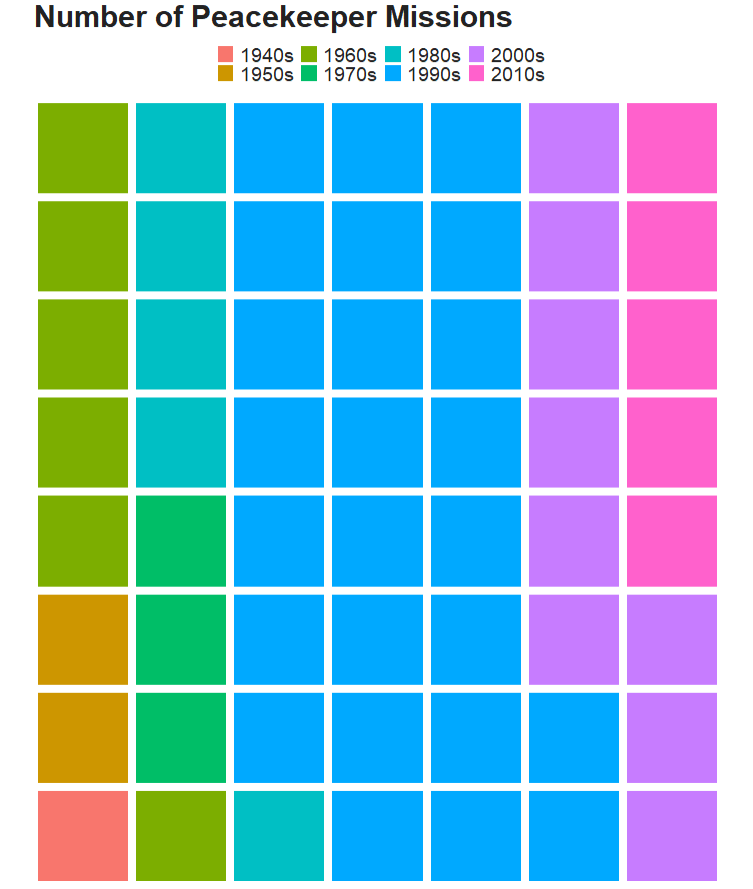
We can use a waffle plot to see which decade had the most operation missions. Waffle plots are often seen as more clear than pie charts.

Click here to read more about waffle charts in R

To get the data ready for a waffle chart, we just need to count the number of peacekeeping missions (i.e. the number of rows) in each decade. Then we fill the groups (i.e. decade) and enter the n variable we created as the value.

pko_countries %>% 
  group_by(decade) %>% 
  count() %>%  
  ggplot(aes(fill = decade, values = n)) + 
  waffle::geom_waffle(color = "white", size= 3, n_rows = 8) +
  scale_x_discrete(expand=c(0,0)) +
  scale_y_discrete(expand=c(0,0)) +
  coord_equal() +
  labs(title = "Number of Peacekeeper Missions") + bbplot::bbc_style() 
Cecily Strong Snl GIF by Saturday Night Live - Find & Share on GIPHY

If we want to add more information, we can go to the UN Peacekeeping website and download more data on peacekeeping troops and operations.

We can graph the number of peacekeepers per country

Click here to learn more about adding flags to graphs!

le_palette <- c("#5f0f40", "#9a031e", "#94d2bd", "#e36414", "#0f4c5c")

pkt %>%
  mutate(contributing_country = ifelse(contributing_country == "United Republic of Tanzania", "Tanzania",ifelse(contributing_country == "Côte d’Ivoire", "Cote d'Ivoire", contributing_country))) %>% 
  mutate(iso2 = tolower(countrycode::countrycode(contributing_country, "country.name", "iso2c"))) %>% 
  mutate(cown = countrycode::countrycode(contributing_country, "country.name", "cown")) %>% 
  inner_join(pacl_region, by = "cown") %>% 
  mutate(un_region_name = case_when(grepl("Africa", un_region_name) ~ "Africa",grepl("Eastern Asia", un_region_name) ~ "South-East Asia",
 un_region_name == "Western Africa" ~ "Middle East",TRUE ~ as.character(un_region_name))) %>% 
  filter(total_uniformed_personnel > 700) %>% 
  ggplot(aes(x = reorder(contributing_country, total_uniformed_personnel),
             y = total_uniformed_personnel)) + 
  geom_bar(stat = "identity", width = 0.7, aes(fill = un_region_name), color = "white") +
  coord_flip() +
  ggflags::geom_flag(aes(x = contributing_country, y = -1, country = iso2), size = 8) +
  # geom_text(aes(label= values), position = position_dodge(width = 0.9), hjust = -0.5, size = 5, color = "#000500") + 
  scale_fill_manual(values = le_palette) +
  labs(title = "Total troops serving as peacekeepers",
       subtitle = ("Across countries"),
       caption = "         Source: UN ") +
  xlab("") + 
  ylab("") + bbplot::bbc_style()

We can see that Bangladesh, Nepal and India have the most peacekeeper troops!

Convert event-level data to panel-level data with tidyr in R

Packages we will need:

library(tidyverse)
library(magrittr)
library(lubridate)
library(tidyr)
library(rvest)
library(janitor)

In this post, we are going to scrape NATO accession data from Wikipedia and turn it into panel data. This means turning a list of every NATO country and their accession date into a time-series, cross-sectional dataset with information about whether or not a country is a member of NATO in any given year.

This is helpful for political science analysis because simply a dummy variable indicating whether or not a country is in NATO would lose information about the date they joined. The UK joined NATO in 1948 but North Macedonia only joined in 2020. A simple binary variable would not tell us this if we added it to our panel data.

Consoling 30 Rock GIF - Find & Share on GIPHY

We will first scrape a table from the Wikipedia page on NATO member states with a few functions form the rvest pacakage.

Click here to read more about the rvest package:

nato_members <- read_html("https://en.wikipedia.org/wiki/Member_states_of_NATO")

nato_tables <- nato_members %>% html_table(header = TRUE, fill = TRUE)

nato_member_joined <- nato_tables[[1]]

We have information about each country and the date they joined. In total there are 30 rows, one for each member of NATO.

Next we are going to clean up the data, remove the numbers in the [square brackets], and select the columns that we want.

A very handy function from the janitor package cleans the variable names. They are lower_case_with_underscores rather than how they are on Wikipedia.

Next we remove the square brackets and their contents with sub("\\[.*", "", insert_variable_name)

And the accession date variable is a bit tricky because we want to convert it to date format, extract the year and convert back to an integer.

nato_member_joined %<>% 
  clean_names() %>% 
  select(country = member_state, 
         accession = accession_3) %>% 
  mutate(member_2020 = 2020,
         country = sub("\\[.*", "", country),
         accession = sub("\\[.*", "", accession),
         accession = parse_date_time(accession, "dmy"),
         accession = format(as.Date(accession, format = "%d/%m/%Y"),"%Y"),
         accession = as.numeric(as.character(accession)))

When we have our clean data, we will pivot the data to longer form. This will create one event column that has a value of accession or member in 2020.

This gives us the start and end year of our time variable for each country.

nato_member_joined %<>% 
  pivot_longer(!country, names_to = "event", values_to = "year") 

Our dataset now has 60 observations. We see Albania joined in 2009 and is still a member in 2020, for example.

Next we will use the complete() function from the tidyr package to fill all the dates in between 1948 until 2020 in the dataset. This will increase our dataset to 2,160 observations and a row for each country each year.

Nect we will group the dataset by country and fill the nato_member status variable down until the most recent year.

nato_member_joined %<>% 
  mutate(year = as.Date(as.character(year), format = "%Y")) %>% 
  mutate(year = ymd(year)) %>% 
  complete(country, year = seq.Date(min(year), max(year), by = "year")) %>% 
  mutate(nato_member = ifelse(event == "accession", 1, 
                              ifelse(event == "member_2020", 1, 0))) %>% 
  group_by(country) %>% 
  fill(nato_member, .direction = "down") %>%
  ungroup()

Last, we will use the ifelse() function to mutate the event variable into one of three categories: 'accession‘, 'member‘ or ‘not member’.

nato_member_joined %>%
  mutate(nato_member = replace_na(nato_member, 0),
         year = parse_number(as.character(year)),
         event = ifelse(nato_member == 0, "not member", event),
         event = ifelse(nato_member == 1 & is.na(event), "member", event),
         event = ifelse(event == "member_2020", "member", event))  %>% 
  distinct(country, year, .keep_all = TRUE) -> nato_panel
High Five 30 Rock GIF - Find & Share on GIPHY

Ethnicity Dataset

epr_indo <- read_csv('/mnt/data/epr_indo.csv')

# Expand the data to have a row for each year for each group
epr_indo_expanded <- epr_indo %>%
  rowwise() %>%
  mutate(year = list(seq(from, to))) %>% 
  unnest(year) %>%
  select(-from, -to)

# Pivot the data to wide format with separate ethnicity, share, and broad_cat columns
epr_indo_wide <- epr_indo_expanded %>%
  group_by(statename, year) %>%
  mutate(index = row_number()) %>%
  ungroup() %>%
  pivot_wider(
    id_cols = c(statename, year),
    names_from = index,
    values_from = c(group, size, broad_cat),
    names_sep = "_"
  ) %>%
  # Renaming the columns for ethnicity, share, and broad category
  rename_with(~ str_replace(., "group_", "ethnicity_"), starts_with("group_")) %>%
  rename_with(~ str_replace(., "size_", "share_"), starts_with("size_")) %>%
  rename_with(~ str_replace(., "broad_cat_", "broad_cat_"), starts_with("broad_cat_"))

Lump groups together and create “other” category with forcats package

Packages we will need:

library(tidyverse)
library(forcats)
library(tidytext)
library(ggthemes)
library(democracyData)
library(magrittr)

For this blog, we are going to look at the titles of all countries’ heads of state, such as Kings, Presidents, Emirs, Chairman … understandably, there are many many many ways to title the leader of a country.

First, we will download the PACL dataset from the democracyData package.

Click here to read more about this super handy package:

If you want to read more about the variables in this dataset, click the link below to download the codebook by Cheibub et al.

pacl <- redownload_pacl()

We are going to look at the npost variable; this captures the political title of the nominal head of stage. This can be King, President, Sultan et cetera!

pacl %>% 
  count(npost) %>% 
  arrange(desc(n))

If we count the occurence of each title, we can see there are many ways to be called the head of a country!

"president"                         3693
"prime minister"                    2914
"king"                               470
"Chairman of Council of Ministers"   229
"premier"                            169
"chancellor"                         123
"emir"                               117
"chair of Council of Ministers"      111
"head of state"                       90
"sultan"                              67
"chief of government"                 63
"president of the confederation"      63
""                                    44
"chairman of Council of Ministers"    44
"shah"                                33

# ... with 145 more rows

155 groups is a bit difficult to meaningfully compare.

So we can collapse some of the groups together and lump all the titles that occur relatively seldomly – sometimes only once or twice – into an “other” category.

Clueless Movie Tai GIF - Find & Share on GIPHY

First, we use grepl() function to take the word president and chair (chairman, chairwoman, chairperson et cetera) and add them into broader categories.

Also, we use the tolower() function to make all lower case words and there is no confusion over the random capitalisation.

 pacl %<>% 
  mutate(npost = tolower(npost)) %>% 
  mutate(npost = ifelse(grepl("president", npost), "president", npost)) %>% 
  mutate(npost = ifelse(grepl("chair", npost), "chairperson", npost))

Next, we create an "other leader type" with the fct_lump_prop() function.

We specifiy a threshold and if the group appears fewer times in the dataset than this level we set, it is added into the “other” group.

pacl %<>% 
  mutate(regime_prop = fct_lump_prop(npost,
                                   prop = 0.005,
                                   other_level = "Other leader type")) %>% 
  mutate(regime_prop = str_to_title(regime_prop)) 

Now, instead of 155 types of leader titles, we have 10 types and the rest are all bundled into the Other Leader Type category

President            4370
Prime Minister       2945
Chairperson           520
King                  470
Other Leader Type     225
Premier               169
Chancellor            123
Emir                  117
Head Of State          90
Sultan                 67
Chief Of Government    63
The Office Smile GIF - Find & Share on GIPHY

The forcast package has three other ways to lump the variables together.

First, we can quickly look at fct_lump_min().

We can set the min argument to 100 and look at how it condenses the groups together:

pacl %>% 
  mutate(npost = tolower(npost)) %>% 
 
  mutate(post_min = fct_lump_min(npost,
                                   min = 100,
                                   other_level = "Other type")) %>% 
  mutate(post_min = str_to_title(post_min)) %>% 
  count(post_min) %>% 
  arrange(desc(n))
President       4370
Prime Minister  2945
Chairperson      520
King             470
Other Type       445
Premier          169
Chancellor       123
Emir             117

We can see that if the post appears fewer than 100 times, it is now in the Other Type category. In the previous example, Head Of State only appeared 90 times so it didn’t make it.

Next we look at fct_lump_lowfreq().

This function lumps together the least frequent levels. This one makes sure that “other” category remains as the smallest group. We don’t add another numeric argument.

pacl %>% 
  mutate(npost = tolower(npost)) %>% 
  mutate(post_lowfreq  = fct_lump_lowfreq(npost,
                                   other_level = "Other type")) %>% 
  mutate(post_lowfreq = str_to_title(post_lowfreq)) %>% 
  count(post_lowfreq) %>% 
  arrange(desc(n))
President       4370
Prime Minister  2945
Other Type      1844

This one only has three categories and all but president and prime minister are chucked into the Other type category.

Last, we can look at the fct_lump_n() to make sure we have a certain number of groups. We add n = 5 and we create five groups and the rest go to the Other type category.

pacl %>% 
  mutate(npost = tolower(npost)) %>% 
  mutate(post_n  = fct_lump_n(npost,
                                n = 5,
                                other_level = "Other type")) %>% 
  mutate(post_n = str_to_title(post_n)) %>% 
  count(post_n) %>% 
  arrange(desc(n))
President       4370
Prime Minister  2945
Other Type       685
Chairperson      520
King             470
Premier          169
Sums It Up The Office GIF - Find & Share on GIPHY

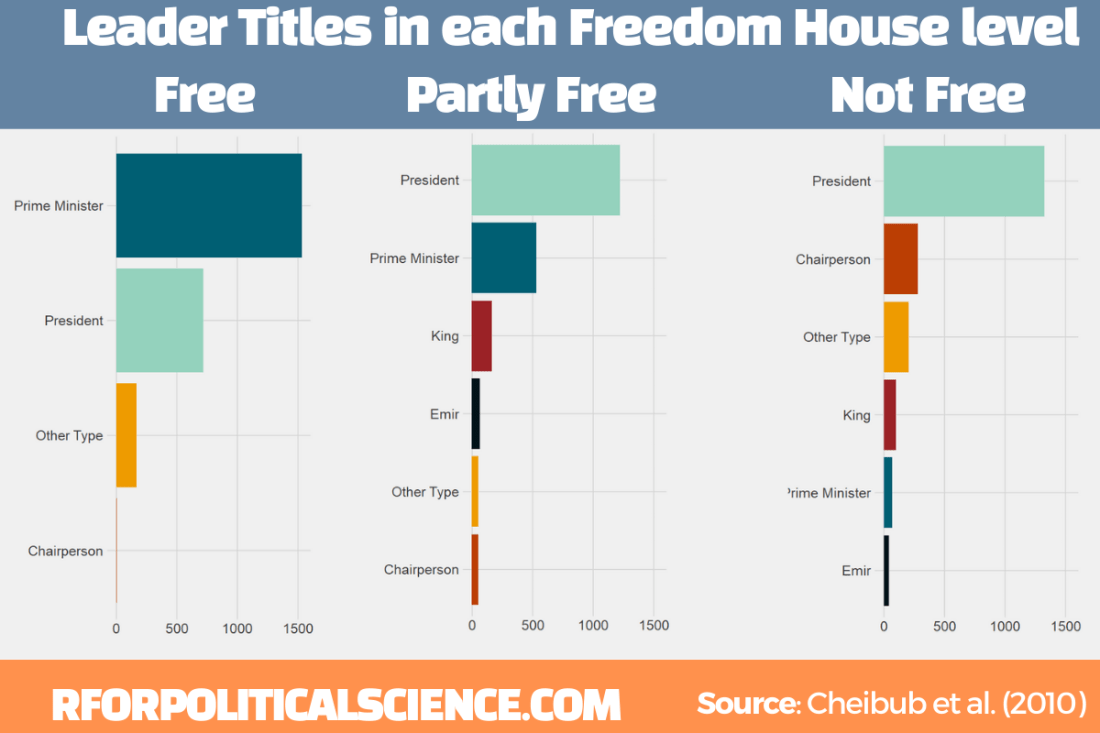
Next we can make a simple graph counting the different leader titles in free, partly free and not free Freedom House countries. We will use the download_fh() from DemocracyData package again

fh <- download_fh()

We will use the reorder_within() function from tidytext package.

Click here to read the full blog post explaining the function from Julia Silge’s blog.

First we add Freedom House data with the inner_join() function

Then we use the fct_lump_n() and choose the top five categories (plus the Other Type category we make)

pacl %<>% 
  inner_join(fh, by = c("cown", "year")) %>% 
  mutate(npost  = fct_lump_n(npost,
                  n = 5,
                  other_level = "Other type")) %>%
  mutate(npost = str_to_title(npost))

Then we group_by the three Freedom House status levels and count the number of each title:

pacl %<>% 
  group_by(status) %>% 
  count(npost) %>% 
  ungroup() %>% 

Using reorder_within(), we order the titles from most to fewest occurences WITHIN each status group:

pacl %<>%
  mutate(npost = reorder_within(npost, n, status)) 

To plot the columns, we use geom_col() and separate them into each Freedom House group, using facet_wrap(). We add scales = "free y" so that we don’t add every title to each group. Without this we would have empty spaces in the Free group for Emir and King. So this step removes a lot of clutter.

pacl_colplot <- pacl %>%
  ggplot(aes(fct_reorder(npost, n), n)) +
  geom_col(aes(fill = npost), show.legend = FALSE) +
  facet_wrap(~status, scales = "free_y") 

Last, I manually added the colors to each group (which now have longer names to reorder them) so that they are consistent across each group. I am sure there is an easier and less messy way to do this but sometimes finding the easier way takes more effort!

We add the scale_x_reordered() function to clean up the names and remove everything from the underscore in the title label.

pacl_colplot + scale_fill_manual(values = c("Prime Minister___F" = "#005f73",
                                "Prime Minister___NF" = "#005f73",
                                "Prime Minister___PF" = "#005f73",
                                
                               "President___F" = "#94d2bd",
                               "President___NF" = "#94d2bd",
                               "President___PF" = "#94d2bd",
                               
                               "Other Type___F" = "#ee9b00",
                               "Other Type___NF" = "#ee9b00",
                               "Other Type___PF" = "#ee9b00",
                               
                               "Chairperson___F" = "#bb3e03",
                               "Chairperson___NF" = "#bb3e03",
                               "Chairperson___PF" = "#bb3e03",
                               
                               "King___F" = "#9b2226",
                               "King___NF" = "#9b2226",
                               "King___PF" = "#9b2226",
                               
                               "Emir___F" = "#001219", 
                               "Emir___NF" = "#001219",
                               "Emir___PF" = "#001219")) +
  scale_x_reordered() +
  coord_flip() + 
  ggthemes::theme_fivethirtyeight() + 
  themes(text = element_size(size = 30))

In case you were curious about the free country that had a chairperson, Nigeria had one for two years.

pacl %>%
  filter(status == "F") %>% 
  filter(npost == "Chairperson") %>% 
  select(Country = pacl_country) %>% 
  knitr::kable("latex") %>%
  kableExtra::kable_classic(font_size = 30)

References

Cheibub, J. A., Gandhi, J., & Vreeland, J. R. (2010). Democracy and dictatorship revisited. Public choice143(1), 67-101.

Visualise DemocracyData with graphs and maps

Packages we will need:

library(tidyverse)
library(democracyData)
library(magrittr)
library(ggrepel)
library(ggthemes)
library(countrycode)

In this post, we will look at easy ways to graph data from the democracyData package.

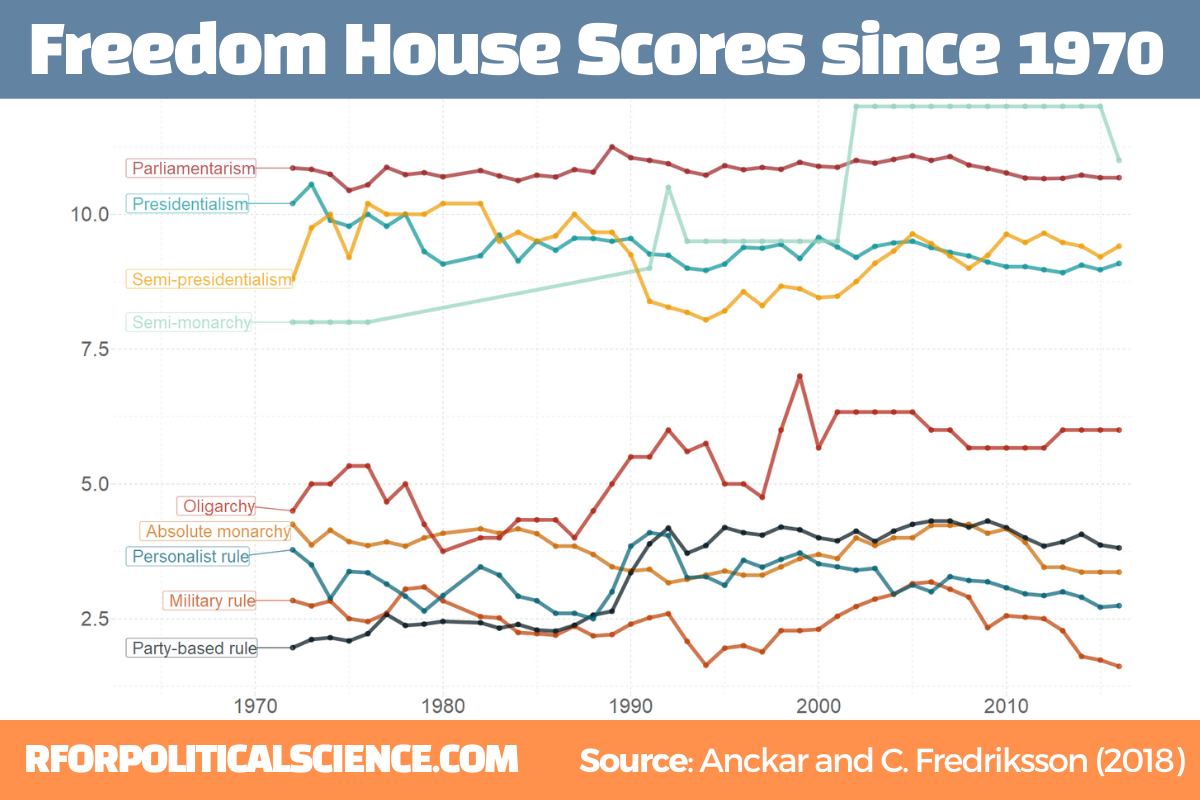
The two datasets we will look at are the Anckar-Fredriksson dataset of political regimes and Freedom House Scores.

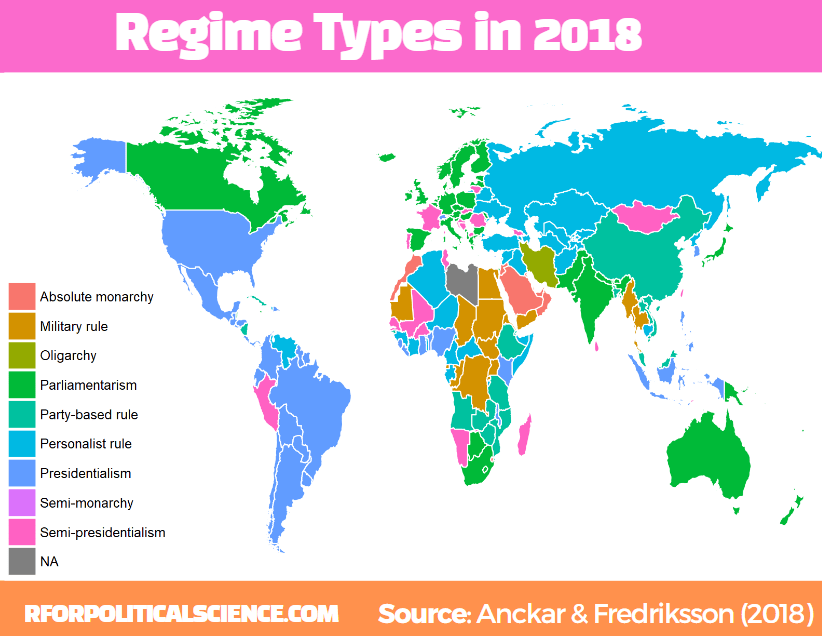
Regarding democracies, Anckar and Fredriksson (2018) distinguish between republics and monarchies. Republics can be presidential, semi-presidential, or parliamentary systems.

Within the category of monarchies, almost all systems are parliamentary, but a few countries are conferred to the category semi-monarchies.

Bill Murray King GIF - Find & Share on GIPHY

Autocratic countries can be in the following main categories: absolute monarchy, military rule, party-based rule, personalist rule, and oligarchy.

anckar <- democracyData::redownload_anckar()
fh <- download_fh()

We will see which regime types have been free or not since 1970.

We join the fh dataset to the anckar dataset with inner_join(). Luckily, both the datasets have the cown and year variables with which we can merge.

Then we sumamrise the mean Freedom House level for each regime type.

anckar %>% 
  inner_join(fh, by = c("cown", "year")) %>% 
  filter(!is.na(regimebroadcat)) %>%
  group_by(regimebroadcat, year) %>% 
  summarise(mean_fh = mean(fh_total_reversed, na.rm = TRUE)) -> anckar_sum

We want to place a label for each regime line in the graph, so create a small dataframe with regime score information only about the first year.

anckar_start <- anckar_sum %>%
  group_by(regimebroadcat) %>% 
  filter(year == 1972) %>% 
  ungroup() 

And we pick some more jewel toned colours for the graph and put them in a vector.

my_palette <- c("#ca6702", "#bb3e03", "#ae2012", "#9b2226", "#001219", "#005f73", "#0a9396", "#94d2bd", "#ee9b00")

And we graph it out

anckar_sum %>%
  ggplot(aes(x = year, y = mean_fh, groups = as.factor(regimebroadcat))) + 
  geom_point(aes(color = regimebroadcat), alpha = 0.7, size = 2) + 
  geom_line(aes(color = regimebroadcat), alpha = 0.7, size = 2) +
  ggrepel::geom_label_repel(data = anckar_start, hjust = 1.5,
            aes(x = year,
                y = mean_fh,
                color = regimebroadcat,
                label = regimebroadcat),
            alpha = 0.7,
            show.legend = FALSE, 
            size = 9) + 
  scale_color_manual(values = my_palette) +
  expand_limits(x = 1965) +  
  ggthemes::theme_pander() + 
  theme(legend.position = "none",
        axis.text = element_text(size = 30, colour ="grey40")) 

We can also use map data that comes with the tidyverse() package.

To merge the countries easily, I add a cown variable to this data.frame

world_map <- map_data("world")

world_map %<>% 
  mutate(cown = countrycode::countrycode(region, "country.name", "cown"))

I want to only look at regimes types in the final year in the dataset – which is 2018 – so we filter only one year before we merge with the map data.frame.

The geom_polygon() part is where we indiciate the variable we want to plot. In our case it is the regime category

anckar %>% 
 filter(year == max(year)) %>%
  inner_join(world_map, by = c("cown")) %>%
  mutate(regimebroadcat = ifelse(region == "Libya", 'Military rule', regimebroadcat)) %>% 
  ggplot(aes(x = long, y = lat, group = group)) + 
  geom_polygon(aes(fill = regimebroadcat), color = "white", size = 1) 
Bill Murray Laughing GIF - Find & Share on GIPHY

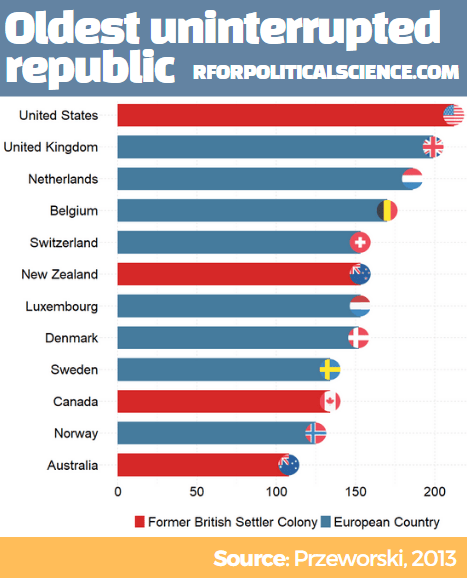
We can next look at the PIPE dataset and see which countries have been uninterrupted republics over time.

pipe <- democracyData::redownload_pipe()

We graph out the max_republic_age variable with geom_bar()


pipe %>% 
  mutate(iso_lower = tolower(countrycode::countrycode(PIPE_cowcodes, "cown", "iso2c"))) %>% 
  mutate(country_name = countrycode::countrycode(PIPE_cowcodes, "cown", "country.name")) %>% 
  filter(year == max(year)) %>% 
  filter(max_republic_age > 100) %>% 
  ggplot(aes(x = reorder(country_name, max_republic_age), y = max_republic_age)) + 
  geom_bar(stat = "identity", width = 0.7, aes(fill = as.factor(europe))) +
  ggflags::geom_flag(aes(y = max_republic_age, x = country_name, 
                         country = iso_lower), size = 15) + 
  coord_flip() +  ggthemes::theme_pander() -> pipe_plot

And fix up some aesthetics:

pipe_plot + 
  theme(axis.text = element_text(size = 30),
        legend.text = element_text(size = 30),
        legend.title = element_blank(),
        axis.title = element_blank(),
        legend.position = "bottom") + 
  labs(y= "", x = "") + 
scale_fill_manual(values =  c("#d62828", "#457b9d"),
 labels = c("Former British Settler Colony", "European Country")) 

I added the header and footer in Canva.com

Bill Murray Ok GIF - Find & Share on GIPHY

Download democracy data with democracyData package in R

Packages we will need:

library(democracyData)
library(tidyverse)
library(magrittr)       # for pipes
library(ggstream)       # proportion plots
library(ggthemes)       # nice ggplot themes
library(forcats)        # reorder factor variables
library(ggflags)        # add flags
library(peacesciencer)  # more great polisci data
library(countrycode)    # add ISO codes to countries

This blog will highlight some quick datasets that we can download with this nifty package.

To install the democracyData package, it is best to do this via the github of Xavier Marquez:

remotes::install_github("xmarquez/democracyData", force = TRUE)
library(democracyData)

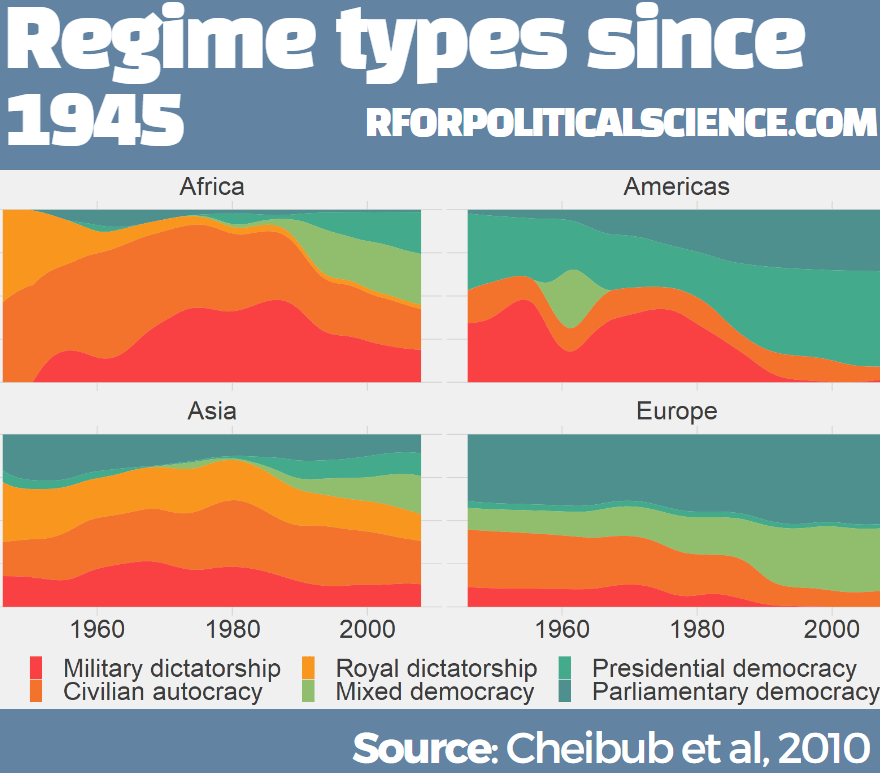
We can download the dataset from the Democracy and Dictatorship Revisited paper by Cheibub Gandhi and Vreeland (2010) with the redownload_pacl() function. It’s all very simple!

pacl <- redownload_pacl()
Happy Maya Rudolph GIF by PeacockTV - Find & Share on GIPHY

This gives us over 80 variables, with information on things such as regime type, geographical data, the name and age of the leaders, and various democracy variables.

We are going to focus on the different regimes across the years.

The six-fold regime classification Cheibub et al (2010) present is rooted in the dichotomous classification of regimes as democracy and dictatorship introduced in Przeworski et al. (2000). They classify according to various metrics, primarily by examining the way in which governments are removed from power and what constitutes the “inner sanctum” of power for a given regime. Dictatorships can be distinguished according to the characteristics of these inner sanctums. Monarchs rely on family and kin networks along with consultative councils; military rulers confine key potential rivals from the armed forces within juntas; and, civilian dictators usually create a smaller body within a regime party—a political bureau—to coopt potential rivals. Democracies highlight their category, depending on how the power of a given leadership ends

We can change the regime variable from numbers to a factor variables, describing the type of regime that the codebook indicates:

pacl %<>% 
  mutate(regime_name = ifelse(regime == 0, "Parliamentary democracies",
       ifelse(regime == 1, "Mixed democracies",
       ifelse(regime == 2, "Presidential democracies",
       ifelse(regime == 3, "Civilian autocracies",
       ifelse(regime == 4, "Military dictatorships",
       ifelse(regime ==  5,"Royal dictatorships", regime))))))) %>%
  mutate(regime = as.factor(regime)) 

Before we make the graph, we can give traffic light hex colours to the types of democracy. This goes from green (full democracy) to more oranges / reds (autocracies):

regime_palette <- c("Military dictatorships" = "#f94144", 
                    "Civilian autocracies" = "#f3722c", 
                    "Royal dictatorships" =  "#f8961e", 
                    "Mixed democracies" = "#f9c74f", 
                    "Presidential democracies" = "#90be6d", 
                    "Parliamentary democracies" = "#43aa8b")

We will use count() to count the number of countries in each regime type and create a variable n

pacl %>% 
  mutate(regime_name = as.factor(regime_name)) %>% 
  mutate(regime_name = fct_relevel(regime_name, 
 levels = c("Parliamentary democracies", 
           "Presidential democracies",
           "Mixed democracies",
           "Royal dictatorships",
           "Civilian autocracies",
           "Military dictatorships"))) %>% 
  group_by(year, un_continent_name) %>% 
  filter(!is.na(regime_name)) %>% 
  count(regime_name) %>% 
  ungroup() %>%  
  filter(un_continent_name != "") %>%
  filter(un_continent_name != "Oceania") -> pacl_count
Cant Handle It Kristen Wiig GIF by Saturday Night Live - Find & Share on GIPHY

We have all the variables we need.

We can now graph the count variables across different regions.

pacl_count %>% 
  ggplot(aes(x = year, y = n, 
             groups = regime_name, 
             fill = regime_name)) +
  ggstream::geom_stream(type = "proportion") + 
  facet_wrap(~un_continent_name) + 
  scale_fill_manual(values = regime_palette) + 
  ggthemes::theme_fivethirtyeight() + 
  theme(legend.title = element_blank(),
        text = element_text(size = 30)) 

I added the title and source header / footer section on canva.com to finish the graph.

Of course, the Cheibub et al (2010) dataset is not the only one that covers types of regimes.

Curtis Bell in 2016 developed the Rulers, Elections, and Irregular Governance Dataset (REIGN) dataset.

This describes political conditions in every country (including tenures and personal characteristics of world leaders, the types of political institutions and political regimes in effect, election outcomes and election announcements, and irregular events like coups)

Again, to download this dataset with the democracyData package, it is very simple:

reign <- download_reign()
Saturday Night Live Happy Dance GIF - Find & Share on GIPHY

I want to compare North and South Korea since their independence from Japan and see the changes in regimes and democracy scores over the years.

Next, we can easily download Freedom House or Polity 5 scores.

The Freedom House Scores default dataset ranges from 1972 to 2020, covering around 195 countries (depending on the year)

fh <- download_fh()

Alternatively, we can look at Polity Scores. This default dataset countains around 190 ish countries (again depending on the year and the number of countries in existance at that time) and covers a far longer range of years; from 1880 to 2018.

polityiv <- redownload_polityIV()

Alternatively, to download democracy scores, we can also use the peacesciencer dataset. Click here to read more about this package:

democracy_scores <- peacesciencer::create_stateyears() %>% 
  add_gwcode_to_cow() %>%
  add_democracy() 

With inner_join() we can merge these two datasets together:

reign %>% 
  select(ccode = cown, everything()) %>% 
  inner_join(democracy_scores, by = c("year", "ccode")) -> reign_demo

We next choose the years and countries for our plot.

Also, for the geom_flag() we will need the country name to be lower case ISO code. Click here to read more about the ggflags package.

reign_demo %>% 
    filter(year > 1945) %>% 
    mutate(gwf_regimetype = str_to_title(gwf_regimetype)) %>% 
    mutate(iso2c_lower = tolower(countrycode::countrycode(reign_country, "country.name", "iso2c"))) %>% 
filter(reign_country == "Korea North" | reign_country == "Korea South") -> korea_reign

We may to use specific hex colours for our graphs. I always prefer these deeper colours, rather than the pastel defaults that ggplot uses. I take them from coolors.co website!

korea_palette <- c("Military" = "#5f0f40",
                   "Party-Personal" = "#9a031e",
                   "Personal" = "#fb8b24",
                   "Presidential" = "#2a9d8f",
                   "Parliamentary" = "#1e6091")

We will add a flag to the start of the graph, so we create a mini dataset that only has the democracy scores for the first year in the dataset.

  korea_start <- korea_reign %>%
    group_by(reign_country) %>% 
    slice(which.min(year)) %>% 
    ungroup() 

Next we plot the graph

korea_reign %>% 
 ggplot(aes(x = year, y = v2x_polyarchy, groups = reign_country))  +
    geom_line(aes(color = gwf_regimetype), 
         size = 7, alpha = 0.7, show.legend = FALSE) +
    geom_point(aes(color = gwf_regimetype), size = 7, alpha = 0.7) +
    ggflags::geom_flag(data = korea_start, 
       aes(y = v2x_polyarchy, x = 1945, country = iso2c_lower), 
           size = 20) -> korea_plot

And then work on the aesthetics of the plot:

korea_plot + ggthemes::theme_fivethirtyeight() + 
    ggtitle("Electoral democracy on Korean Peninsula") +
    labs(subtitle = "Sources: Teorell et al. (2019) and Curtis (2016)") +
    xlab("Year") + 
    ylab("Democracy Scores") + 
    theme(plot.title = element_text(face = "bold"),
      axis.ticks = element_blank(),
      legend.box.background = element_blank(),
      legend.title = element_blank(),
      legend.text = element_text(size = 40),
      text = element_text(size = 30)) +
    scale_color_manual(values = korea_palette) + 
    scale_x_continuous(breaks = round(seq(min(korea_reign$year), max(korea_reign$year), by = 5),1))

While North Korea has been consistently ruled by the Kim dynasty, South Korea has gone through various types of government and varying levels of democracy!

References

Cheibub, J. A., Gandhi, J., & Vreeland, J. R. (2010). . Public choice143(1), 67-101.

Przeworski, A., Alvarez, R. M., Alvarez, M. E., Cheibub, J. A., Limongi, F., & Neto, F. P. L. (2000). Democracy and development: Political institutions and well-being in the world, 1950-1990 (No. 3). Cambridge University Press.

Scrape and graph election polling data from Wikipedia

Packages we will need:

library(rvest)
library(tidyverse)
library(magrittr)
library(forcats)
library(janitor)

With the Korean Presidential elections coming up, I wanted to graph the polling data since the beginning of this year.

Happy Paul Rudd GIF by Saturday Night Live - Find & Share on GIPHY

The data we can use is all collated together on Wikipedia.

Click here to read more about using the rvest package for scraping data from websites and click here to read the CRAN PDF for the package.

poll_html <- read_html("https://en.wikipedia.org/wiki/2022_South_Korean_presidential_election")

poll_tables <- poll_html %>% html_table(header = TRUE, fill = TRUE)

There are 22 tables on the page in total.

I count on the page that the polling data is the 16th table on the page, so extract index [[16]] from the list

feb_poll <- poll_tables[[16]]
View(feb_poll)

It is a bit messy, so we will need to do a bit of data cleaning before we can graph.

John Mulaney Snl GIF by Saturday Night Live - Find & Share on GIPHY

First the names of many variables are missing or on row 2 / 3 of the table, due to pictures and split cells in Wikipedia.

 [1] "Polling firm / Client" "Polling firm / Client" "Fieldwork  date"       "Sample  size" "Margin of  error"     
 [6] ""       ""      ""     ""      ""                     
[11] ""  "Others/Undecided"   "Lead"   

The clean_names() function from the janitor package does a lot of the brute force variable name cleaning!

feb_poll %<>% clean_names()

We now have variable names rather than empty column names, at least.

 [1] "polling_firm_client" "polling_firm_client_2" "fieldwork_date"        "sample_size"  "margin_of_error"      
 [6] "x"  "x_2"  "x_3"  "x_4"  "x_5"                  
[11] "x_6"  "others_undecided"   "lead"

We can choose the variables we want and rename the x variables with the names of each candidate, according to Wikipedia.

feb_poll %<>% 
  select(fieldwork_date, 
         Lee = x, 
         Yoon = x_2,
         Shim = x_3,
         Ahn = x_4, 
         Kim = x_5, 
         Heo = x_6,
         others_undecided)

We then delete the rows that contain text not related to the poll number values.

feb_poll = feb_poll[-25,]
feb_poll = feb_poll[-81,]
feb_poll = feb_poll[-1,]

I want to clean up the fieldwork_date variable and convert it from character to Date class.

First I found that very handy function on Stack Overflow that extracts the last n characters from a string variable.

substrRight <- function(x, n){
  substr(x, nchar(x)-n+1, nchar(x))
}

If we look at the table, some of the surveys started in Feb but ended in March. We want to extract the final section (i.e. the March section) and use that.

So we use grepl() to find rows that have both Feb AND March, and just extract the March section. If it only has one of those months, we leave it as it is.

feb_poll %<>% 
  mutate(clean_date = ifelse(grepl("Feb", fieldwork_date) & grepl("Mar", fieldwork_date), substrRight(fieldwork_date, 5), fieldwork_date))

Next want to extract the three letter date from this variables and create a new month variable

feb_poll %<>%
  mutate(month = substrRight(clean_date, 3)) 

Following that, we use the parse_number() function from tidyr package to extract the first number found in the string and create a day_number varible (with integer class now)

 feb_poll %<>%
   mutate(day_number = parse_number(clean_date))   

We want to take these two variables we created and combine them together with the unite() function from tidyr again! We want to delete the variables after we unite them. But often I want to keep the original variables, so usually I change the argument remove to FALSE.

We indicate we want to have nothing separating the vales with the sep = "" argument

 feb_poll %<>%
     unite("date", day_number:month, sep = "", remove = TRUE)

And we convert this new date into Date class with as.Date() function.

Here is a handy cheat sheet to help choose the appropriate % key so the format recognises the dates. I will never memorise these values, so I always need to refer to this site.

We have days as numbers (1, 2, 3) and abbreviated 3 character month (Jan, Feb, Mar), so we choose %d and %b

feb_poll %<>%
  mutate(dates_format = as.Date(date, "%d%b")) %>% 
  select(dates_format, Lee:others_undecided) 

Next, we will use the pivot_longer() function to combine all the poll number values into one column. This will make it far easier to plot later.

feb_poll %<>%
  pivot_longer(!dates_format, names_to = "candidate", values_to = "favour") 

After than, we need to clean the actual numbers, remove the percentage signs and convert from character to number class. We use the str_extract() and the regex code to extract the number and not keep the percentage sign.

feb_poll %<>%
    mutate(candidate = as.factor(candidate),
 favour_percent = str_extract(favour, "\\d+\\.*\\d*")) %>% 
   mutate(favour_percent = as.integer(favour_percent)) 

Some of the different polls took place on the same day. So we will take the average poll favourability value for each candidate on each day with the group_by() function

feb_poll %<>%
  group_by(dates_format, candidate) %>% 
  mutate(favour_percent_mean = mean(favour_percent, na.rm = TRUE)) %>% 
  ungroup() %>% 
  select(candidate, dates_format, favour_percent_mean) 

And this is how the cleaned up data should look!

We repeat for the 17th and 16th tables, which contain data going back to the beginning of January 2022

early_feb_poll <- poll_tables[[17]]
early_feb_poll = early_feb_poll[-37,]
early_feb_poll = early_feb_poll[-1,]

We repeat the steps from above with early Feb in one chunk

early_feb_poll %<>%
  clean_names() %>% 
  mutate(month = substrRight(fieldwork_date, 3))  %>% 
  mutate(day_number = parse_number(fieldwork_date)) %>%
  unite("date", day_number:month, sep = "", remove = FALSE) %>% 
  mutate(dates_format = as.Date(date, "%d%b")) %>% 
  select(dates_format, 
         Lee = lee_jae_myung, 
         Yoon = yoon_seok_youl,
         Shim = sim_sang_jung,
         Ahn = ahn_cheol_soo, 
         Kim = kim_dong_yeon, 
         Heo = huh_kyung_young,
         others_undecided) %>% 
  pivot_longer(!dates_format, names_to = "candidate", values_to = "favour") %>% 
  mutate(candidate = as.factor(candidate),
         favour_percent = str_extract(favour, "\\d+\\.*\\d*")) %>% 
  mutate(favour_percent = as.integer(favour_percent)) %>% 
  group_by(dates_format, candidate) %>% 
  mutate(favour_percent_mean = mean(favour_percent, na.rm = TRUE)) %>% 
  ungroup() %>% 
  select(candidate, dates_format, favour_percent_mean)

And we use rbind() to combine the two data.frames

polls <- rbind(feb_poll, early_feb_poll)

Next we repeat with January data:

jan_poll <- poll_tables[[18]]

jan_poll = jan_poll[-34,]
jan_poll = jan_poll[-1,]

jan_poll %<>% 
  clean_names() %>% 
  mutate(month = substrRight(fieldwork_date, 3))  %>% 
  mutate(day_number = parse_number(fieldwork_date)) %>%   # drops any non-numeric characters before or after the first number. 
  unite("date", day_number:month, sep = "", remove = FALSE) %>% 
  mutate(dates_format = as.Date(date, "%d%b")) %>% 
  select(dates_format, 
         Lee = lee_jae_myung, 
         Yoon = yoon_seok_youl,
         Shim = sim_sang_jung,
         Ahn = ahn_cheol_soo, 
         Kim = kim_dong_yeon, 
         Heo = huh_kyung_young,
         others_undecided) %>% 
  pivot_longer(!dates_format, names_to = "candidate", values_to = "favour") %>% 
  mutate(candidate = as.factor(candidate),
         favour_percent = str_extract(favour, "\\d+\\.*\\d*")) %>% 
  mutate(favour_percent = as.integer(favour_percent)) %>% 
  group_by(dates_format, candidate) %>% 
  mutate(favour_percent_mean = mean(favour_percent, na.rm = TRUE)) %>% 
  ungroup() %>% 
  select(candidate, dates_format, favour_percent_mean)

And bind to our combined data.frame:

polls <- rbind(polls, jan_poll)

We can create variables to help us filter different groups of candidates. If we want to only look at the largest candidates, we can makes an important variable and then filter

We can lump the candidates that do not have data from every poll (i.e. the smaller candidate) and add them into the “other_undecided” category with the fct_lump_min() function from the forcats package

polls %>% 
  mutate(important = ifelse(candidate %in% c("Ahn", "Yoon", "Lee", "Shim"), 1, 0)) %>% 
  mutate(few_candidate = fct_lump_min(candidate, min = 110, other_level = "others_undecided")) %>% 
  group_by(few_candidate, dates_format) %>% 
  filter(important == 1) -> poll_data

I want to only look at the main two candidates from the main parties that have been polling in the 40% range – Lee and Yoon – as well as the data for Ahn (who recently dropped out and endorsed Yoon).

poll_data %>% 
  filter(candidate %in% c("Lee", "Yoon", "Ahn")) -> lee_yoon_data

We take the official party hex colors for the graph and create a vector to use later with the scale_color_manual() function below:

party_palette <- c(
  "Ahn" = "#df550a",
  "Lee" = "#00a0e2",
  "Yoon" = "#e7001f")

And we plot the variables.

lee_yoon_data %>% 
  ggplot(aes(x = dates_format, y = favour_percent_mean,
             groups = candidate, color = candidate)) + 
  geom_line( size = 2, alpha = 0.8) +
  geom_point(fill = "#5e6472", shape = 21, size = 4, stroke = 3) + 
  labs(title = "Polling data for Korean Presidential Election", subtitle = "Source: various polling companies, via Wikipedia") -> poll_graph

The bulk of aesthetics for changing the graph appearance in the theme()

poll_graph + theme(panel.border = element_blank(),
        legend.position = "bottom",        
        text = element_text(size = 15, color = "white"),
        plot.title = element_text(size = 40),
        legend.title = element_blank(),
        legend.text = element_text(size = 50, color = "white"),
        axis.text.y = element_text(size = 20), 
        axis.text.x = element_text(size = 20),
        legend.background = element_rect(fill = "#5e6472"),
        axis.title = element_blank(),
        axis.text = element_text(color = "white", size = 20),
        panel.grid.major.y = element_blank(),
        panel.grid.minor.y = element_blank(),
        panel.grid.major.x = element_blank(),
        panel.grid.minor.x = element_blank(),
        legend.key = element_rect(fill = "#5e6472"),
        plot.background = element_rect(fill = "#5e6472"),
        panel.background = element_rect(fill = "#5e6472")) +
  scale_color_manual(values = party_palette) 

Last, with the annotate() functions, we can also add an annotation arrow and text to add some more information about Ahn Cheol-su the candidate dropping out.

  annotate("text", x = as.Date("2022-02-11"), y = 13, label = "Ahn dropped out just as the polling blackout began", size = 10, color = "white") +
  annotate(geom = "curve", x = as.Date("2022-02-25"), y = 13, xend = as.Date("2022-03-01"), yend = 10, 
    curvature = -.3, arrow = arrow(length = unit(2, "mm")), size = 1, color = "white")

We will just have to wait until next Wednesday / Thursday to see who is the winner ~

Over It Reaction GIF by Saturday Night Live - Find & Share on GIPHY

Graphing Pew survey responses with ggplot in R

Packages we will need:

library(tidyverse)
library(forcats)
library(ggthemes)

We are going to look at a few questions from the 2019 US Pew survey on relations with foreign countries.

Data can be found by following this link:

We are going to make bar charts to plot out responses to the question asked to American participaints: Should the US cooperate more or less with some key countries? The countries asked were China, Russia, Germany, France, Japan and the UK.

Before we dive in, we can find some nice hex colors for the bar chart. There are four possible responses that the participants could give: cooperate more, cooperate less, cooperate the same as before and refuse to answer / don’t know.

pal <- c("Cooperate more" = "#0a9396",
         "Same as before" = "#ee9b00",
         "Don't know" = "#005f73",
         "Cooperate less" ="#ae2012")

We first select the questions we want from the full survey and pivot the dataframe to long form with pivot_longer(). This way we have a single column with all the different survey responses. that we can manipulate more easily with dplyr functions.

Then we summarise the data to count all the survey reponses for each of the four countries and then calculate the frequency of each response as a percentage of all answers.

Then we mutate the variables so that we can add flags. The geom_flag() function from the ggflags packages only recognises ISO2 country codes in lower cases.

After that we change the factors level for the four responses so they from positive to negative views of cooperation

pew %>% 
  select(id = case_id, Q2a:Q2f) %>% 
  pivot_longer(!id, names_to = "survey_question", values_to = "response")  %>% 
  group_by(survey_question, response) %>% 
  summarise(n = n()) %>%
  mutate(freq = n / sum(n)) %>% 
  ungroup() %>% 
  mutate(response_factor = as.factor(response)) %>% 
  mutate(country_question = ifelse(survey_question == "Q2a", "fr",
ifelse(survey_question == "Q2b", "gb",
ifelse(survey_question == "Q2c", "ru",
ifelse(survey_question == "Q2d", "cn",
ifelse(survey_question == "Q2e", "de",
ifelse(survey_question == "Q2f", "jp", survey_question))))))) %>% 
  mutate(response_string = ifelse(response_factor == 1, "Cooperate more",
ifelse(response_factor == 2, "Cooperate less",
ifelse(response_factor == 3, "Same as before",
ifelse(response_factor == 9, "Don't know", response_factor))))) %>% 
  mutate(response_string = fct_relevel(response_string, c("Cooperate less","Same as before","Cooperate more", "Don't know"))) -> pew_clean

We next use ggplot to plot out the responses.

We use the position = "stack" to make all the responses “stack” onto each other for each country. We use stat = "identity" because we are not counting each reponses. Rather we are using the freq variable we calculated above.

pew_clean %>%
  ggplot() +
  geom_bar(aes(x = forcats::fct_reorder(country_question, freq), y = freq, fill = response_string), color = "#e5e5e5", size = 3, position = "stack", stat = "identity") +
  geom_flag(aes(x = country_question, y = -0.05 , country = country_question), color = "black", size = 20) -> pew_graph

And last we change the appearance of the plot with the theme function

pew_graph + 
coord_flip() + 
  scale_fill_manual(values = pal) +
  ggthemes::theme_fivethirtyeight() + 
  ggtitle("Should the US cooperate more or less with the following country?") +
  theme(legend.title = element_blank(),
        legend.position = "top",
        legend.key.size = unit(2, "cm"),
        text = element_text(size = 25),
        legend.text = element_text(size = 20),
        axis.text = element_blank())

Lollipop plots with ggplot2 in R

Packages we will need:

library(tidyverse)
library(rvest)
library(ggflags)
library(countrycode)
library(ggpubr)

We will plot out a lollipop plot to compare EU countries on their level of income inequality, measured by the Gini coefficient.

A Gini coefficient of zero expresses perfect equality, where all values are the same (e.g. where everyone has the same income). A Gini coefficient of one (or 100%) expresses maximal inequality among values (e.g. for a large number of people where only one person has all the income or consumption and all others have none, the Gini coefficient will be nearly one).

To start, we will take data on the EU from Wikipedia. With rvest package, scrape the table about the EU countries from this Wikipedia page.

Click here to read more about the rvest pacakge

With the gsub() function, we can clean up the different variables with some regex. Namely delete the footnotes / square brackets and change the variable classes.

eu_site <- read_html("https://en.wikipedia.org/wiki/Member_state_of_the_European_Union")

eu_tables <- eu_site %>% html_table(header = TRUE, fill = TRUE)

eu_members <- eu_tables[[3]]

eu_members %<>% janitor::clean_names()  %>% 
  filter(!is.na(accession))

eu_members$iso3 <- countrycode::countrycode(eu_members$geo, "country.name", "iso3c")

eu_members$accession <- as.numeric(gsub("([0-9]+).*$", "\\1",eu_members$accession))

eu_members$name_clean <- gsub("\\[.*?\\]", "", eu_members$name)

eu_members$gini_clean <- gsub("\\[.*?\\]", "", eu_members$gini)

Next some data cleaning and grouping the year member groups into different decades. This indicates what year each country joined the EU. If we see clustering of colours on any particular end of the Gini scale, this may indicate that there is a relationship between the length of time that a country was part of the EU and their domestic income inequality level. Are the founding members of the EU more equal than the new countries? Or conversely are the newer countries that joined from former Soviet countries in the 2000s more equal. We can visualise this with the following mutations:

eu_members %>%
  filter(name_clean != "Totals/Averages") %>% 
  mutate(gini_numeric = as.numeric(gini_clean)) %>% 
  mutate(accession_decades = ifelse(accession < 1960, "1957", ifelse(accession > 1960 & accession < 1990, "1960s-1980s", ifelse(accession == 1995, "1990s", ifelse(accession > 2003, "2000s", accession))))) -> eu_clean 

To create the lollipop plot, we will use the geom_segment() functions. This requires an x and xend argument as the country names (with the fct_reorder() function to make sure the countries print out in descending order) and a y and yend argument with the gini number.

All the countries in the EU have a gini score between mid 20s to mid 30s, so I will start the y axis at 20.

We can add the flag for each country when we turn the ISO2 character code to lower case and give it to the country argument.

Click here to read more about the ggflags package

eu_clean %>% 
ggplot(aes(x= name_clean, y= gini_numeric, color = accession_decades)) +
  geom_segment(aes(x = forcats::fct_reorder(name_clean, -gini_numeric), 
                   xend = name_clean, y = 20, yend = gini_numeric, color = accession_decades), size = 4, alpha = 0.8) +
  geom_point(aes(color = accession_decades), size= 10) +
  geom_flag(aes(y = 20, x = name_clean, country = tolower(iso_3166_1_alpha_2)), size = 10) +
  ggtitle("Gini Coefficients of the EU countries") -> eu_plot

Last we add various theme changes to alter the appearance of the graph

eu_plot + 
coord_flip() +
ylim(20, 40) +
  theme(panel.border = element_blank(),
        legend.title = element_blank(),
        axis.title = element_blank(),
        axis.text = element_text(color = "white"),
        text= element_text(size = 35, color = "white"),
        legend.text = element_text(size = 20),
        legend.key = element_rect(colour = "#001219", fill = "#001219"),
        legend.key.width = unit(3, 'cm'),
        legend.position = "bottom",
        panel.grid.major.y = element_line(linetype="dashed"),
        plot.background = element_rect(fill = "#001219"),
        panel.background = element_rect(fill = "#001219"),
        legend.background = element_rect(fill = "#001219") )

We can see there does not seem to be a clear pattern between the year a country joins the EU and their level of domestic income inequality, according to the Gini score.

Of course, the Gini coefficient is not a perfect measurement, so take it with a grain of salt.

Another option for the lolliplot plot comes from the ggpubr package. It does not take the familiar aesthetic arguments like you can do with ggplot2 but it is very quick and the defaults look good!

eu_clean %>% 
  ggdotchart( x = "name_clean", y = "gini_numeric",
              color = "accession_decades",
              sorting = "descending",                      
              rotate = TRUE,                                
              dot.size = 10,   
              y.text.col = TRUE,
              ggtheme = theme_pubr()) + 
  ggtitle("Gini Coefficients of the EU countries") + 
  theme(panel.border = element_blank(),
        legend.title = element_blank(),
        axis.title = element_blank(),
        axis.text = element_text(color = "white"),
        text= element_text(size = 35, color = "white"),
        legend.text = element_text(size = 20),
        legend.key = element_rect(colour = "#001219", fill = "#001219"),
        legend.key.width = unit(3, 'cm'),
        legend.position = "bottom",
        panel.grid.major.y = element_line(linetype="dashed"),
        plot.background = element_rect(fill = "#001219"),
        panel.background = element_rect(fill = "#001219"),
        legend.background = element_rect(fill = "#001219") )

Replicating Eurostat graphs in R

Packages we will need:

library(eurostat)
library(tidyverse)
library(maggritr)
library(ggthemes)
library(forcats)

In this blog, we will try to replicate this graph from Eurostat!

It compares all European countries on their Digitical Intensity Index scores in 2020. This measures the use of different digital technologies by enterprises.

The higher the score, the higher the digital intensity of the enterprise, ranging from very low to very high. 

For more information on the index, I took the above information from this site: https://ec.europa.eu/eurostat/web/products-eurostat-news/-/ddn-20211029-1

First, we will download the digital index from Eurostat with the get_eurostat() function.

Click here to learn more about downloading data on EU from the Eurostat package.

Next some data cleaning. To copy the graph, we will aggregate the different levels into very low, low, high and very high categories with the grepl() function in some ifelse() statements.

The variable names look a bit odd with lots of blank space because I wanted to space out the legend in the graph to replicate the Eurostat graph above.

dig <- get_eurostat("isoc_e_dii", type = "label")

dig %<>% 
   mutate(dii_level = ifelse(grepl("very low", indic_is), "Very low        " , ifelse(grepl("with low", indic_is), "Low        ", ifelse(grepl("with high", indic_is), "High        ", ifelse(grepl("very high", indic_is), "Very high        ", indic_is)))))

Next I fliter out the year I want and aggregate all industry groups (from the sizen_r2 variable) in each country to calculate a single DII score for each country.

dig %>% 
  select(sizen_r2, geo, values, dii_level, year) %>%  
  filter(year == 2020) %>% 
  group_by(dii_level, geo) %>% 
  summarise(total_values = sum(values, na.rm = TRUE)) %>% 
  ungroup() -> my_dig

I use a hex finder website imagecolorpicker.com to find the same hex colors from the Eurostat graph and assign them to our version.

dii_pal <- c("Very low        " = "#f0aa4f",
             "Low        " = "#fee229",
             "Very high        " = "#154293", 
             "High        " = "#7fa1d4")

We can make sure the factors are in the very low to very high order (rather than alphabetically) with the ordered() function

my_dig$dii_level <- ordered(my_dig$dii_level, levels = c("Very Low        ", "Low        ", "High        ","Very high        "))

Next we filter out the geo rows we don’t want to add to the the graph.

Also we can change the name of Germany to remove its longer title.

my_dig %>% 
  filter(geo != "Euro area (EA11-1999, EA12-2001, EA13-2007, EA15-2008, EA16-2009, EA17-2011, EA18-2014, EA19-2015)") %>% 
  filter(geo != "United Kingdom") %>% 
  filter(geo != "European Union - 27 countries (from 2020)") %>% 
  filter(geo != "European Union - 28 countries (2013-2020)") %>% 
  mutate(geo = ifelse(geo == "Germany (until 1990 former territory of the FRG)", "Germany", geo)) -> my_dig 

And also, to have the same order of countries that are in the graph, we can add them as ordered factors.

my_dig$country <- factor(my_dig$geo, levels = c("Finland", "Denmark", "Malta", "Netherlands", "Belgium", "Sweden", "Estonia", "Slovenia", "Croatia", "Italy", "Ireland","Spain", "Luxembourg", "Austria", "Czechia", "France", "Germany", "Portugal", "Poland", "Cyprus", "Slovakia", "Hungary", "Lithuania", "Latvia", "Greece", "Romania", "Bulgaria", "Norway"), ordered = FALSE)

Now to plot the graph:

my_dig %>% 
  filter(!is.na(country)) %>% 
  group_by(country, dii_level) %>% 
  ggplot(aes(y = country, 
             x = total_values,
             fill = forcats::fct_rev(dii_level))) +
  geom_col(position = "fill", width = 0.7) + 
  scale_fill_manual(values = dii_pal) + 
  ggthemes::theme_pander() +
  coord_flip() +
  labs(title = "EU's Digital Intensity Index (DII) in 2020",
       subtitle = ("(% of enterprises with at least 10 persons employed)"),
       caption = "ec.europa/eurostat") +
  xlab("") + 
  ylab("") + 
  theme(text = element_text(family = "Verdana", color = "#154293"),
        axis.line.x = element_line(color = "black", size = 1.5),
        axis.text.x = element_text(angle = 90, size = 20, color = "#154293", hjust = 1),
        axis.text.y = element_text(color = "#808080", size = 13, face = "bold"),
        legend.position = "top", 
        legend.title = element_blank(),
        legend.text = element_text(color = "#808080", size = 20, face = "bold"),
        plot.title = element_text(size = 42, color = "#154293"),
        plot.subtitle = element_text(size = 25, color = "#154293"),
        plot.caption = element_text(size = 20, color = "#154293"),
        panel.background = element_rect(color = "#f2f2f2"))

It is not identical and I had to move the black line up and the Norway model more to the right with Paint on my computer! So a bit of cheating!

Click to read Part 1, Part 2 and Part 3 of the blog series on visualising Eurostat data

For information on the index discussed in this blog post: https://ec.europa.eu/eurostat/web/products-eurostat-news/-/ddn-20211029-1

Bump charts for ranking with ggbump package in R

library(eurostat)
library(tidyverse)
library(magrittr)
library(ggthemes)
library(ggpbump)
library(ggflags)
library(countrycode)

Click here for Part 1 and here for Part 2 of the series on Eurostat data – explains how to download and visualise the Eurostat data

In this blog, we will look at government expenditure of the European Union!

Part 1 will go into detail about downloading Eurostat data with their package.

govt <- get_eurostat("gov_10a_main", fix_duplicated = TRUE)

Some quick data cleaning and then we can look at the variables in the dataset.

govt$year <- as.numeric(format(govt$time, format = "%Y"))
View(govt)

The numbers and letters are a bit incomprehensible. We can go to the Eurostat data browser site. It ascts as a codebook for all the variables we downloaded:

https://ec.europa.eu/eurostat/databrowser/product/page/GOV_10A_MAIN

I want to take the EU accession data from Wikipedia. Check out the Part 1 blog post to scrape the data.

govt$iso3 <- countrycode(govt$geo, "iso2c", "iso3c")

govt_df <- merge(govt, eu_members, by.x = "iso3", by.y = "iso_3166_1_alpha_3", all.x = TRUE)

We will look at general government spending of the countries from the 2004 accession.

Also we will choose data is government expenditure as a percentage of GDP.

govt_df %<>%
  filter(sector == "S13") %>%      # General government spending
  filter(accession == 2004) %>%    # For countries that joined 2004
  filter(unit == "PC_GDP") %>%     # Spending as percentage of GDP
  filter(na_item == "TE")          # Total expenditure

A little more data cleaning! To use the ggflags package, the ISO 2 character code needs to be in lower case.

Also we will use some regex to remove the strings in the square brackets from the dataset.

govt_df$iso2_lower <- tolower(govt_df$iso_3166_1_alpha_2)

govt_df$name_clean <- gsub("\\[.*?\\]", "", govt_df$name)

To put the flags at the start of the graph and names of the countries at the end of the lines, create mini dataframes with only information for the last year and first year:

last_time <- govt_df %>%
  group_by(geo) %>% 
  slice(which.max(year)) %>% 
  ungroup()

first_time <- govt_df %>%
  group_by(geo) %>% 
  slice(which.min(year)) %>% 
  ungroup()

I choose some nice hex colours from the coolors website. They need # in the strings to be acknowledged as hex colours by ggplot

add_hashtag <- function(my_vec){
  hash_vec <-  paste0('#', my_vec)
  return(hash_vec)
}

pal <- c("0affc2","ffb8d1","05e6dc","00ccf5","ff7700",
         "fa3c3b","f50076","b766b4","fd9c1e","ffcf00")

pal_hash <- add_hashtag(pal)

Now we can plot:

govt_df %>% 
  filter(geo != "CY" | geo != "MT") %>% 
  filter( year < 2020) %>% 
  ggplot(aes(x = year,
             y = values, group = name)) + 
  geom_text_repel(data = last_time, aes(label = name_clean, 
                                        color = name), 
                  size = 6, hjust = -3) +
  geom_point(aes(color = name)) + 
  geom_line(aes(color = name), size = 3, alpha = 0.8) +
  ggflags::geom_flag(data = first_time,
                     aes(x = year,
                         y = values,
                         country = iso2_lower),
                     size = 8) +
   scale_color_manual(values = pal_hash) +
  xlim(1994, 2021) + 
   ggthemes::theme_fivethirtyeight() +
  theme(panel.background = element_rect(fill = "#284b63"),
        legend.position = "none",
        axis.text.x = element_text(size = 20),
        axis.text.y = element_text(size = 20),
        
        panel.grid.major.y = element_line(color = "#495057",
                                          size = 0.5,
                                          linetype = 2),
        panel.grid.minor.y = element_line(color = "#495057",
                                          size = 0.5,
                                          linetype = 2)) +
  guides(colour = guide_legend(override.aes = list(size=10)))

Sometimes a simple line graph doesn’t easily show us the ranking of the countries over time.

The last graph was a bit cluttered, so we can choose the top average highest government expenditures to compare

govt_rank %>% 
  distinct(geo, mean_rank) %>% 
  top_n(6, mean_rank) %>%
  pull(geo) -> top_rank

We can look at a bump chart that ranks the different positions over time

govt_df %>% 
  filter(geo %in%  top_rank) %>% 
  group_by(year) %>%
  mutate(rank_budget = rank(-values, ties.method = "min")) %>%
  ungroup() %>% 
  group_by(geo) %>% 
  mutate(mean_rank = mean(values)) %>% 
  ungroup()  %>% 
  select(geo, iso2_lower, year, fifth_year, rank_budget, mean_rank) -> govt_rank

We recreate the last and first dataframes for the flags with the new govt_rank dataset.

last_time <- govt_rank %>%
  filter(geo %in% top_rank ) %>% 
  group_by(geo) %>% 
  slice(which.max(year)) %>% 
  ungroup()

first_time <- govt_rank %>%
  filter(geo %in% top_rank ) %>% 
  group_by(geo) %>% 
  slice(which.min(year)) %>% 
  ungroup()

All left to do is code the bump plot to compare the ranking of highest government expenditure as a percentage of GDP

govt_rank %>% 
  ggplot(aes(x = year, y = rank_budget, 
             group = country,
             color = country, fill = country)) +
  geom_point() +
  geom_bump(aes(), 
            size = 3, alpha = 0.8,
            lineend = "round") + 
  geom_flag(data = last_time %>%
              filter(year == max(year)),
            aes(country = iso2_lower ),
            size = 20,
            color = "black") +
  geom_flag(data = first_time %>%
              filter(year == max(year)),
            aes(country = iso2_lower),
            size = 20,
            color = "black") -> govt_bump

Last we change the theme aesthetics of the bump plot

govt_bump + theme(panel.background = element_rect(fill = "#284b63"),
      legend.position = "bottom",
      axis.text.x = element_text(size = 20),
      axis.text.y = element_text(size = 20),
      axis.line = element_line(color='black'),
      axis.title.x = element_blank(), 
      axis.title.y = element_blank(), 
      legend.title = element_blank(),
      legend.text = element_text(size = 20),
      panel.grid.major = element_blank(),
      panel.grid.minor = element_blank()) + 
  guides(colour = guide_legend(override.aes = list(size=10))) + 
  scale_y_reverse(breaks = 1:100)

I added the title and moved the legend with canva.com, rather than attempt it with ggplots! I feel bad for cheating a bit.

Visualize EU data with Eurostat package in R: Part 2 (with maps)

In this post, we will map prison populations as a percentage of total populations in Europe with Eurostat data.

library(eurostat)
library(tidyverse)
library(sf)
library(rnaturalearth)
library(ggthemes)
library(countrycode)
library(ggflags)
library(viridis)
library(rvest)

Click here to read Part 1 about downloading Eurostat data.


prison_pop <- get_eurostat("crim_pris_pop", type = "label")

prison_pop$iso3 <- countrycode::countrycode(prison_pop$geo, "country.name", "iso3c")

prison_pop$year <- as.numeric(format(prison_pop$time, format = "%Y"))

Next we will download map data with the rnaturalearth package. Click here to read more about using this package.

We only want to zoom in on continental EU (and not include islands and territories that EU countries have around the world) so I use the coordinates for a cropped European map from this R-Bloggers post.

map <- rnaturalearth::ne_countries(scale = "medium", returnclass = "sf")

europe_map <- sf::st_crop(map, xmin = -20, xmax = 45,
                          ymin = 30, ymax = 73)

prison_map <- merge(prison_pop, europe_map, by.x = "iso3", by.y = "adm0_a3", all.x = TRUE)

We will look at data from 2000.

prison_map %>% 
  filter(year == 2000) -> map_2000

To add flags to our map, we will need ISO codes in lower case and longitude / latitude.

prison_map$iso2c <- tolower(countrycode(prison_map$geo, "country.name", "iso2c"))

coord <- read_html("https://developers.google.com/public-data/docs/canonical/countries_csv")

coord_tables <- coord %>% html_table(header = TRUE, fill = TRUE)

coord <- coord_tables[[1]]

prison_map <- merge(prison_map, coord, by.x= "iso_a2", by.y = "country", all.y = TRUE)

Nex we will plot it out!

We will focus only on European countries and we will change the variable from total prison populations to prison pop as a percentage of total population. Finally we multiply by 1000 to change the variable to per 1000 people and not have the figures come out with many demical places.

prison_map %>% 
  filter(continent == "Europe") %>% 
  mutate(prison_pc = (values / pop_est)*1000) %>% 
  ggplot() +
  geom_sf(aes(fill = prison_pc, geometry = geometry), 
          position = "identity") + 
  labs(fill='Prison population')  +
  ggflags::geom_flag(aes(x = longitude, 
                         y = latitude+0.5, 
                         country = iso2_lower), 
                     size = 9) +  
  scale_fill_viridis_c(option = "mako", direction = -1) +
  ggthemes::theme_map() -> prison_map

Next we change how it looks, including changing the background of the map to a light blue colour and the legend.

prison_map + 
  theme(legend.title = element_text(size = 20),
        legend.text = element_text(size = 14), 
         legend.position = "bottom",
        legend.background = element_rect(fill = "lightblue",
                                         colour = "lightblue"),
        panel.background = element_rect(fill = "lightblue",
                                        colour = "lightblue"))

I will admit that I did not create the full map in ggplot. I added the final titles and block colours with canva.com because it was just easier! I always find fonts very tricky in R so it is nice to have dozens of different fonts in Canva and I can play around with colours and font sizes without needing to reload the plot each time.

How to download EU data with Eurostat package in R: Part 1 (with pyramid graphs)

library(eurostat)
library(tidyverse)
library(janitor)
library(ggcharts)
library(ggflags)
library(rvest)
library(countrycode)
library(magrittr)

Eurostat is the statistical office of the EU. It publishes statistics and indicators that enable comparisons between countries and regions.

With the eurostat package, we can visualise some data from the EU and compare countries. In this blog, we will create a pyramid graph and a Statista-style bar chart.

First, we use the get_eurostat_toc() function to see what data we can download. We only want to look at datasets.

available_data <- get_eurostat_toc()

available_datasets <- available_data %>% 
  filter(type == "dataset")

A simple dataset that we can download looks at populations. We can browse through the available datasets and choose the code id. We feed this into the get_eurostat() dataset.

demo <- get_eurostat(id = "demo_pjan", 
                     type = "label")

View(demo)

Some quick data cleaning. First changing the date to a numeric variable. Next, extracting the number from the age variable to create a numeric variable.

demo$year <- as.numeric(format(demo$time, format = "%Y"))

demo$age_number <- as.numeric(gsub("([0-9]+).*$", "\\1", demo$age))

Next we filter out the data we don’t need. For this graph, we only want the total columns and two years to compare.


demo %>%
  filter(age != "Total") %>%
  filter(age != "Unknown") %>% 
  filter(sex == "Total") %>% 
  filter(year == 1960 | year == 2019 ) %>% 
  select(geo, iso3, values, age_number) -> demo_two_years

I want to compare the populations of the founding EU countries (in 1957) and those that joined in 2004. I’ll take the data from Wikipedia, using the rvest package. Click here to learn how to scrape data from the Internet.

eu_site <- read_html("https://en.wikipedia.org/wiki/Member_state_of_the_European_Union")

eu_tables <- eu_site %>% html_table(header = TRUE, fill = TRUE)

eu_members <- eu_tables[[3]]

eu_members %<>% janitor::clean_names()  %>% 
filter(!is.na(accession))

Some quick data cleaning to get rid of the square bracket footnotes from the Wikipedia table data.

eu_members$accession <- as.numeric(gsub("([0-9]+).*$", "\\1",eu_members$accession))

eu_members$name_clean <- gsub("\\[.*?\\]", "", eu_members$name)

We merge the two datasets, on the same variable. In this case, I will use the ISO3C country codes (from the countrycode package). Using the names of each country is always tricky (I’m looking at you, Czechia / Czech Republic).

demo_two_years$iso3 <- countrycode::countrycode(demo_two_years$geo, "country.name, "iso3c")

my_pyramid <- merge(demo_two_years, eu_members, by.x = "iso3", by.y = "iso_3166_1_alpha_3", all.x = TRUE)

We will use the pyramid_chart() function from the ggcharts package. Click to read more about this function.

The function takes the age group (we go from 1 to 99 years of age), the number of people in that age group and we add year to compare the ages in 1960 versus in 2019.

The first graph looks at the countries that founded the EU in 1957.

my_pyramid %>%  
  filter(!is.na(age_number)) %>%  
  filter(accession == 1957 ) %>% 
  arrange(age_number) %>% 
  group_by(year, age_number) %>% 
  summarise(mean_age = mean(values, na.rm = TRUE)) %>% 
  ungroup() %>% 
  pyramid_chart(age_number, mean_age, year,
                bar_colors = c("#9a031e", "#0f4c5c")) 
Source: Eurostat

The second graph is the same, but only looks at the those which joined in 2004.

my_pyramid %>%  
  filter(!is.na(age_number)) %>%  
  filter(accession == 2004 ) %>% 
  arrange(age_number) %>% 
  group_by(year, age_number) %>% 
  summarise(mean_age = mean(values, na.rm = TRUE)) %>% 
  ungroup() %>% 
  pyramid_chart(age_number, mean_age, year,
                bar_colors = c("#9a031e", "#0f4c5c")) 

Next we will use the Eurostat data on languages in the EU and compare countries in a bar chart.

I want to try and make this graph approximate the style of Statista graphs. It is far from identical but I like the clean layout that the Statista website uses.

Similar to above, we add the code to the get_eurostat() function and claen the data like above.

lang <- get_eurostat(id = "edat_aes_l22", 
                     type = "label")

lang$year <- as.numeric(format(lang$time, format = "%Y"))

lang$iso2 <- tolower(countrycode(lang$geo, "country.name", "iso2c"))

lang %>% 
  mutate(geo = ifelse(geo == "Germany (until 1990 former territory of the FRG)", "Germany", 
                      ifelse(geo == "European Union - 28 countries (2013-2020)", "EU", geo))) %>% 
  filter(n_lang == "3 languages or more") %>% 
  filter(year == 2016) %>% 
  filter(age == "From 25 to 34 years") %>% 
  filter(!is.na(iso2)) %>% 
  group_by(geo, year) %>% 
  mutate(mean_age = mean(values, na.rm = TRUE)) %>% 
  arrange(mean_age) -> lang_clean

Next we will create bar chart with the stat = "identity" argument.

We need to make sure our ISO2 country code variable is in lower case so that we can add flags to our graph with the ggflags package. Click here to read more about this package

lang_clean %>%
  ggplot(aes(x = reorder(geo, mean_age), y = mean_age)) + 
  geom_bar(stat = "identity", width = 0.7, color = "#0a85e5", fill = "#0a85e5") + 
  ggflags::geom_flag(aes(x = geo, y = -1, country = iso2), size = 8) +
  geom_text(aes(label= values), position = position_dodge(width = 0.9), hjust = -0.5, size = 5, color = "#000500") + 
  labs(title = "Percentage of people that speak 3 or more languages",
       subtitle = ("(% of overall population)"),
       caption = "         Source: Eurostat ") +
  xlab("") + 
  ylab("") -> lang_plot 
  

To try approximate the Statista graphs, we add many arguments to the theme() function for the ggplot graph!

lang_plot + coord_flip() + 
  expand_limits(y = 65) + 
  ggthemes::theme_pander() + 
  theme(plot.background = element_rect(color = "#f5f9fc"),
        panel.grid = element_line(colour = "#f5f9fc"),
        # axis.title.x = element_blank(),
        axis.text.x = element_blank(),
        axis.text.y = element_text(color = "#000500", size = 16),
        # axis.title.y = element_blank(),
        axis.ticks.x = element_blank(),
        text = element_text(family = "Gadugi"),
        plot.title = element_text(size = 28, color = "#000500"),
        plot.subtitle = element_text(size = 20, color = "#484e4c"),
        plot.caption = element_text(size = 20, color = "#484e4c") )

Next, click here to read Part 2 about visualizing Eurostat data with maps

Building a dataset for political science analysis in R, PART 2

Packages we will need

library(tidyverse)
library(peacesciencer)
library(countrycode)
library(bbplot)

The main workhorse of this blog is the peacesciencer package by Stephen Miller!

The package will create both dyad datasets and state datasets with all sovereign countries.

Thank you Mr Miller!

There are heaps of options and variables to add.

Go to the page to read about them all in detail.

Here is a short list from the package description of all the key variables that can be quickly added:

We create the dyad dataset with the create_dyadyears() function. A dyad-year dataset focuses on information about the relationship between two countries (such as whether the two countries are at war, how much they trade together, whether they are geographically contiguous et cetera).

In the literature, the study of interstate conflict has adopted a heavy focus on dyads as a unit of analysis.

Alternatively, if we want just state-year data like in the previous blog post, we use the function create_stateyears()

We can add the variables with type D to the create_dyadyears() function and we can add the variables with type S to the create_stateyears() !

Focusing on the create_dyadyears() function, the arguments we can include are directed and mry.

The directed argument indicates whether we want directed or non-directed dyad relationship.

In a directed analysis, data include two observations (i.e. two rows) per dyad per year (such as one for USA – Russia and another row for Russia – USA), but in a nondirected analysis, we include only one observation (one row) per dyad per year.

The mry argument indicates whether they want to extend the data to the most recently concluded calendar year – i.e. 2020 – or not (i.e. until the data was last available).

dyad_df <- create_dyadyears(directed = FALSE, mry = TRUE) %>%
  add_atop_alliance() %>%  
  add_nmc() %>%
  add_cow_trade() %>% 
  add_creg_fractionalization() 

I added dyadic variables for the

You can follow these links to check out the codebooks if you want more information about descriptions about each variable and how the data were collected!

The code comes with the COW code but I like adding the actual names also!

dyad_df$country_1 <- countrycode(dyad_df$ccode1, "cown", "country.name")

With this dataframe, we can plot the CINC data of the top three superpowers, just looking at any variable that has a 1 at the end and only looking at the corresponding country_1!

According to our pals over at le Wikipedia, the Composite Index of National Capability (CINC) is a statistical measure of national power created by J. David Singer for the Correlates of War project in 1963. It uses an average of percentages of world totals in six different components (such as coal consumption, military expenditure and population). The components represent demographic, economic, and military strength

First, let’s choose some nice hex colors

pal <- c("China" = "#DE2910",
         "United States" = "#3C3B6E", 
         "Russia" = "#FFD900")

And then create the plot

dyad_df %>% 
 filter(country_1 == "Russia" | 
          country_1 == "United States" | 
          country_1 == "China") %>% 
  ggplot(aes(x = year, y = cinc1, group = as.factor(country_1))) +
  geom_line(aes(color = country_1)) +
  geom_line(aes(color = country_1), size = 2, alpha = 0.8) + 
  scale_color_manual(values =  pal) +
  bbplot::bbc_style()

In PART 3, we will merge together our data with our variables from PART 1, look at some descriptive statistics and run some panel data regression analysis with our different variables!

Compare Irish census years with compareBars and csodata package in R

Packages we will need:

library(csodata)
library(janitor)
library(ggcharts)
library(compareBars)
library(tidyverse)

First, let’s download population data from the Irish census with the Central Statistics Office (CSO) API package, developed by Conor Crowley.

You can search for the data you want to analyse via R or you can go to the CSO website and browse around the site.

I prefer looking through the site because sometimes I stumble across a dataset I didn’t even think to look for!

Keep note of the code beside the red dot star symbol if you’re looking around for datasets.

Click here to check out the CRAN PDF for the CSO package.

You can search for keywords with cso_search_toc(). I want total population counts for the whole country.

cso_search_toc("total population")

We can download the variables we want by entering the code into the cso_get_data() function

irish_pop <- cso_get_data("EY007")
View(irish_pop)

The EY007 code downloads population census data in both 2011 and 2016 at every age.

It needs a little bit of tidying to get it ready for graphing.

irish_pop %<>%  
  clean_names()

First, we can be lazy and use the clean_names() function from the janitor package.

GIF by The Good Place - Find & Share on GIPHY

Next we can get rid of the rows that we don’t want with select().

Then we use the pivot_longer() function to turn the data.frame from wide to long and to turn the x2011 and x2016 variables into one year variable.

irish_pop %>% 
  filter(at_each_year_of_age == "Population") %>% 
  filter(sex == 'Both sexes') %>% 
  filter(age_last_birthday != "All ages") %>% 
  select(!statistic) %>% 
  select(!sex) %>% 
  select(!at_each_year_of_age) -> irish_wide

irish_wide %>% 
  pivot_longer(!age_last_birthday,
    names_to = "year", 
    values_to = "pop_count",
    values_drop_na = TRUE) %>% 
    mutate(year = as.factor(year)) -> irish_long

No we can create our pyramid chart with the pyramid_chart() from the ggcharts package. The first argument is the age category for both the 2011 and 2016 data. The second is the actual population counts for each year. Last, enter the group variable that indicates the year.

irish_long %>%   
  pyramid_chart(age_last_birthday, pop_count, year)

One problem with the pyramid chart is that it is difficult to discern any differences between the two years without really really examining each year.

One way to more easily see the differences with the compareBars function

The compareBars package created by David Ranzolin can help to simplify comparative bar charts! It’s a super simple function to use that does a lot of visualisation leg work under the hood!

First we need to pivot the data.frame back to wide format and then input the age, and then the two groups – x2011 and x2016 – in the compareBars() function.

We can add more labels and colors to customise the graph also!

irish_long %>% 
  pivot_wider(names_from = year, values_from = pop_count) %>% 
  compareBars(age_last_birthday, x2011, x2016, orientation = "horizontal",
              xLabel = "Population",
              yLabel = "Year",
              titleLabel = "Irish Populations",
              subtitleLabel = "Comparing 2011 and 2016",
              fontFamily = "Arial",
              compareVarFill1 = "#FE6D73",
              compareVarFill2 = "#17C3B2") 

We can see that under the age of four-ish, 2011 had more at the time. And again, there were people in their twenties in 2011 compared to 2016.

However, there are more older people in 2016 than in 2011.

Similar to above it is a bit busy! So we can create groups for every five age years categories and examine the broader trends with fewer horizontal bars.

First we want to remove the word “years” from the age variable and convert it to a numeric class variable. We can easily do this with the parse_number() function from the readr package

irish_wide %<>% 
mutate(age_num = readr::parse_number(as.character(age_last_birthday))) 

Next we can group the age years together into five year categories, zero to 5 years, 6 to 10 years et cetera.

We use the cut() function to divide the numeric age_num variable into equal groups. We use the seq() function and input age 0 to 100, in increments of 5.

irish_wide$age_group = cut(irish_wide$age_num, seq(0, 100, 5))

Next, we can use group_by() to calculate the sum of each population number in each five year category.

And finally, we use the distinct() function to remove the duplicated rows (i.e. we only want to keep the first row that gives us the five year category’s population count for each category.

irish_wide %<>% 
  group_by(age_group) %>% 
  mutate(five_year_2011 = sum(x2011)) %>% 
  mutate(five_year_2016 = sum(x2016)) %>% 
  distinct(five_year_2011, five_year_2016, .keep_all = TRUE)

Next plot the bar chart with the five year categories

compareBars(irish_wide, age_group, five_year_2011, five_year_2016, orientation = "horizontal",
              xLabel = "Population",
              yLabel = "Year",
              titleLabel = "Irish Populations",
              subtitleLabel = "Comparing 2011 and 2016",
              fontFamily = "Arial",
              compareVarFill1 = "#FE6D73",
              compareVarFill2 = "#17C3B2") 

irish_wide2 %>% 
  select(age_group, five_year_2011, five_year_2016) %>% 
  pivot_longer(!age_group,
             names_to = "year", 
             values_to = "pop_count",
             values_drop_na = TRUE) %>% 
  mutate(year = as.factor(year)) -> irishlong2

irishlong2 %>%   
  pyramid_chart(age_group, pop_count, year)

The Good Place Yes GIF by NBC - Find & Share on GIPHY
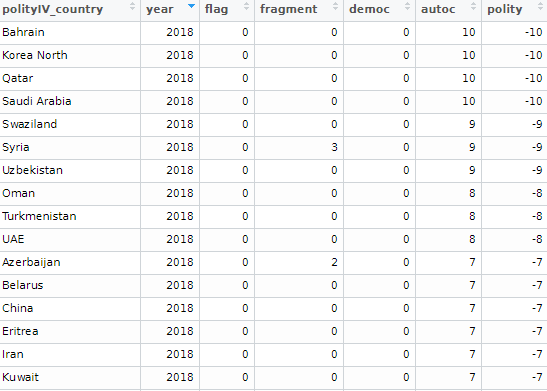
Interpret multicollinearity tests from the mctest package in R

Packages we will need :

library(mctest)

The mctest package’s functions have many multicollinearity diagnostic tests for overall and individual multicollinearity. Additionally, the package can show which regressors may be the reason of for the collinearity problem in your model.

Click here to read the CRAN PDF for all the function arguments available.

So – as always – we first fit a model.

Given the amount of news we have had about elections in the news recently, let’s look at variables that capture different aspects of elections and see how they relate to scores of democracy. These different election components will probably overlap.

In fact, I suspect multicollinearity will be problematic with the variables I am looking at.

Click here for a previous blog post on Variance Inflation Factor (VIF) score, the easiest and fastest way to test for multicollinearity in R.
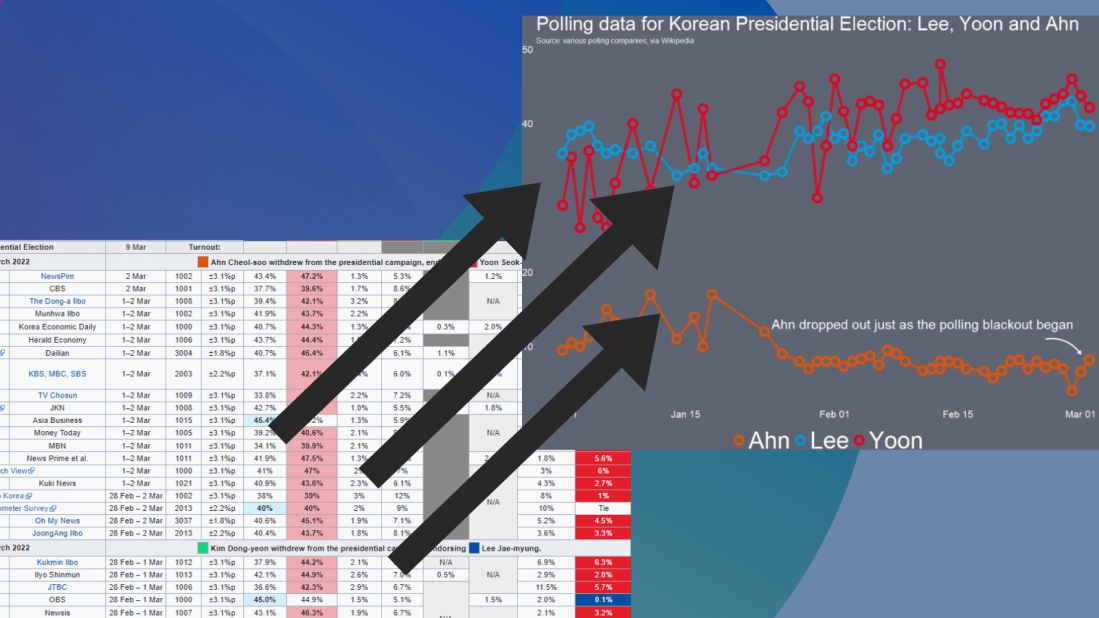
The variables in my model are:

  • emb_autonomy – the extent to which the election management body of the country has autonomy from the government to apply election laws and administrative rules impartially in national elections.
  • election_multiparty – the extent to which the elections involved real multiparty competition.
  • election_votebuy – the extent to which there was evidence of vote and/or turnout buying.
  • election_intimidate – the extent to which opposition candidates/parties/campaign workers subjected to repression, intimidation, violence, or harassment by the government, the ruling party, or their agents.
  • election_free – the extent to which the election was judged free and fair.

In this model the dependent variable is democracy score for each of the 178 countries in this dataset. The score measures the extent to which a country ensures responsiveness and accountability between leaders and citizens. This is when suffrage is extensive; political and civil society organizations can operate freely; governmental positions are clean and not marred by fraud, corruption or irregularities; and the chief executive of a country is selected directly or indirectly through elections.

election_model <- lm(democracy ~ ., data = election_df)
stargazer(election_model, type = "text")

However, I suspect these variables suffer from high multicollinearity. Usually your knowledge of the variables – and how they were operationalised – will give you a hunch. But it is good practice to check everytime, regardless.

The eigprop() function can be used to detect the existence of multicollinearity among regressors. The function computes eigenvalues, condition indices and variance decomposition proportions for each of the regression coefficients in my election model.

To check the linear dependencies associated with the corresponding eigenvalue, the eigprop compares variance proportion with threshold value (default is 0.5) and displays the proportions greater than given threshold from each row and column, if any.

So first, let’s run the overall multicollinearity test with the eigprop() function :

mctest::eigprop(election_model)

If many of the Eigenvalues are near to 0, this indicates that there is multicollinearity.

Unfortunately, the phrase “near to” is not a clear numerical threshold. So we can look next door to the Condition Index score in the next column.

This takes the Eigenvalue index and takes a square root of the ratio of the largest eigenvalue (dimension 1) over the eigenvalue of the dimension.

Condition Index values over 10 risk multicollinearity problems.

In our model, we see the last variable – the extent to which an election is free and fair – suffers from high multicollinearity with other regressors in the model. The Eigenvalue is close to zero and the Condition Index (CI) is near 10. Maybe we can consider dropping this variable, if our research theory allows its.

Another battery of tests that the mctest package offers is the imcdiag( ) function. This looks at individual multicollinearity. That is, when we add or subtract individual variables from the model.

mctest::imcdiag(election_model)

A value of 1 means that the predictor is not correlated with other variables.  As in a previous blog post on Variance Inflation Factor (VIF) score, we want low scores. Scores over 5 are moderately multicollinear. Scores over 10 are very problematic.

And, once again, we see the last variable is HIGHLY problematic, with a score of 14.7. However, all of the VIF scores are not very good.

The Tolerance (TOL) score is related to the VIF score; it is the reciprocal of VIF.

The Wi score is calculated by the Farrar Wi, which an F-test for locating the regressors which are collinear with others and it makes use of multiple correlation coefficients among regressors. Higher scores indicate more problematic multicollinearity.

The Leamer score is measured by Leamer’s Method : calculating the square root of the ratio of variances of estimated coefficients when estimated without and with the other regressors. Lower scores indicate more problematic multicollinearity.

The CVIF score is calculated by evaluating the impact of the correlation among regressors in the variance of the OLSEs. Higher scores indicate more problematic multicollinearity.

The Klein score is calculated by Klein’s Rule, which argues that if Rj from any one of the models minus one regressor is greater than the overall R2 (obtained from the regression of y on all the regressors) then multicollinearity may be troublesome. All scores are 0, which means that the R2 score of any model minus one regression is not greater than the R2 with full model.

Click here to read the mctest paper by its authors – Imdadullah et al. (2016) – that discusses all of the mathematics behind all of the tests in the package.

In conclusion, my model suffers from multicollinearity so I will need to drop some variables or rethink what I am trying to measure.

Click here to run Stepwise regression analysis and see which variables we can drop and come up with a more parsimonious model (the first suspect I would drop would be the free and fair elections variable)

Perhaps, I am capturing the same concept in many variables. Therefore I can run Principal Component Analysis (PCA) and create a new index that covers all of these electoral features.

Next blog will look at running PCA in R and examining the components we can extract.

References

Imdadullah, M., Aslam, M., & Altaf, S. (2016). mctest: An R Package for Detection of Collinearity among Regressors. R J.8(2), 495.

Check linear regression assumptions with gvlma package in R

Packages we will need:

library(gvlma)

gvlma stands for Global Validation of Linear Models Assumptions. See Peña and Slate’s (2006) paper on the package if you want to check out the math!

Linear regression analysis rests on many MANY assumptions. If we ignore them, and these assumptions are not met, we will not be able to trust that the regression results are true.

Luckily, R has many packages that can do a lot of the heavy lifting for us. We can check assumptions of our linear regression with a simple function.

So first, fit a simple regression model:

 data(mtcars)
 summary(car_model <- lm(mpg ~ wt, data = mtcars)) 

We then feed our car_model into the gvlma() function:

gvlma_object <- gvlma(car_model)
  • Global Stat checks whether the relationship between the dependent and independent relationship roughly linear. We can see that the assumption is met.
  • Skewness and kurtosis assumptions show that the distribution of the residuals are normal.

  • Link function checks to see if the dependent variable is continuous or categorical. Our variable is continuous.

  • Heteroskedasticity assumption means the error variance is equally random and we have homoskedasticity!

Often the best way to check these assumptions is to plot them out and look at them in graph form.

Next we can plot out the model assumptions:

plot.gvlma(glvma_object)

The relationship is a negative linear relationship between the two variables.

This scatterplot of residuals on the y axis and fitted values (estimated responses) on the x axis. The plot is used to detect non-linearity, unequal error variances, and outliers.

As explained in this Penn State webpage on interpreting residuals versus fitted plots:

  • The residuals “bounce randomly” around the 0 line. This suggests that the assumption that the relationship is linear is reasonable.
  • The residuals roughly form a “horizontal band” around the 0 line. This suggests that the variances of the error terms are equal.
  • No one residual “stands out” from the basic random pattern of residuals. This suggests that there are no outliers.

In this histograpm of standardised residuals, we see they are relatively normal-ish (not too skewed, and there is a single peak).

Next, the normal probability standardized residuals plot, Q-Q plot of sample (y axis) versus theoretical quantiles (x axis). The points do not deviate too far from the line, and so we can visually see how the residuals are normally distributed.

Click here to check out the CRAN pdf for the gvlma package.

References

Peña, E. A., & Slate, E. H. (2006). Global validation of linear model assumptions. Journal of the American Statistical Association101(473), 341-354.

Visualise panel data regression with ExPanDaR package in R

The ExPand package is an example of a shiny app.

What is a shiny app, you ask? Click to look at a quick Youtube explainer. It’s basically a handy GUI for R.

When we feed a panel data.frame into the ExPanD() function, a new screen pops up from R IDE (in my case, RStudio) and we can interactively toggle with various options and settings to run a bunch of statistical and visualisation analyses.

Click here to see how to convert your data.frame to pdata.frame object with the plm package.

Be careful your pdata.frame is not too large with too many variables in the mix. This will make ExPanD upset enough to crash. Which, of course, I learned the hard way.

Also I don’t know why there are random capitalizations in the PaCkaGe name. Whenever I read it, I think of that Sponge Bob meme.

If anyone knows why they capitalised the package this way. please let me know!

So to open up the new window, we just need to feed the pdata.frame into the function:

ExPanD(mil_pdf)

For my computer, I got error messages for the graphing sections, because I had an old version of Cairo package. So to rectify this, I had to first install a source version of Cairo and restart my R session. Then, the error message gods were placated and they went away.

install.packages("Cairo", type="source")

Then press command + shift + F10 to restart R session

library(Cairo)

You may not have this problem, so just ignore if you have an up-to-date version of the necessary packages.

When the new window opens up, the first section allows you to filter subsections of the panel data.frame. Similar to the filter() argument in the dplyr package.

For example, I can look at just the year 1989:

But let’s look at the full sample

We can toggle with variables to look at mean scores for certain variables across different groups. For example, I look at physical integrity scores across regime types.

  • Purple plot: closed autocracy
  • Turquoise plot: electoral autocracy
  • Khaki plot: electoral democracy:
  • Peach plot: liberal democracy

The plots show that there is a high mean score for physical integrity scores for liberal democracies and less variance. However with the closed and electoral autocracies, the variance is greater.

We can look at a visualisation of the correlation matrix between the variables in the dataset.

Next we can look at a scatter plot, with option for loess smoother line, to graph the relationship between democracy score and physical integrity scores. Bigger dots indicate larger GDP level.

Last we can run regression analysis, and add different independent variables to the model.

We can add fixed effects.

And we can subset the model by groups.

The first column, the full sample is for all regions in the dataset.

The second column, column 1 is

Column 2 Post Soviet countries

Column 3: Latin America

Column 4: AFRICA

Column 5: Europe, North America

Column 6: Asia

Check linear regression assumptions with the olsrr package in R

Packages we will need:

library(olsrr)
library(countrycode)
library(WDI)
library(stargazer)
library(peacesciencer)
library(plm)

One core assumption of linear regression analysis is that the residuals of the regression are normally distributed.

When the normality assumption is violated, interpretation and inferences may not be reliable. In worst case, the interpretations are not at all valid.

So it is important we check this assumption is not violated.

As well residuals being normal distributed, we must also check that the residuals have the same variance (i.e. homoskedasticity).

Click here to find out how to check for homoskedasticity.

Then, if there is a problem with the variance, click here to find out how to fix heteroskedasticity (which means the residuals have a non-random pattern in their variance) with the sandwich package in R.

There are three ways to check that the error in our linear regression has a normal distribution:

  • plots or graphs such histograms, boxplots or Q-Q-plots, to get a visual approximation
  • examining skewness and kurtosis indices
  • formal normality tests, to check for a p-value

In this blog, we will see what factors affect military spending by a government.

We will take some variables from the World Bank via the WDI package.

Click here to read more about downloading World Bank Data with the WDI package.

mil_spend_gdp = WDI(indicator = "MS.MIL.XPND.ZS")
gdp_percap = WDI(indicator = "NY.GDP.PCAP.KD")

mil_spend_gdp %>% 
  inner_join(gdp_percap) %>% 
  select(country, year,
         mil_spend_gdp = MS.MIL.XPND.ZS,
         gdp_percap = NY.GDP.PCAP.KD) %>%  
  mutate(cown = countrycode(country, "country.name", "cown")) %>% 
  filter(!is.na(cown)) -> wdi_data

And also download some variables via the peacesciencer package.

Click here to read more about the peacesciencer package in the blog posts about building datasets

peacesciencer::create_stateyears(system = "gw") %>% 
  add_ucdp_acd() %>% 
  add_democracy() %>% 
  mutate(cown = countrycode(statename, "country.name", "cown")) -> peace_data

We can code a new binary variable that indicates if there was a UCDP conflict in the previous 10 years or not.

We could imagine a country that experienced war is more likely to keep investing in their military (as a larger percentage of their GDP) than countries that have only experienced relative peace in their recent past.

peace_data %<>%
  select(statename, cown, year, ucdpongoing, maxintensity, conflict_ids, v2x_polyarchy, polity2) %>% 
  mutate(ucdpongoing_no_na = ifelse(is.na(ucdpongoing), 0, ucdpongoing)) %>% 
  group_by(statename) %>%
  arrange(year) %>%
  mutate(war_past_10_years = ifelse(ucdpongoing == 1 & lag(ucdpongoing, order_by = year, default = 0, n = 10) == 1, 1, 0)) %>% 
  mutate(war_past_10_years_no_na = ifelse(ucdpongoing_no_na == 1 & lag(ucdpongoing_no_na, order_by = year, default = 0, n = 10) == 1, 1, 0)) 

We merge the data by the Correlates of War codes.

Click here to read more about using COW codes with the countrycode package.

wdi_data %>% 
  inner_join(peace_data, by = c("cown", "year")) -> wdi_peace

With these data, we can build our linear regression model.

Our dependent variable is military spending as a percentage of GDP (logged)

Our independent varibles are:

  • GDP per capita (logged) from the World Bank
  • Demoracy (as measured by the V-DEM polyarchy score)
  • Binary variable that is 1 if a country had a UCDP conflict in the previous 10 years and 0 if none.

We will also add an interaction term with the GDP and democracy variable.

Given we have cross-sectional longitudinal data, the best option would be panel data analysis with the plm package

plm(log(mil_spend_gdp) ~ log(gdp_percap)*v2x_polyarchy + as.factor(war_past_10_years_no_na), data = wdi_peace, 
  index = c("cown", "year"), model = "within") %>% 
  stargazer(., type = "text")
Dependent variable:
Military spending (GDP %) (ln)
GDP pc (ln)-0.288***
(0.029)
Democracy1.004***
(0.353)
War 10 year dummy0.146***
(0.021)
GDP pc (ln) x Democracy-0.199***
(0.046)
Observations3,686
R20.135
Adjusted R20.097
F Statistic137.989*** (df = 4; 3530)
Note:*p<0.1; **p<0.05; ***p<0.01

However, the olsrr package cannot handle plm.

In future blog posts, we will lok more closely at plm() panel regressions and the diagnostic tests we have to run with these types of models.

So we will just look at one year, 2010.

lm(log(mil_spend_gdp) ~ log(gdp_percap)*v2x_polyarchy + as.factor(war_past_10_years_no_na), data = subset(wdi_peace, year == 2010)) -> war_model
Dependent variable:
Military spending (GDP %) (ln)
GDP pc (ln)0.261**
(0.101)
Democracy1.450
(1.565)
War 10 year dummy0.592***
(0.159)
GDP pc (ln) x Democracy-0.343**
(0.168)
Constant0.183
(0.885)
Observations136
R20.381
Adjusted R20.362
Residual Std. Error0.615 (df = 131)
F Statistic20.137*** (df = 4; 131)
Note:*p<0.1; **p<0.05; ***p<0.01

So now we have our OLS model, we can run a heap of linear model diagnostic functions with the olsrr package.

Built by Aravind Hebbali, the description of the package mentions that olsrr has tools designed to make it easier for users, particularly beginner/intermediate R users to build ordinary least squares regression models. Thank you Aravind!

It includes regression output, heteroskedasticity tests, collinearity diagnostics, residual diagnostics, measures of influence, model fit assessment and variable selection procedures. Look through the CRAN PDF below or look at rsquaredacademy website to get a comprehensive overview of the package

We will now check if the residuals in our model (the difference between what our model predicted and what the values actually are) are normally distributed

ols_test_normality(war_model)
Test Statistic p-value
Shapiro-Wilk 0.9817 0.0653
Kolmogorov-Smirnov 0.0524 0.8494
Cramer-von Mises 14.1123 0.0000
Anderson-Darling 0.469 0.2447

Let’s look at each test result in turn

Shapiro-Wilk:

The test statistic is 0.9817, and the p-value is 0.0653.

The null hypothesis is that the residuals are normally distributed.

In this case, the p-value is greater than the predefined significance level (typically 0.05), so you cannot reject the null hypothesis.

This suggests that the residuals may follow a normal distribution.

Woo!

Kolmogorov-Smirnov:

The test statistic is 0.0524, and the p-value is 0.8494.

Similar to the Shapiro-Wilk test, the p-value is greater than 0.05, so you cannot reject the null hypothesis of normality.

This suggests that the residuals may follow a normal distribution.

Yay.

Cramer-von Mises:

This test statistic is 14.1123, and the p-value is 0.0000.

The null hypothesis is that the residuals are normally distributed. The very low p-value indicates that you can reject the null hypothesis, suggesting that the residuals are not from a normal distribution.

Oh no.

Anderson-Darling: This is another test of normality. The test statistic is 0.469, and the p-value is 0.2447. Similar to the Shapiro-Wilk and Kolmogorov-Smirnov tests, the p-value is greater than 0.05, so you cannot reject the null hypothesis of normality.

Phew.

Which of the normality tests is the best?

And what is up with Cramer-von Mises?

A paper by Razali and Wah (2011) tested all these formal normality tests with 10,000 Monte Carlo simulation of sample data generated from alternative distributions that follow symmetric and asymmetric distributions.

Their results showed that the Shapiro-Wilk test is the most powerful normality test, followed by Anderson-Darling test, and Kolmogorov-Smirnov test. Their study did not look at the Cramer-Von Mises test.

The results of Razali and Wah’s study echo the previous findings of Mendes and Pala (2003) and Keskin (2006) in support of Shapiro-Wilk test as the most powerful normality test.

According Ahad and colleagues (2011: 641), they find that

“the performances of the normality tests, namely, the Kolmogorov-Smirnov test, Anderson-Darling test, Cramervon Mises test, and Shapiro-Wilk test, were evaluated under various spectrums of non-normal distributions and different sample sizes. The results showed that the ShapiroWilk test is the most sensitive normality test because this test rejects the null hypothesis of normality at the smallest sample sizes compared to the other tests, at all levels of skewness and kurtosis. Thus, when the four normality tests are available in a statistical package, we would recommend practitioners to use the Shapiro-Wilk normality to test the normality of data”

Ahad et al (2001: 641)

We can plot out the residuals distribution in a histogram with olsrr

olsrr::ols_plot_resid_hist(war_model)

Visually, we can confirm that the residuals have a lovely bell curve and are broadly normally distributed! With a few outliers at -2.

Nest we can check the residuals with a QQ plot.

A QQ plot is used to compare residuals to the normal distribution in linear regression. We can use a normal QQ plot to visually check if our residuals follow a theoretical normal distribution.

In addition to being good at identifying outliers and heavy tails, QQ plots can reveal characteristics such as skewness and bimodality, and can be effective even
for small samples (Marden, 2004).

olsrr::ols_plot_resid_qq(war_model)

Again we can see some outliers at -2

Next we can look at a scatter plot of residuals on the y axis and fitted values on the x axis to detect non-linearity, unequal error variances, and outliers.

Each point in the plot is a residual value (i.e. the difference between what the model predicted and what the value actually

When interpreting this plot, there are a few things we want to look out for.

  1. The points does not deviate too far from 0. This indicates the variance is homogeneous (i.e. homescediasticity, one of my favourite words)
  2. The points are random (i.e. show no distinct pattern) around the horizontal red line at 0
ols_plot_resid_fit(war_model)
  1. There are some residual values at the -2, so they might be outliers. We we look at an outlier diagnostic plot in a bit.
  2. There are no discernible pattern in the scatterplot, so there does not seem to be any heteroscedasticity in the variance.

We can run an ols_plot_resid_lev() to graph for detecting outliers and/or observations with high leverage.

ols_plot_resid_lev(war_model)

There are a few outliers with leverage that we need to look more closely and examine how they prove / challenge our given theory / hypotheses.

FINALLLY. for a more complete diagnostics check, we can insert the model into the ols_coll_diag() function to calculate the Variance Inflation Factor (VIF) and Eigenvalues of the variables in the model.

VIF scores highlight if there is multicollinearity between the independent variables. If they are too highly correlated, our model is in trouble.

  • If the value of VIF is 1< VIF < 5, it specifies that the variables are moderately correlated to each other.

  • The challenging value of VIF is between 5 to 10 as it specifies the highly correlated variables.

  • If VIF ≥ 5 to 10, there will be multicollinearity among the predictors in the regression model.

  • VIF > 10 indicate the regression coefficients are feebly estimated with the presence of multicollinearity

Read more about the issues with multicollinearity in Shrestha (2020)

ols_coll_diag(war_model) 
Variables Tolerance VIF
GDP per capita (ln) 0.13 7.6
Democracy 0.02 56.2
War 10 years 0.91 1.1
GDP pc (ln) X Democracy 0.01 79.9

Next we look at the Eigenvalues

Eigenvalue Condition Index intercept GDP pc (ln) Democracy War 10 years GDP pc (ln) X Democracy
3.93 1.00 0.00 0.00 0.00 0.01 0.00
0.90 2.09 0.00 0.00 0.00 0.82 0.00
0.16 5.01 0.01 0.00 0.00 0.12 0.01
0.02 15.14 0.04 0.08 0.05 0.02 0.02
0.00 67.74 0.95 0.92 0.94 0.03 0.97

This is not good.

But it is probably due to the interaction term.

If we run the regression agaon without any interaction term , the VIF scores are all around 1!

lm(log(mil_spend_gdp) ~ log(gdp_percap) + v2x_polyarchy + as.factor(war_past_10_years_no_na), data = subset(wdi_peace, year == 2010)) -> war_model_no_interaction
ols_coll_diag(war_model_no_interaction) 

There are plenty of other helpful functions in the olsrr package that we can look at with our model.

For example, we can run AIC stepwise regression to see if we need to drop any variables

aic_step <- ols_step_both_p(war_model)
Step Variable Added/Removed R-Square Adj. R-Square C(p) AIC RMSE
1 v2x_polyarchy addition 0.298 0.293 16.4970 271.6880 0.6474
2 as.factor(war_past_10_years_no_na) addition 0.347 0.338 8.0720 263.7888 0.6266
3 log(gdp_percap) addition 0.361 0.347 7.1600 262.8901 0.6223
4 log(gdp_percap):v2x_polyarchy addition 0.381 0.362 5.0000 260.6381 0.6150

Lower AIC scores are better, and AIC penalizes models that use more parameters.

That means if two models explain the same amount of variation, the model with a smaller number of variable parameters will have a lower AIC score.

Many would argue that this would be the better-fit model.

We can see in step 4, the AIC is the lowest. So that is good news!

Variables doe not live in a vacuum in the model. When we run a model, we want to have a better understanding of the relationship between military spending and the independent variables conditional on the other independent variables

According to the package, the added variable plot provides information about the marginal importance of a GIVEN independent variable, given the other variables already in the model.

It shows the marginal importance of the variable in reducing the residual variability.

olsrr::ols_plot_added_variable(war_model)

The military spending dependent variable is on the y axis and we look at adding the named variable (given that the other variables are already in the model).

The democracy variable GDP variable interaction slope appears to decrease while all other variables increase.

What do the Y and X residuals represent? The Y residuals represent the part of Y not explained by all the variables other than X. The X residuals represent the part of X not explained by other variables. The slope of the line fitted to the points in the added variable plot is equal to the regression coefficient when Y is regressed on all variables including X.

A strong linear relationship in the added variable plot indicates the increased importance of the contribution of X to the model already containing the other predictors.

We can see, for example, that (with all other variables held constant) higher GDP per capita correlates with higher proportion of military spending. Richer countries seem to dedicate more of this money to building a military.

Thank you for reading !

References

Ahad, N. A., Yin, T. S., Othman, A. R., & Yaacob, C. R. (2011). Sensitivity of normality tests to non-normal data. Sains Malaysiana40(6), 637-641.

Marden, J. I. (2004). Positions and QQ plots. Statistical Science, 606-614.

Razali, N. M., & Wah, Y. B. (2011). Power comparisons of Shapiro-Wilk, Kolmogorov-Smirnov, Lilliefors and Anderson-Darling tests. Journal of statistical modeling and analytics2(1), 21-33.

Shrestha, N. (2020). Detecting multicollinearity in regression analysis. American Journal of Applied Mathematics and Statistics8(2), 39-42.

How to graph Google search trends with gtrendsR package in R

Google Trends is a search trends feature. It shows how frequently a given search term is entered into Google’s search engine, relative to the site’s total search volume over a given period of time.

( So note: because the results are all relative to the other search terms in the time period, the dates you provide to the gtrendsR function will change the shape of your graph and the relative percentage frequencies on the y axis of your plot).

To scrape data from Google Trends, we use the gtrends() function from the gtrendsR package and the get_interest() function from the trendyy package (a handy wrapper package for gtrendsR).

If necessary, also load the tidyverse and ggplot packages.

library(tidyverse)
library(gtrendsR)
library(trendyy)

To scrape the Google trend data, call the trendy() function and write in the search terms.

We can look at relative search hits for Yevgeny Prigozhin, leader of Russian mercenary army, Wagner Group.

prig <- trendy("Prigozhin", "2022-08-25", "2023-08-26") %>% 
  get_interest()

ggplot(data = prig, aes(x = as.Date(date), 
                          y = hits)) +
  geom_line(colour = "#005f73", 
            size = 6.5, alpha = 0.1)  +
  geom_line(colour = "#005f73", 
            size = 4, alpha = 0.3) +
  geom_line(colour = "#005f73", 
            size = 3, alpha = 0.5) +
  geom_line(colour = "#005f73", 
            size = 2) +
  ylab(label = 'Relative Hits %') +
  bbplot::bbc_style() +
  xlab(label = "Search Dates") + 
  ylab(label = 'Relative Hits %') +
  labs(title = "Relative hits for `Prigozhin` on Google",
       subtitle = "Data from Google search hits") +
  geom_curve(aes(x = as.Date("2021-10-01"), 
                   y = 45, 
                   xend = as.Date("2022-02-01"), 
                   yend = 30),
             size = 2, alpha = 0.8,
               color = "#001219",
               arrow = arrow(type = "closed")) 

For the next example, here we search for the term “Kamala Harris” during the period from 1st of January 2019 until today.

If you want to check out more specifications, for the package, you can check out the package PDF here. For example, we can change the geographical region (US state or country for example) with the geo specification.

We can also change the parameters of the time argument, we can specify the time span of the query with any one of the following strings:

  • “now 1-H” (previous hour)
  • “now 4-H” (previous four hours)
  • “today+5-y” last five years (default)
  • “all” (since the beginning of Google Trends (2004))

If don’t supply a string, the default is five year search data.

kamala <- trendy("Kamala Harris", "2019-01-01", "2020-08-13") %>% get_interest()

We call the get_interest() function to save this data from Google Trends into a data.frame version of the kamala object. If we didn’t execute this last step, the data would be in a form that we cannot use with ggplot().

View(kamala)

In this data.frame, there is a date variable for each week and a hits variable that shows the interest during that week. Remember,  this hits figure shows how frequently a given search term is entered into Google’s search engine relative to the site’s total search volume over a given period of time.

We will use these two variables to plot the y and x axis.

To look at the search trends in relation to the events during the Kamala Presidential campaign over 2019, we can add vertical lines along the date axis, with a data.frame, we can call kamala_events.

kamala_events = data.frame(date=as.Date(c("2019-01-21", "2019-06-25", "2019-12-03", "2020-08-12")), 
event=c("Launch Presidential Campaign", "First Primary Debate", "Drops Out Presidential Race", "Chosen as Biden's VP"))

Note the very specific order the as.Date() function requires.

Next, we can graph the trends, using the above date and hits variables:

ggplot(kamala, aes(x = as.Date(date), y = hits)) +
  geom_line(colour = "steelblue", size = 2.5) +
  geom_vline(data=kamala_events, mapping=aes(xintercept=date), color="red") +
    geom_text(data=kamala_events, mapping=aes(x=date, y=0, label=event), size=4, angle=40, vjust=-0.5, hjust=0) + 
    xlab(label = "Search Dates") + 
    ylab(label = 'Relative Hits %')

Which produces:

I can update the graph

Cairo::CairoWin()

ggplot(data = kamala, aes(x = as.Date(date), 
                          y = hits)) +
  geom_vline(data = kamala_events, 
             mapping = aes(xintercept = date),
             size = 11, 
             alpha = 0.1,
             color = "#9b2226") +
  geom_vline(data = kamala_events, 
             mapping = aes(xintercept = date),
             size = 8, 
             alpha = 0.2,
             color = "#9b2226") +
  geom_vline(data = kamala_events, 
             mapping = aes(xintercept = date),
             size = 7, 
             alpha = 0.3,
             color = "#9b2226") +
  geom_vline(data = kamala_events, 
             mapping = aes(xintercept = date),
             size = 4, 
             alpha = 0.4,
             color = "#9b2226") +
  geom_line(colour = "#005f73", 
            size = 5.5, alpha = 0.4)  +
  geom_line(colour = "#005f73", 
            size = 5, alpha = 0.5) +
  geom_line(colour = "#005f73", 
            size = 4, alpha = 0.6) +
  geom_line(colour = "#005f73", 
            size = 3) +
  geom_text(data = kamala_events, 
            mapping = aes(x = date, 
                          y = 0,
                          label = event), 
                    size = 9,
                    angle = 10, 
                    vjust = -4.6, 
                    hjust = 0.7) + 
  bbplot::bbc_style() +
  xlab(label = "Search Dates") + 
  ylab(label = 'Relative Hits %') +
  labs(title = "Relative hits for `Kamala Harris` on Google",
       subtitle = "Data from Google search hits") +
  theme(plot.title = element_text(size = 40), 
        plot.subtitle = element_text(size = 20)) +
  geom_curve(aes(x = as.Date("2018-12-01"), 
                  y = 88, 
                  xend = as.Date("2019-01-15"), 
                  yend = 99),
             size = 2, alpha = 0.8,
             color = "#001219",
             curvature = -0.4,
             angle = 90,
             arrow = arrow(type = "closed")) +
  geom_curve(aes(x = as.Date("2019-05-01"), 
                 y = 69, 
                 xend = as.Date("2019-06-15"), 
                 yend = 70),
             size = 2, 
             alpha = 0.8,
             color = "#001219",
             curvature = 0.7,
             angle = 90,
             arrow = arrow(type = "closed")) +
  geom_curve(aes(x = as.Date("2019-10-15"), 
                 y = 69, 
                 xend = as.Date("2019-11-20"), 
                 yend = 46),
             size = 2, 
             alpha = 0.8,
             color = "#001219",
             curvature = 0.3,
             angle = 90,
             arrow = arrow(type = "closed")) 

Super easy and a quick way to visualise the ups and downs of Kamala Harris’ political career over the past few months, operationalised as the relative frequency with which people Googled her name.

If I had chosen different dates, the relative hits as shown on the y axis would be different! So play around with it and see how the trends change when you increase or decrease the time period.

Plot marginal effects with sjPlot package in R

Without examining interaction effects in your model, sometimes we are incorrect about the real relationship between variables.

This is particularly evident in political science when we consider, for example, the impact of regime type on the relationship between our dependent and independent variables. The nature of the government can really impact our analysis.

For example, I were to look at the relationship between anti-government protests and executive bribery.

I would expect to see that the higher the bribery score in a country’s government, the higher prevalence of people protesting against this corrupt authority. Basically, people are angry when their government is corrupt. And they make sure they make this very clear to them by protesting on the streets.

First, I will describe the variables I use and their data type.

With the dependent variable democracy_protest being an interval score, based upon the question: In this year, how frequent and large have events of mass mobilization for pro-democratic aims been?

The main independent variable is another interval score on executive_bribery scale and is based upon the question: How clean is the executive (the head of government, and cabinet ministers), and their agents from bribery (granting favors in exchange for bribes, kickbacks, or other material inducements?)

Higher scores indicate cleaner governing executives.

So, let’s run a quick regression to examine this relationship:

summary(protest_model <- lm(democracy_protest ~ executive_bribery, data = data_2010))

Examining the results of the regression model:

We see that there is indeed a negative relationship. The cleaner the government, the less likely people in the country will protest in the year under examination. This confirms our above mentioned hypothesis.

However, examining the R2, we see that less than 1% of the variance in protest prevalence is explained by executive bribery scores.

Not very promising.

Is there an interaction effect with regime type? We can look at a scatterplot and see if the different regime type categories cluster in distinct patterns.

The four regime type categories are

  • purple: liberal democracy (such as Sweden or Canada)
  • teal: electoral democracy (such as Turkey or Mongolia)
  • khaki green: electoral autocracy (such as Georgia or Ethiopia)
  • red: closed autocracy (such as Cuba or China)

The color clusters indicate regime type categories do cluster.

  • Liberal democracies (purple) cluster at the top left hand corner. Higher scores in clean executive index and lower prevalence in pro-democracy protesting.
  • Electoral autocracies (teal) cluster in the middle.
  • Electoral democracies (khaki green) cluster at the bottom of the graph.
  • The closed autocracy countries (red) seem to have a upward trend, opposite to the overall best fitted line.

So let’s examine the interaction effect between regime types and executive corruption with mass pro-democracy protests.

Plot the model and add the * interaction effect:

summary(protest_model_2 <-lm(democracy_protest ~ executive_bribery*regime_type, data = data_2010))

Adding the regime type variable, the R2 shoots up to 27%.

The interaction effect appears to only be significant between clean executive scores and liberal democracies. The cleaner the country’s executive, the prevalence of mass mobilization and protests decreases by -0.98 and this is a statistically significant relationship.

The initial relationship we saw in the first model, the simple relationship between clean executive scores and protests, has disappeared. There appears to be no relationship between bribery and protests in the semi-autocratic countries; (those countries that are not quite democratic but not quite fully despotic).

Let’s graph out these interactions.

In the plot_model() function, first type the name of the model we fitted above, protest_model.

Next, choose the type . For different type arguments, scroll to the bottom of this blog post. We use the type = "pred" argument, which plots the marginal effects.

Marginal effects tells us how a dependent variable changes when a specific independent variable changes, if other covariates are held constant. The two terms typed here are the two variables we added to the model with the * interaction term.

install.packages("sjPlot")
library(sjPlot)

plot_model(protest_model, type = "pred", terms = c("executive_bribery", "regime_type"), title = 'Predicted values of Mass Mobilization Index',

 legend.title = "Regime type")

Looking at the graph, we can see that the relationship changes across regime type. For liberal democracies (purple), there is a negative relationship. Low scores on the clean executive index are related to high prevalence of protests. So, we could say that when people in democracies see corrupt actions, they are more likely to protest against them.

However with closed autocracies (red) there is the opposite trend. Very corrupt countries in closed autocracies appear to not have high levels of protests.

This would make sense from a theoretical perspective: even if you want to protest in a very corrupt country, the risk to your safety or livelihood is often too high and you don’t bother. Also the media is probably not free so you may not even be aware of the extent of government corruption.

It seems that when there are no democratic features available to the people (free media, freedom of assembly, active civil societies, or strong civil rights protections, freedom of expression et cetera) the barriers to protesting are too high. However, as the corruption index improves and executives are seen as “cleaner”, these democratic features may be more accessible to them.

If we only looked at the relationship between the two variables and ignore this important interaction effects, we would incorrectly say that as

Of course, panel data would be better to help separate any potential causation from the correlations we can see in the above graphs.

The blue line is almost vertical. This matches with the regression model which found the coefficient in electoral autocracy is 0.001. Virtually non-existent.

Different Plot Types

type = "std" – Plots standardized estimates.

type = "std2" – Plots standardized estimates, however, standardization follows Gelman’s (2008) suggestion, rescaling the estimates by dividing them by two standard deviations instead of just one. Resulting coefficients are then directly comparable for untransformed binary predictors.

type = "pred" – Plots estimated marginal means (or marginal effects). Simply wraps ggpredict.

type = "eff"– Plots estimated marginal means (or marginal effects). Simply wraps ggeffect.

type = "slope" and type = "resid" – Simple diagnostic-plots, where a linear model for each single predictor is plotted against the response variable, or the model’s residuals. Additionally, a loess-smoothed line is added to the plot. The main purpose of these plots is to check whether the relationship between outcome (or residuals) and a predictor is roughly linear or not. Since the plots are based on a simple linear regression with only one model predictor at the moment, the slopes (i.e. coefficients) may differ from the coefficients of the complete model.

type = "diag" – For Stan-models, plots the prior versus posterior samples. For linear (mixed) models, plots for multicollinearity-check (Variance Inflation Factors), QQ-plots, checks for normal distribution of residuals and homoscedasticity (constant variance of residuals) are shown. For generalized linear mixed models, returns the QQ-plot for random effects.

Check for multicollinearity with the car package in R

Packages we will need:

install.packages("car")
library(car)

When one independent variable is highly correlated with another independent variable (or with a combination of independent variables), the marginal contribution of that independent variable is influenced by other predictor variables in the model.

And so, as a result:

  • Estimates for regression coefficients of the independent variables can be unreliable.
  • Tests of significance for regression coefficients can be misleading.

To check for multicollinearity problem in our model, we need the vif() function from the car package in R. VIF stands for variance inflation factor. It measures how much the variance of any one of the coefficients is inflated due to multicollinearity in the overall model.

As a rule of thumb, a vif score over 5 is a problem. A score over 10 should be remedied and you should consider dropping the problematic variable from the regression model or creating an index of all the closely related variables.

This blog post will look only at the VIF score. Click here to look at how to interpret various other multicollinearity tests in the mctest package in addition to the the VIF score.

Back to our model, I want to know whether countries with high levels of clientelism, high levels of vote buying and low democracy scores lead to executive embezzlement?

So I fit a simple linear regression model (and look at the output with the stargazer package)

summary(embezzlement_model_1 <- lm(executive_embezzlement ~ clientelism_index + vote_buying_score + democracy_score, data = data_2010))

stargazer(embezzlement_model_1, type = "text")

I suspect that clientelism and vote buying variables will be highly correlated. So let’s run a test of multicollinearity to see if there is any problems.

car::vif(embezzlement_model_1)

The VIF score for the three independent variables are :

Both clientelism index and vote buying variables are both very high and the best remedy is to remove one of them from the regression. Since vote buying is considered one aspect of clientelist regime so it is probably overlapping with some of the variance in the embezzlement score that the clientelism index is already explaining in the model

So re-run the regression without the vote buying variable.

summary(embezzlement_model_2 <- lm(v2exembez ~ v2xnp_client  + v2x_api, data = vdem2010))
stargazer(embezzlement_model_2, embezzlement_model_2, type = "text")
car::vif(embezzlement_mode2)

Comparing the two regressions:

And running a VIF test on the second model without the vote buying variable:

car::vif(embezzlement_model_2)

These scores are far below 5 so there is no longer any big problem of multicollinearity in the second model.

Click here to quickly add VIF scores to our regression output table in R with jtools package.

Plus, looking at the adjusted R2, which compares two models, we see that the difference is very small, so we did not lose much predictive power in dropping a variable. Rather we have minimised the issue of highly correlated independent variables and thus an inability to tease out the real relationships with our dependent variable of interest.

tl;dr: As a rule of thumb, a vif score over 5 is a problem. A score over 10 should be remedied (and you should consider dropping the problematic variable from the regression model or creating an index of all the closely related variables).

Click here to run stepwise regression analysis to help decide which problematic variables we can drop from our model (based on AIC scores)

Check for heteroskedasticity in OLS with lmtest package in R

One core assumption when calculating ordinary least squares regressions is that all the random variables in the model have equal variance around the best fitting line.

Essentially, when we run an OLS, we expect that the error terms have no fan pattern.

Example of homoskedasticiy

So let’s look at an example of this assumption being satisfied. I run a simple regression to see whether there is a relationship between and media censorship and civil society repression in 178 countries in 2010.

ggplot(data_010, aes(media_censorship, civil_society_repression)) 
      + geom_point() + geom_smooth(method = "lm") 
      + geom_text(size = 3, nudge_y = 0.1, aes(label = country))

If we run a simple regression

summary(repression_model <- lm(media_censorship ~ civil_society_repression, data = data_2010))
stargazer(repression_model, type = "text")

This is pretty common sense; a country that represses its citizens in one sphere is more likely to repress in other areas. In this case repressing the media correlates with repressing civil society.

We can plot the residuals of the above model with the autoplot() function from the ggfortify package.

library(ggfortify)
autoplot(repression_model)

Nothing unusual appears to jump out at us with regard to evidence for heteroskedasticity!

In the first Residuals vs Fitted plot, we can see that blue line does not drastically diverge from the dotted line (which indicates residual value = 0).

The third plot Scale-Location shows again that there is no drastic instances of heteroskedasticity. We want to see the blue line relatively horizontal. There is no clear pattern in the distribution of the residual points.

In the Residual vs. Leverage plot (plot number 4), the high leverage observation 19257 is North Korea! A usual suspect when we examine model outliers.

While it is helpful to visually see the residuals plotted out, a more objective test can help us find whether the model is indeed free from heteroskedasticity problems.

For this we need the Breusch-Pagan test for heteroskedasticity from the lmtest package.

install.packages("lmtest)
library(lmtest)
bptest(repression_model)

The default in R is the studentized Breusch-Pagan. However if you add the studentize = FALSE argument, you have the non-studentized version

The null hypothesis of the Breusch-Pagan test is that the variance in the model is homoskedastic.

With our repression_model, we cannot reject the null, so we can say with confidence that there is no major heteroskedasticity issue in our model.

The non-studentized Breusch-Pagan test makes a very big assumption that the error term is from Gaussian distribution. Since this assumption is usually hard to verify, the default bptest() in R “studentizes” the test statistic and provide asymptotically correct significance levels for distributions for error.

Why do we care about heteroskedasticity?

If our model demonstrates high level of heteroskedasticity (i.e. the random variables have non-random variation across observations), we run into problems.

Why?

  • OLS uses sub-optimal estimators based on incorrect assumptions and
  • The standard errors computed using these flawed least square estimators are more likely to be under-valued. Since standard errors are necessary to compute our t – statistics and arrive at our p – value, these inaccurate standard errors are a problem.

Example of heteroskedasticity

Let’s look at an example of this homoskedasticity assumption NOT being satisfied.

I run a simple regression to see whether there is a relationship between democracy score and respect for individuals’ private property rights in 178 countries in 2010.

When you are examining democracy as the main dependent variable, heteroskedasticity is a common complaint. This is because all highly democratic countries are all usually quite similar. However, when we look at autocracies, they are all quite different and seem to march to the beat of their own despotic drum. We cannot assume that the random variance across different regime types is equally likely.

First, let’s have a look at the relationship.

prop_graph <- ggplot(vdem2010, aes(v2xcl_prpty, v2x_api)) 
                     + geom_point(size = 3, aes(color = factor(regime_type))) 
                     + geom_smooth(method = "lm")
prop_graph + scale_colour_manual(values = c("#D55E00", "#E69F00", "#009E73", "#56B4E9"))

Next, let’s fit the model to examine the relationship.

summary(property_model <- lm(property_score ~ democracy_score, data = data_2010))
stargazer(property_model, type = "text")

To plot the residuals (and other diagnostic graphs) of the model, we can use the autoplot() function to look at the relationship in the model graphically.

autoplot(property_model)

Graph number 1 plots the residuals against the fitted model and we can see that lower values on the x – axis (fitted values) correspond with greater spread on the y – axis. Lower democracy scores relate to greater error on property rights index scores. Plus the blue line does not lie horizontal and near the dotted line. It appears we have non-random error patterns.

Examining the Scale – Location graph (number 3), we can see that the graph is not horizontal.

Again, interpreting the graph can be an imprecise art. So a more objective approach may be to run the bptest().

bptest(property_model)

Since the p – value is far smaller than 0.05, we can reject the null of homoskedasticity.

Rather, we have evidence that our model suffers from heteroskedasticity. The standard errors in the regression appear smaller than they actually are in reality. This inflates our t – statistic and we cannot trust our p – value.

In the next blog post, we can look at ways to rectify this violation of homoskedasticity and to ensure that our regression output has more accurate standard errors and therefore more accurate p – values.

Click here to use the sandwich package to fix heteroskedasticity in the OLS regression.